whatsapp-osint

byDark Web

WhatsApp OSINT gearnate

InicioConsultasLogin
Inicio

Comments (0)

No comments yet. Be the first!

System Requirements

System Requirements Document for WhatsApp OSINT

1. Introduction

WhatsApp OSINT is a responsive, protected web application for authorized WhatsApp OSINT queries. It enables authorized analysts to validate a phone number, submit a query through the configured RapidAPI WhatsApp endpoint, review returned public or consent-based records, and retain saved results in a gallery for later reference.

The product serves users who need a controlled cyber-terminal interface for reviewing authorized WhatsApp-related information without implying unrestricted access to private data. The application must use only public data or data provided with consent.

Page 1 of 39

Current Success Criteria

The current release is successful when:

  • An enrolled, authenticated OSINT Analyst can validate a phone number and run an authorized query through the available RapidAPI endpoint.
  • Invalid phone numbers are detected before a query is submitted and produce a clear, actionable error message.
  • Returned information can be displayed in structured result areas, including user data, profile photo, Business data, linked devices, privacy information when returned by the endpoint, and a complete query result.
  • Saved query results, including profile-image material when returned, remain available in Galería for later reopening.
  • API failures and unavailable responses are communicated clearly without breaking the interface.
  • Both desktop and mobile users can read all text and operate all controls at 375px, 768px, and 1280px viewport widths.
  • The product preserves the stated boundary of authorized, public, or consent-based data usage.
Page 2 of 39

2. System Overview

WhatsApp OSINT is a web application delivered through a React frontend, a shared FastAPI backend, and MariaDB for application-owned persistent data. It is not a local Python script.

The application provides a public entry surface, self-service enrollment and returning-user verification, protected query and gallery workspaces, and a protected tools destination. The backend integrates with the RapidAPI WhatsApp endpoint and uses its documentation to shape supported query handling and response presentation.

The active human users are OSINT Analyst and Gallery Curator. Both establish or verify identity before protected work. The OSINT Analyst performs authorized lookups and saves results; the Gallery Curator reopens stored lookup records for later reference.

Removed from scope

  • Local Python script delivery (also: script principal, main script)
  • Unrestricted or private-data access
  • Use of data without public availability or consent
Page 3 of 39

2a. Product Interpretation and Delivery Boundary

The product is an application-owned web experience running on port 8080. It provides custom UI for public introduction, authentication, protected WhatsApp queries, saved-result review, and the source-named Herramientas destination.

The RapidAPI WhatsApp endpoint remains the external source for query responses. The application is responsible for validating input, securely submitting authorized requests, presenting supported response data, saving accepted results, and providing clear recovery when input or external responses fail.

The app must not present private information as generally available, bypass WhatsApp controls, or imply that a query can access unrestricted data. Displayed records are limited to public data or data supplied with consent.

Current scope includes the six contracted destinations: Inicio, Login, Consultas, Sign Up, Galería, and Herramientas. No additional pages are part of the current information architecture.

Page 4 of 39

2b. Source Content Inventory

The authoritative content source is the RapidAPI WhatsApp endpoint documentation.

Verified source-backed content requirements:

  • Queries use a RapidAPI endpoint and its documentation.
  • The endpoint is required to support authorized WhatsApp queries.
  • The application must handle endpoint responses and endpoint failure conditions.
  • The current evidence does not provide a verified endpoint URL, request schema, authentication-header name, response schema, pricing plan, rate limit, or vendor-specific field list. Those values must be implemented from the current RapidAPI documentation rather than invented in the user interface or requirements.

2c. Page Content and Component Coverage

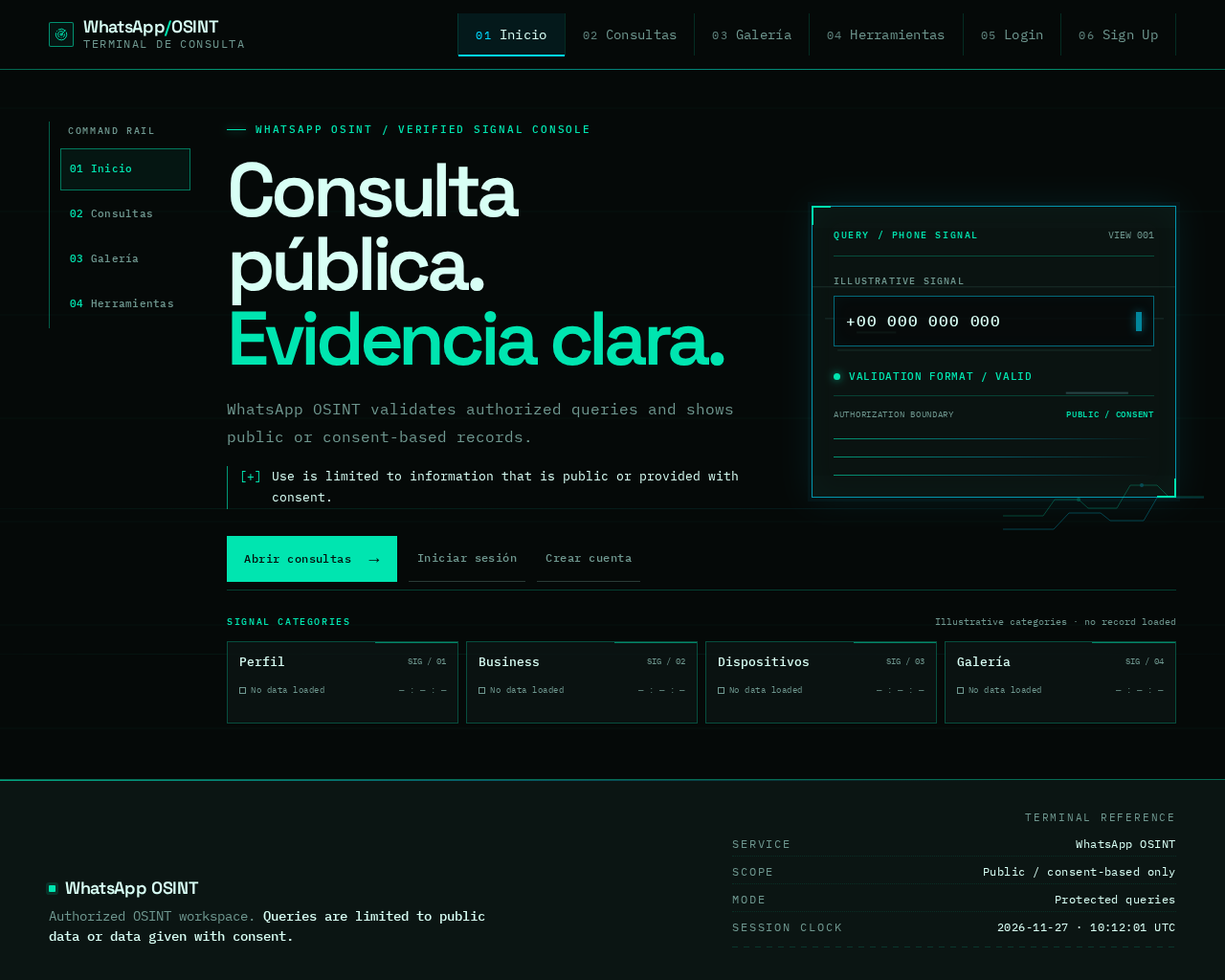
Page 5 of 39

Inicio

  • Information and state
    • Public introduction to the authorized WhatsApp OSINT web tool.
    • Clear statement that use is limited to public data or data given with consent.
    • Entry hero headline: “Consulta pública. Evidencia clara.”
    • Entry hero subline: “WhatsApp OSINT validates authorized queries and shows public or consent-based records.”
    • Primary call to action: “Abrir consultas”.
    • Visible terminal navigation nodes for Inicio, Consultas, Galería, and Herramientas.
  • Primary actions
    • Navigate to Login when a returning user needs identity verification.
    • Navigate to Sign Up when a new user needs self-service enrollment.
    • Direct authenticated users toward Consultas through the primary call to action.
  • Supporting actions
    • Provide access to the named application destinations through the navigation rail.
  • Components
    • Left-aligned terminal hero content.
    • Framed visual phone-query module showing an illustrative validation state without exposing private data.
    • Abstract signal traces, scan lines, terminal status indicators, and compact result-category blocks for Perfil, Business, Dispositivos, and Galería.
  • States
    • Default public-entry state.
    • Responsive stacked mobile state.
Page 6 of 39
  • Reduced-motion state with static scan-line and signal-trace presentation.
  • Protected-navigation state that redirects unauthenticated users to Login before protected work.

Login

  • Information and state
    • Returning-user identity-verification form.
    • Clear explanation that successful verification is required before protected queries and gallery records are available.
  • Primary actions
    • Submit returning-user credentials for verification.
    • Continue to the protected destination originally requested after successful verification.
  • Supporting actions
    • Navigate to Sign Up for self-service enrollment.
    • Return to Inicio.
  • Components
    • Credential-entry form.
    • Validation messages.
    • Verification-progress indicator.
    • Error panel for invalid or unsuccessful verification.
  • States
    • Anonymous default state.
    • Submitting state.
    • Successful verification state with protected-work continuation.
    • Invalid credential or service-failure state with a clear retry path.
Page 7 of 39

Consultas

  • Information and state
    • Protected authorized-query workspace for the OSINT Analyst.
    • Phone-number input and validation status.
    • Structured areas for user data, profile photo, Business data, linked devices, privacy information when returned, and complete query output.
    • Clear disclosure that data shown must be public or consent-based.
    • Saved-result status after a successful query is retained in Galería.
  • Primary actions
    • Enter a phone number.
    • Validate the phone number before query submission.
    • Submit an authorized RapidAPI query.
    • Save a successful query result to Galería, including returned profile-image material where available.
  • Supporting actions
    • Review compact and complete response presentations.
    • Navigate to Galería to revisit saved results.
  • Components
    • Phone-query terminal module.
    • Validation state indicator.
    • Query-submit control.
    • Profile, Business, Dispositivos, Privacidad, and complete-result signal blocks.
    • Profile-photo preview area when supplied by the endpoint.
    • Save-to-gallery control and save confirmation.
    • Clear error-message panel.
  • States
    • Initial protected workspace.
    • Empty state before a number is entered.
Page 8 of 39
  • Invalid-number state that identifies the issue and prevents invalid submission.
  • Validating state.
  • Query-in-progress state.
  • Successful response state.
  • No-supported-data or incomplete-response state when the endpoint returns no relevant supported record.
  • API failure state with a clear retry path that preserves entered input where possible.
  • Save-success and save-failure states.
  • Session-expired state that returns the user to Login before protected work resumes.
Page 9 of 39

Sign Up

  • Information and state
    • Anonymous self-service enrollment form for OSINT Analysts and Gallery Curators.
    • Explanation that enrollment establishes application identity for protected queries and saved records.
  • Primary actions
    • Provide required enrollment inputs.
    • Submit enrollment.
    • Continue to Login or the appropriate protected destination after successful identity establishment.
  • Supporting actions
    • Return to Login for an already-enrolled user.
    • Return to Inicio.
  • Components
    • Enrollment form.
    • Input validation messages.
    • Submission-progress indicator.
    • Enrollment success confirmation.
    • Error panel with recovery guidance.
  • States
    • Anonymous default state.
    • Invalid-input state.
    • Submitting state.
    • Successful enrollment state.
    • Enrollment failure state with retry continuation.
Page 10 of 39

Galería

  • Information and state
    • Protected gallery of saved lookup results.
    • Saved query records retained for later reference.
    • Stored profile-image material where it was part of a saved successful query result.
    • Record summaries sufficient to distinguish saved results without inventing unsupported endpoint fields.
  • Primary actions
    • Browse saved query results.
    • Select and reopen a stored record.
    • Review the saved result and associated returned profile-image material, when available.
  • Supporting actions
    • Continue to Consultas for a new authorized query.
  • Components
    • Saved-result list or grid.
    • Gallery record preview.
    • Record-detail panel using the saved query response.
    • Loading indicator.
    • Clear error and recovery messaging.
  • States
    • Loading gallery state.
    • Empty gallery state when no results have been saved.
    • Populated gallery state.
    • Reopened-record state.
    • Record-loading failure state with retry.
    • Session-expired state that redirects to Login.
Page 11 of 39

Herramientas

  • Information and state
    • Protected, source-named destination within the cyber-terminal interface.
    • Navigation context for the authorized OSINT application.
  • Primary actions
    • Navigate to Consultas or Galería through protected navigation.
  • Supporting actions
    • Review the authorized-use boundary and available application destinations.
  • Components
    • Terminal navigation rail.
    • Authorized-use reminder.
    • Destination links for protected work.
  • States
    • Protected default state.
    • Session-expired state that redirects to Login.
    • Responsive single-column state.

3. Functional Requirements

Page 12 of 39

FR-01 — Public Product Entry

As an OSINT Analyst or Gallery Curator, I should be able to open Inicio and understand that WhatsApp OSINT is an authorized web tool for public or consent-based WhatsApp OSINT queries, so that I can decide whether to enroll, sign in, or proceed to protected work.

  • Provenance: explicit
  • Access: Public; no login required.
  • Trigger/input: The user opens the web application.
  • Required behavior:
    • The system shall provide Inicio as the public entry destination.
    • The system shall present the product purpose and the public-or-consent-based data boundary.
    • The system shall present the entry hero copy supplied for the public page.
    • The system shall offer clear routes to Login and Sign Up.
    • The primary “Abrir consultas” action shall take an authenticated user to Consultas and an unauthenticated user to the required identity-verification path.
  • Observable result: The user understands the authorized-use boundary and can continue to enrollment, verification, or protected work.
  • Failure/recovery: If protected navigation is attempted without an authenticated session, the system shall direct the user to Login without exposing protected data.
  • Continuation: The user proceeds to Login, Sign Up, or Consultas.
Page 13 of 39

FR-02 — Self-Service Enrollment

As an OSINT Analyst or Gallery Curator, I should be able to complete self-service enrollment before protected work, so that my protected queries and gallery records are associated with my application identity.

  • Provenance: required_inference
  • Access: Public; no login required.
  • Trigger/input: A new user opens Sign Up and provides enrollment inputs.
  • Required behavior:
    • The system shall provide Sign Up as an anonymous identity-establishment destination.
    • The system shall validate required enrollment input before creating an application identity.
    • The system shall confirm successful enrollment.
  • Observable result: The user can verify identity and access protected work after enrollment.
  • Failure/recovery: Invalid or unsuccessful enrollment shall produce clear messages and preserve a retry path.
  • Continuation: The user proceeds to Login or the appropriate protected destination after successful enrollment.
Page 14 of 39

FR-03 — Returning Identity Verification

As an OSINT Analyst or Gallery Curator, I should be able to verify my identity on return before protected work, so that protected queries and saved gallery records remain bound to the correct participant.

  • Provenance: required_inference
  • Access: Public; no login required.
  • Trigger/input: An enrolled user submits credentials in Login.
  • Required behavior:
    • The system shall provide Login for returning-user verification.
    • The system shall protect Consultas, Galería, and Herramientas behind successful verification.
    • The system shall preserve the originally requested protected destination where feasible and continue there after successful verification.
  • Observable result: Verified users receive access to the protected destination; unverified users do not.
  • Failure/recovery: Invalid credentials, expired sessions, and verification-service failures shall produce clear error messages and offer retry or enrollment continuation as applicable.
  • Continuation: The verified user continues to Consultas, Galería, or Herramientas.
Page 15 of 39

FR-04 — Phone Number Validation

As an OSINT Analyst, I should be able to validate a phone number before submitting a WhatsApp OSINT query, so that invalid input is detected and explained clearly.

  • Provenance: explicit
  • Access: Login required; Consultas.
  • Trigger/input: The analyst enters a phone number.
  • Required behavior:
    • The system shall validate the phone number before an external query is submitted.
    • The system shall identify invalid phone-number input with a clear message.
    • The system shall prevent submission of invalid phone-number input.
  • Observable result: The analyst sees either a valid state or an actionable invalid-number state.
  • Failure/recovery: The analyst can correct the number and validate again without losing the query workspace.
  • Continuation: A valid number can be submitted to the RapidAPI query workflow.
Page 16 of 39

FR-05 — Authorized RapidAPI WhatsApp Query

As an OSINT Analyst, I should be able to submit a validated, authorized WhatsApp query through the RapidAPI endpoint, so that I can review supported public or consent-based results.

  • Provenance: explicit
  • Access: Login required; Consultas.
  • Trigger/input: The analyst submits a validated phone number.
  • Required behavior:
    • The system shall submit the query using the RapidAPI WhatsApp endpoint and current endpoint documentation.
    • The RapidAPI credential shall be held in server-side configuration, including environment-based configuration such as .env; it shall not be exposed in the browser.
    • The system shall limit the intended use of submitted and displayed data to public data or data provided with consent.
    • The system shall show query progress while awaiting the endpoint response.
  • Observable result: The analyst receives a supported response, an empty/incomplete-result state, or a clear API error.
  • Failure/recovery: If the endpoint is unavailable, returns an error, or returns an unsupported response, the system shall display a clear error without breaking the interface and shall allow the analyst to retry.
  • Continuation: The analyst can review the response, save it to Galería, run another query, or navigate to saved results.
Page 17 of 39

FR-06 — Structured Result Presentation

As an OSINT Analyst, I should be able to review returned user data, profile photo, Business data, linked devices, privacy information when returned, and a complete query response, so that I can interpret an authorized lookup clearly.

  • Provenance: explicit
  • Access: Login required; Consultas.
  • Trigger/input: The RapidAPI endpoint returns a successful or partially successful query response.
  • Required behavior:
    • The system shall present user data returned by the endpoint.
    • The system shall present a profile photo when the endpoint returns one.
    • The system shall present Business data when the endpoint returns it.
    • The system shall present linked-device information when the endpoint returns it.
    • The system shall present privacy information when returned by the endpoint.
    • The system shall provide a complete-response presentation for the query.
    • The system shall clearly distinguish unavailable or unreturned data from displayed data.
  • Observable result: The analyst can inspect supported returned information in structured result panels and the complete response view.
  • Failure/recovery: Missing fields or partial responses shall not be represented as errors unless the endpoint signals an error; unavailable sections shall remain clearly labeled.
  • Continuation: The analyst can save the supported result to Galería, perform another query, or review a saved result later.
Page 18 of 39

FR-07 — Save Query Results to Gallery

As an OSINT Analyst, I should be able to save a successful query result to Galería, including returned profile-image material where available, so that the record can be reopened later.

  • Provenance: explicit
  • Access: Login required; initiated in Consultas.
  • Trigger/input: The analyst selects the save action after a supported query result is available.
  • Required behavior:
    • The system shall persist saved query results in application-owned storage.
    • The system shall save returned profile-image material when it is available as part of the accepted successful result.
    • The system shall confirm successful saving.
  • Observable result: The saved record becomes available in Galería.
  • Failure/recovery: If saving fails, the system shall display a clear failure message and allow retry without requiring a new query.
  • Continuation: The analyst can open Galería or continue with another query.
Page 19 of 39

FR-08 — Reopen Saved Query Results

As a Gallery Curator, I should be able to review saved lookup results and reopen stored records later, so that past authorized queries remain available for reference.

  • Provenance: explicit
  • Access: Login required; Galería.
  • Trigger/input: The curator opens Galería and selects a saved record.
  • Required behavior:
    • The system shall display saved lookup results in Galería.
    • The system shall support reopening an individual stored record.
    • The system shall present the saved result and associated profile-image material when it was saved.
  • Observable result: The curator can inspect a previously stored authorized lookup result.
  • Failure/recovery: Loading failures or unavailable records shall produce clear messages and permit retry or return to the gallery list.
  • Continuation: The curator can open another saved record, return to the gallery, or navigate to Consultas.
Page 20 of 39

FR-09 — Protected Tools Destination

As an OSINT Analyst, I should be able to access Herramientas after login, so that I can use the source-named destination within the protected cyber-terminal interface.

  • Provenance: explicit
  • Access: Login required; Herramientas.
  • Trigger/input: The analyst selects Herramientas from protected navigation.
  • Required behavior:
    • The system shall provide Herramientas as a protected destination.
    • The system shall retain visible protected navigation to Consultas and Galería.
    • The system shall retain the authorized-use boundary in the destination context.
  • Observable result: The analyst reaches the protected source-named destination without receiving unsupported tools or capabilities.
  • Failure/recovery: An expired or absent authenticated session shall redirect the analyst to Login.
  • Continuation: The analyst can navigate to Consultas or Galería.
Page 21 of 39

FR-10 — Responsive Cyber-Terminal Interface

As an OSINT Analyst or Gallery Curator, I should be able to use the application on desktop and mobile screens, so that readable content and controls remain available throughout authorized work.

  • Provenance: explicit
  • Access: Applicable to all application destinations.
  • Trigger/input: The user opens the application at 375px, 768px, or 1280px viewport widths.
  • Required behavior:
    • The interface shall be responsive and visually inspired by the supplied cyber-terminal reference.
    • Readable text, labels, numeric values, cards, and controls shall remain entirely within their containers and the viewport.
    • The narrow left rail and data panels shall stack into a readable single-column layout at mobile widths.
    • Decorative imagery, scan lines, and motion shall not cover readable text or controls.
  • Observable result: Users can read and operate all current page content at supported viewport sizes.
  • Failure/recovery: If a layout cannot fit a control or text block, it shall wrap, scale through responsive typography, or use an intended scrollable arrangement that allows every item to become fully readable.
  • Continuation: Users continue their current public, identity, query, or gallery workflow.

4. User Personas

Page 22 of 39

OSINT Analyst

  • Product context: Uses the protected cyber-terminal workspace to conduct authorized WhatsApp OSINT lookups.
  • Primary goal: Validate a phone number, run a permitted RapidAPI-backed query, and interpret the returned public or consent-based information.
  • Distinct responsibilities: Enters and corrects phone numbers; initiates queries; reviews user, profile, Business, linked-device, privacy, and complete-response data when returned; saves relevant query results to Galería.
  • Relevant inputs and decisions: Chooses the phone number to query, confirms it is valid, decides whether a returned result should be saved, and retries when validation, API, or save operations fail.
  • Interactions with other accepted participants: Produces saved records that the Gallery Curator can later reopen and review.
  • Observable success: Receives a clear validated result, a clear no-data/partial-data state, or a clear recoverable error; successful saved records become visible in Galería.
  • Provenance: required_inference from the accepted query, result-review, and save-to-gallery journey.
Page 23 of 39

Gallery Curator

  • Product context: Uses the protected gallery to keep prior authorized lookup records available for later reference.
  • Primary goal: Locate and reopen saved query results without needing to repeat the original query.
  • Distinct responsibilities: Reviews saved lookup records, selects stored records, and inspects saved result information and profile-image material where present.
  • Relevant inputs and decisions: Selects which saved record to reopen and decides whether to continue reviewing gallery material or move to the query workspace.
  • Interactions with other accepted participants: Consumes the saved results created by the OSINT Analyst; does not initiate the analyst’s lookup workflow.
  • Observable success: Opens a stored result and can review the saved record in Galería.
  • Provenance: required_inference from the explicit requirement that a curator reopens stored gallery records and keeps past queries available for reference.

5. Core User Flows

Page 24 of 39

OSINT Analyst — Enroll Before Protected Work

  1. The analyst opens Inicio anonymously.
  2. The analyst reads the authorized-use boundary: the product uses only public data or data given with consent.
  3. The analyst selects Sign Up.
  4. On Sign Up, the analyst provides the required enrollment inputs.
  5. The system validates the inputs and establishes application identity when enrollment succeeds.
  6. The system displays enrollment confirmation.
  7. The analyst continues to Login or the applicable protected destination.
  8. If enrollment fails or inputs are invalid, the system displays a clear error; the analyst corrects the input and retries.
Page 25 of 39

OSINT Analyst — Verify Identity and Run an Authorized Query

  1. The analyst opens Login from Inicio or after selecting a protected destination.
  2. The analyst submits returning-user credentials.
  3. The system verifies identity and establishes a protected session.
  4. The system opens Consultas, or returns the analyst to the originally requested protected destination.
  5. The analyst enters a phone number in the query module.
  6. The system validates the phone number.
  7. If the number is invalid, the system explains the validation issue and prevents submission; the analyst corrects the number and validates again.
  8. The analyst submits the validated number.
  9. The system sends the authorized query through the configured RapidAPI WhatsApp endpoint.
  10. The system displays a query-progress state while awaiting the response.
  11. When data is returned, the analyst reviews available user data, profile photo, Business data, linked devices, privacy information, and the complete query response.
  12. If a returned category is unavailable, the system identifies it as unavailable rather than fabricating data.
  13. If the endpoint fails, is unavailable, or returns an unsupported response, the system displays a clear error without breaking the workspace; the analyst can retry with the existing input.
  14. The analyst may save the successful result to Galería or enter another number for a separate query.
Page 26 of 39

OSINT Analyst — Save a Successful Result

  1. From a successful result state in Consultas, the analyst selects the save action.
  2. The system persists the supported result in application-owned storage.
  3. When profile-image material is returned and available for saving, the system retains it with the saved record.
  4. The system confirms that the result was saved.
  5. The analyst continues to Galería to review the stored record or remains in Consultas to perform another authorized lookup.
  6. If saving fails, the system shows a clear error and allows the analyst to retry without repeating the query.

Gallery Curator — Verify Identity and Reopen a Saved Record

  1. The Gallery Curator opens Inicio or directly requests Galería.
  2. If not authenticated, the curator opens Login and submits returning-user credentials.
  3. The system verifies identity and opens Galería.
  4. The system loads saved lookup results associated with the protected application state.
  5. If no saved results exist, the system shows an empty-gallery state and offers continuation to Consultas.
  6. The curator selects a saved record.
  7. The system reopens the stored record and presents its saved response information and associated profile-image material when available.
  8. The curator reviews the record, returns to the gallery list, selects another record, or navigates to Consultas.
  9. If the gallery or an individual record cannot be loaded, the system displays a clear error and offers retry or return to the gallery list.
Page 27 of 39

OSINT Analyst — Use the Protected Herramientas Destination

  1. The analyst verifies identity through Login.
  2. The analyst selects Herramientas from protected navigation.
  3. The system opens the protected source-named destination.
  4. The analyst sees the authorized-use reminder and protected navigation links.
  5. The analyst continues to Consultas or Galería as needed.
  6. If the session has expired, the system redirects the analyst to Login before protected content is shown.

6. Visuals Colors and Theme

Muse: Gleb Kuznetsov
Headline: Cinematic cyber terminal

WhatsApp OSINT shall use a controlled, cinematic cyber-terminal visual system appropriate to authorized analytical work. The interface must feel technical, fast, and deliberate rather than playful, consumer-social, or surveillance-themed.

Page 28 of 39

Color Tokens

RoleColorUsage
Main ground#050908Page background and terminal canvas
Surface#0B1513Panels, modules, forms, and result containers
Primary text#D8FFF5Headings, core readable text, key labels
Primary status#00E5B0Valid states, active status, primary emphasis
Active control accent#00D9FFFocus rings, active controls, query emphasis
Muted text#6F9890Supporting labels, timestamps, secondary text
Luminous rule#00E5B0 at reduced opacityOne-pixel panel rules and scan-line accents
Error treatment#EF4444Clear failure states only
Warning treatment#FACC15Input or response warning states only

The interface shall not use blue buttons on white backgrounds, glass cards, gradient blobs, soft pastel surfaces, or generic soft-hover card grids.

Typography

  • Headings: Space Grotesk, weight 600, tight tracking.
  • Body and data: IBM Plex Mono.
  • Display scale: clamp(32px, 7vw, 88px) for hero display text.
  • Body scale: 18px, 16px, and 14px mono text according to hierarchy.
  • Data labels: 12px uppercase mono labels.
  • Numeric treatment: Tabular mono numerals for phone-query, status, and timestamp presentation.
Page 29 of 39

Shape and Layout Language

  • Hard terminal-panel edges with corner radii of 4px or less.
  • One-pixel luminous panel rules.
  • Compact terminal modules rather than floating cards.
  • Full-width terminal canvas with a narrow left command rail and structured data panels.
  • At 375px, all panels must stack into one readable column.
  • Visible command nodes shall include Inicio, Consultas, Galería, and Herramientas.
  • All readable content and controls must remain fully readable and unobscured at 375px, 768px, and 1280px.

Imagery and Data Texture

  • Use abstract signal traces, validated-result panels, terminal-window framing, mono timestamps, and structured interface data.
  • Do not use stock people or unrelated photography.
  • Do not display private data or imply unrestricted access.
  • Decorative scan lines may sit behind the composition but must not cross text fields, labels, or actionable controls.
Page 30 of 39

7. Signature Design Concept

The public Inicio page shall use a “Verified Signal Console” composition.

A large left-aligned “Consulta pública. Evidencia clara.” headline sits over the black terminal field. A narrow numbered command rail establishes the four visible terminal nodes: Inicio, Consultas, Galería, and Herramientas. On the right, a framed phone-query terminal module presents a phone input and a clear validation state, encircled by cyan focus rules and green status lines.

Below or adjacent to the hero module, compact signal blocks introduce the accepted result categories: Perfil, Business, Dispositivos, and Galería. Thin green scan lines and abstract signal traces create cinematic depth without overlapping readable content or controls. This concept recomposes only the accepted entry, query, validation, and result-category concepts; it does not add a new query type, data source, or destination.

8. Interaction Model & Motion Direction

Interaction Model: Animated
Motion Tempo: cinematic
Hero Dimensionality: webgl

Page 31 of 39

Landing Hero Motion Brief

  • Focal subject: A glowing terminal phone-query module positioned on the right of the Inicio hero.
  • Input → transformation → outcome thesis: A user-provided phone-number signal enters the terminal module, passes through a restrained validation scan, and resolves into a clear authorized-result state represented by structured signal blocks for Perfil, Business, Dispositivos, and Galería.
  • Motion vocabulary: Slow low-opacity data scans, luminous line reveals, subtle signal-trace movement, cyan focus-ring activation, and green terminal-status transitions.
  • Composed first frame: The first frame shall be fully useful before animation: left-aligned hero copy, visible “Abrir consultas” action, visible command rail, and a readable framed query module.
  • Reduced-motion state: Decorative scans, line reveals, and signal movement stop. The query module, status lines, command rail, and result-category blocks remain visible in a static, readable arrangement.

Landing Hero 3D Scene Brief — DIRECTION-DERIVED

Create a compact real-time WebGL/R3F terminal scene centered on a single floating phone-query module. The scene should communicate the product’s defining state: a validated authorized query resolving into structured, bounded evidence. The phone module may use shallow dimensional depth, luminous terminal edges, restrained green scan planes, and cyan focus rings. It must not depict private personal data, people, unrelated imagery, or unrestricted surveillance.

The 3D scene remains a decorative enhancement behind or beside the usable hero content. It must never obscure text or controls, must degrade to the static reduced-motion arrangement, and must preserve performance on supported desktop and mobile layouts.

Page 32 of 39

9. Non-Functional Requirements

NFR-01 — Web Delivery

  • Requirement: WhatsApp OSINT shall be delivered as a web application on port 8080 and shall not be delivered as a local Python script.
  • Provenance: explicit
  • Rationale: The current product commitment explicitly replaces local-script delivery.

NFR-02 — Authorized Data Boundary

  • Requirement: The application shall use only public data or data given with consent.
  • Provenance: explicit
  • Rationale: This is a hard product constraint applying to query use, display, saved records, and presentation language.

NFR-03 — Protected Continuity

  • Requirement: Protected query, gallery, and tools work shall require application identity verification; public entry, Login, and Sign Up shall remain anonymously reachable.
  • Provenance: required_inference and contracted access surfaces
  • Rationale: Identity continuity is required to bind protected queries and durable gallery records to the correct participant.
Page 33 of 39

NFR-04 — External API Resilience

  • Requirement: The interface shall show clear error messages for invalid numbers, RapidAPI failures, unavailable responses, unsupported responses, and save/load failures without breaking the current workflow.
  • Provenance: explicit
  • Rationale: The source requires graceful error handling and clear messages.

NFR-05 — Credential Protection

  • Requirement: RapidAPI credentials shall be configured server-side through environment-based configuration, including .env where used, and shall not be exposed to the browser.
  • Provenance: explicit source configuration intent; required implementation boundary
  • Rationale: The user requested direct API-key configuration through .env, while current delivery is a web app rather than a local script.

NFR-06 — Responsive Readability

  • Requirement: Readable text, controls, labels, numbers, cards, and form content shall remain entirely visible and usable at 375px, 768px, and 1280px.
  • Provenance: explicit creative-direction constraint
  • Rationale: The interface is required to be responsive and must not crop, cover, or run readable elements outside their bounds.
Page 34 of 39

NFR-07 — Motion Accessibility

  • Requirement: Decorative motion shall stop when prefers-reduced-motion is enabled, while the static layout remains fully usable.
  • Provenance: explicit creative direction
  • Rationale: The cinematic visual system must not depend on motion for comprehension or use.

NFR-08 — Persistent Saved Records

  • Requirement: Saved query results and supported associated profile-image material shall persist in application-owned storage and remain available through Galería for later reopening.
  • Provenance: explicit and required_inference
  • Rationale: The gallery’s stated purpose requires durable saved state.

10. Tech Stack

Frontend

  • React
    • Provides the responsive custom web interface.
    • Implements Inicio, Login, Consultas, Sign Up, Galería, and Herramientas.
    • Implements responsive terminal layout, validation feedback, protected-route behavior, reduced-motion presentation, and WebGL hero integration where supported.
Page 35 of 39

Backend

  • Python / FastAPI
    • Shared backend process for application APIs and domain modules.
    • Handles authentication continuity, phone validation, RapidAPI query integration, result persistence, gallery retrieval, and clear API-facing error translation.
    • Reuses the existing backend rather than creating separate containers for query or gallery modules.

Database

  • MariaDB
    • Stores application-owned durable state required for protected identities and saved gallery records.
    • Does not imply additional product entities beyond those necessary to support current enrollment, protected continuity, and saved-result retrieval.

External Provider

  • RapidAPI WhatsApp endpoint
    • External query provider.
    • Endpoint request and response implementation shall follow current authoritative RapidAPI documentation.
    • The provider is not a custom application page or application-owned interaction surface.
Page 36 of 39

Configuration

  • Environment-based configuration
    • Stores the RapidAPI credential and server-side deployment settings.
    • Supports .env configuration without exposing secrets to the frontend.

Containerization and Runtime

  • Docker / docker-compose
    • docker-compose.yml shall inventory the runnable services:
      • frontend — React application UI.
      • backend — shared FastAPI application API and domain modules.
      • database — MariaDB persistent storage.
    • The frontend communicates with the backend.
    • The backend communicates with MariaDB and the RapidAPI WhatsApp endpoint.
  • Kubernetes
    • Not required for the current scope because no deployment requirement establishes a Kubernetes need.
Page 37 of 39

11. Assumptions and Constraints

  • [Explicit constraint] The app uses only public data or data given with consent.
  • [Explicit constraint] The app is a web application on port 8080 and is not a local Python script.
  • [Explicit constraint] Queries use a RapidAPI endpoint and its documentation.
  • [Explicit constraint] The interface is responsive and inspired by the supplied cyber-terminal image.
  • [Contracted page constraint] The current page catalog and ordering are exactly: Inicio, Login, Consultas, Sign Up, Galería, Herramientas.
  • [Contracted access constraint] Inicio, Login, and Sign Up are anonymous; Consultas, Galería, and Herramientas require login.
  • [Required inference] Application-owned identity is required because users must privately resume protected, durable query and gallery state.
  • [Required inference] Enrollment and returning-user verification are limited to the minimum workflows necessary to establish and resume access. This document does not add account-management, role-management, password-reset, billing, or administrative capabilities.
  • [Source limitation] RapidAPI endpoint schema, response fields, limits, and provider-specific error codes must be taken from current endpoint documentation at implementation time. They are not invented in this SRD.
  • [Scope limitation] Herramientas is a required named destination, but no separate tool capability beyond protected navigation and authorized-use context is currently accepted.
  • [Scope limitation] Privacy information is displayed only when it is returned by the endpoint and is within the public-or-consent-based boundary.
  • [Scope limitation] No role-based access-control model is specified. Authentication establishes continuity for protected work but does not itself create differentiated permissions.
Page 38 of 39

12. Glossary

  • Authorized WhatsApp OSINT: Open-source intelligence activity involving WhatsApp-related information that is limited to public data or data supplied with consent.
  • Consultas: The protected query workspace where an OSINT Analyst validates a phone number and submits authorized RapidAPI-backed lookups.
  • Galería: The protected destination containing saved query results available for later reopening.
  • Gallery Curator: The accepted persona responsible for reviewing and reopening stored lookup records.
  • Linked devices: Device-related information returned by the configured endpoint, if available.
  • OSINT Analyst: The accepted persona responsible for initiating authorized WhatsApp queries and saving supported results.
  • RapidAPI WhatsApp endpoint: The external provider endpoint used by the application to perform authorized WhatsApp queries.
  • Saved result: A durable application record of a successful supported query response, including associated profile-image material when available.
Page 39 of 39
Live
Inicio design preview

Inicio: Read authorized-use boundary

Sign Up: 1. Provide enrollment inputs

Sign Up: 2. Correct invalid inputs

Sign Up: Confirm enrollment success

Login: 1. Submit returning credentials

Login: 2. Retry after invalid credentials

Galería: 3. Browse saved results

Galería: 4. Retry gallery load

Galería: 1. Select saved record

Galería: 2. Review reopened record

Galería: 3. Return to gallery list

Galería: 4. Retry record load

Consultas: Continue to new query

Login: 5. Re-verify expired session