wells-fargo-za

byMichael Kotliar

Create me a banking website that comes with a admin dashboard login and the future should be like wells Fargo

No preview

Comments (0)

No comments yet. Be the first!

System Requirements

System Requirement Document
Page 1 of 7

System Requirements Document for wells-fargo-za

1. Introduction

The wells-fargo-za project aims to create a banking website that provides a secure and efficient experience for banking customers and bank administrators. The website will include a customer-facing interface for banking activities and an admin dashboard for bank staff. The design and functionality will be inspired by Wells Fargo, focusing on trust, precision, and efficiency.

2. System Overview

The system will deliver a banking website with distinct interfaces for customers and administrators. Customers will have access to a secure dashboard for managing their banking activities, while administrators will have a dedicated dashboard for managing bank operations. The design will follow principles of functional clarity, ensuring a seamless user experience.

2a. Product Interpretation and Delivery Boundary

The product scope includes both banking customers and bank administrators. Customers will access their dashboard after identity verification, while administrators will log in through a secure admin interface. The future direction is inspired by Wells Fargo, serving as a reference for the banking experience without implying affiliation.

2b. Source Content Inventory

Not applicable as there is no explicit content_source directive.

Page 2 of 7

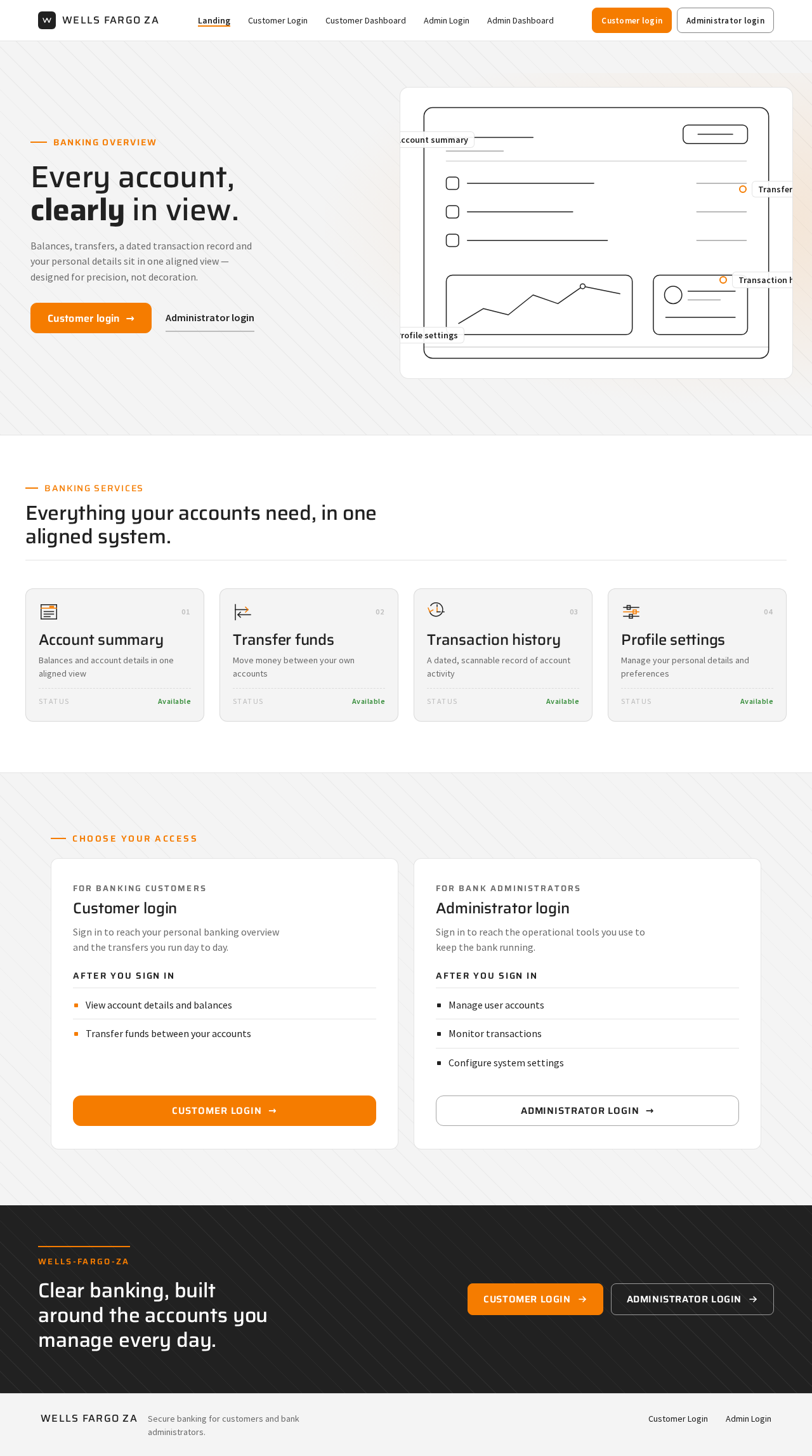
2c. Page Content and Component Coverage

Landing

  • Purpose: Introduce the banking website and its features to potential customers.
  • Components:
    • Overview of banking services
    • Call-to-action for customer login
    • Visuals inspired by Wells Fargo
  • States: Loading, success, error

Customer Login

  • Purpose: Allow customers to log in and access their banking dashboard.
  • Components:
    • Username and password fields
    • Login button
    • Forgot password link
  • States: Loading, success, error, password recovery

Customer Dashboard

  • Purpose: Provide customers with access to their banking information and services.
  • Components:
    • Account summary
    • Transaction history
    • Transfer funds
    • Profile settings
  • States: Loading, success, error, data update
Page 3 of 7

Admin Login

  • Purpose: Allow bank administrators to log in to the admin dashboard.
  • Components:
    • Username and password fields
    • Login button
  • States: Loading, success, error

Admin Dashboard

  • Purpose: Provide administrators with tools to manage bank operations.
  • Components:
    • User management
    • Transaction monitoring
    • System settings
  • States: Loading, success, error, data update

3. Functional Requirements

  • As a Banking customer, I should be able to enroll and verify my identity to access my banking dashboard. (Provenance: required_inference)
  • As a Banking customer, I should be able to log in and view my account details and transaction history. (Provenance: explicit)
  • As a Banking customer, I should be able to transfer funds between accounts. (Provenance: explicit)
  • As a Bank administrator, I should be able to log in to the admin dashboard to manage user accounts and monitor transactions. (Provenance: explicit)
  • As a Bank administrator, I should be able to configure system settings and manage bank operations. (Provenance: explicit)

4. User Personas

  • Banking customer: Responsible for managing personal banking activities, including viewing account details and transferring funds.
  • Bank administrator: Responsible for managing user accounts, monitoring transactions, and configuring system settings.
Page 4 of 7

5. Core User Flows

Banking Customer

  1. Visit the Landing page.
  2. Click on the login button to navigate to the Customer Login page.
  3. Enter credentials and log in.
  4. Access the Customer Dashboard to view account details and perform transactions.
  5. Log out after completing activities.

Bank Administrator

  1. Visit the Admin Login page.
  2. Enter credentials and log in.
  3. Access the Admin Dashboard to manage user accounts and monitor transactions.
  4. Configure system settings as needed.
  5. Log out after completing administrative tasks.
Page 5 of 7

6. Visuals Colors and Theme

  • Muse: Dieter Rams
  • Palette:
    • Background: #F4F4F4
    • Surface: #FFFFFF
    • Text: #212121
    • Primary: #F57C00
    • Accent: #388E3C
    • Muted: #BDBDBD
  • Typography:
    • Headings: Saira, Medium weights
    • Body: Source Sans Pro
  • Shape Language: Rounded-rectangle controls
  • Layout: Modular grid
  • Imagery: Diagrammatic line art

7. Signature Design Concept

The Landing page will feature a full-width headline with a strong orange label, rounded-rectangle buttons, and a modular grid layout. The hero section will include a single oversized product silhouette with key features highlighted.
Page 6 of 7

8. Interaction Model & Motion Direction

  • Interaction Model: Static
  • Motion Tempo: Restrained
  • Hero Dimensionality: Flat
  • Landing Hero Motion Brief: A composed first frame with a product silhouette, using instant feedback for interactions.

9. Non-Functional Requirements

  • The system must ensure secure authentication for both customers and administrators.
  • The website should be responsive and accessible across devices.
  • Performance should support concurrent user access without degradation.

10. Tech Stack

  • Frontend: React
  • Backend: Python/FastAPI
  • Database: PostgreSQL
  • Deployment: Docker, Kubernetes

11. Assumptions and Constraints

  • The product scope includes both customers and bank staff.
  • Administrative access is gated by an admin dashboard login.
  • The future direction should be like Wells Fargo, serving as a reference.
Page 7 of 7

12. Glossary

  • Banking customer: An individual using the banking website for personal financial management.
  • Bank administrator: A staff member responsible for managing the banking system and user accounts.
  • Dashboard: A user interface that provides access to various banking features and information.

No completed page designs yet.

Completed design pages will appear here when they are ready to preview.

Rendering diagram...

No completed page designs yet.

Completed design pages will appear here when they are ready to preview.

Rendering diagram...