wedding-design

byKishor

I would like to build a saas project for my wedding design management. I have alredy built something with my replit agent - how to go ahead with that

Landing
Landing

Comments (0)

No comments yet. Be the first!

System Requirements

System Requirements Document for wedding-design

1. Introduction

Product intent. wedding-design is a SaaS product for managing a wedding design business. It exists so that a wedding design studio can run its engagements — the weddings it is designing, the clients it serves, the design work it produces, and the progress of each engagement — inside one calm, tasteful tool rather than across scattered documents and generic project trackers.

The product is built for a small studio: the person who owns the wedding design business, the designers and planners who carry out the work on individual weddings, and the couple who is the client of that studio. The studio owner and their designers/planners use the product to create and maintain wedding design projects, record the wedding details and the associated client, and track how each project is progressing. The wedding client uses the product to review the design produced for their wedding, give their input, and approve it.

Continuation from existing work. The requester has already built something with their Replit agent for this purpose. That existing build is the implementation foundation: the new work continues from it rather than starting over. Its structure and its features are treated as reference material for how the product is organized and what it already does, and the requirements below describe the product that this continued build must satisfy.

Audience. This document is written for the people who will continue the build — the studio owner acting as product owner, and the engineers and designers implementing the SaaS on top of the existing Replit work.

Page 1 of 20

2. System Overview

wedding-design is a multi-participant, application-owned SaaS product with custom user interface. It is delivered as a web application with a backend that persists durable wedding design records, because the work it holds — projects, wedding details, client associations, progress state, and client approvals — must survive between sessions and remain bound to the correct participant.

Actors. Three human participants use the product: the Wedding Design Business Owner, the Wedding Designer / Planner, and the Wedding Client. All three are first-party users of the application. There is no provider-owned or external destination in the current product; the application owns identity, records, and the review experience.

Accepted behavior. The product lets a studio participant create and maintain wedding design projects, record the wedding details and the associated client within a project, browse and return to projects, track the progress of each project over time, and lets the wedding client review the design for their wedding, provide input on it, and approve it. Approval is a recorded, visible state change on the design.

Access and ownership. The product owns its own identity. A first-time participant establishes access through self-service enrollment; a returning participant verifies identity before reaching durable project records. The Landing surface is anonymous. Login and Sign Up are anonymous entry surfaces. Dashboard, Projects, Project Details, Project Tracking, and Design Review are protected. Within protected work, the studio-side participants (owner and designer/planner) work on the studio's project records, while the wedding client's protected work is the review and approval of their own wedding's design; this distinction is enforced on shared project state.

Page 2 of 20

Narrow exclusions. The current product does not include payment processing, vendor marketplaces, guest-list or RSVP management, seating charts, contract or invoice generation, or any capability beyond managing wedding design projects, their details, their progress, and client review and approval. No capability is added merely because it is conventional for project-management or wedding software.

2a. Product Interpretation and Delivery Boundary

The product is a first-party web application. Everything a participant does — enrolling, signing in, creating a project, recording wedding details, tracking progress, reviewing a design, approving it — happens inside surfaces the application itself owns and renders. There is no third-party surface that a participant is sent to in order to complete accepted work, and no part of the accepted work is delivered headlessly.

Identity is application-owned because the accepted work is durable and participant-specific: a studio's projects and a couple's design approval must remain attached to the right person across sessions, and a client's approval must be bound to that client and that wedding. First use is self-service enrollment, because no invitation, provisioning, or pre-existing account boundary is established for this product. Returning use is verification of that same identity. Establishing access is deliberately anonymous — a person who has no account yet must be able to reach the enrollment interaction, and a person who has an account but no active session must be able to reach the verification interaction, without already being inside protected work.

The current delivery horizon covers the whole accepted product: the anonymous entry surface, the two identity surfaces, and the protected working surfaces for studio-side project management, progress tracking, and client design review and approval. Nothing in this document is deferred to a future horizon; the future section records only ideas that were not accepted as current commitments.

Page 3 of 20

2b. Source Content Inventory

Not applicable. No reference directive in this project declares a content_source use; the existing Replit build is referenced for structure and features only, and supplies no verified factual content, collections, or media to reproduce.

2c. Page Content and Component Coverage

The page inventory is fixed and ordered: Landing, Login, Sign Up, Dashboard, Projects, Project Details, Project Tracking, Design Review. Each appears exactly once below.

Page 4 of 20

Landing

  • Purpose and access. Anonymous public entry surface. Explains what the wedding design management SaaS is, who it serves, and what it does. Reachable with no session.
  • Information and state. Product name wedding-design; a single editorial statement of what the product is for; a short statement of who it serves (the studio that designs weddings and the couples they design for); a short statement of what it does (manage wedding design projects, their details, their progress, and client review and approval). No project data, no client data, no counts, no testimonials, no pricing.
  • Primary actions. Navigate to Sign Up ("Start a studio"). Navigate to Login.
  • Supporting actions. None beyond the two entry links.
  • Domain entities. None read or written. The page is static product description.
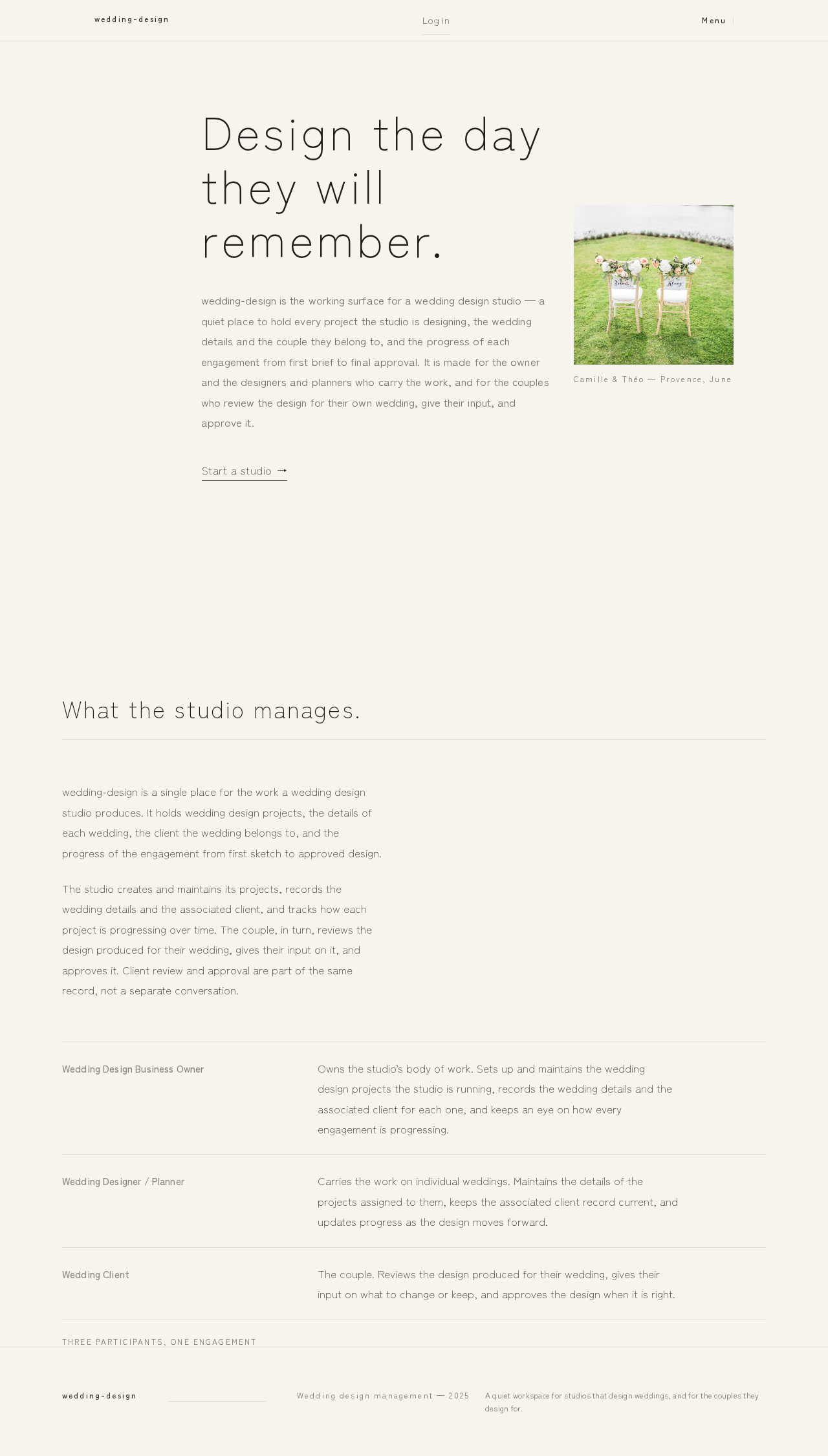
  • Component responsibilities. Top hairline bar with wordmark and a Log in link; hero statement block; supporting description block; a single underlined text-link call to action; one still-life image frame with a short caption. The page never displays protected state and never implies a session.
  • States. Loading: none required — content is static. Empty: not applicable. Success: the page renders and both entry links are reachable. Error: if the page cannot render, a plain static fallback with the wordmark and the two entry links is shown. Recovery: reload returns to the same anonymous entry surface.
Page 5 of 20

Login

  • Purpose and access. Anonymous returning-verification surface for all three participants. Reachable with no session; grants access to protected surfaces on success.
  • Information and state. Identity fields for returning verification; a link to Sign Up for a person who has no account; a link back to Landing. No project or client data is shown before verification succeeds.
  • Primary actions. Submit returning credentials to verify identity and enter the product.
  • Supporting actions. Navigate to Sign Up; navigate to Landing.
  • Domain entities. Participant identity record (read/verified).
  • Component responsibilities. Identity form with field-level validation messaging; submit control; a single inline error region for verification failure; navigation links. On success, the participant is routed to Dashboard.
  • States. Loading: submit control shows an in-progress state and blocks duplicate submission. Empty: fields start empty. Success: identity verified, session established, routed to Dashboard. Error: unrecognized identity or incorrect credential shows a single non-enumerating message that does not reveal whether the identity exists; a transport failure shows a retryable message and preserves entered values. Recovery: the participant can correct and resubmit, or go to Sign Up.
Page 6 of 20

Sign Up

  • Purpose and access. Anonymous self-service first-use enrollment surface for all three participants. Reachable with no session.
  • Information and state. Enrollment fields for establishing a new identity; a statement of which kind of participant is enrolling, so that studio-side participants and wedding clients are distinguishable from first use; a link to Login for a person who already has an account; a link back to Landing.
  • Primary actions. Submit enrollment to establish a new identity and enter the product.
  • Supporting actions. Select the participant kind being enrolled; navigate to Login; navigate to Landing.
  • Domain entities. Participant identity record (created); participant kind (created).
  • Component responsibilities. Enrollment form with field-level validation; participant-kind selection; submit control; inline error region; navigation links. On success, the participant is routed to Dashboard.
  • States. Loading: submit control shows an in-progress state and blocks duplicate submission. Empty: fields start empty with no participant kind preselected. Success: identity established, session started, routed to Dashboard. Error: an identity that already exists is reported without disclosing account details and with a route to Login; invalid or incomplete fields are reported per field; a transport failure is retryable and preserves entered values. Recovery: correct and resubmit, or switch to Login.
Page 7 of 20

Dashboard

  • Purpose and access. Protected continuation hub. Requires a verified session. Summarizes active wedding design work and routes the participant to the workflows relevant to their kind.
  • Information and state. For studio-side participants: a summary of the studio's wedding design projects and their current progress state, with the most recently active work surfaced first. For a wedding client: the wedding design work awaiting their review or already reviewed by them. Only records the participant is entitled to see are included.
  • Primary actions. Open a project (studio-side) or open the design awaiting review (client). Navigate to Projects (studio-side) or to Design Review (client).
  • Supporting actions. Navigate to Project Tracking for a project; sign out.
  • Domain entities. Wedding design project (read, summarized); project progress state (read); design review state (read); participant identity (read).
  • Component responsibilities. Page opener; ruled register rows for the participant's work items; a route into the full list or the review surface; empty-state block; sign-out control.
  • States. Loading: the summary region shows a quiet placeholder while records are fetched. Empty: a participant with no work yet sees a plain statement of that fact and a single route to begin — studio-side participants to Projects, clients to a statement that no design is awaiting them. Success: the participant's work items are listed with their current state. Error: if records cannot be fetched, the page states that the summary is unavailable and offers retry; the participant can still navigate to Projects or Design Review directly. Recovery: retry reloads the summary without losing the session.
Page 8 of 20

Projects

  • Purpose and access. Protected, studio-side browse and overview destination for finding and returning to wedding design projects. Requires a verified session and studio-side entitlement (owner or designer/planner). Wedding clients do not reach this surface.
  • Information and state. The studio's wedding design projects as ruled register rows: project label, associated client, and current progress state. Ordered so that active work is easy to find and return to.
  • Primary actions. Open a project's Project Details. Create a new wedding design project.
  • Supporting actions. Filter or narrow the list to find a project; navigate to Project Tracking for a project; navigate to Dashboard.
  • Domain entities. Wedding design project (read, created); associated client (read); project progress state (read).
  • Component responsibilities. Page opener with a full-width rule; register rows with a hairline between each; a create-project control; list filtering; empty-state block; per-row route into Project Details and Project Tracking.
  • States. Loading: the register region shows a quiet placeholder while projects are fetched. Empty: a studio with no projects yet sees a plain statement and the create-project control as the single next step. Success: projects are listed with client and progress state. Error: if projects cannot be fetched, the page states the list is unavailable and offers retry; a failed create reports the failure inline and preserves entered values. Recovery: retry reloads the list; a failed create can be corrected and resubmitted.
Page 9 of 20

Project Details

  • Purpose and access. Protected, studio-side focused workspace for creating and maintaining the wedding details of a project and representing the associated client. Requires a verified session and studio-side entitlement.
  • Information and state. The project's wedding details — the facts about the wedding being designed — and the associated client record for that project. The project's current progress state is visible so the participant knows where the engagement stands.
  • Primary actions. Create a project's wedding details; edit and save changes to those details; associate or update the client for the project.
  • Supporting actions. Navigate to Project Tracking for this project; navigate back to Projects; navigate to Dashboard.
  • Domain entities. Wedding design project (read, updated); wedding details (created, read, updated); associated client (created, read, updated); project progress state (read).
  • Component responsibilities. Page opener with the project label and a full-width rule; detail fields grouped as related lines; client association block; save control with dirty-state indication; validation messaging; route into Project Tracking.
  • States. Loading: the detail region shows a quiet placeholder while the project is fetched. Empty: a project with no details yet shows the fields ready for first entry and a plain statement that no details have been recorded. Success: saved details and the client association are shown as persisted, with a confirmation that the save succeeded. Error: validation failures are reported per field and block the save; a failed save reports the failure inline and preserves the participant's edits so nothing is lost. Recovery: correct the reported fields and save again; a failed save can be retried without re-entering data.
Page 10 of 20

Project Tracking

  • Purpose and access. Protected, studio-side lifecycle view for tracking the progress of a wedding design project over time. Requires a verified session and studio-side entitlement.
  • Information and state. The project's progress over time: its current state and the sequence of progress changes recorded for it, so the studio can see how the engagement has moved.
  • Primary actions. Record a progress change for the project; move the project to its next state.
  • Supporting actions. Navigate to Project Details for this project; navigate back to Projects; navigate to Dashboard.
  • Domain entities. Wedding design project (read); project progress state (read, updated); progress history entries (created, read).
  • Component responsibilities. Page opener with the project label and a full-width rule; current-state block; ruled history rows with a hairline between each; progress-change control; route into Project Details.
  • States. Loading: the tracking region shows a quiet placeholder while progress records are fetched. Empty: a project with no recorded progress shows its starting state and a plain statement that no progress has been recorded yet. Success: the current state and the recorded history are shown, with the newest change reflected immediately. Error: a failed progress change reports the failure inline and leaves the recorded state unchanged; a failed fetch offers retry. Recovery: retry the change or the fetch; the history is never partially applied.
Page 11 of 20

Design Review

  • Purpose and access. Protected, client-facing workspace for reviewing a wedding design, providing input, and approving it. Requires a verified session and client entitlement for the wedding being reviewed. Studio-side participants do not act here as the reviewer.
  • Information and state. The design produced for the client's wedding, presented as the design board; the client's own input on that design; and the review state of the design — awaiting review, input provided, or approved. The approval, once given, is shown as a recorded state with its date.
  • Primary actions. Review the design; provide input on the design; approve the design.
  • Supporting actions. Navigate back to Dashboard; revisit the design after approval to see the recorded approval.
  • Domain entities. Wedding design project (read); design board (read); client input (created, read); design review state (read, updated); approval record with date (created, read).
  • Component responsibilities. Page opener with the wedding label and a full-width rule; design board presentation; input entry and submission; approval control; recorded-approval presentation including the approval date; route back to Dashboard.
  • States. Loading: the design region shows a quiet placeholder while the design is fetched. Empty: if no design has been shared for review yet, the client sees a plain statement of that fact and no approval control. Success: the design is shown; submitted input is shown as recorded; on approval, the review state changes to approved and the approval date is displayed. Error: a failed input submission reports the failure inline and preserves the client's text; a failed approval reports the failure inline and leaves the review state unchanged, so the client can retry. Recovery: retry the submission or the approval; the review state is never left ambiguous.
Page 12 of 20

3. Functional Requirements

Each requirement is a distinct story point with its provenance, lifecycle facts, and observable acceptance.

FR-1 — Continue from the existing Replit build. As a Wedding Design Business Owner, I should have the wedding design management SaaS built as a continuation of the work already produced with my Replit agent, so that the existing structure and features carry forward instead of being discarded.

  • Provenance: explicit (user states the existing Replit build and asks how to proceed with it); the continuation obligation is required_inference from that accepted current commitment.
  • Lifecycle: initiator — Wedding Design Business Owner; trigger — the decision to proceed with the SaaS; observable result — the delivered product preserves and extends the existing build's structure and features; failure/recovery — where the existing build lacks something the accepted requirements need, that gap is filled rather than the build being replaced; continuation — subsequent requirements are implemented on this foundation.
  • Acceptance: the product delivered satisfies FR-2 through FR-16 on the foundation of the existing build, and no accepted capability from the existing build is dropped without an explicit user decision.
Page 13 of 20

FR-2 — Anonymous product entry. As a prospective participant, I should be able to reach an anonymous entry surface that explains what the wedding design management product is, who it serves, and what it does, so that I can decide whether to enroll.

  • Provenance: required_inference (Landing).
  • Lifecycle: initiator — any prospective participant; trigger — arriving at the product with no session; observable result — the product's purpose, audience, and capabilities are stated and both entry routes are reachable; failure/recovery — if the surface cannot render, a static fallback still exposes both entry routes; continuation — the visitor proceeds to Sign Up or Login.
  • Acceptance: with no session, the entry surface renders and both Sign Up and Login are reachable from it.

FR-3 — First-use enrollment. As a participant without an account, I should be able to establish my own identity through self-service enrollment, so that I can begin using the product without an invitation or provisioning step.

  • Provenance: required_inference (Sign Up; application-owned identity).
  • Lifecycle: initiator — Wedding Design Business Owner, Wedding Designer / Planner, or Wedding Client; trigger — choosing to enroll; input — enrollment fields and the kind of participant being enrolled; observable result — a new identity is established and a session begins; failure/recovery — an already-existing identity is reported without disclosing account details and with a route to Login, invalid fields are reported per field, and a transport failure is retryable with entered values preserved; continuation — the participant lands on Dashboard.
  • Acceptance: a new participant can enroll and reach Dashboard; an existing identity is not silently duplicated; no enrollment path requires an invitation or administrator action.
Page 14 of 20

FR-4 — Returning identity verification. As a returning participant, I should be able to verify my identity before reaching durable project records, so that my studio's or my wedding's records stay bound to me.

  • Provenance: required_inference (Login).
  • Lifecycle: initiator — any enrolled participant; trigger — returning to the product without an active session; input — returning credentials; observable result — identity is verified and a session is established; failure/recovery — an unrecognized identity or incorrect credential produces a single non-enumerating message, and a transport failure is retryable with entered values preserved; continuation — the participant lands on Dashboard.
  • Acceptance: protected surfaces are unreachable without a verified session; a failed verification never reveals whether an identity exists.

FR-5 — Protected continuation hub. As a participant, I should see a protected hub that summarizes the wedding design work relevant to me and routes me to my workflows, so that I can resume where I left off.

  • Provenance: required_inference (Dashboard).
  • Lifecycle: initiator — any verified participant; trigger — arriving after verification; observable result — studio-side participants see their studio's projects and progress state, and a wedding client sees the design work awaiting or already given their review; failure/recovery — if records cannot be fetched, the hub states the summary is unavailable, offers retry, and still routes the participant to Projects or Design Review; continuation — the participant opens a project or the design awaiting review.
  • Acceptance: the hub shows only records the participant is entitled to see, and every listed item routes to its working surface.
Page 15 of 20

FR-6 — Browse and return to projects. As a Wedding Design Business Owner or Wedding Designer / Planner, I should be able to browse the studio's wedding design projects and return to any of them, so that I can find the engagement I need to work on.

  • Provenance: required_inference (Projects).
  • Lifecycle: initiator — studio-side participant; trigger — needing to find a project; observable result — the studio's projects are listed with their associated client and current progress state; failure/recovery — if the list cannot be fetched, the surface states it is unavailable and offers retry; continuation — the participant opens Project Details or Project Tracking for a project.
  • Acceptance: the list is reachable only to studio-side participants, and each row routes into that project's details and tracking.

FR-7 — Create a wedding design project. As a Wedding Design Business Owner or Wedding Designer / Planner, I should be able to create a new wedding design project, so that a new wedding engagement can be managed in the product.

  • Provenance: required_inference (Projects; Project Details).
  • Lifecycle: initiator — studio-side participant; trigger — taking on a new wedding; input — the project's identifying information; observable result — a new project exists in the studio's project list; failure/recovery — a failed create reports the failure inline and preserves entered values for correction and resubmission; continuation — the participant opens the new project's Project Details to record its wedding details.
  • Acceptance: a created project appears in the studio's project list and is openable.
Page 16 of 20

FR-8 — Record and maintain wedding details. As a Wedding Design Business Owner or Wedding Designer / Planner, I should be able to create and maintain the wedding details of a project, so that the facts of the wedding being designed are recorded and kept current.

  • Provenance: required_inference (Project Details).
  • Lifecycle: initiator — studio-side participant; trigger — opening a project's details; input — the wedding's detail fields; observable result — the details are persisted and shown as saved; failure/recovery — per-field validation blocks the save and reports each problem, and a failed save preserves the participant's edits for retry; continuation — the participant continues editing or moves to Project Tracking.
  • Acceptance: saved details persist across sessions and are visible to the studio-side participants entitled to the project.

FR-9 — Represent the associated client. As a Wedding Design Business Owner or Wedding Designer / Planner, I should be able to associate and update the client for a project, so that the wedding being designed is bound to the couple it belongs to.

  • Provenance: required_inference (Project Details).
  • Lifecycle: initiator — studio-side participant; trigger — recording who the wedding is for; input — the client's identifying information; observable result — the project carries its associated client, and that client's review work is bound to this project; failure/recovery — validation failures are reported per field and a failed save preserves edits; continuation — the associated client can reach the design for this project in Design Review.
  • Acceptance: a project with an associated client makes that client's design review reachable to that client and to no other client.
Page 17 of 20

FR-10 — Track project progress over time. As a Wedding Design Business Owner or Wedding Designer / Planner, I should be able to track the progress of a wedding design project over time, so that I can see how the engagement has moved and what state it is in.

  • Provenance: required_inference (Project Tracking).
  • Lifecycle: initiator — studio-side participant; trigger — reviewing or advancing an engagement; input — a progress change; observable result — the project's current state and its recorded progress history are shown, with the newest change reflected immediately; failure/recovery — a failed progress change reports the failure inline and leaves the recorded state unchanged, and a failed fetch offers retry; continuation — the participant continues tracking or returns to Project Details.
  • Acceptance: the recorded history is never partially applied, and the current state always matches the last successfully recorded change.

FR-11 — Review the wedding design. As a Wedding Client, I should be able to review the design produced for my wedding, so that I can see what is being designed for me.

  • Provenance: required_inference (Design Review).
  • Lifecycle: initiator — Wedding Client; trigger — a design being shared for review; observable result — the design board for the client's wedding is presented with the review state; failure/recovery — if the design cannot be fetched, the surface states so and offers retry; continuation — the client provides input or approves.
  • Acceptance: a client sees only the design for their own wedding, and the review state is shown truthfully.
Page 18 of 20

FR-12 — Provide input on the design. As a Wedding Client, I should be able to provide my input on the design for my wedding, so that the studio knows what I want changed or kept.

  • Provenance: required_inference (Design Review).
  • Lifecycle: initiator — Wedding Client; trigger — having something to say about the design; input — the client's input text; observable result — the input is recorded against the design and shown as recorded; failure/recovery — a failed submission reports the failure inline and preserves the client's text for retry; continuation — the client continues reviewing or approves.
  • Acceptance: submitted input is recorded and remains visible to the client on return.

FR-13 — Approve the design. As a Wedding Client, I should be able to approve the design for my wedding, so that the studio has a recorded decision to proceed.

  • Provenance: required_inference (Design Review; approval as a recorded state change).
  • Lifecycle: initiator — Wedding Client; trigger — deciding the design is right; observable result — the review state changes to approved and the approval is recorded with its date and displayed; failure/recovery — a failed approval reports the failure inline and leaves the review state unchanged so the client can retry; continuation — the client can revisit the design and see the recorded approval.
  • Acceptance: approval is bound to the correct client and the correct wedding, is visible after the session ends, and is never recorded without the client's action.
Page 19 of 20

FR-14 — Role-aware separation of shared project state. As a Wedding Design Business Owner or Wedding Designer / Planner, I should have studio-side project work separated from the wedding client's review work on the same project, so that each participant acts only on their own side of the engagement.

  • Provenance: required_inference (role-aware authorization distinguishing business owners and designers/planners from wedding clients on shared project state).
  • Lifecycle: init
Page 20 of 20
Landing design preview

Landing: Read product description

Sign Up: Enroll as client

Login: Submit credentials

Dashboard: 1. Open design awaiting review

Design Review: 2. Review design board

Design Review: 3. Provide input

Design Review: 4. Retry failed submission

Design Review: 5. Approve design

Design Review: 6. Retry failed approval

Design Review: 7. Revisit recorded approval

Landing design preview

Landing: Read product description

Sign Up: Enroll as client

Login: Submit credentials

Dashboard: 1. Open design awaiting review

Design Review: 2. Review design board

Design Review: 3. Provide input

Design Review: 4. Retry failed submission

Design Review: 5. Approve design

Design Review: 6. Retry failed approval

Design Review: 7. Revisit recorded approval