Review & Manage Daily Inventory
Check current stock levels, review the day’s totes, empty returns, and hard-tag returns, and confirm records are accurate before operations move forward.
 Mohit Naik
# DISPLAY REQUIREMENT — LAPTOP / DESKTOP ONLY The **WAREHOUSE INVENTORY** application is designed ONLY for use on a **laptop or desktop computer**. ## Screen Target Design the entire UI specifically for: * Laptop screens * Desktop monitors * Landscape orientation * Mouse and keyboard interaction Recommended primary design resolution: **1366 × 768** The UI should also work well on larger desktop screens such as: * 1440 × 900 * 1920 × 1080 ## IMPORTANT Do NOT design a mobile application. Do NOT create: * Mobile navigation * Hamburger navigation for phones * Mobile bottom navigation * Phone-sized cards * Mobile-first layouts * Swipe-based interfaces The left sidebar should remain visible on the laptop screen. Use the available horizontal space effectively. ## Layout Use: **Left Sidebar + Main Content Area** Example: ┌─────────────────────────────────────────────────────────────┐ │ WAREHOUSE INVENTORY │ ├───────────────┬─────────────────────────────────────────────┤ │ │ │ │ Dashboard │ Main Dashboard │ │ Calendar │ │ │ Stock │ Statistics / Tables / Graphs │ │ Stores │ │ │ Vehicles │ │ │ Statistics │ │ │ Analytics │ │ │ Reports │ │ │ │ │ │ │ │ └───────────────┴─────────────────────────────────────────────┘ ## Desktop UI Principles Use the laptop screen efficiently. For example, on the Dashboard: * Multiple statistic cards can appear in one row. * Charts can appear side-by-side when appropriate. * Tables can use the available width. * Calendar should have enough space to display the complete month clearly. * Forms can use two-column layouts instead of unnecessarily long vertical forms. ## Calendar The calendar should be optimized for a laptop screen. Show a full monthly calendar with: * Monday–Sunday columns * Large clickable date cells * Data status indicators * Planned/Actual indicators * Month navigation The user should be able to comfortably click dates using a mouse. ## Tables Tables should use the laptop's horizontal space. Do not unnecessarily convert tables into cards. Example: | Date | Store Code | Totes Sent | Empty Returned | Hard-Tag Returned | | ---- | ---------- | ---------- | -------------- | ----------------- | Keep important information visible in columns. ## Charts Charts should be large enough to read comfortably on a laptop. When appropriate, place two charts side-by-side. Example: ┌─────────────────────────┐ ┌─────────────────────────┐ │ Pieces Received │ │ Totes Received │ │ │ │ │ │ BAR CHART │ │ BAR CHART │ │ │ │ │ └─────────────────────────┘ └─────────────────────────┘ ## Overall Requirement Build a **professional desktop warehouse-management dashboard**, NOT a mobile application. Prioritize: **Laptop usability → clarity → simple navigation → efficient data entry → statistics → graphs → reports.**

Sign in to leave a comment
Warehouse Inventory
Built for the desktop floor office
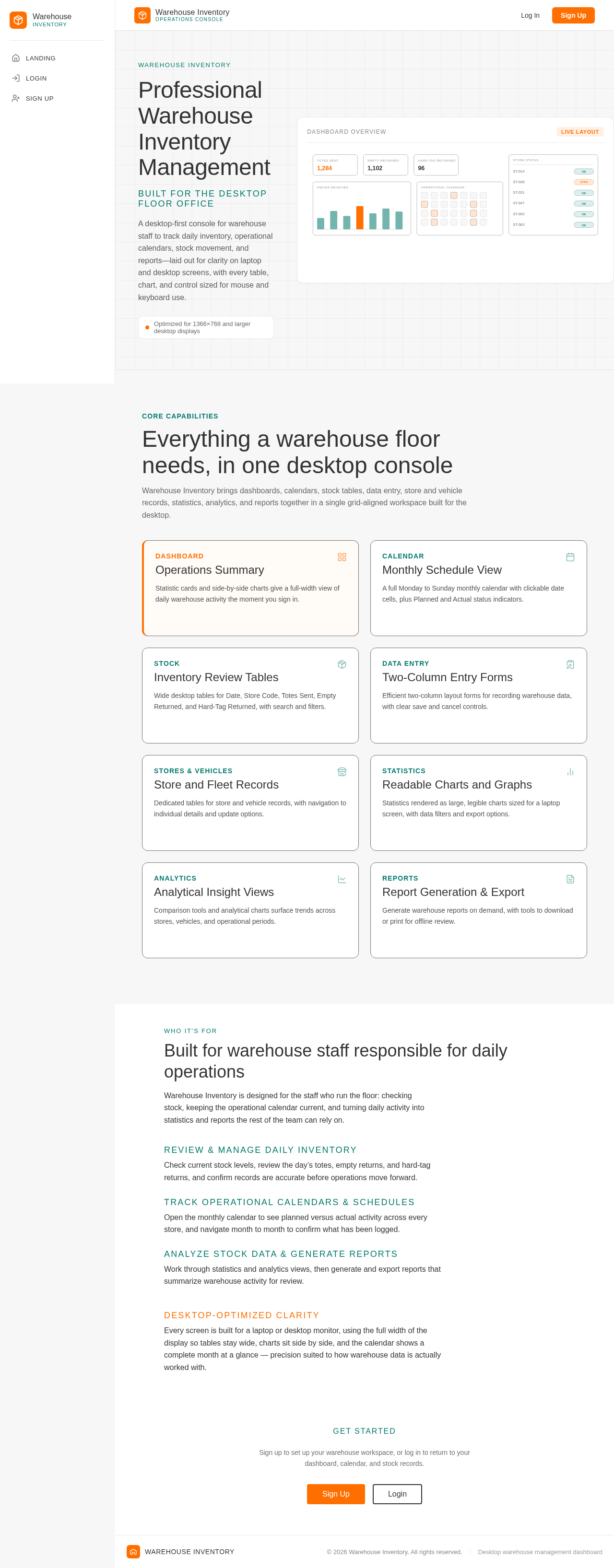
A desktop-first console for warehouse staff to track daily inventory, operational calendars, stock movement, and reports—laid out for clarity on laptop and desktop screens, with every table, chart, and control sized for mouse and keyboard use.
Dashboard Overview
Live LayoutWarehouse Inventory brings dashboards, calendars, stock tables, data entry, store and vehicle records, statistics, analytics, and reports together in a single grid-aligned workspace built for the desktop.
Statistic cards and side-by-side charts give a full-width view of daily warehouse activity the moment you sign in.
A full Monday to Sunday monthly calendar with clickable date cells, plus Planned and Actual status indicators.
Wide desktop tables for Date, Store Code, Totes Sent, Empty Returned, and Hard-Tag Returned, with search and filters.
Efficient two-column layout forms for recording warehouse data, with clear save and cancel controls.
Dedicated tables for store and vehicle records, with navigation to individual details and update options.
Statistics rendered as large, legible charts sized for a laptop screen, with data filters and export options.
Comparison tools and analytical charts surface trends across stores, vehicles, and operational periods.
Generate warehouse reports on demand, with tools to download or print for offline review.
Who It's For
Warehouse Inventory is designed for the staff who run the floor: checking stock, keeping the operational calendar current, and turning daily activity into statistics and reports the rest of the team can rely on.
Check current stock levels, review the day’s totes, empty returns, and hard-tag returns, and confirm records are accurate before operations move forward.
Open the monthly calendar to see planned versus actual activity across every store, and navigate month to month to confirm what has been logged.
Work through statistics and analytics views, then generate and export reports that summarize warehouse activity for review.
Every screen is built for a laptop or desktop monitor, using the full width of the display so tables stay wide, charts sit side by side, and the calendar shows a complete month at a glance — precision suited to how warehouse data is actually worked with.
Warehouse Inventory
Built for the desktop floor office
A desktop-first console for warehouse staff to track daily inventory, operational calendars, stock movement, and reports—laid out for clarity on laptop and desktop screens, with every table, chart, and control sized for mouse and keyboard use.
Dashboard Overview
Live LayoutWarehouse Inventory brings dashboards, calendars, stock tables, data entry, store and vehicle records, statistics, analytics, and reports together in a single grid-aligned workspace built for the desktop.
Statistic cards and side-by-side charts give a full-width view of daily warehouse activity the moment you sign in.
A full Monday to Sunday monthly calendar with clickable date cells, plus Planned and Actual status indicators.
Wide desktop tables for Date, Store Code, Totes Sent, Empty Returned, and Hard-Tag Returned, with search and filters.
Efficient two-column layout forms for recording warehouse data, with clear save and cancel controls.
Dedicated tables for store and vehicle records, with navigation to individual details and update options.
Statistics rendered as large, legible charts sized for a laptop screen, with data filters and export options.
Comparison tools and analytical charts surface trends across stores, vehicles, and operational periods.
Generate warehouse reports on demand, with tools to download or print for offline review.
Who It's For
Warehouse Inventory is designed for the staff who run the floor: checking stock, keeping the operational calendar current, and turning daily activity into statistics and reports the rest of the team can rely on.
Check current stock levels, review the day’s totes, empty returns, and hard-tag returns, and confirm records are accurate before operations move forward.
Open the monthly calendar to see planned versus actual activity across every store, and navigate month to month to confirm what has been logged.
Work through statistics and analytics views, then generate and export reports that summarize warehouse activity for review.
Every screen is built for a laptop or desktop monitor, using the full width of the display so tables stay wide, charts sit side by side, and the calendar shows a complete month at a glance — precision suited to how warehouse data is actually worked with.
No comments yet. Be the first!