vivid-generate
 Aarish Bhanwadia
GENERATE ONE IMPRESSIVE CRICKET AUCION PROJECT


Comments (0)
Sign in to leave a comment
System Requirements
System Requirements Document for vivid-generate
1. Introduction
The project "vivid-generate" aims to create an interactive and engaging cricket auction simulation. The target audience includes gaming and sports enthusiasts seeking a playful and immersive experience. The project is designed to be small in scope and immediately playable, allowing participants to engage in a simulated cricket auction.
2. System Overview
The "vivid-generate" project delivers a cricket auction simulation that users can play immediately. The simulation is designed to be interactive, with a focus on engaging gameplay and exploration. The system includes three main pages: Landing, Auction, and Results. The primary user persona is the Auction Participant, who interacts with the simulation to make decisions and complete the auction process.
2a. Product Interpretation and Delivery Boundary
The project is delivered as a small, interactive simulation accessible without any identity requirements. The simulation is designed to be immediately playable, with no specific auction rules, teams, players, or scoring defined. The system includes custom UI elements and a 3D interactive environment inspired by Bruno Simon's playful design style.
2b. Source Content Inventory
Not applicable as no content source directive was provided.
2c. Page Content and Component Coverage
Landing
- Information/State: Introduction to the cricket auction simulation, instructions for starting the simulation.
- Primary Actions: Start the simulation.
- Supporting Actions: View instructions or help.
- Components: Interactive 3D cricket field scene, start button, floating labels.
- States: Loading, ready to start, error (if unable to load).
Auction
- Information/State: Active auction state, available players/items, current bids, participant's budget.
- Primary Actions: Place bids, view auction items.
- Supporting Actions: Pause auction, view auction rules.
- Components: Interactive bidding panels, 3D auction items, participant's budget display.
- States: Active auction, paused, error (if bidding fails).
Results
- Information/State: Final auction results, participant's acquired items, total expenditure.
- Primary Actions: Review results, restart simulation.
- Supporting Actions: Share results, view detailed breakdown.
- Components: Results summary, detailed breakdown panel, restart button.
- States: Results displayed, error (if results fail to load).
3. Functional Requirements
- As an Auction Participant, I should be able to start the cricket auction simulation from the Landing page to begin the experience. (Provenance: required_inference)
- As an Auction Participant, I should be able to place bids on players/items during the auction to simulate the auction process. (Provenance: explicit)
- As an Auction Participant, I should be able to view the results of the auction to understand the outcome of my participation. (Provenance: required_inference)
- As an Auction Participant, I should be able to restart the simulation after viewing the results to play again. (Provenance: required_inference)
4. User Personas
Auction Participant
- Product Context: Engages with the cricket auction simulation to experience the excitement of a live auction.
- Primary Goal: To participate in and complete a cricket auction simulation.
- Responsibilities: Starting the simulation, making bidding decisions, reviewing auction results.
- Interactions: Interacts with the 3D environment, bidding panels, and results display.
- Observable Success: Successfully completes the auction and reviews the results.
5. Core User Flows
-
Starting the Simulation
- Context: User lands on the Landing page.
- Action: User clicks the "Start" button.
- Result: The Auction page loads, and the simulation begins.
- Next Step: User begins placing bids.
-
Participating in the Auction
- Context: User is on the Auction page.
- Action: User places bids on available players/items.
- Result: Bids are processed, and auction state updates.
- Next Step: User continues bidding or pauses the auction.
-
Viewing Auction Results
- Context: Auction concludes on the Auction page.
- Action: User views the results on the Results page.
- Result: Final auction outcome is displayed.
- Next Step: User can restart the simulation or share results.
6. Visuals Colors and Theme
- Muse: Bruno Simon
- Palette:
- Background: #f1f1f1
- Surface: #ffffff
- Text: #333333
- Primary: #ff6f61
- Accent: #ffd700
- Muted: #b0c4de
- Typography:
- Headings: Nunito — Bold, large scale, uppercase
- Body: Fredoka
- Scale: 1.25 modular, 48/32/24/18/14
- Shape Language: Round, toy-like elements with floating labels.
- Layout: 3D scene-driven with interactive auction components.
- Imagery: Low-poly 3D cricket items and auction elements.
7. Signature Design Concept
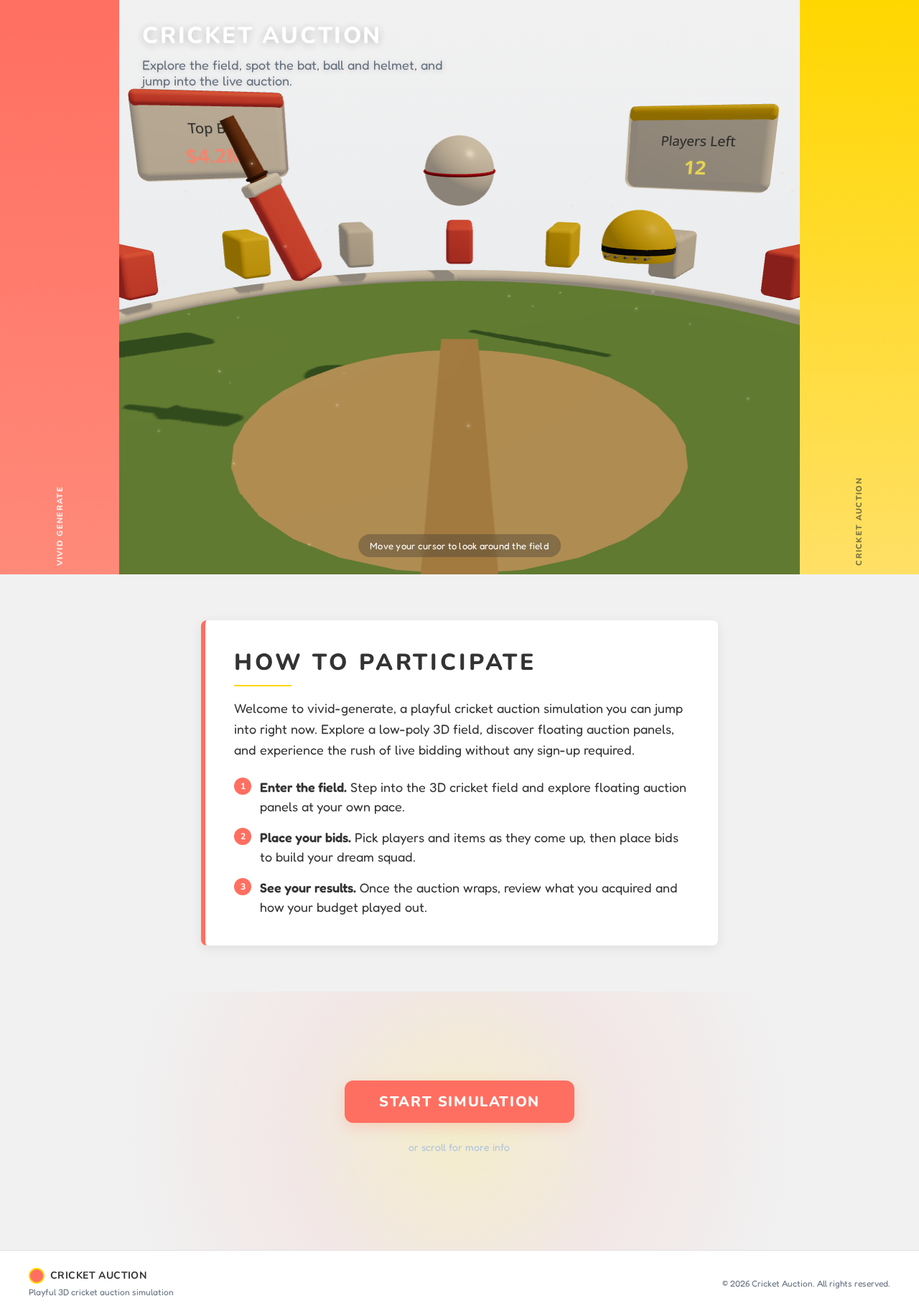
The public entry features a 3D cricket field scene with floating auction panels and interactive elements. Users can navigate the scene to engage with the auction, with vibrant colors and playful composition enhancing the experience.
8. Interaction Model & Motion Direction
- Interaction Model: Animated
- Motion Tempo: Cinematic
- Hero Dimensionality: WebGL
- Landing Hero Motion Brief: The hero scene is a 3D cricket field with interactive elements. Users can click on floating cricket items to start the auction. The scene uses playful physics-driven interactions and bouncy easing transitions. A reduced-motion state simplifies transitions for accessibility.
9. Non-Functional Requirements
- The project must remain small in scope to ensure immediate playability. (Provenance: explicit)
- The system should support a seamless and engaging user experience with minimal loading times. (Provenance: required_inference)
10. Tech Stack
- Frontend: React, Three.js for 3D interactions
- Backend: Node.js for server-side logic
- Deployment: Docker for containerization, Kubernetes for orchestration
11. Assumptions and Constraints
- The project scope is limited to a small, immediately playable simulation.
- No specific auction rules, teams, players, or scoring are defined.
- The system is designed for a single user persona: the Auction Participant.
12. Glossary
- Auction Participant: The user engaging with the cricket auction simulation.
- Simulation: An interactive experience mimicking a cricket auction.
- 3D Scene: A digital environment where the auction takes place, rendered in three dimensions.
How to Participate
Welcome to vivid-generate, a playful cricket auction simulation you can jump into right now. Explore a low-poly 3D field, discover floating auction panels, and experience the rush of live bidding without any sign-up required.
- Enter the field. Step into the 3D cricket field and explore floating auction panels at your own pace.
- Place your bids. Pick players and items as they come up, then place bids to build your dream squad.
- See your results. Once the auction wraps, review what you acquired and how your budget played out.
How to Participate
Welcome to vivid-generate, a playful cricket auction simulation you can jump into right now. Explore a low-poly 3D field, discover floating auction panels, and experience the rush of live bidding without any sign-up required.
- Enter the field. Step into the 3D cricket field and explore floating auction panels at your own pace.
- Place your bids. Pick players and items as they come up, then place bids to build your dream squad.
- See your results. Once the auction wraps, review what you acquired and how your budget played out.
No comments yet. Be the first!