vivid-emr-ggt-healthcare
 Nathaniel Olumide Adewuyi
build me an EMR for a full diagnostics center that also has a clinic. The departments are the center are Front Desk, Account, Cashier, Ultrasound, Phlebotomy, Laboratory, X-ray, Mammogram, Echo, CT Scan, MRI, Record Departments, HMO, Marketing Eye Clinic, Dental Clinic, GOPD, Nursing Station, Inventory, Facility. Make it automated to integrate across departments.


Comments (0)
Sign in to leave a comment
System Requirements
System Requirements Document for vivid-emr-ggt-healthcare
1. Introduction
The vivid-emr-ggt-healthcare project aims to develop an Electronic Medical Records (EMR) system for a comprehensive diagnostics center that includes a clinic. The system will automate and integrate operations across various departments, ensuring seamless communication and data exchange. The intended audience includes healthcare professionals, administrative staff, and department managers within the diagnostics center.
2. System Overview
The system will deliver an integrated EMR platform that connects all specified departments within the diagnostics center. It will automate processes to enhance efficiency and improve patient care. The system will be user-friendly, with a focus on humane technology, ensuring a warm and professional experience for users.
2a. Product Interpretation and Delivery Boundary
The EMR system will be a first-party application owned by the diagnostics center. It will facilitate interactions across departments, including Front Desk, Account, Cashier, Ultrasound, Phlebotomy, Laboratory, X-ray, Mammogram, Echo, CT Scan, MRI, Record Departments, HMO, Marketing Eye Clinic, Dental Clinic, GOPD, Nursing Station, Inventory, and Facility. Future expansions or integrations with external systems are not included in the current scope.
2b. Source Content Inventory
Not applicable as no content source directive was provided.
2c. Page Content and Component Coverage
Front Desk
- Patient Registration: Capture patient details, assign unique IDs, and schedule appointments.
- Appointment Management: View, modify, and cancel appointments.
- Loading/Empty/Success/Error States: Indicate system status during operations.
Account
- Billing Management: Generate, view, and update patient bills.
- Insurance Processing: Handle insurance claims and verifications.
- Loading/Empty/Success/Error States: Reflect billing and insurance processing status.
Cashier
- Payment Processing: Accept and record payments.
- Receipt Generation: Provide printed or digital receipts.
- Loading/Empty/Success/Error States: Indicate payment processing status.
Ultrasound
- Imaging Records: Store and retrieve ultrasound images.
- Report Generation: Create diagnostic reports.
- Loading/Empty/Success/Error States: Reflect imaging and reporting status.
Phlebotomy
- Sample Collection: Record sample collection details.
- Test Orders: Manage test orders and results.
- Loading/Empty/Success/Error States: Indicate sample and test order status.
Laboratory
- Test Management: Conduct tests and record results.
- Quality Control: Ensure accuracy and reliability of test results.
- Loading/Empty/Success/Error States: Reflect laboratory operations status.
X-ray
- Imaging Records: Store and retrieve X-ray images.
- Report Generation: Create diagnostic reports.
- Loading/Empty/Success/Error States: Indicate imaging and reporting status.
Mammogram
- Imaging Records: Store and retrieve mammogram images.
- Report Generation: Create diagnostic reports.
- Loading/Empty/Success/Error States: Reflect imaging and reporting status.
Echo
- Imaging Records: Store and retrieve echocardiogram images.
- Report Generation: Create diagnostic reports.
- Loading/Empty/Success/Error States: Indicate imaging and reporting status.
CT Scan
- Imaging Records: Store and retrieve CT scan images.
- Report Generation: Create diagnostic reports.
- Loading/Empty/Success/Error States: Reflect imaging and reporting status.
MRI
- Imaging Records: Store and retrieve MRI images.
- Report Generation: Create diagnostic reports.
- Loading/Empty/Success/Error States: Indicate imaging and reporting status.
Record Departments
- Patient Records Management: Store, update, and retrieve patient records.
- Data Security: Ensure confidentiality and integrity of records.
- Loading/Empty/Success/Error States: Reflect record management status.
HMO
- Insurance Coordination: Manage HMO-related processes and communications.
- Claim Processing: Handle claims and reimbursements.
- Loading/Empty/Success/Error States: Indicate HMO processing status.
Marketing Eye Clinic
- Patient Outreach: Manage marketing campaigns and patient communications.
- Appointment Scheduling: Coordinate eye clinic appointments.
- Loading/Empty/Success/Error States: Reflect marketing and scheduling status.
Dental Clinic
- Patient Records: Manage dental records and treatment plans.
- Appointment Management: Schedule and manage dental appointments.
- Loading/Empty/Success/Error States: Indicate dental clinic operations status.
GOPD (General Outpatient Department)
- Patient Management: Handle outpatient visits and records.
- Treatment Coordination: Manage treatment plans and follow-ups.
- Loading/Empty/Success/Error States: Reflect outpatient department status.
Nursing Station
- Patient Monitoring: Record and monitor patient vitals and care plans.
- Medication Administration: Track medication schedules and administration.
- Loading/Empty/Success/Error States: Indicate nursing station operations status.
Inventory
- Stock Management: Track and manage medical supplies and equipment.
- Order Processing: Handle supply orders and deliveries.
- Loading/Empty/Success/Error States: Reflect inventory management status.
Facility
- Maintenance Scheduling: Plan and track facility maintenance activities.
- Resource Allocation: Manage allocation of facility resources.
- Loading/Empty/Success/Error States: Indicate facility management status.
3. Functional Requirements
- As a Front Desk staff, I should be able to register patients and schedule appointments to ensure efficient patient flow. (explicit)
- As an Account staff, I should be able to manage billing and insurance processes to ensure accurate financial transactions. (explicit)
- As a Cashier, I should be able to process payments and generate receipts to complete financial transactions. (explicit)
- As an Ultrasound technician, I should be able to store and retrieve imaging records and generate reports for diagnostic purposes. (explicit)
- As a Phlebotomist, I should be able to record sample collections and manage test orders to ensure accurate laboratory processing. (explicit)
- As a Laboratory technician, I should be able to conduct tests and manage quality control to ensure reliable test results. (explicit)
- As an X-ray technician, I should be able to store and retrieve imaging records and generate reports for diagnostic purposes. (explicit)
- As a Mammogram technician, I should be able to store and retrieve imaging records and generate reports for diagnostic purposes. (explicit)
- As an Echo technician, I should be able to store and retrieve imaging records and generate reports for diagnostic purposes. (explicit)
- As a CT Scan technician, I should be able to store and retrieve imaging records and generate reports for diagnostic purposes. (explicit)
- As an MRI technician, I should be able to store and retrieve imaging records and generate reports for diagnostic purposes. (explicit)
- As a Record Department staff, I should be able to manage patient records securely to ensure data confidentiality and integrity. (explicit)
- As an HMO coordinator, I should be able to manage insurance processes and claims to ensure smooth HMO operations. (explicit)
- As a Marketing Eye Clinic staff, I should be able to manage patient outreach and schedule appointments to increase clinic visits. (explicit)
- As a Dental Clinic staff, I should be able to manage dental records and appointments to ensure efficient clinic operations. (explicit)
- As a GOPD staff, I should be able to manage outpatient visits and treatment plans to ensure effective patient care. (explicit)
- As a Nursing Station staff, I should be able to monitor patients and administer medications to ensure proper patient care. (explicit)
- As an Inventory manager, I should be able to manage stock and process orders to ensure adequate supply levels. (explicit)
- As a Facility manager, I should be able to schedule maintenance and allocate resources to ensure smooth facility operations. (explicit)
4. User Personas
- Front Desk Staff: Responsible for patient registration and appointment scheduling.
- Account Staff: Manages billing and insurance processes.
- Cashier: Processes payments and generates receipts.
- Ultrasound Technician: Handles imaging records and report generation.
- Phlebotomist: Manages sample collection and test orders.
- Laboratory Technician: Conducts tests and manages quality control.
- X-ray Technician: Handles imaging records and report generation.
- Mammogram Technician: Handles imaging records and report generation.
- Echo Technician: Handles imaging records and report generation.
- CT Scan Technician: Handles imaging records and report generation.
- MRI Technician: Handles imaging records and report generation.
- Record Department Staff: Manages patient records securely.
- HMO Coordinator: Manages insurance processes and claims.
- Marketing Eye Clinic Staff: Manages patient outreach and appointment scheduling.
- Dental Clinic Staff: Manages dental records and appointments.
- GOPD Staff: Manages outpatient visits and treatment plans.
- Nursing Station Staff: Monitors patients and administers medications.
- Inventory Manager: Manages stock and processes orders.
- Facility Manager: Schedules maintenance and allocates resources.
5. Core User Flows
Front Desk Staff
- Log into the system.
- Register a new patient by entering personal details.
- Schedule an appointment for the patient.
- Confirm appointment details and save.
Account Staff
- Access patient billing information.
- Generate a bill for services rendered.
- Process insurance claims if applicable.
- Update billing records and save.
Cashier
- Access the billing details for a patient.
- Process payment through the preferred method.
- Generate and provide a receipt to the patient.
- Update payment status in the system.
Ultrasound Technician
- Access patient imaging records.
- Perform ultrasound and store images.
- Generate a diagnostic report.
- Save and update patient records.
Phlebotomist
- Access patient test orders.
- Record sample collection details.
- Update test order status.
- Save and confirm sample collection.
Laboratory Technician
- Access test orders and samples.
- Conduct tests and record results.
- Perform quality control checks.
- Save and update test results.
X-ray Technician
- Access patient imaging records.
- Perform X-ray and store images.
- Generate a diagnostic report.
- Save and update patient records.
Mammogram Technician
- Access patient imaging records.
- Perform mammogram and store images.
- Generate a diagnostic report.
- Save and update patient records.
Echo Technician
- Access patient imaging records.
- Perform echocardiogram and store images.
- Generate a diagnostic report.
- Save and update patient records.
CT Scan Technician
- Access patient imaging records.
- Perform CT scan and store images.
- Generate a diagnostic report.
- Save and update patient records.
MRI Technician
- Access patient imaging records.
- Perform MRI and store images.
- Generate a diagnostic report.
- Save and update patient records.
Record Department Staff
- Access patient records.
- Update or retrieve patient information as needed.
- Ensure data security and confidentiality.
- Save changes and log out.
HMO Coordinator
- Access insurance information for patients.
- Process claims and verify coverage.
- Update claim status and records.
- Save and confirm insurance processing.
Marketing Eye Clinic Staff
- Access patient outreach tools.
- Manage marketing campaigns and communications.
- Schedule appointments for eye clinic visits.
- Save and update outreach records.
Dental Clinic Staff
- Access dental records for patients.
- Manage treatment plans and appointments.
- Update dental records and treatment status.
- Save changes and confirm appointments.
GOPD Staff
- Access outpatient records.
- Manage patient visits and treatment plans.
- Update treatment status and follow-up plans.
- Save changes and confirm patient care.
Nursing Station Staff
- Access patient care plans.
- Monitor patient vitals and administer medications.
- Update care plan status and records.
- Save changes and confirm patient monitoring.
Inventory Manager
- Access inventory records.
- Track stock levels and manage orders.
- Process supply orders and deliveries.
- Save changes and confirm inventory updates.
Facility Manager
- Access facility maintenance schedules.
- Plan and track maintenance activities.
- Allocate resources for facility operations.
- Save changes and confirm maintenance scheduling.
6. Visuals Colors and Theme
- Muse: Yves Béhar
- Palette:
- Background: #FAF8F5
- Surface: #FFFFFF
- Text: #333333
- Primary: #B87333
- Accent: #E07A5F
- Muted: #C9ADA7
- Typography:
- Headings: Karla, Medium weight, sentence case
- Body: Work Sans
- Scale: 1.25 modular (48/36/24/16/14)
- Shape Language: Rounded, soft forms with human-scale spacing
- Layout: Product-led hero sections with soft cards, modular panels for departments
- Motion: Breathing, slow easing transitions
- Imagery: Real-life product photography, natural light, healthcare environments
7. Signature Design Concept
The public entry page will feature a product-centered hero section with a softly lit image of a diagnostic tool on a warm white background. Informative text will be balanced with a gentle call to action in copper. Rounded soft cards will highlight department features, and lively copper call-to-action buttons will have subtle shadows. Calm breathing animations will indicate state changes, and modular department panels will ensure human-centered spacing.
8. Interaction Model & Motion Direction
- Interaction Model: Static
- Motion Tempo: Restrained
- Hero Dimensionality: Flat
- Landing Hero Motion Brief: The hero section will feature a diagnostic tool image with a gentle call to action. The motion will include calm breathing animations for state changes, using slow easing transitions to reflect a focus on wellbeing. The first frame will be composed with a softly lit image and informative text. A reduced-motion state will be available for accessibility.
9. Non-Functional Requirements
- The system must ensure data security and confidentiality, complying with healthcare regulations.
- The system should provide high availability and reliability to support continuous healthcare operations.
- The user interface must be intuitive and user-friendly to accommodate diverse user roles.
10. Tech Stack
- Frontend: React
- Backend: Python/FastAPI
- Database: PostgreSQL
- Containerization: Docker/docker-compose
- Deployment: Kubernetes (if required for deployment)
11. Assumptions and Constraints
- The system will be deployed within the diagnostics center's infrastructure.
- Future integrations with external systems are not included in the current scope.
- The system will support only the specified departments and their operations.
12. Glossary
- EMR: Electronic Medical Records
- GOPD: General Outpatient Department
- HMO: Health Maintenance Organization
- MRI: Magnetic Resonance Imaging
- CT Scan: Computed Tomography Scan
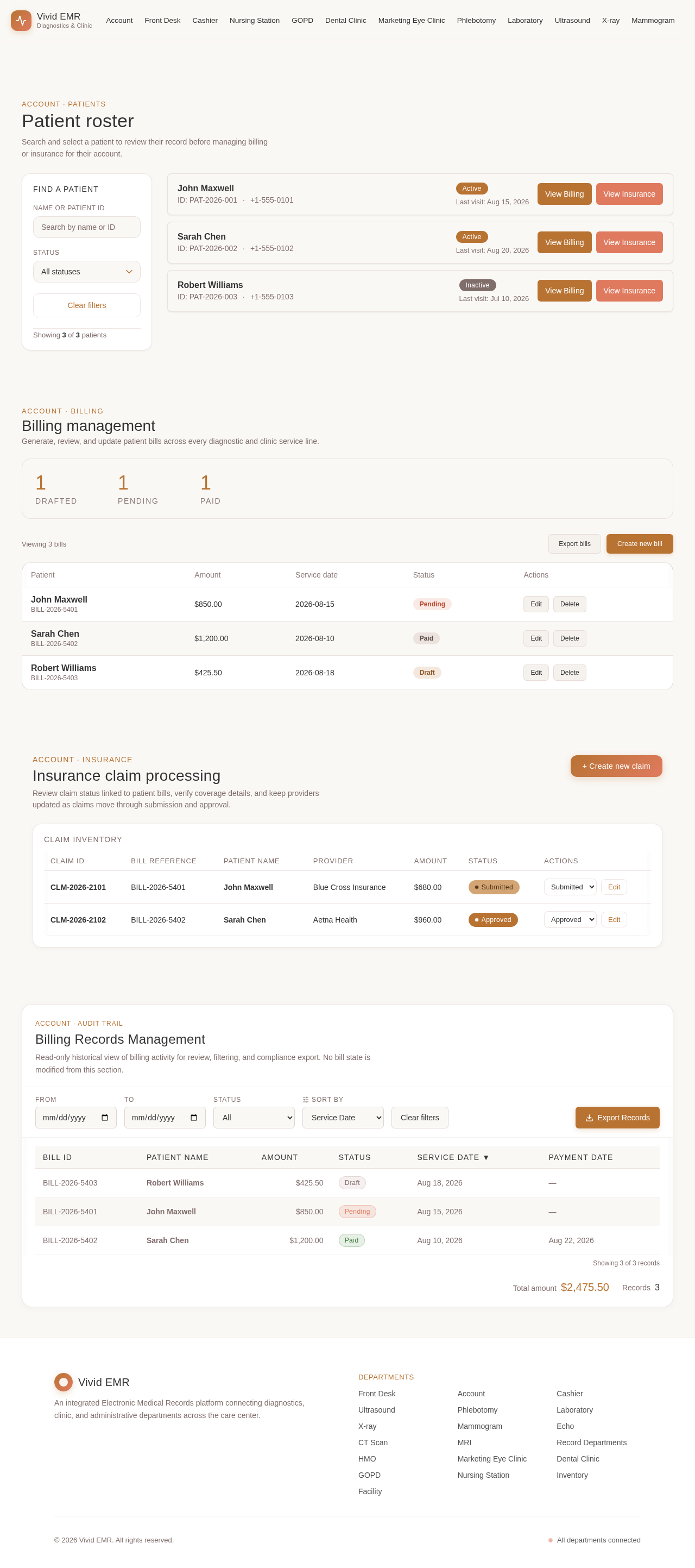
Account · Patients
Patient roster
Search and select a patient to review their record before managing billing or insurance for their account.
Account · Billing
Billing management
Generate, review, and update patient bills across every diagnostic and clinic service line.
| Patient | Amount | Service date | Status | Actions |
|---|---|---|---|---|
| John MaxwellBILL-2026-5401 | $850.00 | 2026-08-15 | pending | |
| Sarah ChenBILL-2026-5402 | $1,200.00 | 2026-08-10 | paid | |
| Robert WilliamsBILL-2026-5403 | $425.50 | 2026-08-18 | draft |
Insurance claim processing
Review claim status linked to patient bills, verify coverage details, and keep providers updated as claims move through submission and approval.
Claim inventory
| Claim ID | Bill Reference | Patient Name | Provider | Amount | Status | Actions |
|---|---|---|---|---|---|---|
| CLM-2026-2101 | BILL-2026-5401 | John Maxwell | Blue Cross Insurance | $680.00 | Submitted | |
| CLM-2026-2102 | BILL-2026-5402 | Sarah Chen | Aetna Health | $960.00 | Approved |
Account · Audit Trail
Billing Records Management
Read-only historical view of billing activity for review, filtering, and compliance export. No bill state is modified from this section.
| Payment Date | |||||
|---|---|---|---|---|---|
| BILL-2026-5403 | Robert Williams | $425.50 | draft | Aug 18, 2026 | — |
| BILL-2026-5401 | John Maxwell | $850.00 | pending | Aug 15, 2026 | — |
| BILL-2026-5402 | Sarah Chen | $1,200.00 | paid | Aug 10, 2026 | Aug 22, 2026 |
Account · Patients
Patient roster
Search and select a patient to review their record before managing billing or insurance for their account.
Account · Billing
Billing management
Generate, review, and update patient bills across every diagnostic and clinic service line.
| Patient | Amount | Service date | Status | Actions |
|---|---|---|---|---|
| John MaxwellBILL-2026-5401 | $850.00 | 2026-08-15 | pending | |
| Sarah ChenBILL-2026-5402 | $1,200.00 | 2026-08-10 | paid | |
| Robert WilliamsBILL-2026-5403 | $425.50 | 2026-08-18 | draft |
Insurance claim processing
Review claim status linked to patient bills, verify coverage details, and keep providers updated as claims move through submission and approval.
Claim inventory
| Claim ID | Bill Reference | Patient Name | Provider | Amount | Status | Actions |
|---|---|---|---|---|---|---|
| CLM-2026-2101 | BILL-2026-5401 | John Maxwell | Blue Cross Insurance | $680.00 | Submitted | |
| CLM-2026-2102 | BILL-2026-5402 | Sarah Chen | Aetna Health | $960.00 | Approved |
Account · Audit Trail
Billing Records Management
Read-only historical view of billing activity for review, filtering, and compliance export. No bill state is modified from this section.
| Payment Date | |||||
|---|---|---|---|---|---|
| BILL-2026-5403 | Robert Williams | $425.50 | draft | Aug 18, 2026 | — |
| BILL-2026-5401 | John Maxwell | $850.00 | pending | Aug 15, 2026 | — |
| BILL-2026-5402 | Sarah Chen | $1,200.00 | paid | Aug 10, 2026 | Aug 22, 2026 |
No comments yet. Be the first!