Page 1 of 21
System Requirements Document for visa-card-memecoins
1. Introduction
visa-card-memecoins is a product for designing, holding, displaying, and using a real Visa card for memecoins — a card that reads as a genuine, physical, collectible artifact rather than a mockup. The product's intent, derived from the authoritative requirement thread, is threefold:
- Build a Visa card product for memecoins that feels like a real card, not just a mockup.
- The card is a collectible the user can display.
- The card links to a wallet/balance so the user can spend or earn with it.
The audience is a crypto-native, streetwear/drop-culture crowd who hold memecoins and want a tangible object they can show off and spend with. The emotional register is ironic, industrial, and self-serious about the artifact: "this is a real card, not a mockup."
The product is delivered as a first-party web application with application-owned identity, a custom UI, and backend integration. It is not a provider-owned card-issuing portal, and it is not a headless or external-only delivery.
Page 2 of 21
2. System Overview
The current system consists of six first-party pages, delivered in this order and with this access contract:
| # | Page | Access | Primary actor(s) |
|---|
| 1 | Landing | none (anonymous) | Memecoin Card Holder, Memecoin Card Spender |
| 2 | Sign Up | none (anonymous) | Memecoin Card Holder, Memecoin Card Spender |
| 3 | Login | none (anonymous) | Memecoin Card Holder, Memecoin Card Spender |
| 4 | Card | login | Memecoin Card Holder |
| 5 | Wallet | login | Memecoin Card Spender |
| 6 | Card Activity | login | Memecoin Card Spender |
Actors. Two accepted human personas: the Memecoin Card Holder (views and presents the card as a real artifact) and the Memecoin Card Spender (uses the card to spend or earn against a linked wallet/balance). Both are served by the anonymous Landing, Sign Up, and Login surfaces; the Card page is owned by the Holder's display responsibility, and the Wallet and Card Activity pages are owned by the Spender's linkage and activity responsibilities.
Accepted behavior. Anonymous visitors learn what the card is and that it is a real, displayable, spendable artifact. A self-starting user enrolls (Sign Up) or a returning user verifies (Login) to establish a durable, privately owned card-and-wallet relationship. Once verified, the Holder views and displays their card on the Card page; the Spender links a wallet or balance on the Wallet page and then performs spending or earning activity against that linked wallet on the Card Activity page. The card must be linked to a wallet or balance before spending or earning activity can be performed.
Ownership. All six pages are application-owned custom UI. Identity is application-owned: a verified user identity persists so the card and wallet linkage can be revisited. Backend integration is required to persist identity, card state, wallet linkage, and activity.
Narrow exclusions. This document does not add adjacent capabilities that the source did not accept — no card-issuing provider portal, no marketplace, no social feed, no admin console, no account-management suite beyond the enrollment and returning-verification interactions required to make the accepted journeys executable. No future-horizon requirements were stated in the authoritative thread; the future section is therefore empty of accepted items.
Page 3 of 21
2a. Product Interpretation and Delivery Boundary
Delivery. The product is a first-party web application. The user interacts with custom pages owned by the application; there is no provider-owned surface and no external destination in the accepted scope. Backend integration is required because identity, card state, wallet linkage, and activity must persist across visits.
Access ownership. The Landing, Sign Up, and Login pages are anonymously reachable. The Card, Wallet, and Card Activity pages require a verified login. Identity is application-owned and is established through self-service enrollment on Sign Up, with returning verification on Login. A protected destination does not own the interaction that establishes access to itself: Sign Up and Login are distinct anonymous access boundaries, and protected state (card, wallet linkage, activity) remains unavailable until identity is established.
Current vs. future. Everything described in this document is current. No future-horizon requirements were accepted in the authoritative thread.
2b. Source Content Inventory
No reference directive with content_source authority was supplied. This section is intentionally omitted.
2c. Page Content and Component Coverage
Page 4 of 21
Landing
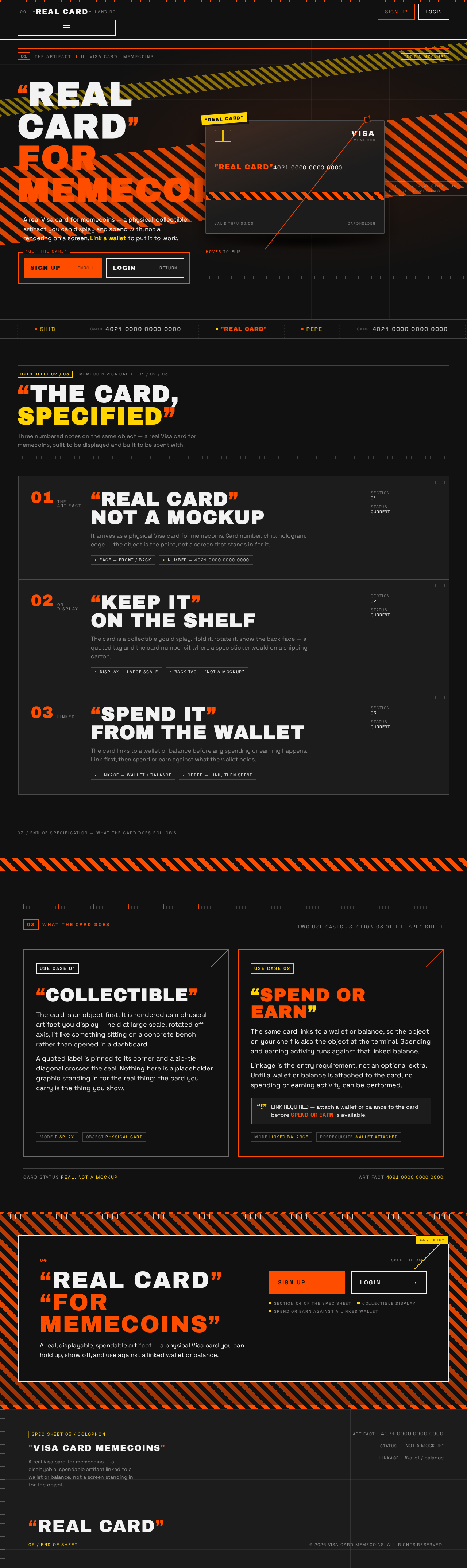
- Information/state: Anonymous entry surface. Explains the real-feeling memecoin Visa card product and its two use cases — collectible display and spending/earning against a linked wallet. Presents the card as a physical artifact, not a mockup.
- Primary actions: Proceed to Sign Up (self-service enrollment); proceed to Login (returning verification).
- Supporting actions: Read the product explanation; view the card artifact at large scale; read the quoted claims and ticker content.
- Domain entities: Card (as displayed artifact), memecoin tickers (display only), the product's two use cases.
- Component responsibilities:
- Hero stage with the oversized card artifact, stacked quoted headline, and pinned CTA.
- Marquee ticker tape across the hero and section boundaries.
- Section headers numbered like industrial labels (01 / 02 / 03) with hairline rules and ruler ticks.
- Hazard-stripe bands separating sections.
- Card hover flip revealing a back face with a quoted tag and a monospace card number.
- States:
- Loading: static-first composition; no data dependency for the hero.
- Empty: not applicable — the page is content-complete without user data.
- Success: visitor understands the product and can choose Sign Up or Login.
- Error: if the card artifact fails to render, the headline, quoted claims, and both CTAs remain fully readable and usable.
- Recovery: static fallback composition with the same readable text and controls.
Page 5 of 21
Sign Up
- Information/state: Anonymous identity-access surface. Split layout: left black panel with oversized quoted type, right form panel on a surface with thick borders. Establishes ownership of the durable card and wallet relationship.
- Primary actions: Submit enrollment to create the application-owned identity.
- Supporting actions: Move to Login if already enrolled; return to Landing.
- Domain entities: User identity (application-owned), credential material, the durable card-and-wallet relationship established at enrollment.
- Component responsibilities:
- Enrollment form with labeled fields and thick-bordered controls.
- Inline validation messaging.
- Link to Login.
- States:
- Loading: submit control shows in-progress state; form remains readable.
- Empty: blank form with labels and helper text.
- Success: identity established; user proceeds to the protected experience (Card, Wallet, Card Activity).
- Error: field-level validation errors and submission errors are shown inline; the form retains entered values so the user can correct and resubmit.
- Recovery: user corrects the flagged field or retries submission; if the identity already exists, the user is directed to Login.
Page 6 of 21
Login
- Information/state: Anonymous identity-access surface for returning users. Same split layout as Sign Up. Verifies identity so the user can resume access to their card, wallet linkage, and card activity.
- Primary actions: Submit credentials to verify identity.
- Supporting actions: Move to Sign Up if not yet enrolled; return to Landing.
- Domain entities: User identity (application-owned), credential material, the persisted card and wallet linkage being resumed.
- Component responsibilities:
- Verification form with labeled fields and thick-bordered controls.
- Inline error messaging.
- Link to Sign Up.
- States:
- Loading: submit control shows in-progress state; form remains readable.
- Empty: blank form with labels.
- Success: identity verified; user resumes access to Card, Wallet, and Card Activity.
- Error: invalid-credential and submission errors are shown inline; the form retains the entered identifier so the user can retry.
- Recovery: user retries verification or moves to Sign Up if no identity exists.
Page 7 of 21
Card
- Information/state: Protected surface (login required). Provides the holder's memecoin Visa card for viewing and display as a real card product. Two-column layout: card artifact on the left at 60% width, data rows on the right in monospace tabular alignment.
- Primary actions: View and display the card artifact.
- Supporting actions: Flip the card to reveal the back face with the quoted tag and monospace card number; read the card's data rows.
- Domain entities: The user's Visa card (card number, card face, card back, quoted tag), the card's linkage status to a wallet/balance.
- Component responsibilities:
- Large-scale card artifact with hazard-stripe band and zip-tie diagonal line across one corner.
- Card hover flip revealing the back face.
- Data rows in monospace tabular alignment.
- Linkage-status indicator showing whether the card is linked to a wallet or balance.
- States:
- Loading: card artifact and data rows show a loading state; layout does not shift.
- Empty: if no card exists for the identity, the page states that no card is available and directs the user to the Wallet page to establish the linkage prerequisite.
- Success: the card is displayed as a real artifact with its data rows readable.
- Error: if card data fails to load, an error message is shown with a retry action; the page remains navigable.
- Recovery: retry loads the card; if the failure persists, the user can navigate to Wallet or Card Activity and return.
Page 8 of 21
Wallet
- Information/state: Protected surface (login required). Owns linking the memecoin card to a wallet or balance for card use. Two-column layout consistent with Card.
- Primary actions: Link a wallet or balance to the card.
- Supporting actions: View current linkage status; change or re-link the wallet/balance.
- Domain entities: Wallet/balance, the card-to-wallet linkage, linkage status.
- Component responsibilities:
- Linkage form or control with labeled fields and thick-bordered controls.
- Current-linkage display in monospace tabular alignment.
- Linkage-status indicator.
- States:
- Loading: linkage status and current-linkage display show a loading state.
- Empty: no wallet linked yet — the page states that the card must be linked before spending or earning activity can be performed, and presents the linking control.
- Success: the wallet/balance is linked to the card; the linkage status reads as linked.
- Error: invalid or failed linkage attempts are shown inline; the previous linkage state is preserved.
- Recovery: user corrects the input or retries linking; the page retains entered values.
Page 9 of 21
Card Activity
- Information/state: Protected surface (login required). Owns spending or earning activity against the linked wallet or balance. Two-column layout consistent with Card and Wallet.
- Primary actions: Perform spending or earning activity against the linked wallet/balance.
- Supporting actions: Review activity records; navigate to Wallet to establish or change the linkage prerequisite.
- Domain entities: Activity records (spend/earn), amounts, timestamps, the linked wallet/balance, the card.
- Component responsibilities:
- Activity entry control with labeled fields and thick-bordered controls.
- Activity list in monospace tabular alignment with timestamps.
- Linkage-prerequisite notice when no wallet is linked.
- States:
- Loading: activity list shows a loading state.
- Empty: no activity yet — the page states that no spending or earning activity has been performed and, when no wallet is linked, directs the user to Wallet.
- Success: the activity is recorded and appears in the list with its amount and timestamp.
- Error: failed activity attempts are shown inline with the reason; no partial activity is recorded.
- Recovery: user retries the activity or navigates to Wallet to fix the linkage, then returns.
Page 10 of 21
3. Functional Requirements
Each requirement is a distinct story point with provenance, lifecycle facts, and observable acceptance.
FR-1 — Real card product, not a mockup (explicit)
As a Memecoin Card Holder, I should have a Visa card for memecoins that reads as a real card product rather than a mockup, so that the artifact I hold and display is credible as an actual card.
- Trigger/input: The user opens the Card page after verification.
- Observable result: The card is presented as a physical artifact — large-scale, with its face, back, and data rows rendered as a real card.
- Access state: Login required.
- Failure/recovery: If card data fails to load, an error with retry is shown; the page remains navigable.
- Continuation: The user can flip the card, read its data rows, or move to Wallet or Card Activity.
FR-2 — The card is a collectible the user can display (explicit)
As a Memecoin Card Holder, I should be able to display my card as a collectible, so that I can present it as an object rather than a dashboard entry.
- Trigger/input: The user views the card on the Card page.
- Observable result: The card is displayed at large scale as the hero object, with its quoted tag and back face available on flip.
- Access state: Login required.
- Failure/recovery: If the artifact fails to render, the card's data rows and quoted labels remain readable.
- Continuation: The user continues to Wallet or Card Activity.
FR-3 — The card links to a wallet/balance (explicit)
As a Memecoin Card Spender, I should link my card to a wallet or balance, so that the card can be used to spend or earn.
- Trigger/input: The user opens the Wallet page and submits a wallet/balance to link.
- Observable result: The linkage is established and the linkage status reads as linked.
- Access state: Login required.
- Failure/recovery: Invalid or failed linkage attempts are shown inline; the previous linkage state is preserved.
- Continuation: The user proceeds to Card Activity to spend or earn.
FR-4 — The card must be linked before spending or earning (required_inference)
As a Memecoin Card Spender, I should be prevented from performing spending or earning activity until the card is linked to a wallet or balance, so that activity is always bound to a real funding source.
- Trigger/input: The user attempts spending or earning activity on Card Activity without a linked wallet.
- Observable result: The activity is not performed; the page states that the card must be linked and directs the user to Wallet.
- Access state: Login required.
- Failure/recovery: After linking on Wallet, the user returns to Card Activity and the activity can be performed.
- Continuation: The user completes the linkage and resumes the activity.
FR-5 — Self-service enrollment (required_inference)
As a Memecoin Card Holder or Memecoin Card Spender, I should be able to enroll myself on Sign Up, so that I can establish ownership of my durable card and wallet relationship without waiting on an operator.
- Trigger/input: The user submits the enrollment form on Sign Up.
- Observable result: An application-owned identity is created and the user proceeds to the protected experience.
- Access state: Anonymous entry; protected state remains unavailable until identity is established.
- Failure/recovery: Field-level and submission errors are shown inline; entered values are retained for correction and resubmission. If the identity already exists, the user is directed to Login.
- Continuation: The user proceeds to Card, Wallet, or Card Activity.
FR-6 — Returning verification (required_inference)
As a Memecoin Card Holder or Memecoin Card Spender, I should be able to verify myself on Login, so that I can resume access to my card, wallet linkage, and card activity.
- Trigger/input: The user submits credentials on Login.
- Observable result: Identity is verified and the user resumes access to Card, Wallet, and Card Activity.
- Access state: Anonymous entry; protected state remains unavailable until verification succeeds.
- Failure/recovery: Invalid-credential and submission errors are shown inline; the entered identifier is retained for retry. If no identity exists, the user is directed to Sign Up.
- Continuation: The user resumes their card, wallet linkage, and activity.
FR-7 — Verified identity persists so the card and wallet linkage can be revisited (required_inference)
As a Memecoin Card Holder or Memecoin Card Spender, I should have my verified identity persist, so that my card and wallet linkage remain bound to me and can be revisited across visits.
- Trigger/input: The user returns and verifies on Login.
- Observable result: The same card and wallet linkage are presented to the verified user.
- Access state: Login required for the persisted protected state.
- Failure/recovery: If verification fails, the user retries or moves to Sign Up; no protected state is exposed.
- Continuation: The user continues to Card, Wallet, or Card Activity.
FR-8 — Anonymous product explanation on Landing (required_inference)
As an anonymous visitor, I should be able to understand on Landing what the memecoin Visa card is and that it is both a collectible to display and a card to spend or earn with, so that I can decide to enroll or verify.
- Trigger/input: The visitor opens Landing.
- Observable result: The product's two use cases and the card artifact are presented, with Sign Up and Login available.
- Access state: Anonymous.
- Failure/recovery: If the card artifact fails to render, the headline, quoted claims, and both CTAs remain fully readable and usable.
- Continuation: The visitor proceeds to Sign Up or Login.
FR-9 — Spending or earning activity against the linked wallet/balance (explicit)
As a Memecoin Card Spender, I should perform spending or earning activity against my linked wallet or balance, so that my memecoin funds are usable through the card.
- Trigger/input: The user submits an activity on Card Activity with a linked wallet.
- Observable result: The activity is recorded and appears in the activity list with its amount and timestamp.
- Access state: Login required.
- Failure/recovery: Failed activity attempts are shown inline with the reason; no partial activity is recorded.
- Continuation: The user reviews the activity list or performs another activity.
Page 11 of 21
4. User Personas
Memecoin Card Holder
Product context. The Holder is the persona for whom the card is primarily an artifact. They came to the product because they wanted a real Visa card for memecoins — not a mockup — and their recurring relationship with the product is viewing and presenting that card.
Primary goal. To have and display a card that reads as a genuine, real card product.
Distinct accepted responsibilities. The Holder owns the display responsibility: opening the Card page, viewing the card at large scale, flipping it to reveal the back face with its quoted tag and monospace card number, and reading the card's data rows. This is different from the Spender's work, which is about linkage and activity rather than presentation.
Relevant inputs or decisions. The Holder decides when to view or present the card and whether to flip it to the back face. The Holder reads the linkage-status indicator to know whether the card is ready for use.
Interactions with other accepted participants. The Holder shares the anonymous Landing, Sign Up, and Login surfaces with the Spender. The Holder's display work depends on the identity established at Sign Up or Login and on the card-and-wallet relationship persisting. When the Holder wants the card to be usable for spending or earning, that work belongs to the Spender's Wallet and Card Activity responsibilities.
Observable success. The card is displayed as a real artifact with its face, back, quoted tag, and data rows fully readable, and the Holder can present it as a collectible.
Page 12 of 21
Memecoin Card Spender
Product context. The Spender is the persona for whom the card is a usable financial instrument tied to memecoin funds. They came to the product because the card links to a wallet/balance so they can spend or earn with it.
Primary goal. To have a usable card tied to their memecoin funds.
Distinct accepted responsibilities. The Spender owns the linkage responsibility on Wallet — linking the card to a wallet or balance — and the activity responsibility on Card Activity — performing spending or earning activity against that linked wallet/balance. This is different from the Holder's work, which is about display rather than use.
Relevant inputs or decisions. The Spender decides which wallet or balance to link, and decides what spending or earning activity to perform. The Spender must satisfy the linkage prerequisite before activity can be performed.
Interactions with other accepted participants. The Spender shares the anonymous Landing, Sign Up, and Login surfaces with the Holder. The Spender's linkage and activity work depends on the identity established at Sign Up or Login and on the card existing for that identity. The Spender's linkage is what makes the Holder's card usable.
Observable success. The wallet/balance is linked to the card, the linkage status reads as linked, and spending or earning activity is recorded and visible in the activity list with its amount and timestamp.
5. Core User Flows
Page 13 of 21
Flow A — Anonymous visitor learns about the card and chooses an entry (Landing)
- Starting context: The visitor is anonymous and has not enrolled or verified.
- Owner: Landing.
- Actor action: The visitor opens Landing and reads the product explanation — that this is a real Visa card for memecoins, that it is a collectible to display, and that it links to a wallet/balance to spend or earn with.
- Observable result: The card artifact is presented at large scale as a physical object, with the quoted claims and the two use cases readable.
- Decision: The visitor chooses Sign Up (new) or Login (returning).
- Next step: Proceed to Flow B or Flow C.
- Failure/recovery: If the card artifact fails to render, the headline, quoted claims, and both CTAs remain fully readable and usable, and the visitor can still choose an entry.
Flow B — Self-service enrollment (Sign Up)
- Starting context: The visitor is anonymous on Landing and has no application-owned identity.
- Owner: Sign Up.
- Actor action: The visitor proceeds to Sign Up and submits the enrollment form.
- Observable result: An application-owned identity is created, establishing ownership of the durable card and wallet relationship.
- Failure/recovery: Field-level and submission errors are shown inline; entered values are retained so the visitor can correct and resubmit. If the identity already exists, the visitor is directed to Login.
- Next step: The user proceeds to the protected experience — Card (Flow D), Wallet (Flow E), or Card Activity (Flow F).
Flow C — Returning verification (Login)
- Starting context: The user has an existing application-owned identity and is anonymous on Landing.
- Owner: Login.
- Actor action: The user proceeds to Login and submits credentials.
- Observable result: Identity is verified and the user resumes access to their card, wallet linkage, and card activity.
- Failure/recovery: Invalid-credential and submission errors are shown inline; the entered identifier is retained for retry. If no identity exists, the user is directed to Sign Up.
- Next step: The user resumes Card (Flow D), Wallet (Flow E), or Card Activity (Flow F).
Page 14 of 21
Flow D — Holder views and displays the card (Card)
- Starting context: The Memecoin Card Holder is verified and opens the Card page.
- Owner: Card.
- Actor action: The Holder views the card artifact at large scale and flips it to reveal the back face with its quoted tag and monospace card number.
- Observable result: The card is displayed as a real artifact — face, back, quoted tag, and data rows fully readable — and the linkage-status indicator shows whether the card is linked to a wallet or balance.
- Failure/recovery: If card data fails to load, an error with a retry action is shown and the page remains navigable. If no card exists for the identity, the page states that no card is available and directs the Holder to Wallet to establish the linkage prerequisite.
- Next step: The Holder continues to Wallet (Flow E) if the card is not yet linked, or to Card Activity (Flow F) if it is.
Flow E — Spender links a wallet or balance (Wallet)
- Starting context: The Memecoin Card Spender is verified and opens the Wallet page.
- Owner: Wallet.
- Actor action: The Spender submits a wallet or balance to link to the card.
- Observable result: The linkage is established and the linkage status reads as linked; the current linkage is displayed in monospace tabular alignment.
- Failure/recovery: Invalid or failed linkage attempts are shown inline and the previous linkage state is preserved; the Spender corrects the input or retries, with entered values retained.
- Next step: The Spender proceeds to Card Activity (Flow F) to spend or earn.
Flow F — Spender performs spending or earning activity (Card Activity)
- Starting context: The Memecoin Card Spender is verified and has linked a wallet or balance on Wallet.
- Owner: Card Activity.
- Actor action: The Spender submits a spending or earning activity against the linked wallet/balance.
- Observable result: The activity is recorded and appears in the activity list with its amount and timestamp.
- Failure/recovery: Failed activity attempts are shown inline with the reason and no partial activity is recorded; the Spender retries or navigates to Wallet to fix the linkage, then returns.
- Next step: The Spender reviews the activity list or performs another activity.
Page 15 of 21
Flow G — Spender attempts activity before linking (prerequisite enforcement)
- Starting context: The Memecoin Card Spender is verified but has not linked a wallet or balance.
- Owner: Card Activity.
- Actor action: The Spender attempts to perform spending or earning activity.
- Observable result: The activity is not performed; the page states that the card must be linked to a wallet or balance before spending or earning activity can be performed, and directs the Spender to Wallet.
- Failure/recovery: The Spender completes Flow E, then returns to Card Activity.
- Next step: The Spender resumes Flow F.
6. Visuals Colors and Theme
The creative direction is authoritative for this section. The muse is Virgil Abloh; the headline concept is "REAL CARD" FOR MEMECOINS — remixed familiarity, quotation marks, industrial references, label/tag motifs, safety-colour accents, and exposed grids.
Colour tokens (dark mode)
| Role | Hex | Usage |
|---|
| Background | #111111 | Industrial black ground |
| Surface | #1C1C1C | Panels and card backs |
| Text | #F2F2F2 | Body and labels |
| Primary | #FF4D00 | CTA, card face accent, quote marks |
| Accent | #FFD400 | Tags, ticker tape, status highlights |
| Muted | #8A8A8A | Metadata, timestamps, disabled states |
Proportion: 70% black/surface, 20% white text, 10% orange/yellow accents. Contrast is intentionally high; no pastel or gradient fills.
Page 16 of 21
Typography
- Headings: Archivo Black, all-caps, wide letterspacing (0.04em), flush-left, tight leading (0.95), oversized — the type is the image. Quotation marks are rendered as literal typographic labels around key phrases (e.g. "REAL CARD").
- Body: Space Grotesk at 16–18px, normal case, 1.5 line-height, with monospace-style tabular numerals for balances and card numbers.
- Scale: 1.333 modular, mobile-first: 48/36/28/20/16/14; desktop: 128/96/64/32/18/16. Headline clamp: 48px mobile → 128px desktop.
Shape language
Hard-edged industrial geometry. Sharp corners (0–4px radius max), thick 2–3px borders in orange or white, exposed grid lines and ruler ticks, hazard-stripe bands (diagonal orange/black), label and tag motifs with cut corners, and zip-tie/plastic-seal references rendered as thin diagonal lines across card corners. No soft blobs, no pill buttons, no glassmorphism.
Layout
Poster-like industrial grid: a 12-column layout with visible hairline rules and section numbers (01, 02, 03) in the margin. The card is the hero object, displayed at large scale on the landing page with a quotation-mark label pinned to its corner. Sections are separated by full-bleed hazard-stripe bands. Auth pages use a split layout: left half is a black panel with oversized quoted type, right half is the form on a surface panel with thick borders. Card and Wallet pages use a two-column layout: card artifact on the left at 60% width, data rows on the right in monospace tabular alignment.
Page 17 of 21
Imagery
The card itself is the primary image — photographed or rendered as a real physical object on concrete or industrial surfaces. Macro details of the card edge, chip, and holographic Visa logo. Halftone-treated photography of the card in a hand or on a table. Industrial textures: concrete, metal, plastic sheeting. No stock people, no abstract 3D blobs, no gradient meshes. Typography and the card artifact are the imagery.
Avoid
Blue–indigo gradients or any #2563EB/#6366F1-style fintech palette; glassmorphism, frosted panels, or soft gradient blobs; rounded pill buttons and 16px+ card radii; centered SaaS hero with headline, subtext, and a blue button; stock photography of people smiling at phones; Inter, Roboto, Arial, Helvetica, Poppins, or system-ui for headings or body; grid of identical hover-lift cards; pastel or neon-on-white colour schemes. The generic indigo/blue-on-white SaaS template is forbidden for this project.
Page 18 of 21
7. Signature Design Concept
"REAL CARD" — the artifact on the stage.
The public entry (Landing) is a full-viewport dark stage (#111111) with a single oversized Visa card artifact rotated 8 degrees and bleeding off the right edge, lit as if on a concrete surface. On the left, a stacked headline in Archivo Black at clamp(48px, 10vw, 128px) reads "REAL CARD" with literal quotation marks, followed by "FOR MEMECOINS" in safety orange (#FF4D00). A hazard-stripe band runs diagonally behind the card. A marquee ticker tape runs across the bottom of the hero with card numbers and memecoin tickers. The CTA is a thick-bordered orange rectangle pinned beneath the headline, not centered. The composition is asymmetric, poster-like, and could not be mistaken for a SaaS hero.
The signature moves that carry the concept across the product:
- Marquee ticker tape across the hero and section boundaries, scrolling card numbers, memecoin tickers, and the phrase "REAL CARD" in safety orange on black. Under reduced motion it wraps to a static two-row label grid.
- Quotation marks as a typographic system: every key claim is wrapped in literal
" " marks set in Archivo Black, used as labels, section headers, and card overlays.
- The Visa card as a physical artifact with a hazard-stripe band and a zip-tie diagonal line across one corner, displayed at large scale and rotated 8 degrees, bleeding off the viewport edge on desktop.
- Section headers numbered like industrial labels (01 / 02 / 03) in the left margin with hairline rules and ruler ticks, turning the page into a spec sheet for the card.
- Card hover flip rotates the artifact 5 degrees and reveals a back face with a quoted tag ("NOT A MOCKUP") and a monospace card number, with tabular numerals as ornament.
This concept only recomposes accepted content, states, and controls — the card artifact, the two use cases, the quoted claims, and the Sign Up and Login entries. It introduces no new behavior, page, or destination.
8. Interaction Model & Motion Direction
Interaction Model: Animated
Motion Tempo: expressive
Hero Dimensionality: flat
Page 19 of 21
Landing Hero Motion Brief
- Focal subject: The oversized Visa card artifact, rotated 8 degrees, bleeding off the right edge of the viewport, lit as if on a concrete surface.
- Input → transformation → outcome thesis: As the visitor scrolls, the card artifact and its shadow separate in a subtle parallax, the marquee ticker tape scrolls continuously across the hero and section boundaries, and the stacked headline lines snap in with a 40ms stagger — transforming a static poster into a moving spec sheet for the card, and landing the visitor on the two accepted entries (Sign Up and Login).
- Motion vocabulary: Snappy and industrial. Marquee ticker tape; tag flips on hover (card rotates 3–5 degrees and reveals a back face with a quote); staggered entrance for label text (each line snaps in with a 40ms delay); subtle parallax between the card and its shadow on scroll. No bouncy easing —
cubic-bezier(0.2, 0.9, 0.3, 1) with 180–240ms durations.
- Composed first frame: Dark stage (
#111111), card artifact bleeding off the right edge at 8 degrees, hazard-stripe band running diagonally behind it, stacked headline "REAL CARD" / "FOR MEMECOINS" flush-left on the left, thick-bordered orange CTA pinned beneath the headline, marquee ticker tape across the bottom.
- Reduced-motion state: The marquee becomes a static row of labels that wraps into a two-row grid; hover flips become instant crossfades; the parallax and staggered entrances resolve to their final composed positions. All readable text and controls remain whole and fully readable at 375px, 768px, and 1280px.
9. Non-Functional Requirements
- NFR-1 — Readable text and controls stay whole (explicit, creative direction): Headlines, wordmarks, labels, numbers, and cards' text and controls stay entirely inside the viewport and their container at 375px, 768px, and 1280px, wrapping or scaling (for example
font-size: clamp(...) with its mobile size) to fit. No other element covers any part of them. Imagery, decoration, and motion may be cropped, bled off an edge, rotated, overlapped, or cut as the direction asks, as long as they cover no readable text or control.
- NFR-2 — Moving and scrollable content (explicit, creative direction): Marquees, tickers, carousels, and horizontally scrollable rows may cross the viewport or container edge by design; every item must become fully readable as it passes. With
prefers-reduced-motion, provide a usable static arrangement — wrap items into rows or allow horizontal scrolling so each item can be brought fully into view.
- NFR-3 — Reduced-motion support (explicit, creative direction): Under
prefers-reduced-motion, the marquee becomes a static row of labels that wraps, hover flips become instant crossfades, and parallax and staggered entrances resolve to their final composed positions.
- NFR-4 — Persistence of identity, card, and wallet linkage (required_inference): A verified user identity must persist so the card and wallet linkage can be revisited across visits. Backend integration is required to persist identity, card state, wallet linkage, and activity.
- NFR-5 — Protected state is not exposed before verification (required_inference): Card, Wallet, and Card Activity require login. Protected state remains unavailable until identity is established, and the anonymous Sign Up and Login surfaces do not expose protected state.
- NFR-6 — Linkage prerequisite is enforced (required_inference): The card must be linked to a wallet or balance before spending or earning activity can be performed; the system must not record partial activity when the prerequisite is unmet or when an activity attempt fails.
- NFR-7 — No generic fintech template (explicit, creative direction): The generic indigo/blue-on-white SaaS template is forbidden. The palette, typography, shape language, layout, and imagery follow the creative direction in Section 6.
Page 20 of 21
10. Tech Stack
No technology choices were specified in the authoritative requirement thread. The following are coherent defaults consistent with the accepted delivery shape (first-party custom UI, application-owned identity, backend integration required):
- Frontend: React (web), with the creative direction's typography (Archivo Black, Space Grotesk) and the industrial layout system implemented in CSS.
- Backend: Python / FastAPI, providing identity, card state, wallet linkage, and activity endpoints.
- Storage: A relational database for identity, card, wallet linkage, and activity records.
- Packaging: Docker / docker-compose for local and single-host deployment.
- Orchestration: Kubernetes only if deployment requires it; not required by the accepted scope.
[Default — not specified by user]
11. Assumptions and Constraints
- A-1 (assumption): The product is delivered as a first-party web application with application-owned identity, per the accepted delivery shape. No provider-owned or external-only delivery was accepted.
- A-2 (assumption): Self-service enrollment on Sign Up and returning verification on Login are the only identity interactions in scope. No adjacent account-management capabilities (password reset suites, profile management, role administration) are added.
- A-3 (assumption): The card is a single card per verified identity, displayed on the Card page and linked to one wallet or balance on the Wallet page. The source does not specify multiple cards or multiple simultaneous linkages.
- A-4 (assumption): "Spend or earn" activity is recorded as activity records with amount and timestamp on Card Activity. The source does not specify particular memecoin assets, networks, or settlement mechanics, so none are invented.
- A-5 (constraint): The card must be linked to a wallet or balance before spending or earning activity can be performed.
- A-6 (constraint): Card, Wallet, and Card Activity require login; Landing, Sign Up, and Login are anonymously reachable.
- A-7 (constraint): The creative direction in Section 6 is authoritative for palette, typography, shape language, layout, imagery, and motion. The generic indigo/blue-on-white SaaS template is forbidden.
- A-8 (constraint): No future-horizon requirements were accepted in the authoritative thread; nothing in this document is deferred.
Page 21 of 21
12. Glossary
- Memecoin — A cryptocurrency associated with internet meme culture; the asset class the card is built around.
- Memecoin Visa card / the card — The real, physical-feeling Visa card artifact for memecoins that the user holds, displays, and uses. It is the product's hero object.
- Card Holder — The accepted persona whose recurring responsibility is viewing and displaying the card as a real artifact.
- Card Spender — The accepted persona whose recurring responsibility is linking a wallet/balance and performing spending or earning activity against it.
- Wallet / balance — The funding source linked to the card; the card must be linked to one before spending or earning activity can be performed.
- Linkage — The established relationship between the card and a wallet or balance, owned by the Wallet page.
- Card Activity — The record of spending or earning performed against the linked wallet/balance, owned by the Card Activity page.
- Landing — The anonymous public entry surface that explains the product and offers Sign Up and Login.
- Sign Up — The anonymous self-service enrollment surface that establishes the application-owned identity.
- Login — The anonymous returning-verification surface that resumes access to the card, wallet linkage, and activity.
- Quotation-mark system — The creative direction's typographic device of wrapping key claims in literal
" " marks set in Archivo Black.
- Hazard-stripe band — The diagonal orange/black band used as a section separator and card accent in the creative direction.
- Marquee ticker tape — The scrolling band of card numbers, memecoin tickers, and the phrase "REAL CARD" used across the hero and section boundaries.



No comments yet. Be the first!