video-summary
 Hello Mcdonald
create a website that can generate a video summary with different time through the video link or upload file


Comments (0)
Sign in to leave a comment
System Requirements
System Requirements Document for video-summary
1. Introduction
video-summary is a website that generates a video summary at a user-chosen target duration from a video supplied either by a video link or by uploading a file. The product's intent is to let a person take a long video and sculpt it down into a shorter cut of a chosen length — for example a 1-minute, 2-minute, 5-minute, or 10-minute summary — and then read/watch that summary.
The audience is knowledge workers, students, researchers, and content teams who already have a video (a link or a local file) and want a shorter version of it at a specific time budget. The product is a precision instrument for compressing time, not a chat interface: the user provides the video, chooses the target duration, and receives a summary shaped to that duration.
The current delivery is a public website with two pages — Landing and Summarize — backed by a server-side summarization service. No account is required to use the product.
2. System Overview
video-summary is a web application with a custom front end and a backend summarization service.
Actors
- Video Summarizer (human, active) — the sole accepted human persona. Supplies a video by link or file upload, chooses a target summary duration, generates the summary, and reviews the result.
- Summarization Service (system, non-persona) — the backend process that ingests the supplied video, produces a summary at the requested duration, and returns it to the client.
- Video Source (external, non-persona) — the remote host of a video supplied by link, or the user's local file system for an uploaded file.
Accepted behavior (current)
- Generate a video summary from a video.
- Accept the video by a video link or by uploading a file.
- Generate the summary at different target time lengths chosen by the user.
- Require a valid video link or an uploaded video file before generation.
- Require a target summary length/time to be chosen before generation.
Ownership
- The Landing page is the anonymous public entry surface explaining the product.
- The Summarize page is the workspace where the user submits a video, chooses the duration, generates the summary, and views the result.
- The backend summarization service performs the actual summarization work; it is not a human-facing destination.
Narrow exclusions
- No account, login, or user profile is required or provided.
- No editing of the source video, no transcript editing, and no export/download of the summary beyond viewing it in the workspace are specified.
- No batch processing, no library/history of past summaries, and no sharing features are specified.
2a. Product Interpretation and Delivery Boundary
The product is delivered as a first-party website with custom UI. Both accepted pages are publicly reachable without identity establishment: the source establishes no account requirement, and the accepted journeys (supply a video, choose a duration, generate, review) do not require durable per-user state, commitments, entitlements, or value transfers bound to a returning participant. Accordingly, no application-owned identity, sign-in, or session continuity is introduced.
The Landing page is the anonymous entry surface. The Summarize page is the working surface where the accepted lifecycle completes. The backend summarization service is a supporting system process; the human interaction that initiates, controls, and reviews summarization is owned by the Summarize page.
Current vs. future: All requirements in this document are current. No future-horizon requirements are established by the source.
2b. Source Content Inventory
Not applicable — no reference directive declares a content_source.
2c. Page Content and Component Coverage
Landing
Purpose: Anonymous public entry surface that explains that the site generates video summaries at different target lengths from a link or an uploaded file, and routes the visitor into the Summarize workspace.
Information and state
- Product wordmark
video-summary. - Headline communicating the value: hours of video compressed into minutes of meaning.
- A single line of supporting body copy describing link-or-upload input and user-chosen summary duration.
- Two entry controls: a "Paste a link" pill (gold-outlined) and an "Upload a file" pill (teal).
- A circular duration dial with a live
mm:ssreadout showing the currently selected target duration (default 5:00), with 1/2/5/10-minute detents. - Section micro-labels:
01 — INPUT,02 — DURATION,03 — SUMMARY.
Primary actions
- "Paste a link" — routes to Summarize with link mode preselected.
- "Upload a file" — routes to Summarize with upload mode preselected.
- Duration dial — adjusts the target duration carried into Summarize.
Supporting actions
- Navigate to Summarize via the persistent left rail.
Domain entities
- Target duration (a time value with 1/2/5/10-minute detents).
- Input mode (link | upload).
Component responsibilities
- Hero stage: full-bleed charcoal stage with the luminous ribbon composition and headline.
- Duration dial: gold bezel, teal sweep, live readout, needle-sweep on change.
- Left rail: rotated wordmark, link/upload mode switch, running duration readout.
States
- Loading: not applicable (static entry surface).
- Empty: not applicable.
- Success: page renders fully; entry controls route to Summarize.
- Error: not applicable on this surface; input validation occurs on Summarize.
- Recovery: not applicable.
Summarize
Purpose: Cohesive workspace where the Video Summarizer submits a video by link or upload, chooses the target summary duration, generates the summary, and views the resulting summary.
Information and state
- Input mode switch: Link and Upload (two stacked capsule buttons in the left rail).
- Link mode: a URL text field for the video link.
- Upload mode: a file picker / drop target for a video file, showing the selected file name.
- Duration dial: circular dial with gold bezel, teal sweep, live
mm:ssreadout, and 1/2/5/10-minute detents. - Generation state: idle, generating (progress indication), success (summary shown), error (message with retry).
- Summary output: a curved timeline ribbon whose segments are the summary chunks, each timestamped in pearl, with the active segment's edge lit teal.
Primary actions
- Enter a video link or select/upload a video file.
- Choose the target summary duration on the dial.
- Trigger generation (teal "Generate" action).
- Review the generated summary and its timestamped segments.
Supporting actions
- Switch between link and upload modes.
- Change the duration and regenerate.
- Retry after an error.
Domain entities
- Video source (link URL or uploaded file).
- Target duration.
- Summary (ordered, timestamped segments at the requested duration).
- Generation job state.
Component responsibilities
- Left rail: wordmark, link/upload mode switch, running duration readout.
- Input pane (left third): link field or upload drop target.
- Duration dial: parameter control with detents and live readout.
- Generate action: teal primary action, disabled until a valid source and duration are present.
- Summary pane (right two-thirds): curved timeline ribbon rendering the summary segments.
States
- Loading: generation in progress — progress indication while the backend summarizes; controls reflect the in-progress state.
- Empty: no video supplied yet — input pane prompts for a link or file; summary pane shows an empty-state prompt.
- Success: summary rendered as the curved timeline ribbon with timestamped segments at the requested duration.
- Error: invalid link, unsupported/unreadable file, or summarization failure — an error message identifies the problem and offers retry; the user's input and chosen duration are preserved.
- Recovery: the user corrects the link or file, or retries generation, without losing the chosen duration.
3. Functional Requirements
FR-1 — Generate a video summary from a video (explicit) As a Video Summarizer, I should generate a video summary from a video I supply, so that I get a shorter version of the video's content.
- Trigger/input: the user supplies a video and requests a summary.
- Observable result: a summary of the video is produced and displayed in the Summarize workspace.
- Access state: public; no account required.
- Failure/recovery: if summarization fails, an error is shown and the user can retry.
- Continuation: the user reviews the summary and may generate another.
- Owner: Summarize page (human interaction); Summarization Service (backend execution).
FR-2 — Provide the video by link or by file upload (explicit) As a Video Summarizer, I should provide the video either by a video link or by uploading a file, so that I can summarize videos I can reach by URL or that I have locally.
- Trigger/input: the user selects link mode and enters a URL, or selects upload mode and chooses a file.
- Observable result: the supplied source is accepted and shown as the active input.
- Access state: public; no account required.
- Failure/recovery: an invalid link or unreadable/unsupported file produces an error identifying the problem; the user can correct the input.
- Continuation: with a valid source present, the user proceeds to choose a duration and generate.
- Owner: Summarize page.
FR-3 — Generate the summary at different target time lengths chosen by the user (explicit) As a Video Summarizer, I should choose the target summary length/time before generation, so that the summary fits the time I have.
- Trigger/input: the user sets the target duration on the duration dial (1/2/5/10-minute detents, live
mm:ssreadout). - Observable result: the generated summary is shaped to the chosen duration and displayed with its duration.
- Access state: public; no account required.
- Failure/recovery: if generation fails, the chosen duration is preserved so the user can retry.
- Continuation: the user may change the duration and regenerate to get a different-length summary.
- Owner: Summarize page.
FR-4 — Require a valid video source before generation (required_inference) As a Video Summarizer, I should be prevented from generating until a valid video link or an uploaded video file is present, so that generation requests are always executable.
- Trigger/input: the user attempts to generate without a valid source.
- Observable result: the generate action is unavailable/disabled and the input pane indicates a source is required.
- Access state: public; no account required.
- Failure/recovery: supplying a valid source enables generation.
- Continuation: the user supplies a source and proceeds.
- Owner: Summarize page.
FR-5 — Require a target summary length before generation (required_inference) As a Video Summarizer, I should have a target summary length selected before generation, so that the summary is produced at a definite duration.
- Trigger/input: the user attempts to generate without a chosen duration.
- Observable result: a default duration (5:00) is present on the dial, and generation uses the currently displayed duration.
- Access state: public; no account required.
- Failure/recovery: the user adjusts the dial to a valid detent.
- Continuation: the user generates with the chosen duration.
- Owner: Summarize page.
FR-6 — Explain the product on the public entry surface (required_inference) As a Video Summarizer, I should understand on arrival that the site generates video summaries at different target lengths from a link or an uploaded file, so that I know what the product does and how to start.
- Trigger/input: the visitor opens the Landing page.
- Observable result: the headline, supporting copy, entry controls, and duration dial communicate the product and route into Summarize.
- Access state: anonymous.
- Failure/recovery: not applicable.
- Continuation: the visitor selects "Paste a link" or "Upload a file" and lands on Summarize in the corresponding mode.
- Owner: Landing page.
4. User Personas
Video Summarizer
Product context. The Video Summarizer is a knowledge worker, student, researcher, or content team member who already has a video — reachable by URL or held as a local file — and needs a shorter version of it at a specific time budget. They arrive with a concrete duration in mind (a 2-minute brief, a 5-minute review, a 10-minute deep cut) and judge the product on whether the summary feels shaped to that duration rather than arbitrarily truncated.
Primary goal. Obtain a usable summary of a supplied video that fits the time they asked for.
Distinct accepted responsibilities.
- Supply the video by link or by file upload (FR-2).
- Choose the target summary duration before generation (FR-3, FR-5).
- Trigger generation and review the resulting summary (FR-1).
- Correct invalid input or retry after failure, and repeat the process for other videos or other target lengths (FR-4, FR-1, FR-3).
Relevant inputs and decisions.
- The video source: a URL or a local file.
- The target duration: one of the 1/2/5/10-minute detents on the duration dial.
- Whether to regenerate at a different duration after reviewing a summary.
Interactions with other accepted participants. The Video Summarizer is the only accepted human participant. Their work is supported by the Summarization Service (system) and the Video Source (external), neither of which is a persona. There is no handoff to another human.
Observable success. A summary is displayed in the Summarize workspace as a curved timeline ribbon of timestamped segments at the chosen duration, and the user can immediately generate another at a different length.
Constraints. No account is required; the persona's work is anonymous and stateless across visits.
5. Core User Flows
Flow A — Summarize a video supplied by link
- The Video Summarizer opens the Landing page (anonymous). The hero presents the headline, supporting copy, the "Paste a link" and "Upload a file" pills, and the duration dial at its default 5:00 readout.
- The Video Summarizer selects "Paste a link". The Summarize page opens with link mode active.
- In the input pane, the Video Summarizer enters the video URL.
- On the duration dial, the Video Summarizer sets the target duration to a detent (for example 2:00); the dial's needle sweeps and the
mm:ssreadout updates. - With a valid link and a chosen duration present, the Generate action becomes available. The Video Summarizer triggers it.
- The Summarize page shows a generating state while the Summarization Service ingests the linked video and produces the summary at the requested duration.
- On success, the summary appears in the right pane as a curved timeline ribbon whose segments are the summary chunks, each timestamped, with the active segment's edge lit teal. The Video Summarizer reviews it.
- Failure/recovery: if the link is invalid or summarization fails, an error message identifies the problem, the entered link and chosen duration are preserved, and the Video Summarizer can correct the link or retry.
- Continuation: the Video Summarizer may change the duration on the dial and generate again, or supply a different video.
Flow B — Summarize a video supplied by file upload
- The Video Summarizer opens the Landing page (anonymous) and selects "Upload a file". The Summarize page opens with upload mode active.
- In the input pane, the Video Summarizer selects a video file (or drops it on the drop target); the selected file name is shown.
- On the duration dial, the Video Summarizer sets the target duration to a detent (for example 10:00); the readout updates.
- With a valid file and a chosen duration present, the Video Summarizer triggers Generate.
- The Summarize page shows a generating state while the Summarization Service processes the uploaded file and produces the summary at the requested duration.
- On success, the summary appears as the curved timeline ribbon with timestamped segments at the chosen duration, and the Video Summarizer reviews it.
- Failure/recovery: if the file is unsupported or unreadable, or summarization fails, an error message identifies the problem, the chosen duration is preserved, and the Video Summarizer can choose another file or retry.
- Continuation: the Video Summarizer may regenerate at a different duration or upload another video.
Flow C — Regenerate at a different target length
- From a displayed summary on the Summarize page, the Video Summarizer adjusts the duration dial to a different detent.
- The Video Summarizer triggers Generate again with the same video source.
- The Summarize page shows the generating state, then replaces the summary with one shaped to the new duration.
- The Video Summarizer compares the new summary against the previous one and continues or stops.
Flow D — Attempt generation without a valid source
- On the Summarize page with no link entered and no file selected, the Video Summarizer attempts to generate.
- The generate action is unavailable/disabled and the input pane indicates that a video link or file is required.
- The Video Summarizer supplies a valid source; generation becomes available and Flow A or Flow B continues from step 4.
6. Visuals, Colors and Theme
Muse and headline. Zaha Hadid — Fluid parametric grandeur for a video that folds into time. The product is a dark, architectural stage where a video becomes a sculpted ribbon whose length is set by a duration dial.
Mode. Dark mode only.
Color tokens (exact hex by role)
- Background (pearl-charcoal ground):
#0E0F12 - Surface (lifted graphite panels):
#16181D - Text (warm pearl):
#F2EFE9 - Primary (gold structural accent — rules, bezels, duration dial, active tab):
#C9A96A - Accent (cool luminous teal — reserved exclusively for the generated summary's highlight and the "Generate" action):
#7FE3D4 - Muted (metadata and timestamps):
#8A8F99
Gold and teal never touch as flat fills; they meet only as thin strokes and glows on curved surfaces.
Typography
- Headings: Jost, Light (300) to Regular (400), wide-set display, tracking
-0.02emat large sizes, sentence case, with rare all-caps micro-labels at 11px /0.18emletter-spacing in gold. - Body: Jost 400 at 17px / 1.65.
- Type scale (1.333 modular): 18 / 24 / 32 / 44 / 60 / 80 / 104 px.
- Hero display:
clamp(44px, 8vw, 104px). - Section headings:
clamp(30px, 4.2vw, 60px). - Body: 17px. Micro-labels: 11px uppercase.
Shape language. Continuous sweeping curves and parametric ribbons. Section boundaries are shallow arcs, not straight lines. The duration selector is a circular dial with a gold bezel and a teal sweep. Cards are cut with one large radius (28–40px) and one sharp corner so they feel carved. Diagonal flow lines and thin gold hairlines trace motion paths. Negative space is dramatic and asymmetric, like an architectural section drawing.
Layout. Asymmetric editorial grid on a 12-column base with a persistent left rail (72px on desktop, collapsing to a bottom bar on mobile) carrying the wordmark, the link/upload mode switch, and a running duration readout. The hero is a full-bleed dark stage with the video ribbon sweeping from the lower-left off the top-right edge, the oversized headline set over it in pearl, and the duration dial anchored bottom-right. Sections alternate between full-bleed dark imagery and a near-black surface panel, each separated by an arc rather than a rule. The Summarize workspace keeps the same rail and turns the main column into a two-pane composition: input + duration on the left third, generated summary on the right two-thirds, with the summary timeline drawn as a curved ribbon whose segments are the chosen chunks.
Imagery. Architectural and parametric: a single hero subject — a luminous ribbon/fluid form derived from a video timeline, rendered as a layered 2D SVG/CSS composition with soft gold and teal glows on charcoal. Supporting imagery: macro shots of curved metal and pearl surfaces for the "how it works" band, and a schematic curved timeline diagram for the summary output. No stock people, no gradient blobs, no 3D clip art.
Forbidden. Centered headline + subtext + blue button + gradient blob hero; white or near-white ground with a blue/indigo accent; a grid of identical hover-lift cards; Inter, Roboto, Arial, Helvetica, Poppins, or system-ui as heading or body font; glassmorphism panels or frosted blur overlays; playful bouncy easing or springy micro-interactions; stock photography of people pointing at screens; rounded-rectangle chips as the primary duration selector — the dial is the point. The generic indigo/blue-on-white SaaS template is forbidden.
Readability constraint. Readable text and controls stay whole at every viewport: headlines, wordmarks, labels, numbers, card text, and controls stay entirely inside the viewport and their container at 375px, 768px, and 1280px, wrapping or scaling (e.g., clamp(...) with its mobile size) to fit, and no other element covers any part of them. Imagery, decoration, and motion may be cropped, bled, rotated, overlapped, or cut as the direction asks, as long as they cover no readable text or control. With prefers-reduced-motion, provide a usable static arrangement.
7. Signature Design Concept
The Sculpted Ribbon Stage. The Landing page is a full-bleed charcoal stage (#0E0F12). The dominant element is an oversized luminous ribbon — a thin, continuous, gold-and-teal-edged band — that enters from the bottom-left corner, sweeps in a wide arc across the viewport, and exits off the top-right, its surface catching a slow light sweep. Over it, the headline "Hours of video. Minutes of meaning." is set in Jost 300 at clamp(44px, 8vw, 104px), flush-left, occupying the left 9 columns and deliberately crossing the ribbon without being covered (text sits above the ribbon layer with a subtle dark scrim behind only the glyph area). Beneath the headline, a single line of pearl body copy and two controls: a gold-outlined "Paste a link" pill and a teal "Upload a file" pill. Bottom-right, an anchored circular duration dial with a gold bezel, teal sweep, and a live "5:00" readout in Jost 400. Top-left, the wordmark "video-summary" in 12px uppercase gold tracking. No centered stack, no gradient blob, no floating glass cards.
The signature moves carry through the product: the duration selector is a physical circular dial (gold bezel, teal sweep, live mm:ss readout, 1/2/5/10-minute detents, needle-sweep on change); section boundaries are shallow arcs with a 1px gold hairline and micro-labels (01 — INPUT, 02 — DURATION, 03 — SUMMARY); the generated summary is a curved timeline ribbon whose segments are the summary chunks, timestamped in pearl, with the active segment's edge lit teal; and a persistent left rail carries the wordmark rotated 90° in gold caps, the link/upload mode switch as two stacked capsule buttons, and a running duration readout at the bottom.
8. Interaction Model & Motion Direction
Interaction Model: Animated Motion Tempo: cinematic Hero Dimensionality: layered_2d
Landing Hero Motion Brief
- Focal subject: the luminous gold-and-teal-edged ribbon derived from a video timeline, sweeping from the lower-left off the top-right edge of the charcoal stage.
- Input → transformation → outcome thesis: the visitor's attention follows the ribbon's continuous arc (input); the ribbon's slow light sweep and the duration dial's needle sweep on change (transformation) communicate that a long flow of time is being sculpted into a chosen shorter form (outcome) — the same gesture the product performs on a video.
- Motion vocabulary: smooth camera-like sweeps; slow parallax on the hero ribbon (scroll-linked, CSS transform only, ≤8px offset); a slow light sweep at a 12s loop; a gold needle sweep on the duration dial when a value changes; a teal light-sweep along the ribbon edge when a summary is generated; section boundaries morph by a few pixels on scroll.
- Composed first frame: full-bleed
#0E0F12stage; the ribbon entering bottom-left and exiting top-right; the headline "Hours of video. Minutes of meaning." in Jost 300 flush-left over the left 9 columns; one line of pearl body copy and the gold "Paste a link" and teal "Upload a file" pills beneath; the circular duration dial anchored bottom-right with a live "5:00" readout; the wordmark top-left in 12px uppercase gold. - Reduced-motion state: the ribbon becomes a static arc, the dial snaps without sweep, and no parallax is applied; all text and controls remain fully readable and operable.
9. Non-Functional Requirements
- NFR-1 — Public access. Both Landing and Summarize are reachable without an account or sign-in. (required_inference; source establishes no account requirement and the accepted journeys need no durable per-user state.)
- NFR-2 — Server-side summarization. Summarization is performed by a backend service, since the browser cannot reliably ingest arbitrary linked or uploaded video and produce a duration-shaped summary. (required_inference; supports FR-1, FR-2, FR-3.)
- NFR-3 — Input validation. The system validates the supplied link and uploaded file before generation and reports a clear error for invalid or unsupported input. (required_inference; supports FR-4.)
- NFR-4 — Duration fidelity. The generated summary is shaped to the user-chosen target duration and displayed with that duration. (explicit; FR-3.)
- NFR-5 — Accessibility and readability. Readable text and controls remain whole and uncovered at 375px, 768px, and 1280px; all motion respects
prefers-reduced-motionwith a usable static arrangement. (explicit design constraint.) - NFR-6 — Visual identity. The product uses the specified dark palette, Jost typography, arc/ribbon shape language, and left-rail layout; the forbidden patterns in Section 6 are not used. (explicit design constraint.)
10. Tech Stack
- Frontend: React (custom UI), styled to the Section 6 tokens; layered 2D SVG/CSS hero composition; CSS transforms for scroll-linked parallax and light sweeps.
- Backend: Python / FastAPI service exposing summarization endpoints (accept link or uploaded file, target duration; return summary segments with timestamps).
- Storage: object storage for uploaded video files and generated summary artifacts; no user-account database is required.
- Deployment: Docker / docker-compose with a frontend service and a backend service.
11. Assumptions and Constraints
- A-1 (assumption) The summarization backend can ingest both remote video links and uploaded video files. This is required by FR-2 and is treated as a capability of the Summarization Service.
- A-2 (assumption) The duration dial offers 1/2/5/10-minute detents with a default of 5:00, per the creative direction; the user may choose among these target lengths. This satisfies "different time" in FR-3.
- A-3 (constraint) No account, login, profile, history, sharing, export, or batch processing is in scope; the source establishes none of these.
- A-4 (constraint) The product is dark-mode only, per the creative direction.
- A-5 (constraint) The generic indigo/blue-on-white SaaS template and the other forbidden patterns in Section 6 are not used.
- A-6 (assumption) The summary is presented as an ordered set of timestamped segments rendered on the curved timeline ribbon; this is the observable form of the generated summary.
12. Glossary
- Video Summarizer — the sole accepted human persona; supplies a video and requests a summary at a chosen duration.
- Video link — a URL pointing to a video that the Summarization Service can ingest.
- Uploaded file — a local video file the user selects or drops into the Summarize workspace.
- Target duration — the user-chosen length of the summary (1/2/5/10-minute detents), set on the duration dial.
- Duration dial — the circular control with a gold bezel, teal sweep, live
mm:ssreadout, and needle-sweep on change. - Summary — the generated shorter version of the video, presented as a curved timeline ribbon of timestamped segments at the target duration.
- Summarization Service — the backend system process that ingests the video and produces the summary.
- Video Source — the external host of a linked video or the user's local file system for an uploaded file.
- Ribbon — the luminous gold-and-teal-edged band that is the hero's dominant visual element and the metaphor for a video timeline compressed into a chosen duration.
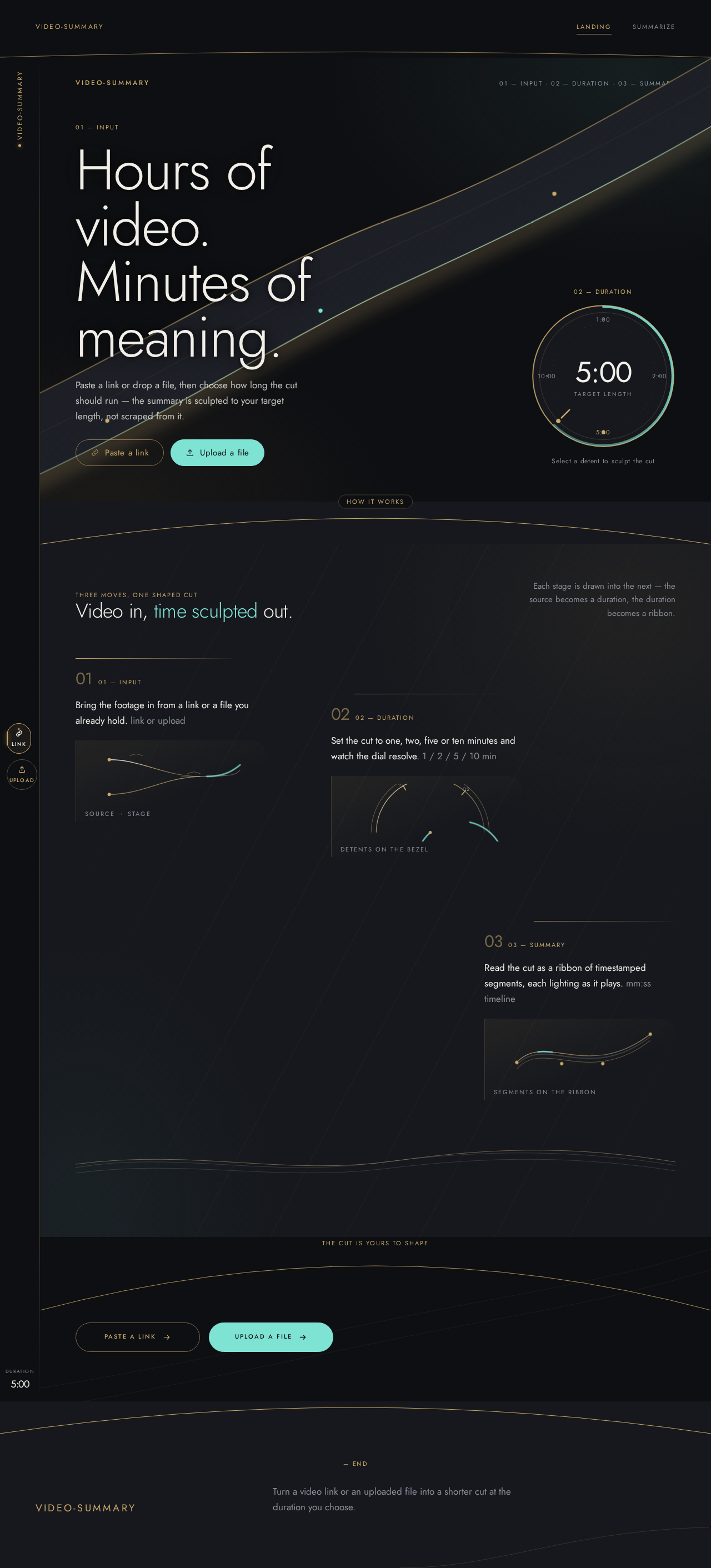
01 — Input
Hours of video.
Minutes of meaning.
Paste a link or drop a file, then choose how long the cut should run — the summary is sculpted to your target length, not scraped from it.
02 — Duration
Select a detent to sculpt the cut
three moves, one shaped cut
Video in, time sculpted out.
Each stage is drawn into the next — the source becomes a duration, the duration becomes a ribbon.
- 0101 — INPUT
Bring the footage in from a link or a file you already hold. link or upload
source → stage
- 0202 — DURATION
Set the cut to one, two, five or ten minutes and watch the dial resolve. 1 / 2 / 5 / 10 min
detents on the bezel
- 0303 — SUMMARY
Read the cut as a ribbon of timestamped segments, each lighting as it plays. mm:ss timeline
segments on the ribbon
01 — Input
Hours of video.
Minutes of meaning.
Paste a link or drop a file, then choose how long the cut should run — the summary is sculpted to your target length, not scraped from it.
02 — Duration
Select a detent to sculpt the cut
three moves, one shaped cut
Video in, time sculpted out.
Each stage is drawn into the next — the source becomes a duration, the duration becomes a ribbon.
- 0101 — INPUT
Bring the footage in from a link or a file you already hold. link or upload
source → stage
- 0202 — DURATION
Set the cut to one, two, five or ten minutes and watch the dial resolve. 1 / 2 / 5 / 10 min
detents on the bezel
- 0303 — SUMMARY
Read the cut as a ribbon of timestamped segments, each lighting as it plays. mm:ss timeline
segments on the ribbon
No comments yet. Be the first!