video-editor
 Atharva
Build a complete, production-ready web-based video editor called Video Editor. The application must be fully functional, clean, fast, responsive, and built using only free and open-source technologies. Do NOT use any paid APIs, paid SaaS services, subscriptions, or services requiring API keys. The application should work locally/self-hosted wherever possible. Core Workflow The user should be able to create a project by uploading: 1. A script file (.txt, .docx) or pasting the script. The script file can have any number of lines like 300+ or 500+ 2. One audio file (.mp3, .wav, etc.) containing the narration. The audio file can be 10+ min or 30+ min also. 3. A folder containing sequential images named `1.png`, `2.png`, `3.png` ... up to hundreds or thousands. Parse the script into individual lines. Each line corresponds to exactly one image. The application must automatically analyze the narration and synchronize the script with the audio using free/open-source speech-to-text and forced-alignment technology. Prefer local models such as Whisper/faster-whisper and other open-source alignment libraries. Do not use OpenAI API, ElevenLabs, Google Cloud, AWS, Azure, AssemblyAI, or any other paid API. Generate accurate start and end timestamps for every script line. Use word-level timestamps internally and calculate precise line-level timestamps from them. Verification Screen Before creating the video timeline, show a clean verification interface containing: * Line number * Script text * Start timestamp * End timestamp * Duration * Corresponding image thumbnail * Play button to preview that specific audio section Allow the user to manually edit timestamps if necessary. Highlight low-confidence/problematic alignments so the user can quickly review them. Only after the user clicks Continue should the application generate the editable timeline. Video Editor Create a professional but extremely simple timeline editor. Automatically place: * `1.png` according to line 1 timestamp * `2.png` according to line 2 timestamp * `3.png` according to line 3 timestamp * etc. Place the original narration audio on the audio track without changing it. The timeline must remain fully editable. The user should be able to: * Drag clips * Trim clips * Split clips * Delete clips * Replace images * Change image duration * Add images * Reorder clips * Add text * Add subtitles * Add multiple audio tracks * Adjust audio volume * Add simple transitions * Zoom/pan images * Undo/redo * Zoom the timeline * Move the playhead precisely * Preview the video smoothly Support at least 500+ images/clips efficiently using thumbnails, lazy loading, virtualization, and optimized preview rendering. UI/UX Keep the interface extremely clean, modern, minimal, and intuitive. Use a dark professional editor-style interface with: * Left: Media/assets/Properties/settings * Center: Video preview * Bottom: Timeline Avoid unnecessary buttons and clutter. Include keyboard shortcuts, autosave, project save/load, undo/redo, and clear error messages. Rendering and Export Use FFmpeg or another free/open-source local rendering solution. The final video must be exportable in high quality, including: * 1080p * 1440p * High-quality H.264 MP4 * Original/high-quality audio Show rendering progress and allow the user to download the finished MP4. Technical Requirements Use React + TypeScript for the frontend and a suitable open-source backend such as Python/FastAPI. Use only free/open-source libraries. Do not add mock functionality. Every visible button and feature should actually work. Design the application so processing can happen locally or on the user's own machine/server, avoiding recurring costs. Before finishing, thoroughly test uploading, script parsing, audio alignment, 500+ image handling, timeline editing, preview, autosave, rendering, and MP4 download. The final result should feel like a simple professional video editor specifically optimized for turning narrated scripts and sequential images into editable videos automatically.

Comments (0)
Sign in to leave a comment
System Requirements
System Requirements Document for video-editor
1. Introduction
The Video Editor is a web-based application designed to provide users with a professional-grade video editing experience using only free and open-source technologies. It allows users to create projects by uploading scripts, audio files, and sequential images, and then automatically synchronizes these elements to produce high-quality videos. The application is intended for users who require a clean, fast, and responsive editing tool that can be locally or self-hosted, avoiding any recurring costs or dependencies on paid services.
2. System Overview
The Video Editor application is a fully functional, production-ready web-based video editor. It is designed to be clean, fast, and responsive, using only free and open-source technologies. The application supports local and self-hosted operations, ensuring that users can work without relying on paid APIs or services. The core functionality includes project creation from scripts, audio synchronization, timeline editing, and high-quality video export.
2a. Product Interpretation and Delivery Boundary
The application is delivered as a web-based platform that users can host locally or on their own servers. It requires user authentication for project creation and editing, ensuring that projects can be saved and resumed across sessions. The application does not use any paid APIs or services, adhering strictly to open-source technologies for all functionalities, including speech-to-text and video rendering.
2b. Source Content Inventory
Not applicable as no content source directive was provided.
2c. Page Content and Component Coverage
Landing
- Information/State: Introduction to Video Editor, its features, and benefits.
- Primary Actions: Navigate to Sign Up or Login.
- Components: Overview of the editing workflow, benefits of local/self-hosted operation.
Sign Up
- Information/State: User registration form.
- Primary Actions: Create a new account.
- Components: Input fields for user details, submit button.
Login
- Information/State: User login form.
- Primary Actions: Access existing account.
- Components: Input fields for username and password, login button.
Projects
- Information/State: List of user projects, project status.
- Primary Actions: Load, resume, save, or delete projects.
- Components: Project thumbnails, status indicators, action buttons.
Project Setup
- Information/State: Upload interface for script, audio, and images.
- Primary Actions: Upload files, parse script.
- Components: File upload controls, parsing status.
Alignment Verification
- Information/State: Display of script lines, timestamps, and images.
- Primary Actions: Edit timestamps, highlight issues, continue to timeline.
- Components: Line editor, audio preview, issue indicators.
Editor
- Information/State: Timeline with synchronized media.
- Primary Actions: Edit timeline, add media, adjust settings.
- Components: Timeline editor, media library, preview window.
Export
- Information/State: Export settings and progress.
- Primary Actions: Render video, download MP4.
- Components: Export options, progress bar, download link.
3. Functional Requirements
-
As a Video Editor User, I should be able to create a project by uploading a script file, an audio file, and a folder of sequential images.
- Provenance: explicit
- Lifecycle: Initiate project setup, upload files, parse script into lines.
- Acceptance: Successful upload and parsing of files.
-
As a Video Editor User, I should be able to synchronize the script with the audio using open-source speech-to-text and forced-alignment technology.
- Provenance: explicit
- Lifecycle: Analyze audio, generate timestamps, align script lines.
- Acceptance: Accurate synchronization with timestamps.
-
As a Video Editor User, I should be able to verify and edit the alignment of script lines and audio before generating the timeline.
- Provenance: explicit
- Lifecycle: Review alignment, edit timestamps, highlight issues.
- Acceptance: User confirmation to proceed to timeline generation.
-
As a Video Editor User, I should be able to edit the video timeline with various media operations.
- Provenance: explicit
- Lifecycle: Drag, trim, split, delete, replace media, adjust settings.
- Acceptance: Successful application of edits and media operations.
-
As a Video Editor User, I should be able to export the final video in high-quality formats.
- Provenance: explicit
- Lifecycle: Configure export settings, render video, download MP4.
- Acceptance: High-quality video export in specified formats.
4. User Personas
Video Editor User
- Product Context: Engages with the Video Editor to create and edit video projects using scripts, audio, and images.
- Primary Goal: To efficiently produce high-quality videos from narrated scripts and sequential images.
- Distinct Responsibilities: Upload project files, verify and edit alignments, manipulate the timeline, and export the final video.
- Interactions: Interacts with the application to manage projects, edit timelines, and export videos.
- Observable Success: Successful creation and export of a video project with accurate synchronization and desired edits.
5. Core User Flows
-
Project Creation
- Start: User accesses the Project Setup page.
- Action: Uploads script, audio, and image files.
- Result: Files are parsed, and script lines are associated with images.
- Next Step: Proceed to Alignment Verification.
-
Alignment Verification
- Start: User reviews the Alignment Verification page.
- Action: Edits timestamps, reviews highlighted issues.
- Result: User confirms alignment.
- Next Step: Generate the editable timeline in the Editor.
-
Timeline Editing
- Start: User accesses the Editor page.
- Action: Edits the timeline by dragging, trimming, and adding media.
- Result: Timeline reflects user edits.
- Next Step: Proceed to Export.
-
Video Export
- Start: User accesses the Export page.
- Action: Configures export settings and initiates rendering.
- Result: Video is rendered and available for download.
- Next Step: Download the finished MP4.
6. Visuals Colors and Theme
- Muse: Gleb Kuznetsov
- Palette:
- Background: #000000
- Surface: #1A1A1A
- Text: #FFFFFF
- Primary: #00FFFF
- Accent: #FF00FF
- Muted: #444444
- Typography:
- Headings: Space Grotesk
- Body: Orbitron
- Scale: 1.414 modular
- Shape Language: Full-bleed 3D scenes, floating glass panels.
- Layout: Radial layouts with HUD-like displays.
- Imagery: Abstract 3D objects and particle fields.
7. Signature Design Concept
The public entry page features a full-bleed 3D scene with floating glass panels over a dark void. Electric cyan and magenta accents highlight active elements, creating a professional and immersive first impression. The radial layout organizes the workspace, enhancing user focus and interaction.
8. Interaction Model & Motion Direction
- Interaction Model: Animated
- Motion Tempo: Cinematic
- Hero Dimensionality: webgl
- Landing Hero Motion Brief:
- Focal Subject: Abstract 3D object with floating panels.
- Thesis: User interaction triggers slow orbit and light sweeps, enhancing depth perception.
- Motion Vocabulary: Continuous slow orbit, light sweeps.
- First Frame: Full-bleed 3D scene with initial data streams.
- Reduced-Motion State: Static view with minimal animation.
9. Non-Functional Requirements
- Performance: Application must efficiently handle 500+ images/clips.
- Scalability: Support for large scripts and long audio files.
- Usability: Intuitive interface with keyboard shortcuts and clear error messages.
- Reliability: Autosave and project recovery features.
- Security: Secure user authentication and data handling.
10. Tech Stack
- Frontend: React + TypeScript
- Backend: Python/FastAPI
- Rendering: FFmpeg
- Libraries: Only free/open-source libraries
11. Assumptions and Constraints
- Assumption: Users have access to a local or self-hosted server for running the application.
- Constraint: No use of paid APIs or services; all technologies must be open-source.
12. Glossary
- Timeline: The visual representation of the video project where media elements are arranged and edited.
- Rendering: The process of generating the final video output from the edited project.
- Alignment Verification: The process of ensuring that script lines and audio are correctly synchronized.
- HUD: Heads-Up Display, a transparent display that presents data without requiring users to look away from their usual viewpoints.
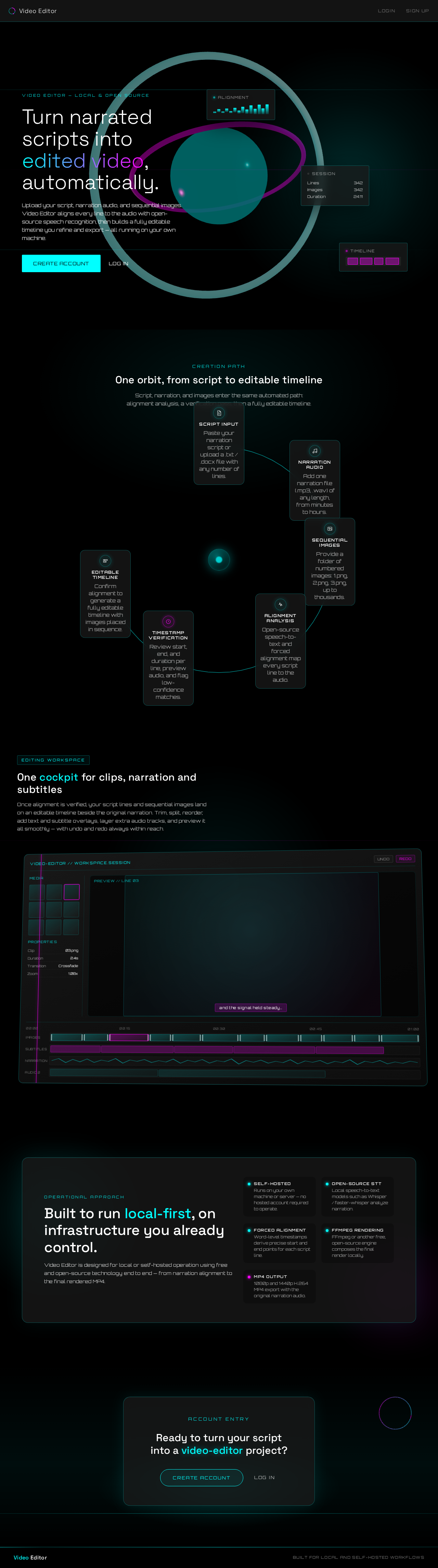
Turn narrated scripts into edited video, automatically.
Upload your script, narration audio, and sequential images. Video Editor aligns every line to the audio with open-source speech recognition, then builds a fully editable timeline you refine and export — all running on your own machine.
One orbit, from script to editable timeline
Script, narration, and images enter the same automated path: alignment analysis, a verification pass, then a fully editable timeline.
- 1Script InputPaste your narration script or upload a .txt / .docx file with any number of lines.
- 2Narration AudioAdd one narration file (.mp3, .wav) of any length, from minutes to hours.
- 3Sequential ImagesProvide a folder of numbered images: 1.png, 2.png, 3.png, up to thousands.
- 4Alignment AnalysisOpen-source speech-to-text and forced alignment map every script line to the audio.
- 5Timestamp VerificationReview start, end, and duration per line, preview audio, and flag low-confidence matches.
- 6Editable TimelineConfirm alignment to generate a fully editable timeline with images placed in sequence.
One cockpit for clips, narration and subtitles
Once alignment is verified, your script lines and sequential images land on an editable timeline beside the original narration. Trim, split, reorder, add text and subtitle overlays, layer extra audio tracks, and preview it all smoothly — with undo and redo always within reach.
Built to run local-first, on infrastructure you already control.
Video Editor is designed for local or self-hosted operation using free and open-source technology end to end — from narration alignment to the final rendered MP4.
Runs on your own machine or server — no hosted account required to operate.
Local speech-to-text models such as Whisper / faster-whisper analyze narration.
Word-level timestamps derive precise start and end points for each script line.
FFmpeg or another free, open-source engine composes the final render locally.
1080p and 1440p H.264 MP4 export with the original narration audio.
Turn narrated scripts into edited video, automatically.
Upload your script, narration audio, and sequential images. Video Editor aligns every line to the audio with open-source speech recognition, then builds a fully editable timeline you refine and export — all running on your own machine.
One orbit, from script to editable timeline
Script, narration, and images enter the same automated path: alignment analysis, a verification pass, then a fully editable timeline.
- 1Script InputPaste your narration script or upload a .txt / .docx file with any number of lines.
- 2Narration AudioAdd one narration file (.mp3, .wav) of any length, from minutes to hours.
- 3Sequential ImagesProvide a folder of numbered images: 1.png, 2.png, 3.png, up to thousands.
- 4Alignment AnalysisOpen-source speech-to-text and forced alignment map every script line to the audio.
- 5Timestamp VerificationReview start, end, and duration per line, preview audio, and flag low-confidence matches.
- 6Editable TimelineConfirm alignment to generate a fully editable timeline with images placed in sequence.
One cockpit for clips, narration and subtitles
Once alignment is verified, your script lines and sequential images land on an editable timeline beside the original narration. Trim, split, reorder, add text and subtitle overlays, layer extra audio tracks, and preview it all smoothly — with undo and redo always within reach.
Built to run local-first, on infrastructure you already control.
Video Editor is designed for local or self-hosted operation using free and open-source technology end to end — from narration alignment to the final rendered MP4.
Runs on your own machine or server — no hosted account required to operate.
Local speech-to-text models such as Whisper / faster-whisper analyze narration.
Word-level timestamps derive precise start and end points for each script line.
FFmpeg or another free, open-source engine composes the final render locally.
1080p and 1440p H.264 MP4 export with the original narration audio.
No comments yet. Be the first!