CAP 01ACTIVE
video-editor-portfolio
by Kartik Pawar
Kartik PawarCreate a premium, modern, highly professional 3D portfolio website for a freelance Video Editor. The website should feel like a high-end creative studio / premium editing agency website — NOT like a basic portfolio template. GOAL: The main goal is to impress potential clients within the first 5 seconds and convert visitors into video-editing clients. DESIGN STYLE: * Premium cinematic 3D aesthetic * Minimal but visually powerful * Dark black / charcoal background * White typography * Electric blue accent color (#014BAA) * Subtle glassmorphism * Soft gradients * 3D floating objects * Smooth cinematic animations * High-end creative-agency feel * Lots of whitespace * Professional typography * No unnecessary colorful elements * No cartoonish UI * No generic template appearance 3D HERO SECTION: Create a full-screen hero section with a large 3D floating video-editing workstation / monitor / timeline interface in the background. Add subtle 3D camera movement and parallax effects while scrolling. Hero headline: "I TURN RAW FOOTAGE INTO HIGH-RETENTION CONTENT." Subheadline: "Video Editor specializing in premium Reels, Shorts, YouTube videos, documentaries and business content." Primary CTA: "VIEW MY WORK" Secondary CTA: "LET'S WORK TOGETHER" Add a small availability badge: "AVAILABLE FOR SELECT PROJECTS" Include a professional 3D floating play button and timeline elements around the hero. ABOUT / INTRO SECTION: Create a clean section introducing the editor. Headline: "EDITING THAT MAKES PEOPLE STOP SCROLLING." Description: "I combine storytelling, motion graphics, sound design, typography and precise pacing to turn ordinary footage into engaging content." Show 4 floating 3D capability cards: • Short-Form Content • YouTube Editing • Motion Graphics • Documentary Editing WORK / PORTFOLIO SECTION: Create a premium interactive portfolio gallery. Display projects as large cinematic cards with: * Video thumbnail * Project title * Category * Short description * Hover animation * Play button * Smooth 3D tilt effect Categories: ALL REELS SHORTS YOUTUBE DOCUMENTARY BUSINESS When hovering over a project card: * Card slightly rotates in 3D * Thumbnail zooms subtly * Blue glow appears * Project information smoothly appears * Cursor changes to a custom "VIEW PROJECT" interaction Include placeholder projects such as: "AI — The $7 Trillion Race" Category: Documentary "Business Growth Reel" Category: Business "From 0 to 1M Views" Category: Social Media "Premium Product Campaign" Category: Advertisement "High-Retention Talking Head" Category: Short Form BEFORE / AFTER SECTION: Create an interactive before-vs-after video editing comparison. Left: "RAW FOOTAGE" Right: "FINAL EDIT" Add a draggable comparison slider. Show improvements such as: * Color grading * Captions * Motion graphics * Sound design * Transitions * Pacing SERVICES SECTION: Create premium 3D service cards. Services: 01 — Short-Form Editing High-retention Instagram Reels, YouTube Shorts and social content. 02 — YouTube Editing Professional long-form editing with storytelling, pacing and retention-focused structure. 03 — Documentary Editing Cinematic documentary-style editing with motion graphics, maps, typography and visual storytelling. 04 — Motion Graphics Clean modern animations, typography, UI animations and visual effects. 05 — Business Content Premium editing for founders, brands, agencies and businesses. Add subtle 3D hover animations to every service card. PROCESS SECTION: Create a horizontal animated workflow: 01 SEND FOOTAGE 02 EDIT & DESIGN 03 REVISION 04 FINAL DELIVERY Each step should animate into view while scrolling. CLIENT RESULTS SECTION: Create a premium statistics section with large animated numbers. Example: +100 VIDEOS EDITED +1M POTENTIAL VIEWS 24–72H FAST DELIVERY 100% FOCUS ON RETENTION Use animated counters. TESTIMONIAL SECTION: Create a cinematic testimonial carousel with 3D card transitions. Use placeholder testimonials rather than fake real clients. Example: "Clean editing, great pacing and very strong attention to detail." Add client name placeholders such as: "Client Name — Founder" ABOUT ME SECTION: Create a visually interesting personal section with a large portrait/video placeholder. Headline: "BEHIND THE EDITS." Description: "I'm a video editor focused on creating content that looks premium, feels intentional and keeps viewers watching." Add skill indicators: CAPCUT ALIGHT MOTION AFTER EFFECTS PREMIERE PRO MOTION GRAPHICS SOUND DESIGN COLOR GRADING Show these as animated skill pills. CONTACT SECTION: Create a dramatic final CTA. Headline: "HAVE A VIDEO IN MIND?" Subheadline: "Let's turn your idea into content people actually want to watch." Primary button: "START A PROJECT" Secondary button: "EMAIL ME" Add social links placeholders: Instagram YouTube LinkedIn Behance NAVIGATION: Sticky transparent navigation bar. Logo: "KARTIK" Navigation: WORK SERVICES ABOUT PROCESS CONTACT Add a small CTA button: "START A PROJECT" INTERACTIONS: Use premium micro-interactions throughout the website: * Smooth scrolling * Scroll-triggered animations * 3D card tilt * Parallax * Magnetic buttons * Cursor-following glow * Text reveal animations * Image zoom * Hover transitions * Smooth page transitions * Animated counters * 3D floating objects * Subtle particle effects Keep animations smooth and professional, not excessive. RESPONSIVE DESIGN: The website must be fully responsive. Desktop: Ultra-premium 3D experience. Tablet: Simplified 3D effects. Mobile: Fast, clean and optimized with reduced 3D complexity. TECHNICAL REQUIREMENTS: * Modern responsive UI * Fast loading * SEO-friendly structure * Accessible typography * Optimized images/videos * Lazy loading for portfolio videos * Smooth 60fps animations where possible * Avoid unnecessary heavy effects * Clean component structure * Professional spacing and alignment IMPORTANT: DO NOT make it look like a generic AI-generated portfolio. It should look like a website designed by a professional creative director for a premium freelance video editor. The visual hierarchy should immediately communicate: VIDEO EDITOR → PREMIUM EDITING → STRONG PORTFOLIO → CLIENT RESULTS → EASY CONTACT Make the final website feel similar to a premium creative agency / award-winning portfolio website while keeping it clean, modern and conversion-focused.


Comments (0)
Sign in to leave a comment
System Requirements
Page 1 of 22
System Requirements Document for video-editor-portfolio
1. Introduction
This document specifies the system requirements for video-editor-portfolio, a premium, modern, highly professional 3D portfolio website for a freelance Video Editor. The site represents the editor's brand identity "KARTIK" and is designed to feel like a high-end creative studio / premium editing agency website — explicitly not a basic portfolio template.
The primary product intent is twofold:
- Impress potential clients within the first 5 seconds of landing, through a cinematic, dark, 3D experience.
- Convert visitors into video-editing clients, by presenting a strong portfolio, clear service offerings, credible results, and easy contact paths.
The audience is prospective clients — founders, brands, agencies, and businesses — who evaluate the editor's craft in seconds and decide whether the editor fits their content needs. The visual hierarchy must immediately communicate: VIDEO EDITOR → PREMIUM EDITING → STRONG PORTFOLIO → CLIENT RESULTS → EASY CONTACT.
The site must feel similar to a premium creative agency / award-winning portfolio website while staying clean, modern, and conversion-focused. It must not look like a generic AI-generated portfolio; it should look like a website designed by a professional creative director for a premium freelance video editor.
Page 2 of 22
2. System Overview
The system is a fully responsive, single-editor portfolio website delivered as a set of first-party custom pages. It presents the editor's positioning, portfolio, before/after craft demonstration, services, process, results, testimonials, personal background, skills, and contact paths.
Actors:
- Prospective Client — an anonymous visitor evaluating the editor's work and deciding whether to initiate contact.
- Freelance Video Editor (Site Owner) — the editor the site represents, whose brand identity "KARTIK", services, process, results, testimonials, skills, and availability are communicated by the site.
Current delivery: A public, anonymous-access website with six first-party custom pages: Landing, Work, Services, About, Process, and Contact. All pages are publicly reachable without an account. Contact and social actions hand off to external destinations (email client and social platforms).
Accepted behavior: Cinematic 3D hero with a floating editing workstation; interactive portfolio gallery with category filters, 3D tilt, and custom cursor; draggable before/after comparison slider; premium 3D service cards; horizontal animated process workflow; animated statistics counters; cinematic testimonial carousel; personal About Me section with animated skill pills; dramatic contact CTA with social links; sticky transparent navigation; premium micro-interactions throughout; full responsive behavior with reduced 3D complexity on mobile.
Narrow exclusions: No account creation, login, or user authentication. No client dashboard or project management. No e-commerce or payment. No CMS or editor-facing admin interface. No fake real clients — testimonials and client names are placeholders. No unnecessary colorful elements, no cartoonish UI, no generic template appearance.
Page 3 of 22
2a. Product Interpretation and Delivery Boundary
The product is a public, anonymous, first-party portfolio website. Every page is reachable without identity establishment; there is no application-owned account, no login, and no protected state. This is consistent with the source: the site is a marketing and conversion surface for a freelance editor, and the accepted journeys (browse work, evaluate services, review process, initiate contact) require no durable actor-specific state to be privately owned or resumed.
Contact and social actions hand off to external destinations: the "EMAIL ME" and "START A PROJECT" actions open the visitor's email client or an external contact destination, and the social link placeholders (Instagram, YouTube, LinkedIn, Behance) navigate to external platforms. These are provider/external-owned destinations, not first-party pages.
Current vs. future: All specified behavior is current. No future-horizon requirements are stated in the authoritative source. Any capability not explicitly requested (e.g., a CMS, client portal, or analytics dashboard) is out of scope for this generation.
2b. Source Content Inventory
Not applicable — no reference directive with content_source authority was supplied.
2c. Page Content and Component Coverage
The page inventory is the closed, ordered page contract: Landing, Work, Services, About, Process, Contact. Each page is represented exactly once below.
Page 4 of 22
Landing
- Information/state: Full-screen cinematic hero presenting the editor's positioning. Hero headline "I TURN RAW FOOTAGE INTO HIGH-RETENTION CONTENT." Subheadline "Video Editor specializing in premium Reels, Shorts, YouTube videos, documentaries and business content." Availability badge "AVAILABLE FOR SELECT PROJECTS". About/intro section headline "EDITING THAT MAKES PEOPLE STOP SCROLLING." with description "I combine storytelling, motion graphics, sound design, typography and precise pacing to turn ordinary footage into engaging content." Four floating 3D capability cards: Short-Form Content, YouTube Editing, Motion Graphics, Documentary Editing.
- Primary actions: Primary CTA "VIEW MY WORK" (navigates to Work). Secondary CTA "LET'S WORK TOGETHER" (navigates to Contact). Availability badge is informational.
- Supporting actions: Sticky transparent navigation with logo "KARTIK", nav items WORK, SERVICES, ABOUT, PROCESS, CONTACT, and small CTA button "START A PROJECT". Smooth scrolling to sections.
- Domain entities: Hero scene (3D floating video-editing workstation / monitor / timeline interface), 3D floating play button, timeline elements, capability cards, availability badge.
- Component responsibilities: 3D hero scene with subtle 3D camera movement and parallax on scroll; floating play button and timeline elements; headline/subheadline/badge/CTA block; intro section with four capability cards; sticky transparent nav bar; cursor-following glow; text reveal animations; 3D floating objects; subtle particle effects.
- States:
- Loading: Hero 3D scene initializes; text and CTAs render immediately (text is not blocked by 3D load).
- Empty: Not applicable (static content).
- Success: Hero renders with 3D workstation, headline, subheadline, badge, and both CTAs visible; intro section and capability cards animate into view on scroll.
- Error/recovery: If 3D scene fails to initialize, the hero falls back to a static composed frame with headline, subheadline, badge, and CTAs fully readable and operable.
- Reduced motion: All motion stops under
prefers-reduced-motion; static frames and whole items remain.
Page 5 of 22
Work
- Information/state: Premium interactive portfolio gallery. Projects displayed as large cinematic cards with video thumbnail, project title, category, short description, hover animation, play button, and smooth 3D tilt effect. Category filters: ALL, REELS, SHORTS, YOUTUBE, DOCUMENTARY, BUSINESS. Placeholder projects: "AI — The $7 Trillion Race" (Documentary), "Business Growth Reel" (Business), "From 0 to 1M Views" (Social Media), "Premium Product Campaign" (Advertisement), "High-Retention Talking Head" (Short Form). Before/After section with left label "RAW FOOTAGE", right label "FINAL EDIT", draggable comparison slider, and improvements shown: color grading, captions, motion graphics, sound design, transitions, pacing.
- Primary actions: Filter projects by category. Hover a project card to trigger 3D rotation, thumbnail zoom, blue glow, project information reveal, and custom "VIEW PROJECT" cursor. Click play button to preview project video. Drag the before/after comparison slider to compare raw footage against the final edit.
- Supporting actions: Navigate via sticky nav; scroll-triggered animations; lazy loading for portfolio videos.
- Domain entities: Project cards (thumbnail, title, category, description, play button), category filter set, before/after comparison slider with improvement markers.
- Component responsibilities: Portfolio gallery grid with filter controls; project card with 3D tilt, hover reveal, blue glow, custom cursor; play button per card; before/after comparison component with draggable slider and labeled sides; lazy-loaded video elements.
- States:
- Loading: Portfolio videos lazy-load; thumbnails and card metadata render first.
- Empty: If a selected category has no projects, show an empty state message within the gallery area; filters remain operable.
- Success: Filtered projects display as cinematic cards; hover interactions and before/after slider operate smoothly.
- Error/recovery: If a video fails to load, the thumbnail and card metadata remain visible and the play button shows an unavailable state; the visitor can continue browsing other projects.
- Reduced motion: Tilt, zoom, and glow animations stop; cards show whole items with static hover states.
Page 6 of 22
Services
- Information/state: Premium 3D service cards presenting five services: 01 — Short-Form Editing (high-retention Instagram Reels, YouTube Shorts and social content); 02 — YouTube Editing (professional long-form editing with storytelling, pacing and retention-focused structure); 03 — Documentary Editing (cinematic documentary-style editing with motion graphics, maps, typography and visual storytelling); 04 — Motion Graphics (clean modern animations, typography, UI animations and visual effects); 05 — Business Content (premium editing for founders, brands, agencies and businesses). Client Results section with large animated counters: +100 VIDEOS EDITED, +1M POTENTIAL VIEWS, 24–72H FAST DELIVERY, 100% FOCUS ON RETENTION. Testimonial section with cinematic carousel and 3D card transitions using placeholder testimonials (e.g., "Clean editing, great pacing and very strong attention to detail.") and client name placeholders (e.g., "Client Name — Founder").
- Primary actions: Review service offerings. View animated statistics counters. Navigate testimonial carousel.
- Supporting actions: Hover service cards for subtle 3D hover animations. Navigate to Contact via nav CTA.
- Domain entities: Service cards (number, title, description), statistics counters, testimonial cards (quote, client name placeholder).
- Component responsibilities: Service card grid with 3D hover; animated counter component; testimonial carousel with 3D card transitions; scroll-triggered animations.
- States:
- Loading: Counters animate up over 1.6s with eased steps when scrolled into view.
- Empty: Not applicable (static content).
- Success: All five service cards render with hover animations; counters reach final values; testimonial carousel cycles through placeholder testimonials.
- Error/recovery: If counter animation fails, final values display statically.
- Reduced motion: Counters show final values immediately; carousel shows whole items without 3D transitions.
Page 7 of 22
About
- Information/state: Visually interesting personal section with a large portrait/video placeholder. Headline "BEHIND THE EDITS." Description "I'm a video editor focused on creating content that looks premium, feels intentional and keeps viewers watching." Animated skill pills: CAPCUT, ALIGHT MOTION, AFTER EFFECTS, PREMIERE PRO, MOTION GRAPHICS, SOUND DESIGN, COLOR GRADING.
- Primary actions: View the editor's personal presentation and skills.
- Supporting actions: Navigate via sticky nav; scroll-triggered animations.
- Domain entities: Portrait/video placeholder, headline, description, skill pills.
- Component responsibilities: Personal section layout with large portrait/video placeholder; animated skill pills; scroll-triggered animations.
- States:
- Loading: Portrait/video placeholder renders; skill pills animate in on scroll.
- Empty: Not applicable (static content).
- Success: Portrait/video placeholder, headline, description, and all seven skill pills display with animations.
- Error/recovery: If the portrait/video placeholder fails to load, the section layout and text remain intact.
- Reduced motion: Skill pills display statically without animation.
Page 8 of 22
Process
- Information/state: Horizontal animated workflow with four steps: 01 SEND FOOTAGE, 02 EDIT & DESIGN, 03 REVISION, 04 FINAL DELIVERY. Each step animates into view while scrolling.
- Primary actions: Review the four-step workflow.
- Supporting actions: Navigate via sticky nav; scroll-triggered animations.
- Domain entities: Process steps (number, label).
- Component responsibilities: Horizontal workflow rail with scroll-linked progress; step animation on scroll.
- States:
- Loading: Steps animate into view as the visitor scrolls.
- Empty: Not applicable (static content).
- Success: All four steps display in horizontal sequence with scroll-triggered animation.
- Error/recovery: If animation fails, all four steps display statically.
- Reduced motion: Steps display statically without scroll animation.
Page 9 of 22
Contact
- Information/state: Dramatic final CTA. Headline "HAVE A VIDEO IN MIND?" Subheadline "Let's turn your idea into content people actually want to watch." Primary button "START A PROJECT". Secondary button "EMAIL ME". Social link placeholders: Instagram, YouTube, LinkedIn, Behance.
- Primary actions: Click "START A PROJECT" to initiate a project inquiry. Click "EMAIL ME" to open the email client. Click social link placeholders to navigate to external social platforms.
- Supporting actions: Navigate via sticky nav.
- Domain entities: Headline, subheadline, primary button, secondary button, social link placeholders.
- Component responsibilities: Final CTA block; primary and secondary buttons; social link list; external destination handoff.
- States:
- Loading: Not applicable (static content).
- Empty: Not applicable (static content).
- Success: Headline, subheadline, both buttons, and all four social link placeholders display and are operable.
- Error/recovery: If an external destination is unavailable, the visitor can use the alternate contact path (email or social).
- Reduced motion: Static display.
Page 10 of 22
3. Functional Requirements
Each requirement is a distinct story point with provenance, lifecycle facts, and observable acceptance.
FR-01 — Premium 3D portfolio website (explicit) As a Freelance Video Editor (Site Owner), I should have a premium, modern, highly professional 3D portfolio website that feels like a high-end creative studio / premium editing agency website, not a basic portfolio template, so that my craft is presented at the level of my work.
- Trigger/input: Visitor loads the site.
- Observable result: The site presents a cinematic, dark, 3D experience consistent with the design style.
- Access state: Public, anonymous.
- Failure/recovery: If 3D elements fail, static fallbacks preserve content and readability.
- Continuation: Visitor proceeds to browse work, services, process, or contact.
FR-02 — First-5-seconds impression and conversion goal (explicit) As a Prospective Client, I should be impressed within the first 5 seconds and be able to convert into a video-editing client, so that I can quickly decide whether the editor fits my content needs.
- Trigger/input: Visitor lands on the Landing page.
- Observable result: Hero communicates VIDEO EDITOR → PREMIUM EDITING → STRONG PORTFOLIO → CLIENT RESULTS → EASY CONTACT hierarchy immediately.
- Access state: Public, anonymous.
- Failure/recovery: If the hero 3D scene is slow, text and CTAs render first so the impression is not blocked.
- Continuation: Visitor clicks "VIEW MY WORK" or "LET'S WORK TOGETHER".
FR-03 — Design style (explicit) As a Freelance Video Editor (Site Owner), I should have a design style that is premium cinematic 3D, minimal but visually powerful, with a dark black/charcoal background, white typography, electric blue accent color (#014BAA), subtle glassmorphism, soft gradients, 3D floating objects, smooth cinematic animations, a high-end creative-agency feel, lots of whitespace, and professional typography, with no unnecessary colorful elements, no cartoonish UI, and no generic template appearance.
- Trigger/input: Any page render.
- Observable result: All pages consistently apply the specified palette, surfaces, and tone.
- Access state: Public, anonymous.
- Failure/recovery: Not applicable (design constraint).
- Continuation: Consistent across all pages.
FR-04 — Full-screen 3D hero section (explicit) As a Prospective Client, I should see a full-screen hero section with a large 3D floating video-editing workstation / monitor / timeline interface in the background, with subtle 3D camera movement and parallax effects while scrolling, and a professional 3D floating play button and timeline elements around the hero, so that the editor's craft is immediately visible.
- Trigger/input: Visitor lands on Landing; visitor scrolls.
- Observable result: Hero renders the 3D workstation with camera movement and parallax; play button and timeline elements float around the hero.
- Access state: Public, anonymous.
- Failure/recovery: Static fallback frame preserves the composition if 3D fails.
- Continuation: Visitor reads headline and CTAs.
FR-05 — Hero headline (explicit) As a Prospective Client, I should see the headline "I TURN RAW FOOTAGE INTO HIGH-RETENTION CONTENT." so that the editor's value proposition is immediately clear.
- Trigger/input: Landing page render.
- Observable result: Headline displays exactly as specified.
- Access state: Public, anonymous.
- Failure/recovery: Text renders independently of 3D scene.
- Continuation: Visitor reads subheadline and CTAs.
FR-06 — Hero subheadline (explicit) As a Prospective Client, I should see the subheadline "Video Editor specializing in premium Reels, Shorts, YouTube videos, documentaries and business content." so that the editor's specialization is clear.
- Trigger/input: Landing page render.
- Observable result: Subheadline displays exactly as specified.
- Access state: Public, anonymous.
- Failure/recovery: Text renders independently of 3D scene.
- Continuation: Visitor reads CTAs.
FR-07 — Hero CTAs (explicit) As a Prospective Client, I should see a primary CTA "VIEW MY WORK" and a secondary CTA "LET'S WORK TOGETHER" so that I can navigate to the portfolio or contact the editor.
- Trigger/input: Visitor clicks a CTA.
- Observable result: "VIEW MY WORK" navigates to Work; "LET'S WORK TOGETHER" navigates to Contact.
- Access state: Public, anonymous.
- Failure/recovery: If navigation fails, the visitor can use the sticky nav.
- Continuation: Visitor browses work or initiates contact.
FR-08 — Availability badge (explicit) As a Prospective Client, I should see a small availability badge "AVAILABLE FOR SELECT PROJECTS" so that I know the editor is accepting work.
- Trigger/input: Landing page render.
- Observable result: Badge displays exactly as specified.
- Access state: Public, anonymous.
- Failure/recovery: Text renders independently of 3D scene.
- Continuation: Visitor proceeds to CTAs.
FR-09 — About/intro section (explicit) As a Prospective Client, I should see a clean intro section with headline "EDITING THAT MAKES PEOPLE STOP SCROLLING." and description "I combine storytelling, motion graphics, sound design, typography and precise pacing to turn ordinary footage into engaging content." so that I understand the editor's approach.
- Trigger/input: Visitor scrolls to the intro section.
- Observable result: Headline and description display exactly as specified.
- Access state: Public, anonymous.
- Failure/recovery: Text renders independently of animations.
- Continuation: Visitor views capability cards.
FR-10 — Four floating 3D capability cards (explicit) As a Prospective Client, I should see 4 floating 3D capability cards: Short-Form Content, YouTube Editing, Motion Graphics, Documentary Editing, so that I can quickly grasp the editor's core capabilities.
- Trigger/input: Visitor scrolls to the intro section.
- Observable result: Four capability cards display with floating 3D treatment.
- Access state: Public, anonymous.
- Failure/recovery: Cards display statically if 3D fails.
- Continuation: Visitor proceeds to Work.
FR-11 — Premium interactive portfolio gallery (explicit) As a Prospective Client, I should see a premium interactive portfolio gallery displaying projects as large cinematic cards with video thumbnail, project title, category, short description, hover animation, play button, and smooth 3D tilt effect, so that I can evaluate the editor's work.
- Trigger/input: Visitor navigates to Work.
- Observable result: Project cards display with all specified elements and interactions.
- Access state: Public, anonymous.
- Failure/recovery: If a video fails, thumbnail and metadata remain visible.
- Continuation: Visitor filters, hovers, or plays a project.
FR-12 — Portfolio category filters (explicit) As a Prospective Client, I should be able to filter projects by categories ALL, REELS, SHORTS, YOUTUBE, DOCUMENTARY, BUSINESS so that I can find relevant work.
- Trigger/input: Visitor selects a category filter.
- Observable result: Gallery filters to show matching projects.
- Access state: Public, anonymous.
- Failure/recovery: If a category has no projects, an empty state message displays; filters remain operable.
- Continuation: Visitor selects another category or browses all.
FR-13 — Project card hover behavior (explicit) As a Prospective Client, when hovering over a project card, the card should slightly rotate in 3D, the thumbnail should zoom subtly, a blue glow should appear, project information should smoothly appear, and the cursor should change to a custom "VIEW PROJECT" interaction, so that the gallery feels premium and interactive.
- Trigger/input: Visitor hovers a project card.
- Observable result: All specified hover effects occur.
- Access state: Public, anonymous.
- Failure/recovery: Static hover state if animations fail.
- Continuation: Visitor clicks the play button or moves to another card.
FR-14 — Placeholder projects (explicit) As a Prospective Client, I should see placeholder projects: "AI — The $7 Trillion Race" (Documentary), "Business Growth Reel" (Business), "From 0 to 1M Views" (Social Media), "Premium Product Campaign" (Advertisement), "High-Retention Talking Head" (Short Form), so that the gallery is populated with representative work.
- Trigger/input: Work page render.
- Observable result: All five placeholder projects display with their specified titles and categories.
- Access state: Public, anonymous.
- Failure/recovery: Not applicable (static content).
- Continuation: Visitor filters or hovers projects.
FR-15 — Before/After comparison section (explicit) As a Prospective Client, I should see an interactive before-vs-after video editing comparison with left label "RAW FOOTAGE", right label "FINAL EDIT", a draggable comparison slider, and improvements shown such as color grading, captions, motion graphics, sound design, transitions, and pacing, so that I can see the editor's craft.
- Trigger/input: Visitor navigates to the Before/After section and drags the slider.
- Observable result: The comparison slider reveals raw footage on the left and final edit on the right; improvements are shown.
- Access state: Public, anonymous.
- Failure/recovery: If the slider fails, both sides display statically with labels.
- Continuation: Visitor proceeds to Services or Contact.
FR-16 — Premium 3D service cards (explicit) As a Prospective Client, I should see premium 3D service cards for: 01 — Short-Form Editing (high-retention Instagram Reels, YouTube Shorts and social content); 02 — YouTube Editing (professional long-form editing with storytelling, pacing and retention-focused structure); 03 — Documentary Editing (cinematic documentary-style editing with motion graphics, maps, typography and visual storytelling); 04 — Motion Graphics (clean modern animations, typography, UI animations and visual effects); 05 — Business Content (premium editing for founders, brands, agencies and businesses), with subtle 3D hover animations on every service card, so that I can evaluate the editor's offerings.
- Trigger/input: Visitor navigates to Services; visitor hovers a service card.
- Observable result: All five service cards display with specified numbers, titles, and descriptions; hover triggers subtle 3D animation.
- Access state: Public, anonymous.
- Failure/recovery: Cards display statically if 3D fails.
- Continuation: Visitor proceeds to Process or Contact.
FR-17 — Horizontal animated process workflow (explicit) As a Prospective Client, I should see a horizontal animated workflow with steps 01 SEND FOOTAGE, 02 EDIT & DESIGN, 03 REVISION, 04 FINAL DELIVERY, each animating into view while scrolling, so that I understand the collaboration process.
- Trigger/input: Visitor scrolls through the Process section.
- Observable result: All four steps animate into view in horizontal sequence.
- Access state: Public, anonymous.
- Failure/recovery: Steps display statically if animation fails.
- Continuation: Visitor proceeds to Contact.
FR-18 — Client Results statistics section (explicit) As a Prospective Client, I should see a premium statistics section with large animated counters: +100 VIDEOS EDITED, +1M POTENTIAL VIEWS, 24–72H FAST DELIVERY, 100% FOCUS ON RETENTION, so that I can gauge the editor's track record.
- Trigger/input: Visitor scrolls to the statistics section.
- Observable result: Counters animate up to their final values.
- Access state: Public, anonymous.
- Failure/recovery: Final values display statically if animation fails.
- Continuation: Visitor proceeds to testimonials or Contact.
FR-19 — Testimonial carousel (explicit) As a Prospective Client, I should see a cinematic testimonial carousel with 3D card transitions using placeholder testimonials (e.g., "Clean editing, great pacing and very strong attention to detail.") and client name placeholders (e.g., "Client Name — Founder"), so that I can see social proof without fake real clients.
- Trigger/input: Visitor navigates to the testimonial section.
- Observable result: Carousel cycles through placeholder testimonials with 3D card transitions.
- Access state: Public, anonymous.
- Failure/recovery: Testimonials display statically if animation fails.
- Continuation: Visitor proceeds to Contact.
FR-20 — About Me section (explicit) As a Prospective Client, I should see a visually interesting personal section with a large portrait/video placeholder, headline "BEHIND THE EDITS.", description "I'm a video editor focused on creating content that looks premium, feels intentional and keeps viewers watching.", and animated skill pills: CAPCUT, ALIGHT MOTION, AFTER EFFECTS, PREMIERE PRO, MOTION GRAPHICS, SOUND DESIGN, COLOR GRADING, so that I can understand the editor's background and skills.
- Trigger/input: Visitor navigates to About.
- Observable result: Portrait/video placeholder, headline, description, and all seven skill pills display with animations.
- Access state: Public, anonymous.
- Failure/recovery: Text and pills display statically if animations fail.
- Continuation: Visitor proceeds to Contact.
FR-21 — Contact section (explicit) As a Prospective Client, I should see a dramatic final CTA with headline "HAVE A VIDEO IN MIND?", subheadline "Let's turn your idea into content people actually want to watch.", primary button "START A PROJECT", secondary button "EMAIL ME", and social link placeholders for Instagram, YouTube, LinkedIn, and Behance, so that I can initiate contact.
- Trigger/input: Visitor navigates to Contact; visitor clicks a button or social link.
- Observable result: "START A PROJECT" initiates a project inquiry; "EMAIL ME" opens the email client; social links navigate to external platforms.
- Access state: Public, anonymous.
- Failure/recovery: If one contact path is unavailable, the visitor can use an alternate path.
- Continuation: Visitor completes contact or returns to browse.
FR-22 — Sticky transparent navigation (explicit) As a Prospective Client, I should see a sticky transparent navigation bar with logo "KARTIK", navigation items WORK, SERVICES, ABOUT, PROCESS, CONTACT, and a small CTA button "START A PROJECT", so that I can navigate the site at any time.
- Trigger/input: Visitor scrolls or clicks a nav item.
- Observable result: Nav remains sticky and transparent; clicking a nav item navigates to the corresponding page; "START A PROJECT" navigates to Contact.
- Access state: Public, anonymous.
- Failure/recovery: If sticky behavior fails, nav remains accessible at the top.
- Continuation: Visitor navigates to any page.
FR-23 — Premium micro-interactions (explicit) As a Prospective Client, I should experience premium micro-interactions throughout the website: smooth scrolling, scroll-triggered animations, 3D card tilt, parallax, magnetic buttons, cursor-following glow, text reveal animations, image zoom, hover transitions, smooth page transitions, animated counters, 3D floating objects, and subtle particle effects, kept smooth and professional, not excessive, so that the site feels premium and cinematic.
- Trigger/input: Visitor scrolls, hovers, or navigates.
- Observable result: Specified micro-interactions occur smoothly and professionally.
- Access state: Public, anonymous.
- Failure/recovery: Interactions degrade gracefully to static states.
- Continuation: Visitor continues browsing.
FR-24 — Fully responsive design (explicit) As a Prospective Client, I should experience a fully responsive website: desktop ultra-premium 3D experience; tablet simplified 3D effects; mobile fast, clean and optimized with reduced 3D complexity, so that the site works well on my device.
- Trigger/input: Visitor loads the site on any device.
- Observable result: Layout and 3D complexity adapt per device tier.
- Access state: Public, anonymous.
- Failure/recovery: If 3D is reduced or unavailable, content remains fully readable and operable.
- Continuation: Visitor browses normally.
FR-25 — Technical requirements (explicit) As a Freelance Video Editor (Site Owner), I should have a site with modern responsive UI, fast loading, SEO-friendly structure, accessible typography, optimized images/videos, lazy loading for portfolio videos, smooth 60fps animations where possible, avoidance of unnecessary heavy effects, clean component structure, and professional spacing and alignment.
- Trigger/input: Site load and interaction.
- Observable result: Site meets specified technical criteria.
- Access state: Public, anonymous.
- Failure/recovery: Performance degrades gracefully without breaking content.
- Continuation: Consistent across all pages.
FR-26 — Visual hierarchy (explicit) As a Prospective Client, I should immediately perceive the hierarchy VIDEO EDITOR → PREMIUM EDITING → STRONG PORTFOLIO → CLIENT RESULTS → EASY CONTACT, so that I understand the editor's value and how to engage.
- Trigger/input: Visitor lands and scrolls.
- Observable result: Hierarchy is communicated through layout, typography, and section order.
- Access state: Public, anonymous.
- Failure/recovery: Not applicable (design constraint).
- Continuation: Visitor proceeds to contact.
FR-27 — Public anonymous access (required_inference) As a Prospective Client, I should be able to access the portfolio and its section navigation publicly and anonymously, so that I can evaluate the editor's work without creating an account.
- Trigger/input: Visitor navigates to any page.
- Observable result: All pages are reachable without identity establishment.
- Access state: Public, anonymous.
- Failure/recovery: If a page fails to load, the visitor can navigate via the sticky nav.
- Continuation: Visitor browses freely.
FR-28 — Portfolio media and content availability (required_inference) As a Prospective Client, I should see portfolio media, placeholder projects, testimonials, results, and service presentation, so that the site is populated and credible.
- Trigger/input: Page render.
- Observable result: All specified content displays.
- Access state: Public, anonymous.
- Failure/recovery: Missing media degrades to placeholders without breaking layout.
- Continuation: Visitor continues browsing.
FR-29 — External contact and social destinations (required_inference) As a Prospective Client, I should be able to use the contact and social-link actions, which hand off to external email and social destinations, so that I can initiate contact or follow the editor.
- Trigger/input: Visitor clicks "START A PROJECT", "EMAIL ME", or a social link.
- Observable result: The external destination opens.
- Access state: Public, anonymous.
- Failure/recovery: If one destination is unavailable, alternate contact paths remain available.
- Continuation: Visitor completes contact or returns to the site.
Page 11 of 22
4. User Personas
Prospective Client
Product context: A founder, brand, agency, or business visitor evaluating the freelance video editor's work within the first seconds of landing. They judge craft quickly and decide whether the editor fits their content needs.
Primary goal: Decide whether the editor fits their content needs and initiate contact.
Distinct accepted responsibilities:
- Browse the portfolio gallery and filter projects by category (ALL, REELS, SHORTS, YOUTUBE, DOCUMENTARY, BUSINESS).
- Hover and open project cards to preview work.
- Compare raw footage against the final edit using the before/after slider.
- Review services, process, results statistics, testimonials, and skills.
- Convert by starting a project or emailing the editor.
Relevant inputs or decisions:
- Which projects are relevant to their content needs.
- Whether the editor's services and process match their requirements.
- Whether the editor's results and testimonials are credible.
- Which contact path to use (start a project, email, or social).
Interactions with other accepted participants:
- The Prospective Client interacts with the site's content and contact paths; the Freelance Video Editor (Site Owner) is the recipient of the contact initiated by the Prospective Client.
Observable success: The Prospective Client decides the editor fits their content needs and initiates contact via "START A PROJECT", "EMAIL ME", or a social link.
Page 12 of 22
Freelance Video Editor (Site Owner)
Product context: The editor the site represents, presenting a premium 3D portfolio to attract and convert video-editing clients. The site communicates their services (short-form, YouTube, documentary, motion graphics, business content), process, results, testimonials, skills, and contact options, with the editor's brand identity "KARTIK" and availability status shown.
Primary goal: Generate inbound client inquiries through the portfolio.
Distinct accepted responsibilities:
- Present a premium, modern, highly professional 3D portfolio that feels like a high-end creative studio / premium editing agency website.
- Communicate services, process, results, testimonials, skills, and availability.
- Provide clear contact paths for prospective clients.
Relevant inputs or decisions:
- Which projects, services, and testimonials to present.
- Availability status ("AVAILABLE FOR SELECT PROJECTS").
- Contact and social destinations.
Interactions with other accepted participants:
- The Freelance Video Editor (Site Owner) is the recipient of contact initiated by the Prospective Client.
Observable success: Inbound client inquiries generated by the portfolio.
5. Core User Flows
Page 13 of 22
Flow 1 — Prospective Client lands and forms a first impression
- Starting context: The Prospective Client opens the site on any device.
- Action: The Landing page renders with the full-screen 3D hero, including the floating video-editing workstation, play button, and timeline elements.
- Observable result: The hero headline "I TURN RAW FOOTAGE INTO HIGH-RETENTION CONTENT." and subheadline "Video Editor specializing in premium Reels, Shorts, YouTube videos, documentaries and business content." display, along with the availability badge "AVAILABLE FOR SELECT PROJECTS" and both CTAs.
- Decision: The Prospective Client decides whether to view work or contact the editor.
- Next step: The Prospective Client clicks "VIEW MY WORK" (→ Flow 2) or "LET'S WORK TOGETHER" (→ Flow 6).
Flow 2 — Prospective Client browses and filters the portfolio
- Starting context: The Prospective Client is on the Work page.
- Action: The Prospective Client selects a category filter (ALL, REELS, SHORTS, YOUTUBE, DOCUMENTARY, BUSINESS).
- Observable result: The gallery filters to show matching projects, including placeholder projects "AI — The $7 Trillion Race" (Documentary), "Business Growth Reel" (Business), "From 0 to 1M Views" (Social Media), "Premium Product Campaign" (Advertisement), and "High-Retention Talking Head" (Short Form).
- Action: The Prospective Client hovers a project card.
- Observable result: The card slightly rotates in 3D, the thumbnail zooms subtly, a blue glow appears, project information smoothly appears, and the cursor changes to a custom "VIEW PROJECT" interaction.
- Decision: The Prospective Client decides whether to preview the project.
- Next step: The Prospective Client clicks the play button to preview the project video, or continues browsing.
Flow 3 — Prospective Client compares raw footage against the final edit
- Starting context: The Prospective Client is on the Work page, at the Before/After section.
- Action: The Prospective Client drags the comparison slider.
- Observable result: The slider reveals "RAW FOOTAGE" on the left and "FINAL EDIT" on the right; improvements such as color grading, captions, motion graphics, sound design, transitions, and pacing are shown.
- Decision: The Prospective Client assesses the editor's craft.
- Next step: The Prospective Client proceeds to Services or Contact.
Page 14 of 22
Flow 4 — Prospective Client evaluates services, results, and testimonials
- Starting context: The Prospective Client is on the Services page.
- Action: The Prospective Client reviews the five service cards: 01 — Short-Form Editing, 02 — YouTube Editing, 03 — Documentary Editing, 04 — Motion Graphics, 05 — Business Content.
- Observable result: All five service cards display with their specified descriptions; hovering triggers subtle 3D hover animations.
- Action: The Prospective Client scrolls to the Client Results section.
- Observable result: Animated counters display +100 VIDEOS EDITED, +1M POTENTIAL VIEWS, 24–72H FAST DELIVERY, 100% FOCUS ON RETENTION.
- Action: The Prospective Client navigates the testimonial carousel.
- Observable result: Placeholder testimonials (e.g., "Clean editing, great pacing and very strong attention to detail.") and client name placeholders (e.g., "Client Name — Founder") display with 3D card transitions.
- Decision: The Prospective Client assesses whether the editor's services and results match their needs.
- Next step: The Prospective Client proceeds to Process or Contact.
Flow 5 — Prospective Client reviews the process and the editor's background
- Starting context: The Prospective Client is on the Process page.
- Action: The Prospective Client scrolls through the horizontal animated workflow.
- Observable result: Steps 01 SEND FOOTAGE, 02 EDIT & DESIGN, 03 REVISION, 04 FINAL DELIVERY animate into view.
- Action: The Prospective Client navigates to the About page.
- Observable result: The personal section displays the large portrait/video placeholder, headline "BEHIND THE EDITS.", description "I'm a video editor focused on creating content that looks premium, feels intentional and keeps viewers watching.", and animated skill pills: CAPCUT, ALIGHT MOTION, AFTER EFFECTS, PREMIERE PRO, MOTION GRAPHICS, SOUND DESIGN, COLOR GRADING.
- Decision: The Prospective Client assesses the editor's background and skills.
- Next step: The Prospective Client proceeds to Contact.
Page 15 of 22
Flow 6 — Prospective Client initiates contact
- Starting context: The Prospective Client is on the Contact page.
- Action: The Prospective Client reads the headline "HAVE A VIDEO IN MIND?" and subheadline "Let's turn your idea into content people actually want to watch."
- Decision: The Prospective Client chooses a contact path.
- Action: The Prospective Client clicks "START A PROJECT" to initiate a project inquiry, or "EMAIL ME" to open the email client, or a social link placeholder (Instagram, YouTube, LinkedIn, Behance) to navigate to an external platform.
- Observable result: The chosen external destination opens.
- Failure/recovery: If one contact path is unavailable, the Prospective Client can use an alternate path.
- Continuation: The Prospective Client completes contact or returns to browse the site.
Flow 7 — Freelance Video Editor (Site Owner) receives inbound inquiries
- Starting context: The Freelance Video Editor (Site Owner) has published the portfolio site.
- Action: The editor's site presents the premium 3D portfolio, services, process, results, testimonials, skills, and contact paths.
- Observable result: Prospective Clients browse the site and initiate contact via "START A PROJECT", "EMAIL ME", or social links.
- Decision: The editor reviews inbound inquiries.
- Next step: The editor responds to the Prospective Client outside the site (via email or social platform).
Page 16 of 22
6. Visuals Colors and Theme
Muse and headline: Gleb Kuznetsov — a glowing editing suite floating in a black void.
The creative direction is authoritative for this section. It translates the brief's premium cinematic 3D aesthetic into concrete tokens.
Palette (dark mode):
| Role | Token | Usage |
|---|---|---|
| Background | #07080C | Near-black ground; carries ~70% of the page |
| Surface | #101319 | Glass panels with 1px rgba(255,255,255,0.08) edges and backdrop-blur |
| Text | #F2F5FA | Body copy at 16–18px on #07080C (contrast >15:1) |
| Primary | #014BAA | Deep instrument blue for large fills, timeline blocks, primary CTA |
| Accent | #3E8BFF | Luminous sibling for thin strokes, glow rims, active states, 1px rules — never text-on-white |
| Muted | #8A93A6 | Labels at 12–13px uppercase with 0.14em tracking — never paragraphs |
No third hue beyond blue. No gradient blobs — only radial glow falloff and a faint 2% film grain.
Typography:
- Headings: Space Grotesk 500/600, uppercase, tracking -0.02em for display and 0.02em for stacked lines, leading 0.92 on the hero.
- Micro-labels: Space Grotesk 500 uppercase at 11–12px with 0.18em tracking.
- Monospace voice: IBM Plex Mono 400 for timecodes, project numbers, and counters (the HUD layer).
- Body: Sora 300/400 at 17px/1.65, max 62ch measure.
- Scale: 1.333 modular — 16 / 21 / 28 / 38 / 50 / 67 / 90. Display sizes as clamp: hero 44px mobile → 104px desktop; section heads 32px → 64px; card titles 20px → 26px; counters 56px → 132px.
Shape language: Glass slabs with 20px radii and hairline luminous edges, floating at different Z depths. Thin 1px strokes and 8px-tick timeline rulers as ornament. Capsule badges and pill CTAs. Circular play button with a 2px ring and a sweeping arc. Hard-edged 2px corner ticks on data panels. No organic blobs, no soft toy curves — geometry is machined.
Layout: Full-bleed dark stage with a centred content column (max 1280px, 24px gutters mobile / 64px desktop). Hero is a layered 3D scene: workstation monitor as the dominant plane, timeline strip running edge-to-edge beneath it, floating play button and waveform slabs at varying depth. Sections alternate between single-column focus (intro, before/after, contact) and asymmetric editorial grids (portfolio 2-up, services 5-row ledger with hairline rules and monospace numbering). Process is a horizontal 4-step rail with a scroll-linked progress line. Generous 160–200px vertical whitespace between sections on desktop, 88px on mobile.
Imagery style: One crafted real-time 3D subject — a dark editing workstation (monitor with a scrubbable-looking timeline, waveform, colour-grading wheels, floating clip slabs, luminous play button) rendered in Three.js with a single key light and blue rim light. Supporting imagery is macro and abstract: film grain plates, waveform close-ups, monochrome stills from the projects treated with a blue duotone. No stock people, no clip art, no cartoon illustration.
Readable text and controls stay whole at every viewport (375px, 768px, 1280px), wrapping or scaling to fit; imagery, decoration, and motion may be cropped, bled, rotated, or overlapped as the direction asks, as long as they cover no readable text or control.
Page 17 of 22
7. Signature Design Concept
Hero as a real 3D editing workstation.
The public entry (Landing) is composed as an asymmetric instrument panel, not a SaaS hero. A full-viewport black stage holds a Three.js editing workstation floating centre-right at 60% viewport width, tilted 12° toward the viewer, its screen the only bright plane in the frame. A timeline strip runs full-bleed along the bottom edge at 15% height with blue clip blocks, and a 96px circular play button hovers mid-left with a slow rotating arc.
The headline "I TURN RAW FOOTAGE / INTO HIGH-RETENTION CONTENT." sits flush-left in two stacked uppercase lines, 44px mobile → 104px desktop, occupying the left 7 of 12 columns and overlapping the workstation's left edge so type reads in front of the scene. Above it, a capsule badge "AVAILABLE FOR SELECT PROJECTS" with a pulsing 6px blue dot; beneath it, the subheadline at 18px in muted white, then the two CTAs side by side (solid #014BAA "VIEW MY WORK", ghost "LET'S WORK TOGETHER"). The cursor drives a soft radial blue glow that tracks across the whole stage.
This concept recomposes only accepted content, states, and controls — it introduces no new behavior, page, or destination.
8. Interaction Model & Motion Direction
Interaction Model: Animated Motion Tempo: cinematic Hero Dimensionality: webgl
Page 18 of 22
Landing Hero Motion Brief
- Focal subject: The 3D editing workstation — a dark monitor with a live-looking timeline and waveform, floating clip slabs, and a luminous play button, rendered in Three.js with a single key light and blue rim light.
- Input → transformation → outcome thesis: As the visitor scrolls, the camera dollies through the layered scene (parallax layers at 0.2x / 0.5x / 0.9x), the workstation's glass catches a continuous 24s light sweep, and a drifting particle field moves at low opacity — transforming a static hero into a cinematic screening-room moment that communicates the editor's craft.
- Motion vocabulary: Scroll-linked camera dolly; 24s light sweep across the workstation glass; drifting particle field at low opacity; 600–900ms cubic-bezier(0.22,1,0.36,1) entrances; counters tick up over 1.6s with eased steps; card hover is 3D tilt via CSS perspective (max 6°) plus a 300ms blue rim glow.
- Composed first frame: Full-viewport black stage; workstation floating centre-right at 60% width, tilted 12°; timeline strip full-bleed along the bottom edge at 15% height with blue clip blocks; 96px circular play button hovering mid-left with a slow rotating arc; headline flush-left in two stacked uppercase lines overlapping the workstation's left edge; capsule badge above; subheadline and two CTAs beneath.
- Reduced-motion state: All motion stops under
prefers-reduced-motion, leaving static frames and whole items. The hero shows the composed first frame without camera dolly, light sweep, or particle drift.
Landing Hero 3D Scene Brief — DIRECTION-DERIVED
The direction's hero dimensionality is webgl, so a real-time 3D hero subject is expected. One crafted real-time object: a dark editing workstation — a monitor with a scrubbable-looking timeline, waveform, colour-grading wheels, floating clip slabs, and a luminous play button — rendered in Three.js with a single key light and blue rim light. The scene shows the product's defining state: the editor's craft as the hero image. Scroll-linked camera dolly and a 24s light sweep across the glass provide depth; a drifting particle field at low opacity adds atmosphere. Under prefers-reduced-motion, the scene renders as a static composed frame.
Page 19 of 22
9. Non-Functional Requirements
NFR-01 — Responsive design (explicit) The website must be fully responsive. Desktop: ultra-premium 3D experience. Tablet: simplified 3D effects. Mobile: fast, clean and optimized with reduced 3D complexity.
- Rationale: Explicit user requirement; ensures the site works well across devices.
NFR-02 — Fast loading (explicit) The website must load fast.
- Rationale: Explicit user requirement; supports the first-5-seconds impression goal.
NFR-03 — SEO-friendly structure (explicit) The website must have an SEO-friendly structure.
- Rationale: Explicit user requirement; supports discoverability.
NFR-04 — Accessible typography (explicit) The website must use accessible typography.
- Rationale: Explicit user requirement; ensures readability.
NFR-05 — Optimized images/videos (explicit) Images and videos must be optimized.
- Rationale: Explicit user requirement; supports fast loading and smooth performance.
NFR-06 — Lazy loading for portfolio videos (explicit) Portfolio videos must use lazy loading.
- Rationale: Explicit user requirement; reduces initial load and supports smooth performance.
NFR-07 — Smooth 60fps animations where possible (explicit) Animations should run at a smooth 60fps where possible.
- Rationale: Explicit user requirement; supports the premium cinematic feel.
NFR-08 — Avoid unnecessary heavy effects (explicit) Unnecessary heavy effects must be avoided.
- Rationale: Explicit user requirement; supports performance and the "not excessive" animation constraint.
NFR-09 — Clean component structure (explicit) The site must have a clean component structure.
- Rationale: Explicit user requirement; supports maintainability.
NFR-10 — Professional spacing and alignment (explicit) The site must use professional spacing and alignment.
- Rationale: Explicit user requirement; supports the premium aesthetic.
NFR-11 — Animations smooth and professional, not excessive (explicit) Animations must be kept smooth and professional, not excessive.
- Rationale: Explicit user requirement; supports the premium cinematic feel without overwhelming the visitor.
NFR-12 — No unnecessary colorful elements; no cartoonish UI; no generic template appearance (explicit) The site must not include unnecessary colorful elements, cartoonish UI, or a generic template appearance.
- Rationale: Explicit user requirement; supports the premium creative-agency feel.
NFR-13 — Placeholder testimonials and client names (explicit) Testimonials must use placeholders rather than fake real clients; client names must be placeholders as specified.
- Rationale: Explicit user requirement; avoids misrepresenting real clients.
NFR-14 — Placeholder projects (explicit) Projects must use the specified placeholders.
- Rationale: Explicit user requirement; provides representative gallery content.
NFR-15 — Not a generic AI-generated portfolio (explicit) The site must not look like a generic AI-generated portfolio; it should look like a website designed by a professional creative director for a premium freelance video editor.
- Rationale: Explicit user requirement; supports the premium positioning.
NFR-16 — Readable text and controls stay whole (required_inference) Headlines, wordmarks, labels, numbers, cards' text, and controls must stay entirely inside the viewport and their container at 375px, 768px, and 1280px, wrapping or scaling to fit, with no other element covering any part of them.
- Rationale: Required for accessibility and usability across viewports; consistent with the creative direction's readability rule.
NFR-17 — Reduced-motion support (required_inference)
All motion must stop under prefers-reduced-motion, leaving static frames and whole items; moving and scrollable content must stop and show whole items, wrapping into rows or sitting in a horizontally scrollable row.
- Rationale: Required for accessibility; consistent with the creative direction's motion rules.
Page 20 of 22
10. Tech Stack
- Frontend: React (modern responsive UI, clean component structure).
- 3D: Three.js / React Three Fiber for the real-time WebGL hero workstation scene (direction-derived hero dimensionality is
webgl). - Styling: CSS with the specified palette, typography, and shape language; glassmorphism via backdrop-blur and hairline edges.
- Animation: Scroll-linked camera dolly, parallax layers, 600–900ms cubic-bezier(0.22,1,0.36,1) entrances, 3D card tilt via CSS perspective, animated counters, and reduced-motion fallbacks.
- Media: Optimized images/videos with lazy loading for portfolio videos.
- Deployment: Docker / docker-compose for containerized delivery.
[Default — not specified by user] for deployment tooling beyond the above; no source-specified backend, database, or authentication stack is required for this public, anonymous portfolio site.
Page 21 of 22
11. Assumptions and Constraints
Assumptions:
- [Assumption] The site is a public, anonymous portfolio with no account creation, login, or protected state; all pages are reachable without identity establishment. This is consistent with the accepted journeys and the absence of any source-stated authentication requirement.
- [Assumption] Contact and social actions hand off to external destinations (email client and social platforms); the site does not own or manage those destinations.
- [Assumption] Portfolio media, placeholder projects, testimonials, results, and service presentation are available as specified; missing media degrades to placeholders without breaking layout.
- [Assumption] The editor's brand identity is "KARTIK" and the availability status is "AVAILABLE FOR SELECT PROJECTS" as specified.
Constraints:
- C-01 (explicit) Do not make it look like a generic AI-generated portfolio; it should look like a website designed by a professional creative director for a premium freelance video editor.
- C-02 (explicit) No unnecessary colorful elements; no cartoonish UI; no generic template appearance.
- C-03 (explicit) Keep animations smooth and professional, not excessive.
- C-04 (explicit) Avoid unnecessary heavy effects.
- C-05 (explicit) Use placeholder testimonials rather than fake real clients.
- C-06 (explicit) Use placeholder projects and placeholder client names as specified.
- C-07 (explicit) Mobile must use reduced 3D complexity; tablet uses simplified 3D effects.
- C-08 (explicit) Lazy loading for portfolio videos.
- C-09 (explicit) The generic indigo/blue-on-white SaaS template is forbidden for this project.
- C-10 (explicit) Readable text and controls stay whole at every viewport; imagery, decoration, and motion may be cropped, bled, rotated, or overlapped as the direction asks, as long as they cover no readable text or control.
Page 22 of 22
12. Glossary
- 3D tilt: A hover effect where a card slightly rotates in 3D space, used on project and service cards.
- Availability badge: The small "AVAILABLE FOR SELECT PROJECTS" indicator on the hero.
- Before/After comparison: An interactive section with a draggable slider comparing "RAW FOOTAGE" (left) against "FINAL EDIT" (right).
- Capability card: One of four floating 3D cards in the intro section: Short-Form Content, YouTube Editing, Motion Graphics, Documentary Editing.
- Client Results: The statistics section with animated counters: +100 VIDEOS EDITED, +1M POTENTIAL VIEWS, 24–72H FAST DELIVERY, 100% FOCUS ON RETENTION.
- Custom "VIEW PROJECT" cursor: The cursor change on project card hover.
- Glassmorphism: Subtle translucent glass panels with hairline edges and backdrop-blur.
- HUD layer: The monospace (IBM Plex Mono) layer for timecodes, project numbers, and counters.
- Magnetic buttons: Buttons that subtly respond to cursor proximity.
- Micro-interactions: Premium small interactions throughout the site (smooth scrolling, scroll-triggered animations, 3D card tilt, parallax, magnetic buttons, cursor-following glow, text reveal animations, image zoom, hover transitions, smooth page transitions, animated counters, 3D floating objects, subtle particle effects).
- Placeholder projects: The five specified projects: "AI — The $7 Trillion Race" (Documentary), "Business Growth Reel" (Business), "From 0 to 1M Views" (Social Media), "Premium Product Campaign" (Advertisement), "High-Retention Talking Head" (Short Form).
- Process workflow: The horizontal animated four-step workflow: 01 SEND FOOTAGE, 02 EDIT & DESIGN, 03 REVISION, 04 FINAL DELIVERY.
- Skill pills: The animated pills in the About Me section: CAPCUT, ALIGHT MOTION, AFTER EFFECTS, PREMIERE PRO, MOTION GRAPHICS, SOUND DESIGN, COLOR GRADING.
- Sticky transparent navigation: The persistent nav bar with logo "KARTIK", nav items WORK, SERVICES, ABOUT, PROCESS, CONTACT, and CTA "START A PROJECT".
- Testimonial carousel: The cinematic carousel with 3D card transitions using placeholder testimonials and client name placeholders.
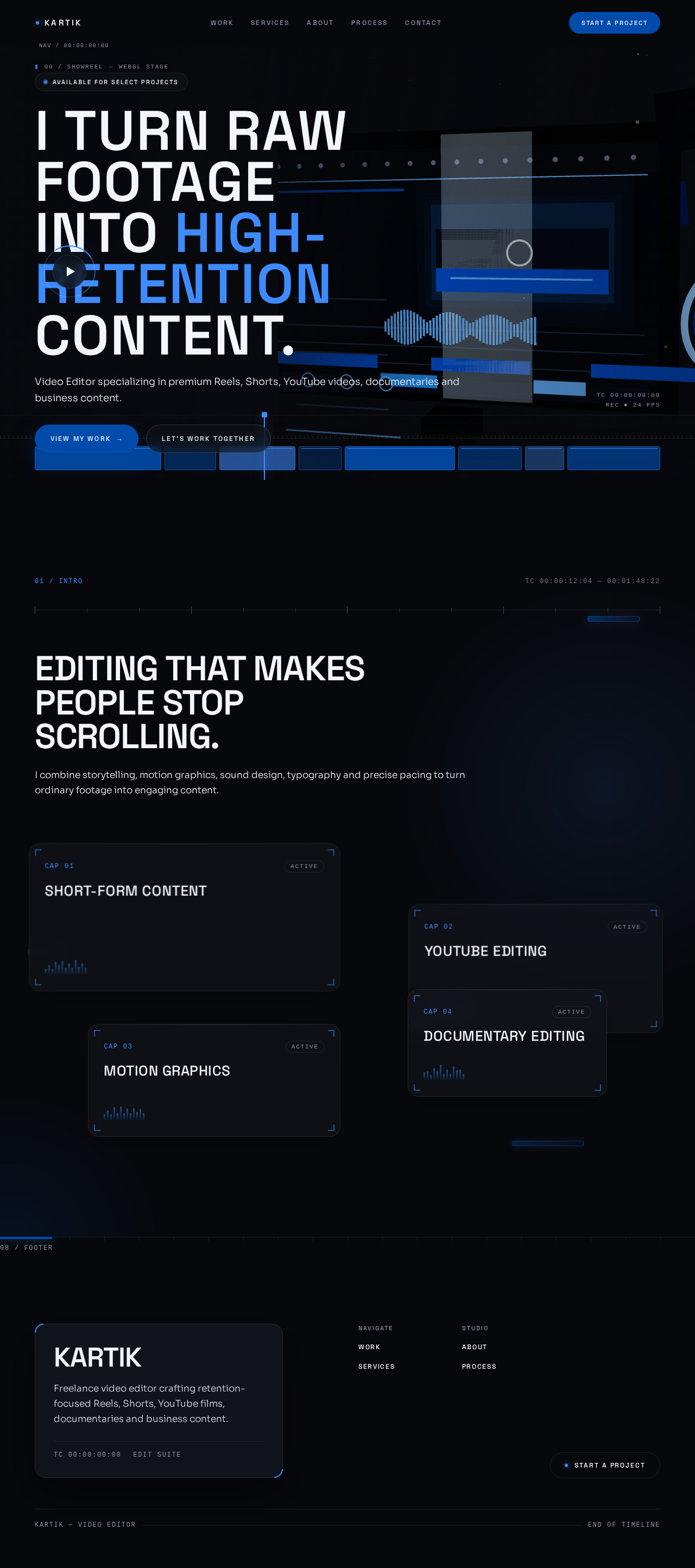
Available for select projects
I turn raw footageinto high-retention content.
Video Editor specializing in premium Reels, Shorts, YouTube videos, documentaries and business content.
01 / INTROTC 00:00:12:04 — 00:01:48:22
Editing that makes people stop scrolling.
I combine storytelling, motion graphics, sound design, typography and precise pacing to turn ordinary footage into engaging content.
CAP 02ACTIVE
YouTube Editing
CAP 03ACTIVE
Motion Graphics
CAP 04ACTIVE
Documentary Editing
Available for select projects
I turn raw footageinto high-retention content.
Video Editor specializing in premium Reels, Shorts, YouTube videos, documentaries and business content.
01 / INTROTC 00:00:12:04 — 00:01:48:22
Editing that makes people stop scrolling.
I combine storytelling, motion graphics, sound design, typography and precise pacing to turn ordinary footage into engaging content.
CAP 01ACTIVE
Short-Form Content
CAP 02ACTIVE
YouTube Editing
CAP 03ACTIVE
Motion Graphics
CAP 04ACTIVE
No comments yet. Be the first!