video-editor
 Atharva
Build a complete, production-ready web-based video editor called Video Editor. The application must be fully functional, clean, fast, responsive, and built using only free and open-source technologies. Do NOT use any paid APIs, paid SaaS services, subscriptions, or services requiring API keys. The application should work locally/self-hosted wherever possible. Core Workflow The user should be able to create a project by uploading: 1. A script file (.txt, .docx) or pasting the script. The script file can have any number of lines like 300+ or 500+ 2. One audio file (.mp3, .wav, etc.) containing the narration. The audio file can be 10+ min or 30+ min also. 3. A folder containing sequential images named `1.png`, `2.png`, `3.png` ... up to hundreds or thousands. Parse the script into individual lines. Each line corresponds to exactly one image. The application must automatically analyze the narration and synchronize the script with the audio using free/open-source speech-to-text and forced-alignment technology. Prefer local models such as Whisper/faster-whisper and other open-source alignment libraries. Do not use OpenAI API, ElevenLabs, Google Cloud, AWS, Azure, AssemblyAI, or any other paid API. Generate accurate start and end timestamps for every script line. Use word-level timestamps internally and calculate precise line-level timestamps from them. Verification Screen Before creating the video timeline, show a clean verification interface containing: * Line number * Script text * Start timestamp * End timestamp * Duration * Corresponding image thumbnail * Play button to preview that specific audio section Allow the user to manually edit timestamps if necessary. Highlight low-confidence/problematic alignments so the user can quickly review them. Only after the user clicks Continue should the application generate the editable timeline. Video Editor Create a professional but extremely simple timeline editor. Automatically place: * `1.png` according to line 1 timestamp * `2.png` according to line 2 timestamp * `3.png` according to line 3 timestamp * etc. Place the original narration audio on the audio track without changing it. The timeline must remain fully editable. The user should be able to: * Drag clips * Trim clips * Split clips * Delete clips * Replace images * Change image duration * Add images * Reorder clips * Add text * Add subtitles * Add multiple audio tracks * Adjust audio volume * Add simple transitions * Zoom/pan images * Undo/redo * Zoom the timeline * Move the playhead precisely * Preview the video smoothly Support at least 500+ images/clips efficiently using thumbnails, lazy loading, virtualization, and optimized preview rendering. UI/UX Keep the interface extremely clean, modern, minimal, and intuitive. Use a dark professional editor-style interface with: * Left: Media/assets/Properties/settings * Center: Video preview * Bottom: Timeline Avoid unnecessary buttons and clutter. Include keyboard shortcuts, autosave, project save/load, undo/redo, and clear error messages. Rendering and Export Use FFmpeg or another free/open-source local rendering solution. The final video must be exportable in high quality, including: * 1080p * 1440p * High-quality H.264 MP4 * Original/high-quality audio Show rendering progress and allow the user to download the finished MP4. Technical Requirements Use React + TypeScript for the frontend and a suitable open-source backend such as Python/FastAPI. Use only free/open-source libraries. Do not add mock functionality. Every visible button and feature should actually work. Design the application so processing can happen locally or on the user's own machine/server, avoiding recurring costs. Before finishing, thoroughly test uploading, script parsing, audio alignment, 500+ image handling, timeline editing, preview, autosave, rendering, and MP4 download. The final result should feel like a simple professional video editor specifically optimized for turning narrated scripts and sequential images into editable videos automatically.

Comments (0)
Sign in to leave a comment
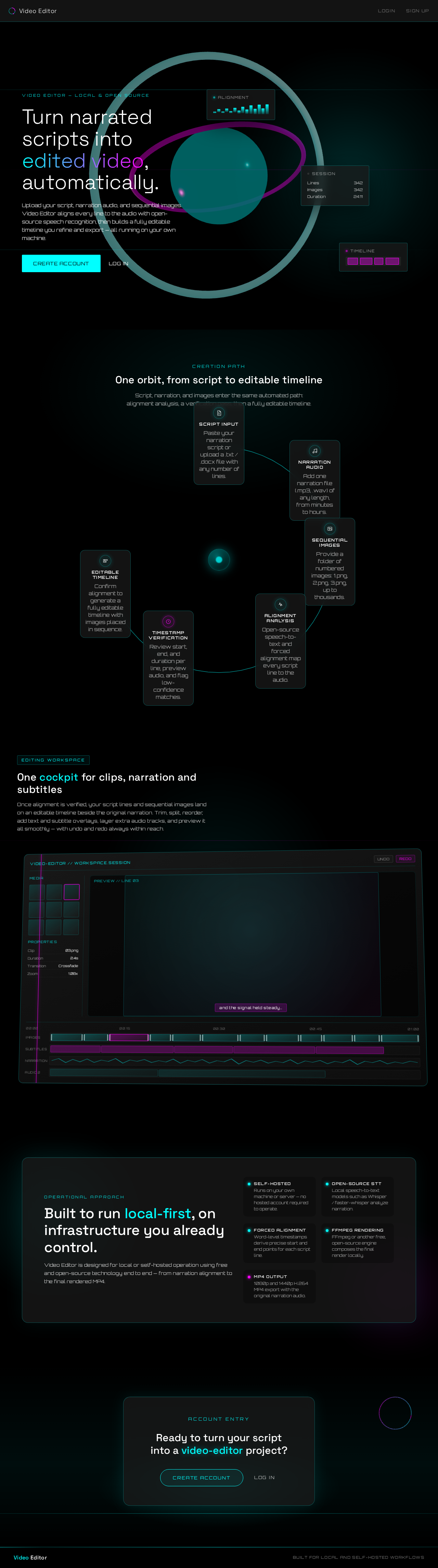
Turn narrated scripts into edited video, automatically.
Upload your script, narration audio, and sequential images. Video Editor aligns every line to the audio with open-source speech recognition, then builds a fully editable timeline you refine and export — all running on your own machine.
One orbit, from script to editable timeline
Script, narration, and images enter the same automated path: alignment analysis, a verification pass, then a fully editable timeline.
- 1Script InputPaste your narration script or upload a .txt / .docx file with any number of lines.
- 2Narration AudioAdd one narration file (.mp3, .wav) of any length, from minutes to hours.
- 3Sequential ImagesProvide a folder of numbered images: 1.png, 2.png, 3.png, up to thousands.
- 4Alignment AnalysisOpen-source speech-to-text and forced alignment map every script line to the audio.
- 5Timestamp VerificationReview start, end, and duration per line, preview audio, and flag low-confidence matches.
- 6Editable TimelineConfirm alignment to generate a fully editable timeline with images placed in sequence.
One cockpit for clips, narration and subtitles
Once alignment is verified, your script lines and sequential images land on an editable timeline beside the original narration. Trim, split, reorder, add text and subtitle overlays, layer extra audio tracks, and preview it all smoothly — with undo and redo always within reach.
Built to run local-first, on infrastructure you already control.
Video Editor is designed for local or self-hosted operation using free and open-source technology end to end — from narration alignment to the final rendered MP4.
Runs on your own machine or server — no hosted account required to operate.
Local speech-to-text models such as Whisper / faster-whisper analyze narration.
Word-level timestamps derive precise start and end points for each script line.
FFmpeg or another free, open-source engine composes the final render locally.
1080p and 1440p H.264 MP4 export with the original narration audio.
Turn narrated scripts into edited video, automatically.
Upload your script, narration audio, and sequential images. Video Editor aligns every line to the audio with open-source speech recognition, then builds a fully editable timeline you refine and export — all running on your own machine.
One orbit, from script to editable timeline
Script, narration, and images enter the same automated path: alignment analysis, a verification pass, then a fully editable timeline.
- 1Script InputPaste your narration script or upload a .txt / .docx file with any number of lines.
- 2Narration AudioAdd one narration file (.mp3, .wav) of any length, from minutes to hours.
- 3Sequential ImagesProvide a folder of numbered images: 1.png, 2.png, 3.png, up to thousands.
- 4Alignment AnalysisOpen-source speech-to-text and forced alignment map every script line to the audio.
- 5Timestamp VerificationReview start, end, and duration per line, preview audio, and flag low-confidence matches.
- 6Editable TimelineConfirm alignment to generate a fully editable timeline with images placed in sequence.
One cockpit for clips, narration and subtitles
Once alignment is verified, your script lines and sequential images land on an editable timeline beside the original narration. Trim, split, reorder, add text and subtitle overlays, layer extra audio tracks, and preview it all smoothly — with undo and redo always within reach.
Built to run local-first, on infrastructure you already control.
Video Editor is designed for local or self-hosted operation using free and open-source technology end to end — from narration alignment to the final rendered MP4.
Runs on your own machine or server — no hosted account required to operate.
Local speech-to-text models such as Whisper / faster-whisper analyze narration.
Word-level timestamps derive precise start and end points for each script line.
FFmpeg or another free, open-source engine composes the final render locally.
1080p and 1440p H.264 MP4 export with the original narration audio.
No comments yet. Be the first!