verdant-where

byprem patel

I want to make a platform where people can work together on a priject of their interested project

LandingLoginProjects
Landing

Comments (0)

No comments yet. Be the first!

System Requirements

System Requirement Document
Page 1 of 8

System Requirements Document for verdant-where

1. Introduction

The verdant-where platform is designed to facilitate collaboration on projects by allowing users to post projects and connect with others interested in working together. The platform aims to provide a space where users can experience teamwork in real life, fostering a sense of community and collaboration.

2. System Overview

Verdant-where is a web-based platform that allows users to post projects, view project details, and request to join projects for collaboration. The platform supports two primary personas: Project posters, who create and manage project postings, and Interested collaborators, who browse projects and request to join them. The platform emphasizes a warm, human-centered design inspired by Pablo Stanley's playful aesthetic, focusing on teamwork and community engagement.

2a. Product Interpretation and Delivery Boundary

The platform requires users to create an account to post projects or request to join them, ensuring that all interactions are tied to a verified identity. The system supports self-service enrollment and requires returning users to log in for access to protected areas such as project management and team workspaces. The platform is designed to be approachable and inclusive, avoiding fintech or luxury aesthetics.

Page 2 of 8

2b. Source Content Inventory

Not applicable as no content source directive was provided.

2c. Page Content and Component Coverage

Landing

  • Purpose: Introduce the platform and its purpose.
  • Components:
    • Overview of platform features and benefits.
    • Call-to-action buttons for Sign Up and Login.
    • Visuals and illustrations reflecting teamwork and collaboration.

Projects

  • Purpose: Allow users to browse available projects.
  • Components:
    • List of projects with brief descriptions.
    • Search and filter options.
    • Navigation to Project Details.

Project Details

  • Purpose: Provide detailed information about a specific project.
  • Components:
    • Project description, requirements, and objectives.
    • Button to request to join the project.
    • Information about the project poster.
Page 3 of 8

Login

  • Purpose: Allow returning users to access their accounts.
  • Components:
    • Fields for username/email and password.
    • Option to reset password.
    • Link to Sign Up for new users.

Sign Up

  • Purpose: Enable new users to create an account.
  • Components:
    • Fields for user information (name, email, password).
    • Confirmation of terms and conditions.
    • Submit button to create an account.

Create Project

  • Purpose: Allow project posters to create and manage projects.
  • Components:
    • Form for entering project details and requirements.
    • Options to save as draft or publish.
    • List of current projects with edit options.

Requests

  • Purpose: Manage connection requests for projects.
  • Components:
    • List of incoming requests for project posters.
    • Option to accept or decline requests.
    • Status updates for interested collaborators.
Page 4 of 8

Team Workspace

  • Purpose: Facilitate collaboration among accepted team members.
  • Components:
    • Shared project resources and communication tools.
    • Task assignments and progress tracking.
    • Team member list and roles.

3. Functional Requirements

  • As a Project poster, I should be able to post a project and its requirements so that others can discover it. (Provenance: explicit)
  • As an Interested collaborator, I should be able to view posted projects and their requirements to find projects of interest. (Provenance: explicit)
  • As an Interested collaborator, I should be able to request to connect for project collaboration to join a project team. (Provenance: explicit)
  • As a Project poster, I should be able to manage incoming connection requests to form a project team. (Provenance: explicit)
  • As a Project poster, I should be able to create and manage project posts to keep information up-to-date. (Provenance: required_inference)
  • As a user, I should be able to sign up and log in to access the platform's features. (Provenance: required_inference)
  • As a user, I should be able to verify my identity upon returning to access protected areas. (Provenance: required_inference)

4. User Personas

  • Project poster: Responsible for posting projects and managing team formation.
  • Interested collaborator: Responsible for browsing projects and requesting to join teams.

5. Core User Flows

Page 5 of 8

Project Poster

  1. Sign Up/Login: Access the platform by creating an account or logging in.
  2. Create Project: Enter project details and publish the project.
  3. Manage Requests: Review and respond to connection requests.
  4. Team Collaboration: Engage with team members in the Team Workspace.

Interested Collaborator

  1. Sign Up/Login: Access the platform by creating an account or logging in.
  2. Browse Projects: Search and filter projects of interest.
  3. Request Connection: Submit a request to join a project.
  4. Join Team: Upon acceptance, collaborate in the Team Workspace.
Page 6 of 8

6. Visuals Colors and Theme

  • Muse: Pablo Stanley
  • Palette:
    • Background: #fff8e1
    • Surface: #ffffff
    • Text: #333333
    • Primary: #ff6f61
    • Accent: #ffd54f
    • Muted: #b0bec5
  • Typography:
    • Headings: Nunito, Bold
    • Body: DM Sans
    • Scale: 1.5 modular
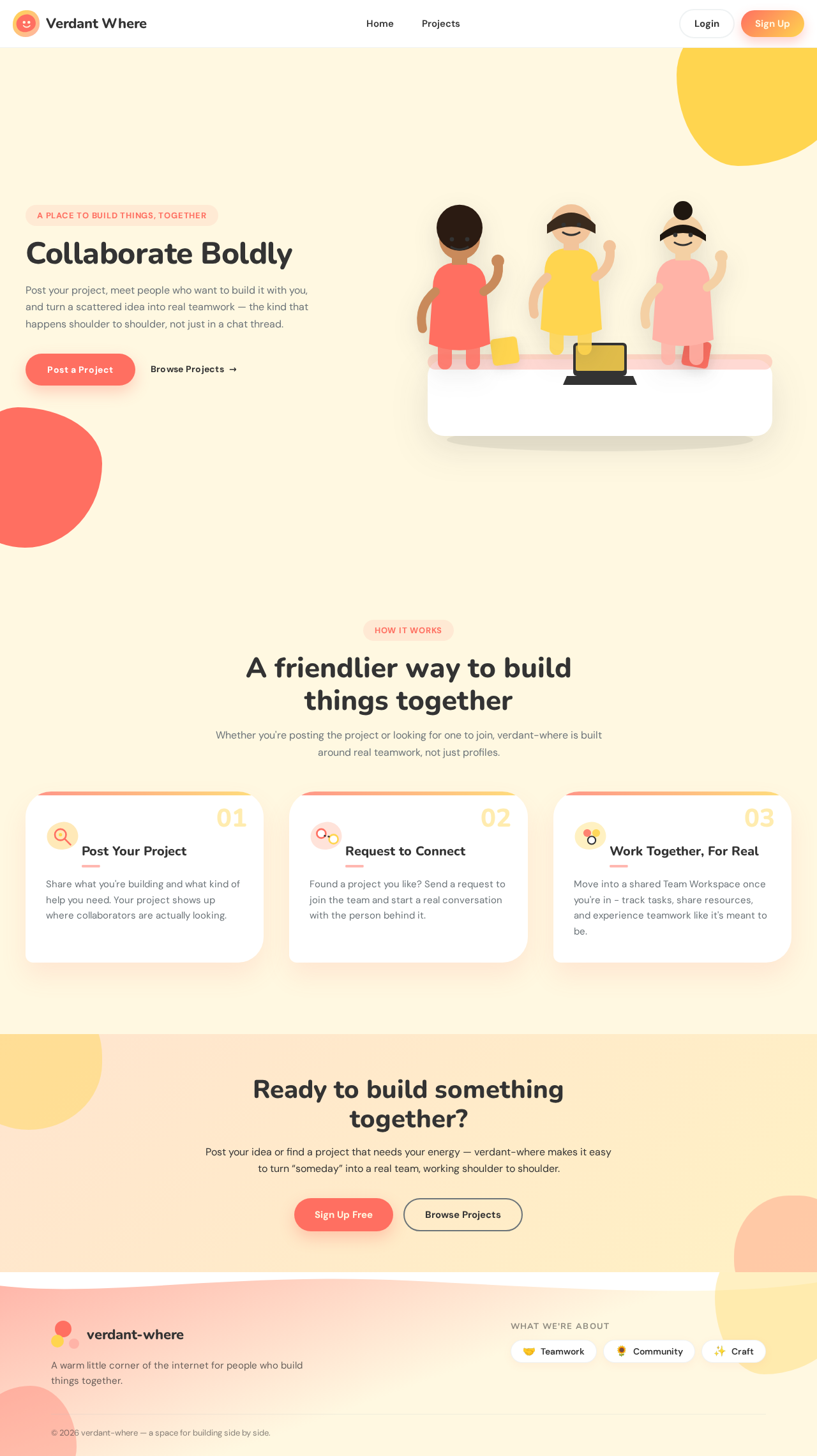
  • Shape Language: Big radii, pill buttons, blob shapes
  • Layout: Generous spacing with blob-shaped cards
  • Imagery: Modular vector people and objects, hand-drawn accents

7. Signature Design Concept

The Landing page will feature a large, central illustration of diverse characters interacting in a project setting, set on a soft cream background with vibrant accent highlights. Rounded blob-shaped cards will be used for project listings, each with a warm shadow. Pill-shaped buttons will have playful colour transitions on hover, and friendly onboarding animations will feature characters nodding or waving.
Page 7 of 8

8. Interaction Model & Motion Direction

  • Interaction Model: Animated
  • Motion Tempo: Expressive
  • Hero Dimensionality: Layered_2d
  • Landing Hero Motion Brief: A playful hero with a central modular illustration of people collaborating. On hover, characters will nod or wave, and buttons will transition colors, creating an inviting and dynamic entry experience.

9. Non-Functional Requirements

  • The platform must support a high volume of concurrent users without performance degradation. (Provenance: required_inference)
  • The user interface must be responsive and accessible on various devices and screen sizes. (Provenance: required_inference)

10. Tech Stack

  • Frontend: React
  • Backend: Python/FastAPI
  • Database: PostgreSQL
  • Containerization: Docker
  • Deployment: Kubernetes (if required for scaling)

11. Assumptions and Constraints

  • Users must have internet access to use the platform.
  • The platform will initially support English language only.
  • User data will be stored securely and comply with relevant data protection regulations.
Page 8 of 8

12. Glossary

  • Project poster: A user who creates and manages project postings.
  • Interested collaborator: A user who browses projects and requests to join them.
  • Team Workspace: A shared space for team members to collaborate on a project.
Landing design preview
Landing: View landing page
Sign Up: Create account
Login: Log in
Projects: Browse projects
Project Details: View project details
Project Details: Request to join project
Requests: View request status
Team Workspace: Join team workspace
Landing design preview
Landing: View landing page
Sign Up: Create account
Login: Log in
Projects: Browse projects
Project Details: View project details
Project Details: Request to join project
Requests: View request status
Team Workspace: Join team workspace