Surveys
Share your opinion in short research questionnaires. Each survey lists its length and its screening criteria so you know what to expect.
 Emmanuel Mutugi
yeah creTE THIS FOR VERCEL


Sign in to leave a comment
You are a senior full-stack software architect, UI/UX designer, Node.js engineer, database engineer and security engineer.
Your task is to BUILD a complete, production-ready rewards platform called LOOTLY.
Do not simply generate a landing page or a frontend prototype. Build the complete functional application, including frontend, backend, database integration, authentication, administrative dashboard, financial system, offerwall integration and deployment configuration.
The final product must be deployable directly to Vercel.
==================================================
Brand: LOOTLY
Tagline: Turn your time into rewards.
Description:
LOOTLY is a Get Paid To (GPT) rewards platform where eligible users discover surveys, sponsored offers and online tasks, earn rewards and request withdrawals.
FINAL GOAL:
LOOTLY must be a real, modern, secure, fully functional rewards platform.
LOOTLY is a Get Paid To (GPT) rewards platform — "Turn your time into rewards." Eligible users discover surveys, sponsored offers and online tasks, earn rewards, and request withdrawals. The deliverable is not a landing page or frontend prototype: it is a complete, production-ready full-stack application — frontend, serverless backend, Neon PostgreSQL schema and migrations, Google authentication, user dashboard, admin dashboard, Offerwall.me integration, reward engine, withdrawal management and immutable financial ledger — deployable directly to Vercel under the project name verdant-vercel.
/admin automatically and manage platform settings, users, withdrawals and Offerwall.me. No other role has initial admin access.Public landing page — hero "Your time has value. Make it count." with supporting text "Discover surveys, explore sponsored offers and complete online tasks to earn rewards," primary CTA Continue with Google, secondary CTA How it works; sections for how LOOTLY works, exploring earning opportunities, surveys and offers, rewards and withdrawals, why LOOTLY, FAQ and footer.
User dashboard — profile image, username, greeting, available KES balance, pending rewards, lifetime earnings, completed tasks, successful withdrawals, an earnings overview chart, recent activity and main navigation.
Earning Hub — categories for surveys, sponsored offers, tasks, partner offerwalls and other admin-enabled opportunities; each with icon, description, available opportunities, estimated reward when supplied by a provider, and eligibility information.
Reward engine and ledger — all user-facing balances in KES. The immutable ledger records every financial event: reward credit, pending reward, reward reversal, withdrawal reservation, withdrawal release.
Admin application — separate premium app at /admin with desktop sidebar and mobile navigation. Financial reporting distinguishes gross provider revenue, user rewards, outstanding reward liabilities, paid withdrawals and platform revenue; platform profit is never computed from total user earnings as revenue. Charts cover daily registrations, daily rewards, provider revenue, withdrawals and top earning users, with date filters. User management shows profile image, username, Google email, registration date, account status, available balance, pending rewards, lifetime earnings, completed activities and withdrawals. Also covered: Google OAuth settings, announcements and in-app notifications, settings autosave, referral tracking, and an administrator-only system health page with connection testing, database health checks and migration status, plus authentication, provider callback and deployment diagnostics.
Data and platform — PostgreSQL tables include users, user_sessions, admin_roles, platform_settings, encrypted_settings, offerwall_settings, reward_transactions, provider_conversions, withdrawals, payout_records, referrals, referral_rewards, announcements, notifications, audit_logs and deployment_logs, with UUID primary keys. The initial DATABASE_URL comes from Vercel environment variables, and the application must initialize without a pre-existing database-settings record.
This is a serverless application: no fake server restart is implemented. A new Vercel deployment replaces the deployed application version but does not erase the Neon database, and the application continues on the same production domain. Withdrawals are paid manually, not automatically. The two super administrators are the only initial admin users; broader role and page catalogs are not established here.
<!-- planning-notes:v1:start -->Planning resolved these page and owner names itself instead of stopping. Review them before building.
Added during planning
Server-side financial calculations.
Transactional financial operations.
Authentication:
Google authentication must be the only login method.
Enable Google OAuth integration.
Users should:
Click Continue with Google.
Authenticate using their Google account.
Automatically create a LOOTLY account on first login.
Return to their existing account on subsequent logins.
Have a persistent user profile.
Sign out securely.
Use verified Google identity information.
Require:
Valid OAuth state.
Correct redirect URI.
Verified Google identity.
Secure server-side session handling.
HTTP-only cookies.
==================================================
These two accounts are the permanent initial SUPER ADMINS.
MANDATORY BEHAVIOUR:
After either account successfully signs in using Google, automatically grant SUPER_ADMIN privileges.
Both accounts must:
Have identical full administrative permissions.
Access /admin automatically.
Manage all platform settings.
Manage users.
Manage withdrawals.
Manage Offerwall.me.
Manage database settings.
Manage deployment settings.
View platform financial statistics.
View audit logs.
Manage other administrative settings.
Create an exceptional landing page.
The first screen must immediately communicate what LOOTLY does.
Hero:
"Your time has value. Make it count."
Supporting text:
"Discover surveys, explore sponsored offers and complete online tasks to earn rewards."
Primary CTA:
Continue with Google.
Secondary CTA:
How it works.
Sections:
Hero section.
How LOOTLY works.
Explore earning opportunities.
Surveys and offers.
Rewards and withdrawals.
Why LOOTLY.
Frequently asked questions.
Footer.
Explain the process:
Create your account.
Discover available opportunities.
Complete eligible activities.
Receive verified rewards.
Request withdrawal.
Receive manually processed payment.
Create a beautiful authenticated dashboard.
Display:
Profile image.
Username.
Greeting.
Available KES balance.
Pending rewards.
Lifetime earnings.
Completed tasks.
Create a clear earnings overview chart.
Include recent activity.
Main navigation:
Dashboard.
Earn.
Surveys.
Offers.
Tasks.
History.
Withdraw.
Referrals.
Profile.
Build an attractive central earning section.
Categories:
Surveys.
Sponsored offers.
Tasks.
Partner offerwalls.
Each category should have:
Icon.
Description.
Available opportunities.
Estimated reward when supplied by a provider.
Eligibility information.
Clear action button.
If a provider has not been configured, display an honest configuration notice.
Do not generate fake offers.
Integrate Offerwall.me properly.
Use the official current Offerwall.me documentation.
The administrator must be able to configure:
Placement ID.
Public API key.
Private signing secret.
Bearer token.
Postback URL.
Placement enabled/disabled status.
Reward conversion rate.
Do not invent API endpoints, signature formats, query parameters or response fields.
Implement the provider's documented signed-user-ID integration.
Each LOOTLY user must have a stable internal UUID.
Generate signed user identities server-side.
POSTBACK SYSTEM:
Create a secure endpoint for Offerwall.me reward notifications.
The endpoint must:
Receive provider notifications.
Validate the documented authentication/signature mechanism.
Validate the user identity.
Validate the provider transaction ID.
Verify the reward amount and currency.
Check for duplicate transactions.
Convert the reward to KES using configured conversion rules.
Credit the user using an atomic database transaction.
Record the provider conversion.
Record the user's reward ledger entry.
Implement idempotency.
A repeated callback must never credit a user twice.
Provide a test mode that is clearly separated from production.
Do not credit users through frontend success callbacks.
All user-facing balances must be in KES.
Examples:
KSh 50
KSh 100
KSh 200
KSh 500
KSh 1,000
Build an admin-configurable reward conversion system.
Admin controls:
Point conversion rate.
Provider currency conversion.
Minimum withdrawal.
Maximum withdrawal.
Withdrawal fee.
Referral rewards.
Manual adjustments.
Suggested initial withdrawal threshold:
Build a proper immutable financial ledger.
Every financial event must be recorded.
Supported event types:
Reward credit.
Pending reward.
Reward reversal.
Withdrawal reservation.
Withdrawal release.
Withdrawal payment.
Administrative adjustment.
Referral reward.
Each ledger record must contain:
Unique ID.
User ID.
Transaction type.
Amount.
Currency.
Reference ID.
Description.
Timestamp.
Status.
Related provider or withdrawal reference.
Ensure users cannot spend reserved or pending funds.
Ensure concurrent withdrawal requests cannot result in negative balances.
IMPORTANT:
LOOTLY does not automatically transfer money to users.
The platform owner personally processes withdrawals and pays users externally using cryptocurrency.
Do not integrate an automatic crypto payment gateway.
Do not request private keys or seed phrases.
USER WITHDRAWAL EXPERIENCE:
Users can:
View available balance.
View minimum withdrawal.
Select an enabled payout method.
Enter requested amount.
Enter payout address.
Select the appropriate blockchain network.
Submit withdrawal request.
Track request status.
View payment history.
Initial payout method:
Cryptocurrency, configured by the administrator.
The admin controls supported currencies and networks.
WITHDRAWAL PROCESS:
User submits request.
Validate the balance and withdrawal limits.
Reserve the requested amount atomically.
Create withdrawal record.
Display submitted status.
Admin reviews request.
Admin approves, rejects or marks processing.
Admin sends the actual payment externally.
Admin records transaction hash/reference.
Admin marks the request paid.
USER-FACING STATUS:
Submitted.
Processing.
Paid.
Declined.
USER-FACING STATUS:
Submitted.
Processing.
Paid.
Declined.
Do not expose internal administrative notes.
A withdrawal must never appear as paid before actual payment confirmation.
If declined:
Release reserved funds.
Return funds to available balance.
Record the reason.
Preserve audit history.
Display a clear message:
"Withdrawals are manually processed. Processing times may vary."
Do not promise instant payments.
Build a separate premium admin application.
Route:
/admin
Only the two default super administrators can access it initially.
Admin dashboard should have a desktop sidebar and mobile navigation.
ADMIN OVERVIEW:
Display live database-backed statistics:
Total users.
Active users.
New registrations.
Gross provider revenue.
Total user rewards generated.
Pending rewards.
Total user liabilities.
Total withdrawals requested.
Total withdrawals paid.
Pending withdrawal count.
Platform gross margin.
Clearly distinguish:
Gross provider revenue
User rewards
Outstanding reward liabilities
Paid withdrawals
Platform revenue
Do not calculate platform profit using total user earnings as revenue.
Include charts:
Daily registrations.
Daily rewards.
Provider revenue.
Withdrawals.
Top earning users.
Allow date filters.
Create a comprehensive user management page.
Display:
Profile image.
Username.
Google email.
Registration date.
Account status.
Available balance.
Pending rewards.
Lifetime earnings.
Completed activities.
Withdrawals.
Features:
Search.
Filtering.
Sorting.
User profile details.
Account suspension.
Account reactivation.
Financial transaction history.
Withdrawal history.
Admin can manually adjust a user's balance.
Every adjustment must:
Require an amount.
Require a reason.
Be recorded in the ledger.
Be recorded in audit logs.
Be executed server-side.
Never allow silent balance modification.
Build a real leaderboard.
Display:
Rank.
User avatar.
Username.
Total earnings.
Completed activities.
Successful withdrawals.
Filters:
Today.
This week.
This month.
All time.
Allow users to opt out of public leaderboard visibility.
Create a complete withdrawal management interface.
Admin can:
View all requests.
Search by user.
Filter by status.
View payout address.
View requested amount.
View date.
View payment history.
Approve.
Reject with a reason.
Mark processing.
Mark paid.
Add transaction hash.
Create a dedicated Offerwall.me settings page.
Admin can:
Enter placement ID.
Enter public API key.
Enter private secret.
Enter bearer token.
Enable/disable provider.
Configure reward conversion.
View postback URL.
View recent conversions.
View failed callbacks.
View duplicate callbacks.
View integration status.
Provide a test connection feature if supported by the official API.
Never claim the provider is connected without a successful real validation.
Create an administrator-only database configuration page.
Connection testing.
Database health checks.
Migration status.
Admin interface:
Database connection URL input.
Test connection button.
Connection status.
Save configuration.
The application must be able to initialize without a previously configured database-settings record.
Changing the database must follow a safe process:
Validate the new connection.
Check schema compatibility.
Require explicit confirmation.
Preserve old database data.
Run migrations only after confirmation.
Switch connections safely.
Provide rollback instructions.
GOOGLE OAUTH ADMIN SETTINGS
Create a Google authentication configuration page.
Provide:
OAuth configuration status.
Client ID status.
Redirect URI.
Setup instructions.
Authentication test.
Do not display client secrets.
Initial Google credentials are supplied through Vercel environment variables.
Do not pretend that editing a database record automatically updates Vercel environment variables.
If an OAuth configuration change requires a deployment, explain and handle it through the deployment workflow where possible.
Create a secure deployment management page.
The administrator can trigger a new deployment through a protected Vercel deployment hook or Vercel API.
Display:
Last deployment time.
Deployment status.
Deployment URL.
Deployment result.
Recent deployment history.
Require confirmation before deployment.
Implement autosave for administrative configuration forms.
Requirements:
Debounced saving approximately every three seconds after changes.
Saving indicator.
Saved indicator.
Error indicator.
Automatic recovery after refreshing.
Handle network interruptions.
Prevent conflicting updates.
Financial actions must NOT use delayed autosave.
Withdrawal requests, payment confirmations, reward credits and balance adjustments must be committed immediately with transactional database operations.
Build a referral system.
Every user receives a unique referral code.
Features:
Personal referral link.
Referral statistics.
Registered referrals.
Configurable referral commission.
Referral reward history.
Admin controls referral settings.
Prevent:
Duplicate rewards.
Referral abuse.
Multiple accounts exploiting the same referral.
Only issue referral rewards according to explicitly configured eligibility rules.
Build an in-app notification system.
Users can receive notifications for:
Verified reward credits.
Withdrawal submitted.
Withdrawal processing.
Withdrawal paid.
Withdrawal declined.
Referral rewards.
Platform announcements.
Admin can create, edit and publish announcements.
User profile must display:
Google profile picture.
Username.
Google email.
Registration date.
Referral code.
Leaderboard privacy setting.
Preferred payout method.
Saved payout address.
Users can update supported profile fields.
Do not let users change their verified Google identity through a normal profile form.
Create a complete FAQ page.
Explain:
How LOOTLY works.
How users earn rewards.
How provider conversions work.
Why some surveys may be unavailable.
How withdrawals work.
What the KSh 200 minimum means.
How long processing may take.
Why withdrawals are manually processed.
Implement:
Centralized API error handling.
User-friendly error messages.
Do not expose stack traces or secrets to normal users.
Implement:
Implement:
Implement:
Implement:
Implement:
Add an administrator-only system health page.
Before declaring the project complete, test:
Landing page.
Google authentication.
New user registration.
Existing user login.
Both default super administrators.
Normal user authorization.
Unauthorized admin access.
Database migrations.
User dashboard.
Offerwall configuration.
Signed user identities.
Provider postback validation.
Duplicate postback rejection.
Reward conversion.
Reward ledger.
Withdrawal requests.
Withdrawal reservations.
Withdrawal approval.
Withdrawal rejection.
Balance restoration.
Manual payment recording.
Admin user management.
Top earners.
Referral tracking.
Notifications.
Settings autosave.
Database health checks.
Deployment management.
Reward engine.
Withdrawal management.
Financial ledger.
Referral system.
Settings.
If credentials are missing, build the complete integration and configuration interface, explain exactly what credentials are needed, and never substitute fake functionality.
Users sign in using Google, complete eligible activities, receive verified KES rewards and request withdrawals.
The platform owner controls users, integrations, financial records, reward rates, manual crypto payouts and deployments.
Both must have automatic full administrator access after successful Google authentication.
Target audience:
Students.
Young adults.
Job seekers.
People looking for additional online earning opportunities.
Actors: Visitor or returning user; Google identity provider; LOOTLY server (supporting).
Trigger: The user selects Continue with Google on the landing page or sign-in screen.
Failure/recovery: If state, redirect URI or identity verification fails, no session is created and the user may retry. Sign-out clears the session securely.
Actors: Visitor.
Trigger: The visitor opens the public landing page.
Actors: Authenticated user.
Trigger: The user opens the dashboard.
Actors: Authenticated user; activity providers (supporting).
Trigger: The user opens the Earn hub or a specific category.
Failure/recovery: Invalid, duplicate or failed callbacks are not credited and are surfaced to the administrator in the Offerwall.me settings view (recent conversions, failed callbacks, duplicate callbacks).
Actors: Authenticated user; administrator (payout).
Trigger: The user opens Withdraw.
Failure/recovery: If declined, reserved funds are released back to the available balance, the reason is recorded, the user is notified, and audit history is preserved. LOOTLY never transfers money automatically and never requests private keys or seed phrases.
Actors: Authenticated user; other users (supporting).
Trigger: The user views Top Earners or manages profile visibility.
Actors: Authenticated user; referred visitor (supporting).
Trigger: The user opens Referrals.
Actors: Authenticated user; administrator (announcements).
Trigger: The user opens Profile or the notification area.
Actors: Super administrator.
Trigger: The administrator opens /admin.
Failure/recovery: Diagnostic error messages guide correction of failed database connections; failed provider validations leave integration status unconfirmed.
[Design proposal; unspecified choices are defaults.]
LOOTLY is a premium dark interface: deep charcoal ground, neon lime signal, glass-like cards, subtle gradients, modern typography, clean layouts, beautiful charts, large readable icons and clear navigation. It is mobile-first and responsive, and must stay fast and legible on low-end Android devices. Explicitly excluded: Matrix animations, excessive neon effects, generic Bootstrap templates, cluttered dashboards, blue/indigo-on-white primaries, and gradient blobs behind centred hero text.
Palette (dark mode, by role)
| Role | Token |
|---|---|
| Background (≈70% of page) | #0B0D0B |
| Surface / glass | #141814 at 60% opacity, 1px #C6FF3D22 border |
| Text | #F2F5EE |
| Primary (one action per screen, key KES figures) | #C6FF3D |
| Accent (positive ledger rows only) | #7BE0A0 |
| Muted | #8D968A |
Lime is a signal, not a toy: it marks exactly one action per screen and the key KES figures. Mint marks credits only.
Typography — Headings Space Grotesk Semi-bold 600, tracking −0.02em; uppercase micro-labels 11px at 0.16em tracking; tabular numerals for all KES values. Body Manrope. Modular scale 1.25: 40/32/24/18/15/13. Hero headline clamp(38px, 7vw, 84px).
Shape and spacing — Glass panels with 20px radii and 1px light borders; soft capsule buttons; sharp 4px corners on ledger rows; one blurred lime glow behind the hero card only.
Layout — Mobile-first single column with a floating glass balance card above the fold and an attractive bottom navigation with four large lime line icons plus a raised centre balance chip, keeping the main balance easy to see and actions accessible. Desktop: 12-column grid, 7/5 split, side rail at 1280px.
Imagery — No stock photos; the interface is the image: a tilted glass balance card, a KES earnings chart, and offer category tiles with large lime line icons. The LOOTLY wordmark uses a lime loot-bag glyph with a cut notch; the same glyph is the favicon.
Readability rule — Headlines, wordmarks, labels, numbers, card text and controls stay whole inside the viewport and their container at 375px, 768px and 1280px, wrapping or scaling to fit; nothing covers them. Decoration may crop, bleed, rotate or overlap freely. Scrolling rows may cross the edge by design provided every item becomes fully readable as it passes, with a usable static arrangement under reduced motion.
Defaults (labelled) — Chart series colours beyond lime/mint, icon stroke weight and glow blur radius are unspecified; use lime for the primary series, mint for positive deltas, muted for baselines, and a 2px line-icon stroke.
Visual identity:
Premium dark interface.
Deep black/charcoal backgrounds.
Neon lime-green accent color.
Modern typography.
Glass-like cards.
Subtle gradients.
Clean layouts.
Beautiful charts.
Smooth but lightweight animations.
Large readable icons.
Clear and attractive navigation.
The design must be mobile-first and responsive.
Do not use Matrix animations, excessive neon effects, generic Bootstrap templates or cluttered dashboards.
Create a distinctive LOOTLY logo and favicon.
On mobile:
On mobile:
Make the leaderboard visually attractive.
[Design proposal; unspecified choices are defaults.]
Muse: Michal Malewicz. Layered translucency with a lime signal: the requested glass cards, subtle gradients and floating layers get a real method, so lime on charcoal reads as a confident signal rather than a neon toy. The mood is dark, calm and premium — fast and trustworthy on a low-end Android phone, never loud or casino-like.
Public entry (landing page). A charcoal field with an oversized lime headline on the left, set in two lines at clamp(38px, 7vw, 84px): “Your time has value. Make it count.” Under it, the subline “Discover surveys, explore sponsored offers and complete online tasks to earn rewards.”, then a solid lime capsule “Continue with Google” with charcoal text and a 1px inner light edge, and a secondary “How it works” control. A tilted glass balance card overlaps the headline block from the lower right, showing a KES figure with a 7-bar chart; a soft lime glow sits behind that card only. The first screen immediately communicates what LOOTLY does.
Signature moves
Section rhythm — Hero, How LOOTLY works, Explore earning opportunities, Surveys and offers, Rewards and withdrawals, Why LOOTLY, FAQ, Footer. The leaderboard is made visually attractive. Withdrawal copy states “Withdrawals are manually processed. Processing times may vary.”; no guaranteed income and no promised instant payments anywhere in the visual language.
[Design proposal; unspecified choices are defaults.]
Interaction Model: Animated Motion Tempo: restrained Hero Dimensionality: layered_2d
Landing Hero Motion Brief
prefers-reduced-motion — card, bars and glow render in their final static arrangement; scrolling rows wrap or scroll so every item can be brought fully into view.Animations stay lightweight and API calls minimal to protect fast initial loading, small bundles and low-end Android performance; pages are lazy-loaded.
On mobile:
Use Vercel-compatible TypeScript serverless functions and ensure the final build works with Vercel's deployment system.
Secure cookies in production.
Appropriate SameSite protection.
CSRF protection where applicable.
Never trust a frontend-supplied user ID or role.
IMPLEMENTATION:
Compare normalized Google email addresses.
Require email_verified=true.
Perform authorization server-side.
Never rely on frontend role information.
Seed default administrators safely.
Preserve both administrators during database migrations.
Never allow normal users to promote themselves.
Never allow these two default accounts to be accidentally removed or demoted.
If an unauthorized user accesses /admin, redirect them to the user dashboard or show an access-denied page.
The admin interface must not have a publicly visible admin button.
On mobile:
All figures must come from real database records.
Never display fabricated user balances or earnings.
Private secrets must never appear in:
Browser JavaScript.
Public API responses.
HTML source.
Frontend environment variables.
Client-side logs.
Use precise monetary calculations.
Prefer integer minor units or a proper PostgreSQL NUMERIC representation.
Never use JavaScript floating-point arithmetic for financial balances.
Do not silently edit or delete historical financial transactions.
Use atomic database transactions.
Never expose sensitive user information publicly.
Show pending requests prominently.
Require confirmation for sensitive financial actions.
Prevent duplicate payment marking.
Record every action in audit logs.
==================================================
Secrets must be encrypted at rest using an application master key.
Do not return secret values to the frontend after they have been saved.
SECURITY:
Never expose database credentials to frontend JavaScript.
Never return the full connection URL after saving.
Encrypt credentials if stored in application settings.
Use a separate ENCRYPTION_KEY.
Do not silently switch production databases.
Do not display client secrets.
Do not pretend that editing a database record automatically updates Vercel environment variables.
Notifications must persist in Neon.
Use immutable ledger records.
Prevent accidental financial record deletion.
Security is mandatory.
Implement:
Server-side authorization.
Google OAuth verification.
Secure session handling.
HTTP-only cookies.
CSRF protection.
Rate limiting.
Input validation.
SQL injection protection.
XSS prevention.
Secure response headers.
Offerwall callback verification.
Idempotency.
Atomic withdrawal reservation.
Audit logging.
Secrets encryption.
ERROR HANDLING AND MONITORING
PERFORMANCE
Optimize for:
Mobile devices.
Slow networks.
Low-end Android devices.
Fast initial loading.
Minimal bundle size.
Lazy-loaded pages.
Efficient PostgreSQL queries.
Pagination.
Caching where appropriate.
Keep animations lightweight.
Avoid excessive API calls.
Mobile responsiveness.
Production build.
Vercel serverless compatibility.
Frontend:
React.
Vite.
TypeScript.
Tailwind CSS.
Lucide React icons.
Reusable components.
Backend:
Node.js.
Vercel serverless functions.
TypeScript.
Secure REST API endpoints.
Server-side authentication and authorization.
Database:
Neon PostgreSQL.
Drizzle ORM or an equally maintainable PostgreSQL ORM.
Database migrations.
Proper foreign keys and indexes.
Deployment:
Vercel.
GitHub.
One repository.
Serverless API functions within the same application.
The application must have actual server-side code under /api. A frontend-only application is not acceptable.
Use Vercel-compatible TypeScript serverless functions and ensure the final build works with Vercel's deployment system.
IMPORTANT:
Use npm for dependency installation and scripts.
==================================================
Organize the application clearly.
Suggested structure:
lootly/
api/
auth/

admin/
users/

offerwall/

rewards/

withdrawals/

settings/

referrals/

health.ts
src/
components/

layouts/

pages/

admin/

hooks/

services/

contexts/

types/
public/
db/
schema.ts

migrations/
index.html
package.json
tsconfig.json
vite.config.ts
vercel.json
.env.example
README.md
The frontend and API must use the same Vercel domain.
Use clean URL routing and configure SPA fallback without interfering with /api routes.
Store credentials in environment variables.
GOOGLE_CLIENT_ID=
GOOGLE_CLIENT_SECRET=
Google OAuth credentials will be entered when the application is being deployed and configured.
The initial database is configured using:
DATABASE_URL=
Support PostgreSQL connection strings including:
postgresql://user:password@host/database?sslmode=require
Support Neon PostgreSQL.
Support:
sslmode=require.
Pooled Neon connections.
Direct Neon connections where appropriate.
Create a proper PostgreSQL relational schema.
Required tables:
users
user_sessions
admin_roles
platform_settings
encrypted_settings
offerwall_settings
reward_transactions
provider_conversions
withdrawals
payout_records
referrals
referral_rewards
announcements
notifications
audit_logs
deployment_logs
Include:
UUID primary keys.
Foreign keys.
Unique constraints.
Proper indexes.
Created and updated timestamps.
Numeric financial columns.
Transactional operations.
Migration files.
GOOGLE_CLIENT_SECRET=
GOOGLE_CALLBACK_URL=
SESSION_SECRET=
ENCRYPTION_KEY=
OFFERWALL_PUBLIC_KEY=
OFFERWALL_PRIVATE_SECRET=
OFFERWALL_BEARER_TOKEN=
VERCEL_DEPLOY_HOOK=
APP_URL=
Document each variable.
Provide:
Complete source code.
Frontend.
Serverless backend.
Neon database schema.
Migrations.
Google authentication.
Admin dashboard.
User dashboard.
Offerwall.me integration.
Vercel configuration.
.env.example.
README.
Deployment instructions.
Build LOOTLY as a complete Vercel-ready full-stack application using Neon PostgreSQL and serverless Node.js functions.
Primary currency: Kenyan Shillings (KES).
No email/password registration.
No password login.
No password-reset functionality.
One production domain.
Do not create a separate permanently running Express server.
GOOGLE OAUTH CONFIGURATION:
Provide clear documentation for:
Creating a Google Cloud project.
Enabling Google Identity/OAuth.
Creating OAuth credentials.
Adding the authorized JavaScript origin.
Adding the authorized redirect URI.
Configuring production and development callback URLs.
Do not hardcode secrets.
Never advertise guaranteed income.
Explain that available offers and earnings depend on location, eligibility and provider availability.
Include appropriate age restrictions based on provider requirements and applicable laws.
KSh 200.
This is a configurable platform policy, not a guaranteed income promise.
IMPORTANT ARCHITECTURE:
The initial DATABASE_URL must come from Vercel environment variables.
If a Vercel environment variable must change, explain that a new deployment is necessary.
Never expose deployment tokens.
Never claim deployment succeeded before Vercel confirms it.
IMPORTANT:
This is a serverless application.
Do not implement a fake server restart.
A new Vercel deployment replaces the deployed application version. It does not erase the Neon database.
The application must continue using the same production domain.
==================================================
Do not require an email service.
Clearly communicate that earnings are not guaranteed and depend on eligible activities and provider availability.
All private credentials must be server-side only.
Never use VITE_ prefixes for private secrets.
Never trust frontend financial values.
Never trust frontend admin roles.
Never expose:
Database URLs.
Google client secrets.
Offerwall private secrets.
Bearer tokens.
Encryption keys.
Vercel deployment tokens.
Create a comprehensive .env.example.
Include:
DATABASE_URL=
GOOGLE_CLIENT_ID=
OFFERWALL_PUBLIC_KEY=
OFFERWALL_PRIVATE_SECRET=
OFFERWALL_BEARER_TOKEN=
The initial Offerwall.me credentials are configured after placement approval.
VERCEL_DEPLOY_HOOK=
The deployment hook is optional until deployment management is configured.
Never include real secrets in GitHub.
Use test fixtures and clearly separated development/test data. Never create fake production earnings.
Deliver the complete working project.
Do not stop after designing the landing page.
Do not leave critical features as non-functional buttons.
Do not substitute hardcoded statistics for database-backed data.
Do not claim integrations are connected when credentials have not been configured.
First inspect the project environment and establish the architecture. Then implement the complete application in logical stages, preserving a working build throughout development.
The two default super administrators are:
What happens when a reward is reversed.
How referrals work.
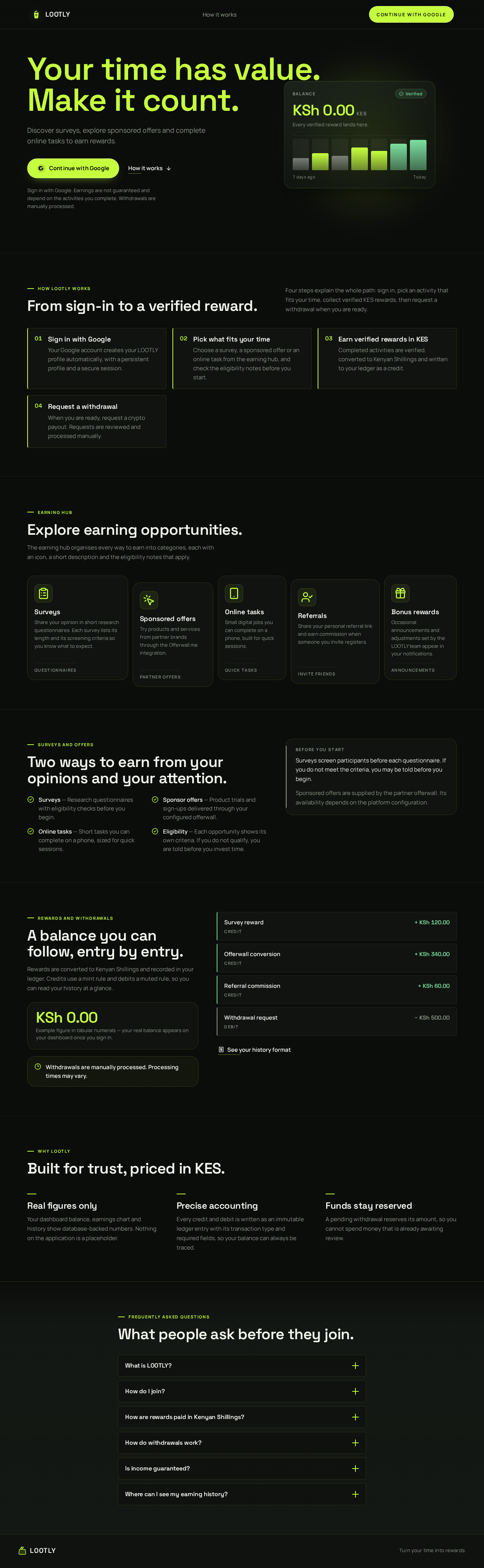
Discover surveys, explore sponsored offers and complete online tasks to earn rewards.
Sign in with Google. Earnings are not guaranteed and depend on the activities you complete. Withdrawals are manually processed.
KSh 0.00 KES
How LOOTLY works
Four steps explain the whole path: sign in, pick an activity that fits your time, collect verified KES rewards, then request a withdrawal when you are ready.
Your Google account creates your LOOTLY profile automatically, with a persistent profile and a secure session.
Choose a survey, a sponsored offer or an online task from the earning hub, and check the eligibility notes before you start.
Completed activities are verified, converted to Kenyan Shillings and written to your ledger as a credit.
When you are ready, request a crypto payout. Requests are reviewed and processed manually.
Earning hub
The earning hub organises every way to earn into categories, each with an icon, a short description and the eligibility notes that apply.
Share your opinion in short research questionnaires. Each survey lists its length and its screening criteria so you know what to expect.
Try products and services from partner brands through the Offerwall.me integration.
Small digital jobs you can complete on a phone, built for quick sessions.
Share your personal referral link and earn commission when someone you invite registers.
Occasional announcements and adjustments set by the LOOTLY team appear in your notifications.
Surveys and offers
Before you start
Surveys screen participants before each questionnaire. If you do not meet the criteria, you may be told before you begin.
Sponsored offers are supplied by the partner offerwall. Its availability depends on the platform configuration.
Rewards and withdrawals
Rewards are converted to Kenyan Shillings and recorded in your ledger. Credits use a mint rule and debits a muted rule, so you can read your history at a glance.
Withdrawals are manually processed. Processing times may vary.
Why LOOTLY
Your dashboard balance, earnings chart and history show database-backed numbers. Nothing on the application is a placeholder.
Every credit and debit is written as an immutable ledger entry with its transaction type and required fields, so your balance can always be traced.
A pending withdrawal reserves its amount, so you cannot spend money that is already awaiting review.
Frequently asked questions
LOOTLY is a Get Paid To (GPT) rewards platform where eligible users discover surveys, sponsored offers and online tasks, earn rewards and request withdrawals.
Sign in with Google. Your account and profile are created automatically, and sign-in keeps your session secure.
Rewards earned from surveys and offers are converted to KES using the platform conversion settings, then credited to your balance through the ledger.
Withdrawals are manually processed. Processing times may vary.
No. LOOTLY never guarantees income. What you earn depends on the activities you complete and whether you qualify for them.
Your history page lists every credit and debit, with the rewards that produced each entry.
Discover surveys, explore sponsored offers and complete online tasks to earn rewards.
Sign in with Google. Earnings are not guaranteed and depend on the activities you complete. Withdrawals are manually processed.
KSh 0.00 KES
How LOOTLY works
Four steps explain the whole path: sign in, pick an activity that fits your time, collect verified KES rewards, then request a withdrawal when you are ready.
Your Google account creates your LOOTLY profile automatically, with a persistent profile and a secure session.
Choose a survey, a sponsored offer or an online task from the earning hub, and check the eligibility notes before you start.
Completed activities are verified, converted to Kenyan Shillings and written to your ledger as a credit.
When you are ready, request a crypto payout. Requests are reviewed and processed manually.
Earning hub
The earning hub organises every way to earn into categories, each with an icon, a short description and the eligibility notes that apply.
Share your opinion in short research questionnaires. Each survey lists its length and its screening criteria so you know what to expect.
Try products and services from partner brands through the Offerwall.me integration.
Small digital jobs you can complete on a phone, built for quick sessions.
Share your personal referral link and earn commission when someone you invite registers.
Occasional announcements and adjustments set by the LOOTLY team appear in your notifications.
Surveys and offers
Before you start
Surveys screen participants before each questionnaire. If you do not meet the criteria, you may be told before you begin.
Sponsored offers are supplied by the partner offerwall. Its availability depends on the platform configuration.
Rewards and withdrawals
Rewards are converted to Kenyan Shillings and recorded in your ledger. Credits use a mint rule and debits a muted rule, so you can read your history at a glance.
Withdrawals are manually processed. Processing times may vary.
Why LOOTLY
Your dashboard balance, earnings chart and history show database-backed numbers. Nothing on the application is a placeholder.
Every credit and debit is written as an immutable ledger entry with its transaction type and required fields, so your balance can always be traced.
A pending withdrawal reserves its amount, so you cannot spend money that is already awaiting review.
Frequently asked questions
LOOTLY is a Get Paid To (GPT) rewards platform where eligible users discover surveys, sponsored offers and online tasks, earn rewards and request withdrawals.
Sign in with Google. Your account and profile are created automatically, and sign-in keeps your session secure.
Rewards earned from surveys and offers are converted to KES using the platform conversion settings, then credited to your balance through the ledger.
Withdrawals are manually processed. Processing times may vary.
No. LOOTLY never guarantees income. What you earn depends on the activities you complete and whether you qualify for them.
Your history page lists every credit and debit, with the rewards that produced each entry.
No comments yet. Be the first!