verdant-start
 Diya Trivedi
start a project to build a simple single page design of calculator

Comments (0)
Sign in to leave a comment
System Requirements
System Requirements Document for verdant-start
1. Introduction
verdant-start is a simple calculator delivered as a single-page design. The product exists for one purpose: to let a person enter numbers and arithmetic operators, see the computed result displayed on the page, and clear the current entry or calculation to start over. There is no account, no history, no saved state, and no second screen — the entire product is one page.
The audience is ordinary people performing quick everyday arithmetic who want a calm, trustworthy tool with no learning curve. The design intent, drawn from the project's creative direction, is that the calculator should feel like a well-made object resting on a clean desk: the numbers are the only thing that speaks, and the interface disappears behind them.
This document is the System Requirements Document for the project named verdant-start, requested by Diya Trivedi.
2. System Overview
verdant-start is a browser-delivered, single-page calculator. The current delivery consists of:
- Frontend (React application UI): renders the one Calculator page — the wordmark, the whispered description, the ruled result display band, and the 4-column keypad — and performs all arithmetic entry, computation, display, and clearing in the browser.
- Backend (shared FastAPI process): provisioned as the shared application API process. The accepted calculator behavior requires no server-side computation, persistence, or domain data; the backend remains available for application APIs and domain modules but carries no calculator requirement in this scope.
- Database (MariaDB): provisioned for application-owned persistent data. The accepted calculator behavior is stateless — no calculation history, saved entries, or user data are required — so no domain entities are defined against it in this scope.
Actors. The only active human actor is the Calculator User, who enters numbers and operators, reads the result, and clears to start over. There are no system, provider, or external actors in the accepted behavior.
Accepted behavior. Number and operator entry; computed result display; clearing the current entry or calculation to start over. All of it happens on the single Calculator page, anonymously, with no identity establishment.
Access. The Calculator page is a public, anonymous entry surface. No sign-in, account, or session continuity is required or provided, because no durable actor-specific state exists to own or resume.
Narrow exclusions. No calculation history, memory keys, scientific functions, unit conversion, currency conversion, accounts, saved calculations, or additional pages are part of this scope.
Removed from scope
- Calculation history and saved calculations (also: memory, recall)
- Scientific or programmer calculator modes (also: advanced functions, trigonometry)
- User accounts and sign-in (also: authentication, profiles)
- Additional pages or navigation beyond the single Calculator page (also: dashboard, settings)
2a. Product Interpretation and Delivery Boundary
verdant-start is delivered entirely as a first-party, browser-rendered single page. The Calculator page is the anonymous public entry: it explains the product in a short whispered description and hosts the full working calculator — entry, result, and clearing — within the exact one-page constraint. Because the calculator is stateless and no participant other than the person at the keyboard is affected, there is no identity boundary, no protected destination, and no handoff to another participant or provider.
The provisioned backend and database are infrastructure available to the application but are not invoked by any accepted calculator behavior. Nothing in this scope is deferred to a future horizon; the current delivery is the complete product.
2c. Page Content and Component Coverage
Calculator
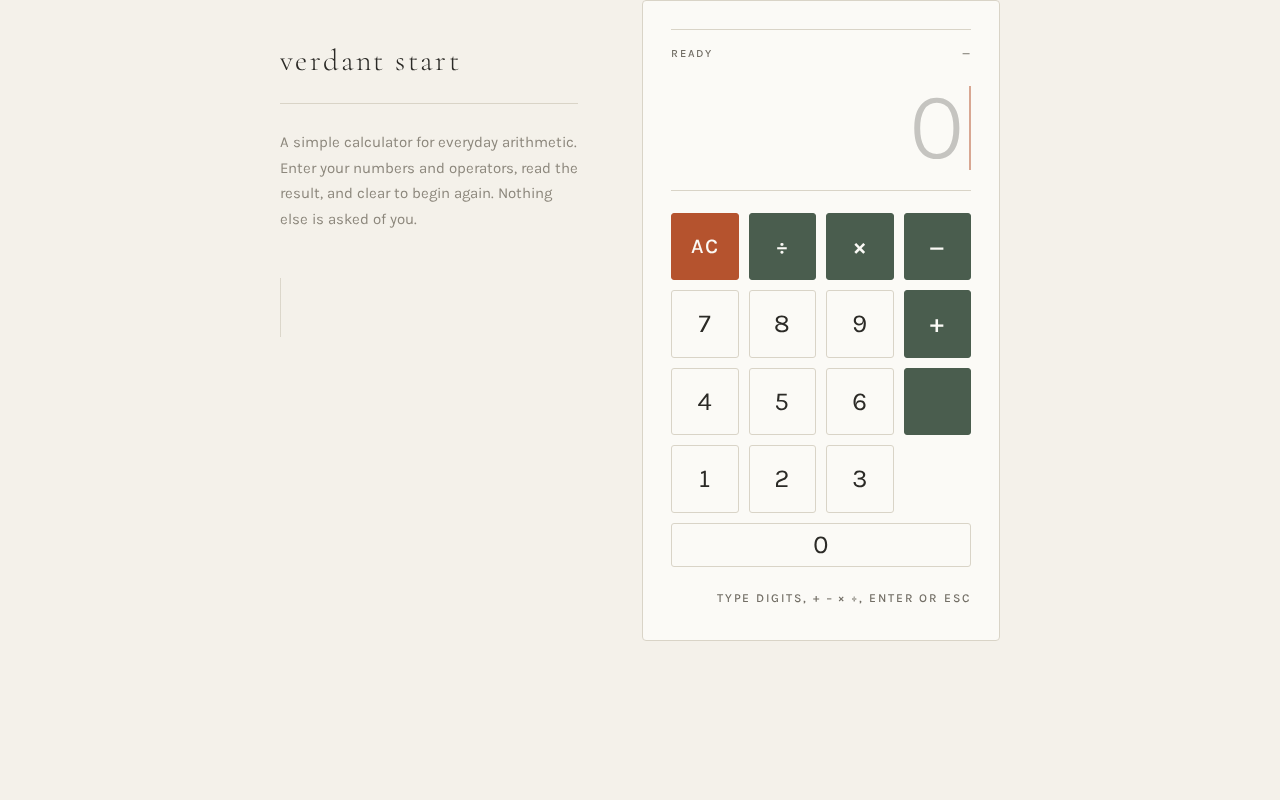
The single page of the product, anonymously reachable, hosting the wordmark, the whispered description, the result display band, and the keypad.
Information and state
- Current entry expression (the digits and operators entered so far).
- Computed result, shown in the ruled display band.
- Active-entry state: a 2px terracotta caret blinking at 1.2s inside the display band marks where the next digit will land.
- Idle/initial state: display band empty or showing a neutral zero with the caret at rest position.
- Error state: an invalid expression (for example a malformed operator sequence) shows a clear, readable error message in the display band instead of a result.
Primary actions
- Press a digit key (0–9) to append that digit to the current entry.
- Press an operator key (+, −, ×, ÷) to set the pending operation.
- Press the equals key to compute and display the result.
- Press the clear key to clear the current entry or calculation and start over.
Supporting actions
- Keyboard input mirroring the on-screen keys (digits, operators, equals, clear) for users who prefer typing.
Domain entities
- Entry expression (transient, in-browser only).
- Result value (transient, in-browser only).
- No persisted entities; nothing is written to the database.
Component responsibilities
- Wordmark: "verdant start" in Cormorant Garamond Light, wide tracking, upper-left on desktop; stacks above the calculator on mobile.
- Whispered description: three lines of Karla 15px muted ink beneath the wordmark on desktop; one line on mobile.
- Display band: spans all four keypad columns; a single hairline rule above and below; result digits flush right in Karla Light tabular numerals at clamp(44px, 9vw, 96px); hosts the terracotta active-entry caret and the error message.
- Keypad: strict 4-column grid of 1:1 near-square keys with 1px hairline borders and 3px radius; a full-width zero key; operator keys and the equals key carry the moss-green ground; the clear key is the sole terracotta element.
States
- Loading: a slow 600ms page fade-in on load; no spinner or skeleton is needed because there is no remote data.
- Empty: initial display band with the caret at rest and no result.
- Success: the computed result replaces the previous display with a 240ms opacity fade.
- Error: an invalid expression shows a readable error message in the display band; pressing clear recovers to the empty state.
- Recovery: clear always returns the page to a usable empty state from any entry, result, or error.
3. Functional Requirements
FR-1 — Single-page calculator delivery (explicit) As a Calculator User, I should get the entire calculator as one single page, so that I can do arithmetic without navigating anywhere.
- Trigger: the user opens the product.
- Observable result: the Calculator page renders with wordmark, description, display band, and keypad; no other page or navigation exists.
- Access: anonymous, no sign-in.
- Failure/recovery: if the page fails to load, reloading returns the same single page.
- Continuation: the user proceeds to enter numbers.
FR-2 — Number and operator entry (explicit) As a Calculator User, I should enter numbers and arithmetic operators, so that I can build the calculation I want to compute.
- Trigger: the user presses digit and operator keys (or types them).
- Observable result: the entered digits and operators appear in the display band, with the terracotta caret marking where the next digit lands.
- Access: anonymous.
- Failure/recovery: a malformed operator sequence is surfaced as a readable error in the display band rather than a wrong result; clear recovers.
- Continuation: the user presses equals or continues entering.
FR-3 — Computed result display (explicit) As a Calculator User, I should see the computed result displayed on the page, so that I know the answer to my calculation.
- Trigger: the user presses the equals key on a valid expression.
- Observable result: the result appears flush right in the ruled display band in large tabular numerals, replacing the previous display with a 240ms opacity fade.
- Access: anonymous.
- Failure/recovery: an invalid expression shows a readable error message in the display band instead of a result.
- Continuation: the user reads the result, then clears or starts a new entry.
FR-4 — Clear to start over (explicit) As a Calculator User, I should clear the current entry or calculation, so that I can start over cleanly.
- Trigger: the user presses the terracotta clear key.
- Observable result: the display band returns to its empty state with the caret at rest; any pending operation and result are discarded.
- Access: anonymous.
- Failure/recovery: clear works from any state, including an error state, restoring a usable empty display.
- Continuation: the user begins a new calculation.
4. User Personas
Calculator User
Product context. An ordinary person doing quick everyday arithmetic — a sum at a desk, a split bill, a running total — who opens verdant-start expecting a calm, trustworthy tool with no learning curve. They are not a power user of scientific or programmer calculators and do not want one.
Primary goal. Get a correct arithmetic result quickly and see it clearly, then move on.
Distinct accepted responsibilities.
- Enter numbers and arithmetic operators to build a calculation.
- Read the computed result displayed on the page.
- Clear the current entry or calculation to start over.
Relevant inputs and decisions. Which digits and operators to enter; when to press equals to compute; when to clear rather than continue. The user decides when a calculation is finished and when to begin a new one.
Interactions with other participants. None. The Calculator User is the only active human actor; no counterparty, recipient, or provider is affected by the calculation, and no handoff occurs.
Observable success. The result appears large and legible in the ruled display band, and clearing returns the page to a clean empty state ready for the next calculation.
5. Core User Flows
Flow 1 — Perform a calculation
- The Calculator User opens verdant-start in a browser. The Calculator page fades in over 600ms on the unbleached paper ground, with the wordmark upper-left, the whispered description beneath it, and the calculator card right of centre.
- The user presses digit keys; each digit appears in the ruled display band with the terracotta caret marking the next position.
- The user presses an operator key (moss-green ground); the pending operation is set and the display reflects it.
- The user presses further digit keys for the second operand.
- The user presses the equals key. The computed result replaces the previous display with a 240ms opacity fade, set flush right in large Karla Light tabular numerals.
- The user reads the result. To start a new calculation, they press the terracotta clear key and the display returns to its empty state with the caret at rest.
Failure and recovery. If the user enters a malformed operator sequence, the display band shows a readable error message instead of a result; pressing clear restores the empty state and the user re-enters the calculation.
Flow 2 — Correct an entry and start over
- The Calculator User is mid-entry or looking at a result on the Calculator page.
- The user decides the current entry or calculation is wrong or no longer needed.
- The user presses the terracotta clear key.
- The display band returns to its empty state with the caret at rest; pending operation and result are discarded.
- The user begins a new calculation by pressing digit keys.
Failure and recovery. Clear works from any state, including an error state, so the user is never stuck.
Flow 3 — Keyboard entry
- The Calculator User focuses the Calculator page.
- The user types digits, operators, equals, and clear on the keyboard instead of pressing on-screen keys.
- The display band updates exactly as with on-screen key presses, and the result appears on equals.
- The user continues or clears as in Flow 1.
6. Visuals Colors and Theme
The creative direction is authoritative for this section. The muse is Kenya Hara — emptiness as the instrument, with the headline idea that the calculator is mostly quiet: a well-made object on a clean desk where the numbers are the only thing that speaks.
Palette (light mode only)
- Background (unbleached paper ground):
#F4F1EA - Surface (calculator card):
#FBFAF6 - Text (charcoal ink):
#2B2A26 - Primary (moss green — operator keys and equals key only):
#4A5D4E - Accent (terracotta — clear key and active-entry caret only):
#B5532E - Muted (stone — secondary labels and key borders):
#8C877C - Hairline rules:
#D9D4C7
Proportion: roughly 90% paper, 8% ink, 2% signal colour. No dark mode; no dark calculator body.
Typography
- Headings and wordmark: Cormorant Garamond Light, wide tracking (0.08em).
- Result display: Karla Light, very large, tabular numerals, tight leading.
- Labels: Karla Medium, all-caps, 11–12px, tracked +0.16em in muted stone.
- Body: Karla, 15px, 1.7 line-height.
- Scale (1.333 modular): 56 / 42 / 32 / 24 / 18 / 15 / 12.
- Result display
clamp(44px, 9vw, 96px); wordmarkclamp(22px, 3vw, 30px); key glyphsclamp(20px, 2.4vw, 26px).
Shape language. Square proportions and thin rules. Calculator body radius 4px (not pill); keys near-square rounded blocks, radius 3px, with 1px hairline borders rather than fills; display sits inside a ruled band with a single horizontal hairline above and below. Nothing glossy, nothing a blob.
Layout. One centred column on the paper ground, max-width 720px on desktop, calculator body offset slightly right of centre with a tall empty left margin holding the wordmark and a three-line whispered description. On mobile the composition stacks: wordmark, one line of description, then the calculator filling the width with 24px gutters. Keypad is a strict 4-column grid with 1:1 keys and a full-width zero; the display band spans all four columns above it.
Imagery. No photography. The only visual artefacts are the ruled hairlines, the tabular numerals, and a single faint paper-grain texture (CSS noise at 3% opacity) on the ground.
Avoid. Filled, glossy, or gradient buttons; saturated or multi-colour keypads; rounded pill shapes and soft drop shadows; dark mode or dark calculator body; illustration, icons, or decorative imagery; centred headline + subtext + coloured CTA hero; bouncy or springy key animations; dense dashboard chrome, tabs, or toolbars. The generic indigo/blue-on-white SaaS template is forbidden.
Readability. Headlines, wordmarks, labels, numbers, and controls stay entirely inside the viewport and their container at 375px, 768px, and 1280px, wrapping or scaling with clamp(...) to fit; no other element covers any part of them.
7. Signature Design Concept
The public entry is a quiet still-life composition on an unbleached paper ground. The wordmark "verdant start" is set small in Cormorant Garamond Light with wide tracking in the upper-left, a three-line whispered description beneath it in Karla 15px muted ink, and the calculator itself — a near-white card with hairline borders and a ruled display band — placed right of centre and occupying roughly 55% of the viewport width. The result digits are set enormous (up to 96px) in Karla Light, tabular, flush right inside the display band. The left third of the screen is intentionally empty paper. There is no gradient, no illustration, no hero image, and no centred headline stack; the dominant element is the empty margin balanced against the single calm object.
The signature moves that make this implementable and product-specific:
- A ruled display band with a single hairline above and below the result digits, digits flush right at up to 96px in Karla Light tabular numerals — the result is the largest thing on the page.
- Keys as near-square hairline-bordered blocks on paper rather than filled buttons; only operator keys carry the moss-green ground, and the clear key is the sole terracotta element.
- An intentionally empty left third of the hero on desktop, holding only the small tracked wordmark and a three-line whisper — emptiness given the same weight as the calculator.
- A 3% paper-grain texture over the whole ground and a 4px corner radius everywhere, so the UI reads as a printed object rather than a screen.
- An active-entry caret: a single 2px terracotta vertical bar blinking at 1.2s inside the display band, marking where the next digit will land.
8. Interaction Model & Motion Direction
Interaction Model: Static (direction) Motion Tempo: still Hero Dimensionality: flat
Landing Hero Motion Brief
- Focal subject: the calculator card — a near-white object with hairline borders and a ruled display band — resting right of centre on the unbleached paper ground, with the empty left third holding the small tracked wordmark and three-line whisper.
- Input → transformation → outcome thesis: the page fades in over 600ms on load; the user presses keys, each key's border darkens over 120ms on press; on equals, the computed result replaces the previous display with a 240ms opacity fade and sits flush right in large tabular numerals. The outcome is a calm, legible result with no bounce, scale, or particles.
- Motion vocabulary: a 600ms page fade-in on load, a 120ms border-colour darkening on key press, a 240ms opacity fade when a result replaces the previous one, and a 1.2s blink of the terracotta active-entry caret.
- Composed first frame: paper ground with 3% grain; wordmark upper-left in Cormorant Garamond Light; three-line whisper beneath; calculator card right of centre at roughly 55% viewport width; display band empty with the caret at rest; keypad in a strict 4-column grid with the full-width zero.
- Reduced-motion state: with
prefers-reduced-motion, the page fade-in, result fade, and caret blink are all instant; the static arrangement is fully usable and every readable element remains whole.
9. Non-Functional Requirements
- Single-page constraint (explicit): the calculator design must be a single page. No additional routes, tabs, or navigation surfaces are permitted.
- Responsive readability (explicit, from design constraints): headlines, wordmarks, labels, numbers, and controls stay entirely inside the viewport and their container at 375px, 768px, and 1280px, wrapping or scaling with
clamp(...)to fit; no other element covers any part of them. - Reduced motion (explicit, from creative direction): with
prefers-reduced-motion, all motion is instant and the static arrangement remains fully usable. - Statelessness (required_inference): the calculator performs all computation in the browser and persists nothing; no calculation history or user data is stored.
- Anonymous access (required_inference): the Calculator page is reachable without sign-in; no identity establishment is required because no durable actor-specific state exists.
10. Tech Stack
- Frontend: React application UI rendering the single Calculator page; all arithmetic entry, computation, display, and clearing happen client-side.
- Backend: shared FastAPI process for application APIs and domain modules (provisioned; not invoked by accepted calculator behavior).
- Database: MariaDB for application-owned persistent data (provisioned; no domain entities defined in this scope).
- Containerization: Docker / docker-compose for the frontend, backend, and database services.
11. Assumptions and Constraints
- Assumption (required_inference): arithmetic is standard four-function (+, −, ×, ÷) on decimal numbers, computed in the browser; no scientific functions are assumed.
- Assumption (required_inference): keyboard input mirrors the on-screen keys as a supporting convenience; the on-screen keypad is the primary control.
- Constraint (explicit): the product is a single page; no additional pages, routes, or navigation may be added.
- Constraint (explicit): the palette, fonts, surfaces, tone, and layout of the creative direction are preserved; the generic indigo/blue-on-white SaaS template is forbidden.
- Constraint (explicit): no dark mode, no illustration or icons, no filled/glossy/gradient buttons, no pill shapes or soft drop shadows, no bouncy key animations.
12. Glossary
- Calculator page: the single page of verdant-start, hosting the wordmark, description, display band, and keypad.
- Display band: the ruled area spanning all four keypad columns, with a hairline above and below, where the entry and result appear flush right in large tabular numerals.
- Active-entry caret: the 2px terracotta vertical bar blinking at 1.2s inside the display band, marking where the next digit will land.
- Operator keys: the +, −, ×, ÷ keys, carrying the moss-green ground.
- Clear key: the sole terracotta key, which clears the current entry or calculation to start over.
- Paper ground: the unbleached
#F4F1EAbackground with a 3% CSS noise grain. - Whispered description: the short three-line (one line on mobile) muted-ink description beneath the wordmark.
verdant start
Quick arithmetic, kept quiet.
A simple calculator for everyday arithmetic. Enter your numbers and operators, read the result, and clear to begin again. Nothing else is asked of you.
Calculator
Type digits, + − × ÷, Enter or Esc
verdant start
Quick arithmetic, kept quiet.
A simple calculator for everyday arithmetic. Enter your numbers and operators, read the result, and clear to begin again. Nothing else is asked of you.
Calculator
Type digits, + − × ÷, Enter or Esc
No comments yet. Be the first!