verdant-simple
 Diya Trivedi
create a simple single page design of todo application

Comments (0)
Sign in to leave a comment
System Requirements
System Requirements Document for verdant-simple
1. Introduction
The project "verdant-simple" is a simple, single-page to-do application designed to help individual users manage their tasks efficiently. The application emphasizes simplicity and warmth, inspired by the warm modernism of Charles & Ray Eames, to create an inviting and user-friendly experience.
2. System Overview
The verdant-simple application is a single-page to-do list designed for individual users. It allows users to add, view, and manage their tasks on a single interface. The application is designed to be simple and intuitive, with a focus on maintaining a warm and inviting aesthetic. The application does not require user authentication and is accessible directly upon opening.
2a. Product Interpretation and Delivery Boundary
The application is delivered as a single-page web application, accessible without any authentication requirements. The focus is on providing a seamless and straightforward user experience for managing tasks. The design is constrained to a single page, ensuring simplicity and ease of use. Future expansions or additional features are not included in the current scope.
2b. Source Content Inventory
Not applicable as there is no explicit content source directive.
2c. Page Content and Component Coverage
Todo
-
Task List
- Display of all current tasks with their completion status.
- Ability to add new tasks.
- Option to mark tasks as complete or incomplete.
- Tasks are displayed in a single-column layout with modular sections.
-
Task Management
- Input field for adding new tasks.
- Checkbox or toggle for marking tasks as complete.
- Editable task descriptions.
-
User Interface
- Warm cream background (#FFF8E7) with white surface panels (#FFFFFF).
- Text in dark grey (#333333) for readability.
- Primary action elements in bold tomato red (#C0392B).
- Accent elements in vibrant mustard (#F39C12).
- Muted tones (#BDC3C7) for secondary text and inactive elements.
-
Typography
- Headings in Jost, bold, moderate tracking, sentence case.
- Body text in Source Sans Pro.
- Modular scale for typography: 48/32/24/18.
-
Motion and Interaction
- Gentle, film-like transitions with slow fades between task states.
- Restrained motion tempo to maintain simplicity.
-
Imagery and Icons
- Illustrative icons and hand-drawn accents for a crafted feel.
- Avoidance of stock photography and overly technical aesthetics.
3. Functional Requirements
- As a Todo user, I should be able to add new tasks to my to-do list so that I can keep track of tasks I need to complete. (explicit)
- As a Todo user, I should be able to view all my tasks in a single list so that I can easily manage them. (explicit)
- As a Todo user, I should be able to mark tasks as complete or incomplete to track my progress. (explicit)
- As a Todo user, I should be able to edit task descriptions to update task details. (required_inference)
- As a Todo user, I should experience smooth transitions between task states to enhance usability. (required_inference)
4. User Personas
Todo User
- Context: An individual user who wants to manage personal tasks efficiently using a simple application.
- Primary Goal: To keep track of tasks and manage them effectively on a single interface.
- Responsibilities: Adding tasks, viewing task lists, marking tasks as complete or incomplete, and editing task descriptions.
- Interactions: Direct interaction with the task list to manage tasks.
- Observable Success: Successfully managing tasks with minimal effort and enjoying a warm, inviting user experience.
5. Core User Flows
-
Adding a Task
- Start: User opens the application.
- Action: User enters a task description in the input field.
- Result: Task is added to the list and displayed immediately.
- Next Step: User can add more tasks or manage existing ones.
-
Viewing Tasks
- Start: User opens the application.
- Action: User views the list of tasks displayed on the page.
- Result: User sees all tasks with their completion status.
- Next Step: User can choose to edit, complete, or add tasks.
-
Marking a Task as Complete
- Start: User views the task list.
- Action: User clicks on the checkbox or toggle next to a task.
- Result: Task is marked as complete, and the status is updated.
- Next Step: User can continue managing other tasks.
-
Editing a Task
- Start: User views the task list.
- Action: User clicks on a task description to edit it.
- Result: Task description is updated.
- Next Step: User can save changes and continue managing tasks.
6. Visuals Colors and Theme
- Muse: Charles & Ray Eames
- Palette:
- Background: #FFF8E7 (warm cream)
- Surface: #FFFFFF (white)
- Text: #333333 (dark grey)
- Primary: #C0392B (bold tomato red)
- Accent: #F39C12 (vibrant mustard)
- Muted: #BDC3C7 (muted tones)
- Typography:
- Headings: Jost, Bold, moderate tracking, sentence case
- Body: Source Sans Pro
- Scale: 1.25 modular, 48/32/24/18
- Shape Language: Organic-modern shapes with soft corners and modular panels
- Layout: Single-column layout with generous margins and modular task sections
- Motion: Gentle, film-like transitions with slow fades between task states
7. Signature Design Concept
The entry page of the verdant-simple application features a centered composition with a modular panel for tasks. The background is a warm cream, with a bold red headline and mustard accent elements. The design includes a bold, oversized headline in Jost that draws immediate attention, modular task sections that can be expanded or collapsed smoothly, and illustrative icons that provide a touch of whimsy and warmth.
8. Interaction Model & Motion Direction
- Interaction Model: Static
- Motion Tempo: Restrained
- Hero Dimensionality: Flat
- Landing Hero Motion Brief: The focal subject is the task list, with gentle transitions between task states using slow fades. The motion vocabulary includes restrained, film-like transitions to maintain simplicity and warmth.
9. Non-Functional Requirements
- The application must load quickly and perform smoothly on modern web browsers. (required_inference)
- The design should maintain a warm and inviting aesthetic, avoiding cold or sterile interfaces. (explicit)
10. Tech Stack
- Frontend: React
- Styling: CSS with a focus on the specified palette and typography
- State Management: Local state management using React hooks
- Build Tool: Webpack or similar for bundling
11. Assumptions and Constraints
- The application is designed for individual users and does not support multi-user functionality.
- The design is constrained to a single page to maintain simplicity.
- No user authentication is required; the application is accessible directly upon opening.
12. Glossary
- Todo User: An individual using the application to manage personal tasks.
- Task: An item in the to-do list that the user can add, view, edit, or mark as complete.
- Completion State: The status of a task, indicating whether it is complete or incomplete.
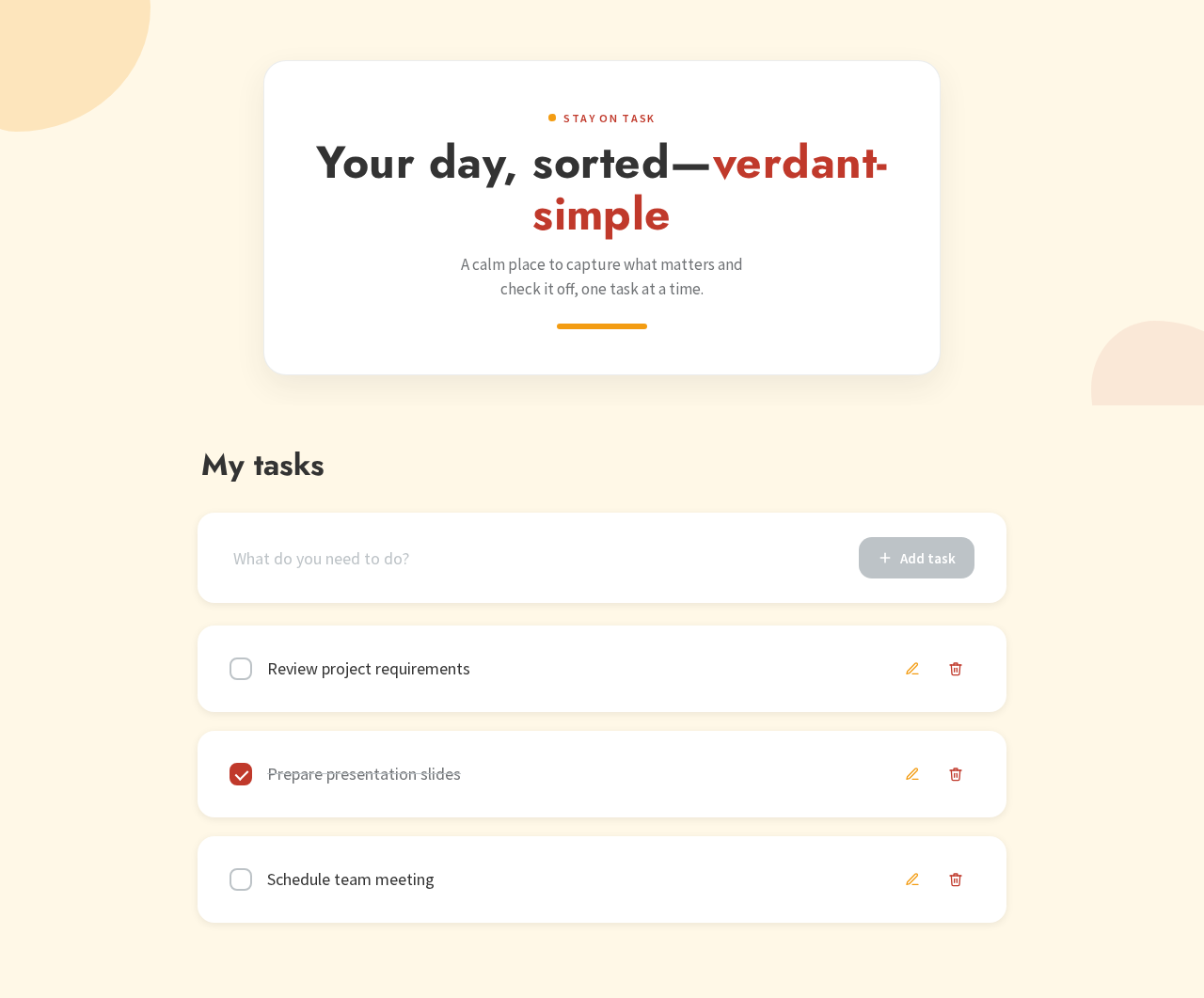
Stay on task
Your day, sorted—verdant-simple
A calm place to capture what matters and check it off, one task at a time.
My tasks
Stay on task
Your day, sorted—verdant-simple
A calm place to capture what matters and check it off, one task at a time.
No comments yet. Be the first!