verdant-pathology
Create a html,css and js offline working Pathology management software (LIMS) automates lab workflows, including patient registration, sample tracking, billing, and report generation, to improve accuracy and reduce turnaround times
Comments (0)
Sign in to leave a comment
System Requirements
System Requirements Document (SRD) for Verdant-Pathology
1. Introduction
The Verdant-Pathology project is a modern, offline-capable Pathology Management System (Laboratory Information Management System - LIMS) designed to automate and streamline laboratory workflows. This system focuses on improving accuracy, reducing turnaround times, and ensuring seamless operation in environments with limited or no internet connectivity.
Developed for single-user operation, the system provides a clean, modern interface with straightforward navigation. It includes essential features such as patient registration, sample tracking, billing, and report generation. The system leverages an offline database to ensure uninterrupted functionality, making it ideal for smaller labs or solo-operated setups.
This document outlines the system requirements for Verdant-Pathology, ensuring alignment with the vision and goals of Arjun Surya, the project owner.
2. System Overview
Verdant-Pathology is a lightweight, offline Pathology Management System tailored for single-user operation. It is designed to:
- Simplify and automate key laboratory processes.
- Operate seamlessly without internet connectivity using an offline database (SQLite).
- Provide a modern and intuitive user interface for efficient navigation and task management.
The system will include the following core modules:
- Patient Registration: For capturing and managing patient details.
- Sample Tracking: To monitor the status and location of samples within the lab.
- Billing: For generating and managing invoices for laboratory services.
- Report Generation: To create and manage diagnostic reports for patients.
3. Functional Requirements
The functional requirements for Verdant-Pathology are as follows:
- As a User, I should be able to register patients with their details.
- As a User, I should be able to track the status and location of samples.
- As a User, I should be able to generate and manage invoices for billing.
- As a User, I should be able to create and manage diagnostic reports.
- As a User, I should be able to operate the system offline without requiring an internet connection.
4. User Personas
4.1 Single User
- Role: Lab Technician or Lab Owner
- Responsibilities:
- Registering patients.
- Tracking samples.
- Generating invoices and managing billing.
- Creating and managing diagnostic reports.
- Needs:
- A simple, intuitive interface for efficient operation.
- Offline functionality to ensure uninterrupted workflows.
- Quick access to patient and sample data.
5. Visuals Colors and Theme
The visual design for Verdant-Pathology will reflect a clean, professional, and modern aesthetic. The color palette is designed to evoke trust, clarity, and efficiency.
Color Palette:
- Background:
#F4F8FB(Light Sky Blue) - Surface:
#FFFFFF(Pure White) - Text:
#2C3E50(Dark Slate Gray) - Accent:
#27AE60(Verdant Green) - Muted Tones:
#BDC3C7(Soft Gray)
This palette ensures a visually appealing and user-friendly interface, suitable for a medical and laboratory setting.
6. Signature Design Concept
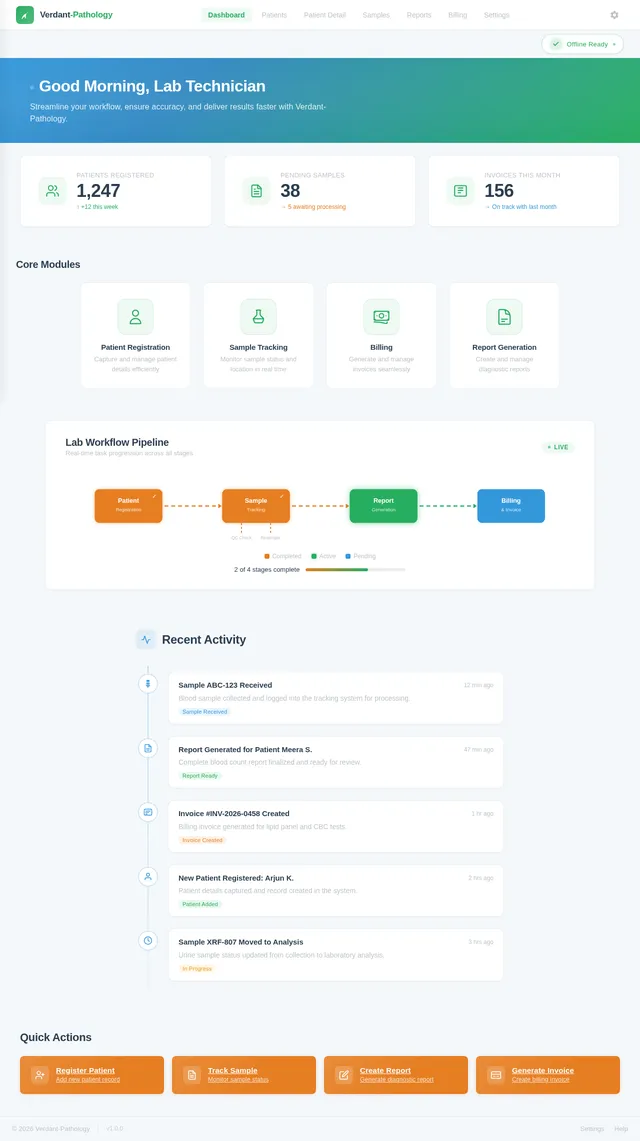
The Signature Design Concept for Verdant-Pathology is a "Dynamic Dashboard with Animated Workflow Visualization."
Concept Details:
- Homepage Design: The landing page will feature a dynamic dashboard with animated icons representing the core modules (Patient Registration, Sample Tracking, Billing, and Report Generation). Each icon will "light up" with a subtle glow when hovered over, providing an interactive and engaging experience.
- Workflow Visualization: A central animated flowchart will visually represent the lab's workflow, starting from patient registration to report generation. This flowchart will update dynamically as tasks are completed, giving the user a real-time overview of lab operations.
- Micro-Interactions: Smooth transitions and hover effects will enhance usability. For example:
- Clicking on a module icon will expand it into a detailed view with a sliding animation.
- Notifications (e.g., "Sample Received") will appear as subtle pop-ups with fade-in effects.
- Offline Indicator: A small, animated icon in the corner will indicate the system's offline status, with a green checkmark for "Offline Ready" and a red cross for "Sync Required."
This design will make the system visually appealing, intuitive, and memorable, ensuring a positive user experience.
7. Non-Functional Requirements
- Performance: The system must load within 2 seconds on standard hardware.
- Reliability: The system must function without internet connectivity and ensure data integrity.
- Usability: The interface must be intuitive and require minimal training for the user.
- Scalability: While designed for single-user operation, the system should be adaptable for potential multi-user functionality in the future.
- Security: All patient and sample data must be securely stored and accessible only to the authorized user.
8. Tech Stack
The following technologies will be used to develop Verdant-Pathology:
Frontend:
- HTML, CSS, JavaScript: For building the user interface.
Backend:
- Python: For backend logic.
- FastAPI: For creating APIs (if needed for future extensions).
Database:
- SQLite: For offline data storage.
Local Orchestration:
- Docker: For containerized development and deployment.
9. Assumptions and Constraints
Assumptions:
- The system will be used by a single user at a time.
- The user will have basic computer literacy.
- The system will primarily operate offline, with no dependency on internet connectivity.
Constraints:
- The system must be lightweight and optimized for offline use.
- The database size must be manageable to ensure smooth performance on standard hardware.
10. Glossary
- LIMS: Laboratory Information Management System.
- SQLite: A lightweight, serverless database engine suitable for offline applications.
- Offline Ready: The ability of the system to function without an active internet connection.
- Dynamic Dashboard: A visually interactive interface providing real-time updates and navigation.
End of Document
No comments yet. Be the first!