verdant-calculator
 Diya Trivedi
create a simple single page project for calculator

Comments (0)
Sign in to leave a comment
System Requirements
System Requirements Document for verdant-calculator
1. Introduction
verdant-calculator is a simple, single-page calculator. It exists to do one thing: let a person enter an arithmetic expression and see the correct result. There is no brand story, no marketing surface, no onboarding, and no account. The product is a small everyday utility — a precision instrument on a quiet page.
The audience is a single person doing arithmetic in a quiet moment: entering numbers and operators, reading the displayed result, and clearing or correcting the current entry to begin a new calculation. The product succeeds when the page returns the correct result for the expression that person entered.
The entire product is delivered as one page. This is an explicit, binding constraint from the authoritative requirement thread ("create a simple single page project for calculator") and is reflected in the page contract as an exact page count of one.
2. System Overview
verdant-calculator is a single-page, client-side arithmetic utility. The one page — Calculator — is the public entry surface and the only destination. It contains the calculator interface for entering expressions, evaluating them, displaying results, and clearing the current calculation.
Actors. The only active human actor is the Calculator User. There are no other personas, no administrators, no operators, and no external recipients. No system, provider, or external service is a persona; arithmetic evaluation is performed by the page itself as an internal system process supporting the user's interaction.
Accepted behavior. The calculator performs arithmetic calculations and shows the result to the user. The user enters numbers and operators, reads the displayed result, and clears or corrects the current entry to start a new calculation.
Ownership. All accepted behavior is owned by the single first-party page, Calculator. There is no provider-owned surface, no external destination, and no headless delivery.
Narrow exclusions. This document does not introduce history, memory, saved calculations, accounts, sign-in, sharing, export, unit conversion, scientific functions beyond the arithmetic operators shown on the keypad, or any second page. Nothing in the source requests them.
2a. Product Interpretation and Delivery Boundary
The product is delivered as one first-party page that any visitor can open and use immediately. Access to the Calculator page requires no identity: there is no sign-in, no account creation, and no session continuity, because the accepted behavior is a single self-contained calculation that produces its result on screen and needs no durable, actor-specific state to be privately owned or resumed. The page is public and ephemeral by design.
Everything the product does happens on that one page. There is no separate anonymous pre-identity lifecycle, because there is no protected state behind an access boundary. There is no future-horizon section in the authoritative source; no deferred capabilities are recorded, and none are implied.
2b. Source Content Inventory
Not applicable. No reference directive in the authoritative source declares a content_source, so no source content inventory is produced.
2c. Page Content and Component Coverage
Calculator
The single page of the product. It is the public entry surface, requires no identity, and owns the complete calculator lifecycle: expression entry, evaluation, result display, and clearing.
Information and state
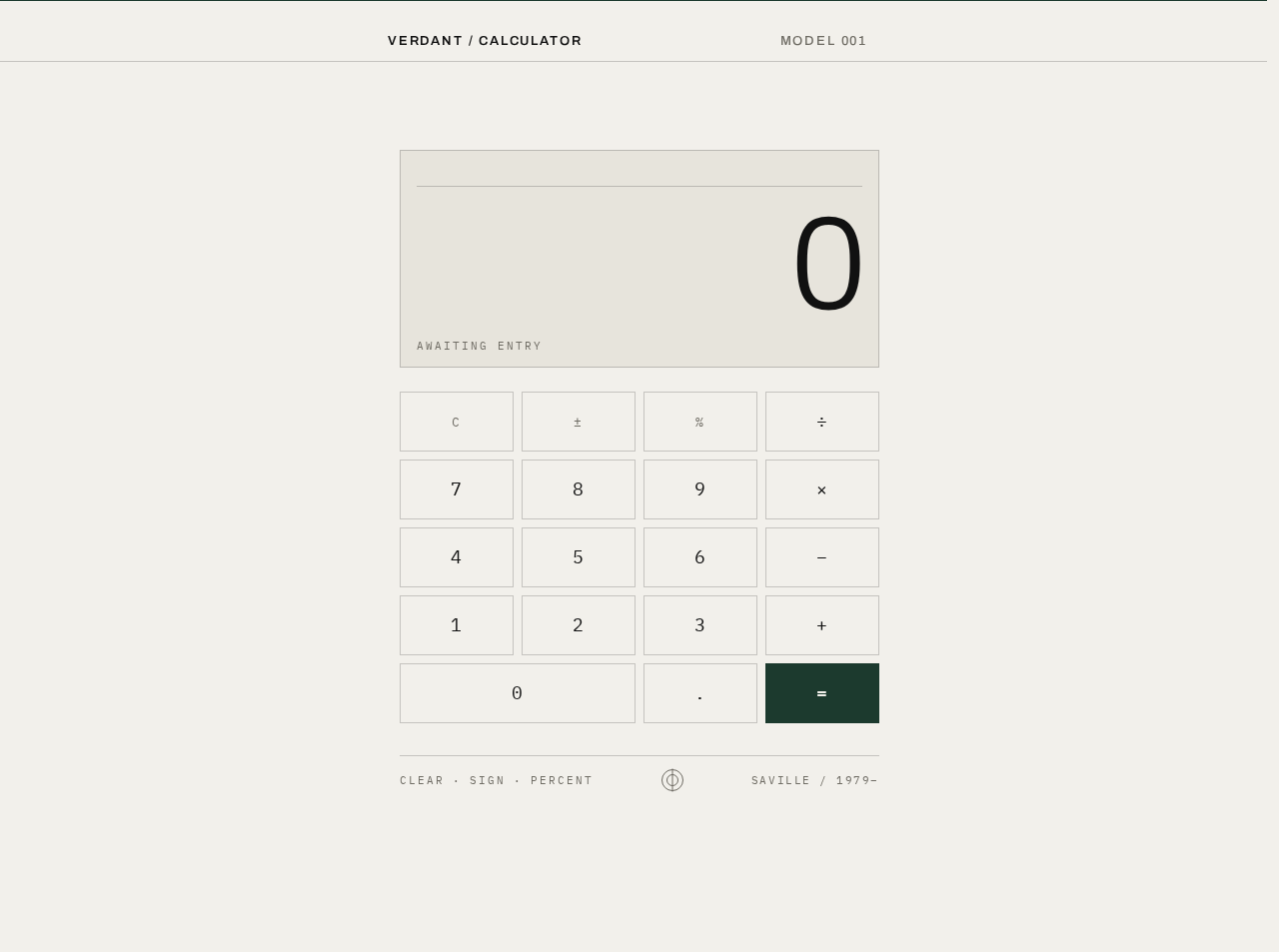
- Wordmark rule — a full-bleed hairline top rule carrying
VERDANT / CALCULATORset left in 13px uppercase Archivo with +0.14em tracking, andMODEL 001set right in muted#6E6B63. - Expression tape — the current expression as typed, right-aligned, IBM Plex Mono 13px in muted
#6E6B63, sitting directly above the result inside the display plate. Scrolls horizontally when it overflows. - Result display — the current value, right-aligned, Archivo 300 at
clamp(56px, 14vw, 132px)with −0.02em tracking, ink#111111, sized so a 9-digit number still fits inside the plate at 375px. - Active operator state — exactly one operator key carries the spot green
#00A05Aat a time, marking the operator currently in effect. - Keypad — a 4×5 grid of flat, 0px-radius rectangles with 1px ink-at-20%-opacity borders: digits 0–9, decimal point, the four arithmetic operators, equals, clear, sign, and percent.
- Metadata strip — IBM Plex Mono 11px muted, listing
CLEAR · SIGN · PERCENTlegends, a small 24px concentric-circle diagram in muted ink, and a code line.
Primary actions
- Enter a digit or the decimal point; the digit appends to the current entry and the result display updates.
- Select an arithmetic operator; the operator is recorded, the active-operator key takes the spot green, and the next entry begins a new operand.
- Press equals; the expression is evaluated and the result is committed to the display.
- Press clear; the current calculation is reset to an empty expression and a zero result.
- Press sign; the sign of the current entry is toggled.
- Press percent; the current entry is converted to its percentage value.
Supporting actions
- Correct the current entry by clearing and re-entering, or by continuing to type digits before an operator is committed.
- Read the expression tape to confirm what was entered before committing with equals.
Domain entities
- Expression — the ordered sequence of operands and operators currently entered.
- Operand — a numeric value being entered or already recorded.
- Operator — one of addition, subtraction, multiplication, division.
- Result — the numeric value produced by evaluating the expression.
Component responsibilities
- The display plate holds the expression tape and the result, divided from the tape by a 1px hairline in ink at 20% opacity, and is itself held inside a 1px hairline plate.
- The keypad captures all numeric and operator input and provides press feedback.
- The metadata strip carries the function legends and the referential diagram; it is informational only and introduces no behavior.
States
- Loading — the page is a static client-side artefact; there is no data fetch and no loading state beyond the one-time entrance sequence.
- Empty — on first load the expression tape is empty and the result display reads
0. - Success — after equals, the result display shows the evaluated value and the expression tape shows the expression that produced it.
- Error — division by zero and any other non-finite evaluation result are shown as an explicit error state in the result display rather than a numeric value; the expression tape retains the offending expression so the user can see what failed.
- Recovery — pressing clear from the error state resets the expression and the result to the empty state, and the user can immediately enter a new calculation. No other recovery path is required.
3. Functional Requirements
FR-1 — Single-page delivery (explicit) As a Calculator User, I should reach the entire calculator on one page, so that I can do arithmetic without navigating anywhere.
- Trigger/input: opening the product.
- Observable result: the Calculator page renders with the wordmark rule, display plate, keypad, and metadata strip; no other page exists.
- Access state: public, no identity required.
- Failure/recovery: not applicable; the page is a static client-side artefact.
- Continuation: the user can immediately begin entering an expression.
FR-2 — Enter an arithmetic expression (explicit) As a Calculator User, I should enter numbers and operators, so that I can build the calculation I want to perform.
- Trigger/input: pressing digit keys, the decimal point, and operator keys on the keypad.
- Observable result: the entered digits appear in the result display as the current entry; the expression tape shows the expression built so far; the active operator key takes the spot green
#00A05A. - Access state: public, no identity required.
- Failure/recovery: if the entry is wrong, the user presses clear and re-enters, or continues typing before committing an operator.
- Continuation: the user presses equals to evaluate, or continues entering operands and operators.
FR-3 — Evaluate and display the result (explicit) As a Calculator User, I should have the calculator perform the arithmetic and show me the result, so that I get the answer to my calculation.
- Trigger/input: pressing the equals key with a valid expression entered.
- Observable result: the result display shows the evaluated numeric value, right-aligned at specimen scale; the expression tape retains the expression that produced it; the result block cross-fades over 120ms.
- Access state: public, no identity required.
- Failure/recovery: if the expression is incomplete or evaluates to a non-finite value, the result display shows an explicit error state instead of a number, and the expression tape retains the offending expression.
- Continuation: the user reads the result, then either continues calculating from it or presses clear to start a new calculation.
FR-4 — Clear the current calculation (explicit) As a Calculator User, I should clear the current calculation, so that I can start a new one without leftover state.
- Trigger/input: pressing the clear key.
- Observable result: the expression tape empties and the result display returns to
0. - Access state: public, no identity required.
- Failure/recovery: clear is always available, including from the error state, and always returns the page to the empty state.
- Continuation: the user begins a new expression.
FR-5 — Correct the current entry (explicit) As a Calculator User, I should correct the current entry, so that a mistyped number does not force me to abandon the calculation.
- Trigger/input: pressing clear and re-entering, or continuing to type digits before an operator is committed.
- Observable result: the result display reflects the corrected entry and the expression tape matches what will be evaluated.
- Access state: public, no identity required.
- Failure/recovery: if the correction is still wrong, the user repeats the correction; clear remains available at all times.
- Continuation: the user presses equals to evaluate the corrected expression.
FR-6 — Sign toggle (explicit) As a Calculator User, I should toggle the sign of the current entry, so that I can enter negative values without retyping.
- Trigger/input: pressing the sign key.
- Observable result: the current entry's sign flips and the result display updates immediately.
- Access state: public, no identity required.
- Failure/recovery: pressing sign again restores the previous sign.
- Continuation: the user continues entering the expression or presses equals.
FR-7 — Percent (explicit) As a Calculator User, I should convert the current entry to its percentage value, so that I can use percentages in a calculation.
- Trigger/input: pressing the percent key.
- Observable result: the current entry is replaced by its percentage value and the result display updates immediately.
- Access state: public, no identity required.
- Failure/recovery: clear resets the entry if the conversion was not what the user intended.
- Continuation: the user continues entering the expression or presses equals.
FR-8 — Read the expression tape (explicit) As a Calculator User, I should see the expression I have entered, so that I can confirm what will be evaluated before I commit it.
- Trigger/input: entering digits and operators.
- Observable result: the expression tape shows the expression in IBM Plex Mono 13px muted, right-aligned above the result, and scrolls horizontally when it overflows.
- Access state: public, no identity required.
- Failure/recovery: not applicable; the tape always reflects the current expression.
- Continuation: the user presses equals, or continues editing the expression.
4. User Personas
Calculator User
Product context. The Calculator User is the sole active human role in this product. They arrive at a single page with no account, no history, and no prior state, in a quiet moment, to do a piece of everyday arithmetic. Nothing about the product asks them to identify themselves, and nothing about their work persists after they leave.
Primary goal. To enter an arithmetic expression and read the correct result.
Distinct accepted responsibilities. This role owns the entire product lifecycle on one page: building an expression from digits, the decimal point, and the four arithmetic operators; committing it with equals; reading the result; and clearing or correcting the current entry to start a new calculation. They also use sign and percent to shape the value they are entering. No other actor shares or splits this work.
Relevant inputs and decisions. The role decides what expression to enter, when to commit it with equals, whether the displayed result is the one they wanted, and whether to continue calculating from it or clear and start again. Their inputs are keypad presses; their decisions are made by reading the expression tape and the result display.
Interactions with other accepted participants. None. There is no second human participant, no counterparty, and no recipient of the calculation. The result is for the Calculator User alone, on screen, and creates no obligation, transfer, or durable relationship with anyone else.
Observable success. The result display shows the correct value for the expression the user entered, and the expression tape shows the expression that produced it. Failure is observable too: an invalid or non-finite evaluation shows an explicit error state rather than a wrong number, and clear returns the page to a usable empty state.
5. Core User Flows
Flow 1 — Perform a calculation
- The Calculator User opens the product. The Calculator page renders: the hairline top rule with
VERDANT / CALCULATORandMODEL 001, the display plate with an empty expression tape and a result of0, the 4×5 keypad, and the metadata strip. The entrance sequence plays once — top rule and wordmark fade in over 400ms, then the display plate, then the keypad rows stagger in 60ms apart. - The user presses digit keys. Each digit appends to the current entry and appears in the result display at specimen scale; the expression tape begins to fill in 13px mono above it.
- The user presses an arithmetic operator key. The operator is recorded, the expression tape shows it, and that operator key takes the single spot green
#00A05Afor the screen. - The user presses digit keys again to enter the second operand. The result display shows the new entry; the expression tape shows the full expression so far.
- The user presses equals. The expression is evaluated. The result block cross-fades over 120ms and the result display shows the evaluated value, right-aligned in Archivo 300; the expression tape retains the expression that produced it.
- Continuation: the user reads the result and either continues calculating from it or presses clear. Pressing clear empties the expression tape and returns the result display to
0, ready for a new calculation.
Flow 2 — Correct a mistyped entry
- The Calculator User is mid-expression on the Calculator page and notices the result display does not show the number they intended.
- The user presses clear. The expression tape empties and the result display returns to
0. - The user re-enters the expression from the keypad. The result display and expression tape update as they type.
- The user presses equals. The result display shows the correct evaluated value and the expression tape retains the corrected expression.
- Continuation: the user reads the result and proceeds with a new calculation or leaves the page.
Flow 3 — Use sign and percent
- The Calculator User is entering an operand on the Calculator page.
- The user presses the sign key. The current entry's sign flips and the result display updates immediately. Pressing sign again restores the previous sign.
- The user presses the percent key. The current entry is replaced by its percentage value and the result display updates immediately.
- The user presses an operator and continues the expression, or presses equals to evaluate it.
- Continuation: the result display shows the evaluated value; clear returns the page to the empty state.
Flow 4 — Recover from an invalid calculation
- The Calculator User enters an expression that cannot produce a finite result — for example, division by zero — and presses equals on the Calculator page.
- The result display shows an explicit error state instead of a numeric value. The expression tape retains the offending expression so the user can see what failed.
- The user presses clear. The expression tape empties and the result display returns to
0. - The user enters a valid expression and presses equals. The result display shows the correct evaluated value.
- Continuation: the user reads the result and either continues calculating or leaves the page.
6. Visuals, Colors and Theme
The creative direction is authoritative for this section. It is an austere reference after Peter Saville: one coded artefact on silence. The emotional register is calm, exact, and slightly cold — a precision instrument on a gallery plinth, not a friendly app. The name verdant-calculator supplies the only colour code: a single exact green, used as code rather than decoration.
Palette — light mode
| Role | Hex | Use |
|---|---|---|
| Background | #F2F0EB | Paper-bone ground; the field the artefact sits on |
| Surface | #E7E4DC | Slightly deeper bone for the keypad plate and display housing |
| Text | #111111 | Ink for all readable type and digits |
| Primary | #1C3A2E | Deep pine: the equals key, the top rule, focus rings, the wordmark |
| Accent | #00A05A | Exact Saville spot green — appears once per screen, on the active operator key or the decimal point, never as a fill field |
| Muted | #6E6B63 | Metadata, key legends, the function row |
Proportion. 80% bone ground, 15% ink and pine structure, 5% spot green. No gradients, no shadows, no blue anywhere.
Typography
- Headings: Archivo, 500–600 weight, uppercase, letterspaced +0.14em at small sizes for the wordmark and metadata.
- Display digits: Archivo 300 at very large size with tight −0.02em tracking, so the number reads as a type specimen rather than a UI label.
- Body and technical voice: IBM Plex Mono 400/500 carries the key legends, expression tape, and memory line — a typed, catalogue-card voice.
- Scale: 1.25 modular on a 4pt baseline. Display digits
clamp(56px, 14vw, 132px); wordmark 13px uppercase tracked; section labels 11px uppercase tracked +0.18em; key legends 18px mono; expression tape 13px mono; footnote 11px muted.
Shape language. Hard edges only — 0px radii on every key, rule, and panel. Exact 1px hairlines in ink at 20% opacity divide the display from the tape and the tape from the keypad, echoing a printed spec sheet. Keys are flat rectangles with a 1px border and no fill change on hover; the only filled shapes are the pine equals key and the single spot-green operator key. Nothing is rounded, nothing is bevelled, nothing casts a shadow.
Layout. One centred artefact on a bone field, held to a strict 4-column grid inside a max-width of 420px at mobile and 480px at desktop, with the whole assembly sitting in the upper-middle third of the viewport and a wide silent margin below. Order top to bottom: a hairline top rule carrying VERDANT / CALCULATOR left and MODEL 001 right; the display plate with right-aligned expression tape above the right-aligned result; a full-width hairline; a 4×5 keypad of flat rectangles; a bottom metadata strip with CLEAR · SIGN · PERCENT legends and a small code line. At 375px the grid keeps four columns with 8px gutters and 44px minimum key height; at 768px and 1280px the artefact simply centres with more silence around it.
Imagery. No photography, no illustration, no icons beyond typographic glyphs. The "image" is the calculator itself treated as a found artefact: the display digits at specimen scale, the hairline rules, the colour code. A single geometric diagram may appear in the bottom metadata strip — a small concentric-circle or grid mark in muted ink, 24px, purely referential, like a catalogue figure number.
Avoid. Any blue or indigo in any state, including focus rings and link colours; rounded corners, pill buttons, or any radius above 0px; drop shadows, glows, gradients, glass or blur effects; hover-lift cards or any card grid; filled colour fields other than the pine equals key and the single spot-green operator; photography, 3D renders, blob shapes or character illustration; friendly micro-copy, emoji or exclamation marks; bouncy, elastic or spring easing of any kind.
7. Signature Design Concept
The first screen is not a SaaS hero — it is a specimen card.
A bone #F2F0EB field with a wide silent margin. In the upper-middle third, a single centred instrument: a 1px hairline-bordered plate holding the expression tape in IBM Plex Mono 13px muted, and beneath it the current value at clamp(56px, 14vw, 132px) in Archivo 300, right-aligned, ink #111111, sized so a 9-digit number still fits inside the plate at 375px. Above the plate, a full-bleed hairline rule with VERDANT / CALCULATOR set 13px uppercase tracked left and MODEL 001 right in muted. Below, the 4×5 keypad of flat 1px-bordered rectangles, with the equals key filled deep pine #1C3A2E and exactly one operator key marked in spot green #00A05A. No gradient, no blob, no button-with-shadow, no photograph — the dominant element is the oversized number and the silence around it.
The signature moves are: the oversized right-aligned result digit block set like a type specimen with the expression tape directly above it, both held inside a 1px hairline plate; a single spot-green key per screen so the "verdant" name is a colour code rather than a theme, with the equals key alone filled deep pine; a full-bleed hairline top rule that turns the page header into a catalogue plate caption; a keypad of perfectly flat 0px-radius rectangles whose only press feedback is an instant 80ms border shift to pine; and a bottom metadata strip in IBM Plex Mono 11px muted, reading like the figure legend of a printed sleeve.
8. Interaction Model & Motion Direction
Interaction Model: Static (direction) Motion Tempo: still Hero Dimensionality: flat
Landing Hero Motion Brief
- Focal subject. The calculator itself as a found artefact: the oversized right-aligned result digit block at
clamp(56px, 14vw, 132px)in Archivo 300, with the 13px mono expression tape directly above it, both inside a 1px hairline plate on a bone field. - Input → transformation → outcome thesis. A keypad press (input) registers as an instant 80ms border-colour shift from ink-at-20% to pine and updates the current entry (transformation), and pressing equals commits the evaluated value to the display with a 120ms cross-fade (outcome). The motion vocabulary is register-and-commit: nothing moves except the value that changed.
- Motion vocabulary. Almost none, by design. Key presses register with an instant 80ms border-colour shift from ink-20% to pine, no easing theatrics. The result digit block cross-fades over 120ms when a new value is committed. The expression tape scrolls horizontally if it overflows, and nothing else moves.
- Composed first frame. The bone field with its wide silent margin; the hairline top rule with
VERDANT / CALCULATORleft andMODEL 001right; the display plate with an empty tape and0; the 4×5 keypad with the pine equals key and one spot-green operator key; the metadata strip below. A single restrained entrance plays once: the top rule and wordmark fade in over 400ms, then the display plate, then the keypad rows stagger in 60ms apart — once, never again. - Reduced-motion state. With
prefers-reduced-motion, the entrance sequence is skipped entirely and the page renders in its final composed state: no fades, no stagger, no cross-fade on commit — the value simply changes. The expression tape remains horizontally scrollable so every part of a long expression can be brought fully into view. All readable text and controls stay whole and inside their container at 375px, 768px, and 1280px.
No 3D or WebGL scene is requested or direction-derived; the hero dimensionality is flat and no Canvas/R3F/Drei dependency is required.
9. Non-Functional Requirements
NFR-1 — Single page (explicit) The product is delivered as exactly one page. No additional routes, pages, or destinations are created.
NFR-2 — No identity or account (required_inference) The Calculator page is publicly reachable with no sign-in, no account creation, and no session continuity. The accepted behavior produces a result on screen and requires no durable, actor-specific state to be privately owned or resumed, so no application-owned identity is established.
NFR-3 — Client-side arithmetic (required_inference) Arithmetic evaluation happens on the page itself. No server round-trip is required for a calculation, and no calculation data leaves the browser.
NFR-4 — Readable text and controls at every viewport (explicit, from the creative direction)
Headlines, wordmarks, labels, numbers, and controls stay entirely inside the viewport and their container at 375px, 768px, and 1280px, wrapping or scaling to fit. No other element covers any part of them. The result display uses clamp(56px, 14vw, 132px) so a 9-digit number fits inside the plate at 375px.
NFR-5 — Reduced motion (explicit, from the creative direction)
With prefers-reduced-motion, the page provides a usable static arrangement: the entrance sequence is skipped and the expression tape remains horizontally scrollable so every item can be brought fully into view.
NFR-6 — No blue, no radius, no shadow (explicit, from the creative direction) No blue or indigo appears in any state, including focus rings and link colours. No corner radius above 0px. No drop shadows, glows, gradients, glass, or blur effects.
NFR-7 — Accessible focus indication (required_inference)
Focus rings use deep pine #1C3A2E, consistent with the palette's structural colour and the prohibition on blue, so keyboard users can see which key has focus.
10. Tech Stack
- React — the single-page calculator is a client-side React application. (Default — not specified by user)
- Vite — build and dev server for the single-page app. (Default — not specified by user)
- CSS — plain CSS with custom properties for the palette tokens, the 4pt baseline scale, and the 1px hairline rules. No CSS framework is required for a single page. (Default — not specified by user)
- No backend, no database, no Docker, no Kubernetes — the product is one static client-side page with no server-side state, so none of these are needed. (Default — not specified by user)
11. Assumptions and Constraints
Constraints (binding)
- The product is a simple single page project for calculator. This is an explicit hard constraint and an exact page count of one.
- The calculator performs arithmetic calculations and shows the result to the user.
- The creative direction is authoritative for palette, typography, shape language, layout, motion, and imagery, and its prohibitions (no blue, no radius, no shadow, no gradient, no photography, no friendly micro-copy, no spring easing) are binding.
Assumptions (narrow, labeled)
- [Assumption] The four arithmetic operators are addition, subtraction, multiplication, and division, matching the 4×5 keypad layout described in the creative direction.
- [Assumption] The keypad's 4×5 grid contains digits 0–9, the decimal point, the four arithmetic operators, equals, clear, sign, and percent — the set named by the direction's
CLEAR · SIGN · PERCENTlegends and its operator and equals keys. - [Assumption] Division by zero and other non-finite evaluations are surfaced as an explicit error state rather than a numeric value, because showing a wrong or undefined number would contradict the accepted outcome of returning the correct result.
- [Assumption] The product is light mode only; the creative direction specifies a light-mode palette and no dark-mode tokens.
- [Assumption] No calculation history, memory, or persistence is provided, because the source requests none and the page is a single self-contained calculation.
Explicit exclusions
- No second page, route, or destination.
- No accounts, sign-in, or user profiles.
- No history, saved calculations, or memory functions.
- No sharing, export, or copy-to-clipboard surface.
- No scientific, trigonometric, or unit-conversion functions.
- No backend service, database, or deployment infrastructure.
12. Glossary
- Calculator page — the single page of the product; the public entry surface that owns expression entry, evaluation, result display, and clearing.
- Calculator User — the sole active human persona; a person who opens the page to perform everyday arithmetic.
- Expression — the ordered sequence of operands and operators currently entered, shown in the expression tape.
- Expression tape — the right-aligned IBM Plex Mono 13px muted line above the result that shows the current expression and scrolls horizontally when it overflows.
- Operand — a numeric value being entered or already recorded in the expression.
- Operator — one of addition, subtraction, multiplication, or division.
- Result — the numeric value produced by evaluating the expression, shown in the result display.
- Result display — the oversized right-aligned Archivo 300 digit block at
clamp(56px, 14vw, 132px)that shows the current entry or the committed result. - Active operator — the operator currently in effect, marked by the single spot green
#00A05Akey on the screen. - Spot green — the exact Saville green
#00A05A, appearing once per screen as a colour code rather than a theme. - Deep pine — the structural colour
#1C3A2E, used for the equals key, the top rule, focus rings, and the wordmark. - Hairline — a 1px rule in ink at 20% opacity, used to divide the display from the tape and the tape from the keypad.
- Metadata strip — the bottom strip in IBM Plex Mono 11px muted carrying the
CLEAR · SIGN · PERCENTlegends, a small concentric-circle diagram, and a code line.
No comments yet. Be the first!