venus-professional
 Singh Connects
professional thumbnail designer for yt shorts instagram reels and yt long video

Comments (0)
Sign in to leave a comment
System Requirements
Venus-Professional System Requirements Document
1. Introduction
The Venus-Professional project aims to develop a comprehensive platform for professional thumbnail design tailored for YouTube Shorts, Instagram Reels, and YouTube long videos. This document outlines the system requirements necessary to achieve the project's objectives, ensuring a user-friendly and efficient design process.
2. System Overview
Venus-Professional will provide tools and features specifically designed for creating engaging and visually appealing thumbnails for various social media platforms. The system will cater to content creators looking to enhance their video content's visual appeal and attract more viewers.
3. Functional Requirements as Story Points
- As a Content Creator, I should be able to design thumbnails for YouTube Shorts that are optimized for mobile viewing.
- As a Content Creator, I should be able to create thumbnails for Instagram Reels that adhere to platform-specific dimensions and guidelines.
- As a Content Creator, I should be able to design thumbnails for YouTube long videos that capture the essence of the video content.
- As a User, I should be able to save and edit previously created thumbnails.
- As a User, I should be able to access a library of templates and design elements for thumbnail creation.
- As a User, I should be able to export thumbnails in various formats suitable for different platforms.
4. User Personas
- Content Creator: Individuals who produce video content for platforms like YouTube and Instagram and require professional thumbnails to enhance their content's visual appeal.
5. Core User Flows
- Content Creator selects a platform (YouTube Shorts, Instagram Reels, or YouTube long video) -> Chooses a template or starts from scratch -> Designs the thumbnail using available tools -> Saves or exports the thumbnail.
6. Visuals Colors and Theme
- primary: #FF5733 (a vibrant orange to capture attention)
- primary_light: #FF8A66 (a lighter tint of the primary color for hover states)
- secondary: #333333 (a neutral dark gray for contrast)
- accent: #FFC300 (a bright yellow for call-to-action elements)
- highlight: #DAF7A6 (a soft green for notifications and active states)
- bg: #FFFFFF (a clean white background)
- surface: #F2F2F2 (a light gray for cards and panels)
- text: #000000 (black for primary text)
- text_muted: #666666 (a muted gray for secondary text)
- border: #DDDDDD (a subtle gray for borders)
7. Signature Design Concept
Interactive Thumbnail Design Canvas
The homepage of Venus-Professional will feature an interactive design canvas where users can drag and drop elements to create thumbnails. The canvas will have a dynamic grid that adjusts based on the selected platform (YouTube Shorts, Instagram Reels, or YouTube long video). Users can interact with elements, such as resizing, rotating, and layering, using intuitive gestures. The design will include a live preview feature that shows how the thumbnail will appear on the chosen platform.
LANDING HERO MOTION BRIEF
The landing page will feature a dynamic animation where a blank canvas transforms into a vibrant thumbnail. Elements like text, images, and icons will animate into place, demonstrating the ease of use and creative potential of the platform. The animation will loop every 10 seconds, showcasing different design possibilities. The motion will be built using motion/react for smooth transitions and interactions.
8. Interaction Model & Motion Direction
- Interaction Model: Animated
- The landing page will feature moderate scroll-triggered reveals and hover transitions to engage users.
- Interactive elements will have spring physics for a polished user experience.
9. Non-Functional Requirements
- The system shall ensure fast loading times for the design interface.
- The platform shall be accessible on both desktop and mobile devices.
- The system shall provide secure storage for user-created thumbnails.
10. Tech Stack
- Frontend: React for Web
- Backend: FastAPI
- Database: MySQL or MariaDB, using Alembic for migrations
- Local Orchestration: Docker, docker-compose
- Server-side Orchestration: Kubernetes
11. Assumptions and Constraints
- The platform will primarily target content creators in India, considering local preferences and requirements.
- The system must comply with platform-specific guidelines for thumbnail dimensions and formats.
12. Glossary
- Thumbnail: A small image that represents a video on platforms like YouTube and Instagram.
- Content Creator: An individual who produces and shares video content on social media platforms.
- Canvas: The design area where users create thumbnails.
Professional thumbnails for Shorts, Reels & long-form video
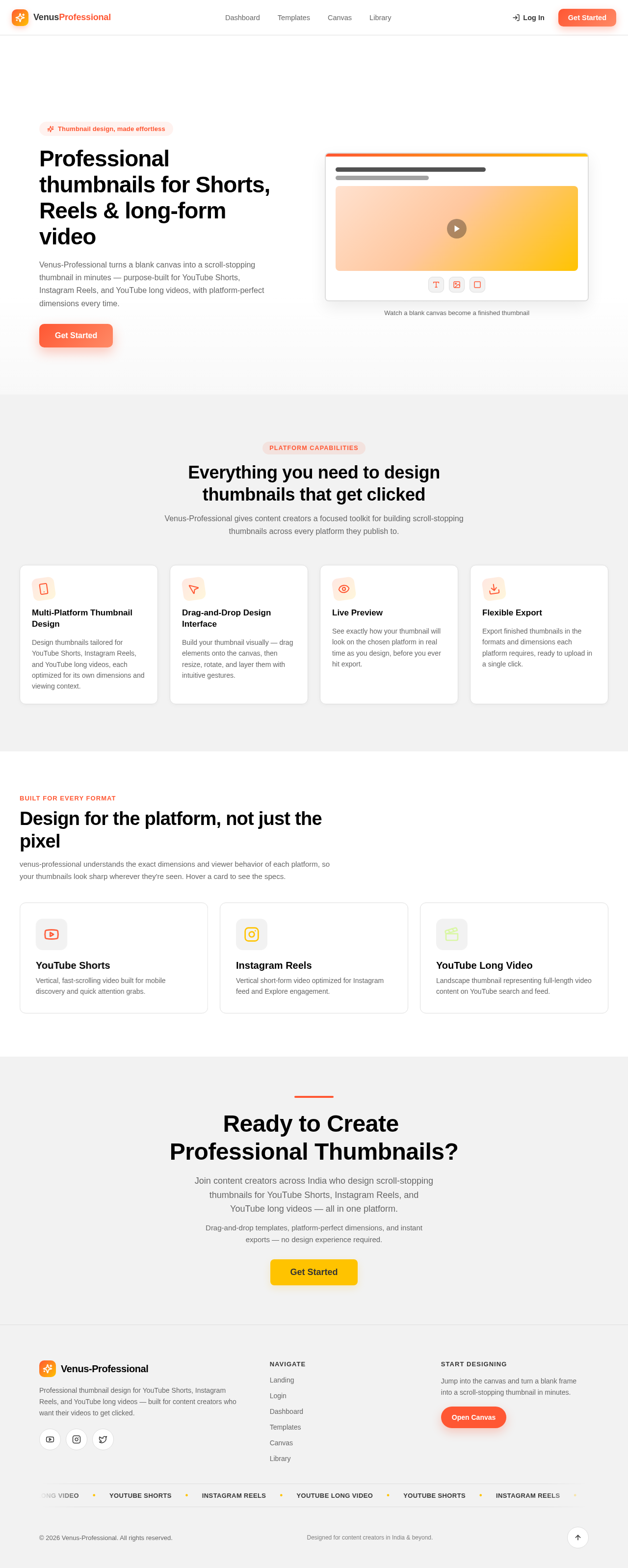
Venus-Professional turns a blank canvas into a scroll-stopping thumbnail in minutes — purpose-built for YouTube Shorts, Instagram Reels, and YouTube long videos, with platform-perfect dimensions every time.
Get StartedWatch a blank canvas become a finished thumbnail
Everything you need to design thumbnails that get clicked
Venus-Professional gives content creators a focused toolkit for building scroll-stopping thumbnails across every platform they publish to.
Multi-Platform Thumbnail Design
Design thumbnails tailored for YouTube Shorts, Instagram Reels, and YouTube long videos, each optimized for its own dimensions and viewing context.
Drag-and-Drop Design Interface
Build your thumbnail visually — drag elements onto the canvas, then resize, rotate, and layer them with intuitive gestures.
Live Preview
See exactly how your thumbnail will look on the chosen platform in real time as you design, before you ever hit export.
Flexible Export
Export finished thumbnails in the formats and dimensions each platform requires, ready to upload in a single click.
Design for the platform, not just the pixel
venus-professional understands the exact dimensions and viewer behavior of each platform, so your thumbnails look sharp wherever they're seen. Hover a card to see the specs.
YouTube Shorts
Vertical, fast-scrolling video built for mobile discovery and quick attention grabs.
- Keep key subject centered for mobile crop safety
- Use bold, high-contrast text under 5 words
- Avoid UI overlap zones near top and bottom edges
Instagram Reels
Vertical short-form video optimized for Instagram feed and Explore engagement.
- Design for a bright, saturated first-frame thumbnail
- Leave clear space for profile and caption overlay
- Favor lifestyle and close-up imagery for scroll-stop
YouTube Long Video
Landscape thumbnail representing full-length video content on YouTube search and feed.
- Use large expressive faces or objects for clarity at small sizes
- Pair thumbnail text with title for context, not repetition
- Test legibility at 120px width before publishing
Ready to Create Professional Thumbnails?
Join content creators across India who design scroll-stopping thumbnails for YouTube Shorts, Instagram Reels, and YouTube long videos — all in one platform.
Drag-and-drop templates, platform-perfect dimensions, and instant exports — no design experience required.
Professional thumbnails for Shorts, Reels & long-form video
Venus-Professional turns a blank canvas into a scroll-stopping thumbnail in minutes — purpose-built for YouTube Shorts, Instagram Reels, and YouTube long videos, with platform-perfect dimensions every time.
Get StartedWatch a blank canvas become a finished thumbnail
Everything you need to design thumbnails that get clicked
Venus-Professional gives content creators a focused toolkit for building scroll-stopping thumbnails across every platform they publish to.
Multi-Platform Thumbnail Design
Design thumbnails tailored for YouTube Shorts, Instagram Reels, and YouTube long videos, each optimized for its own dimensions and viewing context.
Drag-and-Drop Design Interface
Build your thumbnail visually — drag elements onto the canvas, then resize, rotate, and layer them with intuitive gestures.
Live Preview
See exactly how your thumbnail will look on the chosen platform in real time as you design, before you ever hit export.
Flexible Export
Export finished thumbnails in the formats and dimensions each platform requires, ready to upload in a single click.
Design for the platform, not just the pixel
venus-professional understands the exact dimensions and viewer behavior of each platform, so your thumbnails look sharp wherever they're seen. Hover a card to see the specs.
YouTube Shorts
Vertical, fast-scrolling video built for mobile discovery and quick attention grabs.
- Keep key subject centered for mobile crop safety
- Use bold, high-contrast text under 5 words
- Avoid UI overlap zones near top and bottom edges
Instagram Reels
Vertical short-form video optimized for Instagram feed and Explore engagement.
- Design for a bright, saturated first-frame thumbnail
- Leave clear space for profile and caption overlay
- Favor lifestyle and close-up imagery for scroll-stop
YouTube Long Video
Landscape thumbnail representing full-length video content on YouTube search and feed.
- Use large expressive faces or objects for clarity at small sizes
- Pair thumbnail text with title for context, not repetition
- Test legibility at 120px width before publishing
Ready to Create Professional Thumbnails?
Join content creators across India who design scroll-stopping thumbnails for YouTube Shorts, Instagram Reels, and YouTube long videos — all in one platform.
Drag-and-drop templates, platform-perfect dimensions, and instant exports — no design experience required.
No comments yet. Be the first!