AI-Powered Resume Analysis
Unlock Your Resume’s Potential
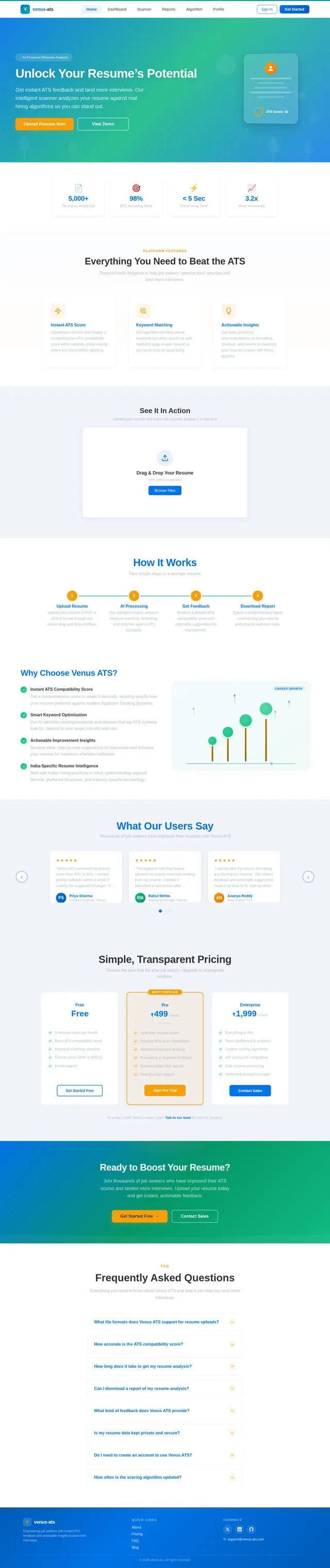
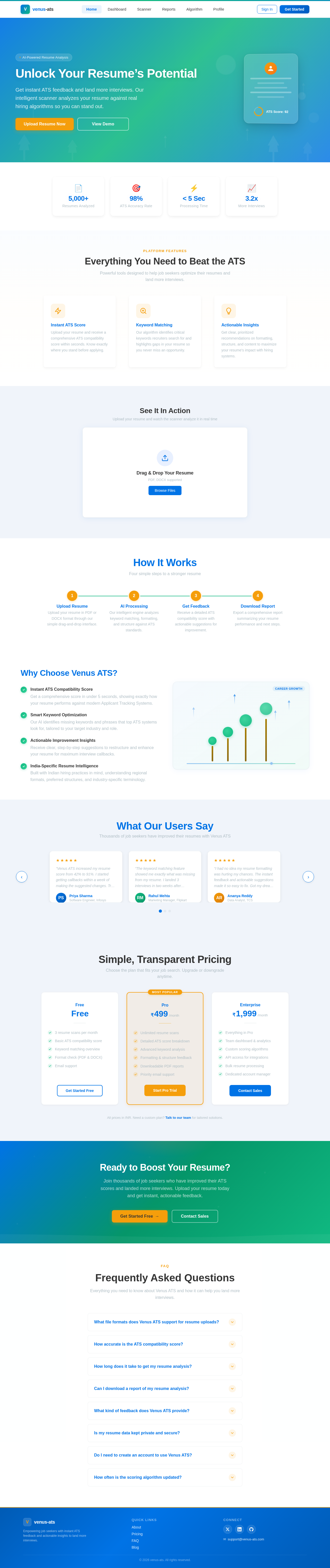
Get instant ATS feedback and land more interviews. Our intelligent scanner analyzes your resume against real hiring algorithms so you can stand out.
 Diya Trivedi
build an ats-score resume score webiste
Sign in to leave a comment
The venus-ats project aims to create a cutting-edge platform that empowers job seekers by providing instant feedback on their resumes' performance with modern Applicant Tracking Systems (ATS). This tool will help users understand how their resumes align with ATS requirements, offering actionable insights to improve their chances of landing interviews. By addressing a critical pain point for job seekers, venus-ats will serve as a valuable resource in the competitive job market.
This document outlines the system requirements for the venus-ats platform, ensuring clarity and alignment with the project's goals.
The venus-ats platform will allow users to upload their resumes and receive instant feedback on their ATS compatibility. The system will analyze resumes based on key metrics such as keyword matching, formatting, and overall structure. The feedback will include a comprehensive score and actionable suggestions for improvement.
The platform will cater to job seekers in India (IN), considering locale-specific nuances such as preferred resume formats, common industry keywords, and regional hiring practices. The system will be designed to provide a seamless, user-friendly experience, ensuring accessibility for users with varying levels of technical expertise.
The functional requirements for venus-ats are as follows:
The venus-ats platform will use a professional yet approachable color palette to instill trust and confidence in users. The colors are designed to reflect the platform's focus on career growth and modern technology.
This palette ensures readability and a clean, modern aesthetic.
The venus-ats homepage will feature an interactive resume dashboard as its centerpiece. Upon landing, users will see a dynamic, animated interface resembling a digital "resume scanner."
This bold, interactive design will make the platform memorable and engaging, ensuring users feel empowered and motivated to improve their resumes.
Get instant ATS feedback and land more interviews. Our intelligent scanner analyzes your resume against real hiring algorithms so you can stand out.
Powerful tools designed to help job seekers optimize their resumes and land more interviews.
Upload your resume and receive a comprehensive ATS compatibility score within seconds. Know exactly where you stand before applying.
Our algorithm identifies critical keywords recruiters search for and highlights gaps in your resume so you never miss an opportunity.
Get clear, prioritized recommendations on formatting, structure, and content to maximize your resume's impact with hiring systems.
Upload your resume and watch the scanner analyze it in real time
Four simple steps to a stronger resume
Upload your resume in PDF or DOCX format through our simple drag-and-drop interface.
Our intelligent engine analyzes keyword matching, formatting, and structure against ATS standards.
Receive a detailed ATS compatibility score with actionable suggestions for improvement.
Export a comprehensive report summarizing your resume performance and next steps.
Thousands of job seekers have improved their resumes with Venus ATS
Choose the plan that fits your job search. Upgrade or downgrade anytime.
Join thousands of job seekers who have improved their ATS scores and landed more interviews. Upload your resume today and get instant, actionable feedback.
Everything you need to know about Venus ATS and how it can help you land more interviews.
What file formats does Venus ATS support for resume uploads?
Venus ATS supports the most common resume formats including PDF and DOCX. Simply drag and drop your file or use the browse button to upload. Our system will automatically detect the format and begin processing your resume within seconds.
How accurate is the ATS compatibility score?
Our scoring algorithm has been validated against real-world ATS systems and achieves 98% accuracy. We continuously update the algorithm to reflect the latest changes in how major Applicant Tracking Systems parse and rank resumes, ensuring you get the most reliable feedback possible.
How long does it take to get my resume analysis?
Most resumes are analyzed in under 5 seconds. Once your file is uploaded, our AI engine instantly evaluates keyword matching, formatting, structure, and overall ATS compatibility. You will receive your score and detailed feedback almost immediately.
Can I download a report of my resume analysis?
Yes! After your resume is analyzed, you can download a comprehensive PDF report summarizing your ATS score, keyword matches, formatting issues, and actionable improvement suggestions. This report is perfect for tracking your progress over multiple revisions.
What kind of feedback does Venus ATS provide?
Venus ATS provides detailed feedback across three key areas: keyword matching (how well your resume matches common job description terms), formatting analysis (ensuring your layout is ATS-friendly), and structural recommendations (optimizing sections, headings, and content hierarchy for better parsing).
Is my resume data kept private and secure?
Absolutely. Your privacy is our top priority. Uploaded resumes are encrypted in transit and at rest, processed securely, and are never shared with third parties. You can delete your data at any time from your profile settings. We comply with all applicable data protection regulations.
Do I need to create an account to use Venus ATS?
You can try a basic scan without an account, but creating a free account unlocks the full experience — including detailed reports, history tracking, and personalized improvement suggestions. Signing up takes less than a minute.
How often is the scoring algorithm updated?
Our team updates the scoring algorithm regularly to reflect the latest ATS standards and hiring practices. We monitor changes across major ATS platforms and incorporate new parsing rules, ensuring your feedback is always current and actionable for the Indian and global job markets.
No comments yet. Be the first!