
venus-app

byJovakwin Litinov

In simple terms, **NODES** is an app designed to answer a single question: *"I want to go do this specific thing, at this specific place, right now—is anyone else up for it?"* Instead of traditional social media apps where you swipe on faces or scroll through an infinite feed, NODES matches **intentions** to **real-world places** (called "Anchors"), like your local independent coffee shop, a neighborhood pub, or a university library. You don't have to be brave, you don't have to carry a forced one-on-one conversation, and you can walk away at any time with zero awkwardness. ## The Feature Blueprint At A Glance | Feature | What It Actually Is | Why It Matters | | :--- | :--- | :--- | | **The Local Grid** | A simple list of the 5 closest physical venues (cafes, pubs, parks) showing how many people are hovering around them. | No endless scrolling; you instantly see where the offline action is. | | **Drop a Node** | A single text box where you type what you want to do and pick a venue. | Zero dropdowns or time-pickers. The AI extracts the vibe automatically. | | **The Boredom Node** | A specific "I'm free right now" text broadcast that completely disappears after 60 minutes. | A low-stakes bat-signal for when you just want a quick break from your room. | | **The Subplot** | A temporary chat group that unlocks when intentions overlap and self-destructs after 2 hours. | No ghost chats or digital clutter. It exists purely to coordinate the meetup. | | **Proof of Life** | A single, un-editable selfie taken at onboarding that remains hidden to others. | It only reveals itself when both users are within 100m of the venue, completely killing catfishing. | | **Skill Exchange Grid** | A localized help board anchored to neighborhood spots. | Borrowing from the marketplace energy of "PULSE_Full_Architecture (2).docx", it lets neighbors swap quick favors. | | **Social Mirror & Energy Guard** | A completely private personal dashboard that tracks your social well-being. | Like a fitness tracker for your social life, helping you avoid burnout. | ## Full User Walkthrough: A Day in the Life of Liam To see how this entirely fits together, let’s follow **Liam**, a 22-year-old university student living in Bloomsbury, London, through a typical Thursday. ### Step 1: The Frictionless Onboarding (Passive Safety) Liam downloads NODES. The setup takes less than a minute. * He inputs his university email address (.ac.uk) to verify he is a local student. * The app prompts him to take a quick, live onboarding selfie. This is his **Proof of Life** photo. The app explicitly tells him: *"This won't be posted on a profile. Nobody can see this until you are standing in the same building as them."* * He doesn't write a bio, pick a filter, or select hobbies. ### Step 2: Checking the Battery & The Grid It’s 3:30 PM on Thursday. Liam has been studying in his flat for five hours and his brain is fried. He opens the app. * Before looking at anyone else, he checks his private **Social Energy Guard**. Based on his recent app usage and high "flake rate" earlier in the week, the AI notes: *"Your social battery is at 35%. Avoid large group events today. A low-stakes, 20-minute coffee break is your sweet spot."* * He looks at **The Local Grid** (the homescreen). It shows the 5 closest physical Anchors to his flat. * He notices that **"The Black Sheep Coffee"** down the street has a small pulsing ring around it with a label: *“3 intentions active.”* ``` NODES · BLOOMSBURY ───────────────────────────────────────── Active Anchors Near You: [☕ The Black Sheep Coffee ] ── 3 people circling [📖 Student Union Library ] ── 7 people circling [🌳 Russell Square Gardens ] ── 1 person circling 72 people nearby are open to cross paths today. ───────────────────────────────────────── ``` ### Step 3: Dropping a Boredom Node Liam decides he needs a screen break. He taps *The Black Sheep Coffee* and drops a **Boredom Node**. * He types one quick sentence: *"Grabbing an iced latte, reading a sci-fi book, down to chat about formula 1 or upcoming gigs."* * He hits post. Because it’s a Boredom Node, a tiny 60-minute countdown timer begins. If nobody connects with him in an hour, the post quietly vanishes so he never feels the sting of public rejection. ### Step 4: The Subplot Unlocks Ten minutes later, Chloe—who is studying on the other side of the campus neighborhood—opens her app because she is also stuck on an essay. The background AI semantic pass reads Liam's text and Chloe's open intention and realizes they are a great contextual match. A **Subplot** text thread instantly unlocks for them. > **System Message inside the chat:** *"This is a temporary Subplot for Black Sheep Coffee. Names only. No photos. No read receipts. Leave at any time without sending a notification."* > * Chloe types: *"Hey! I'm literally 2 minutes away, just wrapping up a paragraph. I'm down for a quick coffee break."* * Liam replies: *"Sweet, I'm heading over now. I'll grab the table near the back corner."* ### Step 5: The "Proof of Life" Reveal Liam walks into the coffee shop and buys his latte. As Chloe walks through the front door, both of their phones register that they are within 100 meters of the physical Anchor. Instantly, the **Proof of Life** feature triggers inside the chat. A tiny, un-edited thumbnail of Liam’s onboarding selfie appears on Chloe's screen, and Chloe’s appears on his. ``` [🔒 Proof of Life Unlocked ] You are both at Black Sheep Coffee. Here is who you are looking for: [ Liam's Selfie ] [ Chloe's Selfie ] ``` Because they can instantly see exactly what the other person looks like *right now* in the real world, the terrifying "blind date" anxiety vanishes. Chloe spots Liam's green jacket, walks over, and sits down. They chat about music and racing for 25 minutes. When Chloe's break is over, she says, *"Right, back to the essay library grind!"* and walks away. There is no awkward exchange of phone numbers or social handles. Two hours later, the Subplot thread self-destructs completely, leaving their digital footprint entirely clean. ### Step 6: Evening (The Skill Exchange Grid) By 7:30 PM, Liam is back at his flat. He has a flat-pack wardrobe that he needs to assemble, but he doesn't own a rubber mallet or an electric screwdriver, and he doesn't want to buy them just for one evening. Instead of dealing with spammy neighborhood forums, he opens NODES and toggles over to the **Skill Exchange Grid**. He drops a utility node anchored to the local pub at the corner of his block: > *"Building a wardrobe tonight. Need to borrow a rubber mallet and an electric screwdriver for 2 hours. Will buy you a pint at The Marlborough Arms tomorrow night as rent."* > A neighbor living three doors down named Marcus sees the node, joins the temporary Subplot, and texts: *"I've got a full toolbox mate, can drop them off on my way past your building in 10 mins."* The swap happens seamlessly, anchored entirely by local accountability. ### Step 7: Sunday Reflection (The Social Mirror) On Sunday morning, Liam opens the app out of habit. He clicks his private profile tab and looks at his **Social Mirror**. ``` YOUR SOCIAL MIRROR (Private to you) ───────────────────────────────────────── • Real-world connections made this week: 3[span_65](start_span)[span_65](end_span) • Active time offline: 1hr 45mins[span_66](start_span)[span_66](end_span) • Flake/Cancellation rate: 0% (Excellent!)[span_67](start_span)[span_67](end_span) Insight: You balanced your heavy study week with short, high-quality micro-breaks. Your social energy levels are well-regulated.[span_68](start_span)[span_68](end_span) ───────────────────────────────────────── ``` The app has done its singular job: it took a vague, lonely Thursday afternoon impulse and translated it cleanly into real human encounters without forcing Liam to spend hours building a fake digital identity. By anchoring everything to existing local venues, NODES gives users a psychological safety net—they aren't leaving the house *for a stranger*, they are leaving the house *for a place they already like*, with the bonus opportunity of meeting a peer. Now looking at this streamlined, 3-screen localized blueprint, what do you think is the best way to incentivize independent local venues (the "Anchors") to actively promote NODES inside their own shops?

Landing
Landing

Comments (0)

No comments yet. Be the first!

System Requirements

System Requirement Document
Page 1 of 5

venus-app System Requirements Document

1. Introduction

The purpose of this document is to outline the system requirements for the "venus-app," a unique application designed to connect users with real-world venues and facilitate spontaneous social interactions. This document will detail the functional and non-functional requirements, user personas, core user flows, and design concepts for the venus-app.

2. System Overview

The venus-app, inspired by the concept of NODES, is designed to answer the question: "I want to go do this specific thing, at this specific place, right now—is anyone else up for it?" Unlike traditional social media platforms, venus-app matches user intentions with real-world places, referred to as "Anchors," such as local coffee shops, pubs, or libraries. The app aims to create a seamless and low-pressure environment for users to connect with others who share similar intentions, without the need for prolonged digital interactions or the pressure of maintaining an online persona.

Page 2 of 5

3. Functional Requirements

  • As a User, I should be able to view a list of the 5 closest physical venues (Anchors) showing how many people are present.
  • As a User, I should be able to type what I want to do and pick a venue using a single text box.
  • As a User, I should be able to broadcast a "Boredom Node" that disappears after 60 minutes.
  • As a User, I should be able to join a temporary chat group (Subplot) when intentions overlap, which self-destructs after 2 hours.
  • As a User, I should be able to take a "Proof of Life" selfie during onboarding that remains hidden until proximity conditions are met.
  • As a User, I should be able to access a localized help board (Skill Exchange Grid) to swap favors with neighbors.
  • As a User, I should have access to a private dashboard (Social Mirror & Energy Guard) that tracks my social well-being.

4. User Personas

  • Liam: A 22-year-old university student living in Bloomsbury, London. He uses the app to take breaks from studying and meet new people in a low-pressure environment.
  • Chloe: A student who uses the app to find study breaks and connect with peers over shared interests.
  • Marcus: A local resident who participates in the Skill Exchange Grid to help neighbors and build community connections.

5. Core User Flows

  • Liam downloads the app -> Onboards with university email and selfie -> Checks Social Energy Guard -> Views Local Grid -> Drops a Boredom Node -> Connects with Chloe via Subplot -> Meets at a coffee shop -> Uses Skill Exchange Grid for a tool swap.
  • Chloe opens the app -> Matches with Liam's Boredom Node -> Engages in Subplot -> Meets Liam at the coffee shop.
  • Marcus sees a Skill Exchange request -> Offers tools -> Coordinates drop-off through Subplot.
Page 3 of 5

6. Visuals Colors and Theme

  • primary: #4A90E2 (a vibrant blue to represent connectivity and trust)
  • primary_light: #A6C8FF (a lighter tint for hover states and secondary UI)
  • secondary: #FF6F61 (a coral hue for emphasis and headlines)
  • accent: #FFD700 (a bright gold for CTAs and active states)
  • highlight: #FFA500 (an orange hue for notifications and active indicators)
  • bg: #F5F5F5 (a soft grey for the page background)
  • surface: rgba(255, 255, 255, 0.9) (a translucent white for cards and panels)
  • text: #333333 (a dark grey for primary text)
  • text_muted: #777777 (a lighter grey for secondary text)
  • border: rgba(0, 0, 0, 0.1) (a subtle border color)

7. Signature Design Concept

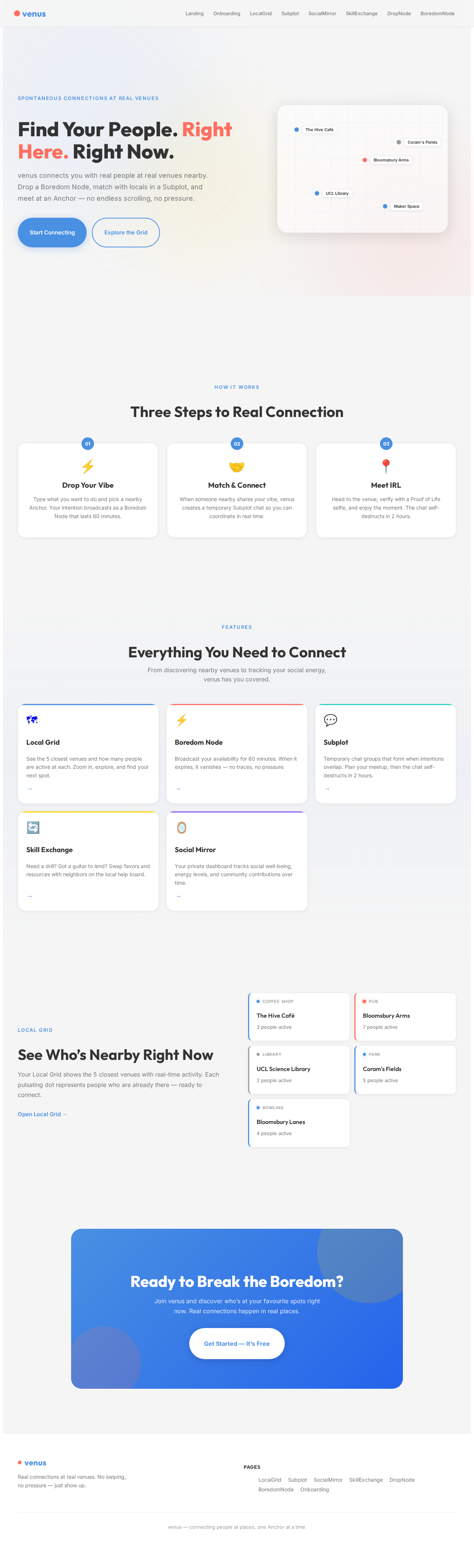
The venus-app will feature an interactive "Local Grid" homepage that resembles a dynamic city map. Users can zoom in and out to explore different Anchors, with each venue represented by a pulsating icon that indicates activity levels. As users hover over an Anchor, a pop-up displays real-time information about the venue and active intentions. The map will be built using @react-three/fiber for 3D rendering and framer-motion for smooth transitions and animations. This interactive map will provide a visually engaging and intuitive way for users to discover and connect with local venues.

Page 4 of 5

8. Interaction Model & Motion Direction

The landing page will utilize a "parallax" interaction model, creating a layered depth effect as users scroll through the Local Grid. Decorative elements, such as atmospheric blobs and distant shapes, will move at different speeds to enhance the sense of depth, while real content scrolls naturally. This approach will provide a visually rich first impression, ideal for engaging users and encouraging exploration.

9. Non-Functional Requirements

  • The app must ensure user privacy and data protection, particularly for the "Proof of Life" feature.
  • The system should be scalable to accommodate a growing user base and increasing data from Anchors.
  • The app must provide a seamless user experience with minimal load times and intuitive navigation.

10. Tech Stack

  • Frontend: React for Web
  • Backend: Python, FastAPI
  • Database: MySQL or MariaDB, with alembic for migrations
  • AI Models: GPT 5.4 for user-friendly responses
  • AI Tools: Litellm for LLM Routing
  • Local Orchestration: Docker, docker-compose
  • Server-side Orchestration: Kubernetes
Page 5 of 5

11. Assumptions and Constraints

  • The app assumes users have access to a smartphone with internet connectivity.
  • The system is constrained by the need to maintain user privacy and data security.
  • The app relies on accurate location data to function effectively.

12. Glossary

  • Anchor: A real-world venue where users can meet.
  • Boredom Node: A temporary broadcast indicating a user's availability for spontaneous interaction.
  • Subplot: A temporary chat group for coordinating meetups.
  • Proof of Life: A selfie taken during onboarding to verify user identity.
  • Skill Exchange Grid: A feature for swapping favors and resources with neighbors.
  • Social Mirror & Energy Guard: A dashboard tracking a user's social interactions and well-being.
Landing design preview
Landing: View App Intro
Onboarding: Complete Setup
LocalGrid: Browse Active Anchors
LocalGrid: View Intentions
Subplot: Match with Node
Subplot: Send Message
Subplot: Confirm Meetup
Subplot: View Proof of Life
SocialMirror: Check Social Stats
SkillExchange: Browse Requests