Page 1 of 18
System Requirements Document for venac
1. Introduction
venac is a futuristic accounting and invoicing system for small businesses. It exists so that a small-business owner or a bookkeeper can keep the books current and get invoices paid without accounting training and without drowning in tabular fatigue.
The product covers two accepted areas of work:
- Accounting — recording and tracking income and expenses, and maintaining financial records.
- Invoicing — creating and sending invoices to customers, and tracking their payment status.
The audience is the small business itself: the owner/operator who runs the business and needs to see the money picture, the bookkeeper/accountant who maintains the ledger day to day, and the customer/client who receives an invoice and settles it. The interface is deliberately built as a financial instrument panel rather than a spreadsheet: dark void ground, glowing volumetric data, monospace numerics, and motion that always encodes a value or a state.
Page 2 of 18
2. System Overview
venac is a first-party web application with application-owned identity and durable financial records. Business users self-enroll, verify their identity on return, and then work across a protected shell: a money-picture dashboard, a transaction ledger, a focused transaction entry workspace, an invoice workspace, a focused invoice editor, and a reporting destination. Invoice recipients reach a customer-facing invoice destination to review issued charges and complete payment.
Current delivery is a custom first-party UI backed by application-owned storage for books, invoices, and reports. Invoices are delivered to external recipients (customers/clients) as an access path to the invoice destination. There is no accepted current scope for payroll, tax filing, banking integrations, inventory, or multi-entity consolidation; those are not part of this release.
Page 3 of 18
2a. Product Interpretation and Delivery Boundary
Delivery ownership. venac owns its own interface and its own financial records. The books, the invoices, the payment status, and the reports are application-owned state, which is why business users must establish and verify identity before touching them. The public entry surface (Landing) is anonymous and explains the product; the identity surfaces (Login, Sign Up) are anonymous entry points that establish or verify access; everything behind them is protected.
Recipient boundary. The customer/client is an external recipient, not a business user of the books. They receive an invoice access path and use the Invoice Payment destination to review charges and complete payment. They do not see the ledger, the dashboard, or the reports.
Current vs. future. Everything described in this document is current. No future-horizon capabilities were accepted in the source thread; the only forward-looking statement in the source is the general intent that the software be "futuristic," which is expressed here as the visual, motion, and interaction direction rather than as additional product capability.
2c. Page Content and Component Coverage
Landing
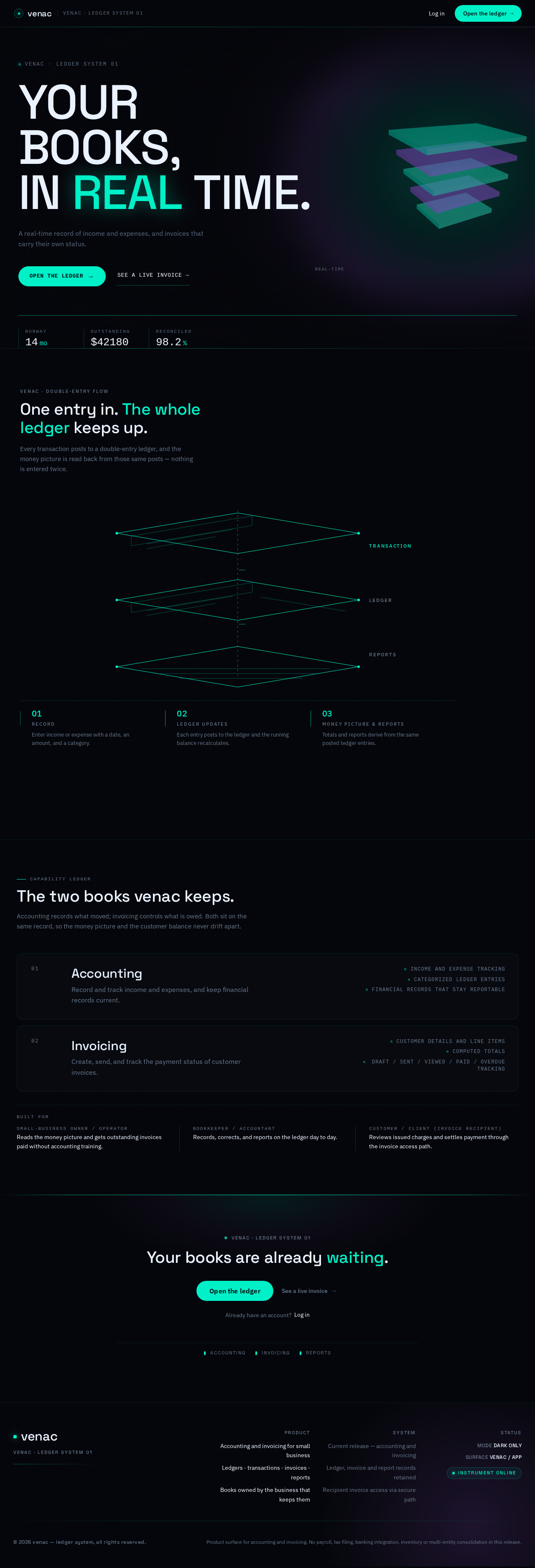
- Information/state: Anonymous public entry. Product identity ("VENAC · LEDGER SYSTEM 01" eyebrow), display headline "YOUR BOOKS, IN REAL TIME.", a 52-character subline, and three inline monospace stat chips (Runway 14 mo · Outstanding $42,180 · Reconciled 98.2%) with tabular numerals that count up on load. Explains the intended business users and the two core capabilities: accounting (income/expense tracking, financial records) and invoicing (create, send, track payment status).
- Primary actions: Pill CTA "Open the ledger" → Sign Up. Ghost link "See a live invoice →" → Invoice Payment (illustrative recipient view).
- Supporting actions: Navigate to Login for returning users.
- Domain entities: Product identity, capability summary, illustrative stat chips.
- Component responsibilities: Hero composition (asymmetric, 3D ledger monolith right-of-centre, 7-column left stack), 1px cyan rule beneath the headline block, stat chip row, CTA pair, "how it works" band with exploded-ledger diagram.
- States: Loading (hero monolith initializing, stat chips at zero), empty (not applicable — static content), success (hero rendered, chips counted up), error (WebGL unavailable → static rendered still of the monolith, all content and CTAs remain fully usable), recovery (reduced-motion → loops stop, chips render at final value).
Page 4 of 18
Login
- Information/state: Anonymous identity-verification surface for returning business users (Small-Business Owner / Operator, Bookkeeper / Accountant) and for a recipient returning to an account if applicable.
- Primary actions: Submit credentials to verify identity and enter the protected shell.
- Supporting actions: Navigate to Sign Up; navigate back to Landing.
- Domain entities: Identity credential, session.
- Component responsibilities: Credential form, submit control, error region, link to Sign Up.
- States: Loading (submitting), empty (blank form), success (redirect to Dashboard), error (invalid credentials — inline message, form retained, no field cleared), recovery (retry without losing entered identity value).
Sign Up
- Information/state: Anonymous first-use enrollment surface for the self-starting business users (Small-Business Owner / Operator, Bookkeeper / Accountant) establishing application-owned accounting and invoicing records.
- Primary actions: Create the business user's identity and enter the protected shell.
- Supporting actions: Navigate to Login; navigate back to Landing.
- Domain entities: Business identity, business profile, session.
- Component responsibilities: Enrollment form, submit control, validation region, link to Login.
- States: Loading (submitting), empty (blank form), success (identity established → Dashboard), error (validation or duplicate identity — inline message, entered values retained), recovery (correct and resubmit).
Dashboard
- Information/state: Protected money picture for returning business users. Full-width band with three arc gauges for income, expense, and net (live-counting, needle sweep on first view); two-thirds ledger table beside a one-third outstanding-invoices stack; monthly cashflow strip chart.
- Primary actions: Read the money picture; continue accounting or invoicing work.
- Supporting actions: Navigate to Transactions, Transaction Entry, Invoices, Invoice Editor, Reports.
- Domain entities: Income total, expense total, net total, recent transactions, outstanding invoices, monthly cashflow series.
- Component responsibilities: Arc-gauge band, ledger table (tabular monospace numerals, right-aligned amounts, 56px rows, hover row lift with 1px cyan left rule), outstanding-invoices stack with glass status pills, cashflow strip chart.
- States: Loading (gauges at zero, skeleton rows), empty (no transactions yet — guidance to record the first transaction; no outstanding invoices — explicit empty message), success (gauges swept and counted up over 900ms, table and stack populated), error (data unavailable — inline notice with retry, gauges hold last known or zero), recovery (retry reloads the money picture without leaving the page).
Page 5 of 18
Transactions
- Information/state: Protected, revisitable ledger view of recorded income and expense transactions with their categories, dates, amounts, and identifiers.
- Primary actions: Browse, review, search, and correct recorded transactions.
- Supporting actions: Navigate to Transaction Entry to record a new transaction; navigate to Dashboard, Invoices, Reports.
- Domain entities: Transaction (date, description, category, amount, direction, identifier), category.
- Component responsibilities: Ledger table with tabular monospace numerals and right-aligned amounts, search control, row selection, correction control, pagination or scroll region.
- States: Loading (skeleton rows), empty (no transactions recorded — guidance to record the first one), success (rows rendered, search filters results), error (load or correction failure — inline notice, prior rows retained), recovery (retry; a failed correction leaves the original entry intact and re-editable).
Transaction Entry
- Information/state: Protected focused workspace for recording and categorizing a single income or expense transaction into the books.
- Primary actions: Enter transaction details, assign a category, commit the transaction to the books.
- Supporting actions: Cancel and return to Transactions; navigate to Dashboard, Invoices, Reports.
- Domain entities: Transaction (date, description, category, amount, direction), category.
- Component responsibilities: Entry form, category selector, amount field with tabular monospace numerals, commit control, validation region.
- States: Loading (form initializing), empty (blank form), success (transaction committed — confirmation and return to Transactions with the new row visible), error (validation failure — inline field messages, entered values retained; commit failure — inline notice, form retained), recovery (correct and resubmit without re-entering the whole form).
Invoices
- Information/state: Protected, revisitable invoice workspace listing invoices with customer, amount, issue date, and payment status (Draft / Sent / Viewed / Paid / Overdue).
- Primary actions: Browse invoices, read issuing status, track payment status, resume tracking after an invoice has been issued.
- Supporting actions: Navigate to Invoice Editor to create an invoice; navigate to Dashboard, Transactions, Reports.
- Domain entities: Invoice (customer, line items, amounts, issue date, status), customer, payment status.
- Component responsibilities: Invoice table with tabular monospace numerals, glass status pills (Paid pulses a 400ms cyan sweep on state change; Overdue carries the violet accent), row selection, status filter.
- States: Loading (skeleton rows), empty (no invoices yet — guidance to create the first invoice), success (rows rendered with live status pills), error (load failure — inline notice, prior rows retained), recovery (retry; status refresh re-reads current payment state).
Page 6 of 18
Invoice Editor
- Information/state: Protected focused workspace for composing an invoice: customer details, line items, amounts, totals, and issuing.
- Primary actions: Enter customer details, add line items with amounts, review the computed total, issue the invoice to the customer.
- Supporting actions: Save as draft; cancel and return to Invoices; navigate to Dashboard, Transactions, Reports.
- Domain entities: Invoice, customer, line item (description, quantity, amount), total, status.
- Component responsibilities: Customer detail fields, line-item editor with tabular monospace amounts, computed total display, issue control, draft control, validation region.
- States: Loading (editor initializing), empty (new invoice with no line items — prompt to add the first), success (invoice issued — status becomes Sent and the invoice appears in Invoices with its recipient access path delivered), error (validation failure — inline messages, entered values retained; issue failure — inline notice, invoice retained as draft), recovery (correct and re-issue; a failed issue never marks the invoice as sent).
Invoice Payment
- Information/state: Customer-facing destination for an issued invoice. Shows the business, the invoice charges (line items and amounts), the total due, and the current payment status. Reached through the invoice access path delivered to the recipient.
- Primary actions: Review the issued charges; complete payment.
- Supporting actions: Return to the invoice after payment to see the settled status.
- Domain entities: Invoice, line item, amount due, payment status, recipient.
- Component responsibilities: Invoice summary with tabular monospace amounts, total due, payment control, status display, confirmation region.
- States: Loading (invoice resolving from the access path), empty (access path invalid or expired — clear message with no charge details exposed), success (payment completed — status becomes Paid and the recipient sees the settled invoice), error (payment failure — inline notice, invoice and amount retained, retry available), recovery (retry payment; the invoice remains payable until it succeeds).
- Note: This is the only surface permitted to invert to a paper-white #F4F6FA ground, and only if the recipient is on a low-power device; type and accent carry through.
Reports
- Information/state: Protected reporting destination presenting financial summaries and reports derived from recorded transactions.
- Primary actions: Read financial summaries and reports.
- Supporting actions: Navigate to Dashboard, Transactions, Invoices.
- Domain entities: Report, financial summary, reporting period, transaction aggregates.
- Component responsibilities: Report selector, summary display with tabular monospace numerals, chart or table region.
- States: Loading (report computing), empty (no recorded transactions for the selected period — explicit message), success (report rendered), error (report generation failure — inline notice with retry), recovery (retry or select a different period).
Page 7 of 18
3. Functional Requirements
FR-1 — Build futuristic accounting and invoicing software. (explicit)
As a Small-Business Owner / Operator, I should have a futuristic accounting and invoicing system, so that my books and my invoices live in one instrument panel rather than a spreadsheet.
- Trigger: the user opens venac.
- Observable result: the product presents accounting and invoicing work in a single dark, instrument-panel interface with monospace numerics and data-bearing motion.
- Access state: public entry is anonymous; protected work requires verified identity.
- Failure/recovery: if the real-time hero subject cannot render, the product falls back to a static rendered still and all content and controls remain usable.
- Continuation: from the entry surface the user proceeds to enroll or verify identity and enter the protected shell.
FR-2 — Record and track income and expenses. (explicit)
As a Bookkeeper / Accountant, I should record income and expense transactions into the books, so that the business's financial position is current.
- Trigger: the user chooses to record a transaction.
- Input: date, description, category, amount, and direction (income or expense).
- Observable result: the transaction is committed to the books and appears in the ledger with its category and amount.
- Access state: protected; requires verified business identity.
- Failure/recovery: validation failure shows inline field messages and retains entered values; commit failure shows an inline notice and retains the form so the user can correct and resubmit.
- Continuation: the user returns to the ledger and sees the new row, or records another transaction.
FR-3 — Maintain financial records. (explicit)
As a Bookkeeper / Accountant, I should browse, review, search, and correct recorded transactions, so that the financial records stay accurate.
- Trigger: the user opens the ledger.
- Input: search terms, row selection, corrected values.
- Observable result: the ledger shows recorded transactions; a correction updates the entry and the corrected value is reflected in the ledger and in derived reports.
- Access state: protected; requires verified business identity.
- Failure/recovery: a failed correction leaves the original entry intact and re-editable, with an inline notice.
- Continuation: the user continues reviewing or moves to reporting.
FR-4 — See the money picture. (explicit)
As a Small-Business Owner / Operator, I should see income, expense, and net at a glance, so that I know where the business stands without accounting training.
- Trigger: the user opens the dashboard.
- Observable result: three arc gauges show income, expense, and net, with needle sweeps and monospace numerals counting up on first view; a ledger table and an outstanding-invoices stack sit below, with a monthly cashflow strip chart.
- Access state: protected; requires verified business identity.
- Failure/recovery: if data cannot be loaded, an inline notice with retry appears and the gauges hold their last known value or zero.
- Continuation: the user drills into transactions, invoices, or reports.
FR-5 — Create invoices with customer details, line items, and amounts. (explicit)
As a Small-Business Owner / Operator, I should compose an invoice with customer details, line items, and amounts, so that I can bill a customer for work delivered.
- Trigger: the user starts a new invoice.
- Input: customer details, one or more line items (description, quantity, amount), computed total.
- Observable result: the invoice is composed and either saved as a draft or issued.
- Access state: protected; requires verified business identity.
- Failure/recovery: validation failure shows inline messages and retains entered values; issue failure shows an inline notice and retains the invoice as a draft.
- Continuation: the user issues the invoice or returns to the invoice list.
FR-6 — Send invoices to customers. (explicit)
As a Small-Business Owner / Operator, I should issue an invoice to a customer, so that the customer receives the charges and can pay.
- Trigger: the user issues a composed invoice.
- Observable result: the invoice status becomes Sent, the invoice appears in the invoice workspace, and the recipient receives an invoice access path to the Invoice Payment destination.
- Access state: protected for the issuing business user; the recipient's access path is the recipient's entry.
- Failure/recovery: a failed issue never marks the invoice as sent; the invoice remains a draft and can be re-issued.
- Continuation: the business user resumes tracking the invoice's payment status.
FR-7 — Track invoice payment status. (explicit)
As a Small-Business Owner / Operator, I should track whether each invoice is Draft, Sent, Viewed, Paid, or Overdue, so that I know who owes what.
- Trigger: the user opens the invoice workspace.
- Observable result: each invoice shows its current status as a glass status pill; a status change to Paid pulses a 400ms cyan sweep across the row, and Overdue carries the violet accent.
- Access state: protected; requires verified business identity.
- Failure/recovery: if status cannot be refreshed, an inline notice appears and the previously known statuses remain visible.
- Continuation: the user follows up on outstanding or overdue invoices.
FR-8 — Resume invoice tracking after an invoice has been issued. (required_inference)
As a Small-Business Owner / Operator, I should be able to come back later and pick up tracking of an invoice I already issued, so that issued invoices are not lost between sessions.
- Trigger: the user returns to the invoice workspace.
- Observable result: previously issued invoices are listed with their current status and can be reopened for review.
- Access state: protected; requires verified business identity.
- Failure/recovery: if the list cannot be loaded, an inline notice with retry appears.
- Continuation: the user continues tracking or issues another invoice.
FR-9 — Review issued charges as the invoice recipient. (explicit)
As a Customer / Client (Invoice Recipient), I should review the charges on an invoice sent to me, so that I understand what I am being asked to pay.
- Trigger: the recipient follows the invoice access path.
- Observable result: the Invoice Payment destination shows the business, the line items, the amounts, and the total due.
- Access state: reached through the invoice access path; no business-account access is required.
- Failure/recovery: an invalid or expired access path shows a clear message without exposing charge details.
- Continuation: the recipient proceeds to pay, or returns later through the same path.
FR-10 — Complete payment on an issued invoice. (explicit)
As a Customer / Client (Invoice Recipient), I should settle payment on the invoice, so that the invoice is cleared without back-and-forth.
- Trigger: the recipient chooses to pay.
- Observable result: payment completes, the invoice status becomes Paid, and the recipient sees the settled invoice.
- Access state: reached through the invoice access path.
- Failure/recovery: a payment failure shows an inline notice, retains the invoice and amount, and allows retry; the invoice remains payable until payment succeeds.
- Continuation: the recipient sees the settled status; the business user sees the invoice as Paid in the invoice workspace.
FR-11 — Read financial summaries and reports. (explicit)
As a Bookkeeper / Accountant, I should read financial summaries and reports derived from recorded transactions, so that the records are reportable at any time.
- Trigger: the user opens reports and selects a period.
- Observable result: a financial summary or report is rendered from the recorded transactions.
- Access state: protected; requires verified business identity.
- Failure/recovery: a report generation failure shows an inline notice with retry; an empty period shows an explicit message rather than a blank report.
- Continuation: the user returns to the ledger or the dashboard.
FR-12 — Self-enroll as a business user. (required_inference)
As a Small-Business Owner / Operator or Bookkeeper / Accountant, I should establish my own identity on first use, so that my books and invoices are privately owned and resumable.
- Trigger: the user chooses to start using venac.
- Input: enrollment details establishing the business identity.
- Observable result: identity is established and the user enters the protected shell.
- Access state: anonymous entry surface; protected state remains unavailable until identity is established.
- Failure/recovery: validation or duplicate-identity errors show inline messages and retain entered values.
- Continuation: the user proceeds to the dashboard and begins recording.
FR-13 — Verify identity on return. (required_inference)
As a Small-Business Owner / Operator or Bookkeeper / Accountant, I should verify my identity when I come back, so that my books, invoices, and reports remain bound to me.
- Trigger: a returning user opens the login surface.
- Input: identity credentials.
- Observable result: identity is verified and the user reaches the protected shell.
- Access state: anonymous entry surface; protected destinations remain unavailable until verification succeeds.
- Failure/recovery: invalid credentials show an inline message, retain the entered identity value, and allow retry.
- Continuation: the user resumes accounting or invoicing work.
FR-14 — Receive an invoice access path. (required_inference)
As a Customer / Client (Invoice Recipient), I should receive a path to the invoice issued to me, so that I can review and pay it.
- Trigger: the business user issues an invoice.
- Observable result: the recipient receives an access path that resolves to the Invoice Payment destination for that invoice.
- Access state: the access path is the recipient's entry; no business-account access is required.
- Failure/recovery: an invalid or expired path shows a clear message without exposing charge details.
- Continuation: the recipient reviews the charges and pays.
Page 8 of 18
4. User Personas
Small-Business Owner / Operator
Product context. Runs the business and is accountable for its cash position, but has no accounting training and does not want to hire a bookkeeper to know where things stand. Uses venac as a cockpit rather than a filing cabinet.
Primary goal. Keep the books current and get outstanding invoices paid, so cash keeps coming in.
Distinct accepted responsibilities. Reads the money picture (income, expense, net, cashflow) on the dashboard; checks who owes what in the invoice workspace; composes and issues invoices with customer details, line items, and amounts; follows up on outstanding and overdue invoices; reads financial summaries when needed.
Relevant inputs and decisions. Decides what to bill and to whom; decides when an invoice is ready to issue; decides which outstanding invoices need chasing; decides whether the books are current enough to trust.
Interactions with other accepted participants. Hands work to the Bookkeeper / Accountant when the ledger needs day-to-day maintenance; issues invoices to the Customer / Client (Invoice Recipient), whose payment changes the invoice status the owner is watching.
Observable success. The dashboard shows a current money picture, the invoice workspace shows which invoices are Sent, Viewed, Paid, or Overdue, and outstanding invoices get paid without the owner hiring a bookkeeper.
Page 9 of 18
Bookkeeper / Accountant
Product context. Maintains the ledger day to day. Works inside the transaction ledger and the reporting destination, and prepares invoices and reports for the owner. Cares about accuracy and reconciliation more than about the headline number.
Primary goal. Keep records accurate, reconciled, and reportable at any time.
Distinct accepted responsibilities. Records and categorizes income and expense transactions; browses, reviews, searches, and corrects recorded entries; prepares invoices for the owner; produces financial summaries and reports from recorded transactions.
Relevant inputs and decisions. Decides the correct category for each transaction; decides when an entry is wrong and must be corrected; decides which period to report on; decides when the records are clean enough to report.
Interactions with other accepted participants. Works on the same books the Small-Business Owner / Operator reads, and prepares the invoices the owner issues to the Customer / Client (Invoice Recipient).
Observable success. The ledger reflects reality, corrections land cleanly, and a report can be produced for any period without cleanup work.
Page 10 of 18
Customer / Client (Invoice Recipient)
Product context. Receives invoices from the business and is not a user of the books. Arrives through an invoice access path, not through the business shell.
Primary goal. Understand the charges and settle payment without back-and-forth.
Distinct accepted responsibilities. Reviews the issued charges (line items, amounts, total due); completes payment; returns to see the settled status.
Relevant inputs and decisions. Decides whether the charges are correct and whether to pay now or return later.
Interactions with other accepted participants. Receives the invoice from the Small-Business Owner / Operator or Bookkeeper / Accountant; the recipient's payment is what turns the invoice to Paid on the business side.
Observable success. The invoice is clear, payment completes, and the recipient sees the invoice settled.
5. Core User Flows
Page 11 of 18
Flow A — Small-Business Owner / Operator: enroll and see the money picture
- The owner opens venac at the Landing page (anonymous). The hero presents "YOUR BOOKS, IN REAL TIME." with the three stat chips counting up, and the two CTAs.
- The owner selects Open the ledger, arriving at Sign Up.
- The owner enters enrollment details and submits. On success, identity is established and the owner lands on the Dashboard.
- The Dashboard renders the money picture: three arc gauges for income, expense, and net sweep their needles and count up over 900ms; the ledger table and outstanding-invoices stack render below; the monthly cashflow strip chart renders beneath them.
- If the business has no transactions yet, the dashboard shows an explicit empty state directing the owner to record the first transaction. The owner selects Transaction Entry.
- The owner enters date, description, category, amount, and direction, and commits. The transaction is written to the books and the owner returns to Transactions, where the new row is visible.
- Failure/recovery: if commit fails, an inline notice appears and the form is retained; the owner corrects and resubmits without re-entering everything.
- Continuation: the owner returns to the Dashboard, where the gauges now reflect the recorded transaction.
Flow B — Small-Business Owner / Operator: issue an invoice and track it to payment
- From the Dashboard, the owner selects Invoices and then starts a new invoice, arriving at the Invoice Editor.
- The owner enters customer details, then adds line items (description, quantity, amount). The editor computes and displays the total in tabular monospace numerals.
- The owner reviews the total and selects Issue. The invoice status becomes Sent, the invoice appears in Invoices with a glass status pill, and the recipient receives an invoice access path to the Invoice Payment destination.
- Failure/recovery: if issuing fails, an inline notice appears and the invoice is retained as a draft — it is never marked as sent. The owner corrects and re-issues.
- The owner returns to Invoices and tracks the invoice. When the recipient views it, the status moves to Viewed; when the recipient pays, the status moves to Paid and a 400ms cyan sweep flashes across the row. If payment does not arrive by the due date, the status becomes Overdue and carries the violet accent.
- Resume: the owner closes the session and returns later. After verifying identity at Login, the owner reopens Invoices and finds the issued invoice with its current status, and continues tracking it.
- Continuation: the owner follows up on the Overdue invoice, or moves to Reports to read the period summary.
Page 12 of 18
Flow C — Bookkeeper / Accountant: maintain the ledger and report
- The bookkeeper opens Login (anonymous), enters credentials, and on success reaches the Dashboard.
- Failure/recovery: invalid credentials show an inline message, retain the entered identity value, and allow retry.
- The bookkeeper selects Transactions and reviews the ledger: tabular monospace numerals, right-aligned amounts, 56px rows, and a 1px cyan left rule on the hovered row.
- The bookkeeper searches for a specific entry. If an entry is wrong, the bookkeeper selects the row and corrects it. The corrected value is written to the books and reflected in derived reports.
- Failure/recovery: if the correction fails, the original entry remains intact and re-editable, with an inline notice.
- The bookkeeper selects Transaction Entry to record a new income or expense transaction, assigns its category, and commits it. The new row appears in Transactions.
- The bookkeeper selects Reports, chooses a period, and reads the financial summary derived from the recorded transactions.
- Failure/recovery: if the selected period has no recorded transactions, an explicit empty message appears rather than a blank report; if report generation fails, an inline notice with retry appears.
- Continuation: the bookkeeper returns to Transactions or Dashboard to continue the day's work.
Flow D — Customer / Client (Invoice Recipient): review and pay an invoice
- The recipient receives the invoice access path from the business and follows it, arriving at Invoice Payment.
- The destination resolves the invoice and shows the business, the line items, the amounts, and the total due in tabular monospace numerals.
- Failure/recovery: if the access path is invalid or expired, a clear message appears and no charge details are exposed.
- The recipient reviews the charges and selects Pay.
- On success, payment completes, the invoice status becomes Paid, and the recipient sees the settled invoice. On the business side, the invoice row in Invoices shows Paid with its cyan sweep.
- Failure/recovery: if payment fails, an inline notice appears, the invoice and amount are retained, and the recipient can retry; the invoice remains payable until payment succeeds.
- Continuation: the recipient returns to the invoice through the same access path to confirm the settled status.
Page 13 of 18
6. Visuals Colors and Theme
Muse: Gleb Kuznetsov. Headline direction: cinematic future-tech ledger — numbers as signal, not paperwork.
Mode: dark only across the product shell. The single permitted inversion is the public invoice-recipient view (Invoice Payment), and only when the recipient is on a low-power device.
Colour tokens (dark mode):
| Role | Hex | Usage |
|---|
| Background (void) | #05060B | Dominant ground, ~70% of any screen |
| Surface | #0C1018 | Floating glass slabs, hovered table rows |
| Text | #EAF2FF | Body and headings |
| Primary | #00F0C8 | Live money signal: positive balances, Paid status, primary CTA, focus rings, active nav rail, 1px rules |
| Accent | #B36BFF | Secondary emphasis: Overdue/attention states, chart secondary series, hero underglow |
| Muted | #5A6B82 | Labels, timestamps, disabled states |
Contrast rules: body text #EAF2FF on #05060B (~16:1) and on #0C1018 (~14:1) both pass AA at body size. #00F0C8 is never used for body copy on #0C1018; it is reserved for numerals, glyphs, and short labels.
Typography:
- Headings: Space Grotesk Medium (500), tracking -0.01em, no italics.
- Hero display: Space Grotesk 500 at
clamp(44px, 9vw, 132px), line-height 0.94, letter-spacing -0.02em, uppercase for the first word only.
- Labels: IBM Plex Mono 500, 11–12px, letter-spacing 0.18em, uppercase,
#5A6B82.
- Numerals: IBM Plex Mono tabular everywhere, so ledger columns align.
- Body: IBM Plex Sans, 16px/1.6.
- Scale: 1.25 modular on a 4px baseline — 11 / 12 / 14 / 16 / 20 / 25 / 31 / 39 / 49 / 61 / 76 / 95 / 119 / 132. Page H1
clamp(32px, 5.2vw, 61px); section H2 clamp(24px, 3.4vw, 39px); card value numerals clamp(28px, 3vw, 49px) in IBM Plex Mono; micro-label 11px/1.4 tracked 0.18em.
Shape language: full-bleed dark canvas with floating glass slabs; 14px radius on panels; 999px on status pills and the primary CTA; 2px hairline rules for table dividers. Luminous 1px strokes rather than heavy borders; radial HUD rings and arc gauges around the hero subject; a faint 24px dot-grid under the whole page at 4% opacity as the space the data floats in. No drop shadows — depth comes from glow, opacity, and one-pixel light edges.
Layout: persistent 64px left icon-rail (dashboard, transactions, invoices, reports, settings) with a 240px expandable label column, then a 12-column content grid with 24px gutters and 32px page padding. The dashboard is a HUD: full-width money-picture band at top (three arc gauges, live-counting), below it a two-thirds ledger table beside a one-third outstanding-invoices stack, then a monthly cashflow strip chart. Tables use tabular monospace numerals, right-aligned amounts, 56px row height, hover = row background lifts to #0C1018 with a 1px left cyan rule. At 375px the rail collapses to a bottom tab bar and every band stacks to one column; the ledger table becomes a horizontally scrollable card list with a sticky amount column.
Imagery: one crafted real-time 3D subject in the hero — a slowly rotating monolith built from stacked translucent ledger slabs, each etched with faint tabular numerals, lit by a cyan rim and a violet underglow. Elsewhere: schematic diagrams of the double-entry flow as thin cyan line art on the void, arc-gauge components, and a faint topographic grid. No stock people, no gradient blobs, no device frames.
Readable-text rule: headlines, wordmarks, labels, numbers, card text, and controls stay entirely inside the viewport and their container at 375px, 768px, and 1280px, wrapping or scaling to fit, with nothing covering them. Imagery, decoration, and motion may crop, bleed, rotate, or overlap freely as long as they cover no readable text or control. Moving and scrollable content may cross an edge by design; with prefers-reduced-motion it stops and shows whole items, wrapping into rows or sitting in a horizontally scrollable row.
Forbidden: any blue–indigo primary (#0057FF, #2563EB, #4F46E5, #6366F1, #7C3AED) on white; Inter, Roboto, Arial, Helvetica, Open Sans, Lato, Poppins, or system-ui for headings or body; gradient-blob heroes and grids of identical hover-lift cards; device mockups, laptop frames, or stock photography of people shaking hands; decorative particle fields with no data meaning; light mode anywhere in the product shell (except the permitted recipient inversion); rounded-corner friendly illustration, mascots, or emoji; heavy drop shadows or skeuomorphic bevels. The generic indigo/blue-on-white SaaS template is forbidden for this project.
Page 14 of 18
7. Signature Design Concept
The instrument panel, not the landing page. The public entry is composed as a financial cockpit rather than a marketing page.
Full-bleed #05060B void. The composition is asymmetric: the 3D ledger monolith sits right-of-centre at roughly 55% of the viewport width, cropped off the right edge so it bleeds past the frame, lit from behind with a soft cyan-to-violet volumetric glow. On the left, a 7-column stack carries the content:
- A 12px tracked monospace eyebrow:
VENAC · LEDGER SYSTEM 01.
- A two-line display headline in Space Grotesk at
clamp(44px, 9vw, 132px): "YOUR BOOKS, IN REAL TIME." — the word REAL set in #00F0C8, the rest in #EAF2FF.
- A 52-character subline at 16px in
#5A6B82.
- A pill CTA "Open the ledger" in
#00F0C8 with #05060B text, paired with a ghost link "See a live invoice →".
- A thin 1px cyan rule running the full viewport width beneath the headline block.
- Three inline monospace stat chips — Runway 14 mo · Outstanding $42,180 · Reconciled 98.2% — with tabular numerals that count up on load.
No centred headline, no blue button, no gradient blob. The hero reads as an instrument panel. The monolith is the product's defining state made visible: stacked ledger slabs, each etched with tabular numerals, orbiting slowly — the books, in real time.
Page 15 of 18
8. Interaction Model & Motion Direction
Interaction Model: Animated
Motion Tempo: cinematic
Hero Dimensionality: webgl
Landing Hero Motion Brief
- Focal subject: the 3D ledger monolith — stacked translucent slabs etched with faint tabular numerals, lit by a cyan rim and a violet underglow, cropped off the right edge of the frame.
- Input → transformation → outcome thesis: the page loads → the monolith begins an 18-second continuous slow orbit while the three stat chips count up from zero over 900ms → the visitor reads a live ledger as an instrument, not a static claim, and the CTA "Open the ledger" is the next action.
- Motion vocabulary: continuous slow orbit (18s); scroll-scrubbed camera dolly between the hero and the "how it works" band, where the monolith resolves into a flat, legible exploded-ledger diagram; arc-gauge needle sweeps and number count-ups over 900ms with
cubic-bezier(0.16, 1, 0.3, 1); a 400ms cyan sweep across an invoice row on status change; a 320ms crossfade page transition with a 1px cyan rule wiping top-to-bottom. Nothing bounces; nothing particles for decoration — every motion carries a data meaning.
- Composed first frame: void ground; monolith right-of-centre, cropped, glowing; left stack with eyebrow, two-line headline with REAL in cyan, subline, CTA pair, full-width 1px cyan rule, and three stat chips at their counted-up values.
- Reduced-motion state: all loops stop, the monolith renders as a static still, scroll scrubbing becomes instant jumps, gauges render at their final value, and the stat chips show their final numbers.
Landing Hero 3D Scene Brief — DIRECTION-DERIVED
A single crafted real-time object: a monolith of stacked translucent ledger slabs, each slab etched with faint tabular numerals, slowly orbiting on an 18-second loop. It is lit by a cyan rim light and a violet underglow against the #05060B void, positioned right-of-centre and cropped off the right edge. On scroll it dollies and resolves into a flat, legible exploded-ledger diagram. It is abstract — not clip-art, not a laptop mockup, not a device frame. Under prefers-reduced-motion it renders as a static still.
Page 16 of 18
9. Non-Functional Requirements
NFR-1 — Dark-only product shell. (explicit, from creative direction)
The product shell renders on the #05060B void in dark mode only. The sole permitted inversion is the public invoice-recipient view (Invoice Payment), and only when the recipient is on a low-power device; type and accent carry through in that case.
- Rationale: the direction specifies a dark ground as the product's identity, with one explicit recipient exception.
NFR-2 — Text and control integrity at every viewport. (explicit, from creative direction)
Headlines, wordmarks, labels, numbers, card text, and controls stay entirely inside the viewport and their container at 375px, 768px, and 1280px, wrapping or scaling to fit, with no other element covering any part of them. Imagery, decoration, and motion may crop, bleed, rotate, or overlap as long as they cover no readable text or control.
- Rationale: readability and operability are hard constraints that outrank decorative gesture.
NFR-3 — Reduced-motion compliance. (explicit, from creative direction)
Under prefers-reduced-motion, all loops stop, gauges render at their final value, scroll scrubbing becomes instant jumps, the hero shows a static rendered still, and moving or scrollable content stops and shows whole items (wrapping into rows or sitting in a horizontally scrollable row).
- Rationale: motion is decorative-adjacent but data-bearing; users who opt out must still receive every value.
NFR-4 — Numeric legibility. (explicit, from creative direction)
All amounts, dates, and identifiers render in IBM Plex Mono tabular, right-aligned in fixed columns, so ledger columns align and values are comparable at a glance.
- Rationale: the product's core read is a column of numbers; misalignment is a correctness-of-reading failure.
NFR-5 — Contrast. (explicit, from creative direction)
Body text #EAF2FF on #05060B (~16:1) and on #0C1018 (~14:1) pass AA at body size. #00F0C8 is never used for body copy on #0C1018; it is reserved for numerals, glyphs, and short labels.
- Rationale: the palette is high-contrast by design; the cyan is a signal colour, not a text colour.
NFR-6 — Durable, identity-bound financial records. (required_inference)
Books, invoices, and reports are application-owned durable state bound to the verified business identity, so a returning user resumes exactly the records they own.
- Rationale: the accepted journeys require resuming invoice tracking and maintaining financial records across sessions.
NFR-7 — Recipient access without business-account access. (required_inference)
The Invoice Payment destination is reachable through the invoice access path without granting the recipient access to the ledger, dashboard, or reports.
- Rationale: the recipient is an external party whose only accepted responsibility is reviewing and paying an issued invoice.
NFR-8 — Failure never corrupts financial state. (required_inference)
A failed transaction commit, correction, invoice issue, or payment leaves the prior state intact and re-editable; an invoice is never marked Sent when issuing failed, and never marked Paid when payment failed.
- Rationale: the accepted statuses (Draft / Sent / Viewed / Paid / Overdue) are the business's source of truth for who owes what.
Page 17 of 18
10. Tech Stack
- Frontend: React (web), with a real-time WebGL/R3F hero subject on the Landing page.
- Backend: Python / FastAPI.
- Storage: application-owned persistent storage for business identities, transactions, categories, invoices, line items, payment status, and reports.
- Containerization: Docker / docker-compose for local and deployment packaging.
- Deployment: Kubernetes only if the deployment requires it; not otherwise mandated by the source.
No source-specified technology was overridden; the stack above reflects the accepted delivery shape (custom first-party UI, application-owned identity, backend integration required).
11. Assumptions and Constraints
Assumptions
- A-1 (required_inference) — Business users self-enroll rather than being provisioned by an administrator, because the accepted journeys begin with a self-starting business user and no provisioning actor was accepted.
- A-2 (required_inference) — The invoice access path is delivered to the recipient outside the business shell; the source does not specify the delivery channel, so no channel is mandated here.
- A-3 (required_inference) — Invoice statuses are Draft, Sent, Viewed, Paid, and Overdue, taken from the direction's status-pill specification and consistent with the accepted tracking requirement.
- A-4 (required_inference) — The Landing page's illustrative stat chips (Runway 14 mo · Outstanding $42,180 · Reconciled 98.2%) are presentation content for the public entry, not live business data.
Constraints
- C-1 (explicit) — The product is accounting and invoicing software; no payroll, tax filing, banking integration, inventory, or multi-entity consolidation is in current scope.
- C-2 (explicit) — The product shell is dark-only; the only permitted inversion is the invoice-recipient view on a low-power device.
- C-3 (explicit) — The generic indigo/blue-on-white SaaS template is forbidden for this project.
- C-4 (explicit) — Headings and body never use Inter, Roboto, Arial, Helvetica, Open Sans, Lato, Poppins, or system-ui.
- C-5 (explicit) — No heavy drop shadows or skeuomorphic bevels; depth comes from glow, opacity, and one-pixel light edges.
- C-6 (explicit) — No decorative particle fields; every motion must encode a value or a state.
- C-7 (explicit) — Readable text and controls stay whole at 375px, 768px, and 1280px; decoration carries any cropping gesture instead.
- C-8 (required_inference) — Protected destinations (Dashboard, Transactions, Transaction Entry, Invoices, Invoice Editor, Reports) are unavailable until business identity is established or verified; Landing, Login, Sign Up, and Invoice Payment are anonymously reachable.
Page 18 of 18
12. Glossary
- Books — The application-owned record of the business's income and expense transactions and the financial records derived from them.
- Transaction — A single recorded income or expense entry with date, description, category, amount, and direction.
- Category — The classification assigned to a transaction when it is recorded.
- Ledger — The revisitable view of recorded transactions, presented as a monospace-first table.
- Invoice — A bill issued to a customer, composed of customer details, line items, amounts, and a total.
- Line item — A single billed entry on an invoice, with description, quantity, and amount.
- Invoice status — One of Draft, Sent, Viewed, Paid, or Overdue.
- Money picture — The dashboard's top band: three arc gauges for income, expense, and net, with a ledger table, outstanding-invoices stack, and monthly cashflow strip chart below.
- Invoice access path — The route by which a recipient reaches the Invoice Payment destination for a specific issued invoice.
- Business user — A Small-Business Owner / Operator or Bookkeeper / Accountant with verified access to the books.
- Recipient — The Customer / Client who receives an invoice and settles payment; not a business user of the books.
- Glass status pill — The invoice-state indicator; Paid pulses a 400ms cyan sweep on state change, Overdue carries the violet accent.
- Void — The
#05060B near-black ground that dominates roughly 70% of any screen.
 Printona


No comments yet. Be the first!