velvet-replica

byVivek K

Build a replica of ERPNext

Dashboard Overview
Dashboard Overview

Comments (0)

No comments yet. Be the first!

System Requirements

System Requirement Document
Page 1 of 7

System Requirements Document for velvet-replica

1. Introduction

The velvet-replica project aims to create a replica of the ERPNext system, specifically focusing on the Stock and Inventory module. This module is intended for enterprise users who require efficient and precise inventory management solutions. The design and functionality are inspired by Dieter Rams' principles, emphasizing clarity, simplicity, and honesty.

2. System Overview

The velvet-replica project will deliver a Stock and Inventory module that replicates the functionality of ERPNext's equivalent module. The system will be designed for enterprise users, providing a clear and efficient interface for managing stock and inventory. The design will follow Dieter Rams' principles, ensuring a functional and precise user experience.

2a. Product Interpretation and Delivery Boundary

The Stock and Inventory module will be delivered as a standalone component within the velvet-replica system. It will not include other ERPNext modules or functionalities. The module will be accessed through a web interface, with a focus on providing enterprise-level inventory management capabilities. The design will avoid playful or decorative elements, adhering strictly to the functional clarity inspired by Dieter Rams.

2b. Source Content Inventory

Not applicable as there is no explicit content_source directive.

Page 2 of 7

2c. Page Content and Component Coverage

Stock and Inventory Module

  • Dashboard Overview

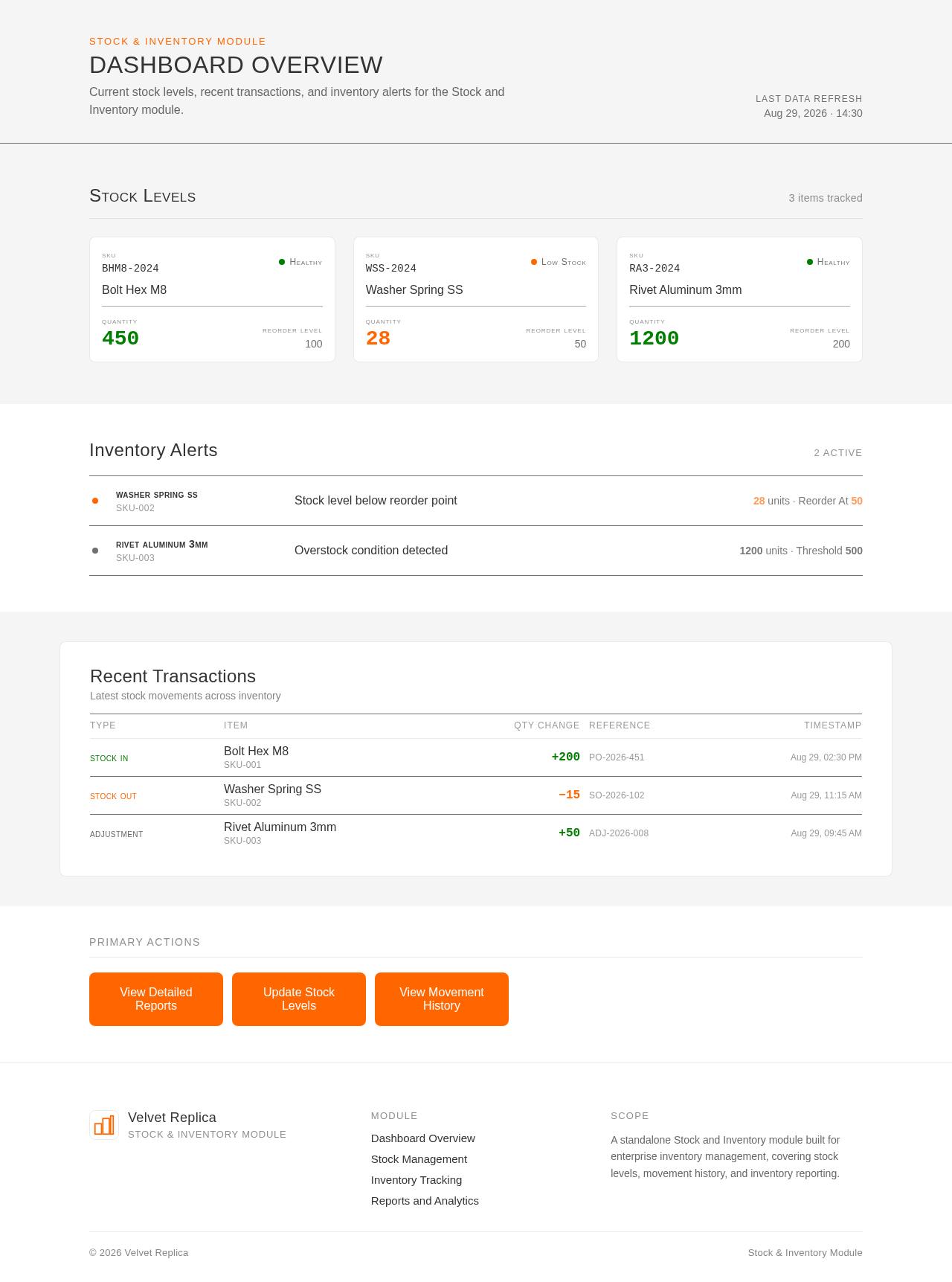
    • Displays current stock levels, recent transactions, and alerts for low inventory.
    • Primary actions: View detailed stock reports, update stock levels.
    • Components: Stock level indicators, transaction list, alert notifications.
    • States: Loading, empty (no data), success, error, recovery.
  • Stock Management

    • Allows users to add, update, and remove stock items.
    • Primary actions: Add new stock item, edit existing item, delete item.
    • Components: Stock item form, item list, confirmation dialogs.
    • States: Loading, success, error, recovery.
  • Inventory Tracking

    • Provides detailed tracking of inventory movements and history.
    • Primary actions: View movement history, filter by date or item.
    • Components: Movement history table, filter controls.
    • States: Loading, empty (no movements), success, error, recovery.
  • Reports and Analytics

    • Generates reports on stock levels, turnover rates, and inventory valuation.
    • Primary actions: Generate report, export data.
    • Components: Report generation form, data export options.
    • States: Loading, success, error, recovery.
Page 3 of 7

3. Functional Requirements

  • As an enterprise user, I should be able to view a dashboard overview of current stock levels, recent transactions, and alerts for low inventory to manage inventory effectively. (explicit)
  • As an enterprise user, I should be able to add, update, and remove stock items to maintain accurate inventory records. (explicit)
  • As an enterprise user, I should be able to track inventory movements and history to monitor stock changes over time. (explicit)
  • As an enterprise user, I should be able to generate reports on stock levels, turnover rates, and inventory valuation for analysis and decision-making. (explicit)

4. User Personas

  • Enterprise User
    • Responsibilities: Manage stock and inventory, track inventory movements, generate reports.
    • Outcomes: Efficient inventory management, accurate stock records, informed decision-making.
Page 4 of 7

5. Core User Flows

  1. Dashboard Overview

    • The enterprise user logs into the system.
    • The user navigates to the Stock and Inventory module.
    • The dashboard displays current stock levels, recent transactions, and alerts.
    • The user can view detailed stock reports or update stock levels.
  2. Stock Management

    • The enterprise user selects the stock management option.
    • The user adds a new stock item by filling out the form and submitting it.
    • The system confirms the addition of the new stock item.
    • The user can edit or delete existing stock items as needed.
  3. Inventory Tracking

    • The enterprise user accesses the inventory tracking section.
    • The user views the movement history table and applies filters if necessary.
    • The system displays the filtered inventory movements.
  4. Reports and Analytics

    • The enterprise user selects the reports and analytics option.
    • The user generates a report by selecting parameters and submitting the request.
    • The system generates the report and provides options for data export.
Page 5 of 7

6. Visuals Colors and Theme

  • Muse: Dieter Rams
  • Palette:
    • Background: #F5F5F5
    • Surface: #FFFFFF
    • Text: #333333
    • Primary: #FF6600
    • Accent: #007F00
    • Muted: #CCCCCC
  • Typography:
    • Headings: IBM Plex Sans — Medium weight, small caps, tight tracking
    • Body: IBM Plex Sans
    • Scale: 1.25 modular (48/32/24/18/16)
  • Shape Language: Rounded-rectangle controls
  • Layout: Strict modular grid
  • Imagery: Diagrammatic line art and product silhouettes

7. Signature Design Concept

The public entry page will feature a full-width hero with a diagrammatic illustration of the inventory system. The illustration will be set against a warm grey background, with a primary call to action in orange. The design will emphasize clarity and functionality, avoiding decorative elements.
Page 6 of 7

8. Interaction Model & Motion Direction

  • Interaction Model: Static
  • Motion Tempo: Restrained
  • Hero Dimensionality: Flat
  • Landing Hero Motion Brief: The hero will feature a static diagrammatic illustration of the inventory system with clear labels. The focus will be on providing instant feedback on interactions with mechanical precision.

9. Non-Functional Requirements

  • The system must provide instant feedback on user interactions to ensure a responsive user experience. (explicit)
  • The design must adhere to Dieter Rams' principles, focusing on clarity, simplicity, and honesty. (explicit)

10. Tech Stack

  • Frontend: React
  • Backend: Python/FastAPI
  • Storage: PostgreSQL
  • Containerization: Docker/docker-compose

11. Assumptions and Constraints

  • The module will be standalone and will not integrate with other ERPNext modules.
  • The design will strictly follow the principles of Dieter Rams, avoiding playful or decorative elements.
Page 7 of 7

12. Glossary

  • ERPNext: An open-source enterprise resource planning software.
  • Stock and Inventory Module: A component of ERP systems used for managing stock levels and inventory movements.
Dashboard Overview design preview
Dashboard Overview: View stock levels
Dashboard Overview: View detailed reports
Dashboard Overview: Update stock levels
Stock Management: Add stock item
Stock Management: Edit stock item
Stock Management: Delete stock item
Inventory Tracking: View movement history
Inventory Tracking: Filter by date item
Reports and Analytics: Generate report
Reports and Analytics: Export data
Dashboard Overview design preview
Dashboard Overview: View stock levels
Dashboard Overview: View detailed reports
Dashboard Overview: Update stock levels
Stock Management: Add stock item
Stock Management: Edit stock item
Stock Management: Delete stock item
Inventory Tracking: View movement history
Inventory Tracking: Filter by date item
Reports and Analytics: Generate report
Reports and Analytics: Export data