velvet-calculator
 Diya Trivedi
start a project to build a simple single page design of calculator

Comments (0)
Sign in to leave a comment
System Requirements
System Requirements Document for velvet-calculator
1. Introduction
velvet-calculator is a simple, single-page calculator. The product intent is deliberately narrow: one page where a person enters numbers and operators and reads the result on that same page. There is no multi-page application, no account, and no surrounding workflow — the calculator itself is the whole product.
The audience is everyday users who want a quick, pleasant calculator in the browser. The design brief asks for something soft, modern, and easy to touch: a frosted keypad on a warm plum ground rather than the plain white calculator template.
This document is the System Requirements Document for velvet-calculator. It specifies the single page, its components and states, the one active human persona, the calculation journey, and the visual and technical direction.
2. System Overview
2a. Product Interpretation and Delivery Boundary
velvet-calculator is delivered as a first-party web application with a single page, Calculator. The page is the anonymous public entry: anyone who opens the app lands directly on the working calculator with no sign-in, no account creation, and no gated state. There is no application-owned identity, no session continuity requirement, and no differentiated permission or visibility — every visitor sees the same calculator.
All calculation interaction is owned by the Calculator page in the browser. The provisioned backend (FastAPI) and database (MariaDB) are part of the deployment inventory but carry no accepted product behavior for this release: the calculator's arithmetic and display state live in the page itself, and no durable user data is created, stored, or retrieved. The database is provisioned infrastructure only and does not justify domain entities, authentication, or persistence requirements.
The current delivery horizon is exactly this one page. Nothing beyond a simple single-page calculator is in scope now; any future expansion would be a separate, explicitly requested change.
2c. Page Content and Component Coverage
Calculator
The single page of the product. It is the anonymous public entry and the complete working surface: number and operator entry, the running expression, and the result all live here.
Information and state
- Current entry / running expression: the sequence of digits and operators the user has entered, shown so the user can see what is being computed.
- Result display: the current computed value, rendered in large tabular-figure digits (
clamp(48px, 10vw, 96px)), warm white on the frosted glass slab. - Keypad state: idle, key-pressed (transient), and error (for example division by zero or an incomplete expression) states.
Primary actions
- Press digit keys
0–9to append digits to the current number. - Press the decimal point key to begin a fractional part.
- Press operator keys
+,−,×,÷to choose the operation (amber glow on press). - Press the equals key (the only coral key, 1.5× wider than the others) to evaluate the expression and show the result.
- Press clear to reset the current entry and result.
Supporting actions
- Continue calculating from a displayed result by pressing an operator or a digit.
- Correct the current entry via clear.
Domain entities
- Expression: the ordered sequence of operands and operators currently entered.
- Operand: a number being entered or already committed.
- Result: the evaluated value shown on the result slab.
- Error state: a message shown in place of a result when the expression cannot be evaluated (for example division by zero).
Component responsibilities
- Result slab: frosted glass panel floating above the keypad, 1px light border, wide soft shadow; displays the expression and the result digits; fades result digits in over 160ms.
- Keypad: one centred column, 4 by 5 keys, maximum 420px wide; frosted rounded keys with 1px light borders and 20px radii; keys lift 2px and glow on press with no bounce.
- Equals key: coral (
#FF6B4A), the only coral key, 1.5× wider than the others, anchored at the bottom right of the keypad. - Operator keys: amber (
#FFC24B) glow on press with a 160ms light sweep. - Decorative layer: soft gradient light behind the glass panel and small glass 3D primitives as quiet corner decoration only; never covers readable text or controls.
States
- Loading: not applicable — the page renders its keypad and result slab immediately; no data fetch is required.
- Empty: initial state shows
0in the result display with an empty expression. - Success: pressing equals shows the evaluated result with the 160ms digit fade-in.
- Error: an unevaluable expression (for example division by zero) shows an error message in the result area; the user recovers by pressing clear and entering a new expression.
- Recovery: clear always returns the page to the empty state.
3. Functional Requirements
FR-1 — Open the calculator As a Calculator user, I should open the app and land directly on the working Calculator page, so that I can start calculating immediately.
- Provenance: explicit (single-page calculator design).
- Lifecycle: trigger — navigating to the app; input — none; observable result — the Calculator page renders with the keypad and result slab showing
0; access — anonymous, no sign-in; failure/recovery — none applicable; continuation — begin entering digits. - Acceptance: the app opens on the Calculator page with no intermediate screen, prompt, or authentication step.
FR-2 — Enter digits and decimal point As a Calculator user, I should press digit keys and the decimal point to build a number, so that I can enter the operands I want to calculate with.
- Provenance: required_inference (the single page "holds the number and operator entry").
- Lifecycle: trigger — pressing a digit or decimal key; input — key press; observable result — the digit appends to the current entry and the expression display updates; access — anonymous; failure/recovery — a second decimal point in the same number is ignored; continuation — press an operator or equals.
- Acceptance: each digit press appends exactly one digit; the decimal key begins a fractional part once per number.
FR-3 — Choose an operator As a Calculator user, I should press an operator key to choose addition, subtraction, multiplication, or division, so that I can combine operands.
- Provenance: required_inference (the single page "holds the number and operator entry").
- Lifecycle: trigger — pressing
+,−,×, or÷; input — operator key press; observable result — the operator is recorded in the expression and the key glows amber with a 160ms light sweep; access — anonymous; failure/recovery — pressing an operator with no operand entered uses the current displayed value; continuation — enter the next operand. - Acceptance: the chosen operator appears in the expression; the amber press glow lasts 160ms.
FR-4 — Evaluate the expression As a Calculator user, I should press the equals key to evaluate the expression, so that I can read the result.
- Provenance: required_inference (the single page "shows the result").
- Lifecycle: trigger — pressing equals; input — the entered expression; observable result — the result appears in the result slab with a 160ms fade-in, in tabular figures; access — anonymous; failure/recovery — an unevaluable expression shows an error message in the result area; continuation — press an operator or digit to continue from the result, or clear to start over.
- Acceptance: equals evaluates the entered expression and displays the result; the equals key is the only coral key and is 1.5× wider than the others.
FR-5 — Clear and recover As a Calculator user, I should press clear to reset the calculator, so that I can start a new calculation or recover from an error.
- Provenance: required_inference (indispensable recovery for the entry/result lifecycle).
- Lifecycle: trigger — pressing clear; input — clear key press; observable result — the expression empties and the result display returns to
0; access — anonymous; failure/recovery — clear is always available, including in the error state; continuation — begin a new entry. - Acceptance: after clear, the page is in the empty state with
0displayed.
FR-6 — Press feedback on keys As a Calculator user, I should see keys lift 2px and glow when pressed, so that the keypad feels physical and responsive.
- Provenance: explicit (creative direction motion).
- Lifecycle: trigger — key press; input — pointer or keyboard press; observable result — the key lifts 2px and glows, with no bounce; access — anonymous; failure/recovery — none applicable; continuation — the key returns to rest on release.
- Acceptance: every key shows the 2px lift and glow on press; no bounce easing is used.
4. User Personas
Calculator user
Product context. An everyday person who opens velvet-calculator in a browser to do a quick calculation. They arrive with no account and no prior state; the calculator is the entire product they see.
Primary goal. Enter a calculation — numbers and operators — and read the result on the same page, quickly and without friction.
Distinct accepted responsibilities.
- Entering digits and the decimal point to build operands.
- Choosing operators (
+,−,×,÷). - Pressing equals to evaluate and reading the result.
- Clearing the calculator to start over or recover from an error.
Relevant inputs and decisions. Which numbers to enter, which operator to apply, when to press equals, and when to clear. The user decides when a calculation is complete by reading the result slab.
Interactions with other accepted participants. None. The Calculator user is the only active human persona; there is no counterparty, recipient, or approver in this product.
Observable success. The result appears in the frosted result slab in large tabular digits after pressing equals, and the user can continue from it or clear and start again.
5. Core User Flows
Flow 1 — Perform a calculation
- The Calculator user opens velvet-calculator in a browser. The Calculator page renders immediately — no sign-in, no loading screen — with the frosted result slab showing
0above the keypad. - The user presses digit keys to enter the first operand; each digit appends to the expression shown on the result slab.
- The user presses an operator key (
+,−,×, or÷); the operator is recorded in the expression and the key glows amber with a 160ms light sweep. - The user presses digit keys to enter the second operand.
- The user presses the coral equals key (1.5× wider than the others, bottom right). The expression is evaluated and the result fades into the result slab over 160ms in large tabular figures.
- Continuation: the user presses an operator to continue calculating from the result, or presses clear to reset to
0and start a new calculation.
Flow 2 — Recover from an error
- The user has entered an expression that cannot be evaluated (for example division by zero) and presses equals.
- The result area shows an error message in place of a result.
- The user presses clear; the expression empties and the result display returns to
0. - The user enters a new expression and presses equals to obtain a result.
6. Visuals Colors and Theme
The creative direction — Layered glass keys on a warm plum ground, muse Michal Malewicz — is authoritative for this section.
Mode. Dark mode.
Colour tokens (exact hex by role).
- Background:
#2A1B2E— deep plum ground, filling roughly 70 percent of the surface. - Surface:
#3B2740— frosted plum keys and glass slab. - Text:
#F7EEF4— warm white on plum. - Primary:
#FF6B4A— hot coral, marking the equals key only. - Accent:
#FFC24B— amber, marking operator keys. - Muted:
#B79BB4— secondary and subdued text.
Typography.
- Headings: Space Grotesk, Semi-bold, tight tracking.
- Body: Manrope.
- Result digits: lowercase, tabular figures,
clamp(48px, 10vw, 96px). - Scale: 1.25 modular — 64 / 48 / 32 / 20 / 16.
Shape language. Frosted rounded keys with 1px light borders and 20px radii; soft floating layers with wide soft shadows.
Layout. One centred keypad column, 4 by 5 keys, maximum 420px wide. The result panel floats above the keys as a glass slab.
Imagery. No photos. Soft gradient light behind the glass panel and small glass 3D primitives as quiet corner decoration only.
Avoid. No white page background; no blue or indigo accents; no grid of identical hover-lift cards; no gradient blob behind the headline; no Inter, Roboto, or system fonts.
Readability constraint. Headlines, labels, numbers, and controls stay entirely inside the viewport and their container at 375px, 768px, and 1280px, wrapping or scaling (for example clamp(...)) to fit; decoration and motion may be cropped or bled off edges but never cover readable text or controls.
7. Signature Design Concept
The public entry is the Calculator page itself: a dark plum full screen holding one floating frosted keypad slab at centre. The result digits glow warm white across the top of the slab, rendered in tabular figures at clamp(48px, 10vw, 96px). The keypad is a single centred 4-by-5 column, maximum 420px wide, with frosted rounded keys (1px light borders, 20px radii) sitting above the plum ground. The equals key is the only coral key and is 1.5× wider than the others, anchoring the bottom right; operator keys carry the amber accent. Soft gradient light sits behind the glass panel, and small glass 3D primitives appear as quiet corner decoration only. The concept recomposes only the accepted calculator content and controls — it adds no new behavior or destination.
8. Interaction Model & Motion Direction
Interaction Model: Animated Motion Tempo: expressive Hero Dimensionality: layered_2d
Landing Hero Motion Brief
- Focal subject: the floating frosted keypad slab with its glowing result digits, on the deep plum ground.
- Input → transformation → outcome thesis: a key press lifts the key 2px and glows it (amber sweep on operators, coral on equals); the expression updates on the slab; pressing equals fades the result digits in over 160ms — the outcome is the readable result.
- Motion vocabulary: 2px key lift, press glow, 160ms amber light sweep on operator keys, 160ms result-digit fade-in, no bounce.
- Composed first frame: the plum full screen with the centred frosted slab, result showing
0, the coral equals key at bottom right, soft gradient light behind the glass. - Reduced-motion state: keys show a static pressed state (no lift or sweep) and result digits appear without the fade; the layout remains fully usable and every control stays whole.
9. Non-Functional Requirements
- Single page (explicit). The product is exactly one page, the Calculator; no additional routes or destinations.
- Simplicity (explicit). The design stays simple: one keypad, one result slab, no surrounding workflow.
- Responsive readability (explicit, creative direction). Readable text and controls stay whole at 375px, 768px, and 1280px; the keypad column is capped at 420px wide and the result digits scale with
clamp(48px, 10vw, 96px). - Accessibility of motion (explicit, creative direction). With
prefers-reduced-motion, provide a usable static arrangement with no lift, sweep, or fade. - No persistence (required_inference). The calculator holds no durable user data; the provisioned database is not used for product state in this release.
- Anonymous access (explicit). No authentication, accounts, or permissions are part of the product.
10. Tech Stack
- Frontend: React application UI — the single Calculator page, keypad, and result slab.
- Backend: shared FastAPI process for application APIs and domain modules (provisioned; no accepted calculator API behavior in this release).
- Database: MariaDB for application-owned persistent data (provisioned infrastructure; no calculator domain entities in this release).
- Containerization: Docker / docker-compose for the frontend, backend, and database services.
11. Assumptions and Constraints
- Assumption: The calculator performs standard arithmetic (addition, subtraction, multiplication, division) with a decimal point and clear — the minimum mechanics needed for the accepted "number and operator entry … shows the result" lifecycle.
[required_inference] - Assumption: The page is anonymous and public; no identity or session continuity is needed.
[explicit] - Constraint: Exactly one page, the Calculator.
[explicit] - Constraint: The design must be simple.
[explicit] - Constraint: The creative direction's palette, fonts, shape language, layout, and motion are authoritative for visuals.
[explicit] - Constraint: No white page background, no blue/indigo accents, no Inter/Roboto/system fonts.
[explicit]
12. Glossary
- Calculator page — the single page of the product; the anonymous public entry and complete working surface.
- Result slab — the frosted glass panel floating above the keypad that shows the expression and result digits.
- Keypad — the centred 4-by-5 column of frosted keys, maximum 420px wide.
- Equals key — the only coral key, 1.5× wider than the others, anchored bottom right; evaluates the expression.
- Operator keys — the
+,−,×,÷keys, marked with the amber accent. - Expression — the ordered sequence of operands and operators currently entered.
- Tabular figures — digits of equal width used for the result display so values do not shift as they change.
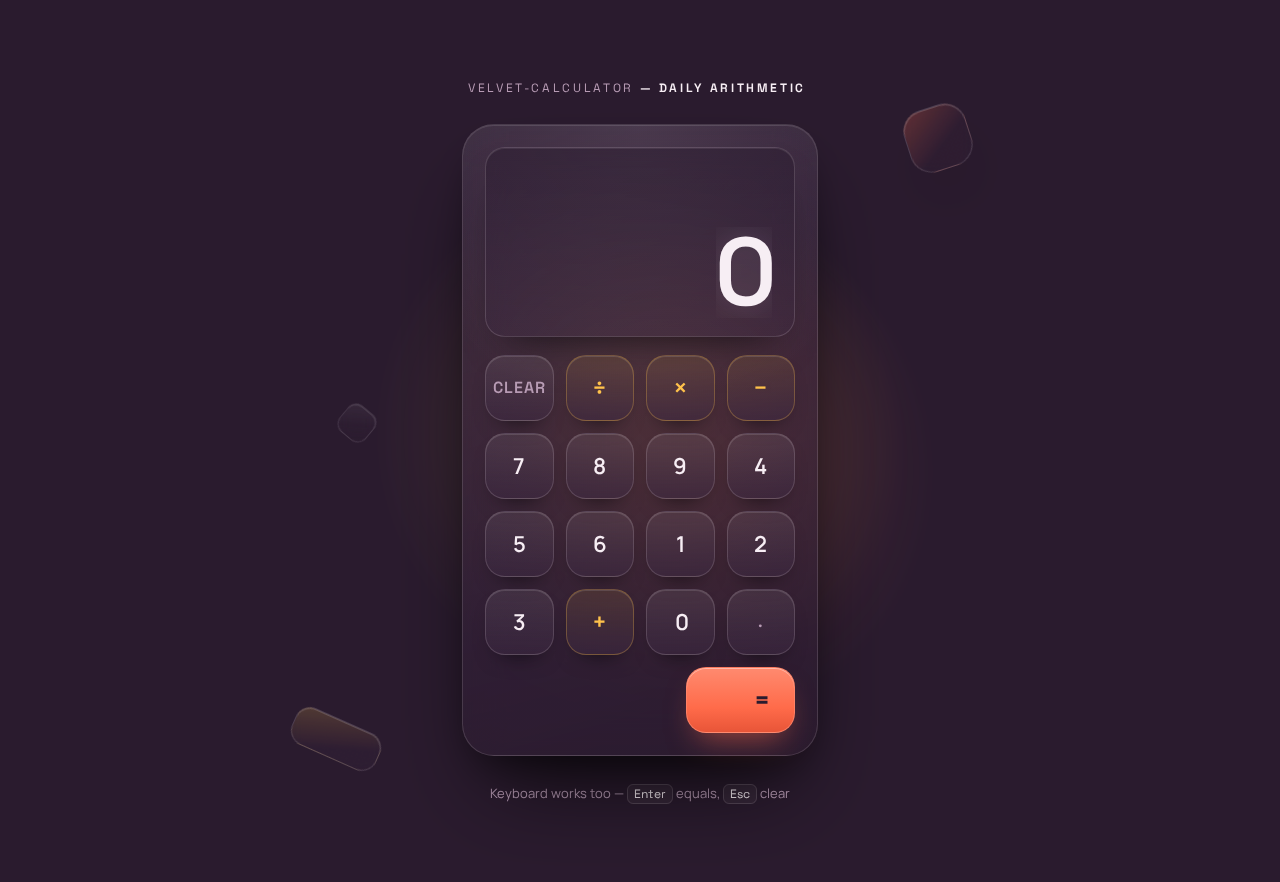
velvet-calculator — daily arithmetic
Keyboard works too — Enter equals, Esc clear
velvet-calculator — daily arithmetic
Keyboard works too — Enter equals, Esc clear
No comments yet. Be the first!