velvet-anything
a website that can have anything on it and cant be goguardian blocked
Comments (0)
Sign in to leave a comment
System Requirements
System Requirements Document (SRD) for velvet-anything
1. Introduction
The velvet-anything project is a real-time messaging platform designed to facilitate seamless communication between teachers and students. The platform aims to bypass restrictive filters like GoGuardian, ensuring accessibility and usability in educational settings. By providing features such as real-time chat, read receipts, typing indicators, and group chat functionality, velvet-anything will empower users to collaborate effectively while maintaining a secure and user-friendly environment.
This document outlines the system requirements for velvet-anything, including functional and non-functional specifications, user personas, design concepts, and technical considerations.
2. System Overview
The velvet-anything platform is a web-based messaging system tailored for educational environments. It will allow teachers and students to communicate in real-time, fostering collaboration and engagement. Key features include:
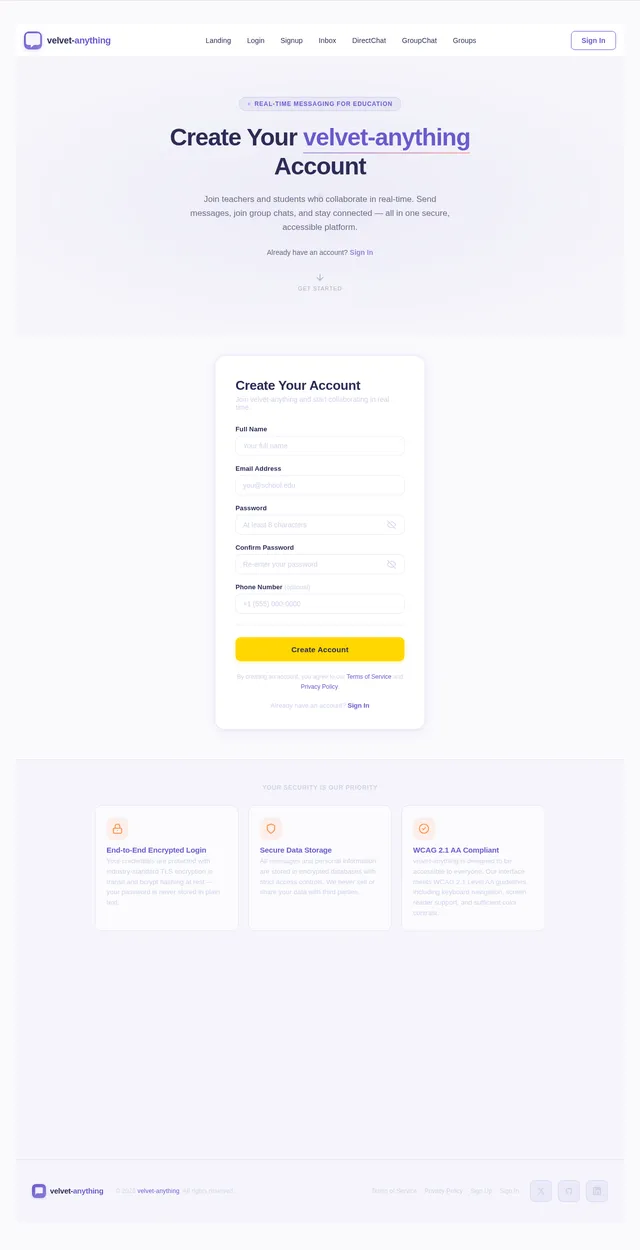
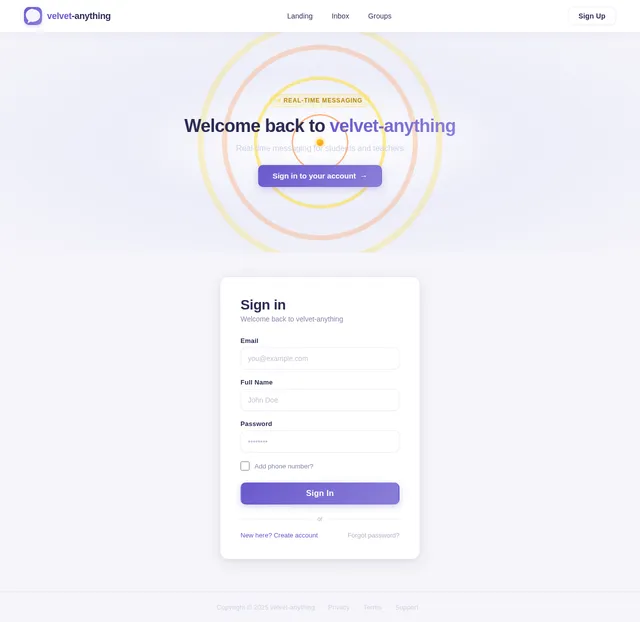
- Secure user authentication via email, name, and password, with an optional phone number for added flexibility.
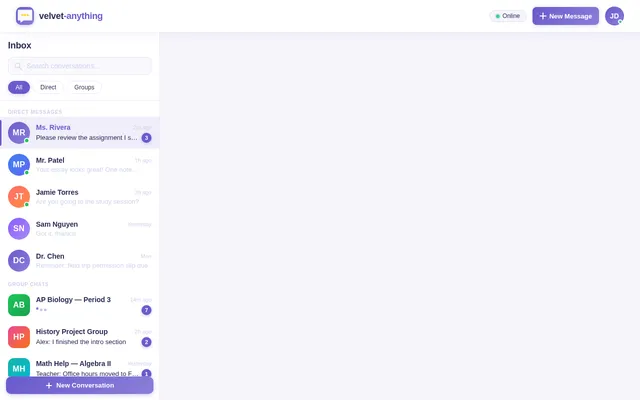
- Real-time direct messaging with read receipts and typing indicators.
- Group chat functionality for collaborative discussions.
- A visually appealing and intuitive user interface designed to enhance user experience.
The platform will prioritize accessibility, ensuring it remains functional even in environments with restrictive internet filters.
3. Functional Requirements
The following are the functional requirements for velvet-anything, expressed as user stories:
- As a User, I should be able to log in using my email, name, and password, with an optional phone number for added flexibility.
- As a User, I should be able to send direct messages to other users in real-time.
- As a User, I should be able to see if my messages have been read by the recipient.
- As a User, I should be able to see if the recipient is typing a reply.
- As a User, I should be able to create and participate in group chats.
4. User Personas
4.1 Teachers
- Description: Educators who use the platform to communicate with students and other teachers.
- Goals: Facilitate discussions, share resources, and manage group chats for classes or projects.
- Needs: Secure login, reliable messaging, and group chat functionality.
4.2 Students
- Description: Learners who use the platform to collaborate with peers and communicate with teachers.
- Goals: Participate in group discussions, ask questions, and share ideas.
- Needs: Easy-to-use interface, real-time messaging, and typing/read indicators.
5. Visuals Colors and Theme
The velvet-anything platform will feature a unique color palette to create a modern, professional, and engaging aesthetic. The chosen colors reflect creativity and collaboration while maintaining readability and accessibility.
- Background: #F5F5FA (soft lavender gray)
- Surface: #FFFFFF (pure white for clean UI elements)
- Text: #2C2C54 (deep indigo for high contrast)
- Accent: #6A5ACD (soft slate blue for interactive elements)
- Muted Tones: #D1D1E9 (light periwinkle for secondary elements)
6. Signature Design Concept
The homepage of velvet-anything will feature an interactive "message ripple" animation.
Concept Details:
- Visuals: The homepage will display a dynamic, circular ripple effect that mimics the flow of a message being sent. Each ripple will represent a message, starting from the center and expanding outward. The ripples will subtly change colors (cycling through the accent palette) as they expand.
- Interaction: Hovering over a ripple will display a tooltip with a sample message or feature description (e.g., "Real-time chat," "Group discussions").
- Transitions: Smooth fade-ins and fade-outs will accompany the ripple animations, creating a calming yet engaging effect.
- Micro-interactions: Clicking on a ripple will zoom into the center, transitioning seamlessly into the login page.
- Mood: The design will evoke a sense of flow and connectivity, emphasizing the platform's purpose of fostering communication.
This bold and memorable design will make velvet-anything stand out while reinforcing its messaging-centric identity.
7. Non-Functional Requirements
- Performance: The platform must support real-time messaging with minimal latency, even during peak usage.
- Scalability: The system should handle up to 10,000 concurrent users without degradation in performance.
- Security: User data, including login credentials, must be encrypted and stored securely.
- Accessibility: The platform must comply with WCAG 2.1 Level AA standards to ensure usability for all users.
- Cross-Platform Compatibility: The platform should function seamlessly on modern web browsers and mobile devices.
8. Tech Stack
Frontend
- React for Web
Backend
- Python
- FastAPI
Database
- MySQL (with Alembic for migrations)
AI Tools
- Litellm for LLM Routing
- Langchain
Local Orchestration
- Docker
- docker-compose
Server-Side Orchestration
- Kubernetes
9. Assumptions and Constraints
-
Assumptions:
- Users will have access to a stable internet connection.
- The platform will primarily be used in educational settings.
- Email-based authentication will be sufficient for most users.
-
Constraints:
- The platform must bypass restrictive filters like GoGuardian.
- Development must adhere to US data privacy regulations (e.g., FERPA, COPPA).
10. Glossary
- GoGuardian: A web filtering and monitoring tool commonly used in educational institutions.
- Read Receipts: A feature that indicates whether a message has been read by the recipient.
- Typing Indicators: A feature that shows when a user is typing a message.
- WCAG: Web Content Accessibility Guidelines, a set of standards for making web content accessible to people with disabilities.
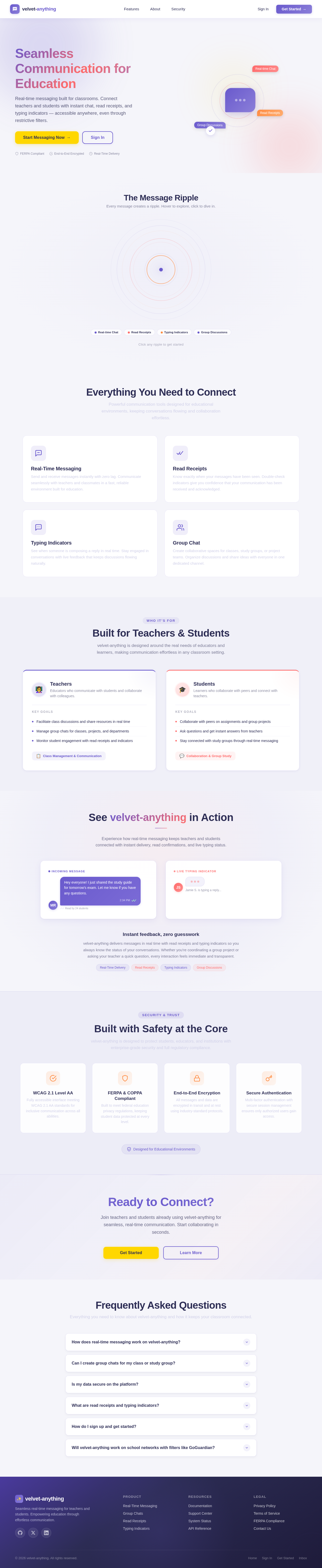
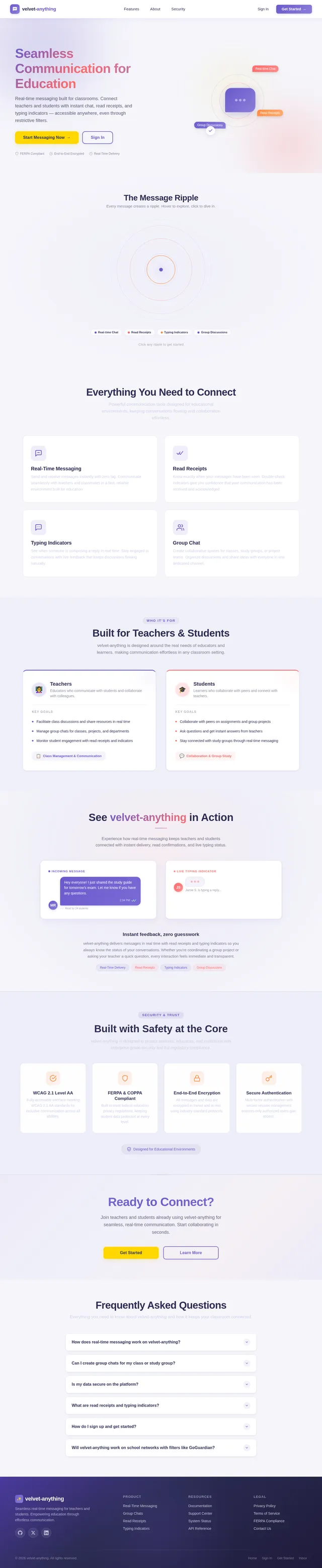
Seamless Communication for Education
Real-time messaging built for classrooms. Connect teachers and students with instant chat, read receipts, and typing indicators — accessible anywhere, even through restrictive filters.
The Message Ripple
Every message creates a ripple. Hover to explore, click to dive in.
Everything You Need to Connect
Powerful communication tools designed for educational environments, keeping conversations flowing and collaboration effortless.
Send and receive messages instantly with zero lag. Communicate seamlessly with teachers and classmates in a fast, reliable environment built for education.
Know exactly when your messages have been seen. Double-check indicators give you confidence that your communication has been received and acknowledged.
See when someone is composing a reply in real time. Stay engaged in conversations with live feedback that keeps discussions flowing naturally.
Create collaborative spaces for classes, study groups, or project teams. Organize discussions and share ideas with everyone in one dedicated channel.
Built for Teachers & Students
velvet-anything is designed around the real needs of educators and learners, making communication effortless in any classroom setting.
Teachers
Educators who communicate with students and collaborate with colleagues.
Key Goals
- Facilitate class discussions and share resources in real time
- Manage group chats for classes, projects, and departments
- Monitor student engagement with read receipts and indicators
Students
Learners who collaborate with peers and connect with teachers.
Key Goals
- Collaborate with peers on assignments and group projects
- Ask questions and get instant answers from teachers
- Stay connected with study groups through real-time messaging
See velvet-anything in Action
Experience how real-time messaging keeps teachers and students connected with instant delivery, read confirmations, and live typing status.
Instant feedback, zero guesswork
velvet-anything delivers messages in real time with read receipts and typing indicators so you always know the status of your conversations. Whether you're coordinating a group project or asking your teacher a quick question, every interaction feels immediate and transparent.
Built with Safety at the Core
velvet-anything is designed to protect students, educators, and institutions with enterprise-grade security and full regulatory compliance.
WCAG 2.1 Level AA
Fully accessible interface meeting WCAG 2.1 AA standards for inclusive communication across all abilities.
FERPA & COPPA Compliant
Built to meet federal education privacy regulations, keeping student data protected at every level.
End-to-End Encryption
All messages and data are encrypted in transit and at rest using industry-standard protocols.
Secure Authentication
Multi-factor authentication with secure session management ensures only authorized users gain access.
Ready to Connect?
Join teachers and students already using velvet-anything for seamless, real-time communication. Start collaborating in seconds.
Frequently Asked Questions
Everything you need to know about velvet-anything and how it keeps your classroom connected.
velvet-anything uses WebSocket connections to deliver messages instantly between teachers and students. As soon as you hit send, the recipient sees your message appear in real-time with no page refresh needed. The platform is optimized for minimal latency even during peak school hours.
Absolutely! Any user can create a group chat and invite teachers or students to join. Group chats are perfect for class discussions, project collaboration, or study sessions. You can manage members and keep conversations organized all in one place.
Security is a top priority. All login credentials and messages are encrypted, and the platform is designed to comply with FERPA and COPPA regulations for educational environments. We also meet WCAG 2.1 Level AA accessibility standards to ensure a safe, inclusive experience for everyone.
Read receipts let you know when your message has been seen by the recipient, shown as a small checkmark indicator. Typing indicators display a real-time animation when someone is composing a reply, so you know a response is on the way. Both features make conversations feel natural and responsive.
Getting started is simple. Click "Get Started" and create an account with your email, name, and password. Adding a phone number is optional. Once registered, you can immediately start sending direct messages or create group chats to connect with teachers and classmates.
Yes. velvet-anything is specifically designed to remain accessible in educational environments that use restrictive web filters. The platform is built to ensure uninterrupted communication so teachers and students can collaborate without connectivity barriers.
No comments yet. Be the first!