urban-way
 Desert Chief
Build me a fully functional J.a.r.v.a.s app. Enhanced way more the standard and actually works


Comments (0)
Sign in to leave a comment
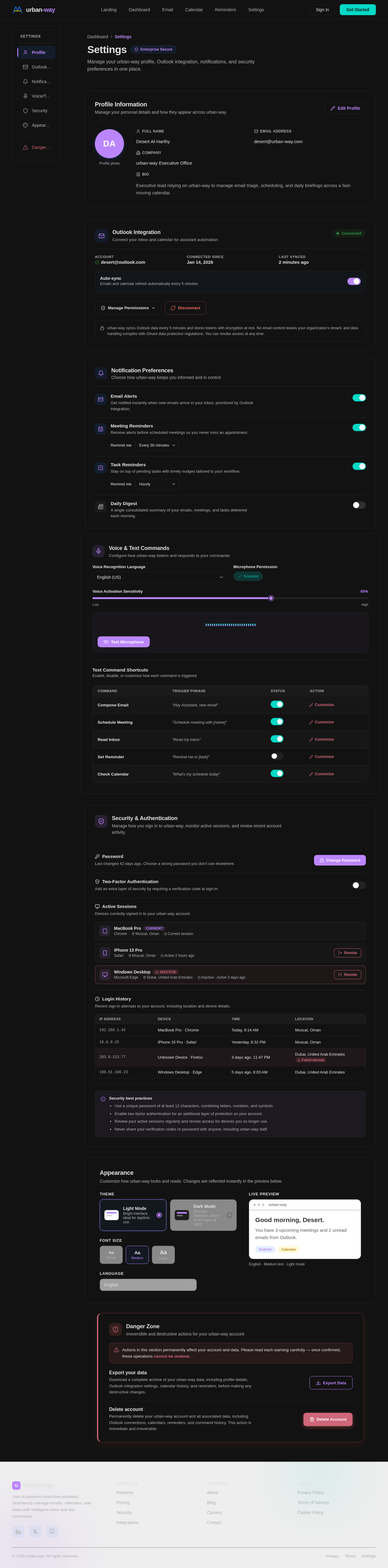
Settings
Enterprise SecureManage your urban-way profile, Outlook integration, notifications, and security preferences in one place.
Profile Information
Manage your personal details and how they appear across urban-way.
Desert Al-Harthy
desert@urban-way.com
urban-way Executive Office
Executive lead relying on urban-way to manage email triage, scheduling, and daily briefings across a fast-moving calendar.
Outlook Integration
Connect your inbox and calendar for assistant automation
urban-way syncs Outlook data every 5 minutes and stores tokens with encryption at rest. No email content leaves your organization's tenant, and data handling complies with Omani data protection regulations. You can revoke access at any time.
Notification Preferences
Choose how urban-way keeps you informed and in control
Voice & Text Commands
Configure how urban-way listens and responds to your commands
Text Command Shortcuts
Enable, disable, or customize how each command is triggeredSecurity & Authentication
Manage how you sign in to urban-way, monitor active sessions, and review recent account activity.
Last changed 42 days ago. Choose a strong password you don't use elsewhere.
Add an extra layer of security by requiring a verification code at sign-in.
Devices currently signed in to your urban-way account.
Recent sign-in attempts to your account, including location and device details.
Security best practices
- Use a unique password of at least 12 characters, combining letters, numbers, and symbols.
- Enable two-factor authentication for an additional layer of protection on your account.
- Review your active sessions regularly and revoke access for devices you no longer use.
- Never share your verification codes or password with anyone, including urban-way staff.
Appearance
Customize how urban-way looks and reads. Changes are reflected instantly in the preview below.
Good morning, Desert.
You have 3 upcoming meetings and 2 unread emails from Outlook.
Danger Zone
Irreversible and destructive actions for your urban-way account
Export your data
Download a complete archive of your urban-way data, including profile details, Outlook integration settings, calendar history, and reminders, before making any destructive changes.
Delete account
Permanently delete your urban-way account and all associated data, including Outlook connections, calendars, reminders, and command history. This action is immediate and irreversible.

Your AI Executive Assistant
Seamlessly manage emails, calendars, and tasks with intelligent voice and text commands. Built for executives who demand precision and speed.
Everything you need, one command away
Streamline your executive workflow with an AI assistant that manages emails, schedules, and reminders — so you can focus on what matters.
Manage Emails
Triage, draft, and send emails using voice or text commands. Your inbox stays organized without lifting a finger.
Schedule Meetings
Coordinate calendars, find open slots, and send invites — all through natural language instructions.
Get Reminders
Never miss a deadline. Proactive notifications surface upcoming tasks and meetings before they sneak up on you.
Secure Integration
Enterprise-grade encryption and compliance-first Outlook integration keep your data private and protected.
Intelligent Tools for the Modern Executive
From voice-driven commands to proactive insights, urban-way streamlines every aspect of your daily workflow with AI precision.
Control your entire workflow with natural voice commands. Draft emails, schedule meetings, and manage tasks hands-free — your AI assistant understands context and executes with precision.
Smart scheduling that understands your priorities. Automatically resolves conflicts, suggests optimal meeting times, and syncs seamlessly with Outlook to keep your day perfectly orchestrated.
Intelligent email management that prioritizes what matters. Auto-categorize, smart replies, and contextual summaries help you process your inbox in a fraction of the time.
Stay ahead with AI-driven intelligence. Get briefing summaries before meetings, deadline alerts, and actionable recommendations that keep you informed and always one step ahead.
Your Command Center, Reimagined
Interact with your AI assistant via an intuitive holographic interface. Manage emails, calendar, and tasks through a unified 3D workspace.
Seamlessly Connected to Outlook
Seamlessly connect to Outlook for email and calendar management. Your voice and text commands flow through urban-way directly into your inbox and schedule.
Everything You Need, Intelligently Handled
Six powerful capabilities working together to transform how you manage your executive workflow.
Intelligent Email Filtering
AI-powered inbox management that prioritizes important messages and filters noise, keeping you focused on what matters most.
Smart Scheduling
Automatically finds optimal meeting times across multiple calendars, respecting your preferences and time zones.
Meeting Reminders
Context-aware reminders that brief you on attendees, agenda items, and relevant documents before every meeting.
Natural Language Processing
Understands complex voice and text commands, interpreting intent and executing multi-step tasks seamlessly.
Real-Time Responses
Processes commands instantly with sub-second latency, delivering results as fast as you can think of them.
Privacy & Security
Enterprise-grade encryption and compliance protocols ensure your sensitive communications remain fully protected.
Built for How Executives Actually Work
See how urban-way transforms everyday executive workflows into seamless, voice-driven experiences — from the first email to the last reminder.
Morning Briefing
Desert starts the day with a simple voice command: "What’s on my plate today?" urban-way instantly pulls the morning’s emails, flags urgent messages, and reads out the calendar — all before the first coffee is poured.
Morning Briefing
Desert starts the day with a simple voice command: "What’s on my plate today?" urban-way instantly pulls the morning’s emails, flags urgent messages, and reads out the calendar — all before the first coffee is poured.
Midday Scheduling Sprint
A client requests a last-minute meeting. Desert tells urban-way: "Find a 30-minute slot this afternoon with the leadership team." The assistant cross-references Outlook calendars, proposes three conflict-free windows, and sends invitations — all in seconds.
End-of-Day Wrap-Up
Before leaving the office, Desert asks: "Summarize what I missed and set reminders for tomorrow." urban-way compiles unread threads, drafts follow-up emails for review, and queues morning reminders — ensuring nothing falls through the cracks.
Trusted by Executives Worldwide
See how leaders across industries rely on urban-way to streamline their workflows and reclaim their most valuable asset — time.
Choose Your Executive Plan
Scale your productivity with the right level of AI assistance. All plans include Outlook integration and intelligent command processing.
Starter
Essential AI assistance for individual professionals getting started.
- Voice & text command interface
- Basic email management
- Calendar scheduling (up to 20/mo)
- Smart reminders
- Outlook integration
- 5 automated workflows
Professional
Full-powered executive assistant with unlimited commands and priority AI.
- Everything in Starter
- Unlimited voice & text commands
- Advanced email triage & drafting
- Unlimited calendar scheduling
- Priority AI processing
- Meeting prep summaries
- 50 automated workflows
Enterprise
Organization-wide deployment with custom integrations and dedicated support.
- Everything in Professional
- Multi-user team accounts
- Custom API integrations
- Dedicated account manager
- SSO & advanced security
- Unlimited workflows
- SLA guarantee (99.9% uptime)
Ready to Transform Your Workflow?
Experience the future of executive productivity with 14 days free. Voice commands, smart scheduling, and seamless Outlook integration — all powered by AI.
Or get started with your email
No comments yet. Be the first!