urban-pictures
 sambhav appdev
Build an app that will let me take pictures of the food I eat, then neatly track my calories and the time at which I eat the food. It should show me a dashboard of how I am progressing


Comments (0)
Sign in to leave a comment
System Requirements
Urban-Pictures
Introduction
Urban-Pictures is a personal food tracking application designed to help users visually document their meals, estimate calorie intake, and track meal times. The app provides a personal dashboard for users to monitor their daily and weekly progress towards their health goals.
System Overview
Urban-Pictures is a mobile application that allows users to take pictures of their meals, automatically estimate the calories, and log the time of consumption. The app is designed for personal use, focusing on simplicity and ease of use without any social sharing or third-party integrations. The primary goal is to help users maintain awareness of their eating habits through visual tracking and a clear progress dashboard.
Functional Requirements
- As a User, I should be able to take pictures of my meals.
- As a User, I should be able to automatically estimate the calories of my meals.
- As a User, I should be able to track the time at which I eat each meal.
- As a User, I should be able to view a personal dashboard displaying my daily and weekly progress.
User Personas
- User: An individual who wants to track their food intake for personal health monitoring. They value simplicity and ease of use in an app that helps them stay mindful of their eating habits.
Visuals Colors and Theme
- primary: #4A90E2 (a calming blue for a trustworthy and reliable feel)
- primary_light: #A6C8F0 (a lighter blue for hover states and secondary UI elements)
- secondary: #F5A623 (a warm orange for emphasis and headlines)
- accent: #E94E77 (a vibrant pink for call-to-action buttons and active states)
- highlight: #F8E71C (a bright yellow for hover states and notifications)
- bg: #FFFFFF (a clean white for the page background)
- surface: rgba(255, 255, 255, 0.9) (a slightly transparent white for card/panel backgrounds)
- text: #333333 (a dark grey for primary text and headings)
- text_muted: #777777 (a softer grey for secondary text and labels)
- border: rgba(200, 200, 200, 0.5) (a subtle grey for borders)
Signature Design Concept
The homepage of Urban-Pictures will feature an interactive "Meal Timeline" that visually represents the user's meal history. Using framer-motion for smooth animations, the timeline will allow users to scroll horizontally through their meal photos. Each photo will expand into a detailed view with calorie information and meal time when clicked. The timeline will dynamically adjust based on the user's scrolling speed, providing a fluid and engaging experience. Hovering over a meal photo will display a quick summary of the meal's calorie count and time, encouraging users to explore their eating habits interactively.
Interaction Model & Motion Direction
The landing page will utilize a "parallax" interaction model, creating a layered depth effect as users scroll through their meal timeline. The meal photos will move at different speeds compared to the background, enhancing the visual storytelling of the user's food journey. Internal pages, such as the dashboard, will adopt a "static" interaction model to prioritize readability and data clarity.
Non-Functional Requirements
- The app must be responsive and function seamlessly on both iOS and Android devices.
- The app should load meal photos and data quickly to ensure a smooth user experience.
- Data privacy must be ensured, with all user data stored securely and locally on the device.
Tech Stack
- Frontend: React Native for mobile app development
- Backend: Python with FastAPI for handling image processing and calorie estimation
- Database: SQLite for local data storage on the device
Assumptions and Constraints
- The app will not include any social sharing features or third-party integrations.
- Calorie estimation will rely on a predefined database of common foods and their nutritional values.
- The app will be designed for personal use, focusing on simplicity and ease of use.
Glossary
- Calorie Estimation: The process of calculating the approximate number of calories in a meal based on its components.
- Dashboard: A user interface that provides an overview of the user's progress and data.
- Parallax: An effect where different layers of content move at different speeds to create a sense of depth.
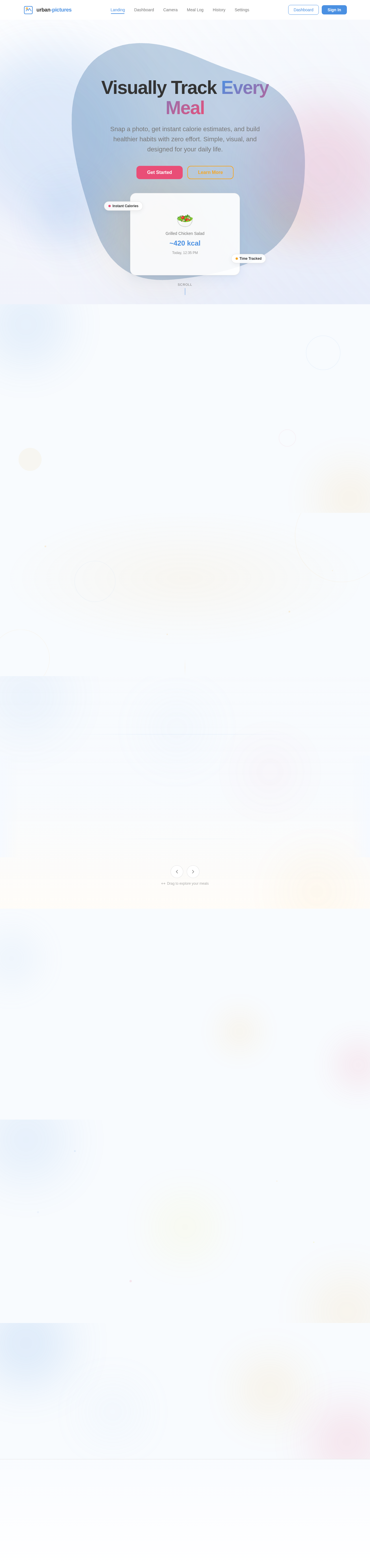
Visually Track Every Meal
Snap a photo, get instant calorie estimates, and build healthier habits with zero effort. Simple, visual, and designed for your daily life.
Three Simple Steps to Healthier Eating
Track every meal effortlessly. Snap a photo, get instant calorie estimates, and watch your progress unfold.
Take Photos
Capture your meals instantly with a single tap. No manual logging — just point, snap, and let the app do the rest.
Auto-Calculate Calories
AI-powered estimation analyzes your meal photo and provides an accurate calorie breakdown within seconds.
Track Progress
View daily and weekly insights on your personal dashboard. Monitor trends and build healthier eating habits over time.
Your Meal History at a Glance
Scroll horizontally through your meal photos to revisit every bite. Hover over any meal to see a quick calorie summary and time stamp, or tap to expand for the full nutritional breakdown.
Today's Meal Timeline
Scroll through your daily meals, hover for a quick calorie snapshot, and tap any card for the full nutritional breakdown.
Berry Overnight Oats
Spinach Power Smoothie
Grilled Chicken Grain Bowl
Almond Trail Mix
Pan-Seared Salmon
Greek Yogurt Parfait
Timeline Features
Explore your meal history with an engaging, interactive timeline built for speed and clarity.
Smooth Scrolling
Fluid parallax layers move at different speeds as you scroll through your meal history, creating an immersive depth experience that brings your food journey to life.
Quick Hover Summaries
Hover over any meal photo to instantly see calorie count and meal time — no clicks needed. Get a snapshot of your nutrition at a glance.
Detailed Expansion
Click any meal to expand into a detailed view with full nutritional breakdown, time logged, and meal notes. Explore your eating habits interactively.
Built for Trust, Designed for You
Track your meals with confidence. We put simplicity, privacy, and performance at the heart of everything we build.
Simple & Intuitive Design
Snap a photo of your meal and get instant calorie estimates. No complicated forms, no manual data entry — just point, shoot, and track.
Data Private & Secure
All your meal photos and nutrition data stay on your device. No cloud uploads, no third-party sharing — your eating habits remain yours alone.
Fast & Responsive
Lightning-fast photo analysis and smooth navigation across every screen. Track meals in seconds and review your progress without any lag.
Ready to Start Tracking?
Join thousands of users who track their meals visually, estimate calories instantly, and build healthier habits — one photo at a time.
No comments yet. Be the first!