upgrader-version

byRajneesh Sharma

act like 0.1 % website design builder not website looking like create by ai create agym website wher e people come and book their slot in gym and pay after pay they get an unique primpary key id card

LandingSlot BookingLogin
Landing

Comments (0)

No comments yet. Be the first!

System Requirements

System Requirement Document
Page 1 of 6

System Requirements Document for upgrader-version

1. Introduction

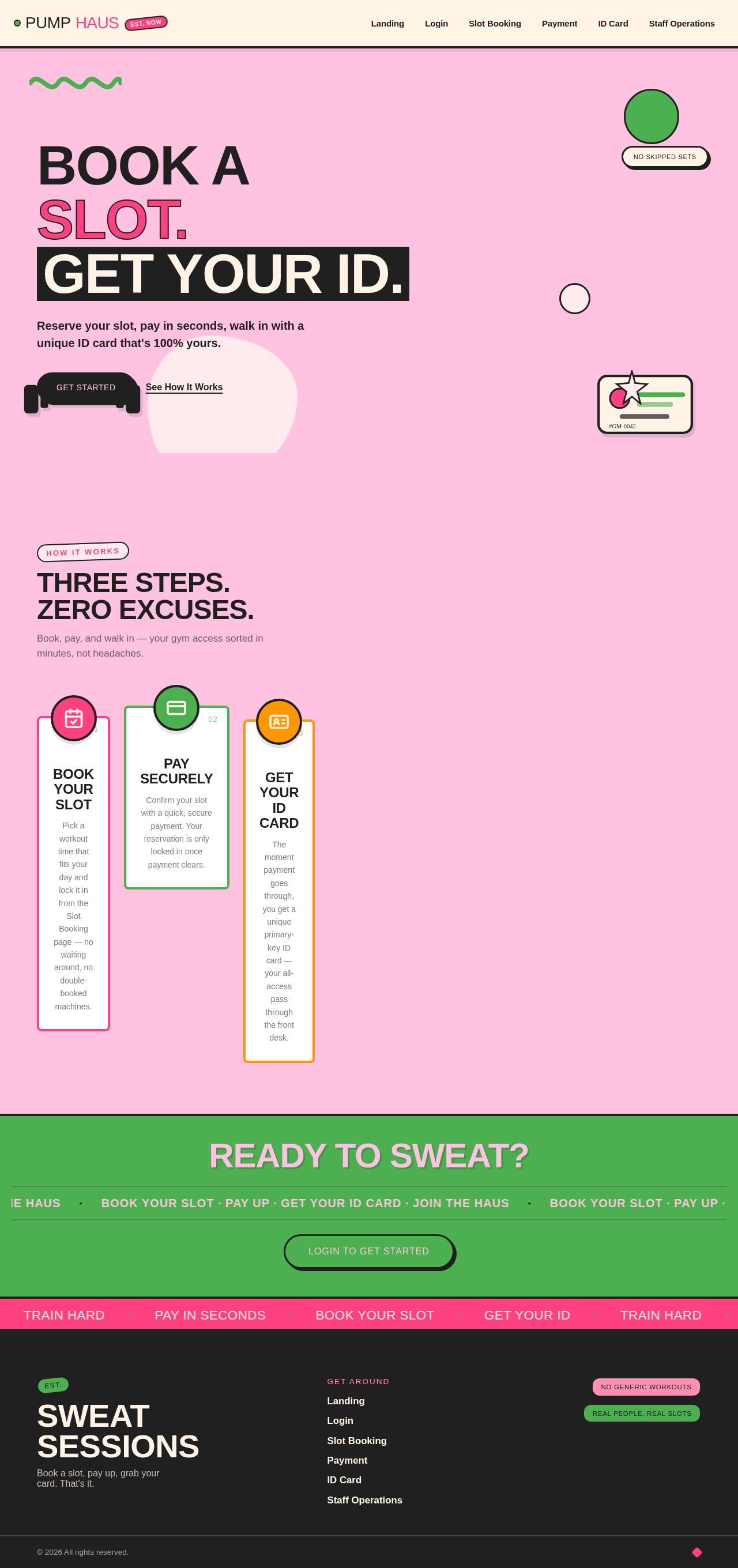
The upgrader-version project aims to create a gym website where users can book gym slots, make payments, and receive a unique primary-key ID card after payment. The design will embody a playful maximalism style inspired by Jessica Walsh, ensuring a vibrant and engaging user experience.

2. System Overview

The system will provide a platform for gym members to book slots, pay for them, and receive a unique ID card. Gym staff will have access to oversee bookings and issued ID cards. The website will feature a custom UI with application-owned identity management to ensure secure and personalized user interactions.

2a. Product Interpretation and Delivery Boundary

The system will deliver a custom gym booking website with the following key features:

  • Slot booking and payment system for gym members.
  • Unique ID card generation post-payment.
  • Gym staff access to manage bookings and ID cards.
  • Application-owned identity for secure access.
  • A vibrant, playful design inspired by Jessica Walsh.

2b. Source Content Inventory

Not applicable as no content source directive was provided.

Page 2 of 6

2c. Page Content and Component Coverage

Landing

  • Information/State: Introduction to the gym booking service.
  • Primary Actions: Navigate to booking, login, or information pages.
  • Components: Hero section with vibrant design, navigation menu.
  • States: Loading, empty, success, error.

Login

  • Information/State: User authentication interface.
  • Primary Actions: Login, password reset.
  • Components: Login form, error messages.
  • States: Loading, success, error.

Slot Booking

  • Information/State: Available slots for booking.
  • Primary Actions: Select slot, submit booking.
  • Components: Calendar view, slot selection interface.
  • States: Loading, empty, success, error.

Payment

  • Information/State: Payment processing for booked slots.
  • Primary Actions: Enter payment details, confirm payment.
  • Components: Payment form, confirmation message.
  • States: Loading, success, error.
Page 3 of 6

ID Card

  • Information/State: Display of unique ID card post-payment.
  • Primary Actions: View ID card, download ID card.
  • Components: ID card display, download button.
  • States: Loading, success, error.

Staff Operations

  • Information/State: Overview of bookings and issued ID cards.
  • Primary Actions: Manage bookings, view ID cards.
  • Components: Booking management interface, ID card list.
  • States: Loading, success, error.

3. Functional Requirements

  • As a Gym Member, I should be able to book a slot in the gym. (Provenance: explicit)
  • As a Gym Member, I should be able to pay for my booked slot. (Provenance: explicit)
  • As a Gym Member, I should receive a unique primary-key ID card after successful payment. (Provenance: explicit)
  • As a Gym Member, I must create or use an application account before booking and retrieving my ID card. (Provenance: required_inference)
  • As a Gym Staff, I should have authorized access to oversee bookings and issued ID cards. (Provenance: required_inference)

4. User Personas

  • Gym Member: Books gym slots, makes payments, and receives a unique ID card.
  • Gym Staff: Manages bookings and oversees issued ID cards.

5. Core User Flows

Page 4 of 6

Gym Member Flow

  1. Visit the Landing page.
  2. Navigate to the Login page and authenticate.
  3. Access the Slot Booking page to select a slot.
  4. Proceed to the Payment page to complete the transaction.
  5. Receive and view the unique ID card on the ID Card page.

Gym Staff Flow

  1. Visit the Landing page.
  2. Navigate to the Login page and authenticate.
  3. Access the Staff Operations page to manage bookings and view issued ID cards.

6. Visuals Colors and Theme

  • Muse: Jessica Walsh
  • Palette: Background #FFC2E1, Surface #FFF4E6, Text #202020, Primary #FF4081, Accent #4CAF50, Muted #FFEBEE
  • Typography: Headings Archivo Black, Body Syne
  • Shape Language: Bold color fields, overlapping shapes, sticker-like elements
  • Layout: Asymmetrical layouts with bold color sections
  • Motion: Bouncy scale-ins, marquee text, color flips on hover

7. Signature Design Concept

The Landing page will feature a full-bleed color block with a playful typographic statement. Interactive elements will include bouncy hover effects and marquee text changes, using hot pink and green as the primary palette.
Page 5 of 6

8. Interaction Model & Motion Direction

  • Interaction Model: Animated
  • Motion Tempo: Expressive
  • Hero Dimensionality: Layered_2d
  • Landing Hero Motion Brief: A playful typographic statement with interactive elements, using bouncy scale-ins and color flips on hover.

9. Non-Functional Requirements

  • The system must ensure secure payment processing.
  • The website should be responsive and accessible across devices.
  • The design must avoid generic SaaS templates and adhere to the playful maximalism style.

10. Tech Stack

  • Frontend: React
  • Backend: Python/FastAPI
  • Database: PostgreSQL
  • Deployment: Docker, Kubernetes

11. Assumptions and Constraints

  • The ID card is issued only after payment.
  • Each issued ID card must have a unique primary key identifier.
  • Gym members must create or use an application account before booking.
Page 6 of 6

12. Glossary

  • ID Card: A unique identifier issued to gym members post-payment.
  • Slot Booking: The process of reserving a time slot at the gym.
  • Gym Member: A user who books slots and uses the gym facilities.
  • Gym Staff: Personnel responsible for managing gym operations and bookings.
Landing design preview
Landing: Browse landing page
Login: Authenticate as member
Slot Booking: Select available slot
Slot Booking: Submit slot booking
Payment: Enter payment details
Payment: Confirm payment
ID Card: View ID card
ID Card: Download ID card
Landing design preview
Landing: Browse landing page
Login: Authenticate as member
Slot Booking: Select available slot
Slot Booking: Submit slot booking
Payment: Enter payment details
Payment: Confirm payment
ID Card: View ID card
ID Card: Download ID card