The ultra-system project is designed to create a personal productivity application tailored for users in Bangladesh. The application will focus on providing a minimal checklist-style interface to enhance personal productivity.
System Overview
The ultra-system is a personal productivity tool aimed at helping users manage their tasks efficiently. The application will feature a minimalistic design to ensure ease of use and quick access to essential functionalities. The primary goal is to enable users to create, manage, and track their to-do lists effectively.
Page 2 of 5
Functional Requirements
As a User, I should be able to create a new to-do list to organize my tasks.
As a User, I should be able to add tasks to my to-do list to keep track of what needs to be done.
As a User, I should be able to mark tasks as completed to track my progress.
As a User, I should be able to delete tasks that are no longer needed.
As a User, I should be able to edit tasks to update details or correct errors.
As a User, I should be able to view all tasks in a checklist format for easy readability.
As a User, I should be able to prioritize tasks to focus on the most important ones.
As a User, I should be able to set reminders for tasks to ensure timely completion.
As a User, I should be able to categorize tasks for better organization.
As a User, I should be able to sync my tasks across devices for consistent access.
As a User, I should be able to access personal productivity features pre-resolved by the API supervisor to enhance task management.
User Personas
User: An individual looking to improve personal productivity through task management. They prefer a simple and intuitive interface to manage their daily tasks efficiently.
Core User Flows
User creates a new to-do list -> adds tasks -> marks tasks as completed -> edits or deletes tasks as needed -> sets reminders -> syncs tasks across devices.
Page 3 of 5
Visuals Colors and Theme
primary: #4A90E2 (a calming blue for the main interface)
primary_light: #A6C8FF (a lighter blue for hover states)
secondary: #F5A623 (a vibrant orange for emphasis and links)
accent: #E94E77 (a striking pink for CTAs and active states)
highlight: #F8E71C (a bright yellow for notifications and active indicators)
bg: #FFFFFF (a clean white for the background)
surface: rgba(255, 255, 255, 0.9) (a semi-transparent white for cards/panels)
text: #333333 (a dark gray for primary text)
text_muted: #777777 (a lighter gray for secondary text)
border: rgba(200, 200, 200, 0.5) (a subtle gray for borders)
Signature Design Concept
The ultra-system will feature an interactive "Task Galaxy" concept on the homepage. Users will see a galaxy of tasks where each task is represented as a star. Clicking on a star will open a task card with details and options to edit or mark as complete. Users can drag to rotate the galaxy, providing a dynamic and engaging way to interact with their tasks. The concept will use @react-three/fiber for 3D rendering and gsap for smooth animations and transitions.
Page 4 of 5
Interaction Model & Motion Direction
The landing page will utilize a "parallax" interaction model, creating a layered depth effect as users scroll through their tasks. Decorative elements will move at different speeds to enhance the visual storytelling, while the main content will scroll naturally. Internal pages will maintain a "static" interaction model to prioritize readability and quick access to task management features.
Non-Functional Requirements
The application must be responsive and accessible on various devices, including smartphones, tablets, and desktops.
The system should ensure data security and user privacy, adhering to local regulations.
The application should perform efficiently, with minimal load times and smooth transitions.
Tech Stack
Frontend: React for Web
Backend: Python, FastAPI
Database: MySQL or MariaDB, using alembic for migrations
Local orchestration: Docker, docker-compose
Server-side orchestration: Kubernetes
Assumptions and Constraints
The application will be primarily used by individuals in Bangladesh, so localization and language support are essential.
The system must integrate with existing productivity tools and APIs as needed.
The application should be designed to handle a moderate number of concurrent users without performance degradation.
Page 5 of 5
Glossary
To-Do List: A list of tasks that a user intends to complete.
Task Galaxy: An interactive visualization of tasks as stars in a galaxy.
API Supervisor: A backend service responsible for managing and resolving API requests related to personal productivity features.
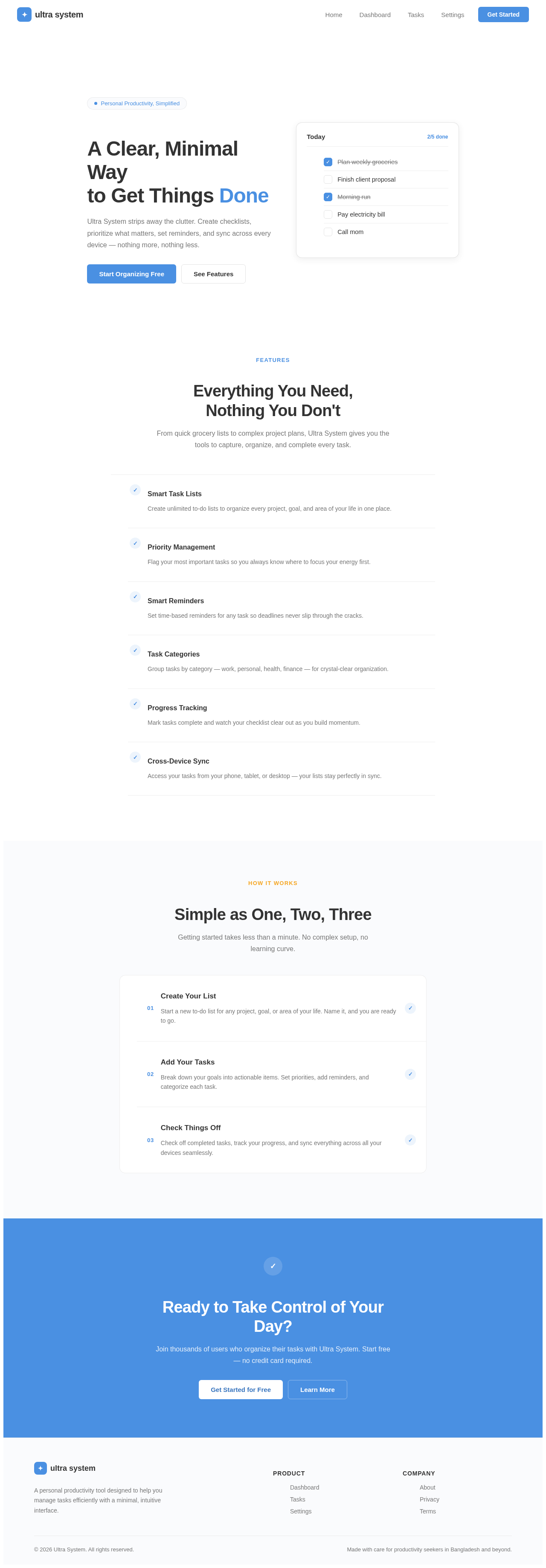
Personal Productivity, Simplified
A Clear, Minimal Way to Get Things Done
Ultra System strips away the clutter. Create checklists, prioritize what matters, set reminders, and sync across every device — nothing more, nothing less.

No comments yet. Be the first!