ultra-project
 Aditya Hegde
Build an **AI-Powered Cooking Assistant** website that feels like the future of food—bold, playful, and unapologetically modern. Think TikTok meets MasterChef meets your bestie's kitchen. The vibe should be: - **Chaotic energy** with clean functionality (controlled chaos) - **Dopamine-driven** interactions (satisfying animations, playful copy) - **Mobile-first, doomscrolling-ready** (vertical scrolling as primary) - **Accessible** but edgy (no corporate blandness) - **Gen Z voice**: casual, authentic, witty, no corporate jargon --- ## 🎯 Core Features ### 1. **Ingredient Input & Recipe Discovery** - **Search bar** with playful placeholder text like "drop your ingredients bestie 👀" - Users type/paste ingredients they have at home - AI suggests 3-5 recipes ranked by: - ⏱️ Cook time (quick wins highlighted) - 💪 Vibes/difficulty level - 🌟 Trending/popular recipes - Card-based recipe display with: - Appetizing hero image - Recipe name (catchy, real titles) - Prep + cook time badges - "Missing ingredients" callout (with option to show substitutes) - Quick save/share buttons ### 2. **Step-by-Step Cooking Mode** - **Immersive full-screen experience** (like TikTok Stories) - Large, legible step numbers with progress bar at top - Each step shows: - **Main instruction** (big, bold text) - **Ingredient list for this step** (highlighted in color) - **Timer button** (tap to start 30s, 5min, custom) - **Visual hints** (GIF or short video if available) - **Difficulty indicator** (🟢 easy / 🟡 medium / 🔴 spicy) - Swipe or tap to navigate steps - **One-handed navigation** (CTA buttons at thumb-reach) ### 3. **Voice-Guided Instructions** - 🎤 **Text-to-speech** with natural, conversational tone - Play/pause/skip controls - Playback speed (0.75x, 1x, 1.25x) - Voice *doesn't* feel robotic—use a warm, Gen Z-coded narrator voice - Trigger: tap speaker icon or "read to me" button - Works in background (screen can lock) ### 4. **Nutritional Breakdown** - Clean, colorful macro breakdown (protein, carbs, fats) - Per serving + total recipe nutrition - **Allergen warnings** (bold red flags) - **Calorie counter** per serving - Visual: donut chart or horizontal bar chart - Show if recipe fits common diets (vegan, keto, gluten-free) ### 5. **Additional Interactive Features** - ⏲️ **Smart timers** for multiple steps (can run simultaneously) - 💾 **Save recipes** to personal cookbook - 📤 **Share on social** (Instagram story, TikTok, Pinterest) - 🔄 **Substitute finder** ("don't have soy sauce? try...") - 🎵 **Cooking playlist** suggestion (Spotify integration idea) - 📸 **Photo upload** to share your creation - 👥 **Rate & review** recipes (show rating on recipe card) --- ## 🎨 Design Direction: "Chaotic But Clean" ### Color Palette - **Primary accent**: Vibrant lime/neon green (#00FF41 or #39FF14) — energy, fresh, food vibes - **Secondary accent**: Hot pink/magenta (#FF006E or #FF1493) — playful, trendy, warmth - **Neutral base**: Dark charcoal/near-black background (#0A0E27 or #111827) — modern, not boring - **Highlight**: Bright orange/peachy (#FF7A59) — warm, inviting, food-ey - **Text**: Cream white (#F5F5F5) for contrast, gray (#B0B0B0) for secondary ### Typography - **Display font**: "Clash Display" or "Space Grotesk" (bold, geometric, Gen Z energy) - **Body font**: "Inter" or "Segoe UI" (clean, readable, modern) - **Accent/playful**: "Fredoka One" or "Montserrat Black" for energetic callouts - **Type sizes**: Aggressive scale (big headings = 48-72px, small text = 12-14px, nothing in-between blandness) ### Visual Signature Elements - **Neon glow effects** on CTA buttons (lime green glow on hover) - **Gradient overlays** on recipe images (lime → pink → orange gradient) - **Bouncy animations** on interactive elements (buttons, cards) - **Playful illustrations** for empty states, errors, loading - **Hand-drawn arrows** or doodles pointing to important features - **Glassmorphism cards** with slight transparency and backdrop blur - **Neumorphic or shadow effects** that feel tactile, not flat --- ## 🏗️ Page Structure & Layout ### Homepage / Landing ``` [Header with logo + user profile] [Hero: "Your AI Kitchen Buddy" or playful tagline] [Search bar: "drop your ingredients bestie 👀"] [Recent searches / trending recipes carousel] [Curated collections: "Quick & Lazy", "Vegan Vibes", "Trending RN"] [Footer with social links] ``` ### Recipe Discovery Page ``` [Ingredient search + filter options] [Grid of recipe cards (3 cols on desktop, 1 col on mobile)] [Each card: image, title, cook time, difficulty, save/share buttons] [Infinite scroll or pagination] ``` ### Recipe Detail / Cooking Mode ``` [Full-screen immersive view] [Progress bar at top (step 2 of 8)] [Large recipe title] [Ingredient list for current step (highlighted)] [Main instruction text (huge)] [Timer + Voice button + navigation arrows] [Bottom: Nutrition info (swipeable)] ``` ### User Cookbook ``` [Tab: "My Recipes"] [Saved recipes grid] [Filter by: cooking time, difficulty, diet type] [Search saved recipes] ``` --- ## ✨ Micro-Interactions & Animations - **Button hover**: Glow effect + slight scale-up - **Card flip**: Hover to see quick stats (cook time, difficulty) - **Timer start**: Satisfying pulse animation - **Step completion**: Confetti or checkmark animation (dopamine hit) - **Voice play**: Subtle waveform animation - **Loading state**: Playful skeleton loader or bouncing dots - **Empty state**: Cute illustration with encouraging copy ("no recipes yet, add some ingredients!") --- ## 🔧 Technical Implementation ### Frontend Stack (Recommended) - **React.js** (or Vue/Svelte) for interactivity - **Tailwind CSS** + custom CSS for styling (use CSS variables for theme colors) - **Framer Motion** for animations - **Web Speech API** for voice guidance (text-to-speech) - **Chart.js** or **Recharts** for nutrition visualization - **Firebase or Supabase** for user accounts & saved recipes ### Backend - **Node.js + Express** or **Python + FastAPI** - **OpenAI API** (or similar) for AI recipe suggestions - **Nutritionix API** or **USDA API** for nutritional data - **Database**: PostgreSQL or MongoDB for recipe storage, user data ### Key Libraries - `react-icons` for trendy icons - `react-toastify` for notifications (success, errors) - `axios` or `fetch` for API calls - `date-fns` for timer formatting --- ## 📱 Mobile-First Checklist - ✅ Single-column layout on mobile - ✅ Large touch targets (44px+ buttons) - ✅ Voice controls work without text input - ✅ Voice mode works with screen off - ✅ Swipe navigation for steps - ✅ Landscape mode support (rotating phone) - ✅ No excessive animations on lower-end devices (respects `prefers-reduced-motion`) - ✅ Fast load times (<3s) --- ## 🎬 Copy/Voice Tone Examples **Search placeholder**: "Drop your ingredients bestie 👀" **Empty state**: "No recipes yet? Add some ingredients and let's cook up something fire 🔥" **Timer**: "Staring at a pot makes it boil slower... (5:32 left)" **Step complete**: "Yesss! You're crushing it 💪 Next up..." **Error message**: "Oops! Something went wrong. Try again? (we believe in u)" **Save recipe**: "Saved to your cookbook! 📖✨" **Voice narration**: Warm, encouraging, casual tone like a friend teaching you --- ## 🎯 Success Metrics / Key Features to Nail 1. ✨ **First impression** is memorable & energetic (not boring) 2. 🎨 **Color scheme** is cohesive and readable (high contrast) 3. ⚡ **Animations feel snappy** (not laggy) 4. 🗣️ **Voice guide sounds human**, not robotic 5. 📱 **Mobile experience** is smooth & intuitive 6. 🎵 **Copy throughout** matches Gen Z vibe (no corporate speak) 7. 💾 **Save/share features** work flawlessly 8. ♿ **Accessible** (keyboard nav, screen readers, color contrast) --- ## 🚀 Next Steps 1. **Start with the homepage** - Get colors, fonts, and hero right 2. **Build recipe discovery** - Card design, search functionality 3. **Create cooking mode** - Full-screen experience with step navigation 4. **Integrate voice** - Text-to-speech for instructions 5. **Add nutrition data** - API integration for macro breakdowns 6. **Polish & animate** - Add micro-interactions and transitions 7. **Test on mobile** - Ensure responsive, fast, and intuitive --- ## 💡 Bonus Ideas (Nice-to-Have) - **AI shopping list** generator (export to grocery app) - **Recipe difficulty progression** (learn from easy → hard) - **Cooking streak counter** (gamify cooking habit) - **Collab cooking mode** (invite friends to cook together) - **Video walkthroughs** (pro chef demonstrations) - **Budget-friendly filter** (recipes under $5) - **Noise detection** (kitchen sounds like sizzling = progress!) --- **Remember**: The goal is to make cooking feel *fun, accessible, and cool*—not intimidating. If your grandma and a TikTok creator would both enjoy using this, you've nailed it. 🔥 Build a website for this and i need a zip file from yopu


Comments (0)
Sign in to leave a comment
System Requirements
ultra-project System Requirements Document
Introduction
The ultra-project aims to develop an AI-Powered Cooking Assistant website named CookPilot. This platform will revolutionize the way users interact with cooking by providing a bold, playful, and modern experience. The website will be accessible to all users and will require them to create profiles using their Gmail ID and passwords.
System Overview
CookPilot is designed to be a futuristic cooking assistant that combines the excitement of social media with the practicality of a kitchen assistant. It will offer users the ability to input ingredients, discover recipes, and follow step-by-step cooking instructions with voice guidance. The platform will also provide nutritional breakdowns and allow users to save and share their favorite recipes.
Functional Requirements
- As a User, I should be able to input ingredients and discover recipes based on what I have at home.
- As a User, I should be able to view recipes ranked by cook time, difficulty, and popularity.
- As a User, I should be able to see a card-based display of recipes with images and details.
- As a User, I should be able to enter a full-screen cooking mode with step-by-step instructions.
- As a User, I should be able to receive voice-guided instructions with play/pause/skip controls.
- As a User, I should be able to view a nutritional breakdown of recipes, including allergen warnings.
- As a User, I should be able to set smart timers for cooking steps.
- As a User, I should be able to save recipes to a personal cookbook.
- As a User, I should be able to share recipes on social media platforms.
- As a User, I should be able to find substitutes for missing ingredients.
- As a User, I should be able to upload photos of my cooking creations.
- As a User, I should be able to rate and review recipes.
- As a User, I should be able to create a profile using my Gmail ID and password.
User Personas
- General User: Individuals who enjoy cooking and are looking for new recipes and cooking guidance.
- Social Sharer: Users who like to share their cooking experiences and recipes on social media.
- Health-Conscious Cook: Users interested in nutritional information and dietary considerations.
Core User Flows
- User inputs ingredients -> AI suggests recipes -> User selects a recipe -> Enters cooking mode -> Follows step-by-step instructions -> Saves or shares the recipe.
- User creates a profile -> Searches for recipes -> Saves favorite recipes to personal cookbook -> Shares recipes on social media.
Visuals Colors and Theme
- primary: #00FF41 (Vibrant lime/neon green)
- primary_light: #39FF14 (Lighter neon green)
- secondary: #FF006E (Hot pink/magenta)
- accent: #FF7A59 (Bright orange/peachy)
- highlight: #FF7A59 (Bright orange/peachy)
- bg: #0A0E27 (Dark charcoal/near-black)
- surface: rgba(10, 14, 39, 0.8)
- text: #F5F5F5 (Cream white)
- text_muted: #B0B0B0 (Gray)
- border: rgba(255, 255, 255, 0.2)
Signature Design Concept
The homepage of CookPilot will feature an interactive, chaotic yet clean design that captures the energy of a bustling kitchen. Users will be greeted with a neon-lit interface where ingredients and recipes float in a 3D space. Using @react-three/fiber and @react-three/drei, users can click and drag ingredients to see recipe suggestions pop up in real-time. The interface will have bouncy animations and neon glow effects on interactive elements, creating a dopamine-driven experience that feels like a game.
Interaction Model & Motion Direction
The landing page will use a "parallax" interaction model, with layered depth via scroll. Decorative elements will translate at different speeds, creating a dynamic and engaging first impression. Internal pages will maintain a "static" interaction model for clarity and ease of use.
Non-Functional Requirements
- The system must be responsive and mobile-first, ensuring a seamless experience on all devices.
- The voice guidance feature must work in the background, allowing users to lock their screens.
- The platform should load quickly, with a target load time of under 3 seconds.
Tech Stack
- Frontend: React.js, Tailwind CSS, Framer Motion
- Backend: Node.js + Express or Python + FastAPI
- Database: PostgreSQL or MongoDB
- AI Models: OpenAI API for recipe suggestions
- APIs: Nutritionix API or USDA API for nutritional data
- Libraries:
react-icons,react-toastify,axios,date-fns
Assumptions and Constraints
- The platform will be open to all users, requiring only a Gmail ID and password for profile creation.
- The design will prioritize a Gen Z aesthetic, avoiding corporate blandness.
- The system must support multiple languages for voice guidance.
Glossary
- AI-Powered Cooking Assistant: A digital platform that uses artificial intelligence to assist users in cooking.
- Dopamine-driven interactions: User interactions designed to be satisfying and engaging.
- Neon glow effects: Visual effects that create a glowing appearance, often used for emphasis.
- Parallax: A scrolling effect where background images move slower than foreground images, creating a sense of depth.
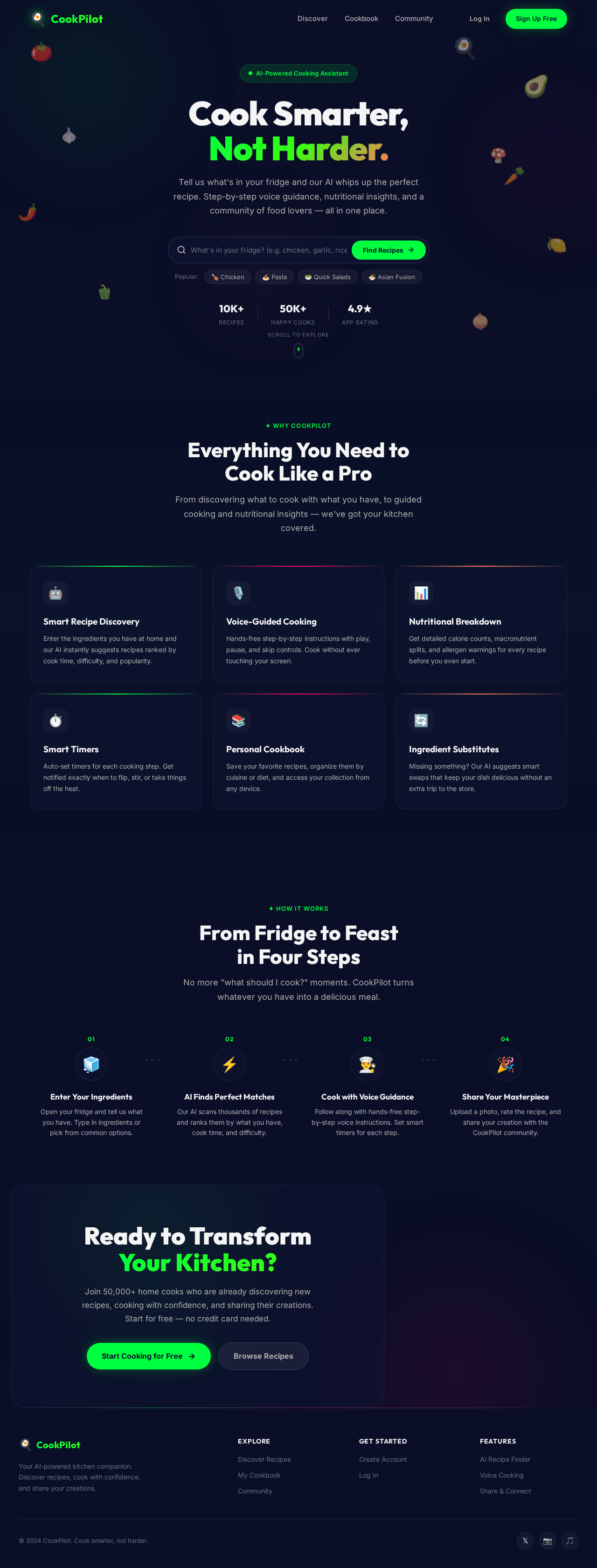
Cook Smarter,
Not Harder.
Tell us what's in your fridge and our AI whips up the perfect recipe. Step-by-step voice guidance, nutritional insights, and a community of food lovers — all in one place.
Everything You Need to
Cook Like a Pro
From discovering what to cook with what you have, to guided cooking and nutritional insights — we've got your kitchen covered.
Smart Recipe Discovery
Enter the ingredients you have at home and our AI instantly suggests recipes ranked by cook time, difficulty, and popularity.
Voice-Guided Cooking
Hands-free step-by-step instructions with play, pause, and skip controls. Cook without ever touching your screen.
Nutritional Breakdown
Get detailed calorie counts, macronutrient splits, and allergen warnings for every recipe before you even start.
Smart Timers
Auto-set timers for each cooking step. Get notified exactly when to flip, stir, or take things off the heat.
Personal Cookbook
Save your favorite recipes, organize them by cuisine or diet, and access your collection from any device.
Ingredient Substitutes
Missing something? Our AI suggests smart swaps that keep your dish delicious without an extra trip to the store.
From Fridge to Feast
in Four Steps
No more "what should I cook?" moments. CookPilot turns whatever you have into a delicious meal.
Enter Your Ingredients
Open your fridge and tell us what you have. Type in ingredients or pick from common options.
AI Finds Perfect Matches
Our AI scans thousands of recipes and ranks them by what you have, cook time, and difficulty.
Cook with Voice Guidance
Follow along with hands-free step-by-step voice instructions. Set smart timers for each step.
Share Your Masterpiece
Upload a photo, rate the recipe, and share your creation with the CookPilot community.
Ready to Transform
Your Kitchen?
Join 50,000+ home cooks who are already discovering new recipes, cooking with confidence, and sharing their creations. Start for free — no credit card needed.
No comments yet. Be the first!