ultra-calculator
 Diya Trivedi
start a project to build a simple single pge design of calculator

Comments (0)
Sign in to leave a comment
System Requirements
System Requirements Document for ultra-calculator
1. Introduction
ultra-calculator is a simple calculator delivered as a single-page design. Its product intent is narrow and complete: a person opens one page, enters numbers and operators, and reads a correct arithmetic result. There is no onboarding, no navigation, and no second destination — the calculator page is the entire product.
The audience is anyone who needs a number fast: a single-purpose utility read at a glance, designed in the spirit of civic signage — legible, systematic, and trustworthy. The design language is "Systematic clarity," a calculator treated as wayfinding signage in the manner of Massimo Vignelli: a visible grid, colour-coded categories, and Helvetica-grade type.
2. System Overview
ultra-calculator is a browser-delivered, single-page calculator. The page presents an oversized wordmark, a one-line explanation, a colour-coded operator legend, and a calculator card containing an expression history, a tabular result display, and a 4×5 key lattice. All arithmetic is performed on the page; the user's entry, the computed result, and the clear action all live within this one surface.
Actors
- Calculator User (human, active): opens the single calculator page, enters numbers and operators, reads the computed result, and clears the entry to start anew.
- Calculator engine (system process): evaluates the entered expression and produces the displayed result. It is not a human-facing actor and has no separate destination.
Accepted behavior
- A simple calculator: entry of numbers and operators, display of the computed result, and clearing to start a new calculation.
- A single-page design: exactly one page, with no additional destinations, navigation, or account surfaces.
Ownership
The single page, Calculator, is the anonymous public entry and the sole working surface. It is owned by the application and requires no identity, sign-in, or account. Arithmetic evaluation is a supporting system process behind that page.
Exclusions
No multi-page navigation, no history persistence across sessions, no accounts, no scientific or programmer modes, and no adjacent calculator capabilities beyond the simple arithmetic entry, result, and clear behavior described here.
Removed from scope
- None.
2a. Product Interpretation and Delivery Boundary
ultra-calculator is delivered as one first-party web page. The page is publicly reachable with no identity requirement: a visitor lands directly on the calculator and can immediately begin entering numbers and operators. There is no anonymous pre-identity lifecycle, because no protected state, commitment, or durable actor-specific record exists — the calculator's state is ephemeral to the page session.
The current delivery horizon contains only the simple calculator on its single page. Nothing in the accepted requirements establishes a future phase, provider-owned surface, or external destination; the calculator engine runs as a supporting process behind the page rather than as a separate service the user visits.
2c. Page Content and Component Coverage
Calculator
The sole page of the product, anonymously reachable, presenting the calculator as a signage composition.
Information and state
- The wordmark "ULTRA-CALCULATOR" set in Archivo 700 uppercase, flush-left, oversized.
- A one-line explanation of the calculator.
- A colour-coded operator legend styled like a transit line key, mapping each operator to its colour code.
- The current expression history, shown in small uppercase grey above the result.
- The current computed result, shown in tabular numerals directly above a yellow rule.
- The 4×5 key lattice: digits 0–9, decimal point, the four operators (÷ × − +), equals, and clear.
Primary actions
- Press a digit or decimal key to append it to the current entry.
- Press an operator key to record the operator for the calculation.
- Press equals to evaluate the expression and display the result.
- Press clear to reset the entry and begin a new calculation.
Supporting actions
- Read the operator legend to identify each operator's colour code.
- Read the expression history to see what was entered.
Domain entities
- Expression: the sequence of numbers and operators the user has entered.
- Result: the numeric outcome of evaluating the expression.
- Operator: one of ÷, ×, −, +, each with an associated colour code in the legend.
Component responsibilities
- Wordmark block: displays the product name at display scale; stacks above the calculator on mobile.
- Explanation line: one line describing the calculator.
- Operator legend: colour-coded key mapping operators to their codes.
- Calculator card: white rectangle with a 2px black outer rule containing the display and keypad.
- Expression history: renders the entered expression in small uppercase grey.
- Result display: renders the computed result in tabular numerals above a yellow rule.
- Keypad lattice: 4-column grid of square keys with 1px black gutters; equals key filled Vignelli red; clear key outlined yellow.
States
- Loading: not applicable — the page renders immediately with an empty expression and an empty or zero result.
- Empty: no expression entered; the display shows an empty history and a neutral result state ready for input.
- Success: a valid expression is evaluated and the result is displayed in tabular numerals.
- Error: an expression that cannot be evaluated (for example, an incomplete or malformed entry) leaves the display in a recoverable state; the user can clear and re-enter.
- Recovery: pressing clear resets the expression and result to the empty state so a new calculation can begin.
3. Functional Requirements
FR-1 — Simple calculator entry and result (explicit) As a Calculator User I should enter numbers and operators on the single calculator page and see the computed result, so that I get a correct arithmetic answer without leaving the page.
- Trigger/input: the user presses digit, decimal, and operator keys on the keypad.
- Observable result: the expression history reflects the entry and, on equals, the result display shows the computed value in tabular numerals.
- Access state: anonymous; no identity required.
- Failure/recovery: an expression that cannot be evaluated leaves a recoverable display; the user clears and re-enters.
- Continuation: the user may continue entering a new expression after reading the result.
FR-2 — Clear to start anew (explicit) As a Calculator User I should clear the current entry so that I can start a new calculation from a clean state.
- Trigger/input: the user presses the clear key (outlined in yellow).
- Observable result: the expression history and result display reset to the empty state.
- Access state: anonymous.
- Failure/recovery: not applicable — clear always returns the page to the empty state.
- Continuation: the user begins a new expression.
FR-3 — Single-page presentation (explicit) As a Calculator User I should find the entire calculator on one page, so that I never need to navigate elsewhere to complete a calculation.
- Trigger/input: the user opens the product.
- Observable result: the wordmark, explanation, operator legend, and calculator card are all present on the one page.
- Access state: anonymous public entry.
- Failure/recovery: not applicable.
- Continuation: the user proceeds directly to entry.
FR-4 — Operator legend (required_inference) As a Calculator User I should see a colour-coded legend of the operators, so that I can identify each operator at a glance in the signage style.
- Trigger/input: the page renders.
- Observable result: the legend maps ÷, ×, −, + to their colour codes beside the wordmark.
- Access state: anonymous.
- Failure/recovery: not applicable.
- Continuation: the user reads the legend and proceeds to entry.
FR-5 — Expression history display (required_inference) As a Calculator User I should see the expression I have entered above the result, so that I can confirm what is being calculated.
- Trigger/input: the user enters numbers and operators.
- Observable result: the expression history updates in small uppercase grey above the result.
- Access state: anonymous.
- Failure/recovery: on clear, the history resets to empty.
- Continuation: the user presses equals or continues entry.
4. User Personas
Calculator User
Product context. The Calculator User arrives at ultra-calculator with a single, immediate need: a number, fast. They are not looking for a workspace, an account, or a saved history — they want a legible machine that answers an arithmetic question at a glance. The page is anonymous and ephemeral; nothing about their visit persists.
Primary goal. Get a correct arithmetic result from the on-page calculator without navigating anywhere else.
Distinct accepted responsibilities.
- Enter numbers and operators on the keypad.
- Read the expression history to confirm the entry.
- Press equals to obtain the computed result.
- Press clear to reset and begin a new calculation.
Relevant inputs and decisions. The user decides which numbers and operators to enter, when to evaluate with equals, and when to clear. They read the operator legend to identify operators by their colour codes.
Interactions with other accepted participants. The Calculator User is the only human participant. The calculator engine evaluates the expression and returns the result to the display; the user does not interact with it directly beyond pressing keys.
Observable success. The result display shows the correct computed value in tabular numerals, and the user can clear and start again without leaving the page.
5. Core User Flows
Flow 1 — Perform a calculation
- The Calculator User opens the product and lands on the Calculator page (anonymous; no sign-in).
- The page presents the wordmark, the one-line explanation, the colour-coded operator legend, and the calculator card with an empty expression history and a neutral result display.
- The user presses digit keys to enter the first number; the expression history updates in small uppercase grey.
- The user presses an operator key (÷, ×, −, or +); the operator is recorded in the expression.
- The user presses digit keys to enter the second number; the history reflects the full expression.
- The user presses the equals key (filled Vignelli red); the calculator engine evaluates the expression.
- The result display shows the computed value in tabular numerals above the yellow rule.
- Continuation: the user may read the result and then press clear to begin a new calculation, or continue entering a new expression.
Failure/recovery: if the expression cannot be evaluated (for example, an incomplete entry), the display remains in a recoverable state; the user presses clear and re-enters the expression.
Flow 2 — Clear and start anew
- The Calculator User is on the Calculator page with an expression or result displayed.
- The user presses the clear key (outlined in yellow).
- The expression history and result display reset to the empty state.
- The user begins a new expression by pressing digit keys.
Failure/recovery: not applicable — clear always returns the page to the empty state.
Flow 3 — Read the operator legend
- The Calculator User is on the Calculator page.
- The user reads the colour-coded operator legend beside the wordmark, styled like a transit line key.
- The user identifies each operator's colour code and proceeds to entry.
6. Visuals Colors and Theme
Muse and headline. Massimo Vignelli — "Systematic clarity: a calculator as wayfinding signage." The page reads as civic infrastructure: a machine legible at a glance, in the spirit of subway signage and Unigrid publications.
Colour tokens (light mode)
| Role | Hex | Usage |
|---|---|---|
| Background | #F4F1EA | Warm paper ground |
| Surface | #FFFFFF | White keypad card — the only bright surface |
| Text | #111111 | All type and rules |
| Primary | #D6281E | Vignelli red — equals key and operator column headers only |
| Accent | #F2B705 | Yellow — clear key and the single rule under the display |
| Muted | #6B6862 | Secondary labels and footer legend |
Proportions: ~70% paper/white, 20% black ink, 8% red, 2% yellow.
Typography
- Headings: Archivo — 700 uppercase for the wordmark and keypad digits, 500 for labels, 400 for the display expression history. Flush-left, ragged-right, tracking 0, no italics, no letterspacing tricks. Hierarchy comes from weight and size only.
- Body: Archivo.
- Scale: 1.333 modular — 96/72/48/32/24/18/16. Display result uses tabular numerals at
clamp(48px, 9vw, 96px); keypad digitsclamp(22px, 3vw, 28px); labels 12px uppercase; body 16px.
Shape language. Hard edges and hairlines. Keys are perfect squares with a 1px #111111 border and 0 radius — no rounded corners anywhere. The keypad is a strict 4-column grid with 1px gutters so the borders read as a single drawn lattice. Horizontal rules (1px, #111111) separate the display, the keypad, and the legend.
Layout. One page, two zones on desktop: a left column (5 of 12) holding the oversized wordmark, a one-line explanation, and the colour-coded operator legend; a right column (7 of 12) holding the calculator card. The card is a white rectangle with a black 2px outer rule, the expression history at top, the tabular result below a yellow rule, then the 4×5 key lattice. On mobile the wordmark stacks above the calculator; the keypad stays 4 columns wide and never breaks out of the card. All columns align to a 12-column grid with 24px gutters.
Imagery. No photography, no illustration. The only "imagery" is diagrammatic: a small colour-coded operator legend that reads like a transit line key, and 1px pictogram glyphs for ÷ × − + = drawn as geometry. The keypad itself is the visual subject.
Readability. Headlines, wordmarks, labels, numbers, cards' text, and controls stay entirely inside the viewport and their container at 375px, 768px, and 1280px, wrapping or scaling to fit; no other element covers any part of them.
7. Signature Design Concept
The first screen is a signage composition, not a SaaS hero. The wordmark "ULTRA-CALCULATOR" is set in Archivo 700 at clamp(56px, 11vw, 128px) in black, flush-left, spanning the full left column edge-to-edge on the warm paper ground, stacked over a 1px black rule. To its right, the white calculator card sits as a single dominant object with a hard black border, its tabular result set at clamp(48px, 9vw, 96px).
There is no centred headline, no sub-head button, no gradient. The dominant elements are the oversized wordmark and the grid lattice of the keypad, with red reserved for the equals key. The keypad is drawn as one continuous lattice: 4 columns of square keys separated by 1px black gutters inside a 2px black card border, so the grid itself becomes the graphic. The equals key is filled solid Vignelli red #D6281E as the only saturated block on the page; the clear key is outlined in yellow #F2B705. A colour-coded operator legend beside the wordmark, styled like a subway line key, maps each operator to its colour code. The tabular result display sits directly above a yellow rule, with the expression history in small uppercase grey above it.
8. Interaction Model & Motion Direction
Interaction Model: Static (direction) Motion Tempo: still Hero Dimensionality: flat
Landing Hero Motion Brief
- Focal subject: the oversized "ULTRA-CALCULATOR" wordmark and the keypad lattice of the calculator card.
- Input → transformation → outcome thesis: a keypress inverts the pressed key to
#111111ground with white digits for 90ms — mechanical, no easing curve — then returns to its resting state; the display updates instantly to reflect the entry or result. No other motion occurs. - Motion vocabulary: instant state change only; no reveals, no transitions on scroll, no hover-lift.
- Composed first frame: warm paper ground with the black wordmark flush-left above a 1px rule on the left; the white calculator card with black 2px border on the right, expression history in small uppercase grey, tabular result above the yellow rule, and the 4×5 key lattice with the red equals key as the only saturated block.
- Reduced-motion state:
prefers-reduced-motionis a no-op because there is nothing to reduce; the page is fully usable as a static arrangement.
9. Non-Functional Requirements
- Single-page constraint (explicit): the product must be a single page; no additional destinations, routes, or navigation may be introduced.
- Simplicity (explicit): the design must remain a simple calculator — no scientific, programmer, or adjacent modes.
- Legibility (explicit, from creative direction): readable text and controls stay whole at every viewport (375px, 768px, 1280px), wrapping or scaling to fit, with no element covering them.
- Accessibility (required_inference): keys are operable by keyboard and pointer; the pressed-key inversion provides a visible state change; the page is usable with
prefers-reduced-motionbecause no motion is required. - Performance (required_inference): the page renders immediately with no loading state; arithmetic evaluation is instantaneous on keypress.
10. Tech Stack
- Frontend: React, single-page application rendering the Calculator page.
- Styling: CSS with the Archivo typeface, 12-column grid, and the colour tokens defined in Section 6.
- Arithmetic: client-side evaluation on the page; no server round-trip is required for the accepted behavior.
- Deployment: static hosting of the single-page build.
11. Assumptions and Constraints
- Assumption (required_inference): arithmetic is evaluated on the client; no backend service is needed for the accepted simple calculator behavior.
- Assumption (required_inference): calculator state is ephemeral to the page session; no persistence across visits is required.
- Constraint (explicit): exactly one page — the Calculator page — with no additional destinations.
- Constraint (explicit): the design must be a simple single-page calculator.
- Constraint (explicit, from creative direction): no rounded corners, no gradients, drop shadows, or glass panels; no blue or indigo accents; no decorative illustration or stock photography; no more than two accent colours; no italic or letter-spaced display type.
12. Glossary
- Calculator page: the single, anonymously reachable page that constitutes the entire product.
- Expression: the sequence of numbers and operators entered by the user.
- Result: the numeric outcome of evaluating the expression, displayed in tabular numerals.
- Operator: one of ÷, ×, −, +, each with a colour code in the legend.
- Key lattice: the 4×5 grid of square keys with 1px black gutters inside the calculator card.
- Clear key: the key outlined in yellow that resets the expression and result to the empty state.
- Equals key: the key filled solid Vignelli red
#D6281Ethat triggers evaluation.
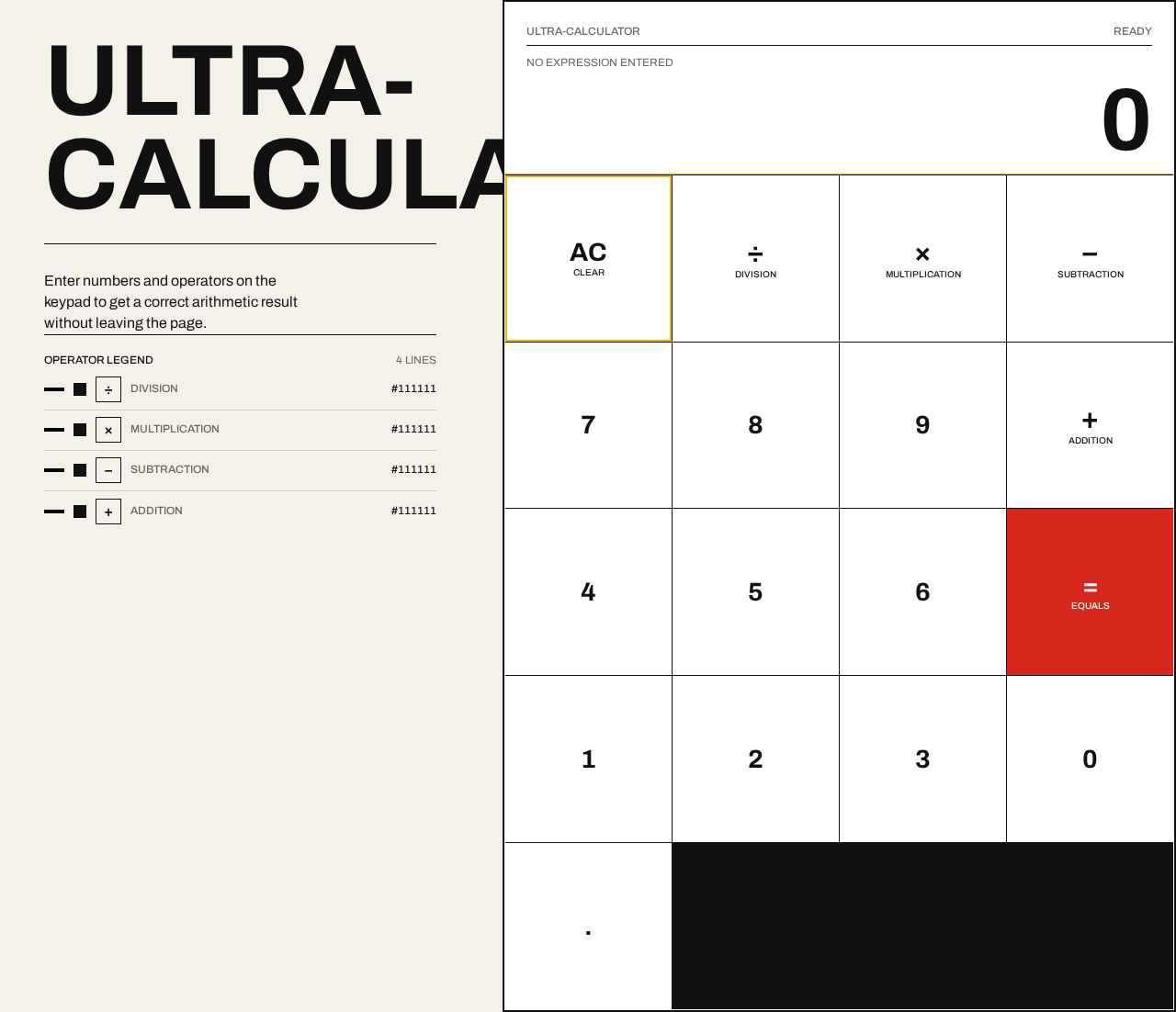
Ultra-Calculator
Enter numbers and operators on the keypad to get a correct arithmetic result without leaving the page.
Operator legend
4 lines- Division#111111
- Multiplication#111111
- Subtraction#111111
- Addition#111111
NO EXPRESSION ENTERED
Ultra-Calculator
Enter numbers and operators on the keypad to get a correct arithmetic result without leaving the page.
Operator legend
4 lines- Division#111111
- Multiplication#111111
- Subtraction#111111
- Addition#111111
NO EXPRESSION ENTERED
No comments yet. Be the first!