turbo-invoice
 Yashwnath
Build a production-ready multi-tenant micro-SaaS called “PayPilot”. PayPilot helps small web-design, marketing, branding, and development agencies automatically follow up on unpaid invoices without sending awkward messages manually. Positioning: “Get overdue invoices paid without awkward follow-up.” This is NOT a full accounting or invoice-generation platform. It is a focused accounts-receivable reminder tool for businesses that already create invoices elsewhere. TARGET USERS - Web-design agencies with 2–15 employees - Marketing agencies - Freelance developers and designers - Branding studios - Small consulting businesses TECHNOLOGY Use the platform’s modern full-stack web framework, relational database, secure authentication, responsive UI, scheduled background jobs, email provider integration, and Stripe subscriptions. Use environment variables for secrets. Build a real working application, not only a visual mockup. MULTI-TENANCY AND AUTHENTICATION - Email/password signup and login - Forgot/reset password - Workspace creation after signup - Invite team members - Roles: Owner, Admin, Member - Every record must include organization/workspace ownership - Enforce server-side tenant isolation and authorization - Users must never access another workspace’s data MAIN NAVIGATION - Overview - Invoices - Clients - Reminder Campaigns - Templates - Activity - Settings - Billing ONBOARDING Create a setup wizard asking for: - Business name - Logo - Website - Sender name and email - Timezone - Currency - Default payment terms: due on receipt, 7, 14, 30, or custom - Preferred import method: CSV, Stripe, or manual entry Allow users to load demo data. OVERVIEW DASHBOARD Display: - Total outstanding amount - Total overdue amount - Number of overdue invoices - Amount recovered - Recovery rate - Reminders sent this month - Invoices by aging: not due, 1–7, 8–14, 15–30, and 31+ days overdue - Payments recovered over time - Overdue invoices by client Add a prominent “Review overdue invoices” button. INVOICES Create an invoice table with: - Invoice number - Client - Amount - Balance due - Currency - Issue date - Due date - Days overdue - Status - Last reminder - Next reminder Statuses: - Draft - Sent - Due soon - Overdue - Partially paid - Paid - Disputed - Paused - Written off Invoice details must show: - Full invoice information - Client information - Payment URL - Reminder timeline - Email delivery status - Client replies - Internal notes - Send reminder now - Pause/resume reminders - Mark paid - Record partial payment Support: - Manual invoice creation - CSV import/export - Search - Filtering and sorting - Duplicate warnings - Bulk pause/resume - Bulk send with confirmation Invoice fields: invoice number, client, client email, company, amount, amount paid, balance due, currency, issue date, due date, payment URL, notes, status, campaign, created date, and updated date. CSV IMPORT Accept: invoice_number, client_name, client_email, client_company, amount, amount_paid, currency, issue_date, due_date, payment_url, notes. Show column mapping, validation errors, duplicate warnings, preview, and import summary. CLIENTS Create a client list showing: - Name/company - Email - Total invoiced - Outstanding balance - Overdue invoices - Last payment - Average days to pay Client profiles should show all invoices, payment history, reminder history, notes, tags, and a “pause all reminders” setting. Tags: VIP, Retainer, Slow payer, New client, Disputed, Agency partner. REMINDER CAMPAIGNS Create configurable campaigns with this default sequence: 1. Three days before due date: friendly heads-up 2. Due date: payment due reminder 3. Seven days overdue: professional follow-up 4. Fourteen days overdue: firm follow-up 5. Twenty-one days overdue: owner review notification Each step supports: - Enable/disable - Days relative to due date - Template - Sending time and timezone - Approval required or automatic sending - Stop if payment is detected - Stop if client replies - Internal notification - Maximum reminders Require approval before automatic sending for all new users. Include create, edit, duplicate, activate, pause, preview, test email, and campaign performance features. EMAIL TEMPLATES Provide templates for: - Upcoming reminder - Due today - Seven-day overdue - Fourteen-day overdue - Payment confirmation - Payment-plan request - Client says they paid - Invoice dispute - Client requests more time Variables: {{client_first_name}}, {{client_full_name}}, {{client_company}}, {{invoice_number}}, {{invoice_amount}}, {{balance_due}}, {{currency}}, {{issue_date}}, {{due_date}}, {{days_overdue}}, {{payment_link}}, {{business_name}}, {{sender_name}}, {{sender_email}}. Every email must be concise, professional, and non-threatening. Never make legal claims or threaten legal action. Include invoice number, balance, due date, business name, and payment link when available. Implement: - Preview - Edit before sending - Test email - Approval workflow - Sent/delivered/bounced/failed status - Optional opened/clicked status - Duplicate-send prevention - Rate limiting - Retry for safe failures AI ASSISTANT Add “PayPilot Assistant” to: - Draft reminders - Adjust tone: friendly, neutral, professional, or firm - Recommend the next follow-up date - Classify replies as payment confirmation, payment promise, dispute, extension request, wrong recipient, question, or unclear - Extract promised payment date, amount, dispute reason, and requested action - Suggest next action AI safety: - Label AI-generated content - Require user review before first send - Allow editing - Never give legal advice - Never invent payment history - Never claim a payment occurred without confirmation - Do not send sensitive invoice information to AI unless enabled - If no AI API is configured, use fallback templates INTEGRATIONS MVP priority: 1. CSV import 2. Stripe payment links/status 3. Gmail/SMTP email sending Prepare clean adapters for QuickBooks, Xero, and Outlook, but do not let unavailable integrations block the MVP. For Stripe: - Support account connection if available - Detect successful payments using secure webhooks - Support partial payments - Stop future reminders when paid - Verify webhook signatures - Process webhook events idempotently BILLING Use Stripe subscriptions with: - 14-day free trial, up to 10 active invoices - Starter: $19/month, up to 25 active invoices - Agency: $49/month, up to 150 active invoices - Studio: $99/month, up to 500 active invoices, team members, branding, advanced analytics Include upgrade, downgrade, cancellation, reactivation, payment-failure handling, usage limits, billing history, and Stripe customer portal. SETTINGS Include: - Business profile - Logo/branding - Sender and reply-to email - Currency/timezone - Payment terms - Default campaign - Email settings - AI settings - Team members - Billing - Data export - Delete workspace ACTIVITY LOG Track: - Invoice creation/import/update - Reminder approval/sending/failure - Payment detection - Invoice marked paid - Campaign activation/pause - Team changes - Subscription changes Show timestamp, user, action, related invoice/client, and result. DATABASE Create suitable tables for: users, organizations, organization_members, subscriptions, clients, invoices, payments, reminder_campaigns, reminder_steps, reminder_runs, message_templates, email_messages, email_replies, ai_suggestions, activity_logs, integration_connections, webhook_events, and notifications. Add foreign keys, timestamps, indexes, organization IDs, and secure access rules. DESIGN Use a clean B2B SaaS interface: - White cards - Light background - Dark navy text - Blue/indigo primary buttons - Green for paid - Orange for due soon - Red for overdue - Responsive mobile layout - Accessible contrast - Clear empty states - Helpful validation messages LANDING PAGE Create a landing page with: Headline: “Get overdue invoices paid without awkward follow-up.” Subheadline: “PayPilot automatically sends professional payment reminders for small agencies while keeping you in control.” Sections: how it works, features, reminder timeline, dashboard preview, AI assistant, security, pricing, FAQs, and CTA. Primary CTA: “Start free trial.” Do not claim guaranteed recovery rates. DEMO DATA Add a demo workspace with: - 8 clients - 15 invoices - Paid, due, overdue, and partially paid statuses - Reminder history - Payment events - Sample AI reply classifications SECURITY Implement server-side authorization, tenant isolation, input validation, rate limiting, XSS-safe rendering, encrypted credentials, secure webhook verification, audit logs, data export, workspace deletion, and no secrets in frontend code. TESTING Add tests for: - Invoice status calculations - Reminder scheduling - Duplicate prevention - Tenant isolation - Roles and permissions - Subscription limits - CSV validation - Webhook idempotency - End-to-end flow: signup → import invoice → create campaign → approve reminder → send test email → mark paid → stop future reminders. BUILD PRIORITY 1. Authentication and tenant isolation 2. Clients and invoices 3. CSV import 4. Reminder campaigns 5. Templates and email sending 6. Stripe billing 7. Payment status/webhooks 8. AI features 9. Analytics and polish If an integration is unavailable, provide a clearly labeled demo/mock adapter. Before completion, run tests, fix build errors, verify mobile responsiveness, check all protected routes, seed demo data, and provide README/setup instructions.


Comments (0)
Sign in to leave a comment
System Requirements
System Requirements Document for Turbo-Invoice
1. Introduction
Turbo-Invoice is a production-ready multi-tenant micro-SaaS designed to help small web-design, marketing, branding, and development agencies automatically follow up on unpaid invoices without sending awkward messages manually. It is a focused accounts-receivable reminder tool for businesses that already create invoices elsewhere.
2. System Overview
2a. Product Interpretation and Delivery Boundary
-
Domain Descriptors:
- Accounts Receivable Automation: Automates invoice follow-ups for small agencies.
-
Scope:
- Included: Secure authentication, workspace management, email integration, Razorpay subscriptions, AI assistance, server-side tenant isolation, and robust security measures.
- Excluded: Full accounting features, invoice generation capabilities.
-
Access:
- Application-owned identity with secure access and data isolation for different organizations.
-
Behavior Contracts:
- Multi-Tenant Authentication and Workspace Management: User signs up, logs in, or manages workspace/team membership.
- Navigate Main Application Sections: User selects a main navigation item.
- Complete Onboarding Setup Wizard: User completes onboarding after signup.
- Display Overview Dashboard: User accesses the overview dashboard.
- Import Invoices via CSV: User uploads a CSV file for invoice import.
- Manage Email Templates: User creates, edits, previews, or tests an email template.
- AI Assistant for Drafting Reminders and Classifying Replies: User invokes AI assistant for drafting or classifying.
- Integrate with CSV Import, Razorpay, and Email Providers: User connects or uses an integration (CSV, Razorpay, Email).
- Seed Demo Workspace with Example Data: System loads demo data during onboarding or from settings.
2b. Source Content Inventory
Not applicable as no explicit content_source directive was provided.
2c. Page Content and Component Coverage
-
Overview Page:
- Display key metrics such as total outstanding amount, total overdue amount, number of overdue invoices, amount recovered, recovery rate, reminders sent this month, invoices by aging, payments recovered over time, and overdue invoices by client.
- Include a prominent “Review overdue invoices” button.
-
Invoices Page:
- Display an invoice table with details like invoice number, client, amount, balance due, currency, issue date, due date, days overdue, status, last reminder, and next reminder.
- Support manual invoice creation, CSV import/export, search, filtering, sorting, duplicate warnings, bulk actions, and detailed invoice views.
-
Clients Page:
- Show client list with name/company, email, total invoiced, outstanding balance, overdue invoices, last payment, and average days to pay.
- Client profiles to include all invoices, payment history, reminder history, notes, tags, and a “pause all reminders” setting.
-
Reminder Campaigns Page:
- Allow creation and management of configurable campaigns with default sequences and features like enable/disable, template selection, sending time, approval workflow, and performance tracking.
-
Templates Page:
- Provide email templates for various reminder scenarios with variables for customization and features like preview, edit, test email, and approval workflow.
-
Activity Page:
- Track user actions and system events with details like timestamp, user, action, related invoice/client, and result.
-
Settings Page:
- Allow configuration of business profile, logo/branding, email settings, AI settings, team members, billing, data export, and workspace deletion.
-
Billing Page:
- Manage user subscriptions and billing through Razorpay with features like upgrade, downgrade, cancellation, reactivation, and billing history.
3. Functional Requirements as Story Points
- As an Agency User, I should be able to sign up and create a workspace to manage my invoices and reminders.
explicit - As an Admin, I should be able to invite team members and assign roles to manage access within the workspace.
explicit - As an Owner, I should be able to manage billing and subscription details through Razorpay.
explicit - As an Agency User, I should be able to navigate through the main application sections like Overview, Invoices, Clients, etc.
explicit - As an Agency User, I should be able to complete the onboarding setup wizard to initialize my workspace profile.
explicit - As an Agency User, I should be able to view key metrics on the Overview dashboard.
explicit - As an Agency User, I should be able to import invoices via CSV with validation and error handling.
explicit - As an Agency User, I should be able to manage email templates for reminders and notifications.
explicit - As an Agency User, I should be able to use the AI Assistant to draft reminders and classify replies.
explicit - As an Agency User, I should be able to integrate with CSV, Razorpay, and email providers for seamless operations.
explicit - As a System, I should load demo data into a workspace for new users to explore the application.
explicit - As a Developer, I should replace all Stripe references with Razorpay and make Razorpay the primary billing and subscription provider.
explicit - As a Developer, I should introduce a clean payment-provider abstraction with RazorpayProvider as primary and MockPaymentProvider for demo/test mode.
explicit - As a Developer, I should ensure all payment logic goes through the payment-provider abstraction.
explicit - As a User, I should be able to subscribe to plans using Razorpay Subscriptions for recurring billing.
explicit - As a User, I should be able to choose between monthly and annual plans.
explicit - As a User, I should be able to subscribe to plans with specific features and invoice limits.
explicit - As a Developer, I should integrate the backend with Razorpay Subscriptions API.
explicit - As a Developer, I should implement webhooks for subscription events like activated, charged, payment_failed, and cancelled.
explicit - As a User, I should be able to manage my subscription through a billing page with Razorpay integration.
explicit - As an Admin, I should be able to view and manage all subscriptions, filter by plan, status, and workspace.
explicit - As a Developer, I should support Razorpay test keys and test mode for development and testing.
explicit - As a Developer, I should ensure security and compliance by storing only necessary Razorpay identifiers and using environment variables for secrets.
explicit
4. User Personas
- Agency User: Primary user managing invoices and reminders.
- Admin: User with elevated permissions for managing settings and users.
- Owner: User responsible for billing and overall account management.
5. Core User Flows
-
Agency User Onboarding:
- Sign up with email and password.
- Complete the onboarding setup wizard.
- Explore the demo workspace with pre-loaded data.
-
Invoice Management:
- Navigate to the Invoices page.
- Import invoices via CSV or create manually.
- View and manage invoice details, statuses, and reminders.
-
Reminder Campaigns:
- Navigate to the Reminder Campaigns page.
- Create and configure a new campaign.
- Monitor campaign performance and adjust settings as needed.
-
Billing Management:
- Navigate to the Billing page.
- Manage subscription plans and payment details through Razorpay.
- View billing history and handle upgrades or downgrades.
6. Visuals Colors and Theme
- Primary: #1E3A8A (Blue/Indigo)
- Primary Light: #3B82F6 (Light Blue)
- Secondary: #F59E0B (Orange)
- Accent: #10B981 (Green)
- Highlight: #EF4444 (Red)
- Background: #F9FAFB (Light Background)
- Surface: #FFFFFF (White Cards)
- Text: #1F2937 (Dark Navy)
- Text Muted: #6B7280 (Gray)
- Border: #E5E7EB (Light Gray)
7. Signature Design Concept
The design for Turbo-Invoice will feature a clean B2B SaaS interface with a focus on usability and clarity. The Overview page will serve as the primary entry point, providing a dashboard with key metrics and actions for overdue invoices. The interface will use white cards on a light background, with dark navy text for readability. Primary actions will be highlighted with blue/indigo buttons, while status indicators will use green for paid, orange for due soon, and red for overdue. The design will be responsive, ensuring a seamless experience across devices.
8. Interaction Model & Motion Direction
The interaction model for Turbo-Invoice will be static with minimal motion, focusing on layout clarity and data presentation. The Overview page will feature a restrained animation for the "Review overdue invoices" button to draw attention without overwhelming the user. Internal pages will prioritize clarity and task completion, avoiding unnecessary motion.
9. Non-Functional Requirements
- Security: Implement server-side authorization, tenant isolation, input validation, rate limiting, XSS-safe rendering, encrypted credentials, secure webhook verification, audit
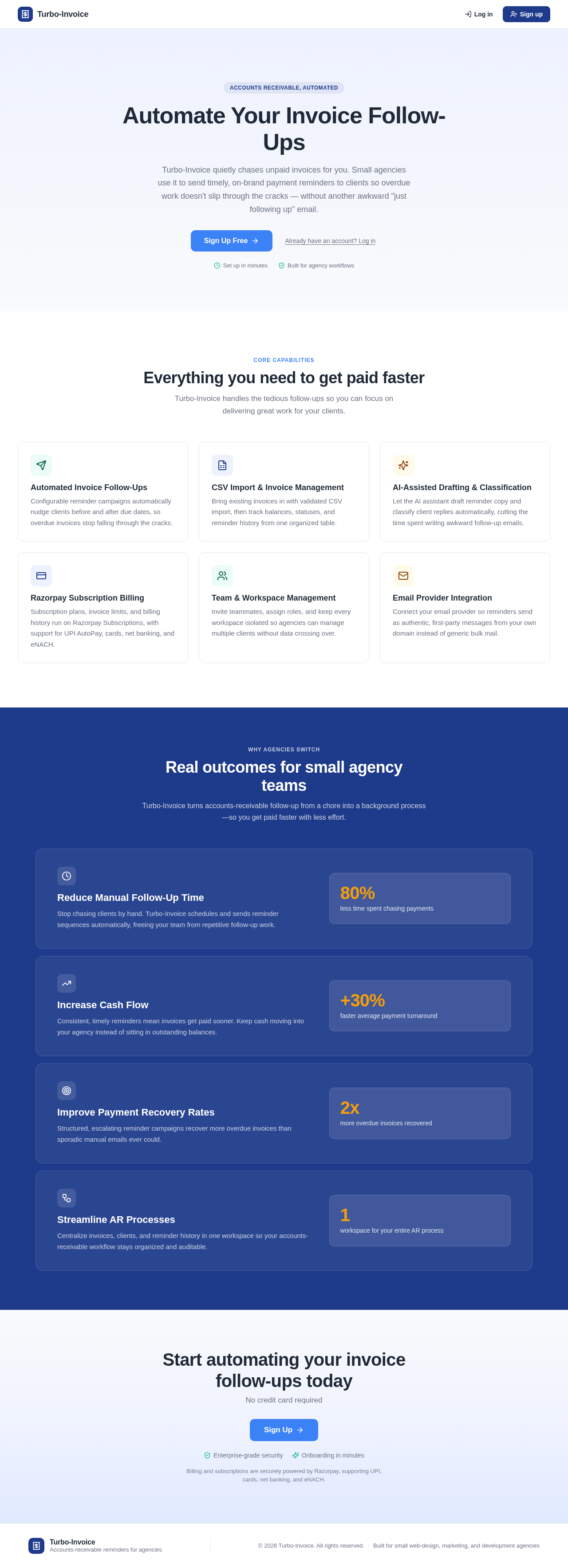
Accounts Receivable, Automated
Automate Your Invoice Follow-Ups
Turbo-Invoice quietly chases unpaid invoices for you. Small agencies use it to send timely, on-brand payment reminders to clients so overdue work doesn't slip through the cracks — without another awkward "just following up" email.
Everything you need to get paid faster
Turbo-Invoice handles the tedious follow-ups so you can focus on delivering great work for your clients.
Automated Invoice Follow-Ups
Configurable reminder campaigns automatically nudge clients before and after due dates, so overdue invoices stop falling through the cracks.
CSV Import & Invoice Management
Bring existing invoices in with validated CSV import, then track balances, statuses, and reminder history from one organized table.
AI-Assisted Drafting & Classification
Let the AI assistant draft reminder copy and classify client replies automatically, cutting the time spent writing awkward follow-up emails.
Razorpay Subscription Billing
Subscription plans, invoice limits, and billing history run on Razorpay Subscriptions, with support for UPI AutoPay, cards, net banking, and eNACH.
Team & Workspace Management
Invite teammates, assign roles, and keep every workspace isolated so agencies can manage multiple clients without data crossing over.
Email Provider Integration
Connect your email provider so reminders send as authentic, first-party messages from your own domain instead of generic bulk mail.
Real outcomes for small agency teams
Turbo-Invoice turns accounts-receivable follow-up from a chore into a background process—so you get paid faster with less effort.
Reduce Manual Follow-Up Time
Stop chasing clients by hand. Turbo-Invoice schedules and sends reminder sequences automatically, freeing your team from repetitive follow-up work.
80%less time spent chasing paymentsIncrease Cash Flow
Consistent, timely reminders mean invoices get paid sooner. Keep cash moving into your agency instead of sitting in outstanding balances.
+30%faster average payment turnaroundImprove Payment Recovery Rates
Structured, escalating reminder campaigns recover more overdue invoices than sporadic manual emails ever could.
2xmore overdue invoices recoveredStreamline AR Processes
Centralize invoices, clients, and reminder history in one workspace so your accounts-receivable workflow stays organized and auditable.
1workspace for your entire AR process
Start automating your invoice follow-ups today
No credit card required
Billing and subscriptions are securely powered by Razorpay, supporting UPI, cards, net banking, and eNACH.
Accounts Receivable, Automated
Automate Your Invoice Follow-Ups
Turbo-Invoice quietly chases unpaid invoices for you. Small agencies use it to send timely, on-brand payment reminders to clients so overdue work doesn't slip through the cracks — without another awkward "just following up" email.
Everything you need to get paid faster
Turbo-Invoice handles the tedious follow-ups so you can focus on delivering great work for your clients.
Automated Invoice Follow-Ups
Configurable reminder campaigns automatically nudge clients before and after due dates, so overdue invoices stop falling through the cracks.
CSV Import & Invoice Management
Bring existing invoices in with validated CSV import, then track balances, statuses, and reminder history from one organized table.
AI-Assisted Drafting & Classification
Let the AI assistant draft reminder copy and classify client replies automatically, cutting the time spent writing awkward follow-up emails.
Razorpay Subscription Billing
Subscription plans, invoice limits, and billing history run on Razorpay Subscriptions, with support for UPI AutoPay, cards, net banking, and eNACH.
Team & Workspace Management
Invite teammates, assign roles, and keep every workspace isolated so agencies can manage multiple clients without data crossing over.
Email Provider Integration
Connect your email provider so reminders send as authentic, first-party messages from your own domain instead of generic bulk mail.
Real outcomes for small agency teams
Turbo-Invoice turns accounts-receivable follow-up from a chore into a background process—so you get paid faster with less effort.
Reduce Manual Follow-Up Time
Stop chasing clients by hand. Turbo-Invoice schedules and sends reminder sequences automatically, freeing your team from repetitive follow-up work.
80%less time spent chasing paymentsIncrease Cash Flow
Consistent, timely reminders mean invoices get paid sooner. Keep cash moving into your agency instead of sitting in outstanding balances.
+30%faster average payment turnaroundImprove Payment Recovery Rates
Structured, escalating reminder campaigns recover more overdue invoices than sporadic manual emails ever could.
2xmore overdue invoices recoveredStreamline AR Processes
Centralize invoices, clients, and reminder history in one workspace so your accounts-receivable workflow stays organized and auditable.
1workspace for your entire AR process
Start automating your invoice follow-ups today
No credit card required
Billing and subscriptions are securely powered by Razorpay, supporting UPI, cards, net banking, and eNACH.
No comments yet. Be the first!