turbo-dashboard
 Alex DEVIL
Act as a senior full-stack architect, SaaS product designer, and startup CTO. Build a complete production-ready SaaS platform called "NepalBite" — an all-in-one restaurant management ecosystem. ## 🎯 CORE GOAL Create a scalable multi-tenant SaaS system that helps restaurants manage orders, billing, kitchen, analytics, and customer engagement. --- # 🧱 SYSTEM ARCHITECTURE ## Frontend (Client Side) * Framework: React (Vite) + Tailwind CSS * Mobile-first responsive design * Dark modern UI (similar to premium SaaS dashboards) * Component-based architecture ## Backend (Server Side) * Node.js + Express.js * REST API (structured & scalable) * JWT authentication + role-based access * WebSocket for real-time updates (orders, kitchen) ## Database * PostgreSQL (preferred) or MongoDB * Multi-tenant architecture (each restaurant isolated) * Proper relational schema ## Deployment * Frontend: Vercel * Backend: Railway / Render * Database: Supabase / Firebase --- # 👥 USER ROLES 1. Super Admin (platform owner) 2. Restaurant Owner 3. Staff (waiter, cashier) 4. Kitchen Staff 5. Customer (QR ordering) --- # 📱 CORE MODULES (BASED ON IMAGE) ## 1. Dashboard (Owner Panel) * Total sales * Orders count * Active orders * Customers * Graph (sales trend) * Top-selling items * Live order feed --- ## 2. POS & Billing System * Create new order * Add items (with images, price) * Quantity control * Apply discount * Generate bill * Payment methods (cash, online) * Print / download receipt --- ## 3. QR Ordering System (Customer Side) * Generate unique QR per table * Customer scans QR → opens menu * Add to cart * Place order * Order confirmation screen * No login required (guest mode) --- ## 4. Kitchen Display System (KDS) * Real-time incoming orders * Status: * New * Preparing * Ready * Order details with items * Auto-update using WebSockets --- ## 5. Stories & Promotions (UNIQUE FEATURE) * Instagram-like story system for restaurants * Add: * Offers (e.g., 20% OFF) * Videos/images * Time-based promotions * Show to customers in QR app --- ## 6. Inventory Management * Track stock (kg, pcs, etc.) * Auto-update when item sold * Low stock alert system * Restock management --- ## 7. Analytics & Insights * Revenue tracking * Order trends * Average order value * Top products * Weekly/monthly reports --- ## 8. Customer Loyalty System * Reward points * Repeat customer tracking * Offers for loyal users --- ## 9. Delivery Management * Assign delivery person * Track delivery status * Order tracking system --- ## 10. Multi-Branch Support * One owner → multiple restaurants * Separate dashboards per branch --- ## 🧠 ADVANCED FEATURES * AI Upsell: Suggest items based on cart (e.g., "Add Coke with Momo") * Notifications: * New order alert * Low stock alert * Role-based dashboards * Offline fallback mode (important for Nepal) --- # 🗂 DATABASE SCHEMA (IMPORTANT) Tables/Collections: * Users (id, role, restaurant_id) * Restaurants (id, name, plan) * Branches * MenuItems (name, price, category, stock) * Orders (status, total, table_id) * OrderItems * Tables (QR linked) * Inventory * Promotions / Stories * Customers * Payments --- # 🔐 AUTH SYSTEM * JWT-based login/signup * Role-based access control * Separate login for: * Admin * Restaurant Owner * Staff --- # 🎨 UI DESIGN SYSTEM * Dark theme with orange accent (#FF6B35) * Card-based layout * Smooth animations * Glassmorphism elements * Fully responsive: * Mobile * Tablet * Desktop --- # 📦 OUTPUT REQUIREMENTS Generate: 1. Full frontend UI (all pages) 2. Backend API routes (organized) 3. Database schema 4. Folder structure 5. Sample data 6. Real-time logic (WebSocket) 7. Admin dashboard 8. Customer QR interface --- # ⚡ BONUS * Include SaaS pricing system: * Starter * Growth * Pro * Include onboarding flow for new restaurants --- Build this as a clean, scalable, production-ready SaaS product — not a demo.

Comments (0)
Sign in to leave a comment
System Requirements
System Requirements Document (SRD) for turbo-dashboard
1. Introduction
The turbo-dashboard project is a cutting-edge SaaS platform designed to provide a seamless, scalable, and feature-rich dashboard solution for users in Nepal. This document outlines the system requirements for the development of turbo-dashboard, ensuring alignment with the vision of Alex, the project's visionary leader. The platform will cater to diverse user roles and provide a robust, intuitive interface tailored to the needs of its audience.
2. System Overview
The turbo-dashboard is envisioned as a multi-functional dashboard platform that integrates real-time analytics, user management, and advanced visualization tools. It will be designed with a focus on scalability, responsiveness, and user-centric design, ensuring it meets the needs of businesses and individuals in Nepal. The system will leverage modern technologies to deliver a high-performance, secure, and aesthetically pleasing experience.
Key features include:
- Real-time data visualization
- Role-based access control
- Advanced analytics and reporting
- Multi-language support with a focus on Nepali localization
- Offline fallback mode for uninterrupted functionality
3. Functional Requirements
As a User:
- I should be able to view real-time analytics on the dashboard.
- I should be able to customize the dashboard layout to suit my preferences.
- I should be able to generate and download detailed reports.
- I should be able to switch between light and dark modes for the interface.
- I should be able to receive notifications for critical updates.
As an Admin:
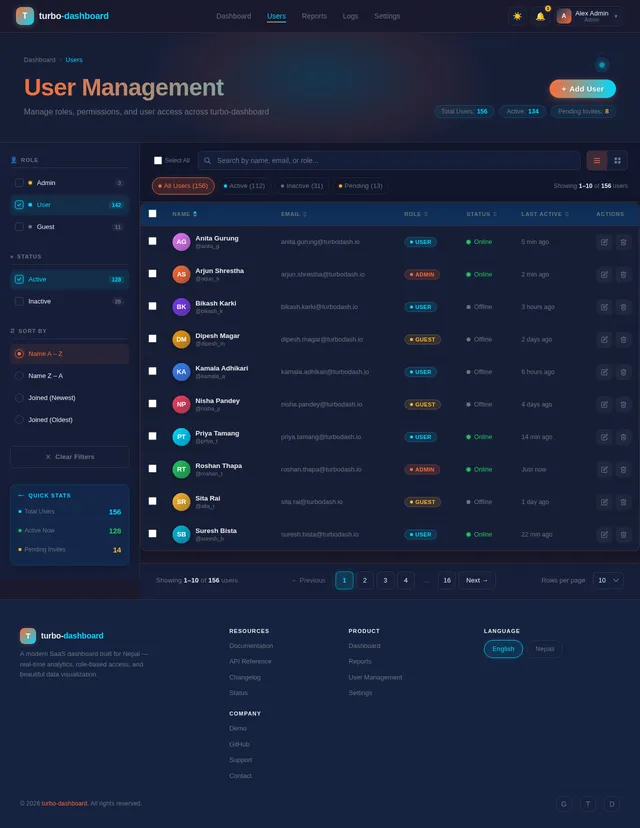
- I should be able to manage user roles and permissions.
- I should be able to monitor system performance and usage statistics.
- I should be able to configure system settings and integrations.
- I should be able to view logs of user activities for auditing purposes.
As a Guest:
- I should be able to explore a demo version of the dashboard with limited functionality.
- I should be able to sign up for a full account to access all features.
4. User Personas
-
Admin:
- Role: Oversees the entire system, manages users, and configures settings.
- Goals: Ensure system integrity, monitor performance, and manage user access.
-
User:
- Role: Regular user of the dashboard, accessing analytics and reports.
- Goals: Gain insights, customize the dashboard, and stay informed.
-
Guest:
- Role: Potential user exploring the platform.
- Goals: Evaluate the platform's features and decide whether to sign up.
5. Visuals Colors and Theme
The turbo-dashboard will feature a unique and vibrant color palette that reflects its modern and dynamic nature. The color scheme will be tailored to resonate with users in Nepal while maintaining a professional and sleek appearance.
- Background: #1A1A2E (Deep Midnight Blue)
- Surface: #16213E (Dark Slate Blue)
- Text: #EAEAEA (Soft White)
- Accent: #FF6B35 (Vivid Orange)
- Muted Tones: #6C757D (Muted Gray)
This palette ensures high contrast and readability while providing a visually appealing experience.
6. Signature Design Concept
The turbo-dashboard will feature an interactive galaxy map as its landing page. This bold and unforgettable design will allow users to explore the dashboard's features as if navigating a constellation of stars. Each "star" will represent a feature or module, and hovering over a star will display a brief description with a glowing animation.
Key Details:
- Animations: Stars will gently pulse and connect with glowing lines, creating a dynamic and engaging visual.
- Transitions: Smooth zoom-in and zoom-out effects as users navigate between stars.
- Interaction Patterns: Clicking on a star will transition the user to the corresponding module with a seamless fade effect.
- Micro-Interactions: Subtle haptic feedback for mobile users and sound effects for desktop users.
This design will create a memorable first impression and set the tone for the platform's innovative approach.
7. Non-Functional Requirements
- Performance: The system must handle up to 10,000 concurrent users with minimal latency.
- Scalability: The architecture must support horizontal scaling to accommodate future growth.
- Security: Implement robust security measures, including encryption, secure authentication, and regular vulnerability assessments.
- Localization: Provide full support for Nepali language and currency formats.
- Accessibility: Ensure compliance with WCAG 2.1 standards for accessibility.
8. Tech Stack
Frontend:
- React for Web
- Tailwind CSS for styling
Backend:
- Python
- FastAPI
Database:
- MySQL (preferred) with Alembic for migrations
AI Models:
- GPT 5.4 for user-friendly responses
- Claude 4.6 Opas for coding assistance
AI Tools:
- LangChain for AI workflow orchestration
Orchestration:
- Docker for local development
- Kubernetes for server-side orchestration
9. Assumptions and Constraints
- The platform will primarily target users in Nepal, with Nepali as the default language.
- Internet connectivity in Nepal may be inconsistent; hence, offline fallback mode is critical.
- The system will be deployed on cloud infrastructure to ensure scalability and reliability.
10. Glossary
- Dashboard: A user interface that provides an overview of key metrics and data.
- Multi-Tenant Architecture: A software architecture where a single instance serves multiple tenants.
- WebSocket: A protocol for real-time communication between a client and server.
- Localization: Adapting software to meet the language and cultural requirements of a specific region.
- WCAG: Web Content Accessibility Guidelines, a set of standards for making web content accessible.
This document serves as the foundation for the development of the turbo-dashboard project. Alex, your vision for this platform is both ambitious and inspiring, and this SRD ensures that every aspect of the project is meticulously planned and executed.

Navigate Your Data
Like Stars in the Galaxy
Experience real-time analytics and intuitive design built for modern teams. turbo-dashboard transforms complex data into actionable insights with a seamless, scalable interface crafted for Nepal and beyond.
Navigate the Feature Galaxy
Each star represents a powerful module of turbo-dashboard. Hover to discover, click to explore — your data universe awaits.
Real-time Analytics
Monitor live data streams with dynamic visualizations that update in real time across your entire dashboard.
Explore →Custom Dashboards
Build personalized layouts with drag-and-drop widgets tailored to your unique workflow and preferences.
Explore →Role-Based Access
Manage permissions for Admin, User, and Guest roles with fine-grained access control policies.
Explore →Advanced Reports
Generate detailed analytical reports with export options and automated scheduling capabilities.
Explore →Activity Logs
Track every user action with comprehensive audit trails for security and compliance monitoring.
Explore →Offline Mode
Continue working without interruption. Data syncs automatically when connectivity is restored.
Explore →Real-time Analytics
Monitor live data streams with dynamic visualizations that update in real time across your entire dashboard.
Explore →Custom Dashboards
Build personalized layouts with drag-and-drop widgets tailored to your unique workflow and preferences.
Explore →Role-Based Access
Manage permissions for Admin, User, and Guest roles with fine-grained access control policies.
Explore →Advanced Reports
Generate detailed analytical reports with export options and automated scheduling capabilities.
Explore →Activity Logs
Track every user action with comprehensive audit trails for security and compliance monitoring.
Explore →Offline Mode
Continue working without interruption. Data syncs automatically when connectivity is restored.
Explore →Everything You Need to Navigate Your Data
Six powerful capabilities designed for scalability, security, and a seamless experience tailored to users in Nepal and beyond.
Real-time Analytics
Monitor live data streams with instant visual feedback. Track key metrics as they update across your entire system in real time.
Customizable Dashboard
Drag, drop, and rearrange widgets to build a workspace that fits your unique workflow. Save multiple layouts for different tasks.
Role-Based Access
Assign granular permissions for Admin, User, and Guest roles. Control exactly who sees what across every module and report.
Advanced Reporting
Generate detailed reports with custom filters, date ranges, and export options. Schedule automated reports delivered to your inbox.
Dark / Light Mode
Switch seamlessly between dark and light themes to match your environment. Your preference syncs across all devices instantly.
Offline Support
Keep working without interruption even when connectivity drops. Data syncs automatically the moment you are back online.
Designed for Every Role
turbo-dashboard adapts to your needs with tailored experiences for admins, users, and guests — ensuring the right access at every level.
Admin
Oversees the entire system, manages users, and configures settings for optimal performance.
- Ensure system integrity and uptime
- Monitor performance and usage statistics
- Manage user roles and permissions
- Configure system settings and integrations
- View activity logs for auditing
Accessible Pages
User
Regular user accessing analytics, reports, and customizable dashboard views.
- View real-time analytics on the dashboard
- Customize dashboard layout and widgets
- Generate and download detailed reports
- Switch between light and dark modes
- Receive notifications for critical updates
Accessible Pages
Guest
Potential user exploring the platform to evaluate features before signing up.
- Explore the demo dashboard experience
- Preview analytics and visualization tools
- Evaluate platform capabilities
- Sign up for a full account seamlessly
Accessible Pages
Built on Modern, Scalable Architecture
turbo-dashboard leverages cutting-edge technologies to deliver real-time analytics, intelligent insights, and seamless performance at any scale.
Frontend
Responsive, component-driven UI
Backend
High-performance API layer
Database
Reliable, structured data storage
AI & Intelligence
Advanced language models for insights
Orchestration
Containerized, auto-scaling deployment
Trusted by Teams Across Nepal
Hear from professionals who have transformed their workflow with turbo-dashboard's powerful analytics and intuitive interface.
turbo-dashboard transformed how we monitor network performance. The real-time analytics and customizable layouts let my team spot issues before they impact our customers. The galaxy map interface makes navigating complex data feel effortless.
The advanced reporting tools save me hours every week. I can generate detailed financial reports with just a few clicks, and the offline mode means I never lose access during internet outages. It has become indispensable for our team.
We evaluated several dashboard platforms before choosing turbo-dashboard. The role-based access control, seamless dark mode, and Nepali localization made it the clear winner for our entire organization. Deployment was smooth with Docker support.
Our logistics team relies on turbo-dashboard daily. The real-time data visualization helps us track shipments across Nepal efficiently. The mobile-responsive design means our drivers can access critical updates on the go.
Choose Your Mission Plan
Start free and scale as your team grows. Every plan includes core analytics to navigate your data like stars in the galaxy.
Starter
For individuals exploring real-time analytics and basic dashboards.
Billed monthly
What's included
- Real-time data visualization
- Up to 3 custom dashboards
- Basic analytics reports
- Light and dark mode
- Email support
- Role-based access control
- Advanced reporting & export
- Offline fallback mode
- Dedicated account manager
Professional
For growing teams who need powerful analytics and full customization.
Billed monthly
What's included
- Real-time data visualization
- Unlimited custom dashboards
- Advanced analytics & reporting
- Light and dark mode
- Priority support
- Role-based access control
- Advanced reporting & export
- Offline fallback mode
- Dedicated account manager
Enterprise
For organizations requiring full platform control and dedicated support.
Tailored to your organization
What's included
- Real-time data visualization
- Unlimited custom dashboards
- Advanced analytics & reporting
- Light and dark mode
- Dedicated 24/7 support
- Role-based access control
- Advanced reporting & export
- Offline fallback mode
- Dedicated account manager
Ready to Explore the Galaxy?
Join thousands of businesses across Nepal already using turbo-dashboard for real-time analytics, customizable dashboards, and seamless team collaboration — all powered by cutting-edge AI.
Frequently Asked Questions
Everything you need to know about turbo-dashboard. Can't find what you're looking for? Reach out to our support team.
turbo-dashboard is a cutting-edge SaaS analytics platform built specifically for businesses and individuals in Nepal. It integrates real-time data visualization, advanced reporting, and role-based access control into a single intuitive dashboard — designed for admins, regular users, and guests alike.
Yes! We understand that internet connectivity in Nepal can be inconsistent, so turbo-dashboard includes an offline fallback mode. You can continue accessing cached data, viewing reports, and interacting with the dashboard even when connectivity drops. Changes sync automatically once you are back online.
turbo-dashboard supports three distinct user roles: Admin, User, and Guest. Admins can manage users, configure system settings, and view activity logs. Users access analytics, customize their dashboard layout, and generate reports. Guests can explore a limited demo version before signing up for a full account.
Absolutely. Multi-language support is a core feature with full Nepali localization including language, date formats, and currency (NPR). The interface defaults to Nepali but can be switched to English or other supported languages at any time from your profile settings.
Yes, turbo-dashboard offers a fully customizable layout. You can drag-and-drop widgets, resize panels, choose between light and dark modes, and save multiple layout presets. Your preferences are stored in the cloud and sync across all your devices automatically.
Security is a top priority. We implement end-to-end encryption, secure authentication with multi-factor support, regular vulnerability assessments, and full WCAG 2.1 accessibility compliance. All data is hosted on secure cloud infrastructure with automatic backups and horizontal scaling for reliability.
Still have questions?
Get in touch with our team →
No comments yet. Be the first!