trip-group
 Umang Suthar
create me an application where a user can create the trip group and add the members in the group. Now all group members can maintain the expensis of the trip at one places and also they can add the photos and iteneries and stay locations and all the info related to their trip. And also if they want application can help to split the total expense between the memebers of the groups.


Comments (0)
Sign in to leave a comment
System Requirements
System Requirements Document for trip-group
1. Introduction
trip-group is a shared trip workspace for small groups of friends and families. One person creates a trip group and adds the members who are travelling together; from that point every member of the group maintains the same shared record of the trip in one place — the expenses, the photos, the itinerary, the stay locations, and any other information related to the trip. When the group wants it, the application helps split the total expense between the members of the group.
The product intent is to keep a trip's money and its memories together, in a warm, collaborative space that feels like a well-made holiday album and a tidy shared ledger rather than a fintech dashboard. The audience is the ordinary traveller who plans and pays alongside other people: the person who organises the group, and the people who join it.
This document is the System Requirements Document for trip-group, written for Umang Suthar.
2. System Overview
trip-group is a web application with an application-owned identity layer and a custom user interface. A visitor arrives at a public Landing page that explains the shared trip-group product and its expense, photo, itinerary, stay, and information features. From there the visitor reaches Login, where a person enrolls for the first time or verifies themselves on return. Once signed in, the person lands on Trips, the revisitable overview of every trip group they belong to.
A signed-in person can open New Trip to create a trip group and add its members. Opening a trip group gives access to its shared workspace, which is organised as five modular panels — Expenses, Itinerary, Stays, Photos, and Trip Info — plus the on-request Expense Split. Every member of the group can record and maintain expenses, add photos, add itinerary entries, add stay locations, and add other trip information to the same shared record. Any member can ask the application to split the group's total expense between the members, and the resulting per-member amounts are shown on Expense Split.
Two human personas act in the product: the Trip group creator, who sets up the group and its members, and the Trip group member, who joins a group created by someone else and contributes to the shared record. Both personas share the same contribution capabilities once the group exists; they differ in who establishes the group and its membership.
The application owns identity and durable shared state: trip groups, their members, expenses, photos, itinerary entries, stay locations, trip information, and computed expense splits persist and are revisited across sessions.
Removed from scope
- None. No concept from the authoritative requirement thread was removed or replaced.
2a. Product Interpretation and Delivery Boundary
trip-group is delivered as a first-party web application with its own identity layer and its own custom interface. Nothing in the accepted requirements delegates trip-group's work to a provider surface or an external destination: creating groups, adding members, maintaining expenses, photos, itineraries, stays, and trip information, and splitting expenses are all first-party responsibilities.
Access is split into two boundaries. Landing and Login are anonymously reachable: a visitor can read what the product is and can enroll or verify without already being signed in. Every other destination — Trips, New Trip, Expenses, Expense Split, Photos, Itinerary, Stays, and Trip Info — requires a signed-in identity, because each one reads or writes durable state that must remain bound to the correct person and the correct group. A protected destination never owns the interaction that establishes access to itself; that interaction lives on Login.
The current delivery horizon covers everything described in this document. No future-horizon capabilities are defined for trip-group at this time.
2c. Page Content and Component Coverage
Landing
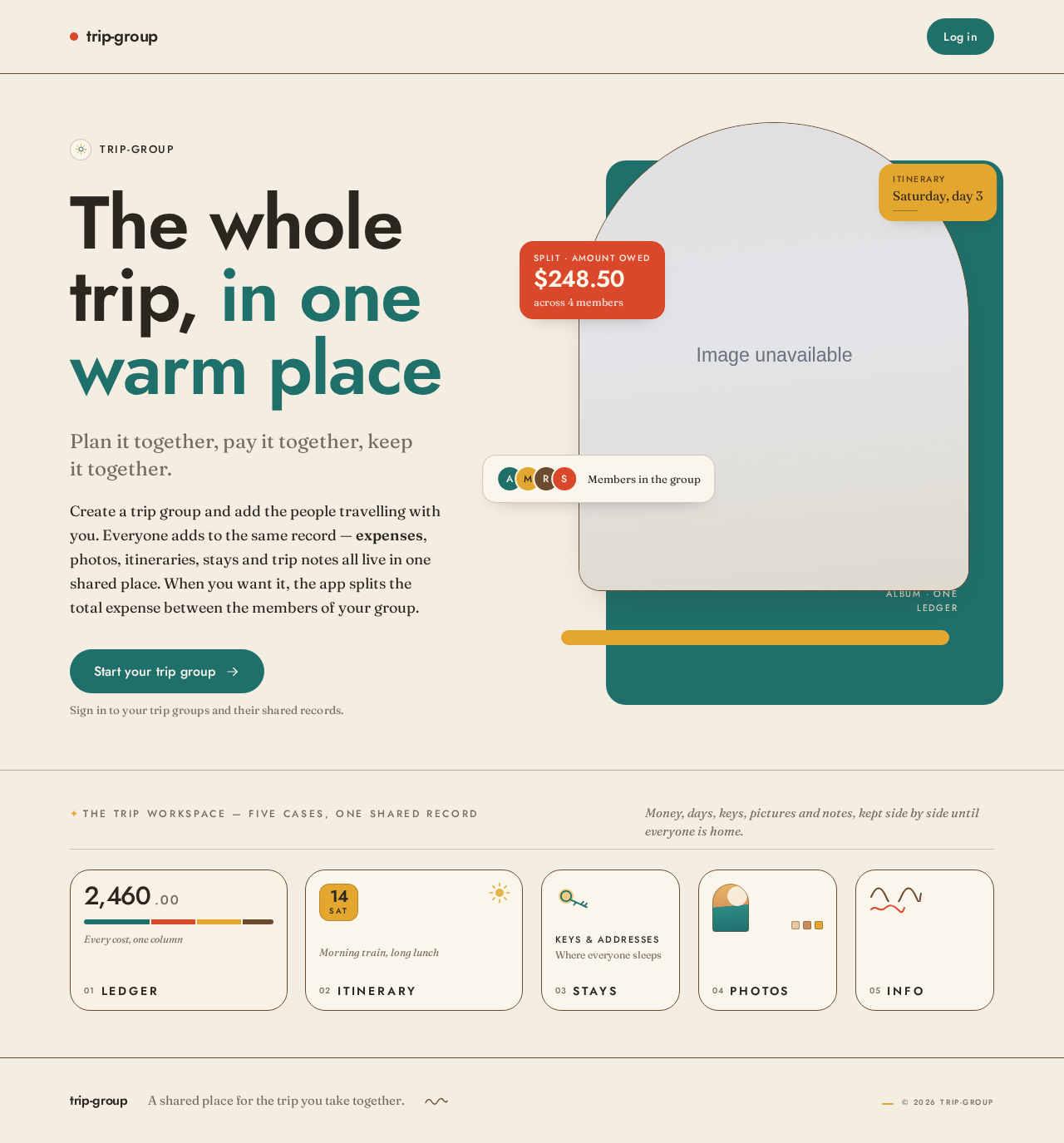
- Information and state: the product name trip-group; a display headline in Jost ("The whole trip, in one warm place"); a Fraunces serif subline; a short explanation that a group creates a trip together and keeps expenses, photos, itineraries, stays, and trip information in one shared place, and that the application can split the total expense between members on request; a horizontal row of modular panel labels (Ledger · Itinerary · Stays · Photos · Info) as the transition into the page; a full-width thin walnut rule beneath the hero.
- Primary action: a teal capsule call to action that leads to Login.
- Supporting actions: none beyond the single entry action; no sign-up form, no trip data, and no protected content is shown here.
- Domain entities: none read or written; the page is purely explanatory.
- Component responsibilities: hero composition (asymmetric split, arch-topped sunlit photograph overlapping a solid teal panel and a mustard strip, three floating ledger chips — a tomato-red amount owed, a member avatar cluster, an itinerary date tag — pinned across the photo edge); headline block; subline block; entry CTA; walnut rule; panel-label row.
- States: loading — not applicable (static content); empty — not applicable; success — the page renders fully; error — if the page fails to render, a plain cream fallback with the product name and the entry CTA; recovery — reload returns the same page.
Login
- Information and state: a neutral access surface with two modes — first-time enrollment and returning verification. Fields for the person's identifying credential (email address) and secret (password), plus a display name on enrollment. A clear statement that signing in gives access to the person's trip groups and their shared trip records.
- Primary action: enroll (first use) or verify (returning).
- Supporting actions: switch between enrollment and returning verification; return to Landing.
- Domain entities: person identity (email, display name, credential).
- Component responsibilities: mode switch; credential fields; submit control; inline validation messages; error banner.
- States: loading — submit control shows a pending state while the credential is checked; empty — fields blank with inline hints; success — the person is signed in and continues to Trips; error — invalid credentials, an email already enrolled, or a missing required field, each shown inline with the field preserved so the person can correct it; recovery — the person retries without losing typed input.
Trips
- Information and state: the signed-in person's overview of every trip group they belong to, each shown with its name and its member count; a clear indication when the person belongs to no trip groups yet.
- Primary action: open a trip group, which enters that group's shared workspace.
- Supporting actions: go to New Trip to create a group; sign out.
- Domain entities: trip group (name, members), membership link between person and trip group.
- Component responsibilities: trip-group list as modular panels; empty-state block; create-trip entry; account control.
- States: loading — panel placeholders while the person's groups are fetched; empty — a warm empty state explaining that no trip groups exist yet, with the create-trip entry; success — the list of groups; error — a message that groups could not be loaded with a retry control; recovery — retry reloads the list.
New Trip
- Information and state: a focused form for a new trip group: the group's name, and the members to add. Each member is identified by the email address the person enters, with an optional display name.
- Primary action: create the trip group with its members.
- Supporting actions: add another member row; remove a member row before submitting; cancel and return to Trips.
- Domain entities: trip group (name), member entries (email, display name), membership links.
- Component responsibilities: group-name field; repeatable member-entry rows; add/remove controls; submit control; validation summary.
- States: loading — submit control pending while the group is created; empty — one blank member row ready; success — the group is created and the person continues into the new group's workspace; error — a missing group name, an invalid member email, or a duplicate member entry, each shown against the offending field with entered values preserved; recovery — the person corrects the field and resubmits.
Expenses
- Information and state: the shared expense list for the open trip group, presented as a ruled table with aligned label/value pairs. Each expense shows its description, its amount, and who recorded it. A running total of the group's expenses is shown. Tabular Jost numerals align amounts in columns.
- Primary action: record a new expense (description and amount).
- Supporting actions: edit an existing expense; remove an existing expense; open Expense Split for this group.
- Domain entities: expense (description, amount, recorder, trip group).
- Component responsibilities: ruled expense table; running-total block; add-expense form; per-row edit and remove controls; entry to Expense Split.
- States: loading — table placeholders while expenses are fetched; empty — a warm empty state explaining that no expenses have been recorded yet, with the add-expense form still available; success — the table with the running total; error — a message that expenses could not be loaded or saved, with retry, and unsaved input preserved; recovery — retry reloads or resaves.
Expense Split
- Information and state: the on-request split of the open trip group's total expense. The left column shows the total and each member's resulting amount; the right column shows a proportional colour-bar breakdown segmented per member in teal, tomato, mustard, and walnut. Tabular Jost numerals align the amounts.
- Primary action: calculate the split for the group's current total and members.
- Supporting actions: return to Expenses; recalculate after the group's expenses or members change.
- Domain entities: expense total, group members, per-member split amount.
- Component responsibilities: total block; per-member amount list; proportional colour-bar breakdown; calculate control; explanatory note that the split is shown on request and does not itself move money.
- States: loading — a pending state while the split is computed; empty — when the group has no recorded expenses or no members to allocate to, an explanation of what is missing with a link back to Expenses; success — total, per-member amounts, and the colour-bar breakdown, with a soft count-up of the numerals; error — a message that the split could not be calculated, with a retry control; recovery — retry recalculates from the current expenses and members.
Photos
- Information and state: the shared photo collection for the open trip group, arranged as a loose album mosaic of arch-topped and square tiles with thin walnut frames, each tile showing its photo and who added it.
- Primary action: add a photo to the trip.
- Supporting actions: open a photo at full size; remove a photo the person added.
- Domain entities: photo (image, contributor, trip group).
- Component responsibilities: album mosaic; add-photo control; full-size viewer; per-tile contributor label and remove control.
- States: loading — mosaic placeholders while photos are fetched; empty — a warm empty state inviting the first photo, with the add-photo control; success — the mosaic; error — a message that photos could not be loaded or that an upload failed, with retry, and the selected file preserved where possible; recovery — retry reloads or re-uploads.
Itinerary
- Information and state: the shared itinerary entries for the open trip group, each with its date, its title, and its details, marked with a hand-drawn pictogram chip for its category.
- Primary action: add an itinerary entry.
- Supporting actions: edit an entry; remove an entry.
- Domain entities: itinerary entry (date, title, details, category, contributor, trip group).
- Component responsibilities: chronological entry list; add-entry form; per-entry edit and remove controls; category pictogram chips.
- States: loading — entry placeholders while the itinerary is fetched; empty — a warm empty state inviting the first entry, with the add-entry form; success — the chronological list; error — a message that the itinerary could not be loaded or saved, with retry, and unsaved input preserved; recovery — retry reloads or resaves.
Stays
- Information and state: the shared stay locations for the open trip group, each with its location name, its address or description, and its dates, marked with a hand-drawn pictogram chip for its category.
- Primary action: add a stay location.
- Supporting actions: edit a stay; remove a stay.
- Domain entities: stay (location name, address or description, dates, category, contributor, trip group).
- Component responsibilities: stay list; add-stay form; per-stay edit and remove controls; category pictogram chips.
- States: loading — stay placeholders while stays are fetched; empty — a warm empty state inviting the first stay, with the add-stay form; success — the stay list; error — a message that stays could not be loaded or saved, with retry, and unsaved input preserved; recovery — retry reloads or resaves.
Trip Info
- Information and state: the shared place for other trip-related information for the open trip group — free-form notes contributed by any member, each showing its content and who added it.
- Primary action: add a trip-information note.
- Supporting actions: edit a note; remove a note.
- Domain entities: trip-information note (content, contributor, trip group).
- Component responsibilities: note list; add-note form; per-note edit and remove controls.
- States: loading — note placeholders while notes are fetched; empty — a warm empty state inviting the first note, with the add-note form; success — the note list; error — a message that trip information could not be loaded or saved, with retry, and unsaved input preserved; recovery — retry reloads or resaves.
3. Functional Requirements
FR-1 — Create a trip group (explicit) As a Trip group creator, I should create a trip group so that my travelling companions and I have one shared place for the trip.
- Trigger: the signed-in creator opens New Trip from Trips and submits a group name.
- Observable result: the trip group exists, the creator is a member of it, and it appears on Trips.
- Access: signed in.
- Failure/recovery: a missing group name is rejected inline with the entered values preserved; the creator corrects and resubmits.
- Continuation: the creator continues into the new group's workspace to add members and shared content.
FR-2 — Add members to a trip group (explicit) As a Trip group creator, I should add members to a trip group I created so that those people can share the trip's record.
- Trigger: the creator enters each member's email address (with an optional display name) on New Trip and submits.
- Observable result: each added person is a member of the trip group and sees the group on their own Trips overview.
- Access: signed in.
- Failure/recovery: an invalid member email or a duplicate member entry is rejected against the offending row with entered values preserved; the creator corrects and resubmits.
- Continuation: added members open the group from Trips and begin contributing.
FR-3 — Maintain the trip's expenses in one shared place (explicit) As a Trip group member, I should record, edit, and remove the trip's expenses in the group's shared expense list so that the group's spending is maintained in one place.
- Trigger: a member opens Expenses for the group and adds, edits, or removes an expense with a description and an amount.
- Observable result: the expense list and its running total reflect the change for every member of the group.
- Access: signed in and a member of the group.
- Failure/recovery: a missing description or amount is rejected inline; a failed save shows an error with retry and preserves unsaved input.
- Continuation: the member returns to the list, or proceeds to Expense Split.
FR-4 — Add photos to the trip (explicit) As a Trip group member, I should add photos to the group's shared photo collection so that the trip's pictures live with the rest of the trip record.
- Trigger: a member selects a photo on Photos and adds it.
- Observable result: the photo appears in the album mosaic for every member, attributed to the member who added it.
- Access: signed in and a member of the group.
- Failure/recovery: a failed upload shows an error with retry and preserves the selected file where possible.
- Continuation: the member views the photo at full size or adds another.
FR-5 — Add itineraries to the trip (explicit) As a Trip group member, I should add itinerary entries to the group's shared itinerary so that the group's plan is visible to everyone.
- Trigger: a member adds an itinerary entry with its date, title, and details on Itinerary.
- Observable result: the entry appears in the shared chronological itinerary for every member.
- Access: signed in and a member of the group.
- Failure/recovery: a missing required entry field is rejected inline; a failed save shows an error with retry and preserves unsaved input.
- Continuation: the member edits the entry or adds another.
FR-6 — Add stay locations to the trip (explicit) As a Trip group member, I should add stay locations to the group's shared stays list so that everyone knows where the group is staying.
- Trigger: a member adds a stay with its location name, address or description, and dates on Stays.
- Observable result: the stay appears in the shared stays list for every member.
- Access: signed in and a member of the group.
- Failure/recovery: a missing required stay field is rejected inline; a failed save shows an error with retry and preserves unsaved input.
- Continuation: the member edits the stay or adds another.
FR-7 — Add other trip information (explicit) As a Trip group member, I should add other information related to the trip to the group's shared trip-info place so that anything else the group needs is kept with the trip.
- Trigger: a member adds a note on Trip Info.
- Observable result: the note appears in the shared trip-information list for every member, attributed to the member who added it.
- Access: signed in and a member of the group.
- Failure/recovery: an empty note is rejected inline; a failed save shows an error with retry and preserves unsaved input.
- Continuation: the member edits the note or adds another.
FR-8 — Split the total expense between group members on request (explicit) As a Trip group member, I should ask the application to split the group's total expense between the members so that each member can see their share.
- Trigger: a member opens Expense Split for the group and asks the application to calculate the split.
- Observable result: the group's total expense and each member's resulting amount are shown, with a proportional colour-bar breakdown per member.
- Access: signed in and a member of the group.
- Failure/recovery: when the group has no recorded expenses or no members to allocate to, the page explains what is missing and links back to Expenses; a failed calculation shows an error with retry.
- Continuation: the member returns to Expenses or recalculates after the group's expenses or members change.
FR-9 — Self-service enrollment and returning verification (required_inference) As a visitor, I should enroll on first use or verify myself on return through Login so that my trip groups and shared trip records remain mine across sessions.
- Trigger: a visitor follows the entry action from Landing to Login and submits an email, a password, and (on enrollment) a display name.
- Observable result: the person is signed in and continues to Trips.
- Access: anonymous entry on Login; protected destinations remain unavailable until identity is established.
- Failure/recovery: invalid credentials, an already-enrolled email, or a missing required field are shown inline with typed input preserved; the person retries.
- Continuation: the signed-in person opens Trips.
FR-10 — Group prerequisite for shared trip records (required_inference) As a Trip group member, I should only reach a group's shared expenses, photos, itinerary, stays, and trip information through a trip group I belong to so that shared records stay bound to the correct group and its members.
- Trigger: a signed-in person opens a trip group from Trips.
- Observable result: the group's workspace panels — Expenses, Itinerary, Stays, Photos, Trip Info — and Expense Split are available for that group only.
- Access: signed in and a member of the group.
- Failure/recovery: a group the person does not belong to is not offered on Trips; if a group cannot be opened, an error with retry is shown.
- Continuation: the person works within the opened group.
FR-11 — Split prerequisite (required_inference) As a Trip group member, I should see the split only when the group has recorded expenses and members to allocate to so that the per-member amounts are meaningful.
- Trigger: a member opens Expense Split.
- Observable result: with expenses and members present, the split is calculated; otherwise the page explains what is missing.
- Access: signed in and a member of the group.
- Failure/recovery: the explanation links back to Expenses so the member can record an expense; retry recalculates.
- Continuation: the member returns to Expenses or recalculates.
4. User Personas
Trip group creator
The Trip group creator is the person who gathers the group. Their product context begins before the trip has a shared record: they know who is travelling and they need one place where everyone's spending, pictures, plans, stays, and notes will live. Their primary goal is to stand up the trip group and its membership so the shared workspace exists for everyone else.
Their distinct accepted responsibilities are creating the trip group on New Trip and adding its members by email address with optional display names. They decide the group's name and who belongs to it. They interact with the Trip group member by adding them to the group; the observable result of that handoff is that each added member sees the group on their own Trips overview and can begin contributing. Once the group exists, the creator is also a member and shares every contribution capability — maintaining expenses, adding photos, itineraries, stays, and trip information, and asking for the expense split.
Their observable success is a created group with the intended members, visible on Trips, and a shared workspace that the whole group can use. Their work differs from a member's because they own the act of establishing the group and its membership; nothing in the accepted requirements gives them different rights over the shared content afterwards.
Trip group member
The Trip group member is a person who has been added to a trip group created by someone else. Their product context is the shared trip record itself: they arrive on Trips, find the group they were added to, and open its workspace. Their primary goal is to keep the group's shared record accurate and complete alongside everyone else.
Their distinct accepted responsibilities are maintaining the trip's expenses in the shared expense list, adding photos to the shared album, adding itinerary entries, adding stay locations, adding other trip information, and asking the application to split the group's total expense between the members. Their inputs are expense descriptions and amounts, photos, itinerary dates, titles and details, stay locations and dates, and free-form notes. Their decisions include what to record, what to correct, and when to request a split.
They interact with the Trip group creator by receiving membership in the group, and with every other member through the same shared record: a change one member makes is what the others see. Their observable success is a shared record that reflects the trip and a split view that shows each member's share of the total.
5. Core User Flows
Flow A — A creator sets up a trip group and adds members
- The visitor opens Landing and reads what trip-group does: a group keeps expenses, photos, itineraries, stays, and trip information in one shared place, and the application can split the total expense between members on request.
- The visitor uses the teal capsule call to action and arrives at Login.
- On first use, the visitor enrolls with an email address, a password, and a display name; on return, they verify with their email and password. On success they continue to Trips.
- Trips shows the person's trip groups; with none yet, it shows the empty state with the create-trip entry.
- The person opens New Trip, enters the group's name, and adds each member by email address with an optional display name, adding or removing member rows as needed.
- The person submits. The group is created with the creator as a member and the entered members added. If a member email is invalid or duplicated, the offending row is flagged with its values preserved and the person corrects it and resubmits.
- The person continues into the new group's workspace, where the Expenses, Itinerary, Stays, Photos, and Trip Info panels are ready and empty.
- Each added member signs in through Login, finds the group on their own Trips, and opens it — the handoff from creator to member is complete.
Flow B — A member records and maintains an expense
- The signed-in member opens Trips and selects the trip group.
- In the Expenses panel, the member sees the ruled expense table with its running total, or the empty state if nothing has been recorded.
- The member adds an expense with a description and an amount. A missing field is flagged inline; a failed save shows an error with retry and keeps the typed input.
- The expense appears in the table with its amount aligned in tabular numerals and the running total updated; every other member sees the same change when they open Expenses.
- The member edits or removes an expense as needed, and the table and total update again.
Flow C — A member adds photos
- The member opens the trip group from Trips and selects the Photos panel.
- The member sees the album mosaic of arch-topped and square tiles, or the empty state inviting the first photo.
- The member selects a photo and adds it. A failed upload shows an error with retry and preserves the selected file where possible.
- The photo appears in the mosaic, attributed to the member, and every other member sees it in the shared collection.
- The member opens a photo at full size, or removes a photo they added.
Flow D — A member adds itinerary entries
- The member opens the trip group and selects the Itinerary panel.
- The member adds an entry with its date, title, and details, marked with a category pictogram chip. A missing required field is flagged inline; a failed save shows an error with retry and preserves the input.
- The entry appears in the shared chronological itinerary for every member.
- The member edits or removes the entry as the plan changes.
Flow E — A member adds stay locations
- The member opens the trip group and selects the Stays panel.
- The member adds a stay with its location name, address or description, and dates, marked with a category pictogram chip. A missing required field is flagged inline; a failed save shows an error with retry and preserves the input.
- The stay appears in the shared stays list for every member.
- The member edits or removes the stay as arrangements change.
Flow F — A member adds other trip information
- The member opens the trip group and selects the Trip Info panel.
- The member adds a note. An empty note is rejected inline; a failed save shows an error with retry and preserves the input.
- The note appears in the shared trip-information list, attributed to the member, for every member to read.
- The member edits or removes the note.
Flow G — A member asks the application to split the total expense
- The member opens the trip group and goes to Expense Split, either from the workspace or from the entry on Expenses.
- If the group has no recorded expenses or no members to allocate to, the page explains what is missing and links back to Expenses; the member records an expense there and returns.
- The member asks the application to calculate the split.
- The application computes the split of the group's total expense between the members. The left column shows the total and each member's amount in tabular numerals with a soft count-up; the right column shows the proportional colour-bar breakdown segmented per member.
- If the calculation fails, an error with retry is shown and the member retries.
- The member returns to Expenses, or recalculates after the group's expenses or members change. The split is shown on request and does not itself move money.
6. Visuals Colors and Theme
The visual language is warm modernism for shared journeys, after Charles & Ray Eames: honest materials, joyful colour inside order, curiosity and craft. The headline is "The whole trip, in one warm place".
Colour tokens (light mode)
| Role | Hex | Use |
|---|---|---|
| Background | #F4EDE1 | Cream paper ground for every page |
| Surface | #FBF6EC | Lighter card and panel surface |
| Text | #2B2620 | Ink-brown for all reading |
| Primary | #1F6F6B | Teal — primary actions and navigation |
| Accent | #D9482B | Tomato red — the single hot accent for amounts owed, split moments, and active states |
| Muted | #8A7D6B | Taupe — secondary labels and metadata |
| Mustard | #E3A72F | Small categorising chips, rules, illustration fills only — never behind body text |
| Walnut | #6B4A2F | Small categorising chips, thin rules, illustration fills only — never behind body text |
Typography
- Headings: Jost at 500–600, tight geometric mid-century display sizes, slightly negative tracking (-0.02em), short line lengths.
- Second voice: Fraunces (soft serif, high optical size, weight 400) for section openers and pull-quotes.
- Body: Fraunces.
- Ledger numerals: Jost with tabular figures so amounts align in columns.
- Scale, 1.25 modular: display
clamp(40px, 7vw, 96px); h1 32→56; h2 24→36; h3 20→24; body 16→18; caption 13→14; ledger numerals 18→28 tabular.
Shape language
- Organic-modern: generous 20–28px radii on cards and panels; capsule pill buttons; soft arch-topped photo tiles; thin 1px walnut rules as section dividers; modular panel blocks that read like exhibition cases. Rounded but never bubbly; nothing glossy.
Layout
- Gallery-like sequences on a strict 12-column grid with wide cream margins.
- The trip workspace is a horizontal band of modular panels (Ledger, Itinerary, Stays, Photos, Info) that stack vertically on mobile.
- Expenses is a ruled table with aligned label/value pairs.
- Expense Split is a two-column composition: total and per-member amounts on the left, proportional colour-bar breakdown on the right.
- Every panel is a distinct module, not a repeated identical card.
Imagery
- Warm, sunlit photography of real trips — shared tables, coastal light, market stalls, luggage in a hallway — with a slight grain and cream-tinted grade so it sits in the palette.
- Photo tiles are arch-topped or square with thin walnut frames, arranged as a loose album mosaic rather than a uniform grid.
- Small hand-drawn accent marks (a squiggle, an arrow, a sun) and simplified mid-century pictograms for itinerary and stay categories.
Spacing rhythm
- Wide cream margins around a 12-column grid; generous vertical rhythm between gallery sections; thin walnut rules marking each section boundary.
Accessibility of text and controls
- Headlines, wordmarks, labels, numbers, card text, and controls stay entirely inside the viewport and their container at 375px, 768px, and 1280px, wrapping or scaling with
clamp(...)and its mobile size. Imagery and decoration may be cropped, bled, rotated, or overlapped as the direction asks, but never over readable text or controls.
7. Signature Design Concept
The public entry is a full-bleed cream ground split asymmetrically. On the left, a stacked display headline in Jost — "The whole trip, in one warm place" — at clamp(40px, 7vw, 96px) with slightly negative tracking, a small Fraunces serif subline beneath it, and a teal capsule call to action that leads to Login. On the right, a large arch-topped sunlit trip photograph with a thin walnut frame overlaps a solid teal panel and a mustard strip. Three floating ledger chips are pinned across the photo edge: a tomato-red amount owed, a member avatar cluster, and an itinerary date tag — each a small surface panel with tabular Jost numerals or Fraunces labels, never covering the headline, subline, or CTA.
A thin walnut rule runs the full width beneath the hero. Below it, a horizontal row of modular trip-panel labels — Ledger · Itinerary · Stays · Photos · Info — set in small Jost caps acts as the transition into the page, each label a distinct exhibition-case module rather than a repeated identical card. The composition recomposes only accepted content: the product's shared panels, its members, its amounts, and its dates. No centred headline, no gradient blob, no generic SaaS button row.
8. Interaction Model & Motion Direction
Interaction Model: Animated Motion Tempo: restrained Hero Dimensionality: layered_2d
Landing Hero Motion Brief
- Focal subject: the arch-topped sunlit trip photograph with its thin walnut frame, overlapping the teal panel and mustard strip, with the three ledger chips pinned across its edge.
- Input → transformation → outcome thesis: on load, the cream ground and headline settle first; the arch-topped photograph then crossfades and rises gently into place over the teal panel, and the three ledger chips stagger in one after another to rest across the photo edge — the trip's money, people, and dates arriving together in one warm place. The walnut rule draws across the full width, and the panel-label row fades and rises into the transition position.
- Motion vocabulary: 400–600ms slow pans and crossfades, gentle staggered fade-and-rise on section entry, quiet colour shifts on pills and underlines on rules. No bounce, no parallax theatrics.
- Composed first frame: cream ground, headline and subline fully legible on the left, teal capsule CTA in place, arch-topped photograph at rest over the teal panel and mustard strip, ledger chips settled across the photo edge, walnut rule and panel-label row visible.
- Reduced-motion state: with
prefers-reduced-motion, all fades, rises, and count-ups are removed; the hero renders in its composed final arrangement as a static layered composition, and every label, chip, and control remains fully readable.
9. Non-Functional Requirements
- Durable shared state (required_inference): trip groups, members, expenses, photos, itinerary entries, stays, trip information, and computed splits persist across sessions so that every member revisits the same shared record. Rationale: the accepted requirement that all members maintain the trip's records in one place.
- Identity continuity (required_inference): a person's trip groups and their contributions remain bound to their identity across sessions; protected destinations are reachable only after enrollment or returning verification on Login. Rationale: shared durable records must remain bound to the correct participant.
- Group-scoped access (required_inference): a person reaches a group's shared records only through a trip group they belong to. Rationale: the accepted requirement that group members maintain the group's records.
- Readable text and controls at every viewport (explicit, from the creative direction): headlines, labels, numbers, card text, and controls stay whole inside the viewport and their container at 375px, 768px, and 1280px.
- Reduced-motion support (explicit, from the creative direction):
prefers-reduced-motionremoves fades and count-ups entirely and provides a usable static arrangement. - Warm, non-fintech presentation (explicit, from the creative direction): the ledger is never dense spreadsheet chrome or a fintech-dark surface; the primary is teal on cream, never indigo or blue on white.
10. Tech Stack
- Frontend: React web application with the custom interface described in sections 6–8, using Jost and Fraunces as specified.
- Backend: Python with FastAPI, serving the trip-group, membership, expense, photo, itinerary, stay, trip-information, split, and identity APIs from one shared backend process.
- Storage: a relational database for durable trip-group state (groups, members, expenses, itinerary entries, stays, trip information, splits) plus object storage for uploaded photos.
- Deployment: Docker with docker-compose for the frontend, backend, and database services. Kubernetes is not required for the current product.
11. Assumptions and Constraints
- A-1 (required_inference): Identity is application-owned and self-service; a person enrolls on first use and verifies on return through Login. No invitation, provisioning, or deployment-bootstrap flow is specified.
- A-2 (required_inference): A trip group must exist with its members before shared expenses, photos, itineraries, stays, and trip information can be maintained; the group's workspace is reached from Trips.
- A-3 (required_inference): The expense split requires recorded group expenses and group members to allocate to; without them, Expense Split explains what is missing.
- A-4 (required_inference): Members are added by the creator using their email address, with an optional display name; the accepted requirements do not specify a separate join or invitation acceptance step.
- A-5 (required_inference): The split is shown on request and does not itself move money or record settlements.
- A-6 (explicit, from the creative direction): The visual language, palette, typography, shape, layout, imagery, and motion are fixed as described in sections 6–8; the generic indigo/blue-on-white SaaS template is forbidden.
- A-7 (explicit): No future-horizon capabilities are defined for trip-group at this time.
12. Glossary
- Trip group — the shared unit of the product: a named group of travelling members with one shared record of expenses, photos, itinerary, stays, and trip information.
- Trip group creator — the person who creates a trip group and adds its members.
- Trip group member — a person added to a trip group who contributes to and reads its shared record.
- Expense — a recorded item of trip spending with a description and an amount, maintained in the group's shared expense list.
- Expense split — the on-request calculation of the group's total expense divided between its members, shown as per-member amounts and a proportional colour-bar breakdown.
- Itinerary entry — a dated plan item with a title, details, and a category, shared with the group.
- Stay — a shared stay location with its name, address or description, and dates.
- Trip information — free-form notes related to the trip, shared with the group.
- Ledger — the panel label used for the group's shared expense list.
trip-group
The whole trip, in one warm place
Plan it together, pay it together, keep it together.
Create a trip group and add the people travelling with you. Everyone adds to the same record — expenses, photos, itineraries, stays and trip notes all live in one shared place. When you want it, the app splits the total expense between the members of your group.

Split · amount owed
$248.50across 4 membersItinerary
Saturday, day 3The trip workspace — five cases, one shared record
Money, days, keys, pictures and notes, kept side by side until everyone is home.
- 2,460Every cost, one columnLedger
- Morning train, long lunchItinerary
- Stays
- Photos
- Info
Swipe to see all five
trip-group
The whole trip, in one warm place
Plan it together, pay it together, keep it together.
Create a trip group and add the people travelling with you. Everyone adds to the same record — expenses, photos, itineraries, stays and trip notes all live in one shared place. When you want it, the app splits the total expense between the members of your group.
Split · amount owed
$248.50across 4 membersItinerary
Saturday, day 3The trip workspace — five cases, one shared record
Money, days, keys, pictures and notes, kept side by side until everyone is home.
- 2,460Every cost, one columnLedger
- Morning train, long lunchItinerary
- Stays
- Photos
- Info
Swipe to see all five
No comments yet. Be the first!