trigonometry-calculator
 BIPUL KRPANDEY
calculator for trigonometry,algorithm

Comments (0)
Sign in to leave a comment
System Requirements
System Requirements Document for trigonometry-calculator
1. Introduction
Product intent. trigonometry-calculator is a web-based trigonometry calculator for students practicing trigonometry and for general users who need quick, trustworthy trigonometric results. It computes the basic trigonometric functions — sine, cosine, and tangent — together with their inverses, supports both degree and radian angle modes, and provides a dedicated workspace for solving triangles from given sides or angles using the law of sines and the law of cosines.
Audience. The product serves a single active human role: the Trigonometry Calculator User — a student practicing trigonometry or a general user performing trigonometric computations. The tool must feel authoritative and trustworthy while remaining alive and memorable: clarity and pattern recognition matter more than decoration, and mathematics should read as a visual language rather than a chore.
The product is delivered as a first-party web application with custom UI. It is anonymous and ephemeral: no account, sign-in, or stored history is required or implied by the accepted requirements. All three surfaces are openly reachable.
2. System Overview
trigonometry-calculator is a small, focused web application with three first-party pages:
- Landing — the anonymous public entry surface that explains the calculator for students and general users before any computation.
- Calculator — the workspace for basic and inverse trigonometric calculations with a selectable degree/radian mode.
- Triangle Solver — the focused workspace for solving triangles from given sides or angles using the law of sines and the law of cosines.
Actors. One accepted human persona, the Trigonometry Calculator User, performs all accepted work. There are no other human participants, no counterparties, and no outbound recipients whose state changes as a result of a computation. The application itself is a non-persona system actor that performs the numeric evaluation and returns results.
Accepted behavior. The user enters an angle or ratio, selects degrees or radians, and reads the resulting sine, cosine, tangent, or inverse value. Separately, the user enters known sides and/or angles of a triangle and reads the solved remaining sides and angles produced through the law of sines and the law of cosines.
Ownership. All three pages are application-owned custom pages with no access requirement. Computation is performed by the application's own backend; there is no third-party calculation provider, no external destination, and no provider-owned surface in the accepted scope.
Narrow exclusions. No account creation, sign-in, saved history, sharing, export, graphing, unit conversion beyond degrees/radians, or any capability not listed in the accepted requirements is part of this product. The design system skill supplied in planning scope describes an unrelated micro-grid dashboard and is not a source of product facts, copy, or capabilities for this project; only the project-wide creative direction governs presentation.
2a. Product Interpretation and Delivery Boundary
Delivery. The product is a first-party web application rendered in the browser, with a backend that performs the trigonometric and triangle-solving computations. The frontend is the only surface the user interacts with; the backend is invoked by the frontend and returns numeric results. No mobile-native client, no CLI, and no third-party integration is accepted.
Access ownership. All three pages are anonymous and openly reachable. The accepted requirements describe a practice and general-use tool with no durable per-user state, no commitments, entitlements, or value transfers bound to an individual, and no need to resume work across sessions. Application-owned identity is therefore neither explicitly required nor indispensable, and no identity establishment, verification, or account-management capability is included. The degree/radian mode selection and the current input values are transient page state only.
Current vs. future. Everything in this document is current. No future-horizon requirements were accepted; nothing is deferred, and no placeholder or "coming soon" surface exists.
2b. Source Content Inventory
Not applicable. No reference directive in the supplied material declares content_source authority, so no source content inventory is produced.
2c. Page Content and Component Coverage
Landing
- Information and state. Anonymous public entry. Presents the product's purpose: solve triangles, compute sin, cos, tan, in degrees or radians. No user-specific state; no loading state beyond initial page render.
- Primary action. A red rectangular CTA button labelled
OPEN CALCULATORin white uppercase, navigating to the Calculator page. - Supporting actions. Top navigation bar with the wordmark and links to Calculator and Triangle Solver.
- Domain entities. None persisted. The page references the concepts of angle, ratio, and triangle only as explanatory content.
- Component responsibilities.
- Top navigation bar — black type on warm paper, wordmark set in Anton, links to Calculator and Triangle Solver. No logo mark.
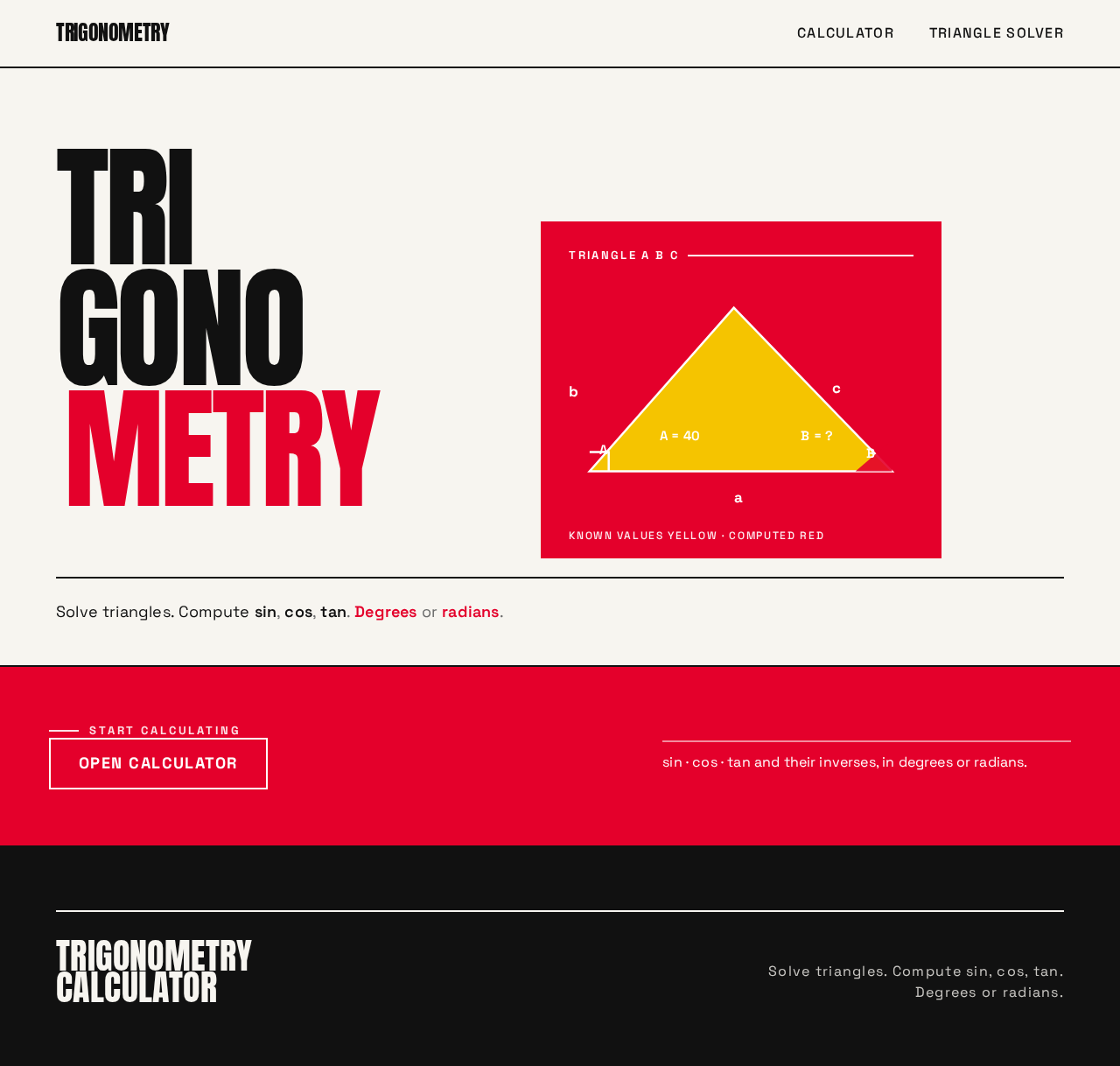
- Poster hero — full-viewport composition: the word
TRIGONOMETRYset in Anton atclamp(48px, 12vw, 160px), stacked in three lines, flush-left, black on warm paper; a solid red rectangle overlapping the bottom-right of the wordmark containing a white triangle diagram with labelled sides a, b, c and angles A, B, C in Space Grotesk. - Body line — a single line in Space Grotesk 18px: "Solve triangles. Compute sin, cos, tan. Degrees or radians."
- CTA button — rectangular, solid red fill, white uppercase label
OPEN CALCULATOR, hard edges, no radius, no shadow.
- States.
- Loading: minimal; the hero renders as static type and diagram, so no skeleton is required beyond the initial document load.
- Empty: not applicable — the page has no data-dependent content.
- Success: the page renders fully and the CTA navigates to Calculator.
- Error: if the application bundle fails to load, a plain-text fallback message and a retry affordance are shown; the user can reload.
- Recovery: reloading the page restores the entry surface; no state is lost because none is held.
Calculator
- Information and state. Displays the currently selected angle mode (degrees or radians), the current input value, and the computed result. Result values are shown in Anton at
clamp(32px, 6vw, 64px)on a white card with a 2px black border and no shadow. - Primary action. Compute the selected trigonometric function for the entered value.
- Supporting actions. Select the function (sin, cos, tan, or their inverses); toggle between degrees and radians; clear the input and result.
- Domain entities. Angle mode (degrees | radians), function (sin | cos | tan | asin | acos | atan), input value (numeric), result value (numeric).
- Component responsibilities.
- Mode toggle — a flat two-cell black-bordered switch where the active cell fills solid red with white uppercase text. No rounded pills. Snaps with a 100ms colour flip from black to red.
- Function selector — rectangular buttons with uppercase labels for sin, cos, tan, asin, acos, atan; the active function is marked with a solid red fill and white text.
- Input field — sharp rectangle, 2px black border, white fill, numeric entry.
- Result panel — white card, 2px black border, no shadow; the result value is set in Anton and counts up over 200ms when computed.
- Clear control — rectangular button with an uppercase label that resets input and result.
- States.
- Loading: while a computation is in flight, the result panel shows a restrained pending indicator; the input and mode controls remain usable.
- Empty: before any input, the result panel shows a neutral placeholder indicating that a result will appear after entry.
- Success: the computed value is displayed in the result panel with the 200ms count-up.
- Error: if the input is empty, non-numeric, or outside the domain of the selected function (for example, an inverse function applied to a value outside its valid range), the result panel shows a plain-language message naming the problem and the input remains editable.
- Recovery: the user corrects the input or changes the function or mode and recomputes; the error message clears on the next successful computation.
Triangle Solver
- Information and state. Displays the entered known values (sides a, b, c and angles A, B, C), the currently selected angle mode, and the computed unknown values. Known values are filled yellow in the diagram; computed values are filled red.
- Primary action. Solve the triangle from the entered sides and/or angles.
- Supporting actions. Select the angle mode; clear all entered values; edit any individual known value.
- Domain entities. Angle mode (degrees | radians), side a, side b, side c, angle A, angle B, angle C, solved triangle (the complete set of sides and angles).
- Component responsibilities.
- Known-values panel — a full-width yellow colour band containing the input fields for sides and angles, each a sharp rectangle with a 2px black border.
- Mode toggle — the same flat two-cell black-bordered switch used on the Calculator page.
- Triangle diagram — flat vector geometry drawn in black with 2–3px lines; yellow fills for known values, red fills for computed values; labels in Space Grotesk; the known-value fills animate with a 150ms left-to-right wipe.
- Result rail — on desktop, a 5-column right rail listing the solved sides and angles; on mobile, it stacks below the diagram.
- Clear control — rectangular button with an uppercase label that resets all entered values and the diagram.
- States.
- Loading: while a solve is in flight, the result rail shows a restrained pending indicator; the known-values panel remains editable.
- Empty: before any values are entered, the diagram shows an unlabelled triangle outline and the result rail shows a neutral placeholder.
- Success: all remaining sides and angles are displayed in the result rail and filled red in the diagram.
- Error: if the entered values are insufficient to determine a triangle, or are inconsistent (for example, they violate the triangle inequality or produce an ambiguous case that the entered data does not resolve), the result rail shows a plain-language message naming the problem and the entered values remain editable.
- Recovery: the user corrects or adds known values and solves again; the error message clears on the next successful solve.
3. Functional Requirements
Each requirement is stated as a story point with provenance, lifecycle facts, and observable acceptance.
FR-1 — Compute sine, cosine, and tangent. As a Trigonometry Calculator User, I should compute the sine, cosine, and tangent of an entered angle so that I can get the basic trigonometric value I need.
- Provenance:
explicit. - Actor: Trigonometry Calculator User. Trigger: the user enters an angle on the Calculator page and selects sin, cos, or tan.
- Observable result: the result panel displays the computed value in Anton at
clamp(32px, 6vw, 64px)on a white card with a 2px black border, with a 200ms count-up. - Access state: anonymous; no identity required.
- Failure/recovery: if the input is empty or non-numeric, the result panel shows a plain-language message and the input remains editable; the user corrects the input and recomputes.
- Continuation: the user can immediately compute another value, change the function, or switch to the Triangle Solver.
FR-2 — Compute inverse sine, cosine, and tangent. As a Trigonometry Calculator User, I should compute the inverse sine, cosine, and tangent of an entered ratio so that I can recover the angle from a ratio.
- Provenance:
explicit. - Actor: Trigonometry Calculator User. Trigger: the user enters a ratio on the Calculator page and selects asin, acos, or atan.
- Observable result: the result panel displays the computed angle in the currently selected angle mode, in Anton at
clamp(32px, 6vw, 64px)on a white card with a 2px black border, with a 200ms count-up. - Access state: anonymous; no identity required.
- Failure/recovery: if the entered ratio lies outside the domain of the selected inverse function, the result panel shows a plain-language message naming the problem and the input remains editable; the user corrects the ratio and recomputes.
- Continuation: the user can immediately compute another value or switch to the Triangle Solver.
FR-3 — Select degrees or radians. As a Trigonometry Calculator User, I should choose whether my angle input and result are interpreted in degrees or radians so that my results match the convention I am working in.
- Provenance:
explicit. - Actor: Trigonometry Calculator User. Trigger: the user operates the mode toggle on the Calculator or Triangle Solver page.
- Observable result: the active cell of the flat two-cell black-bordered switch fills solid red with white uppercase text, snapping with a 100ms colour flip from black to red; subsequent computations use the selected mode.
- Access state: anonymous; no identity required.
- Failure/recovery: not applicable — the toggle has two mutually exclusive states and always resolves to one of them.
- Continuation: the selected mode persists for the duration of the session on that page and applies to the next computation.
FR-4 — Solve a triangle using the law of sines. As a Trigonometry Calculator User, I should solve a triangle from a known side and its opposite angle together with one further known value, using the law of sines, so that I can obtain the remaining sides and angles.
- Provenance:
explicit. - Actor: Trigonometry Calculator User. Trigger: the user enters the required known values on the Triangle Solver page and initiates the solve.
- Observable result: the result rail lists the solved sides and angles, and the corresponding regions of the flat vector triangle diagram fill red with a 150ms left-to-right wipe; known values remain filled yellow.
- Access state: anonymous; no identity required.
- Failure/recovery: if the entered values are insufficient or inconsistent, the result rail shows a plain-language message naming the problem and the entered values remain editable; the user corrects or adds values and solves again.
- Continuation: the user can edit any known value and solve again, or clear all values and start a new triangle.
FR-5 — Solve a triangle using the law of cosines. As a Trigonometry Calculator User, I should solve a triangle from two sides and the included angle, or from all three sides, using the law of cosines, so that I can obtain the remaining sides and angles.
- Provenance:
explicit. - Actor: Trigonometry Calculator User. Trigger: the user enters the required known values on the Triangle Solver page and initiates the solve.
- Observable result: the result rail lists the solved sides and angles, and the corresponding regions of the flat vector triangle diagram fill red with a 150ms left-to-right wipe; known values remain filled yellow.
- Access state: anonymous; no identity required.
- Failure/recovery: if the entered values violate the triangle inequality or are otherwise inconsistent, the result rail shows a plain-language message naming the problem and the entered values remain editable; the user corrects the values and solves again.
- Continuation: the user can edit any known value and solve again, or clear all values and start a new triangle.
FR-6 — Solve a triangle from given sides or angles. As a Trigonometry Calculator User, I should enter whichever sides and angles I know and receive the complete solved triangle so that I do not have to choose the law myself.
- Provenance:
explicit. - Actor: Trigonometry Calculator User. Trigger: the user enters any valid combination of known sides and/or angles on the Triangle Solver page and initiates the solve.
- Observable result: the application selects the applicable law (sines or cosines) and returns the complete set of sides and angles in the result rail, with computed values filled red in the diagram.
- Access state: anonymous; no identity required.
- Failure/recovery: if the entered combination is insufficient to determine a triangle, or is ambiguous and the entered data does not resolve the ambiguity, the result rail shows a plain-language message naming the problem and the entered values remain editable; the user adds or corrects values and solves again.
- Continuation: the user can edit any known value and solve again, or clear all values and start a new triangle.
FR-7 — Reach the calculator from the public entry. As a Trigonometry Calculator User, I should understand what the tool does and open the calculator from the entry page so that I can begin computing without prior knowledge of the tool.
- Provenance:
required_inference. - Actor: Trigonometry Calculator User. Trigger: the user opens the Landing page.
- Observable result: the poster hero presents the word
TRIGONOMETRYin Anton atclamp(48px, 12vw, 160px)stacked in three lines, a red rectangle containing a white labelled triangle diagram, the body line "Solve triangles. Compute sin, cos, tan. Degrees or radians.", and a red rectangularOPEN CALCULATORbutton; activating the button navigates to the Calculator page. - Access state: anonymous; no identity required.
- Failure/recovery: if the application bundle fails to load, a plain-text fallback message and a retry affordance are shown; reloading restores the entry surface.
- Continuation: from the Calculator page the user can compute values or navigate to the Triangle Solver.
FR-8 — Clear inputs and results. As a Trigonometry Calculator User, I should clear the current input and result so that I can start a fresh computation without stale values.
- Provenance:
required_inference. - Actor: Trigonometry Calculator User. Trigger: the user activates the clear control on the Calculator or Triangle Solver page.
- Observable result: the input fields and result panel (or known-values panel, diagram fills, and result rail) return to their empty state; the selected angle mode is retained.
- Access state: anonymous; no identity required.
- Failure/recovery: not applicable — clearing is idempotent and cannot fail.
- Continuation: the user enters new values and computes or solves again.
4. User Personas
Trigonometry Calculator User
Product context. A student practicing trigonometry or a general user who needs a trigonometric value or a solved triangle quickly. They arrive at the tool with a specific problem in hand — an angle whose sine they need, a ratio whose angle they need, or a triangle with some sides and angles known and others missing. They are working in a convention (degrees or radians) that they must be able to set explicitly, because a result in the wrong convention is worse than no result.
Primary goal. Obtain correct, trustworthy trigonometric values and solved triangles for practice or general use, without friction and without ambiguity about the convention in use.
Distinct accepted responsibilities.
- Enter an angle and read its sine, cosine, or tangent.
- Enter a ratio and read its inverse sine, cosine, or tangent as an angle.
- Choose degrees or radians and have that choice govern both input interpretation and result presentation.
- Enter known sides and/or angles of a triangle and read the complete solved triangle, with the application selecting the law of sines or the law of cosines as applicable.
- Clear the current inputs and results to begin a fresh computation.
Relevant inputs and decisions. The numeric angle or ratio; the function to apply; the angle mode; the set of known sides and angles for a triangle; whether the entered triangle data is sufficient or needs correction after an error message.
Interactions with other accepted participants. None. The persona is the sole human actor; the application performs the computation and returns the result. There is no counterparty, approver, or recipient whose state changes.
Observable success. The result panel or result rail displays the computed value or the complete solved triangle, in the selected angle mode, on a white card with a 2px black border and no shadow, with the result value set in Anton and counted up over 200ms. Known values appear yellow in the triangle diagram and computed values red.
What makes this role's work distinct. The persona's work is a single continuous act of translation between representations: from an angle to a ratio, from a ratio to an angle, or from a partial triangle to a complete one. The tool's value is that this translation is immediate, unambiguous about convention, and visually legible — the diagram and the oversized numerals are the result, not decoration around it.
5. Core User Flows
Flow 1 — Compute a basic trigonometric value
- The user opens the Landing page and reads the poster hero:
TRIGONOMETRYin Anton, the red rectangle with the labelled triangle, and the line "Solve triangles. Compute sin, cos, tan. Degrees or radians." - The user activates the red rectangular
OPEN CALCULATORbutton and arrives at the Calculator page. - The user sets the angle mode by operating the flat two-cell black-bordered switch; the active cell fills solid red with white uppercase text, snapping with a 100ms colour flip.
- The user selects sin, cos, or tan from the rectangular function buttons; the active function is marked with a solid red fill and white text.
- The user enters an angle in the sharp-rectangled input field with its 2px black border.
- The user initiates the computation. The result panel displays the computed value in Anton at
clamp(32px, 6vw, 64px)on a white card with a 2px black border, counting up over 200ms. - Failure path: if the input is empty or non-numeric, the result panel shows a plain-language message naming the problem and the input remains editable. The user corrects the input and recomputes; the message clears on the next successful computation.
- Continuation: the user computes another value, changes the function or mode, activates the clear control to reset input and result while retaining the angle mode, or navigates to the Triangle Solver.
Flow 2 — Compute an inverse trigonometric value
- The user is on the Calculator page, having arrived from the Landing page or from the Triangle Solver.
- The user sets the angle mode with the flat two-cell switch; the active cell fills solid red with white uppercase text.
- The user selects asin, acos, or atan from the rectangular function buttons.
- The user enters a ratio in the input field.
- The user initiates the computation. The result panel displays the recovered angle in the selected angle mode, in Anton at
clamp(32px, 6vw, 64px)on a white card with a 2px black border, counting up over 200ms. - Failure path: if the ratio lies outside the domain of the selected inverse function, the result panel shows a plain-language message naming the problem and the input remains editable. The user corrects the ratio or changes the function and recomputes.
- Continuation: the user computes another value, switches the angle mode to check the result in the other convention, or clears the input and result.
Flow 3 — Solve a triangle from given sides or angles
- The user navigates to the Triangle Solver page from the top navigation bar.
- The user sets the angle mode with the flat two-cell switch; the active cell fills solid red with white uppercase text.
- The user enters the known values in the full-width yellow known-values panel: any combination of sides a, b, c and angles A, B, C, each in a sharp rectangle with a 2px black border. The known regions of the flat vector triangle diagram fill yellow with a 150ms left-to-right wipe.
- The user initiates the solve. The application selects the applicable law — the law of sines or the law of cosines — from the entered combination.
- The result rail lists the solved sides and angles, and the corresponding regions of the diagram fill red with a 150ms left-to-right wipe; known values remain yellow.
- Failure path — insufficient data: if the entered values do not determine a triangle, the result rail shows a plain-language message naming the problem and the entered values remain editable. The user adds the missing values and solves again.
- Failure path — inconsistent data: if the entered values violate the triangle inequality or are otherwise inconsistent, the result rail shows a plain-language message naming the problem and the entered values remain editable. The user corrects the values and solves again.
- Failure path — ambiguous case: if the entered data admits more than one triangle and does not resolve the ambiguity, the result rail shows a plain-language message naming the problem and the entered values remain editable. The user adds a value that disambiguates and solves again.
- Continuation: the user edits any known value and solves again, activates the clear control to reset all values and the diagram while retaining the angle mode, or navigates back to the Calculator.
Flow 4 — Recover from an error and continue
- The user is on the Calculator or Triangle Solver page and has just received a plain-language error message in the result panel or result rail.
- The user reads the message, which names the specific problem — empty or non-numeric input, a ratio outside the domain of the selected inverse function, insufficient triangle data, inconsistent triangle data, or an unresolved ambiguous case.
- The user corrects the offending input, changes the function, or adds a disambiguating value; the entered values remain editable throughout.
- The user recomputes or solves again. The error message clears and the result is displayed with the standard count-up and diagram fill.
- Continuation: the user proceeds with the result, computes another value, or clears the inputs to start fresh.
6. Visuals, Colors, and Theme
The creative direction is authoritative for this section. The muse is Paula Scher, and the headline idea is "Typography as instrument: trigonometry you can see at a glance." Information becomes architecture through typography, flat colour blocks, and poster-scale contrast; trigonometry's relationships — angles, ratios, waves, triangles — are made visible through oversized type, flat colour fields, and diagrammatic composition.
Colour tokens
Light mode (the only mode specified by the direction):
| Role | Hex | Usage |
|---|---|---|
| Background | #F7F5F0 | Warm paper off-white ground |
| Surface | #FFFFFF | Input cards and result panels — crisp paper on the warm ground |
| Text | #111111 | Pure black type |
| Primary | #E4002B | Hot poster red — active states, results, key labels, CTA fill |
| Accent | #F5C400 | Saturated yellow — highlights, mode toggles, known-value diagram fills |
| Muted | #6B6B6B | Secondary text |
Contrast: black-on-warm-white at 14:1 and red-on-white at 5.9:1, both readable at body size. Colour fields are used as flat blocks, never gradients. No blue anywhere in the palette — no #0057FF, #2563EB, #4F46E5, or similar.
Typography
- Headings: Anton — condensed, uppercase, flush-left, tightly stacked with 0.9 line-height. Headlines are poster-scale and act as colour blocks themselves: black or red type on warm paper, occasionally reversed to white on a red field. No italics, no light weights.
- Body: Space Grotesk.
- Type scale: 1.5 modular — 96 / 64 / 40 / 24 / 18 / 16.
- Display sizes: hero headlines use
clamp(40px, 8vw, 112px); calculator numerals useclamp(32px, 6vw, 64px)in Anton for result values. - Forbidden fonts: Inter, Roboto, Arial, Helvetica, Open Sans, Lato, Poppins, or system-ui for headings or body.
Shape language
Hard edges and flat colour blocks. No border-radius on primary panels; inputs and result cards are sharp rectangles with 2px black borders or solid colour fills. Buttons are rectangular with uppercase labels. Diagram lines are 2–3px solid black or red. Triangle diagrams use flat fills — yellow for known values, red for computed values, black for labels. No soft shadows, no blobs, no rounded pills.
Layout
A strict asymmetric poster grid: a 12-column base with a dominant 7-column content field and a 5-column result/diagram rail on desktop. The Calculator page stacks input fields in a single column on mobile, then splits into a two-column layout at 768px with results pinned to the right rail. Section breaks are full-width colour bands — a red band for the mode toggle, a yellow band for the Triangle Solver's known-values panel. Horizontal rules are 2px black and used as section dividers. Navigation is a top bar with black type on warm paper, no logo mark, just a wordmark in Anton.
Imagery
Typography and diagram are the imagery. The hero uses a full-bleed composition of oversized trig notation — sin, cos, tan, θ — set in Anton and arranged as a poster. The Triangle Solver uses flat vector diagrams with colour-coded sides and angles, drawn in black with red and yellow fills. No photography, no 3D renders, no illustration for its own sake. Every visual element is either a number, a symbol, or a diagram that carries information.
7. Signature Design Concept
The poster hero as the product's front door.
The Landing page is a full-viewport poster. On the left 7 columns, the word TRIGONOMETRY is set in Anton at clamp(48px, 12vw, 160px), stacked in three lines, flush-left, black on warm paper. Overlapping the bottom-right of the wordmark is a solid red rectangle, 40% of the viewport width, containing a white triangle diagram with labelled sides a, b, c and angles A, B, C in Space Grotesk. Below the headline, a single line of body copy in Space Grotesk 18px reads "Solve triangles. Compute sin, cos, tan. Degrees or radians." A red rectangular CTA button reads OPEN CALCULATOR in white uppercase.
The composition is asymmetric, type-dominant, and could not be mistaken for a centred SaaS hero. It recomposes only accepted content — the product's name, its two accepted capabilities, its two accepted angle modes, and the triangle diagram that the Triangle Solver page uses — into a single poster-scale statement. It introduces no new behaviour, page, or destination.
Signature moves carried through the product:
- Oversized Anton wordmark spanning the viewport at
clamp(48px, 12vw, 160px), stacked in three lines and overlapping a solid red colour block. - Degree/radian toggle rendered as a flat two-cell black-bordered switch where the active cell fills solid red with white uppercase text — no rounded pills.
- Result values displayed in Anton at
clamp(32px, 6vw, 64px)with a 200ms count-up animation, set on white cards with 2px black borders and no shadow. - Triangle solver diagram uses flat vector geometry with yellow fills for known values and red fills for computed values, animating with a left-to-right wipe.
- Section transitions use full-width colour bands (red, yellow, black) with 2px black horizontal rules, creating a poster-like vertical rhythm.
8. Interaction Model & Motion Direction
Interaction Model: Static Motion Tempo: restrained Hero Dimensionality: flat
Landing Hero Motion Brief
- Focal subject. The oversized Anton wordmark
TRIGONOMETRYstacked in three lines, overlapping the solid red rectangle that contains the white labelled triangle diagram. - Input → transformation → outcome thesis. As the user scrolls or the page enters, the type reveals slide up 8px with a 120ms ease-out on section entry, and the red rectangle's triangle diagram animates its known-value fills with a 150ms wipe from left to right. The outcome is a composed first frame in which the wordmark and the diagram are fully legible and the CTA is reachable. Motion reinforces the act of reading the poster; it never decorates.
- Motion vocabulary. Type reveals slide up 8px with a 120ms ease-out on section entry; result values count up over 200ms when computed; the degree/radian toggle snaps with a 100ms colour flip from black to red; triangle diagrams animate their known-value fills with a 150ms wipe from left to right. No bounce, no parallax, no particles.
- Composed first frame. The wordmark occupies the left 7 columns, flush-left, black on warm paper. The red rectangle sits at the bottom-right, overlapping the wordmark's lower right. The body line and the red
OPEN CALCULATORbutton sit below the headline, left-aligned. The top navigation bar carries the wordmark and links in black type on warm paper. - Reduced-motion state. With
prefers-reduced-motion, all reveals, count-ups, colour flips, and wipes resolve instantly to their final state. The poster composition is unchanged and fully legible; the CTA remains reachable and the diagram remains fully drawn with its yellow and red fills in place.
No user-requested 3D or WebGL hero was made, and the direction's hero dimensionality is flat, so no 3D scene brief is included.
9. Non-Functional Requirements
NFR-1 — Numerical correctness. Trigonometric and triangle-solving results must be numerically correct for the selected angle mode. Provenance: explicit — the accepted requirements state that the tool is for students practicing and for general use, and that success means getting correct, trustworthy results. Rationale: a trigonometry tool that returns wrong values is worse than no tool.
NFR-2 — Angle-mode consistency. The selected angle mode must govern both the interpretation of angle input and the presentation of angle results, on both the Calculator and Triangle Solver pages. Provenance: explicit — the accepted requirements state support for both degrees and radians angle modes. Rationale: a result in the wrong convention is a wrong answer.
NFR-3 — Error clarity. Every failure state must present a plain-language message that names the specific problem and leaves the offending input editable. Provenance: required_inference — indispensable for the accepted outcome of trustworthy results, since a silent or opaque failure would leave the user unable to distinguish a wrong answer from a rejected input.
NFR-4 — Readable text and controls at every viewport. Headlines, wordmarks, labels, numbers, and card text and controls must stay entirely inside the viewport and their container at 375px, 768px, and 1280px, wrapping or scaling (for example font-size: clamp(...) with its mobile size) to fit, with no other element covering any part of them. Provenance: explicit — stated in the creative direction's readability rule. Rationale: the poster-scale typography must remain legible on a phone as well as a desktop.
NFR-5 — Reduced-motion support. With prefers-reduced-motion, the interface must present a usable static arrangement in which every item is fully readable and every control is reachable. Provenance: explicit — stated in the creative direction's readability rule.
NFR-6 — Responsive layout. The Calculator page stacks input fields in a single column on mobile and splits into a two-column layout at 768px with results pinned to the right rail. The Triangle Solver's known-values panel and result rail stack vertically on mobile. Provenance: explicit — stated in the creative direction's layout section.
NFR-7 — No blue in the palette. No blue or indigo may appear anywhere in the interface. Provenance: explicit — stated in the creative direction's avoid list.
NFR-8 — No photography or 3D renders as hero imagery. Typography and diagrams only. Provenance: explicit — stated in the creative direction's imagery and avoid sections.
10. Tech Stack
No technology choices were specified by the user. The following are coherent defaults for the accepted scope, labelled as such.
- Frontend: React with a modern build tool, rendering the three accepted pages.
[Default — not specified by user] - Backend: Python with FastAPI, exposing the trigonometric and triangle-solving computation endpoints consumed by the frontend.
[Default — not specified by user] - Storage: none. The accepted requirements describe no durable per-user state, no history, and no persistence; all state is transient page state.
[Default — not specified by user] - Containerization: Docker with docker-compose, running the frontend and the backend as the two runnable services.
[Default — not specified by user] - Orchestration: Kubernetes is not required for this scope and is not included.
[Default — not specified by user]
11. Assumptions and Constraints
Assumptions.
- A1. The product is anonymous and ephemeral. No account, sign-in, saved history, or cross-session continuity is required or implied by the accepted requirements.
[Assumption — not specified by user] - A2. The degree/radian mode selection and all entered values are transient page state and are not persisted between sessions.
[Assumption — not specified by user] - A3. The application performs all trigonometric and triangle-solving computation itself; no third-party calculation provider is involved.
[Assumption — not specified by user] - A4. The design system skill supplied in planning scope describes an unrelated micro-grid dashboard and is not a source of product facts, copy, or capabilities for this project. Only the project-wide creative direction governs presentation.
[Assumption — derived from source boundaries]
Constraints.
- C1. The palette is fixed: background
#F7F5F0, surface#FFFFFF, text#111111, primary#E4002B, accent#F5C400, muted#6B6B6B. No blue or indigo anywhere. - C2. Headings use Anton; body uses Space Grotesk. Inter, Roboto, Arial, Helvetica, Open Sans, Lato, Poppins, and system-ui are excluded for headings and body.
- C3. Shape language is hard edges and flat colour blocks: no border-radius on primary panels, no soft shadows, no glassmorphism, no gradient blobs, no rounded pills.
- C4. Motion is restrained: type reveals slide up 8px with a 120ms ease-out, result values count up over 200ms, the mode toggle snaps with a 100ms colour flip, and triangle diagram fills wipe left-to-right over 150ms. No bounce, no parallax, no particles.
- C5. Imagery is typography and diagrams only. No photography, no 3D renders, no illustration for its own sake.
- C6. The generic indigo/blue-on-white SaaS template is forbidden for this project.
- C7. The page inventory is closed at three pages: Landing, Calculator, Triangle Solver. All three are anonymous and openly reachable.
12. Glossary
- Angle mode — the convention in which angles are interpreted and presented: degrees or radians.
- Basic trigonometric functions — sine (sin), cosine (cos), and tangent (tan).
- Inverse trigonometric functions — arcsine (asin), arccosine (acos), and arctangent (atan), which recover an angle from a ratio.
- Law of sines — the relationship used to solve a triangle from a known side and its opposite angle together with one further known value.
- Law of cosines — the relationship used to solve a triangle from two sides and the included angle, or from all three sides.
- Known value — a side or angle entered by the user on the Triangle Solver page; filled yellow in the triangle diagram.
- Computed value — a side or angle produced by the solve; filled red in the triangle diagram.
- Ambiguous case — a set of entered triangle data that admits more than one triangle and does not resolve which one is intended.
- Poster hero — the full-viewport Landing composition of oversized Anton type overlapping a solid red rectangle containing a labelled triangle diagram.
Tri
Triangle a b c
Known values yellow · computed red
Solve triangles. Compute sin, cos, tan. Degrees or radians.
Start calculating
Open CalculatorTri
Triangle a b c
Known values yellow · computed red
Solve triangles. Compute sin, cos, tan. Degrees or radians.
Start calculating
Open Calculator
No comments yet. Be the first!