travel-management-travellers

byMarketing 8080AI

Build a functional, AI-first travel management platform for web and mobile where travellers can plan, organize, and manage multi-booking trips through chat or voice. Core Features 1. Traveller Interface Secure signup, login, and session management. Dashboard for upcoming trips, bookings, alerts, and pending approvals. Conversational AI with streaming responses and voice input. Interactive trip workspace with booking cards, editable itinerary timeline, maps, and travel options. Responsive, accessible UI with light/dark themes, notifications, and deep links. 2. Trip and Booking Management Create trips and manage flights, hotels, transport, and activities. Import booking confirmations from emails, PDFs, and screenshots. Extract, validate, and store booking details, allowing users to correct errors. Maintain a central source of truth for bookings, travellers, constraints, and dependencies. Separate mandatory travel constraints from optional preferences. 3. AI Travel Agent Use tool-calling agents to retrieve trip data, suggest itinerary changes, compare options, and generate recovery plans. Ground responses in verified data; never invent bookings, prices, availability, or travel times. Maintain editable user memory, versioned prompts, debugging traces, and automated AI evaluations. Treat imported documents as untrusted data and validate extracted information. 4. Backend and Integrations Use TypeScript, typed APIs, and a structured database. Implement background jobs, retries, idempotency, verified webhooks, and streaming responses. Create modular integrations for travel search, booking retrieval/changes/cancellations, flight status, maps, speech-to-text, and text-to-speech. Support payment approval workflows through external APIs. 5. Safety and Approvals Separate read, write, and action permissions. Require explicit user authorization before booking, paying, or cancelling. Generate itemized approval requests with providers, prices, and booking details. Record actions and their actual execution results. Enforce server-side access controls and protect user data. 6. Disruption Recovery Detect flight or booking changes, identify affected itinerary items, suggest feasible alternatives, and let travellers review and approve a recovery plan. Technology and Delivery Prefer TypeScript with React Native/Expo for web and mobile, a suitable backend, and a relational database. Use AI coding agents to implement the application, review generated code, and test each feature. Start by defining the architecture, database schema, API contracts, user flows, and implementation backlog. Build incrementally, ensuring all core workflows use persistent data and work end to end. Use real integrations where credentials are available and clearly labelled mocks otherwise. Do not claim unverified functionality. Hosting, CI/CD, secrets management, and payment infrastructure are handled externally.

LandingSign UpDashboardLoginAssistantImport BookingsApprovalsActivity LogTrip WorkspaceAI OperationsBooking ReviewTrip DataPreferencesTripsDisruptions
Landing

Comments (0)

No comments yet. Be the first!

System Requirements

System Requirements Document for travel-management-travellers

1. Introduction

travel-management-travellers is a functional, AI-first travel management platform for web and mobile. It exists so that travellers can plan, organize, and manage multi-booking trips — flights, hotels, ground transport, and activities — through chat or voice, with an AI travel agent that retrieves verified trip data, suggests itinerary changes, compares options, and generates recovery plans.

The product's intent is a calm, intelligent concierge that visibly handles complexity: a single translucent cockpit that layers many sources of truth (bookings, travellers, constraints, live status) without hiding any of them. The audience is mobile-first, competent, and slightly anxious about money and missed connections. They want the platform to feel like it is handling the complexity for them — not a spreadsheet, and not a discount OTA.

The platform is built incrementally, with all core workflows using persistent data and working end to end. Real integrations are used where credentials are available; clearly labelled mocks are used otherwise. Hosting, CI/CD, secrets management, and payment infrastructure are handled externally.

Page 1 of 65

2. System Overview

The platform delivers a traveller-facing web and mobile application (TypeScript with React Native/Expo) backed by a TypeScript backend with typed APIs and a relational database. It provides:

  • Identity and session management — secure signup, login, and session management for travellers and authorizing users.
  • A traveller dashboard — upcoming trips, bookings, alerts, and pending approvals.
  • A conversational AI assistant — streaming responses and voice input, backed by tool-calling agents.
  • An interactive trip workspace — booking cards, an editable itinerary timeline, maps, and travel options.
  • Trip and booking management — creating trips and managing flights, hotels, transport, and activities; importing booking confirmations from emails, PDFs, and screenshots; extracting, validating, and storing booking details with user correction; maintaining a central source of truth for bookings, travellers, constraints, and dependencies; separating mandatory travel constraints from optional preferences.
  • An AI travel agent — tool-calling agents that retrieve trip data, suggest itinerary changes, compare options, and generate recovery plans; grounded in verified data; with editable user memory, versioned prompts, debugging traces, and automated AI evaluations; treating imported documents as untrusted data.
  • Backend and integrations — background jobs, retries, idempotency, verified webhooks, streaming responses, and modular integrations for travel search, booking retrieval/changes/cancellations, flight status, maps, speech-to-text, and text-to-speech; payment approval workflows through external APIs.
Page 2 of 65
  • Safety and approvals — separated read, write, and action permissions; explicit user authorization before booking, paying, or cancelling; itemized approval requests with providers, prices, and booking details; recorded actions and their actual execution results; server-side access controls and user data protection.
  • Disruption recovery — detecting flight or booking changes, identifying affected itinerary items, suggesting feasible alternatives, and letting travellers review and approve a recovery plan.

Actors. The active human personas are the Traveller and the Approver / Authorizing Traveller. The AI Travel Agent (conversational assistant) is a system actor that serves travellers through tool-calling agents. External travel providers, payment providers, maps, speech-to-text, and text-to-speech services are provider-owned or externally handled.

Narrow exclusions. Hosting, CI/CD, secrets management, and payment infrastructure are handled externally and are not built by this product. No functionality may be claimed as verified unless it is actually implemented and tested.

Page 3 of 65

2a. Product Interpretation and Delivery Boundary

Delivery ownership. The platform owns its own application identity: travellers self-enroll through Sign Up and return through Login, and protected destinations require an established session. The Landing page is anonymously reachable and explains the product before any identity is established. All protected destinations — Dashboard, Assistant, Trip Workspace, Trips, Import Bookings, Booking Review, Trip Data, Preferences, AI Operations, Approvals, Activity Log, and Disruptions — require an authenticated session and enforce server-side access controls.

Provider and external ownership. Travel search, booking retrieval/changes/cancellations, flight status, maps, speech-to-text, text-to-speech, and payment execution are provider-owned or externally handled. The platform integrates with them through modular adapters and never claims provider functionality it has not verified. Where credentials are unavailable, clearly labelled mocks stand in for the provider.

Current vs. future. Everything described in this document is current. Hosting, CI/CD, secrets management, and payment infrastructure are explicitly external and are not part of the current build. No future-horizon product capabilities are asserted.

2b. Source Content Inventory

No reference directive in this project declares content_source authority, so no source content inventory is included.

2c. Page Content and Component Coverage

Page 4 of 65

Landing

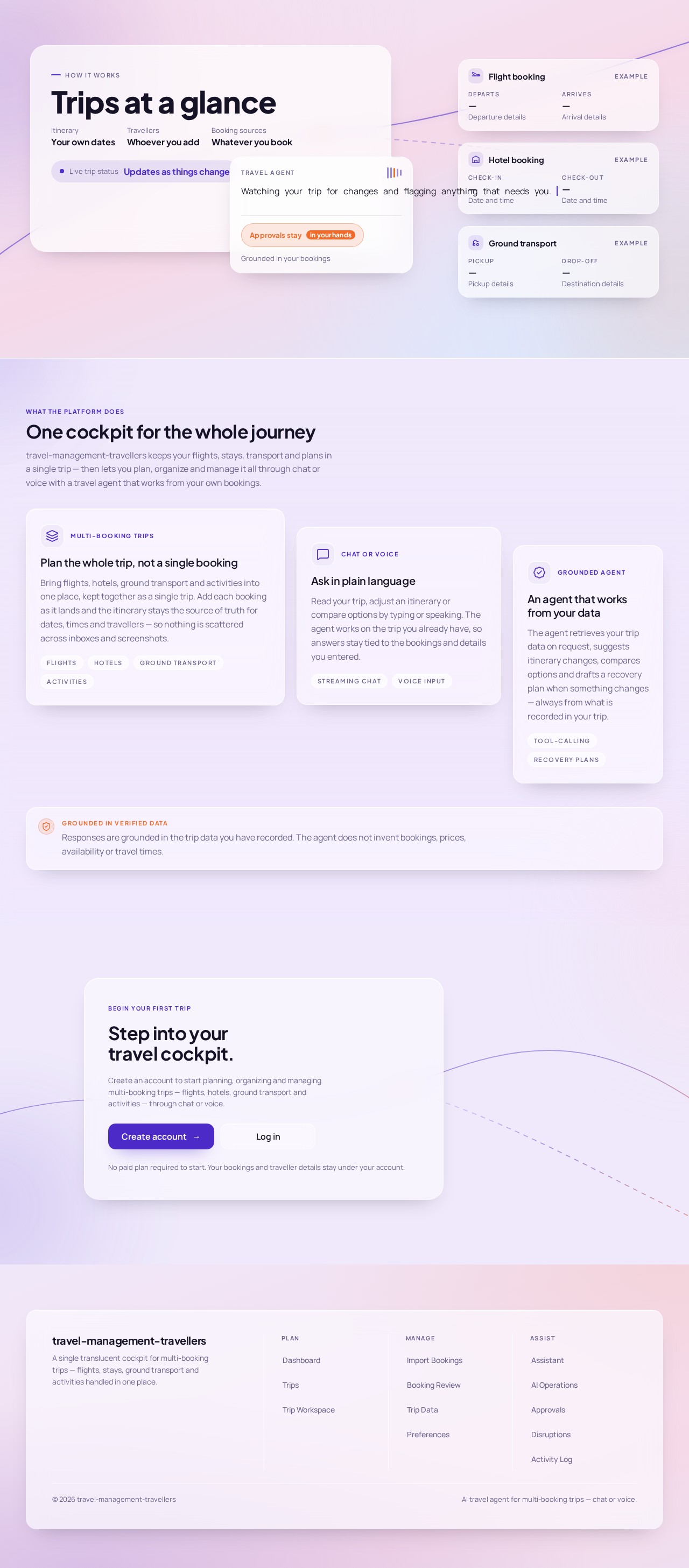
  • Information/state: Anonymous first impression of the AI-first travel platform — what it does for travellers planning and managing multi-booking trips, and that planning and management happen through chat or voice. A layered glass cockpit composition: a full-bleed gradient field (lavender → blush → sky) with a large frosted panel holding the traveller's next trip concept, an overlapping smaller glass card showing the active agent concept, and a vertical stack of narrow glass booking chips (flight, hotel, transfer) with tabular times. A thin luminous route line crosses the gradient behind the panels.
  • Primary actions: Navigate to Sign Up; navigate to Login.
  • Supporting actions: Read product explanation; view the layered cockpit composition.
  • Domain entities: None persisted; conceptual trip, booking, and agent representations only.
  • Component responsibilities: Gradient ground; hero glass panel; agent glass card with streaming status line, 5-bar voice waveform, and amber "Review approvals" pill; booking chip stack; luminous route line; Sign Up and Login entry controls.
  • States: Loading — gradient and panels render immediately, no data fetch. Empty — not applicable (static entry). Success — traveller proceeds to Sign Up or Login. Error — not applicable. Recovery — not applicable.
Page 5 of 65

Login

  • Information/state: Returning verification and secure session establishment for travellers and authorizing users managing protected durable travel data and actions. Credential entry fields and session establishment status.
  • Primary actions: Submit credentials to establish a session; navigate to Sign Up.
  • Supporting actions: Recover from invalid credentials; return to Landing.
  • Domain entities: Traveller identity, session.
  • Component responsibilities: Credential form; submit control; error surface; link to Sign Up.
  • States: Loading — submission in progress. Empty — form fields blank. Success — session established, redirect to Dashboard. Error — invalid credentials shown inline without revealing which field failed. Recovery — retry submission; navigate to Sign Up.
Page 6 of 65

Sign Up

  • Information/state: Self-service enrollment for travellers independently beginning to use the platform. Enrollment fields and validation feedback.
  • Primary actions: Submit enrollment to create a traveller identity; navigate to Login.
  • Supporting actions: Correct validation errors; return to Landing.
  • Domain entities: Traveller identity.
  • Component responsibilities: Enrollment form; validation surface; submit control; link to Login.
  • States: Loading — submission in progress. Empty — form fields blank. Success — identity created, session established, redirect to Dashboard. Error — validation or duplicate-identity errors shown inline. Recovery — correct fields and resubmit; navigate to Login.
Page 7 of 65

Dashboard

  • Information/state: Upcoming trips, bookings, alerts, and pending approvals for the signed-in traveller. A layered dashboard: full-bleed gradient field behind stacked translucent planes; a persistent 260px frosted left rail (Trips / Bookings / Approvals / Agent) on desktop; a centre workspace column; a right-hand agent dock (360px) that stays open for chat and voice. Tablet collapses the rail to an icon strip and moves the agent to a bottom sheet. Mobile is a single column with a sticky glass header with trip switcher, scrollable day timeline, and a floating voice button bottom-right. The dashboard greeting is a display moment.
  • Primary actions: Open a trip; open the Assistant; open Approvals; open Trips; open Bookings.
  • Supporting actions: Review alerts; review pending approvals; switch trips; start voice input.
  • Domain entities: Trip, booking, alert, approval request, traveller.
  • Component responsibilities: Greeting display; upcoming-trips list; bookings summary; alerts list; pending-approvals list; left rail navigation; agent dock; trip switcher; floating voice button.
  • States: Loading — skeleton glass panels while trips, bookings, alerts, and approvals load. Empty — no upcoming trips, no bookings, no alerts, or no pending approvals each show a distinct empty state with a next step. Success — populated panels. Error — failed panel load shows an inline retry without blocking other panels. Recovery — retry the failed panel; navigate to Trips to create a trip.
Page 8 of 65

Assistant

  • Information/state: Conversational workspace for streaming chat, voice input, verified trip retrieval, itinerary suggestions, option comparison, and recovery plans. Streamed AI responses render word-group by word-group, each response carrying a small "sources" chip row listing the exact bookings it was grounded in. A persistent frosted agent dock on the right (desktop) and a full-height glass sheet (mobile). Voice input shows a live 5-bar waveform that reacts to amplitude.
  • Primary actions: Send a chat message; start and stop voice input; act on a suggested itinerary change; compare options; request a recovery plan.
  • Supporting actions: Inspect the sources chip row for a response; open a referenced booking or trip; review an approval request surfaced by the agent.
  • Domain entities: Conversation, message, tool call, source booking, suggested change, option comparison, recovery plan, user memory.
  • Component responsibilities: Message stream; streaming text renderer; sources chip row; voice record control with waveform; tool-call trace surface; suggestion and comparison cards; recovery-plan card.
  • States: Loading — streaming response in progress with word-group fade-in. Empty — no conversation yet, with a prompt to ask about a trip. Success — grounded response with sources chips. Error — provider or tool failure shown as a non-invented failure message with retry. Recovery — retry the request; fall back to typed input when voice fails.
Page 9 of 65

Trip Workspace

  • Information/state: Interactive trip workspace containing booking cards, an editable itinerary timeline, maps, and travel options. A horizontal day-strip of glass chips above a vertical editable timeline; booking cards in a responsive 1/2/3-up grid; a luminous route line drawn across the gradient background behind the workspace with solid segments for confirmed bookings, dashed for tentative, and amber nodes for disrupted segments that pulse once when opened. Each destination shows a tinted duotone map fragment or generative gradient tile generated from the booking's coordinates and dates behind the itinerary header.
  • Primary actions: Edit the itinerary timeline; drag a booking between days; open a booking card; view maps; review travel options.
  • Supporting actions: Re-flow the route line on drag; read the live feasibility warning when a constraint (check-in time, transfer buffer) is violated; open a disrupted segment.
  • Domain entities: Trip, itinerary item, booking, day, map fragment, travel option, constraint, dependency.
  • Component responsibilities: Day-strip; editable vertical timeline; booking card grid; map fragment; route line; feasibility warning; travel-options list.
  • States: Loading — timeline and cards load with staggered glass-panel reveal. Empty — trip with no itinerary items shows a prompt to add or import bookings. Success — populated timeline with route line. Error — failed map or option load shows an inline retry. Recovery — retry the failed element; undo a drag that violates a constraint.
Page 10 of 65

Trips

  • Information/state: Revisitable trip collection and focused creation and management context for flights, hotels, transport, and activities. Trip list with status and dates.
  • Primary actions: Create a trip; open a trip; manage flights, hotels, transport, and activities within a trip.
  • Supporting actions: Edit trip details; navigate to Import Bookings for a trip.
  • Domain entities: Trip, flight, hotel, transport, activity.
  • Component responsibilities: Trip list; create-trip form; trip detail controls; booking-type management controls.
  • States: Loading — trip list loads. Empty — no trips yet, with a create-trip prompt. Success — trip list populated. Error — failed load shows inline retry. Recovery — retry; create a trip.

Import Bookings

  • Information/state: Submission destination for booking confirmations from emails, PDFs, and screenshots. Upload and paste surfaces with a clear statement that imported documents are treated as untrusted data.
  • Primary actions: Submit an email, PDF, or screenshot for extraction.
  • Supporting actions: Select the target trip; review submission status.
  • Domain entities: Imported document, extraction job, target trip.
  • Component responsibilities: Email paste surface; file upload for PDFs; image upload for screenshots; trip selector; submission status.
  • States: Loading — extraction job in progress. Empty — no document submitted yet. Success — extraction completes and routes to Booking Review. Error — unsupported or unreadable document shown with a clear failure. Recovery — resubmit a corrected document; proceed to Booking Review to correct extracted fields.
Page 11 of 65

Booking Review

  • Information/state: Focused validation and correction destination for extracted booking details before trusted storage. Extracted fields are presented for validation, with the untrusted origin of the data made explicit.
  • Primary actions: Validate extracted booking details; correct errors; confirm storage of validated details.
  • Supporting actions: Reject an extraction; return to Import Bookings.
  • Domain entities: Extracted booking detail, validation state, corrected field, stored booking.
  • Component responsibilities: Extracted-field form; per-field validation indicators; correction controls; confirm and reject controls.
  • States: Loading — extraction results load. Empty — no pending extraction. Success — validated details stored and visible in Trip Data. Error — validation failure on a field blocks storage until corrected. Recovery — correct the field and re-validate; reject and re-import.
Page 12 of 65

Trip Data

  • Information/state: Destination for reviewing the authoritative relationships among bookings, travellers, constraints, and dependencies. The central source of truth for bookings, travellers, constraints, and dependencies.
  • Primary actions: Review bookings, travellers, constraints, and dependencies and their relationships.
  • Supporting actions: Navigate to a booking or trip; navigate to Preferences to adjust constraints and preferences.
  • Domain entities: Booking, traveller, constraint, dependency, relationship.
  • Component responsibilities: Bookings list; travellers list; constraints list; dependencies list; relationship view.
  • States: Loading — data loads. Empty — no bookings, travellers, constraints, or dependencies yet. Success — populated authoritative view. Error — failed load shows inline retry. Recovery — retry; import or create bookings.
Page 13 of 65

Preferences

  • Information/state: Destination for separating mandatory travel constraints from optional preferences. Two clearly distinct groups so mandatory constraints are never confused with optional preferences.
  • Primary actions: Add, edit, and remove mandatory travel constraints; add, edit, and remove optional preferences.
  • Supporting actions: Review how constraints affect feasibility warnings.
  • Domain entities: Mandatory constraint, optional preference.
  • Component responsibilities: Mandatory-constraints editor; optional-preferences editor; separation indicator.
  • States: Loading — constraints and preferences load. Empty — none set yet. Success — saved constraints and preferences. Error — save failure shown inline. Recovery — retry save; revert to last saved values.
Page 14 of 65

AI Operations

  • Information/state: Authorized operational destination for editable user memory, prompt versions, debugging traces, and automated AI evaluations.
  • Primary actions: Edit user memory; review and manage prompt versions; inspect debugging traces; run and review automated AI evaluations.
  • Supporting actions: Compare prompt versions; inspect a trace for a specific response.
  • Domain entities: User memory entry, prompt version, debugging trace, evaluation run, evaluation result.
  • Component responsibilities: User-memory editor; prompt-version list; trace viewer; evaluation runner and results.
  • States: Loading — memory, versions, traces, and evaluations load. Empty — no memory entries, versions, traces, or evaluations yet. Success — populated operational view. Error — failed load or failed evaluation run shown inline. Recovery — retry; re-run an evaluation.
Page 15 of 65

Approvals

  • Information/state: Approval queue for itemized providers, prices, booking details, and explicit authorization of booking, payment, or cancellation actions. Approval requests render as amber-edged glass cards with an itemized provider/price/time breakdown and a two-step authorize control — a slider that must be dragged to "Authorize" before the confirm button becomes active — with the execution result stamped back onto the same card afterwards.
  • Primary actions: Review an itemized approval request; drag the authorize slider; confirm authorization; decline an approval request.
  • Supporting actions: Open the referenced booking or trip; review the recorded execution result on the card.
  • Domain entities: Approval request, provider, price, booking detail, authorization, execution result.
  • Component responsibilities: Approval queue; amber-edged approval card; itemized breakdown; two-step authorize control; decline control; execution-result stamp.
  • States: Loading — queue loads. Empty — no pending approvals. Success — authorization recorded and execution result stamped on the card. Error — provider execution failure recorded on the card with the actual result. Recovery — retry the action; review the recorded result in Activity Log.
Page 16 of 65

Activity Log

  • Information/state: Revisitable record of requested actions and their actual execution results.
  • Primary actions: Review requested actions and their actual execution results.
  • Supporting actions: Filter by action type or trip; open the referenced booking or approval request.
  • Domain entities: Action record, execution result, actor, timestamp.
  • Component responsibilities: Action list; result indicator; filter controls; detail view.
  • States: Loading — log loads. Empty — no actions recorded yet. Success — populated log. Error — failed load shows inline retry. Recovery — retry.
Page 17 of 65

Disruptions

  • Information/state: Destination for reviewing detected flight or booking changes, affected itinerary items, alternatives, and recovery-plan approval. Disruption and approval views use a diagrammatic route line drawn as a luminous stroke over the gradient, with amber nodes marking affected segments. Disruption alerts slide in from the right with a single amber sweep across the card.
  • Primary actions: Review a detected change; review affected itinerary items; review suggested feasible alternatives; approve a recovery plan.
  • Supporting actions: Open the affected booking or trip; decline a recovery plan.
  • Domain entities: Detected change, affected itinerary item, alternative, recovery plan, approval.
  • Component responsibilities: Disruption list; affected-items view; alternatives list; route-line diagram with amber nodes; recovery-plan approval control.
  • States: Loading — disruptions load. Empty — no detected disruptions. Success — recovery plan approved and applied. Error — failed detection or failed alternative retrieval shown inline. Recovery — retry; review the affected item in Trip Workspace.

3. Functional Requirements

Page 18 of 65

Identity and Session

FR-1 — Self-service traveller enrollment (required_inference) As a Traveller, I should be able to create my own account through Sign Up so that I can begin using the platform without an invitation.

  • Trigger/input: Traveller submits enrollment details on Sign Up.
  • Observable result: A traveller identity is created and a session is established.
  • Access state: Anonymous entry; Sign Up is reachable without a session.
  • Failure/recovery: Validation or duplicate-identity errors are shown inline; the traveller corrects fields and resubmits, or navigates to Login.
  • Continuation: The traveller lands on Dashboard.

FR-2 — Returning verification and secure session establishment (required_inference) As a Traveller, I should be able to log in through Login so that I can resume my protected travel data and actions.

  • Trigger/input: Traveller submits credentials on Login.
  • Observable result: A session is established and protected destinations become available.
  • Access state: Anonymous entry; Login is reachable without a session.
  • Failure/recovery: Invalid credentials are shown inline without revealing which field failed; the traveller retries or navigates to Sign Up.
  • Continuation: The traveller lands on Dashboard.
Page 19 of 65

FR-3 — Session management (explicit) As a Traveller, I should have my session managed securely so that my protected travel data and actions remain bound to me.

  • Trigger/input: Session establishment, continuation, and expiry.
  • Observable result: Protected destinations remain accessible while the session is valid and require re-verification when it is not.
  • Access state: Protected destinations require an established session.
  • Failure/recovery: An expired or invalid session returns the traveller to Login.
  • Continuation: The traveller re-verifies and returns to the destination they were using.

Dashboard

FR-4 — Dashboard for upcoming trips, bookings, alerts, and pending approvals (explicit) As a Traveller, I should see upcoming trips, bookings, alerts, and pending approvals on my Dashboard so that I know what needs my attention.

  • Trigger/input: Traveller opens Dashboard.
  • Observable result: Upcoming trips, bookings, alerts, and pending approvals are displayed.
  • Access state: Requires an established session.
  • Failure/recovery: A failed panel shows an inline retry without blocking other panels.
  • Continuation: The traveller opens a trip, the Assistant, Approvals, or Trips.
Page 20 of 65

Conversational AI

FR-5 — Conversational AI with streaming responses (explicit) As a Traveller, I should converse with the AI travel agent and see responses stream in so that I get fast, readable answers.

  • Trigger/input: Traveller sends a message in Assistant.
  • Observable result: The response streams word-group by word-group, each response carrying a sources chip row listing the exact bookings it was grounded in.
  • Access state: Requires an established session.
  • Failure/recovery: Provider or tool failure is shown as a non-invented failure message with retry.
  • Continuation: The traveller continues the conversation or acts on a suggestion.

FR-6 — Voice input (explicit) As a Traveller, I should speak to the AI travel agent so that I can plan and manage trips hands-free.

  • Trigger/input: Traveller activates the voice record control.
  • Observable result: A live 5-bar waveform reacts to amplitude and the transcribed input is submitted.
  • Access state: Requires an established session.
  • Failure/recovery: Speech-to-text failure falls back to typed input with a clear message.
  • Continuation: The traveller reviews the streamed response.
Page 21 of 65

FR-7 — Tool-calling agents retrieve trip data (explicit) As a Traveller, I should have the AI travel agent retrieve my trip data through tool calls so that answers reflect my actual bookings.

  • Trigger/input: Traveller asks about a trip, booking, or itinerary.
  • Observable result: The agent retrieves trip data and grounds its response in it, with sources chips naming the exact bookings used.
  • Access state: Requires an established session.
  • Failure/recovery: A failed tool call is surfaced as a failure, never as invented data.
  • Continuation: The traveller continues the conversation or opens the referenced booking.

FR-8 — Suggest itinerary changes (explicit) As a Traveller, I should receive suggested itinerary changes from the AI travel agent so that I can improve my trip.

  • Trigger/input: Traveller asks for suggestions or the agent identifies an opportunity.
  • Observable result: A suggested change is presented with its grounding sources.
  • Access state: Requires an established session.
  • Failure/recovery: Suggestions that cannot be grounded are not presented.
  • Continuation: The traveller accepts, modifies, or dismisses the suggestion.
Page 22 of 65

FR-9 — Compare options (explicit) As a Traveller, I should have the AI travel agent compare options so that I can choose between alternatives.

  • Trigger/input: Traveller asks to compare options.
  • Observable result: A grounded comparison is presented with its sources.
  • Access state: Requires an established session.
  • Failure/recovery: Unavailable comparison data is reported as unavailable, never invented.
  • Continuation: The traveller selects an option or requests an approval.

FR-10 — Generate recovery plans (explicit) As a Traveller, I should have the AI travel agent generate recovery plans so that I can respond to a disruption.

  • Trigger/input: A disruption is detected or the traveller asks for a recovery plan.
  • Observable result: A grounded recovery plan is presented with its sources.
  • Access state: Requires an established session.
  • Failure/recovery: A plan that cannot be grounded is not presented.
  • Continuation: The traveller reviews the plan in Disruptions and approves or declines it.
Page 23 of 65

FR-11 — Ground responses in verified data (explicit) As a Traveller, I should have AI responses grounded in verified data so that I am never misled about bookings, prices, availability, or travel times.

  • Trigger/input: Any AI response.
  • Observable result: The response is grounded in verified data and never invents bookings, prices, availability, or travel times.
  • Access state: Requires an established session.
  • Failure/recovery: When verified data is unavailable, the agent says so rather than inventing it.
  • Continuation: The traveller acts on verified information only.

FR-12 — Editable user memory (explicit) As a Traveller, I should be able to edit the AI travel agent's memory of me so that its behaviour reflects my current situation.

  • Trigger/input: Traveller edits user memory in AI Operations.
  • Observable result: The edited memory is persisted and used by the agent.
  • Access state: Requires an established session.
  • Failure/recovery: A failed save is shown inline and the previous memory is retained.
  • Continuation: The traveller continues using the Assistant.

FR-13 — Versioned prompts (explicit) As a Traveller, I should have the AI travel agent's prompts versioned so that changes are traceable.

  • Trigger/input: A prompt version is created or changed in AI Operations.
  • Observable result: Prompt versions are retained and reviewable.
  • Access state: Requires an established session.
  • Failure/recovery: A failed version write is shown inline.
  • Continuation: The traveller reviews or compares versions.
Page 24 of 65

FR-14 — Debugging traces (explicit) As a Traveller, I should be able to inspect debugging traces so that I can understand how a response was produced.

  • Trigger/input: Traveller opens a trace in AI Operations.
  • Observable result: The trace for the response is displayed.
  • Access state: Requires an established session.
  • Failure/recovery: A missing trace is reported as missing.
  • Continuation: The traveller returns to the Assistant or adjusts memory or prompts.

FR-15 — Automated AI evaluations (explicit) As a Traveller, I should have automated AI evaluations run so that agent quality is checked continuously.

  • Trigger/input: An evaluation run is triggered in AI Operations.
  • Observable result: Evaluation results are recorded and reviewable.
  • Access state: Requires an established session.
  • Failure/recovery: A failed evaluation run is reported with its failure.
  • Continuation: The traveller re-runs the evaluation or adjusts prompts.
Page 25 of 65

Trip and Booking Management

FR-16 — Create trips (explicit) As a Traveller, I should create trips so that I can organize multi-booking travel.

  • Trigger/input: Traveller creates a trip in Trips.
  • Observable result: The trip is persisted and appears in Trips and on Dashboard.
  • Access state: Requires an established session.
  • Failure/recovery: Validation errors are shown inline; the traveller corrects and resubmits.
  • Continuation: The traveller opens the trip in Trip Workspace.

FR-17 — Manage flights, hotels, transport, and activities (explicit) As a Traveller, I should manage flights, hotels, transport, and activities within a trip so that every part of my journey is covered.

  • Trigger/input: Traveller adds, edits, or removes a flight, hotel, transport, or activity.
  • Observable result: The change is persisted and reflected in Trip Workspace and Trip Data.
  • Access state: Requires an established session.
  • Failure/recovery: A failed save is shown inline and the previous state is retained.
  • Continuation: The traveller continues editing or opens the booking card.
Page 26 of 65

FR-18 — Import booking confirmations from emails, PDFs, and screenshots (explicit) As a Traveller, I should import booking confirmations from emails, PDFs, and screenshots so that I do not have to re-enter them.

  • Trigger/input: Traveller submits an email, PDF, or screenshot in Import Bookings.
  • Observable result: An extraction job runs and produces extracted booking details for review.
  • Access state: Requires an established session.
  • Failure/recovery: An unsupported or unreadable document is reported clearly; the traveller resubmits.
  • Continuation: The traveller proceeds to Booking Review.

FR-19 — Extract, validate, and store booking details (explicit) As a Traveller, I should have booking details extracted, validated, and stored so that my trip data is accurate.

  • Trigger/input: An extraction job completes.
  • Observable result: Extracted details are validated and, once confirmed, stored as trusted bookings.
  • Access state: Requires an established session.
  • Failure/recovery: A field that fails validation blocks storage until corrected.
  • Continuation: The traveller confirms storage and sees the booking in Trip Data.
Page 27 of 65

FR-20 — Correct extracted booking errors (explicit) As a Traveller, I should be able to correct errors in extracted booking details so that my stored data is right.

  • Trigger/input: Traveller edits an extracted field in Booking Review.
  • Observable result: The corrected value is validated and stored.
  • Access state: Requires an established session.
  • Failure/recovery: A correction that still fails validation is shown inline.
  • Continuation: The traveller confirms storage or rejects the extraction.

FR-21 — Treat imported documents as untrusted data (explicit) As a Traveller, I should have imported documents treated as untrusted data so that a malicious document cannot corrupt my trip data.

  • Trigger/input: Any imported email, PDF, or screenshot.
  • Observable result: Imported content is handled as untrusted and its extracted information is validated before it becomes trusted.
  • Access state: Requires an established session.
  • Failure/recovery: Content that fails validation is not promoted to trusted data.
  • Continuation: The traveller corrects or rejects the extraction.
Page 28 of 65

FR-22 — Central source of truth for bookings, travellers, constraints, and dependencies (explicit) As a Traveller, I should have a central source of truth for bookings, travellers, constraints, and dependencies so that every part of the platform agrees.

  • Trigger/input: Any booking, traveller, constraint, or dependency change.
  • Observable result: Trip Data reflects the authoritative relationships among bookings, travellers, constraints, and dependencies.
  • Access state: Requires an established session.
  • Failure/recovery: A failed load shows an inline retry.
  • Continuation: The traveller navigates to a booking, trip, or Preferences.

FR-23 — Separate mandatory travel constraints from optional preferences (explicit) As a Traveller, I should separate mandatory travel constraints from optional preferences so that the platform never treats a preference as a hard rule.

  • Trigger/input: Traveller adds, edits, or removes a mandatory constraint or an optional preference in Preferences.
  • Observable result: Mandatory constraints and optional preferences are stored and displayed as distinct groups.
  • Access state: Requires an established session.
  • Failure/recovery: A failed save is shown inline and the last saved values are retained.
  • Continuation: The traveller reviews how constraints affect feasibility warnings in Trip Workspace.
Page 29 of 65

Trip Workspace

FR-24 — Interactive trip workspace with booking cards (explicit) As a Traveller, I should work with booking cards in an interactive trip workspace so that I can see and manage each booking.

  • Trigger/input: Traveller opens a trip in Trip Workspace.
  • Observable result: Booking cards render in a responsive 1/2/3-up grid with tabular times.
  • Access state: Requires an established session.
  • Failure/recovery: A failed card load shows an inline retry.
  • Continuation: The traveller opens a booking card or edits the itinerary.

FR-25 — Editable itinerary timeline (explicit) As a Traveller, I should edit the itinerary timeline so that I can reorder and adjust my trip.

  • Trigger/input: Traveller edits or drags an item on the timeline.
  • Observable result: The timeline updates, the route line re-flows, and a live feasibility warning appears when a constraint (check-in time, transfer buffer) is violated.
  • Access state: Requires an established session.
  • Failure/recovery: A failed save is shown inline; the traveller can undo the change.
  • Continuation: The traveller resolves the warning or continues editing.
Page 30 of 65

FR-26 — Maps (explicit) As a Traveller, I should see maps in the trip workspace so that I can understand where my bookings are.

  • Trigger/input: Traveller opens a trip or a booking with a location.
  • Observable result: A tinted duotone map fragment or generative gradient tile generated from the booking's coordinates and dates renders behind the itinerary header.
  • Access state: Requires an established session.
  • Failure/recovery: A failed map load shows an inline retry.
  • Continuation: The traveller continues reviewing the itinerary.

FR-27 — Travel options (explicit) As a Traveller, I should see travel options in the trip workspace so that I can consider alternatives.

  • Trigger/input: Traveller opens travel options for a trip or segment.
  • Observable result: Grounded travel options are displayed.
  • Access state: Requires an established session.
  • Failure/recovery: Unavailable options are reported as unavailable, never invented.
  • Continuation: The traveller selects an option or requests an approval.
Page 31 of 65

Safety and Approvals

FR-28 — Separate read, write, and action permissions (explicit) As a Traveller, I should have read, write, and action permissions separated so that reading my data never implies the ability to change or act on it.

  • Trigger/input: Any read, write, or action request.
  • Observable result: Read, write, and action permissions are enforced separately.
  • Access state: Requires an established session; action permissions are distinct from read and write.
  • Failure/recovery: A request without the required permission is refused.
  • Continuation: The traveller requests the appropriate authorization.

FR-29 — Explicit user authorization before booking, paying, or cancelling (explicit) As an Approver / Authorizing Traveller, I should explicitly authorize before any booking, payment, or cancellation so that nothing happens without my consent.

  • Trigger/input: A booking, payment, or cancellation is proposed.
  • Observable result: The action does not execute until explicit authorization is given.
  • Access state: Requires an established session with action permission.
  • Failure/recovery: A declined or abandoned authorization leaves the action unexecuted.
  • Continuation: The traveller reviews the itemized request and authorizes or declines.
Page 32 of 65

FR-30 — Itemized approval requests with providers, prices, and booking details (explicit) As an Approver / Authorizing Traveller, I should receive itemized approval requests with providers, prices, and booking details so that I know exactly what I am authorizing.

  • Trigger/input: An action requires authorization.
  • Observable result: An amber-edged approval card shows the itemized provider/price/time breakdown and a two-step authorize control — a slider that must be dragged to "Authorize" before the confirm button becomes active.
  • Access state: Requires an established session with action permission.
  • Failure/recovery: An incomplete itemization blocks authorization.
  • Continuation: The traveller drags the slider and confirms, or declines.

FR-31 — Record actions and their actual execution results (explicit) As an Approver / Authorizing Traveller, I should have actions and their actual execution results recorded so that I can confirm what really happened.

  • Trigger/input: An authorized action executes.
  • Observable result: The execution result is stamped back onto the same approval card and recorded in Activity Log.
  • Access state: Requires an established session.
  • Failure/recovery: A provider execution failure is recorded as the actual result, not as success.
  • Continuation: The traveller reviews the result in Activity Log or retries the action.
Page 33 of 65

FR-32 — Enforce server-side access controls and protect user data (explicit) As a Traveller, I should have server-side access controls protect my data so that my travel information stays private.

  • Trigger/input: Any request to protected data or actions.
  • Observable result: Server-side access controls are enforced and user data is protected.
  • Access state: Requires an established session; access is enforced server-side, not only in the client.
  • Failure/recovery: An unauthorized request is refused server-side.
  • Continuation: The traveller re-verifies or requests the appropriate authorization.

FR-33 — Payment approval workflows through external APIs (explicit) As an Approver / Authorizing Traveller, I should have payment approval workflows run through external APIs so that payments are handled by the payment infrastructure.

  • Trigger/input: An authorized payment action.
  • Observable result: The payment approval workflow is executed through the external payment API and its result is recorded.
  • Access state: Requires an established session with action permission and explicit authorization.
  • Failure/recovery: An external payment failure is recorded as the actual result.
  • Continuation: The traveller reviews the result in Activity Log.
Page 34 of 65

Disruption Recovery

FR-34 — Detect flight or booking changes (explicit) As a Traveller, I should have flight or booking changes detected so that I learn about disruptions without hunting for them.

  • Trigger/input: A provider reports a flight or booking change, or a verified webhook delivers one.
  • Observable result: The change is detected and surfaced in Disruptions and on Dashboard alerts.
  • Access state: Requires an established session.
  • Failure/recovery: A failed detection or retrieval is reported inline.
  • Continuation: The traveller opens the disruption.

FR-35 — Identify affected itinerary items (explicit) As a Traveller, I should see which itinerary items are affected so that I understand the impact.

  • Trigger/input: A detected change.
  • Observable result: Affected itinerary items are identified and marked with amber nodes on the route line.
  • Access state: Requires an established session.
  • Failure/recovery: An item that cannot be evaluated is reported as unevaluated.
  • Continuation: The traveller reviews the affected items.
Page 35 of 65

FR-36 — Suggest feasible alternatives (explicit) As a Traveller, I should receive feasible alternatives so that I have a way forward.

  • Trigger/input: A detected change with affected items.
  • Observable result: Grounded feasible alternatives are suggested.
  • Access state: Requires an established session.
  • Failure/recovery: Alternatives that cannot be grounded are not suggested.
  • Continuation: The traveller reviews the alternatives.

FR-37 — Review and approve a recovery plan (explicit) As a Traveller, I should review and approve a recovery plan so that recovery happens only with my consent.

  • Trigger/input: A recovery plan is generated.
  • Observable result: The traveller reviews the plan and approves or declines it; an approved plan is applied.
  • Access state: Requires an established session; any booking, payment, or cancellation within the plan requires explicit authorization.
  • Failure/recovery: A declined plan leaves the itinerary unchanged; a failed application is recorded.
  • Continuation: The traveller sees the updated itinerary in Trip Workspace.
Page 36 of 65

Platform and Delivery

FR-38 — Responsive, accessible UI with light/dark themes (explicit) As a Traveller, I should use a responsive, accessible UI with light and dark themes so that the platform works wherever I am.

  • Trigger/input: Traveller uses the platform at any viewport or theme.
  • Observable result: The UI is responsive and accessible, with light and dark themes; light mode is the default.
  • Access state: Applies to all destinations.
  • Failure/recovery: Not applicable.
  • Continuation: The traveller continues their task.

FR-39 — Notifications (explicit) As a Traveller, I should receive notifications so that I learn about changes and pending approvals.

  • Trigger/input: A trip, booking, alert, or approval event.
  • Observable result: A notification is delivered and the corresponding alert appears on Dashboard.
  • Access state: Requires an established session.
  • Failure/recovery: A failed notification delivery does not lose the underlying alert.
  • Continuation: The traveller opens the referenced destination.
Page 37 of 65

FR-40 — Deep links (explicit) As a Traveller, I should be able to follow deep links so that I land directly on the relevant trip, booking, or approval.

  • Trigger/input: Traveller follows a deep link.
  • Observable result: The relevant destination opens with the referenced item in context.
  • Access state: Protected deep links require an established session; an unauthenticated deep link routes through Login and then continues to the target.
  • Failure/recovery: An invalid or inaccessible target is reported clearly.
  • Continuation: The traveller acts on the referenced item.

FR-41 — TypeScript, typed APIs, and a structured database (explicit) As a Traveller, I should have the platform built on TypeScript, typed APIs, and a structured database so that behaviour is predictable and data is consistent.

  • Trigger/input: All platform implementation.
  • Observable result: The platform uses TypeScript, typed APIs, and a structured relational database.
  • Access state: Not applicable.
  • Failure/recovery: Not applicable.
  • Continuation: Not applicable.
Page 38 of 65

FR-42 — Background jobs, retries, idempotency, verified webhooks, and streaming responses (explicit) As a Traveller, I should have background jobs, retries, idempotency, verified webhooks, and streaming responses so that long-running work completes reliably and never duplicates.

  • Trigger/input: Import extraction, provider calls, webhook delivery, and streamed responses.
  • Observable result: Background jobs run with retries and idempotency; webhooks are verified; responses stream.
  • Access state: Not applicable to the traveller directly.
  • Failure/recovery: Retries and idempotency prevent duplicate effects; an unverified webhook is rejected.
  • Continuation: The affected workflow continues from its last durable state.

FR-43 — Modular integrations (explicit) As a Traveller, I should have modular integrations for travel search, booking retrieval/changes/cancellations, flight status, maps, speech-to-text, and text-to-speech so that each provider can be used or replaced independently.

  • Trigger/input: Any provider-dependent capability.
  • Observable result: Each integration is modular and used through a defined boundary.
  • Access state: Not applicable.
  • Failure/recovery: A failing integration is isolated and reported without inventing data.
  • Continuation: The traveller retries or uses an available alternative.
Page 39 of 65

FR-44 — Real integrations where credentials are available; clearly labelled mocks otherwise (explicit) As a Traveller, I should have real integrations used where credentials are available and clearly labelled mocks otherwise so that I always know what is real.

  • Trigger/input: Any provider-dependent capability.
  • Observable result: Real integrations are used where credentials exist; mocks are clearly labelled.
  • Access state: Not applicable.
  • Failure/recovery: A missing credential results in a labelled mock, never a silent fake.
  • Continuation: The traveller continues with the labelled behaviour.

FR-45 — Do not claim unverified functionality (explicit) As a Traveller, I should never be shown a claim of functionality that has not been verified so that I can trust the platform.

  • Trigger/input: Any user-facing claim about functionality.
  • Observable result: Only verified functionality is claimed.
  • Access state: Not applicable.
  • Failure/recovery: Unverified functionality is labelled or withheld.
  • Continuation: Not applicable.

4. User Personas

Page 40 of 65

Traveller

Product context. The Traveller is the primary human actor. They are mobile-first, competent, and slightly anxious about money and missed connections. They plan, organize, and manage multi-booking trips — flights, hotels, ground transport, and activities — through chat or voice, and they expect the platform to visibly handle complexity on their behalf.

Primary goal. To keep a multi-booking trip coherent and under control: know what is coming up, keep every booking accurate, and be able to change or recover the trip without losing money or missing a connection.

Distinct accepted responsibilities. The Traveller signs up and logs in and maintains a secure session. They view a Dashboard of upcoming trips, bookings, alerts, and pending approvals. They converse with the AI travel agent through streaming chat and voice input. They work in an interactive trip workspace with booking cards, an editable itinerary timeline, maps, and travel options. They create trips and manage flights, hotels, transport, and activities. They import booking confirmations from emails, PDFs, and screenshots, and correct extracted booking errors. They separate mandatory constraints from optional preferences. They review and approve recovery plans after disruptions. They use a responsive, accessible UI with light and dark themes, notifications, and deep links.

Relevant inputs and decisions. Which trip to open; which booking to edit; whether an extracted field is correct; which items are mandatory constraints versus optional preferences; whether a suggested itinerary change or compared option is worth taking; whether a recovery plan is acceptable.

Page 41 of 65

Interactions with other accepted participants. The Traveller initiates nearly every journey. They hand off to the AI Travel Agent (conversational assistant) for retrieval, suggestions, comparisons, and recovery plans, and they receive grounded responses with sources chips. They hand off to the Approver / Authorizing Traveller role — which they themselves may occupy — for explicit authorization before booking, paying, or cancelling. They interact with external providers indirectly through the platform's modular integrations.

Observable success. The Dashboard shows an accurate picture of upcoming trips, bookings, alerts, and pending approvals. Imported bookings appear correctly in Trip Data after review. The itinerary timeline reflects their edits and warns them when a constraint is violated. Approved actions show their actual execution results. A disruption produces a reviewed and approved recovery plan that is applied to the itinerary.

Page 42 of 65

Approver / Authorizing Traveller

Product context. The Approver / Authorizing Traveller is the human actor who holds the decision over money and irreversible actions. In many trips this is the same person as the Traveller, but the responsibility is distinct: this role exists wherever a booking, payment, or cancellation must be explicitly authorized before it happens. They are the person who would be upset if money moved without their consent.

Primary goal. To authorize only what they actually intend, with full knowledge of the provider, price, and booking details, and to be able to confirm afterwards that the approved action executed as intended.

Distinct accepted responsibilities. They review itemized approval requests containing providers, prices, and booking details. They grant explicit authorization before booking, paying, or cancelling. They rely on separated read, write, and action permissions so that reading data never implies the ability to act on it. They rely on recorded actions and their actual execution results to confirm that approved actions executed as intended. They also review and approve recovery plans that contain bookings, payments, or cancellations.

Relevant inputs and decisions. The itemized provider/price/time breakdown on an approval card; whether the price and provider are acceptable; whether to drag the authorize slider and confirm; whether to decline; whether a recovery plan's alternatives are acceptable.

Interactions with other accepted participants. The Approver / Authorizing Traveller receives approval requests generated from the Traveller's and the AI Travel Agent's work. They hand the authorized action back to the platform for execution through external provider and payment APIs, and they receive the execution result stamped onto the same card and recorded in Activity Log.

Page 43 of 65

Observable success. Every booking, payment, or cancellation they authorized executed as described, and every one they declined did not execute. The Activity Log shows the requested action and its actual execution result. No action executed without their explicit authorization.

Page 44 of 65

AI Travel Agent (conversational assistant)

Product context. The AI Travel Agent is the system actor that serves travellers through tool-calling agents. It is not a human persona; it is the conversational intelligence of the platform, and it is deliberately visible — its voice is rendered in the primary violet, and its work is shown as streaming text, tool-call traces, and sources chips.

Primary goal. To answer travellers accurately and usefully while never inventing bookings, prices, availability, or travel times.

Distinct accepted responsibilities. It retrieves trip data, suggests itinerary changes, compares options, and generates recovery plans through tool calls. It grounds every response in verified data. It maintains editable user memory, versioned prompts, debugging traces, and automated AI evaluations. It treats imported documents as untrusted data and validates extracted information before it becomes trusted.

Relevant inputs and decisions. The traveller's chat or voice input; retrieved trip data; tool-call results; user memory; the active prompt version; validation outcomes for imported documents.

Interactions with other accepted participants. It serves the Traveller directly in Assistant and Trip Workspace. It surfaces approval requests to the Approver / Authorizing Traveller rather than executing booking, payment, or cancellation itself. It calls external provider integrations for travel search, booking retrieval/changes/cancellations, flight status, maps, speech-to-text, and text-to-speech.

Observable success. Every response carries a sources chip row naming the exact bookings it was grounded in. No response contains an invented booking, price, availability, or travel time. Traces exist for responses, prompt versions are retained, evaluations run, and imported documents are validated before their data is trusted.

Page 45 of 65

5. Core User Flows

Flow 1 — Traveller enrolls and reaches the Dashboard

  1. The Traveller arrives at Landing anonymously and reads what the platform does for multi-booking trips planned and managed through chat or voice.
  2. The Traveller selects Sign Up and submits enrollment details.
  3. The platform creates the traveller identity and establishes a session. On validation or duplicate-identity error, the Traveller corrects the fields and resubmits, or navigates to Login.
  4. The Traveller lands on Dashboard, which shows upcoming trips, bookings, alerts, and pending approvals. With no trips yet, the Dashboard shows an empty state with a prompt to create a trip.
  5. Next step: the Traveller creates a trip (Flow 3) or opens the Assistant (Flow 4).

Flow 2 — Returning Traveller logs in and resumes

  1. The Traveller arrives at Login anonymously and submits credentials.
  2. The platform establishes a session. On invalid credentials, an inline error is shown without revealing which field failed, and the Traveller retries or navigates to Sign Up.
  3. The Traveller lands on Dashboard with their upcoming trips, bookings, alerts, and pending approvals.
  4. If the Traveller arrived through a protected deep link, they are routed through Login and then continue to the referenced trip, booking, or approval.
  5. Next step: the Traveller opens the referenced item or their next trip.
Page 46 of 65

Flow 3 — Traveller creates a trip and manages its bookings

  1. From Dashboard or Trips, the Traveller creates a trip.
  2. The platform persists the trip; it appears in Trips and on Dashboard. On validation error, the Traveller corrects the fields and resubmits.
  3. The Traveller opens the trip in Trip Workspace and adds flights, hotels, transport, and activities.
  4. Each addition is persisted and reflected in Trip Workspace and Trip Data. On a failed save, an inline error is shown and the previous state is retained.
  5. Next step: the Traveller imports confirmations (Flow 5) or edits the itinerary (Flow 6).

Flow 4 — Traveller converses with the AI travel agent

  1. The Traveller opens Assistant and asks about a trip, booking, or itinerary — by typing or by activating the voice record control, which shows a live 5-bar waveform reacting to amplitude.
  2. The AI Travel Agent retrieves trip data through tool calls and streams its response word-group by word-group, each response carrying a sources chip row listing the exact bookings it was grounded in.
  3. If speech-to-text fails, the Traveller falls back to typed input with a clear message. If a provider or tool call fails, the failure is surfaced as a failure — never as invented data.
  4. The Traveller may ask for a suggested itinerary change, a comparison of options, or a recovery plan. Each is presented only when it can be grounded.
  5. Next step: the Traveller acts on a suggestion in Trip Workspace, or requests an approval (Flow 8).
Page 47 of 65

Flow 5 — Traveller imports booking confirmations and corrects extraction errors

  1. The Traveller opens Import Bookings, selects the target trip, and submits an email, PDF, or screenshot.
  2. The platform treats the imported document as untrusted data and runs an extraction job. An unsupported or unreadable document is reported clearly and the Traveller resubmits.
  3. Extraction completes and the Traveller is routed to Booking Review, where extracted booking details are presented for validation with their untrusted origin made explicit.
  4. The Traveller validates the details and corrects any errors. A field that fails validation blocks storage until it is corrected.
  5. The Traveller confirms storage. The validated booking becomes trusted and appears in Trip Data and Trip Workspace. Alternatively, the Traveller rejects the extraction and returns to Import Bookings.
  6. Next step: the Traveller reviews the booking in Trip Data or edits the itinerary (Flow 6).
Page 48 of 65

Flow 6 — Traveller edits the itinerary timeline and resolves a feasibility warning

  1. The Traveller opens a trip in Trip Workspace, which shows a horizontal day-strip of glass chips above a vertical editable timeline, booking cards in a responsive 1/2/3-up grid, and a luminous route line with solid segments for confirmed bookings and dashed for tentative.
  2. The Traveller drags a booking between days.
  3. The route line re-flows. If a constraint is violated — a check-in time or a transfer buffer — a live feasibility warning appears.
  4. The Traveller resolves the warning by adjusting the itinerary, or undoes the change. A failed save is shown inline and the previous state is retained.
  5. Next step: the Traveller reviews the updated relationships in Trip Data or adjusts constraints in Preferences (Flow 7).

Flow 7 — Traveller separates mandatory constraints from optional preferences

  1. The Traveller opens Preferences, which presents mandatory travel constraints and optional preferences as two clearly distinct groups.
  2. The Traveller adds, edits, or removes a mandatory constraint and adds, edits, or removes an optional preference.
  3. The platform stores them separately. On a failed save, an inline error is shown and the last saved values are retained.
  4. The Traveller returns to Trip Workspace and sees that feasibility warnings respect the mandatory constraints and do not treat optional preferences as hard rules.
  5. Next step: the Traveller continues editing the itinerary or asks the Assistant for suggestions.
Page 49 of 65

Flow 8 — Approver / Authorizing Traveller authorizes a booking, payment, or cancellation

  1. An action requiring authorization is proposed — from the Traveller's request, from a suggestion in Assistant, or from a recovery plan in Disruptions.
  2. The Approver / Authorizing Traveller opens Approvals and reviews the itemized approval request: an amber-edged glass card with the provider, price, and time breakdown and the booking details.
  3. The Approver drags the authorize slider to "Authorize". Only then does the confirm button become active. An incomplete itemization blocks authorization.
  4. The Approver confirms. The platform executes the action through the external provider or payment API. If the Approver declines or abandons the authorization, the action does not execute.
  5. The execution result — including a provider failure — is stamped back onto the same card and recorded in Activity Log.
  6. Next step: the Approver reviews the recorded result in Activity Log or retries the action.

Flow 9 — Traveller reviews the record of actions and results

  1. The Traveller or Approver opens Activity Log.
  2. The log shows each requested action and its actual execution result, with actor and timestamp. With no actions recorded yet, an empty state is shown.
  3. The Traveller filters by action type or trip, or opens the referenced booking or approval request.
  4. Next step: the Traveller returns to the referenced trip or approval.
Page 50 of 65

Flow 10 — Traveller reviews and approves a recovery plan after a disruption

  1. A provider reports a flight or booking change, or a verified webhook delivers one. The platform detects the change and surfaces it in Disruptions and as an alert on Dashboard.
  2. The Traveller opens Disruptions and sees the affected itinerary items marked with amber nodes on the diagrammatic route line, which pulses once when opened.
  3. The AI Travel Agent suggests feasible alternatives, grounded in verified data. Alternatives that cannot be grounded are not suggested.
  4. The Traveller reviews the recovery plan. If the plan contains a booking, payment, or cancellation, it routes through Approvals for explicit authorization (Flow 8).
  5. The Traveller approves the plan and it is applied; the updated itinerary appears in Trip Workspace. If the Traveller declines, the itinerary is unchanged. If application fails, the failure is recorded.
  6. Next step: the Traveller reviews the updated itinerary in Trip Workspace.
Page 51 of 65

Flow 11 — Traveller maintains AI memory, prompts, traces, and evaluations

  1. The Traveller opens AI Operations.
  2. The Traveller edits the AI travel agent's user memory. The edited memory is persisted and used by the agent; a failed save is shown inline and the previous memory is retained.
  3. The Traveller reviews prompt versions and compares them. A failed version write is shown inline.
  4. The Traveller inspects a debugging trace for a specific response. A missing trace is reported as missing.
  5. The Traveller runs an automated AI evaluation and reviews the results. A failed run is reported with its failure.
  6. Next step: the Traveller returns to Assistant and continues the conversation.

6. Visuals, Colors and Theme

The creative direction is authoritative for this section. The muse is Michal Malewicz, and the headline idea is layered translucency for an AI travel cockpit — frosted glass over a twilight gradient, one hot amber signal. The visual metaphor is a single translucent surface that layers many sources of truth (bookings, travellers, constraints, live status) without hiding any of them.

Page 52 of 65

Palette — Light mode (default)

RoleValue
Background#EFE9FB
Surface#FBF8FF
Text#171326
Primary#4B2AC7
Accent#F26B2A
Muted#6E6690

The background is a soft lavender-tinged gradient field from #EFE9FB to #F6D9E8 to #DCE9FF at 160deg — never pure white. Cards and panels are frosted white at 62–78% opacity with a 1px rgba(255,255,255,0.75) top edge and a #FFFFFF 8% bottom edge, blur(18px). Primary #4B2AC7 is used for the AI agent's own voice, active nav, focus rings, and links. Accent #F26B2A is the single hot signal reserved for anything requiring the traveller's decision: pending approvals, disruption alerts, the record button, and price deltas. Muted #6E6690 carries metadata, timestamps, and secondary labels.

Palette — Dark mode

Ground flips to #0E0B1A with panels at #1B1630 / 78%. Accent text rises to #FF8A4D for contrast. Primary becomes #A78BFA for the AI voice.

Page 53 of 65

Typography

  • Headings: Plus Jakarta Sans, Semi-bold to bold (600–800), tight tracking -0.02em, sentence case for product copy and uppercase micro-labels at 11px with 0.14em tracking for section eyebrows and status chips. Headings sit large and confident; the dashboard greeting is a display moment, not a label.
  • Body: Manrope.
  • Scale: 1.25 modular — 13 / 14 / 16 / 20 / 25 / 31 / 39 / 49.
  • Display: clamp(34px, 6vw, 56px) for the hero line; clamp(24px, 3.2vw, 34px) for page titles; 20px section heads; 16px body; 14px dense table text; 13px metadata.
  • Numerals: tabular in itinerary and price contexts so times and amounts align in columns.

Shape language

Generous continuous radii: 28px for hero glass panels, 20px for booking and approval cards, 14px for inputs and buttons, 999px for pills, chips, and the voice record control. Cards are never flat rectangles — each has a 1px luminous top border, a soft inner highlight, and a diffuse shadow 0 18px 40px -24px rgba(23,19,38,0.35). Blob and capsule shapes appear only as ambient background decoration behind the hero, never as containers for text. Icons are 1.75px stroke, rounded caps, drawn on a 24px grid.

Page 54 of 65

Layout

A layered dashboard: a full-bleed gradient field sits behind everything, and content floats on it in stacked translucent planes. Desktop (1280px) uses a 12-column grid with a persistent 260px left rail (Trips / Bookings / Approvals / Agent) rendered as a frosted panel, a centre workspace column, and a right-hand agent dock (360px) that stays open for chat and voice. Tablet (768px) collapses the rail to an icon strip and moves the agent to a bottom sheet. Mobile (375px) is a single column: sticky glass header with trip switcher, scrollable day timeline, floating voice button bottom-right, agent as a full-height sheet. The trip workspace is a horizontal day-strip above an editable vertical itinerary; booking cards sit in a responsive 1/2/3-up grid. All text and controls stay whole inside their panel at every breakpoint; the gradient and decorative blobs bleed off-edge freely.

Imagery

No stock photography of people or planes. The visual vocabulary is the interface itself plus abstract material: soft 3D gradient blobs and glass primitives floating behind the hero, and — for each destination — a tinted duotone map fragment or a generative gradient tile generated from the booking's coordinates and dates, sitting behind the itinerary header. Airline and hotel marks appear as small monochrome glyphs inside glass chips. Disruption and approval views use a diagrammatic route line drawn as a luminous stroke over the gradient, with amber nodes marking affected segments.

Page 55 of 65

7. Signature Design Concept

The layered glass cockpit. The first screen is not a centred headline with a button. A full-bleed gradient field (lavender → blush → sky) fills the viewport. On the left, a 28px-radius frosted panel occupies columns 1–7 and holds the traveller's next trip: an oversized destination line set at clamp(34px, 6vw, 56px) in Plus Jakarta Sans bold, spanning the panel width, with the trip dates, traveller count, and a live "next event in 14h 20m" counter beneath it. Overlapping the bottom-right corner of that panel, offset by −40px, sits a second, smaller glass card showing the active agent: a streaming one-line status ("Checking BA117 status…"), a 5-bar voice waveform, and an amber "Review 2 approvals" pill. To the right, columns 8–12, a vertical stack of three narrow glass booking chips (flight, hotel, transfer) with tabular times, each slightly rotated 0.5deg and staggered vertically so they read as physical cards on the surface. A thin luminous route line is drawn across the gradient behind the panels, entering from the left edge and exiting bottom-right off-canvas.

The concept recomposes only accepted content and controls: the trip, its dates and traveller count, the agent's streaming status and voice waveform, the pending-approval count, and the flight/hotel/transfer bookings. It introduces no new behaviour, page, or destination. There is no centred composition, no blue button, and no gradient blob behind a headline.

8. Interaction Model & Motion Direction

Interaction Model: Animated Motion Tempo: expressive Hero Dimensionality: layered_2d

Page 56 of 65

Landing Hero Motion Brief

Page 57 of 65
  • Focal subject: The layered glass cockpit — the hero frosted panel holding the next trip, the overlapping agent glass card with its streaming status line and 5-bar waveform, and the staggered stack of three narrow booking chips, all floating over the gradient field with the luminous route line behind them.
  • Input → transformation → outcome thesis: As the traveller arrives, the gradient ground drifts slowly and the glass panels enter with a 220ms translateY(12px) + opacity reveal, staggered 60ms, so the layered cockpit assembles itself plane by plane; the agent's status line streams in word-group by word-group at 40ms intervals with a subtle upward 4px drift, and the waveform responds to amplitude — the outcome is a cockpit that reads as alive and already handling complexity, without any invented data or new behaviour.
  • Motion vocabulary: Word-group streaming at 40ms with 4px upward drift; 220ms translateY(12px) + opacity panel reveals staggered 60ms; a 30s gradient drift loop at 2% translate; a 5-bar amplitude-reactive waveform; a single pulse on record-button activation (never continuous); a 3px lift and brightened top edge on booking-card hover; a single amber sweep for disruption alerts sliding in from the right.
  • Composed first frame: The gradient field fills the viewport. The hero glass panel is already in place at columns 1–7 with the destination line, dates, traveller count, and live counter. The agent glass card overlaps its bottom-right corner at −40px offset, showing the streaming status line mid-word-group and the waveform at rest. The three booking chips sit staggered at columns 8–12, each rotated 0.5deg. The luminous route line enters from the left edge and exits bottom-right off-canvas.
  • Reduced-motion state: All reveals become instant opacity swaps, the gradient stops drifting, and the waveform is replaced by a static level meter. The composed first frame is otherwise identical, and every readable text and control remains whole and fully visible.
Page 58 of 65

9. Non-Functional Requirements

NFR-1 — Grounding constraint (explicit) AI responses must be grounded in verified data. The platform must never invent bookings, prices, availability, or travel times. Rationale: the traveller makes money and connection decisions on this information.

NFR-2 — Untrusted imported documents (explicit) Imported documents must be treated as untrusted data, and extracted information must be validated before it becomes trusted. Rationale: imported emails, PDFs, and screenshots are attacker-controllable input.

NFR-3 — Separated permissions (explicit) Read, write, and action permissions must be separated. Rationale: reading travel data must never imply the ability to change or act on it.

NFR-4 — Explicit authorization (explicit) Explicit user authorization is required before booking, paying, or cancelling. Rationale: these actions move money and are not trivially reversible.

NFR-5 — Server-side access control and data protection (explicit) Server-side access controls must be enforced and user data protected. Rationale: client-side checks alone cannot protect private travel data.

NFR-6 — Real integrations and labelled mocks (explicit) Real integrations must be used where credentials are available, and clearly labelled mocks otherwise. Rationale: the traveller must always know what is real.

NFR-7 — No unverified claims (explicit) The platform must not claim unverified functionality. Rationale: trust in an AI-first travel product depends on honest capability reporting.

Page 59 of 65

NFR-8 — External infrastructure (explicit) Hosting, CI/CD, secrets management, and payment infrastructure are handled externally. Rationale: these are explicitly out of the product's build scope.

NFR-9 — Reliability of long-running work (explicit) Background jobs, retries, idempotency, verified webhooks, and streaming responses must be implemented. Rationale: import extraction, provider calls, and webhook delivery are long-running and must not duplicate effects.

NFR-10 — Responsive and accessible UI (explicit) The UI must be responsive and accessible, with light and dark themes, notifications, and deep links. Light mode is the default. Rationale: the audience is mobile-first and uses the product across devices.

NFR-11 — Readable text and controls stay whole (explicit) At 375px, 768px, and 1280px, headlines, wordmarks, labels, numbers, cards' text, and controls must stay entirely inside the viewport and their container, wrapping or scaling (for example font-size: clamp(...) with its mobile size) to fit, and no other element may cover any part of them. Imagery, decoration, and motion may be cropped, bled off an edge, rotated, overlapped, or cut as the direction asks, as long as they cover no readable text or control. Moving and scrollable content may cross the viewport or container edge by design, judged by whether it actually moves or scrolls and whether every item becomes fully readable as it passes. With prefers-reduced-motion, a usable static arrangement must be provided — items wrap into rows or scroll horizontally so each can be brought fully into view. Rationale: the layered glass composition must never obscure the information the traveller needs.

NFR-12 — Persistent data and end-to-end workflows (explicit) All core workflows must use persistent data and work end to end. Rationale: the platform is built incrementally and must be functional at each step.

Page 60 of 65

NFR-13 — Contrast (explicit) Heavy blur must not be stacked so deep that it obscures text or drops below 4.5:1 contrast on body copy. Rationale: frosted surfaces must remain legible.

10. Tech Stack

  • Frontend: TypeScript with React Native/Expo for web and mobile (explicit — preferred by the user).
  • Backend: TypeScript with typed APIs (explicit). A single shared backend process serves the platform's APIs, including the dashboard, trip, booking, import, approval, disruption, and AI operations routes.
  • Database: A relational database (explicit — "a suitable backend, and a relational database").
  • Cache/queue: Redis for background jobs, retries, idempotency keys, and streaming coordination (required by the planning scope: redis_required: true).
  • AI: Tool-calling agents with streaming responses, versioned prompts, debugging traces, and automated evaluations (explicit).
  • Integrations: Modular adapters for travel search, booking retrieval/changes/cancellations, flight status, maps, speech-to-text, and text-to-speech (explicit). Real integrations where credentials are available; clearly labelled mocks otherwise (explicit).
  • Payments: Payment approval workflows through external APIs; payment infrastructure is handled externally (explicit).
  • Containerization: Docker and docker-compose for the runnable services (frontend, backend, database, Redis). Kubernetes is not required by any source requirement and is not included.
  • External and out of scope: Hosting, CI/CD, and secrets management (explicit).
Page 61 of 65

11. Assumptions and Constraints

Assumptions

  • A-1 (required_inference): The platform owns its own application identity because travellers must privately own and resume durable, actor-specific travel state, and because approvals, entitlements, and value transfers must remain bound to the correct participant. Sign Up and Login are the anonymous entry points; all other destinations require an established session.
  • A-2 (required_inference): The Traveller and the Approver / Authorizing Traveller may be the same human in a given trip, but the authorization responsibility is modeled distinctly because explicit authorization is a hard constraint.
  • A-3 (required_inference): Where a provider credential is unavailable, a clearly labelled mock stands in for that provider so that the workflow remains end to end without claiming unverified functionality.
  • A-4 (required_inference): The AI Travel Agent is a system actor, not a human persona; it acts on behalf of the traveller and never executes booking, payment, or cancellation without explicit human authorization.

Constraints

Page 62 of 65
  • C-1 (explicit): AI responses must be grounded in verified data; the platform must never invent bookings, prices, availability, or travel times.
  • C-2 (explicit): Imported documents must be treated as untrusted data and extracted information must be validated.
  • C-3 (explicit): Read, write, and action permissions must be separated.
  • C-4 (explicit): Explicit user authorization is required before booking, paying, or cancelling.
  • C-5 (explicit): Server-side access controls must be enforced and user data protected.
  • C-6 (explicit): Real integrations must be used where credentials are available, and clearly labelled mocks otherwise.
  • C-7 (explicit): The platform must not claim unverified functionality.
  • C-8 (explicit): Hosting, CI/CD, secrets management, and payment infrastructure are handled externally and are not built by this product.
  • C-9 (explicit): The platform must be built incrementally, with all core workflows using persistent data and working end to end.
  • C-10 (explicit): The build must start by defining the architecture, database schema, API contracts, user flows, and implementation backlog.
Page 63 of 65

12. Glossary

  • AI Travel Agent — The system actor that serves travellers through tool-calling agents, grounded in verified data, with editable user memory, versioned prompts, debugging traces, and automated evaluations.
  • Approval request — An itemized request containing the provider, price, and booking details for a proposed booking, payment, or cancellation, which must be explicitly authorized before execution.
  • Approver / Authorizing Traveller — The human actor who reviews itemized approval requests and grants explicit authorization before booking, paying, or cancelling.
  • Booking — A flight, hotel, transport, or activity reservation held within a trip.
  • Booking card — The glass card in Trip Workspace that represents a single booking, with tabular times and a luminous top edge.
  • Constraint (mandatory) — A hard travel rule that must not be violated; distinct from an optional preference.
  • Dependency — A relationship between itinerary items such that one affects the feasibility of another.
  • Disruption — A detected flight or booking change that affects one or more itinerary items.
  • Extraction — The process of reading booking details out of an imported email, PDF, or screenshot.
  • Feasibility warning — A live warning shown when an itinerary edit violates a constraint such as a check-in time or transfer buffer.
  • Idempotency — The property that repeating a request produces the same effect once, preventing duplicate bookings or payments.
  • Import — The submission of a booking confirmation from an email, PDF, or screenshot for extraction.
  • Itinerary timeline — The editable vertical timeline of a trip's items, above which sits the horizontal day-strip.
Page 64 of 65
  • Mock — A clearly labelled stand-in for a provider integration when credentials are unavailable.
  • Preference (optional) — A soft travel preference that must never be treated as a hard rule.
  • Prompt version — A retained, reviewable version of an AI travel agent prompt.
  • Recovery plan — A grounded plan of feasible alternatives for a disruption, which the traveller reviews and approves.
  • Route line — The luminous line drawn across the gradient behind the workspace, with solid segments for confirmed bookings, dashed for tentative, and amber nodes for disrupted segments.
  • Sources chip row — The small chip row attached to each AI response listing the exact bookings the response was grounded in.
  • Tool call — A structured call made by the AI travel agent to retrieve trip data or invoke an integration.
  • Trip — A container for bookings, travellers, constraints, and dependencies.
  • Trip Data — The destination that presents the authoritative relationships among bookings, travellers, constraints, and dependencies.
  • User memory — The editable record of traveller-specific information the AI travel agent uses.
  • Verified webhook — An inbound provider callback whose authenticity has been verified before it is acted upon.
Page 65 of 65
Landing design preview
Assistant: 1. Receive traveller query
Assistant: 2. Retrieve trip data via tool call
Assistant: 3. Report tool call failure
Assistant: 4. Stream grounded response
Assistant: Suggest itinerary change
Assistant: Withhold ungrounded suggestion
Assistant: Compare options
Disruptions: Generate recovery plan
Approvals: Surface approval request
Import Bookings: Flag document as untrusted
Booking Review: Validate extracted information
AI Operations: 5. Maintain user memory
AI Operations: 6. Version prompts
AI Operations: 7. Record debugging trace
AI Operations: 8. Run automated evaluation
Landing design preview
Assistant: 1. Receive traveller query
Assistant: 2. Retrieve trip data via tool call
Assistant: 3. Report tool call failure
Assistant: 4. Stream grounded response
Assistant: Suggest itinerary change
Assistant: Withhold ungrounded suggestion
Assistant: Compare options
Disruptions: Generate recovery plan
Approvals: Surface approval request
Import Bookings: Flag document as untrusted
Booking Review: Validate extracted information
AI Operations: 5. Maintain user memory
AI Operations: 6. Version prompts
AI Operations: 7. Record debugging trace
AI Operations: 8. Run automated evaluation