trading-stocks-currencies
 TinyTales
Create an application for trading stocks internationally where all world currencies are supported


Comments (0)
Sign in to leave a comment
System Requirements
System Requirements Document for trading-stocks-currencies
1. Introduction
trading-stocks-currencies is a self-service brokerage application for trading stocks internationally, where every world currency is supported across the application's monetary operations. The product intent, derived from the authoritative requirement thread, is twofold and inseparable:
- International stock trading — users buy and sell shares listed on markets outside their home country.
- Universal currency support — all world currencies are supported for account funding, balances, and trade settlement; no currency may be excluded from the application's monetary operations.
The audience is the self-directed investor who crosses borders and currencies as a matter of routine: someone who wants to browse equities listed on foreign exchanges, place buy and sell orders against them, hold cash in whichever currencies those trades involve, and see a clear, current picture of holdings, balances, and history — without a currency mismatch blocking the trade.
This document is the System Requirements Document for the product. It specifies the current delivery: an anonymous public entry, self-service enrollment and returning verification, and a protected trading workspace covering stock discovery, buy and sell order placement, portfolio and cash balance visibility, and transaction/order history.
2. System Overview
trading-stocks-currencies is delivered as a three-service application:
- Frontend — a React application providing the public entry, identity access surfaces, and the protected trading workspace.
- Backend — a shared FastAPI process hosting all application APIs and domain modules: identity and session handling, stock listing and search, order placement and status, portfolio and cash balance state, and history.
- Database — MariaDB holding application-owned persistent data: investor accounts, cash balances per currency, holdings, orders, and transaction history.
The application owns its identity: investors enroll themselves, verify on return, and then reach durable, private portfolio, order, and balance state. Anonymous visitors can read the Landing page and reach Sign Up and Login; every trading destination (Stocks, Buy Order, Sell Order, Portfolio, Cash Balances, History) requires login.
Actors. Two accepted human personas operate the product: the International Investor, who browses international listings and places buy and sell orders, and the Account Holder / Portfolio Owner, who funds the account, monitors holdings and balances across currencies, and reviews history. The backend and database are non-persona system actors supporting both.
Accepted behavior. International buy and sell of listed equities; monetary operations in any world currency for funding, balances, and settlement; self-service enrollment; returning verification; account funding before trading; stock discovery; order status visibility; portfolio and cash balance review; transaction and order history.
Narrow exclusions. No capability beyond the above is accepted. The product does not include, and this document does not specify, advisory or managed portfolio services, social or community features, derivatives, margin, or lending, or any account-management capability beyond enrollment, verification, and funding.
Removed from scope
- None — no concept was explicitly removed by the user.
2a. Product Interpretation and Delivery Boundary
The product is a first-party, application-owned brokerage experience. The application itself owns investor identity and the durable state behind it: an investor's cash balances in each currency, holdings, orders, and history belong to that investor and persist across sessions. Because that state is private and must remain bound to the correct person, the application establishes identity at first use (Sign Up) and verifies it on return (Login); both are anonymously reachable, and neither protected destination can be used to establish access to itself.
The public boundary is the Landing page, which explains international stock trading with all world currencies supported and routes visitors to Sign Up or Login. The protected boundary begins after verification: Stocks, Buy Order, Sell Order, Portfolio, Cash Balances, and History are all login-gated and show only the signed-in investor's own state.
All current work is in the present delivery horizon. No future-horizon capabilities are accepted; nothing in this document is deferred.
2c. Page Content and Component Coverage
Landing
- Information/state: Anonymous public entry. Explains international stock trading and that all world currencies are supported. Presents the product's value proposition and routes to Sign Up and Login.
- Primary actions: Open an account (→ Sign Up); Sign in (→ Login).
- Supporting actions: Navigate to any explanatory section of the page.
- Domain entities: None persisted; presentation only.
- Component responsibilities: Hero with headline and primary call to action; currency-support statement; entry links to Sign Up and Login.
- States: Loading — static content, no data fetch; Empty — not applicable; Success — page renders with both entry actions available; Error — not applicable; Recovery — if a navigation target is unavailable, the visitor remains on Landing and can retry the entry action.
Sign Up
- Information/state: Anonymous self-service enrollment form. Collects the information needed to create an investor account.
- Primary actions: Submit enrollment to create the account.
- Supporting actions: Navigate to Login if already enrolled.
- Domain entities: Investor account (created on successful submission).
- Component responsibilities: Enrollment form; validation feedback; submission control; link to Login.
- States: Loading — submission in progress with the control disabled; Empty — blank form; Success — account created and the investor proceeds to verification/Login; Error — validation or submission failure shown inline with the form preserved for correction; Recovery — correct the flagged input and resubmit.
Login
- Information/state: Anonymous returning verification form for existing account holders.
- Primary actions: Submit credentials to verify identity and enter the protected workspace.
- Supporting actions: Navigate to Sign Up if not yet enrolled.
- Domain entities: Investor account and session.
- Component responsibilities: Credential form; validation feedback; submission control; link to Sign Up.
- States: Loading — verification in progress with the control disabled; Empty — blank form; Success — verified and routed into the protected workspace; Error — invalid credentials shown without revealing which field failed; Recovery — re-enter credentials and resubmit.
Stocks
- Information/state: Login-gated catalog of international stock listings with search and per-listing price and detail information.
- Primary actions: Search/browse listings; open a listing's details; choose to buy or sell.
- Supporting actions: Move from a listing to Buy Order or Sell Order.
- Domain entities: Stock listing (symbol, name, market/exchange, listing currency, price).
- Component responsibilities: Search input; listing results; listing detail view; buy and sell entry controls.
- States: Loading — results skeleton while listings load; Empty — no listings match the search, with a clear reset affordance; Success — listings rendered with price and detail; Error — listing fetch failure shown with a retry; Recovery — retry the fetch or adjust the search.
Buy Order
- Information/state: Login-gated order entry for purchasing a selected international stock, showing the order's resulting status.
- Primary actions: Specify quantity and confirm the buy order; view resulting order status.
- Supporting actions: Return to Stocks to change the selection.
- Domain entities: Order (stock, side = buy, quantity, price, currency, status); cash balance in the settlement currency.
- Component responsibilities: Order form with the selected stock context; confirmation control; order status display.
- States: Loading — submission in progress with the control disabled; Empty — no stock selected, prompting return to Stocks; Success — order accepted and its status shown; Error — insufficient balance in the required currency or submission failure, shown with the order preserved for correction; Recovery — fund the currency via Cash Balances or adjust the order and resubmit.
Sell Order
- Information/state: Login-gated order entry for selling a held international stock, showing the order's resulting status.
- Primary actions: Specify quantity and confirm the sell order; view resulting order status.
- Supporting actions: Return to Stocks or Portfolio to change the selection.
- Domain entities: Order (stock, side = sell, quantity, price, currency, status); holding.
- Component responsibilities: Order form with the selected holding context; confirmation control; order status display.
- States: Loading — submission in progress with the control disabled; Empty — no held stock selected, prompting return to Portfolio or Stocks; Success — order accepted and its status shown; Error — quantity exceeds the held position or submission failure, shown with the order preserved for correction; Recovery — adjust the quantity and resubmit.
Portfolio
- Information/state: Login-gated view of the investor's holdings and cash balances denominated in supported currencies.
- Primary actions: Review holdings and their currencies; review cash balances; move to Sell Order for a held position.
- Supporting actions: Navigate to Cash Balances or History.
- Domain entities: Holding (stock, quantity, currency); cash balance per currency.
- Component responsibilities: Holdings list; per-currency balance summary; sell entry control per holding.
- States: Loading — holdings and balances loading; Empty — no holdings yet, with a route to Stocks; Success — holdings and balances rendered; Error — load failure with retry; Recovery — retry the load.
Cash Balances
- Information/state: Login-gated view of cash balances in any world currency, with the ability to fund the account in a supported currency.
- Primary actions: Fund the account in a chosen currency; review balances per currency.
- Supporting actions: Navigate to Portfolio or History.
- Domain entities: Cash balance per currency; funding transaction.
- Component responsibilities: Currency selection across all world currencies; funding amount entry; balance list per currency.
- States: Loading — balances loading; Empty — no balances yet, with the funding control prominent; Success — funding recorded and the updated balance shown; Error — funding failure shown with the amount preserved; Recovery — retry the funding or choose another currency.
History
- Information/state: Login-gated record of the investor's transactions and orders.
- Primary actions: Review transaction and order history.
- Supporting actions: Navigate to Portfolio or Cash Balances.
- Domain entities: Transaction record; order record with status.
- Component responsibilities: Chronological transaction list; order list with status; currency and amount columns.
- States: Loading — history loading; Empty — no history yet; Success — records rendered chronologically; Error — load failure with retry; Recovery — retry the load.
3. Functional Requirements
FR-1 — International stock trading (explicit) As an International Investor I should buy and sell shares listed on markets outside my home country, so that I can trade internationally.
- Trigger/input: selection of an international listing and a buy or sell instruction with quantity.
- Observable result: an order is created with a status the investor can see.
- Access: login required.
- Failure/recovery: insufficient balance (buy) or insufficient holding (sell) is reported and the order is preserved for correction.
- Continuation: the investor returns to Stocks or Portfolio to continue trading.
FR-2 — All world currencies supported (explicit) As an Account Holder / Portfolio Owner I should have every world currency supported for the application's monetary operations — funding, balances, and trade settlement — so that no currency mismatch blocks a trade.
- Trigger/input: a currency selection during funding or settlement.
- Observable result: the balance and settlement are denominated in the chosen currency, with no currency excluded.
- Access: login required.
- Failure/recovery: a funding failure is reported with the amount preserved; the investor may retry or choose another currency.
- Continuation: the funded balance is available for subsequent trades.
FR-3 — Self-service enrollment (required_inference) As an International Investor I should enroll myself before first protected trading work, so that my portfolio, orders, and balances are bound to me.
- Trigger/input: submission of the Sign Up form.
- Observable result: an investor account is created.
- Access: anonymous.
- Failure/recovery: validation or submission failure is shown inline with the form preserved.
- Continuation: the investor proceeds to verification via Login.
FR-4 — Returning verification (required_inference) As an Account Holder / Portfolio Owner I should verify my identity on return before accessing my durable portfolio, order, and balance state.
- Trigger/input: submission of credentials on Login.
- Observable result: a verified session granting access to the protected workspace.
- Access: anonymous entry; protected state unavailable until verified.
- Failure/recovery: invalid credentials are reported without revealing which field failed; the investor re-enters and resubmits.
- Continuation: the investor enters Stocks, Portfolio, Cash Balances, or History.
FR-5 — Account funding before trading (required_inference) As an Account Holder / Portfolio Owner I should fund my account in a supported world currency before placing trades, so that buy orders can settle.
- Trigger/input: a currency selection and funding amount on Cash Balances.
- Observable result: the cash balance for that currency increases and is visible.
- Access: login required.
- Failure/recovery: funding failure is reported with the amount preserved; retry or choose another currency.
- Continuation: the investor proceeds to Stocks to place a buy order.
FR-6 — Stock discovery (required_inference) As an International Investor I should browse and search international stock listings and review price and details before trading.
- Trigger/input: a search query or browse action on Stocks.
- Observable result: matching listings with price and detail are shown.
- Access: login required.
- Failure/recovery: fetch failure shows a retry; no matches show a reset affordance.
- Continuation: the investor opens a listing and proceeds to Buy Order or Sell Order.
FR-7 — Buy order placement and status (required_inference) As an International Investor I should place a buy order for an international stock and see its resulting status.
- Trigger/input: quantity and confirmation on Buy Order.
- Observable result: an order with a visible status.
- Access: login required.
- Failure/recovery: insufficient balance in the required currency is reported with the order preserved; the investor funds via Cash Balances or adjusts and resubmits.
- Continuation: the investor reviews the order in History or the position in Portfolio.
FR-8 — Sell order placement and status (required_inference) As an International Investor I should place a sell order for a held international stock and see its resulting status.
- Trigger/input: quantity and confirmation on Sell Order.
- Observable result: an order with a visible status.
- Access: login required.
- Failure/recovery: quantity exceeding the held position is reported with the order preserved; the investor adjusts and resubmits.
- Continuation: the investor reviews the order in History or the updated position in Portfolio.
FR-9 — Portfolio visibility (required_inference) As an Account Holder / Portfolio Owner I should view my holdings and cash balances denominated in supported currencies.
- Trigger/input: opening Portfolio.
- Observable result: holdings and per-currency balances rendered.
- Access: login required.
- Failure/recovery: load failure shows a retry.
- Continuation: the investor moves to Sell Order for a holding, or to Cash Balances or History.
FR-10 — Cash balance visibility and funding (required_inference) As an Account Holder / Portfolio Owner I should hold balances in any world currency with no currency excluded.
- Trigger/input: opening Cash Balances and selecting a currency.
- Observable result: per-currency balances listed; funding updates the chosen currency's balance.
- Access: login required.
- Failure/recovery: funding failure reported with the amount preserved.
- Continuation: the investor returns to Portfolio or proceeds to trading.
FR-11 — Transaction and order history (required_inference) As an Account Holder / Portfolio Owner I should review my transaction and order history.
- Trigger/input: opening History.
- Observable result: chronological transactions and orders with status and currency amounts.
- Access: login required.
- Failure/recovery: load failure shows a retry.
- Continuation: the investor returns to Portfolio or Cash Balances.
4. User Personas
International Investor
- Product context: A self-directed investor who wants to trade equities listed on markets outside their home country and hold or settle positions across multiple world currencies.
- Primary goal: Complete a cross-border trade without a currency mismatch blocking it.
- Distinct responsibilities: Browsing and searching international stock listings; reviewing price and detail; placing buy orders; placing sell orders against held positions; observing order status.
- Relevant inputs/decisions: Which listing to trade; buy or sell; quantity; which currency the trade settles in.
- Interactions with other participants: Relies on the Account Holder / Portfolio Owner role (often the same person) to have funded the account in the required currency before a buy can settle; consumes holdings that the portfolio view reflects.
- Observable success: An order is accepted with a visible status, and the resulting position and balance changes are reflected in Portfolio and History.
Account Holder / Portfolio Owner
- Product context: Manages their own account by funding it in a supported currency, reviewing portfolio value and transaction history, and monitoring open positions across currencies.
- Primary goal: A clear, current view of balances and holdings across currencies so they can decide what to trade next.
- Distinct responsibilities: Funding the account in any world currency; reviewing per-currency cash balances; reviewing holdings; reviewing transaction and order history; monitoring open positions.
- Relevant inputs/decisions: Which currency to fund and how much; which holding to sell; what to trade next based on balances and history.
- Interactions with other participants: Supplies the cash balances that the International Investor's buy orders settle against; reflects the orders the International Investor places.
- Observable success: Balances and holdings are current and complete across currencies, and history shows every transaction and order with its status.
5. Core User Flows
Flow A — First-time enrollment and entry (International Investor)
- Visitor arrives anonymously on Landing and reads that international stock trading is available with all world currencies supported.
- Visitor selects Open an account and lands on Sign Up.
- Visitor completes the enrollment form and submits.
- On success, an investor account is created; on validation failure, the form is preserved with inline errors and the visitor corrects and resubmits.
- Visitor proceeds to Login, submits credentials, and on success enters the protected workspace. On invalid credentials, the error is shown without revealing which field failed, and the visitor resubmits.
Flow B — Funding the account (Account Holder / Portfolio Owner)
- Verified investor opens Cash Balances.
- Investor selects a currency — any world currency is available, none excluded — and enters a funding amount.
- Investor submits; on success the balance for that currency increases and is shown. On failure, the amount is preserved and the investor retries or chooses another currency.
- Investor continues to Stocks to trade, or to Portfolio to review.
Flow C — Buying an international stock (International Investor)
- Verified investor opens Stocks and searches or browses international listings.
- Investor opens a listing to review price and details.
- Investor chooses to buy and lands on Buy Order with the selected stock in context.
- Investor specifies quantity and confirms.
- On success, the order is accepted and its status is shown. If the balance in the required currency is insufficient, the error is reported, the order is preserved, and the investor either funds via Cash Balances (Flow B) or adjusts and resubmits.
- Investor continues to History to review the order or Portfolio to see the position.
Flow D — Selling a held international stock (International Investor)
- Verified investor opens Portfolio (or Stocks) and selects a held position.
- Investor chooses to sell and lands on Sell Order with the holding in context.
- Investor specifies quantity and confirms.
- On success, the order is accepted and its status is shown. If the quantity exceeds the held position, the error is reported, the order is preserved, and the investor adjusts and resubmits.
- Investor continues to History or Portfolio to see the updated position.
Flow E — Reviewing portfolio and balances (Account Holder / Portfolio Owner)
- Verified investor opens Portfolio and reviews holdings and per-currency cash balances.
- Investor may move to Sell Order for a holding, to Cash Balances to fund, or to History to review records.
- On load failure, a retry is offered and the investor retries.
Flow F — Reviewing history (Account Holder / Portfolio Owner)
- Verified investor opens History.
- Investor reviews chronological transactions and orders with status and currency amounts.
- Investor returns to Portfolio or Cash Balances to act on what they saw.
6. Visuals Colors and Theme
Muse: Zaha Hadid — fluid parametric precision for a borderless trading floor. Confident, architectural, quietly futuristic, precise.
Headline: Trade the world. In any currency.
Colour tokens (light mode):
| Role | Hex |
|---|---|
| Background (pearl ground) | #F4F2EE |
| Surface | #FFFFFF |
| Text (ink) | #1A1C1E |
| Primary (charcoal panels) | #232629 |
| Accent (luminous gold) | #C9A227 |
| Muted (secondary labels, hairlines) | #8A8F94 |
Pearl-white ground carries ~65% of every screen; charcoal is the ink and the dominant hero surface; gold is a single hot accent used sparingly (live price tick, primary CTA, one curved rule per section) — never a large fill. Gold appears only on charcoal or white for AA contrast.
Typography:
- Headings: Jost, Light (300), wide geometric display; tracking −0.02em on large sizes, +0.14em uppercase micro-labels at 11px for section eyebrows and currency codes; sentence case with generous leading.
- Body: Manrope 400/500 at 16–18px, tight calm rhythm, tabular numerals for all prices.
- Scale: 1.333 modular — 56/40/28/18/16; hero display
clamp(56px, 9vw, 128px); section headlineclamp(32px, 5vw, 56px); card title 20px; body 16px; micro-label 11px uppercase.
Shape language: Sweeping continuous curves and parametric flow — section boundaries cut with large-radius elliptical arcs (border-radius: 50% 50% 0 0 / 8% 8% 0 0 on hero panels), thin 1px gold diagonal flow lines, capsule currency chips and pill buttons, glossy soft-shadowed cards with 24–32px radii, dramatic negative space. Hard edges avoided except data tables, which stay strictly rectilinear.
Layout: Asymmetric editorial architecture — full-bleed charcoal hero with oversized light Jost headline pushed left and a large curved white panel sweeping in from the right; below, a two-column rhythm with a sticky left section label and a long-form right column. Data pages (Stocks, Portfolio, Cash Balances, History) use a rectilinear 12-column grid inside a curved outer frame — curves belong to the chrome, straight lines to the numbers. Margins min 24px mobile, 96px desktop.
Imagery: Architectural abstraction — two large overlapping curved planes (charcoal and pearl) with a thin gold contour line tracing a parametric surface, rendered in CSS gradients on curved divs; a single luminous 3D curved form in CSS/SVG as visual anchor; topographic contour line art for section openers; no human stock photography. Currency and market flags appear only as tiny monogram chips.
Avoid: Blue/indigo primary on white; centred headline + subtext + button + gradient blob hero; grids of identical hover-lift cards with no hierarchy; heavy or bold display weights; large gold fills; bouncy or springy motion; decorative curves cutting through tables; stock photography of people or trading-floor clichés.
7. Signature Design Concept
The public entry (Landing) is a full-bleed charcoal (#232629) hero at 88vh on desktop. The left two-thirds carries an oversized Jost Light headline — Trade the world. In any currency. — set at clamp(56px, 9vw, 128px), flush-left, wrapping to three lines, with a gold uppercase eyebrow GLOBAL EQUITIES · 180+ CURRENCIES above and a single gold pill CTA Open an account pinned beneath. The right third is a large pearl-white (#F4F2EE) curved panel sweeping in from the right edge with a 50% elliptical top, overlapping the charcoal and bleeding off the right edge; inside it a live-feeling strip of three currency chips (USD · EUR · JPY) with a gold tick. A thin gold contour line arcs across the whole hero behind the type. No centred stack, no gradient blob, no blue button. All readable text and controls remain whole and inside the viewport at 375px, 768px, and 1280px; the curved panel and contour line may bleed and crop as decoration.
8. Interaction Model & Motion Direction
Interaction Model: Animated Motion Tempo: cinematic Hero Dimensionality: layered_2d
Landing Hero Motion Brief
- Focal subject: The two overlapping curved planes (charcoal and pearl) with the gold contour line tracing a parametric surface, and the pearl panel's currency-chip strip.
- Input → transformation → outcome thesis: On load and scroll, the pearl panel sweeps in from the right edge with a smooth camera-like motion while the gold contour line draws itself across the hero (stroke-dashoffset); the currency chips settle with a single 240ms ease-out slide-and-settle. The outcome is a composed, continuous surface that reads as one engineered flow across markets and currencies — never a bounce.
- Motion vocabulary: Smooth camera-like sweeps and parallax on the hero's curved panels; scroll-linked morphing of the arc boundary; gold hairline rules drawing in on scroll; single 240ms ease-out slide-and-settle for price ticks and order confirmations; hover on stock rows lifts with a slow 300ms
cubic-bezier(0.22, 1, 0.36, 1)and reveals a gold left-edge arc. - Composed first frame: Charcoal hero filling the viewport, oversized Jost Light headline flush-left, gold eyebrow above, gold pill CTA beneath, pearl curved panel already partially swept in from the right with the three currency chips visible and a gold tick on the first.
- Reduced-motion state: All parallax frozen, arc boundary static, gold rules drawn statically, chips and rows in their settled positions; data rows wrap or scroll horizontally so every item can be brought fully into view.
9. Non-Functional Requirements
- Currency completeness (explicit): All world currencies must be supported; no currency may be excluded from the application's monetary operations. Balances, funding, and settlement must accept any world currency.
- Durable state (required_inference): Investor accounts, cash balances per currency, holdings, orders, and history persist in MariaDB and survive sessions; state is bound to the verified investor.
- Access control (required_inference): Stocks, Buy Order, Sell Order, Portfolio, Cash Balances, and History require login; Landing, Sign Up, and Login are anonymously reachable. A protected destination never establishes access to itself.
- Readability and responsiveness (explicit design constraint): Headlines, labels, numbers, cards' text, and controls stay entirely inside the viewport and their container at 375px, 768px, and 1280px, wrapping or scaling to fit; no element covers readable text or controls. Decoration and motion may crop and bleed.
- Reduced motion (explicit design constraint): With
prefers-reduced-motion, provide a usable static arrangement — wrap items into rows or allow horizontal scrolling so each item can be brought fully into view. - Numeric legibility (explicit design constraint): All prices and amounts use tabular numerals in strictly rectilinear data tables; decorative curves never cut through tables or data legibility.
- Contrast (explicit design constraint): Gold appears only on charcoal or white for AA contrast.
10. Tech Stack
- Frontend: React application UI.
- Backend: Shared FastAPI process hosting all application APIs and domain modules (identity/session, listings, orders, portfolio, balances, history).
- Database: MariaDB for application-owned persistent data.
- Infrastructure: Docker/docker-compose provisioning the three services (frontend, backend, database). No additional infrastructure is required for the accepted workflows.
11. Assumptions and Constraints
- A-1 (required_inference): The application owns investor identity; enrollment is self-service and returning access is by credential verification.
- A-2 (required_inference): Account funding precedes buy-order settlement; a buy order that cannot settle in the required currency is reported and preserved for correction.
- A-3 (required_inference): A sell order is limited to the held position; a quantity exceeding it is reported and preserved for correction.
- A-4 (explicit): No currency is excluded from monetary operations.
- A-5 (explicit design constraint): The generic indigo/blue-on-white SaaS template is forbidden.
- A-6 (basic_default): Stock listings, prices, and market data are application-owned records served by the backend; no external market-data provider is specified.
12. Glossary
- International stock trading: Buying and selling shares listed on markets outside the investor's home country.
- World currency: Any of the world's currencies; all are supported for funding, balances, and settlement, with none excluded.
- Cash balance: The investor's held funds in a specific currency.
- Holding: A position in a stock the investor owns, denominated in its listing currency.
- Order: A buy or sell instruction for a stock with quantity, price, currency, and status.
- Settlement currency: The currency in which a trade's cash leg is denominated and settled.
- Funding: Adding cash to the account in a chosen world currency.
- Protected workspace: The login-gated destinations (Stocks, Buy Order, Sell Order, Portfolio, Cash Balances, History).
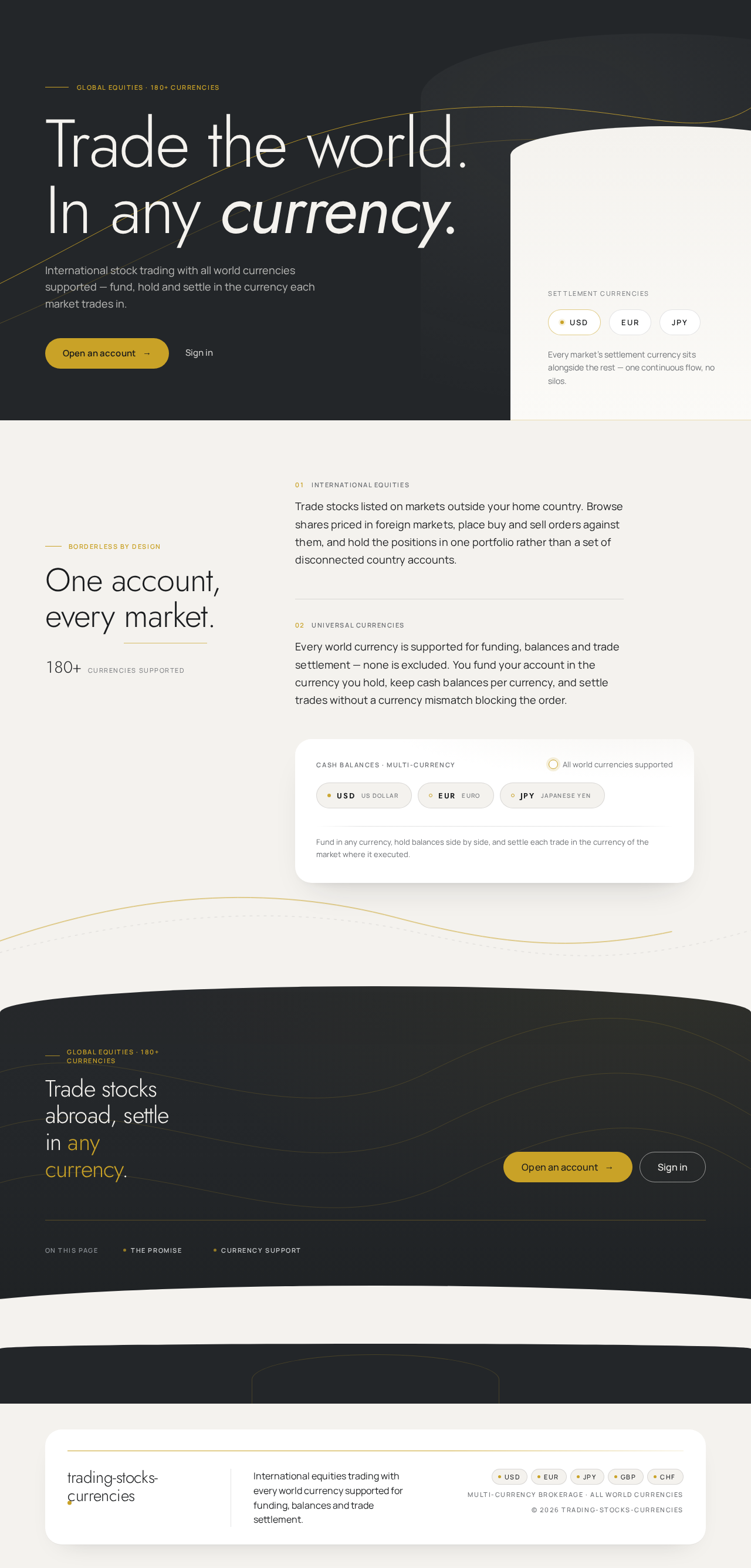
Global equities · 180+ currencies
Trade the world.In any currency.
International stock trading with all world currencies supported — fund, hold and settle in the currency each market trades in.
Settlement currencies
- USD
- EUR
- JPY
Every market’s settlement currency sits alongside the rest — one continuous flow, no silos.
Borderless by design
One account, every market.
180+currencies supported
01 International equities
Trade stocks listed on markets outside your home country. Browse shares priced in foreign markets, place buy and sell orders against them, and hold the positions in one portfolio rather than a set of disconnected country accounts.
02 Universal currencies
Every world currency is supported for funding, balances and trade settlement — none is excluded. You fund your account in the currency you hold, keep cash balances per currency, and settle trades without a currency mismatch blocking the order.
Cash balances · multi-currency
All world currencies supported
- USDUS Dollar
- EUREuro
- JPYJapanese Yen
Fund in any currency, hold balances side by side, and settle each trade in the currency of the market where it executed.
Global equities · 180+ currencies
Trade stocks abroad, settle in any currency.
Global equities · 180+ currencies
Trade the world.In any currency.
International stock trading with all world currencies supported — fund, hold and settle in the currency each market trades in.
Settlement currencies
- USD
- EUR
- JPY
Every market’s settlement currency sits alongside the rest — one continuous flow, no silos.
Borderless by design
One account, every market.
180+currencies supported
01 International equities
Trade stocks listed on markets outside your home country. Browse shares priced in foreign markets, place buy and sell orders against them, and hold the positions in one portfolio rather than a set of disconnected country accounts.
02 Universal currencies
Every world currency is supported for funding, balances and trade settlement — none is excluded. You fund your account in the currency you hold, keep cash balances per currency, and settle trades without a currency mismatch blocking the order.
Cash balances · multi-currency
All world currencies supported
- USDUS Dollar
- EUREuro
- JPYJapanese Yen
Fund in any currency, hold balances side by side, and settle each trade in the currency of the market where it executed.
Global equities · 180+ currencies
No comments yet. Be the first!