trading-ea-agents

byDISTRADES Shaun

BUILD THE GREATEST TRADING EA OF ALL TIME THAT USES 5 AGENTS CONCEPT ,1 ANALYST ,2 SAFETY STANDARD , 3SCANNER,4 MANAGER,5 FINAL DECISION

LandingLoginPipeline ConfigTrading MonitorAgent MonitorSign Up
Landing

Comments (0)

No comments yet. Be the first!

System Requirements

System Requirements Document for trading-ea-agents

1. Introduction

trading-ea-agents is a trading Expert Advisor (EA) built around a five-agent concept. The product's intent is to deliver a trading EA in which five cooperating agents — Analyst, Safety Standard, Scanner, Manager, and Final Decision — each perform a distinct, visible role in producing and managing trading decisions. The EA is not a black box: its operator must be able to see what each agent is doing, review each agent's outputs, and monitor the trading decisions and positions that result. Its strategy configurator must be able to set up and tune the five-agent pipeline and its parameters so the system trades according to their rules.

The audience is retail-to-semi-pro forex and futures operators who run the EA, and strategy configurators who define the rules the EA trades by. The product is delivered as a first-party web application with application-owned identity, a shared backend, durable application state, and a model-provider gateway used by the agents' AI reasoning.

Page 1 of 24

1.1 Success Criteria

  • All five agents — Analyst, Safety Standard, Scanner, Manager, Final Decision — are present, individually observable, and each performs its named role in the pipeline.
  • An EA Operator can open the Agent Monitor and see the current status and latest output of every one of the five agents without leaving the page.
  • A Strategy Configurator can open Pipeline Config, adjust the pipeline and its parameters, save them, and see the saved configuration reflected in subsequent agent behavior.
  • An EA Operator can open the Trading Monitor and see the EA's trading decisions and the resulting positions.
  • A new user can enroll via Sign Up, and a returning user can verify via Login, before reaching any protected agent or trading state.
Page 2 of 24

2. System Overview

trading-ea-agents is a web-delivered trading Expert Advisor organized as a five-agent pipeline:

  1. Analyst — performs market analysis.
  2. Safety Standard — enforces safety standards.
  3. Scanner — scans for trading opportunities.
  4. Manager — manages trades and positions.
  5. Final Decision — makes the final trading decision.

The application is delivered as a React frontend talking to a shared FastAPI backend. The backend owns application APIs and domain modules, persists application-owned data in MariaDB, and calls model providers through a LiteLLM gateway (which itself uses a PostgreSQL store). The five agents run as background automation inside the shared backend; their status and outputs are surfaced to authenticated users through the application UI.

Actors. Two active human personas: the EA Operator, who runs the EA and monitors agent behavior and trading outcomes, and the Strategy Configurator, who configures the five-agent pipeline and its parameters. The five agents are internal system actors, not human personas. LiteLLM and the model providers are external system actors.

Access. The Landing page is anonymous. Login and Sign Up are anonymous identity-access surfaces. Agent Monitor, Pipeline Config, and Trading Monitor require login.

Exclusions. This document does not add broker-connection management, backtesting engines, payment/subscription billing, social/community features, or mobile native apps; none were requested.

Removed from scope

Page 3 of 24
  • None. No concept from the authoritative requirement thread was removed or replaced.

2a. Product Interpretation and Delivery Boundary

The product is a first-party web console wrapped around a five-agent trading EA. The EA's reasoning and trading logic live in the shared backend as background automation; the human-facing product is the ability to configure that pipeline and to observe its agents and its trading outcomes. Identity is application-owned: a new user self-enrolls through Sign Up, and a returning user verifies through Login before any protected agent or trading state is shown. The Landing page is the anonymous entry surface that explains the five-agent EA before identity is established. Model reasoning is delegated to external model providers through the LiteLLM gateway; the application does not own model hosting. No future-horizon features are currently accepted.

2c. Page Content and Component Coverage

Page 4 of 24

Landing

  • Purpose / access: Anonymous public entry surface explaining the five-agent trading EA, its audience, and its capabilities. No login required.
  • Information / state: Product name and positioning; the five-agent concept (Analyst, Safety Standard, Scanner, Manager, Final Decision) with each agent's role; the audience (operators and strategy configurators); entry actions to Sign Up and Login.
  • Primary actions: Navigate to Sign Up; navigate to Login.
  • Supporting actions: Scroll through agent explanations.
  • Domain entities: Agent (name, role description).
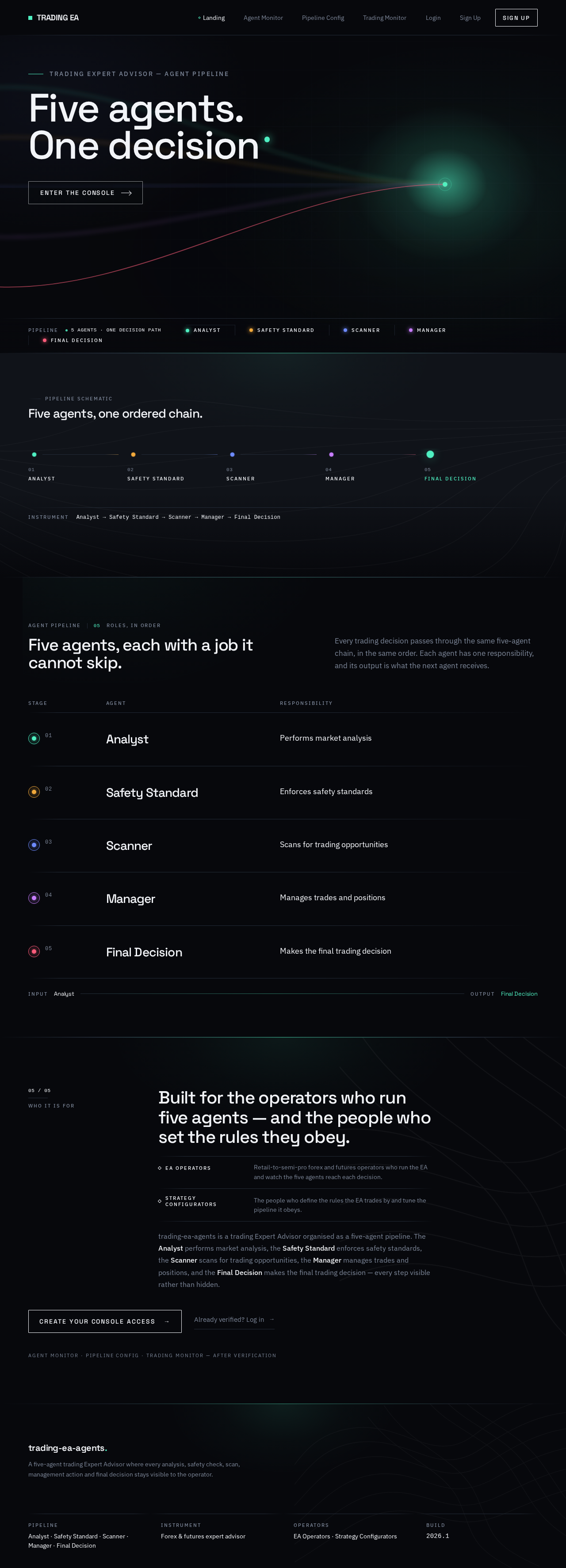
  • Component responsibilities: Full-bleed WebGL flow-field hero with five agent-hued particle streams converging on a mint Final Decision node; oversized flush-left headline "FIVE AGENTS. ONE DECISION."; kicker "TRADING EXPERT ADVISOR — AGENT PIPELINE"; ghost-outline CTA "Enter the console"; thin ruled status strip along the bottom edge; schematic thin-line pipeline diagram; agent role sections.
  • States: Loading (canvas initializing — static fallback frame shown); empty (n/a); success (canvas running, content readable); error (WebGL unavailable — static rendered still replaces canvas, all text and CTAs remain usable); recovery (reduced-motion — canvas freezes to a single still, reveals instant).
Page 5 of 24

Login

  • Purpose / access: Returning verification for EA Operators and Strategy Configurators. Anonymous.
  • Information / state: Email and password fields; error messaging; link to Sign Up.
  • Primary actions: Submit credentials to authenticate.
  • Supporting actions: Navigate to Sign Up if not yet enrolled.
  • Domain entities: User account (email, credential).
  • Component responsibilities: Credential form; validation messaging; submit control; post-success redirect to Agent Monitor.
  • States: Loading (submit in progress); empty (blank form); success (authenticated, redirected to Agent Monitor); error (invalid credentials — inline message, form retained); recovery (retry submission).

Sign Up

  • Purpose / access: Self-service first-use enrollment. Anonymous.
  • Information / state: Email, password, and confirmation fields; validation rules; link to Login.
  • Primary actions: Create an account.
  • Supporting actions: Navigate to Login if already enrolled.
  • Domain entities: User account (email, credential).
  • Component responsibilities: Enrollment form; validation messaging; submit control; post-success redirect to Agent Monitor.
  • States: Loading (submit in progress); empty (blank form); success (account created, authenticated, redirected to Agent Monitor); error (duplicate email or invalid input — inline message); recovery (correct and resubmit).
Page 6 of 24

Agent Monitor

  • Purpose / access: Recurring view of the status and outputs of the Analyst, Safety Standard, Scanner, Manager, and Final Decision agents. Requires login.
  • Information / state: Per-agent status (active/idle/error); per-agent latest output rendered as ruled tabular rows with 11px uppercase tracked micro-labels and monospace numerals; timestamps; the live Final Decision signal.
  • Primary actions: Inspect each agent's current status and latest output.
  • Supporting actions: Select an agent from the left agent rail to scroll to its section; refresh.
  • Domain entities: Agent, Agent Output (agent, timestamp, content), Final Decision.
  • Component responsibilities: Persistent left agent rail of five circular nodes with active-trace arcs; full-bleed generative canvas top third; tabular readout panel; per-agent sections; status dots in agent hues.
  • States: Loading (skeleton rows, canvas still); empty (agent has produced no output yet — explicit "no output yet" row); success (statuses and outputs populated); error (agent in error state — status dot and error row; backend unreachable — retry affordance); recovery (refresh re-fetches).
Page 7 of 24

Pipeline Config

  • Purpose / access: Configure the five-agent pipeline and its parameters. Requires login.
  • Information / state: The five pipeline stages in order; per-stage parameter fields; current saved values; unsaved-change indicator.
  • Primary actions: Edit pipeline parameters and save the configuration.
  • Supporting actions: Reset unsaved changes; view last-saved timestamp.
  • Domain entities: Pipeline Configuration (stage, parameter key, value), Agent.
  • Component responsibilities: Ordered stage list; parameter form controls; save/reset controls; validation messaging.
  • States: Loading (fetching current configuration); empty (no configuration saved yet — defaults presented); success (saved confirmation with timestamp); error (validation failure or save failure — inline message, edits retained); recovery (correct and resave).
Page 8 of 24

Trading Monitor

  • Purpose / access: Recurring owner for monitoring the EA's trading decisions and resulting positions. Requires login.
  • Information / state: Trading decisions produced by the Final Decision agent; resulting positions with instrument, direction, size, entry, current state; timestamps.
  • Primary actions: Review trading decisions and resulting positions.
  • Supporting actions: Refresh.
  • Domain entities: Trading Decision, Position.
  • Component responsibilities: Decision log as ruled tabular rows; positions table; status indicators; canvas top third.
  • States: Loading (skeleton rows); empty (no decisions or positions yet — explicit empty message); success (populated tables); error (fetch failure — retry affordance); recovery (refresh re-fetches).
Page 9 of 24

3. Functional Requirements

FR-1 — Five-agent EA. As an EA Operator I should run a trading Expert Advisor built around a five-agent concept, so that trading decisions are produced by a structured multi-agent pipeline. (explicit)

  • Trigger: the EA is running.
  • Observable result: the five agents — Analyst, Safety Standard, Scanner, Manager, Final Decision — are present and each performs its named role.
  • Owner: shared backend (background automation); observable in Agent Monitor.
  • Failure/recovery: if an agent fails, its error state is visible in Agent Monitor and the pipeline continues or halts per the Safety Standard's enforcement; the operator can refresh to re-check.

FR-2 — Analyst agent. As an EA Operator I should have an Analyst agent that performs market analysis, so that the pipeline has a market-analysis input. (explicit)

  • Trigger: the EA runs its analysis cycle.
  • Observable result: the Analyst's latest market analysis is shown in Agent Monitor.
  • Owner: shared backend; observable in Agent Monitor.
  • Failure/recovery: analysis failure surfaces as an Analyst error state; refresh re-fetches.
Page 10 of 24

FR-3 — Safety Standard agent. As an EA Operator I should have a Safety Standard agent that enforces safety standards, so that trading activity is constrained by safety rules. (explicit)

  • Trigger: the pipeline evaluates a candidate action.
  • Observable result: the Safety Standard's enforcement result is shown in Agent Monitor.
  • Owner: shared backend; observable in Agent Monitor.
  • Failure/recovery: a safety rejection is visible as the Safety Standard's output; refresh re-fetches.

FR-4 — Scanner agent. As an EA Operator I should have a Scanner agent that scans for trading opportunities, so that candidate opportunities are identified. (explicit)

  • Trigger: the EA runs its scan cycle.
  • Observable result: the Scanner's latest opportunities are shown in Agent Monitor.
  • Owner: shared backend; observable in Agent Monitor.
  • Failure/recovery: scan failure surfaces as a Scanner error state; refresh re-fetches.

FR-5 — Manager agent. As an EA Operator I should have a Manager agent that manages trades and positions, so that open trades are managed. (explicit)

  • Trigger: positions exist and the EA runs its management cycle.
  • Observable result: the Manager's latest management actions are shown in Agent Monitor; resulting positions appear in Trading Monitor.
  • Owner: shared backend; observable in Agent Monitor and Trading Monitor.
  • Failure/recovery: management failure surfaces as a Manager error state; refresh re-fetches.
Page 11 of 24

FR-6 — Final Decision agent. As an EA Operator I should have a Final Decision agent that makes the final trading decision, so that the pipeline resolves to a single decision. (explicit)

  • Trigger: upstream agents have produced their outputs.
  • Observable result: the Final Decision is shown in Agent Monitor and the resulting decision appears in Trading Monitor.
  • Owner: shared backend; observable in Agent Monitor and Trading Monitor.
  • Failure/recovery: decision failure surfaces as a Final Decision error state; refresh re-fetches.

FR-7 — Self-service enrollment. As a new user I should be able to create an account via Sign Up, so that I can access protected agent and trading state. (required_inference)

  • Trigger: anonymous user submits the Sign Up form.
  • Observable result: account created and authenticated; redirected to Agent Monitor.
  • Access: anonymous.
  • Failure/recovery: duplicate email or invalid input shows an inline error and retains the form; user corrects and resubmits.

FR-8 — Returning verification. As a returning user I should verify via Login, so that I can reach protected agent and trading state. (required_inference)

  • Trigger: anonymous user submits the Login form.
  • Observable result: authenticated; redirected to Agent Monitor.
  • Access: anonymous.
  • Failure/recovery: invalid credentials show an inline error and retain the form; user retries.
Page 12 of 24

FR-9 — Agent status and output monitoring. As an EA Operator I should see the status and outputs of all five agents in Agent Monitor, so that I can review what each agent is doing. (required_inference)

  • Trigger: operator opens Agent Monitor while logged in.
  • Observable result: per-agent status and latest output rendered as ruled tabular rows.
  • Access: login required.
  • Failure/recovery: backend unreachable shows a retry affordance; refresh re-fetches.

FR-10 — Pipeline configuration. As a Strategy Configurator I should configure the five-agent pipeline and its parameters in Pipeline Config, so that the system trades according to my rules. (required_inference)

  • Trigger: configurator edits parameters and saves.
  • Observable result: saved confirmation with timestamp; saved configuration reflected in subsequent agent behavior.
  • Access: login required.
  • Failure/recovery: validation or save failure shows an inline message and retains edits; configurator corrects and resaves.

FR-11 — Trading decision and position monitoring. As an EA Operator I should monitor the EA's trading decisions and resulting positions in Trading Monitor, so that I can review outcomes. (required_inference)

  • Trigger: operator opens Trading Monitor while logged in.
  • Observable result: decision log and positions table populated.
  • Access: login required.
  • Failure/recovery: fetch failure shows a retry affordance; refresh re-fetches.

4. User Personas

Page 13 of 24

EA Operator

  • Product context: Runs the trading EA and needs to see what the five agents are doing, review their outputs, and monitor the resulting trading decisions and outcomes.
  • Primary goal: Trust the pipeline by observing each agent's status and output and the trades that result.
  • Distinct responsibilities: Opens Agent Monitor to inspect per-agent status and latest output; opens Trading Monitor to review decisions and positions; refreshes to re-check state.
  • Inputs / decisions: Reads agent outputs and trading outcomes; decides whether the pipeline is behaving as expected.
  • Interactions: Consumes outputs produced by the five agents (system actors) and configuration set by the Strategy Configurator.
  • Observable success: Sees all five agents' statuses and outputs and the resulting decisions and positions without leaving the relevant monitor.
Page 14 of 24

Strategy Configurator

  • Product context: Sets up and tunes the EA's agent pipeline — configuring the Analyst, Safety Standard, Scanner, Manager, and Final Decision stages and their parameters — so the system trades according to their rules.
  • Primary goal: Encode trading rules into the five-agent pipeline and have them take effect.
  • Distinct responsibilities: Opens Pipeline Config; edits per-stage parameters; saves configuration; verifies saved state.
  • Inputs / decisions: Chooses parameter values for each of the five stages; decides when to save or reset.
  • Interactions: Configuration is consumed by the five agents (system actors); the EA Operator observes the resulting behavior.
  • Observable success: Saved configuration is confirmed and reflected in subsequent agent behavior.

5. Core User Flows

Flow A — New user enrolls and reaches the console

  1. Anonymous visitor lands on Landing and reads the five-agent explanation.
  2. Visitor selects the ghost-outline CTA "Enter the console" or the Sign Up link.
  3. On Sign Up, visitor enters email, password, and confirmation and submits.
  4. System validates; on success the account is created and the visitor is authenticated and redirected to Agent Monitor.
  5. Failure: duplicate email or invalid input shows an inline error; the form is retained; the visitor corrects and resubmits.
Page 15 of 24

Flow B — Returning user verifies

  1. Returning user opens Login.
  2. User enters email and password and submits.
  3. System authenticates and redirects to Agent Monitor.
  4. Failure: invalid credentials show an inline error; the user retries.

Flow C — EA Operator monitors the five agents

  1. Logged-in EA Operator opens Agent Monitor.
  2. System loads per-agent status and latest output for Analyst, Safety Standard, Scanner, Manager, and Final Decision as ruled tabular rows.
  3. Operator selects an agent from the left agent rail; the page scrolls to that agent's section with a canvas morph.
  4. Operator reads the agent's status and output; the active agent's node shows a tracing arc.
  5. Failure: backend unreachable shows a retry affordance; operator refreshes to re-fetch.

Flow D — Strategy Configurator tunes the pipeline

  1. Logged-in Strategy Configurator opens Pipeline Config.
  2. System loads the current configuration (or defaults if none saved).
  3. Configurator edits parameters for the five stages; an unsaved-change indicator appears.
  4. Configurator saves; system validates and persists.
  5. Success: saved confirmation with timestamp; the configuration is reflected in subsequent agent behavior.
  6. Failure: validation or save failure shows an inline message and retains edits; configurator corrects and resaves.
Page 16 of 24

Flow E — EA Operator monitors trading decisions and positions

  1. Logged-in EA Operator opens Trading Monitor.
  2. System loads the decision log and positions table.
  3. Operator reviews decisions produced by the Final Decision agent and the resulting positions.
  4. Failure: fetch failure shows a retry affordance; operator refreshes.
Page 17 of 24

6. Visuals Colors and Theme

Muse: Refik Anadol — data made physical as a living generative flow. Headline: "FIVE AGENTS. ONE DECISION."

Mode: Dark only. Near-black ground dominates ~70% of every screen.

Colour tokens (exact hex by role):

  • Background: #07080C
  • Surface: #101319
  • Text (body and headings): #F2F4F8
  • Primary: #F2F4F8
  • Accent (live Final Decision signal, active pipeline node, focus rings only — never large fills): #4FF0C2
  • Muted (micro-labels, metadata): #7C8698
  • Hairline borders: #222A36
  • Agent hues (generative canvas and status dots only): Analyst #4FF0C2, Safety Standard #F2A93B, Scanner #6E8BFF, Manager #C77DFF, Final Decision #FF5C7A

Typography:

  • Headings: Space Grotesk, 500–600 weight, tracking -0.03em, sentence case for statements; uppercase 11px / 0.18em-tracked micro-labels for agent names and data keys. No italic, no decorative serif.
  • Body: IBM Plex Sans.
  • Numerals: IBM Plex Mono.
  • Scale (1.414 modular): display 40/56/80/112 (clamp 40px mobile → 112px desktop); body ramp 28/22/18/16/14/12; micro-labels 11px uppercase. Body measure capped at 62ch.
Page 18 of 24

Shape language: Sharp-cornered rectangles (0–2px radius) with 1px hairline borders; never pills. Section boundaries are soft horizontal luminous gradients fading to black at both ends. Agent nodes are perfect circles sized by hierarchy; data ruled in thin tabular rows. Recurring motif: a thin 1px arc tracing an agent node's circumference when active.

Layout: Full-bleed generative canvas as the top third of every authenticated page; narrow left rail of agent glyphs; right-hand tabular readout. Below the hero, strict 12-column grid with 96px vertical rhythm and a single-column reading measure. On mobile the rail collapses to a horizontal scrollable strip of agent chips; the canvas shrinks to a 40vh banner but never disappears.

Imagery: No stock photography, no device mockups, no illustration. The imagery is the generative render — a WebGL particle/flow field derived from the EA's own signal data, five-hue streams braiding into one with the mint Final Decision thread brightest. Secondary imagery is schematic: thin-line pipeline diagrams, sparkline traces, and a dark topographic contour watermark at 4% opacity.

Accessibility: Readable text and controls stay whole at 375px, 768px, and 1280px, wrapping or scaling to fit; no element covers them. With prefers-reduced-motion, the canvas freezes to a single rendered still and all reveals become instant.

Page 19 of 24

7. Signature Design Concept

The public entry is a full-bleed near-black WebGL canvas filling the first screen edge to edge. Inside it, five luminous particle streams in the agent hues (mint, amber, indigo, violet, coral) flow from the left edge and converge at a single bright node on the right — the Final Decision. Over the canvas, flush-left, sits a 9-column oversized headline in Space Grotesk 500 at clamp(40px, 7vw, 112px) reading "FIVE AGENTS. ONE DECISION.", with a 14px uppercase tracked kicker above it ("TRADING EXPERT ADVISOR — AGENT PIPELINE") and a single ghost-outline CTA ("Enter the console") pinned beneath the headline, not centred. A thin ruled status strip along the bottom edge shows live-looking agent states. Nothing is centred; no gradient blob; no blue button. The canvas re-tints on scroll and on decision events; the five agent nodes in the left rail each trace a 1px arc while active.

Page 20 of 24

8. Interaction Model & Motion Direction

Interaction Model: Parallax Motion Tempo: cinematic Hero Dimensionality: webgl

Landing Hero Motion Brief

  • Focal subject: Five luminous particle streams in the agent hues braiding into one mint Final Decision node.
  • Input → transformation → outcome thesis: Scroll position and decision events drive the flow field; streams morph and re-tint as the user moves from Landing toward Agent Monitor; when a Final Decision fires, the canvas briefly re-tints toward the mint node.
  • Motion vocabulary: Continuous slow generative flow (noise field morphing at ~0.02 speed, never visibly looping); scroll-linked morphing; data-driven re-tint on decision events; 180–240ms functional fades elsewhere; slow, gravitational easing — no bouncy or springy motion.
  • Composed first frame: Near-black ground; five streams entering from the left; mint node bright at right; flush-left oversized headline; kicker above; ghost-outline CTA beneath; ruled status strip along the bottom.
  • Reduced-motion state: Canvas freezes to a single rendered still; all reveals become instant; content remains fully readable and CTAs usable.

Landing Hero 3D Scene Brief — DIRECTION-DERIVED

A real-time WebGL/R3F scene: a particle flow field of five agent-hued streams converging on a single bright mint node, driven by the EA's own signal data. The scene shows the product's defining state — five agents resolving into one decision — as a crafted, continuous, non-looping generative object. Reduced-motion renders a single still frame.

Page 21 of 24

9. Non-Functional Requirements

  • NFR-1 — Durable state. Application-owned persistent data (accounts, pipeline configuration, agent outputs, trading decisions, positions) is stored durably in MariaDB. (required_inference; planning scope durable_state_required)
  • NFR-2 — AI reasoning. Agent reasoning uses model providers through the LiteLLM gateway; the application does not host models. (required_inference; planning scope ai_required)
  • NFR-3 — Background automation. The five agents run as background automation in the shared backend, independent of any open browser session. (required_inference; planning scope background_automation)
  • NFR-4 — Access control. Agent Monitor, Pipeline Config, and Trading Monitor require login; Landing, Login, and Sign Up are anonymous. (required_inference; page contract)
  • NFR-5 — Readability. Readable text and controls stay whole at 375px, 768px, and 1280px; no element covers them. (explicit design constraint)
  • NFR-6 — Reduced motion. With prefers-reduced-motion, the canvas freezes to a single still and reveals become instant. (explicit design constraint)
  • NFR-7 — Dark-only theme. No light/white ground, no blue-on-white, no indigo/blue primary. (explicit design constraint)
Page 22 of 24

10. Tech Stack

  • Frontend: React application UI.
  • Backend: Shared FastAPI process for application APIs and domain modules, including the five-agent background automation.
  • Application storage: MariaDB for application-owned persistent data.
  • Model gateway: LiteLLM gateway for the backend's model-provider calls.
  • Gateway storage: PostgreSQL supporting LiteLLM; separate from application-owned storage.
  • Orchestration: docker-compose with services backend, database (MariaDB), frontend, litellm, postgres.
11. Assumptions and Constraints

  • A-1: The five agents run as background automation inside the shared backend; no separate worker container is provisioned in the current inventory. (required_inference)
  • A-2: Identity is application-owned and self-service; no invitation or provisioning boundary was established. (required_inference)
  • A-3: No differentiated permissions or RBAC are established; both personas authenticate with the same account model. (required_inference)
  • A-4: Broker connectivity, order execution venue, and instrument universe are not specified by the source and are not added. (constraint)
  • A-5: The design direction is authoritative for visuals; the generic indigo/blue-on-white SaaS template is forbidden. (explicit)
  • A-6: No future-horizon features are currently accepted. (constraint)
Page 23 of 24

12. Glossary

  • EA (Expert Advisor): An automated trading program that produces and manages trading decisions.
  • Agent: One of the five cooperating roles in the pipeline — Analyst, Safety Standard, Scanner, Manager, Final Decision.
  • Analyst: The agent that performs market analysis.
  • Safety Standard: The agent that enforces safety standards.
  • Scanner: The agent that scans for trading opportunities.
  • Manager: The agent that manages trades and positions.
  • Final Decision: The agent that makes the final trading decision.
  • Pipeline: The ordered five-agent chain from Analyst through Final Decision.
  • Agent Output: A timestamped result produced by an agent and shown in Agent Monitor.
  • Trading Decision: The decision produced by the Final Decision agent and shown in Trading Monitor.
  • Position: An open trade resulting from a trading decision, shown in Trading Monitor.
  • Pipeline Configuration: The saved per-stage parameters that govern the five-agent pipeline.
  • LiteLLM: The model-provider gateway used by the backend for agent reasoning.
Page 24 of 24
Live
Landing design preview
Landing: Read five-agent explanation
Sign Up: Enter enrollment details
Sign Up: Correct and resubmit
Login: Submit credentials
Login: Retry submission
Agent Monitor: Inspect agent statuses and outputs
Agent Monitor: Select agent from rail
Agent Monitor: Refresh to re-fetch
Trading Monitor: Review decisions and positions
Trading Monitor: Refresh after fetch failure
Live
Landing design preview
Landing: Read five-agent explanation
Sign Up: Enter enrollment details
Sign Up: Correct and resubmit
Login: Submit credentials
Login: Retry submission
Agent Monitor: Inspect agent statuses and outputs
Agent Monitor: Select agent from rail
Agent Monitor: Refresh to re-fetch
Trading Monitor: Review decisions and positions
Trading Monitor: Refresh after fetch failure