tough-single
 Diya Trivedi
start a project to build a simple single page design of the calculator

Comments (0)
Sign in to leave a comment
System Requirements
System Requirements Document for tough-single
1. Introduction
tough-single is a simple calculator delivered as a single page. A visitor opens the page, enters numbers and arithmetic operators, and reads the computed result on that same page. There is no account, no dashboard, no marketing site, and no second screen: the calculator is the product, and the product is one page.
The audience is broad and casual — anyone who needs quick everyday arithmetic on any device. The page must be immediately readable at any age and any viewport, and it must feel like a warm, hand-made, legible instrument rather than a corporate or futuristic tool.
This document is the System Requirements Document for the project named tough-single, requested by Diya Trivedi.
2. System Overview
tough-single is a single-page, browser-delivered calculator. The page presents a calculator slab — a display area showing the current expression and the computed result, plus a keypad of digits, arithmetic operators, a clear control, and an equals control. The visitor enters numbers and operators, and the computed result appears on the same page.
Actors
- Calculator user (active human persona): opens the single-page calculator, enters numbers and operators, and reads the computed result.
Delivery and ownership
- The calculator is a first-party custom page owned by the application, reachable anonymously with no access requirement.
- All arithmetic entry, computation display, and result presentation happen on that one page.
- No identity, account, session continuity, or permission model is required or introduced: the accepted behavior is a stateless, anonymous, single-visit arithmetic interaction.
Current accepted behavior
- A simple calculator presented as a single page design.
- Number and arithmetic-operator entry with the computed result shown to the user.
Narrow exclusions
- No additional pages, routes, or navigable destinations beyond the single calculator page.
- No account creation, sign-in, profiles, or saved history.
- No marketing or landing content separate from the calculator page itself.
Removed from scope
- None. No concept was removed by the authoritative requirement thread.
2a. Product Interpretation and Delivery Boundary
The requester asked for a simple single page design of the calculator. That is read literally and completely: one page, one calculator, no surrounding product surface. The page is the entire delivery — it both introduces the calculator (a compact wordmark and a short plain-spoken line) and hosts the working instrument (display, expression line, keypad). There is no separate landing page, no onboarding, no settings, and no second destination.
Access is anonymous and public. Nothing on the page requires a visitor to identify themselves, and nothing persists between visits as an accepted requirement. The calculator is a self-contained instrument: entry, computation, and result all live on the one page.
Everything described in this document is current. No future-horizon capabilities are accepted, and none are planned here.
2c. Page Content and Component Coverage
Calculator
The single page of the product. It introduces the calculator and hosts the full arithmetic interaction: expression entry, operator selection, computation, and result display. Reachable anonymously; no access requirement.
Information and state
- Wordmark: "TOUGH" over "SINGLE", stacked in two tight lines, set in VT323, uppercase-tracked. At 1280px it fills the left column; at 768px and 375px it sits above the calculator slab.
- Tagline / introduction: one short plain-spoken line describing the calculator, set in Work Sans body type. One line at 768px and 1280px; compact at 375px.
- Expression line: the current entered expression (numbers and operators as typed), set in muted warm grey (#8A8175) at 15–18px, labelled with an 11px uppercase micro-label "EXPRESSION" at 0.14em tracking.
- Result readout: the computed result, the largest type on the page — tabular VT323, right-aligned, clamp(48px, 12vw, 112px) — labelled with an 11px uppercase micro-label "RESULT". A 2px burnt-orange (#E4572E) rule sits beneath the result and doubles as the live state indicator.
- Keypad: a strict 4-column grid with 8px gutters containing digit keys (0–9), arithmetic operator keys, a clear key, and an equals key.
- Pixel legend row: four inline-SVG pixel icons on a 16×16 grid — numbers, operators, clear, equals — each on a cream chip with a 2px ink border. The page's only illustration and its wayfinding key.
Primary actions
- Press a digit key to append that digit to the current number entry.
- Press an arithmetic operator key to record the operator and begin the next operand.
- Press the clear key to reset the current entry and expression.
- Press the equals key to compute the result of the entered expression and display it in the result readout.
Supporting actions
- Read the expression line to confirm what has been entered.
- Read the result readout to obtain the computed answer.
- Use the pixel legend row to identify what each key group does.
Domain entities
- Expression: the ordered sequence of entered numbers and operators currently shown in the expression line.
- Result: the computed numeric outcome of the expression, shown in the result readout.
Component responsibilities
- Calculator slab: a cream (#FFFDF7) panel with 20px radius, 2px ink border, and a 6px hard ink drop-shadow, reading as a physical object on the warm paper (#F4EFE4) ground. Contains the display area and the keypad.
- Display area: hosts the expression line, the result readout, and the orange rule beneath the result.
- Keypad: hosts digit tiles (solid ink #1E1B16 with cream glyphs), operator tiles (outlined), the clear key, and the equals key (the only filled orange tile).
- Key tiles: each key is a hard-edged tile with a 2px ink outline, 12px radius, and a 4px un-blurred offset shadow in ink at 12% opacity; on press the tile translates 2px down and loses its offset shadow (90ms linear).
- Wordmark and introduction block: the left editorial column at 1280px; stacked above the slab at narrower widths.
- Pixel legend row: four inline-SVG icons, hard-edged on a 16×16 grid, no anti-aliased curves.
States
- Loading: not applicable — the page is a static instrument with no remote data fetch; the calculator is usable as soon as the page renders.
- Empty / initial: expression line empty or showing a neutral starting state; result readout showing its resting value; the orange rule beneath the result present as the resting live-state indicator.
- Entry in progress: expression line shows the numbers and operators entered so far; result readout retains its last computed value until equals is pressed.
- Success (computed): result readout shows the computed result; on computation the equals key emits a single 180ms orange pulse ring and the readout flips digits with a 60ms stepped blink.
- Error / recovery: if an entry cannot be computed (for example an incomplete expression with a trailing operator), the page does not present a computed result; the visitor recovers by completing the expression or pressing clear to reset, after which normal entry and computation resume.
- Reduced motion: with
prefers-reduced-motion, all transitions collapse to instant state changes and the pulse ring is removed; the page remains fully usable.
3. Functional Requirements
FR-1 — Single-page calculator delivery (explicit) As a Calculator user, I should get the calculator as a simple single page design, so that the entire tool is available to me in one place without navigating anywhere.
- Trigger: the visitor opens the page.
- Observable result: the calculator — wordmark, introduction, display area, and keypad — is presented on one page.
- Access state: anonymous; no access requirement.
- Failure/recovery: not applicable; the page is the whole product.
- Continuation: the visitor proceeds directly to entering numbers and operators.
- Acceptance: the calculator is reachable and fully usable on a single page with no other destination required.
FR-2 — Number and operator entry with computed result (explicit) As a Calculator user, I should enter numbers and arithmetic operators and see the computed result, so that I can perform everyday arithmetic quickly.
- Trigger: the visitor presses digit keys and arithmetic operator keys on the keypad.
- Input: digits (0–9) and arithmetic operators, entered in sequence.
- Observable result: the entered expression appears in the expression line; pressing equals computes the expression and the result appears in the result readout.
- Access state: anonymous; no access requirement.
- Failure/recovery: an incomplete or non-computable expression does not produce a result; the visitor completes the expression or presses clear to reset, then continues.
- Continuation: after reading the result, the visitor may clear and begin a new calculation.
- Acceptance: entering a valid sequence of numbers and operators and pressing equals displays the correct computed result on the same page.
FR-3 — Clear and reset (required_inference) As a Calculator user, I should clear the current entry and expression, so that I can start a fresh calculation without reloading the page.
- Trigger: the visitor presses the clear key.
- Observable result: the expression line resets and the display returns to its resting state.
- Access state: anonymous; no access requirement.
- Failure/recovery: not applicable.
- Continuation: the visitor begins a new calculation.
- Acceptance: after pressing clear, the expression line no longer shows the previous entry and new entry begins cleanly.
- Rationale: indispensable mechanics for a usable repeated-arithmetic lifecycle on a single page; no adjacent capability is introduced.
FR-4 — Live expression and result display (required_inference) As a Calculator user, I should see the expression I have entered and the result I have computed, so that I can confirm my input and read my answer.
- Trigger: any key press that changes the expression or computes a result.
- Observable result: the expression line reflects the current entry; the result readout shows the computed result; the orange rule beneath the result indicates live state.
- Access state: anonymous; no access requirement.
- Failure/recovery: when no result is available, the readout does not present a computed value.
- Continuation: the visitor continues entering or clears.
- Acceptance: the expression line and result readout always reflect the current state of the calculation.
- Rationale: indispensable observable state for the accepted entry-and-result behavior.
4. User Personas
Calculator user
Product context. A broad, casual visitor who needs quick everyday arithmetic. They arrive at the single page with no account, no prior setup, and no expectation of anything beyond a working calculator. They may be on a phone at 375px, a tablet at 768px, or a desktop at 1280px, and they may be any age.
Primary goal. Get a correct arithmetic result quickly, on the same page, without navigating away or signing in.
Distinct accepted responsibilities.
- Enter numbers using the digit keys.
- Select arithmetic operators using the operator keys.
- Press equals to compute the result.
- Read the computed result in the result readout.
- Press clear to reset and begin a new calculation.
Relevant inputs and decisions. Which digits to enter, which operator applies, when the expression is complete enough to compute, and whether to clear and start over.
Interactions with other accepted participants. None. The calculator user is the only active human participant; there is no counterparty, recipient, or approver in the accepted behavior.
Observable success. The computed result appears in the result readout on the same page, matching the entered expression, with no navigation away from the page.
What makes this role distinct. The role is defined by direct manipulation of a single instrument — pressing keys and reading a display — rather than by any account, workflow, or shared state. Its entire responsibility is entry, computation, and reading the answer.
5. Core User Flows
Flow 1 — Perform a calculation
- Starting context. The Calculator user opens the tough-single page in a browser. No identity is required; the page is anonymously reachable.
- Introduction. The page shows the stacked VT323 wordmark "TOUGH / SINGLE", a short plain-spoken line, the pixel legend row, and the calculator slab with its expression line, result readout, and keypad.
- Entry. The user presses digit keys to enter the first number. Each pressed digit tile translates 2px down and loses its offset shadow (90ms linear), and the digit appears in the expression line.
- Operator selection. The user presses an arithmetic operator key. The operator is recorded in the expression line and the user begins the next operand.
- Second operand. The user presses digit keys to enter the second number; the expression line reflects the full entered expression.
- Commitment. The user presses the equals key — the single filled orange tile on the page.
- Observable result. The expression is computed and the result appears in the result readout in tabular VT323, right-aligned, with the 2px burnt-orange rule beneath it. The readout flips digits with a 60ms stepped blink, and the equals key emits a single 180ms orange pulse ring.
- Reading and continuation. The user reads the computed result. To perform another calculation, they press the clear key; the expression line resets and the display returns to its resting state, and they begin again at step 3.
Failure and recovery. If the expression is incomplete or cannot be computed (for example a trailing operator with no second operand), no computed result is presented. The user either completes the expression with the missing operand and presses equals again, or presses clear to reset and starts a fresh calculation. Normal entry and computation resume immediately.
Reduced motion. With prefers-reduced-motion, the key press, digit flip, and pulse ring all collapse to instant state changes; the flow is otherwise identical and fully usable.
6. Visuals Colors and Theme
Muse and headline. Susan Kare — Charming clarity: a calculator as a crisp, pixel-honest instrument.
Mode. Light mode only.
Colour tokens (exact hex, by role)
| Role | Hex | Use |
|---|---|---|
| Background (paper) | #F4EFE4 | Page ground — warm paper |
| Surface (slab) | #FFFDF7 | Calculator slab, cream-white |
| Text / ink | #1E1B16 | All type; solid digit key tiles |
| Primary | #1E1B16 | Ink tiles and outlines |
| Accent (signal) | #E4572E | Equals key fill, operator glyphs, live result underline — never large fills |
| Muted | #8A8175 | Labels, expression line, secondary chrome |
Colour proportion. Roughly 70% paper, 20% ink tiles, 10% orange signal. No gradients, no glass, no blue anywhere.
Typography
- Headings / wordmark / readout: VT323. Wordmark uppercase-tracked, split into two tight stacked lines ("TOUGH" over "SINGLE"). Result readout tabular and right-aligned so digits never shift.
- Body / key labels: Work Sans at 500/600. Micro-labels in small-caps-style uppercase at 11px with 0.14em tracking ("EXPRESSION", "RESULT").
- Scale: 1.25 modular on a 4px baseline — wordmark
clamp(40px, 9vw, 96px); result readoutclamp(48px, 12vw, 112px)in VT323 tabular; expression line 15–18px; key labels 20–26px; micro-labels 11px; body 15–17px.
Shape language
- Every key: chunky 2px ink outline, 12px radius rounded square, hard 4px offset shadow in ink at 12% opacity — no blur, no soft elevation.
- Keys sit on a strict 4-column grid with 8px gutters.
- Calculator slab: 20px radius cream panel, 2px ink border, 6px hard ink drop-shadow, reading as a physical object on paper.
- Operators are outlined tiles; digits are solid ink tiles with cream glyphs; equals is the only filled orange tile.
Spacing rhythm. 4px baseline; 8px gutters; everything aligns to a 4-column / 8px-gutter subgrid so keys and type share one rhythm.
Layout
- 375px: single column — compact wordmark top-left, small tagline, calculator slab filling the width with 8px side margins.
- 768px: slab centred at 420px, wordmark and a short one-line introduction stacked above it.
- 1280px: two-zone asymmetric editorial composition — calculator slab pinned to the right third; large left column carrying the oversized wordmark, a short plain-spoken line, and the pixel-icon legend row. Not centred.
Imagery. No photography. The visual content is the interface itself: pixel-drawn inline SVG icons on a 16×16 grid with hard edges and no anti-aliased curves — a tiny smiling calculator glyph, a pixel arrow, a pixel clear X. A legend row of four pixel icons (numbers, operators, clear, equals) on cream chips with 2px ink borders is the page's only illustration.
Avoid. Blue, indigo, or violet anywhere; gradients, glassmorphism, blurred drop shadows, floating blobs; Inter, Roboto, Arial, Helvetica, Poppins, or system-ui for any type; a centred headline + subtext + button hero; a grid of identical hover-lift cards; rounded pill buttons and springy bouncy easing; photography or stock imagery; any reference to planning documents, specs, or success criteria on the page.
Readability constraint. Headlines, wordmarks, labels, numbers, and controls stay entirely inside the viewport and their container at 375px, 768px, and 1280px, wrapping or scaling (for example clamp(...) with its mobile size) to fit, with no other element covering any part of them.
7. Signature Design Concept
The instrument on paper. The first screen is dominated by the calculator itself as a physical object: a cream slab with a thick ink border and a hard offset shadow, sitting off-centre on warm paper. At 1280px the oversized VT323 wordmark "TOUGH / SINGLE" is stacked in two tight lines to its left, with a short plain-spoken line and the four-icon pixel legend row beneath it; at mobile the wordmark sits above the slab. The result readout is the largest type on the page — tabular VT323 at up to 112px, right-aligned — with the current expression in muted warm grey beneath it and a 2px burnt-orange rule under the result that doubles as the live state indicator.
Signature moves
- Every key is a hard-edged tile with a 2px ink outline and a 4px un-blurred offset shadow that disappears on press — the page's tactile signature.
- The result readout is set in tabular VT323 at up to 112px, right-aligned, with a 2px burnt-orange rule beneath it that is the only orange on the resting screen.
- A four-icon pixel legend row (numbers / operators / clear / equals) drawn on a 16×16 grid as inline SVG, acting as the page's sole illustration and its wayfinding key.
- The wordmark is split into two tight stacked VT323 lines ("TOUGH" over "SINGLE") filling the left column at desktop, with small-caps 11px micro-labels ("EXPRESSION", "RESULT") as the only other type in that column.
- The equals key is the single filled orange tile on the page and emits one 180ms stepped pulse ring on computation — the only motion with colour.
No centred headline, no subtext-and-button stack, no gradient. The composition is an editorial left column of type and pixel icons against a right-hand instrument.
8. Interaction Model & Motion Direction
Interaction Model: Animated Motion Tempo: restrained Hero Dimensionality: flat
Landing Hero Motion Brief
- Focal subject. The calculator slab itself — a cream panel with a 2px ink border and 6px hard offset shadow, sitting off-centre on warm paper, with the oversized stacked VT323 wordmark and pixel legend row in the left column at 1280px.
- Input → transformation → outcome thesis. A key press (input) translates the pressed tile 2px down and removes its 4px offset shadow in 90ms linear (transformation), confirming the press; pressing equals computes the expression, the result readout flips digits with a 60ms stepped blink, and the equals key emits a single 180ms orange pulse ring (outcome) — the only motion with colour.
- Motion vocabulary. Frame-by-frame, mechanical micro-motion only: linear 90ms key depression with shadow loss; 60ms stepped digit blink on readout update; a single 180ms orange pulse ring on computation. No spring, no bounce, no parallax, no easing curves.
- Composed first frame. Warm paper ground; the cream slab off-centre right with its ink border and hard shadow; the stacked VT323 wordmark, plain-spoken line, and four pixel-icon chips in the left column; the result readout at rest in tabular VT323 with the 2px orange rule beneath it; the keypad in a strict 4-column grid with ink digit tiles, outlined operator tiles, and the single orange equals tile.
- Reduced-motion state. With
prefers-reduced-motion, all transitions collapse to instant state changes and the pulse ring is removed; the page remains fully usable and every readable element stays whole.
9. Non-Functional Requirements
- Single-page constraint (explicit): the calculator design is a single page. No additional routes or navigable destinations are introduced.
- Simplicity (explicit): the design is a simple single page design of the calculator; no adjacent product surfaces, dashboards, or marketing content are added.
- Readability across viewports (explicit, from creative direction): headlines, wordmarks, labels, numbers, and controls stay entirely inside the viewport and their container at 375px, 768px, and 1280px, wrapping or scaling to fit, with no other element covering any part of them.
- Reduced motion (explicit, from creative direction): with
prefers-reduced-motion, all transitions collapse to instant state changes and the pulse ring is removed, while the page remains fully usable. - Access (explicit): the page is anonymously reachable with no access requirement; no identity, session, or permission model is introduced.
- No persistence requirement (basic_default): no saved history or cross-visit state is required by the accepted behavior.
10. Tech Stack
- Frontend: React single-page application rendering the Calculator page.
- Styling: CSS with the exact palette, VT323 and Work Sans font families, 4px baseline, and 8px gutter grid described in Section 6.
- Icons: inline SVG on a 16×16 grid, hard-edged, no anti-aliased curves.
- Computation: client-side arithmetic within the page; no server-side behavior is required by the accepted behavior.
- Deployment: static delivery of the single page; no database, queue, or additional service is required.
11. Assumptions and Constraints
- Assumption (basic_default): arithmetic covers the standard four operations (addition, subtraction, multiplication, division) entered via the operator keys; the source does not enumerate operators beyond "arithmetic operators."
- Assumption (basic_default): the calculator is stateless between visits; no history, memory, or saved calculations are required.
- Constraint (explicit): the product is exactly one page — the Calculator page — with no other destinations.
- Constraint (explicit): the design is simple; no adjacent capabilities are added.
- Constraint (explicit, from creative direction): no blue, indigo, or violet; no gradients, glassmorphism, or blurred shadows; no Inter, Roboto, Arial, Helvetica, Poppins, or system-ui type; no photography.
- Constraint (explicit): the page carries no reference to planning documents, specs, or success criteria.
12. Glossary
- Calculator page: the single page of tough-single, hosting the wordmark, introduction, display area, keypad, and pixel legend row.
- Calculator slab: the cream panel with a 2px ink border and 6px hard offset shadow that contains the display area and keypad.
- Expression line: the muted warm grey line showing the numbers and operators entered so far.
- Result readout: the large tabular VT323 display of the computed result, with a 2px burnt-orange rule beneath it.
- Key tile: a hard-edged key with a 2px ink outline, 12px radius, and a 4px un-blurred offset shadow that disappears on press.
- Pixel legend row: the four inline-SVG icons (numbers, operators, clear, equals) on cream chips that serve as the page's only illustration and wayfinding key.
- Micro-label: an 11px uppercase label at 0.14em tracking, such as "EXPRESSION" or "RESULT".
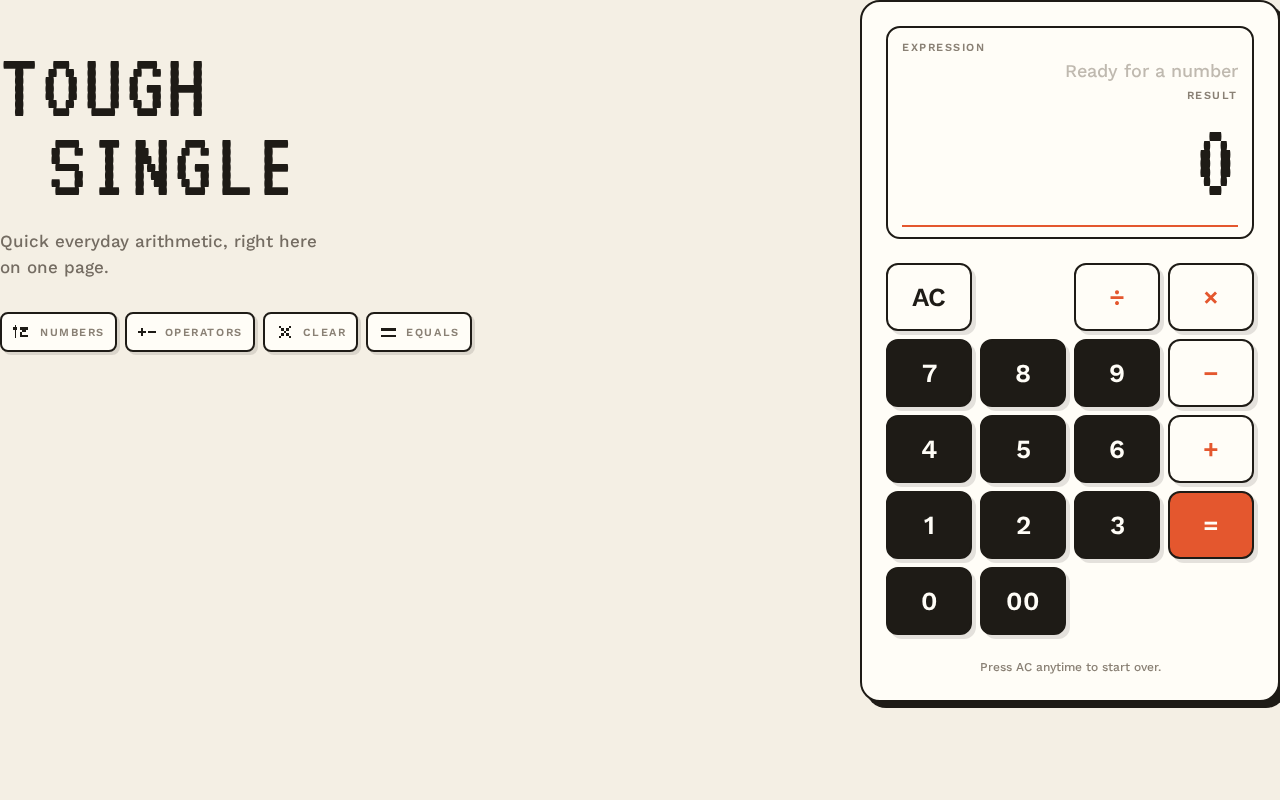
ToughSingle
Quick everyday arithmetic, right here on one page.
- Numbers
- Operators
- Clear
- Equals
Press AC anytime to start over.
ToughSingle
Quick everyday arithmetic, right here on one page.
- Numbers
- Operators
- Clear
- Equals
Press AC anytime to start over.
No comments yet. Be the first!