tough-habit
Build Daylight, a simple personal habit tracker. Include a dashboard with daily progress, a habits page to add and complete habits, and a weekly insights page. Use a clean, friendly design with teal accents. Keep the first version focused on these three pages.


Comments (0)
Sign in to leave a comment
System Requirements
System Requirements Document for Daylight
1. Introduction
Daylight is a simple personal habit tracker for one calm user. It exists to make a small daily ritual feel warm and encouraging: the user adds the habits they care about, marks them complete each day, watches daily progress fill up, and reviews how the week went. The product is deliberately narrow — a first version focused on exactly three working pages (a dashboard with daily progress, a habits page to add and complete habits, and a weekly insights page) plus a public Landing entry that explains Daylight and establishes the user's identity before protected habit work.
The audience is a single individual tracking personal habits for their own encouragement, not a team, coach, or administrator. Daylight's tone is friendly and upbeat, its surfaces are clean and rounded, and its accent colour is teal, with coral reserved for streaks and small wins.
This document is the System Requirements Document for Daylight; it specifies the product's features, workflows, pages, personas, and delivery boundaries in full.
Success Criteria
- The user can add a habit on the habits page and see it appear in their habit list.
- The user can complete a habit for the current day and see the completion reflected immediately in the habit's state and in the dashboard's daily progress.
- The dashboard shows daily progress that truthfully reflects the habits completed today.
- The weekly insights page shows the user's week of habit activity, including the best day.
- The first version contains exactly the three working pages plus the Landing entry, with no additional product destinations.
- The interface reads as clean and friendly with teal accents throughout, and no readable text or control is cropped or covered at 375px, 768px, or 1280px.
2. System Overview
Daylight is delivered as a React web application backed by a shared FastAPI service and a MariaDB database. The frontend renders four destinations: a public Landing page, and three protected working pages — dashboard, habits page, and weekly insights page. The backend owns habit records and daily completion records per user; the database persists them. There is one active human actor, the Habit tracker user, who owns all of their own habit data.
Current accepted behavior:
- Landing — an anonymous public entry that explains Daylight and its habit-tracking purpose, and where the user enrolls on first use and verifies identity when returning.
- dashboard — shows the user's daily progress for the current day.
- habits page — where the user adds habits and completes habits.
- weekly insights page — shows the user's weekly habit insights.
The three working pages require the user to be signed in; Landing is reachable anonymously and is the only place identity is established or verified. There is no sharing, social, coaching, notification, or administrative surface in this version.
Removed from scope
- None. No concept from the authoritative requirement thread was removed or replaced.
2a. Product Interpretation and Delivery Boundary
Daylight is a first-party application: the React frontend and the shared FastAPI backend own all product behavior, and MariaDB owns the durable habit and completion state. The user's habit list and daily completions are private to that user, so the application owns identity: the user establishes access on the anonymous Landing page on first use and verifies it there when returning, and the three working pages are reachable only after that. Landing is the sole anonymous entry boundary; it cannot be reached from inside the protected pages as a place to do habit work, and the protected pages cannot establish access to themselves.
The first version is deliberately bounded to these four destinations. Everything the user does with habits — adding, completing, viewing daily progress, reviewing the week — happens inside the three working pages. No future features are committed in this document; anything beyond these pages is out of current scope.
2c. Page Content and Component Coverage
Landing
- Purpose and information: the anonymous public entry. Explains Daylight and its habit-tracking purpose, and presents the entry hero: headline "Small habits, brighter days", subline "Track your habits each day and see your week in one calm place.", and the call to action "Start today".
- States: anonymous, signed-out entry (default); first-use enrollment state; returning verification state; submitting state; error state for invalid or failed enrollment/verification with a recovery path back to the form.
- Primary actions: begin enrollment ("Start today"); submit enrollment details to create the user's account; switch to returning verification and submit credentials to sign in.
- Supporting actions: toggle between first-use enrollment and returning verification; read the product explanation.
- Domain entities: user identity (account credentials and the resulting session).
- Component responsibilities: hero block (teal panel with headline, subline, coral pill CTA; cream panel with the coral day-progress ring); identity form (enrollment fields, verification fields, submit control, inline validation and error messaging); session establishment that routes the user into the dashboard on success.
- States detail: loading while a submission is in flight; empty form on first arrival; success routes to dashboard; error keeps the user on Landing with a clear message and the entered context preserved where possible.
dashboard
- Purpose and information: shows the user's daily progress for the current day — how many of their habits are complete today against how many they have, expressed as the day-progress ring and a readable count.
- States: loading daily progress; empty state when the user has no habits yet (with a pointer to the habits page to add one); populated progress state; error state with retry.
- Primary actions: read today's progress; follow the pointer to the habits page when there is nothing to show.
- Supporting actions: navigate to habits page and weekly insights page via the left rail (desktop) or bottom tab bar (mobile).
- Domain entities: habits, today's completions, derived daily progress.
- Component responsibilities: day-progress ring (teal fill, coral ring accent, soft ease when progress changes); progress summary count; navigation rail/tab bar with teal active pill; empty and error panels.
habits page
- Purpose and information: the user's habit list for the current day, where habits are added and completed.
- States: loading habit list; empty state when no habits exist (with the add-habit affordance prominent); populated list with per-habit completion state; add-habit form open/closed; submitting state; validation error for an empty or invalid habit name; save failure with retry; completion toggle in-flight and its failure/recovery.
- Primary actions: add a habit (enter a habit name and save); complete a habit for today (teal check pill on the habit row); un-complete a habit completed today.
- Supporting actions: navigate to dashboard and weekly insights page.
- Domain entities: habit (name, created date, active state), daily completion record (habit, date, completed state).
- Component responsibilities: add-habit form and submit control; habit rows as chunky cream cards with a teal check pill on the right; per-row completion state and hover pop; empty, loading, and error panels; navigation rail/tab bar.
weekly insights page
- Purpose and information: the user's weekly habit insights — how their habit activity went across the week, presented as seven tall teal bars with coral tips marking the best day.
- States: loading weekly data; empty state when there is no habit activity to summarize (with a pointer to the habits page); populated week with best-day emphasis; error state with retry.
- Primary actions: read the week's insights and identify the best day.
- Supporting actions: navigate to dashboard and habits page.
- Domain entities: habits, daily completions across the week, derived weekly aggregates and best day.
- Component responsibilities: seven-bar week chart (teal bars, coral tips on the best day); week summary labels; empty, loading, and error panels; navigation rail/tab bar.
3. Functional Requirements
FR-1 — Product identity. As a Habit tracker user, I should use Daylight as a simple personal habit tracker, so that my habit tracking lives in one calm place. (explicit)
- Trigger: the user opens Daylight. Observable result: the product presents itself as Daylight, a personal habit tracker. Access: Landing is anonymous; working pages require sign-in. Failure/recovery: if the app cannot load, the user can retry. Continuation: the user proceeds to Landing or a working page.
FR-2 — Daily progress on the dashboard. As a Habit tracker user, I should see my daily progress on the dashboard, so that I know how today is going. (explicit)
- Trigger: the user opens the dashboard. Input: the user's habits and today's completions. Observable result: the dashboard shows daily progress for the current day, reflected in the day-progress ring and a readable count. Access: signed in. Failure/recovery: if progress cannot load, an error state offers retry. Continuation: the user can move to the habits page to complete more habits.
FR-3 — Add habits on the habits page. As a Habit tracker user, I should add habits on the habits page, so that I can track what matters to me. (explicit)
- Trigger: the user submits a new habit name on the habits page. Input: habit name. Observable result: the habit appears in the user's habit list and is persisted for that user. Access: signed in. Failure/recovery: an empty or invalid name is rejected with a validation message; a save failure shows an error and lets the user retry without losing the entered name. Continuation: the user can immediately complete the new habit or add another.
FR-4 — Complete habits on the habits page. As a Habit tracker user, I should complete habits on the habits page, so that I can record today's wins. (explicit)
- Trigger: the user activates the teal check pill on a habit row. Input: the habit and the current date. Observable result: the habit shows as completed for today, and the dashboard's daily progress reflects it. Access: signed in. Failure/recovery: if the completion cannot be saved, the row reverts and shows an error with retry. Continuation: the user can complete further habits or un-complete a habit completed today.
FR-5 — Weekly insights. As a Habit tracker user, I should review a weekly insights page, so that I can see how my week of habits went. (explicit)
- Trigger: the user opens the weekly insights page. Input: the user's habits and completions across the week. Observable result: the page shows the week's habit activity as seven tall teal bars with coral tips marking the best day. Access: signed in. Failure/recovery: if weekly data cannot load, an error state offers retry. Continuation: the user can return to the dashboard or habits page.
FR-6 — Clean, friendly design with teal accents. As a Habit tracker user, I should experience a clean, friendly design with teal accents, so that the daily ritual feels warm and encouraging. (explicit)
- Trigger: any page render. Observable result: cream ground, teal primary actions and progress, coral for streaks and small wins, chunky rounded cards, friendly type, and no readable text or control cropped or covered at 375px, 768px, or 1280px. Failure/recovery: not applicable. Continuation: consistent across all pages.
FR-7 — Focused first version. As a Habit tracker user, I should see only the dashboard, habits page, and weekly insights page as working pages, so that the product stays simple. (explicit)
- Trigger: navigation across the app. Observable result: exactly those three working pages plus the Landing entry exist; no other product destinations are offered. Access: as per each page. Failure/recovery: not applicable. Continuation: navigation stays within these destinations.
FR-8 — First-use enrollment on Landing. As a Habit tracker user, I should enroll on Landing before doing protected habit work, so that my habits and completions belong to me. (required_inference)
- Trigger: an anonymous visitor selects "Start today" and submits enrollment details. Input: enrollment details. Observable result: the user's account is created, a session is established, and the user is routed into the dashboard. Access: anonymous Landing. Failure/recovery: invalid or failed enrollment shows an inline error on Landing and keeps the user there to correct and retry. Continuation: on success the user reaches the dashboard and can begin adding habits.
FR-9 — Returning verification on Landing. As a Habit tracker user, I should verify my identity on Landing when I return, so that I can resume my own habit data. (required_inference)
- Trigger: a returning user switches to verification on Landing and submits credentials. Input: credentials. Observable result: a session is established and the user reaches the dashboard with their own habits and progress. Access: anonymous Landing. Failure/recovery: incorrect credentials show an inline error and allow retry. Continuation: the user resumes habit work on the protected pages.
4. User Personas
Habit tracker user
- Product context: a single individual using Daylight for their own personal habit tracking. They are the only human actor in the product and own all habit data they create.
- Primary goal: build and keep a small daily habit ritual with minimal friction and visible encouragement.
- Distinct accepted responsibilities: enrolls on Landing on first use and verifies identity when returning; adds habits on the habits page; completes habits for the current day on the habits page; reads daily progress on the dashboard; reviews the week on the weekly insights page.
- Relevant inputs and decisions: the habit names they choose to track; which habits they mark complete each day; whether to un-complete a habit completed today; when to review their week.
- Interactions with other participants: none beyond themselves; the backend and database persist their data on their behalf, and Landing establishes the identity that binds that data to them.
- Observable success: their habits appear after adding, completions register immediately, the dashboard's daily progress matches what they completed today, and the weekly insights page shows their week with the best day marked.
- What makes this role distinct: the work is private, self-directed, and encouragement-oriented — there is no supervisor, teammate, or audience, and every action is about the user's own consistency rather than shared state.
5. Core User Flows
Flow A — First use: enroll on Landing and start tracking
- The visitor arrives anonymously on Landing and reads the explanation of Daylight and its habit-tracking purpose, with the headline "Small habits, brighter days", the subline, and the "Start today" call to action.
- The visitor selects "Start today" and completes the enrollment form on Landing.
- On submit, Landing shows a submitting state; on success the account is created, a session is established, and the user is routed to the dashboard.
- On failure, Landing shows an inline error and keeps the visitor on Landing to correct and retry.
- From the dashboard's empty state, the user follows the pointer to the habits page to add their first habit.
Flow B — Add a habit
- The signed-in user opens the habits page from the left rail (desktop) or bottom tab bar (mobile).
- The user opens the add-habit form, enters a habit name, and saves.
- The habit appears as a chunky cream card in the habit list and is persisted for that user.
- If the name is empty or invalid, the form shows a validation message; if saving fails, an error appears and the user retries without losing the entered name.
- The user can immediately complete the new habit or add another.
Flow C — Complete a habit and see daily progress
- On the habits page, the user activates the teal check pill on a habit row.
- The row shows the habit as completed for today, with the hover pop and the day ring filling with a soft ease.
- The user opens the dashboard and sees daily progress for the current day updated to include the completion, in the day-progress ring and the readable count.
- If the completion cannot be saved, the row reverts and shows an error with retry; the user retries or continues with other habits.
- The user may un-complete a habit completed today, and the dashboard progress reflects that change.
Flow D — Review the week
- The signed-in user opens the weekly insights page from the navigation.
- The page shows the week's habit activity as seven tall teal bars with coral tips marking the best day.
- If there is no activity to summarize, the page shows an empty state pointing to the habits page; if data cannot load, an error state offers retry.
- The user returns to the dashboard or habits page to continue their ritual.
Flow E — Returning use: verify identity and resume
- A returning user arrives on Landing and switches to verification.
- The user submits credentials; on success a session is established and they are routed to the dashboard with their own habits and progress.
- On incorrect credentials, Landing shows an inline error and the user retries.
- The user resumes habit work on the protected pages.
6. Visuals Colors and Theme
The creative direction is authoritative for this section.
- Muse and headline: Haraldur Thorleifsson — big-hearted boldness for a daily habit ritual.
- Mode: light.
- Colour tokens by role:
- Background (cream ground):
#FFF6E9 - Surface (cards):
#FFFFFF - Text (deep ink):
#12312E - Primary (teal, main action and progress):
#0E8C7F - Accent (coral, streaks and small wins):
#FF6B4A - Muted:
#5C7A76
- Background (cream ground):
- Typography: headings Sora (bold, large, tight tracking, sentence case, short warm headings); body Outfit. Modular scale 1.25: 56/44/32/22/17/15px; mobile headline 40px to desktop 88px. Inter, Roboto, Arial, and Poppins are forbidden.
- Shape language: chunky rounded cards with 24px radii; full-width colour blocks with soft edges; pill buttons; a circular day-progress ring.
- Layout: the landing hero is a two-block split — a large teal panel with the headline and a cream panel with a day ring. App pages use one wide column with a left nav rail on desktop and a bottom tab bar on mobile.
- Spacing rhythm: generous, calm spacing consistent with the chunky card language and the 24px radii.
- Imagery style: custom flat spot illustration — sun, plant, and checkmark shapes in teal and coral. No stock photography.
- Avoid: blue or indigo accents and white-first grounds; gradient-blob heroes and grids of identical hover-lift cards; stock photography and system fonts; the generic indigo/blue-on-white SaaS template.
7. Signature Design Concept
The public entry is a full-bleed two-block hero. The left 60% of the first screen is a solid teal (#0E8C7F) block carrying an oversized three-line Sora headline at up to 88px, stacked and spanning the viewport height on desktop, with the coral (#FF6B4A) pill CTA "Start today" sitting under the headline inside the teal block. The right block is cream (#FFF6E9) and holds a large coral-ringed day-progress circle as the hero subject. The same day ring repeats on the dashboard, tying the entry promise to the daily ritual. Flat spot illustration shapes — sun, plant, checkmark — in teal and coral accent the blocks. On mobile the blocks stack, the headline scales down to 40px, and all readable text and controls remain whole within the viewport.
8. Interaction Model & Motion Direction
Interaction Model: Animated Motion Tempo: expressive Hero Dimensionality: layered_2d
Landing Hero Motion Brief
- Focal subject: the coral day-progress ring on the cream panel, paired with the oversized teal headline block.
- Input → transformation → outcome thesis: as the page loads, the teal and cream blocks enter with a lively staggered entrance; the coral day ring draws and fills with a soft ease, echoing the daily progress the user will see on the dashboard; the coral "Start today" pill settles into place under the headline. The motion uses only accepted behavior — the entry explanation, the day ring, and the enrollment CTA.
- Motion vocabulary: lively entrance for the hero blocks, soft-ease ring fill, gentle settle of the CTA.
- Composed first frame: teal block on the left with the three-line headline and coral pill; cream block on the right with the coral-ringed day circle; flat teal and coral spot shapes.
- Reduced-motion state: with
prefers-reduced-motion, the hero renders in its final composed arrangement — blocks, headline, ring, and CTA fully visible and static, with no entrance animation and the ring shown at its resting fill.
9. Non-Functional Requirements
- Design constraint (explicit): the design is clean and friendly with teal accents, applied consistently across all pages.
- Readability constraint (explicit): headlines, wordmarks, labels, numbers, card text, and controls stay entirely inside the viewport and their container at 375px, 768px, and 1280px, wrapping or scaling (for example
clamp(...)) to fit; no other element covers any part of them. Imagery and decoration may be cropped, bled, or overlapped as the direction asks, but never over readable text or controls. - Scope constraint (explicit): the first version stays focused on the three working pages plus the Landing entry; no additional product destinations.
- Durability (required_inference): habits and daily completions persist per user in MariaDB so that daily progress and weekly insights remain truthful across sessions.
- Privacy (required_inference): each user's habits and completions are bound to their own identity and are not visible to other users.
- Access (required_inference): the three working pages require a signed-in session; Landing is the only anonymous entry and the only place identity is established or verified.
10. Tech Stack
- Frontend: React application UI.
- Backend: shared FastAPI process for application APIs and domain modules (habits, completions, daily progress, weekly insights, identity).
- Database: MariaDB for application-owned persistent data.
- Infrastructure:
docker-compose.ymlwith thebackend,database, andfrontendservices; the backend serves all feature APIs on its existing process and port.
11. Assumptions and Constraints
- Assumption: the user tracks habits for themselves only; there is no sharing, social, coaching, or administrative role.
- Assumption: "daily progress" means the proportion of the user's habits completed for the current day, shown as the day-progress ring and a readable count.
- Assumption: "weekly insights" means the user's habit activity across the current week, shown as seven tall teal bars with coral tips marking the best day.
- Constraint: the first version contains exactly the dashboard, habits page, and weekly insights page as working pages, plus the Landing entry.
- Constraint: the design is clean and friendly with teal accents; blue/indigo accents, white-first grounds, stock photography, and system fonts are avoided.
- Constraint: readable text and controls remain whole at 375px, 768px, and 1280px.
12. Glossary
- Daylight: the product name for this personal habit tracker.
- Habit: a named behavior the user chooses to track, created on the habits page.
- Completion: a record that a habit was marked done for a specific day.
- Daily progress: the current day's share of habits completed, shown on the dashboard.
- Day-progress ring: the circular progress indicator used on Landing and the dashboard.
- Weekly insights: the week's habit activity summary on the weekly insights page, with the best day marked by coral tips.
- Landing: the anonymous public entry where the user enrolls on first use and verifies identity when returning.
- Habit tracker user: the single active human persona who owns and tracks their own habits.
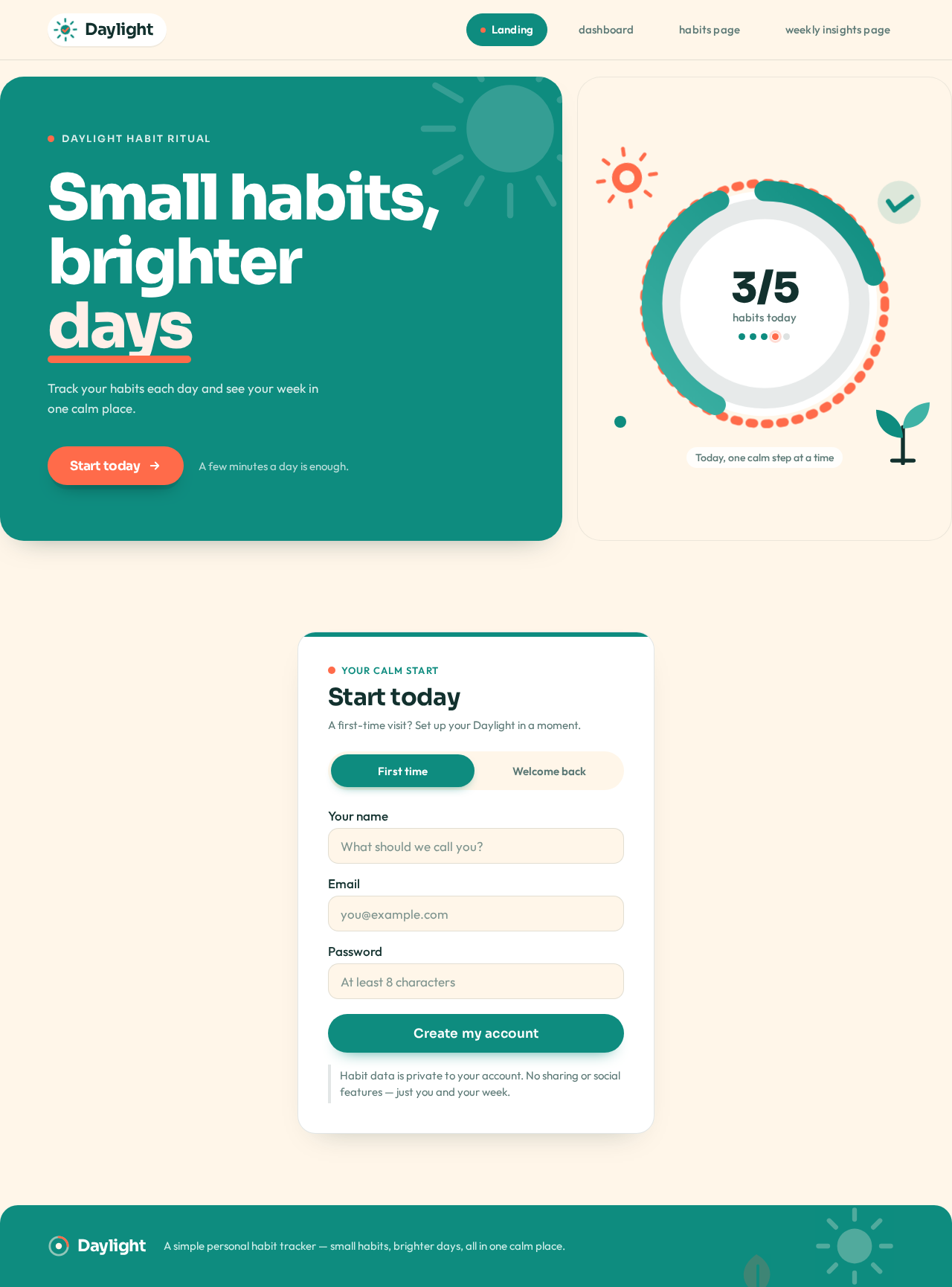
Daylight habit ritual
Small habits,brighterdays
Track your habits each day and see your week in one calm place.
A few minutes a day is enough.
Start today
A first-time visit? Set up your Daylight in a moment.
Habit data is private to your account. No sharing or social features — just you and your week.
Daylight habit ritual
Small habits,brighterdays
Track your habits each day and see your week in one calm place.
A few minutes a day is enough.
Start today
A first-time visit? Set up your Daylight in a moment.
Habit data is private to your account. No sharing or social features — just you and your week.
No comments yet. Be the first!