tough-clock
 Adi Patil
Build an alarm clock app with available am or pm also costumize theme and alarm clock sound also add alarm repeat for upto 5 min
Comments (0)
Sign in to leave a comment
System Requirements
System Requirements Document (SRD)
Project Name: tough-clock
1. Introduction
The tough-clock project is an innovative alarm clock application designed to provide users with a highly customizable and user-friendly experience. Developed with Adi Patil's vision in mind, this app caters to users in India (IN) and beyond, offering features such as AM/PM settings, customizable themes, personalized alarm sounds, and a practical snooze/repeat functionality. The app aims to simplify time management while adding a touch of personalization to daily routines.
2. System Overview
The tough-clock application is a mobile-first solution designed to help users manage their schedules effectively. It supports the creation of multiple alarms, offers extensive customization options, and ensures a seamless user experience. The app is built using modern technologies, ensuring scalability, reliability, and responsiveness.
Key features include:
- Support for multiple alarms with AM/PM settings.
- Customizable themes to suit user preferences.
- The ability to choose or upload custom alarm sounds.
- A snooze/repeat feature that repeats alarms at 5-minute intervals.
The app is designed to be intuitive, visually appealing, and adaptable to the diverse needs of users.
3. Functional Requirements
- As a User, I should be able to create multiple alarms with AM/PM settings.
- As a User, I should be able to customize the app's theme.
- As a User, I should be able to choose or upload custom alarm sounds.
- As a User, I should be able to enable a snooze/repeat feature for alarms, repeating at 5-minute intervals.
4. User Personas
-
Primary User:
- Description: Individuals who rely on alarms for daily schedules, including students, professionals, and homemakers.
- Goals: Manage multiple alarms, customize the app's appearance, and personalize alarm sounds.
- Pain Points: Difficulty in managing multiple alarms, lack of personalization in existing alarm apps.
-
Admin:
- Description: The app administrator responsible for maintaining the app, updating features, and addressing user issues.
- Goals: Ensure app stability, monitor user feedback, and roll out updates.
- Pain Points: Managing app performance and addressing user complaints promptly.
5. Visuals Colors and Theme
The tough-clock app will feature a unique and vibrant color palette to enhance user engagement and personalization.
- Background: #F5F5F5 (Soft Gray)
- Surface: #FFFFFF (Pure White)
- Text: #333333 (Dark Charcoal)
- Accent: #FF6F61 (Warm Coral)
- Muted Tones: #B0BEC5 (Cool Gray)
These colors are chosen to provide a clean, modern, and visually appealing interface while ensuring readability and accessibility.
6. Signature Design Concept
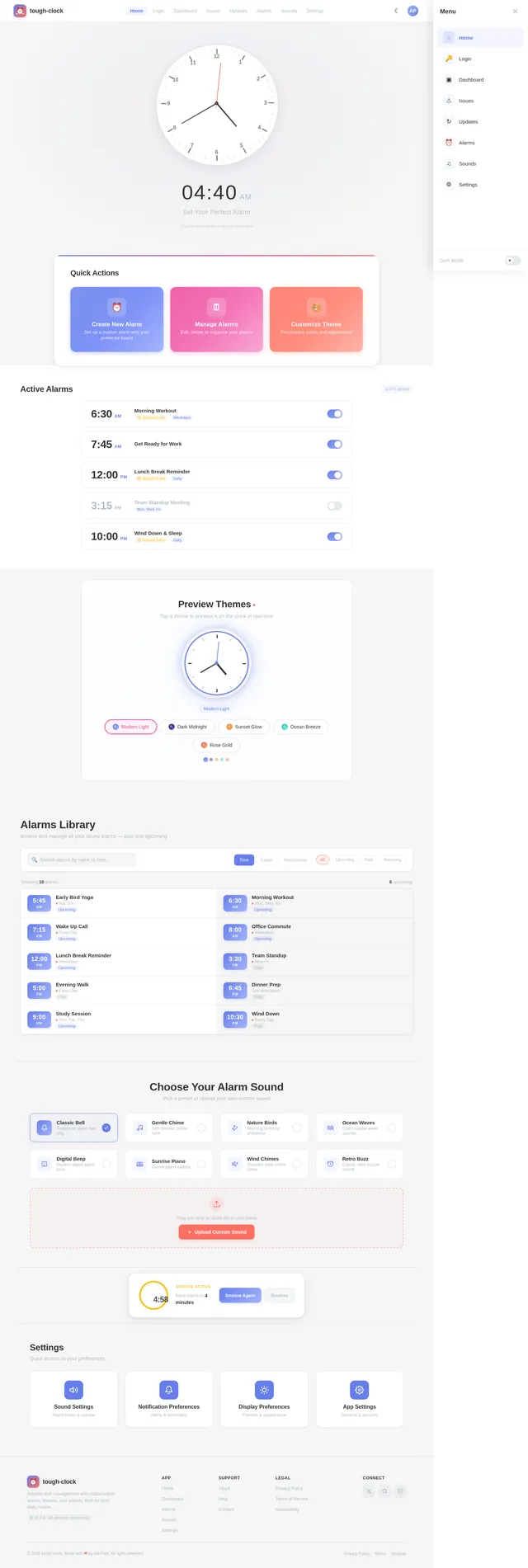
The tough-clock app will feature a dynamic, interactive clock interface as its signature design concept.
Details:
- Home Page Design:
The landing page will showcase a 3D animated clock that users can interact with. The clock hands will move in real-time, and users can drag them to set alarm times directly. - Theme Customization:
Users can preview theme changes in real-time on the 3D clock interface. For example, selecting a new theme will instantly update the clock's colors, background, and accents. - Micro-Interactions:
- When setting an alarm, the clock face will "glow" softly to indicate the selected time.
- A subtle chime sound will play when an alarm is successfully set.
- Transitions:
Smooth transitions between pages, with a "flip clock" animation when navigating between alarms and settings. - Snooze Interaction:
When the snooze feature is activated, the clock will display a countdown timer in the center, visually indicating the time left until the next alarm.
This design ensures the app is not only functional but also visually captivating and enjoyable to use.
7. Non-Functional Requirements
- Performance: The app should load within 2 seconds on a standard 4G network.
- Scalability: Support up to 10,000 concurrent users without performance degradation.
- Security: User data, including custom alarm sounds, must be encrypted.
- Accessibility: The app must comply with WCAG 2.1 Level AA standards.
- Localization: Default to Indian Standard Time (IST) and support English as the primary language.
8. Tech Stack
Frontend:
- React Native for mobile app development.
Backend:
- Python with FastAPI for API development.
Database:
- MySQL for structured data storage, with Alembic for migrations.
AI Models:
- GPT 5.4 for user-friendly responses.
AI Tools:
- LangChain for workflow orchestration.
Orchestration:
- Docker for local development.
- Kubernetes for server-side orchestration.
9. Assumptions and Constraints
- The app will primarily target Android and iOS platforms.
- Users will have internet access to download custom alarm sounds.
- The app will not support desktop platforms in its initial release.
- The snooze/repeat feature will be limited to a maximum of 5 minutes per interval.
10. Glossary
- AM/PM: A time format distinguishing morning (AM) and evening (PM) hours.
- Snooze: A feature that delays the alarm for a short period.
- Theme Customization: The ability to change the app's visual appearance.
- 3D Animated Clock: A dynamic, interactive clock interface with real-time animations.
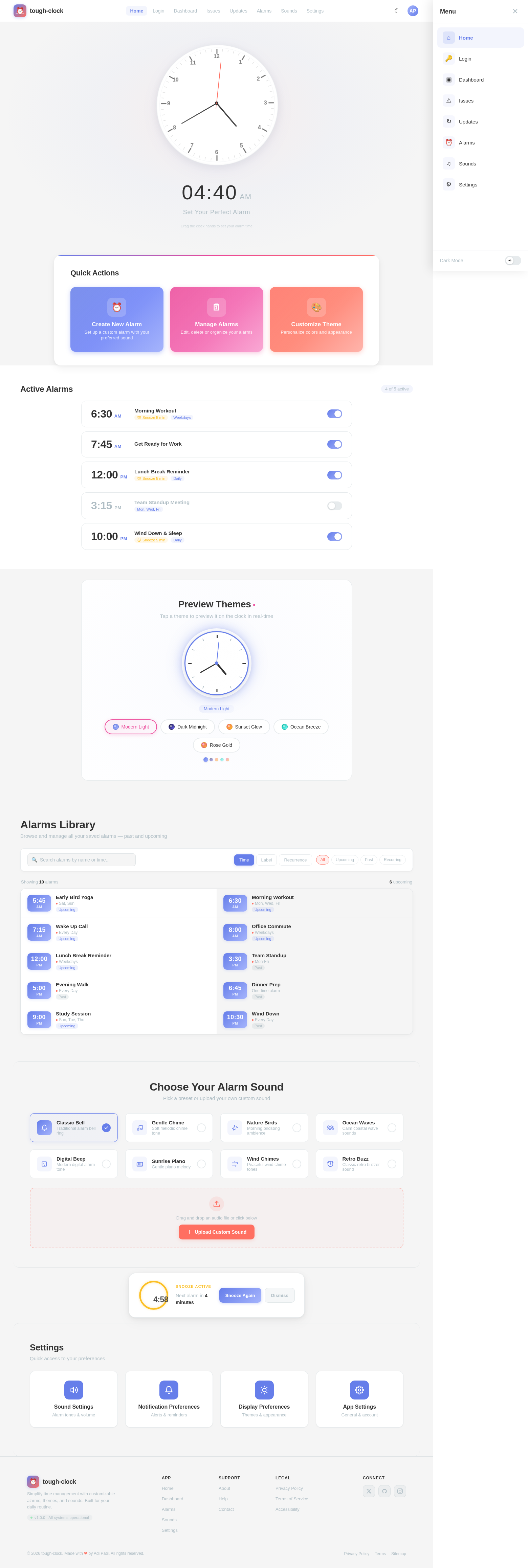
09:53AM
Set Your Perfect Alarm
Drag the clock hands to set your alarm time
Quick Actions
Active Alarms
4 of 5 activePreview Themes
Tap a theme to preview it on the clock in real-time
Alarms Library
Browse and manage all your saved alarms — past and upcoming
Choose Your Alarm Sound
Pick a preset or upload your own custom sound
Classic Bell
Traditional alarm bell ring
Gentle Chime
Soft melodic chime tone
Nature Birds
Morning birdsong ambience
Ocean Waves
Calm coastal wave sounds
Digital Beep
Modern digital alarm tone
Sunrise Piano
Gentle piano melody
Wind Chimes
Peaceful wind chime tones
Retro Buzz
Classic retro buzzer sound
Drag and drop an audio file or click below
Snooze Active
Settings
Quick access to your preferences
No comments yet. Be the first!