Page 1 of 4
tough-bot System Requirements Document
Introduction
The purpose of this document is to outline the system requirements for the "tough-bot" project. This project aims to create a simplified, single-page design for a to-do application.
System Overview
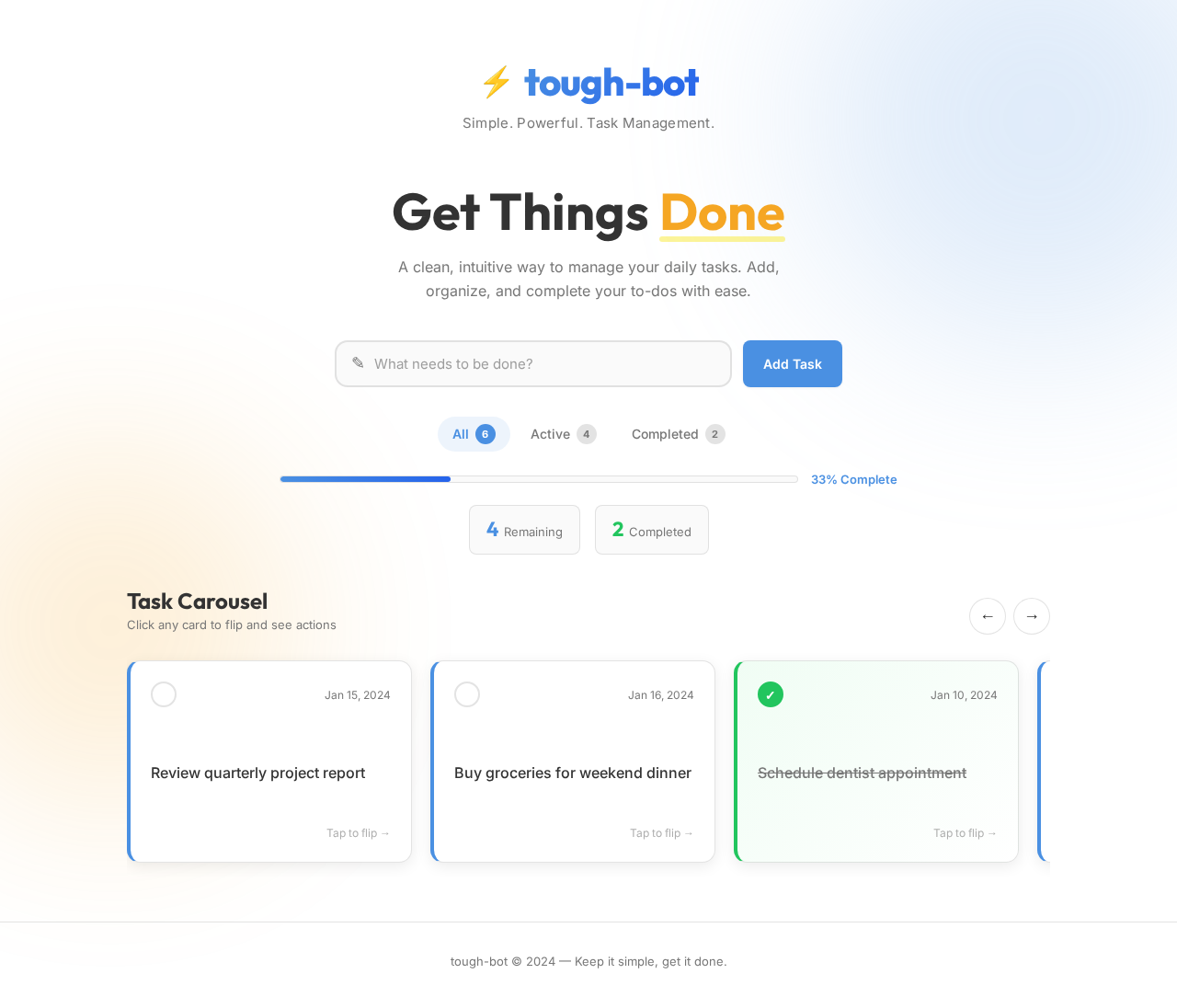
The tough-bot project is a single-page application designed to manage tasks efficiently. The application will provide users with a streamlined interface to add, view, and manage their to-do items. The focus is on simplicity and ease of use, ensuring that users can interact with the application without unnecessary complexity.
Functional Requirements
- As a User, I should be able to add a new task to my to-do list.
- As a User, I should be able to view all my tasks in a single-page layout.
- As a User, I should be able to mark tasks as complete.
- As a User, I should be able to delete tasks from my list.
- As a User, I should be able to edit existing tasks.
User Personas
- User: The primary user of the application who needs to manage personal tasks efficiently.
Page 2 of 4
Core User Flows
- User opens the application -> User adds a new task -> Task appears in the list.
- User views the list of tasks -> User marks a task as complete -> Task status updates.
- User selects a task -> User edits the task details -> Task updates in the list.
- User selects a task -> User deletes the task -> Task is removed from the list.
Visuals Colors and Theme
- primary: #4A90E2 (a calming blue for the main interface elements)
- primary_light: #A6C8F0 (a lighter blue for hover states and secondary UI)
- secondary: #F5A623 (a warm amber for headlines and emphasis)
- accent: #D0021B (a vibrant red for CTAs and active states)
- highlight: #F8E71C (a bright yellow for hover states and notifications)
- bg: #FFFFFF (a clean white for the page background)
- surface: rgba(250, 250, 250, 0.8) (a soft grey for card/panel backgrounds)
- text: #333333 (a dark grey for primary text)
- text_muted: #777777 (a lighter grey for secondary text)
- border: rgba(200, 200, 200, 0.5) (a subtle grey for borders)
Signature Design Concept
The tough-bot application will feature an interactive "Task Carousel" on the homepage. Users can swipe through tasks in a carousel format, with each task card flipping to reveal details when clicked. This dynamic interaction will be powered by framer-motion for smooth transitions and spring physics. The carousel will provide a visually engaging way to manage tasks, making the process both intuitive and enjoyable.
Page 3 of 4
Interaction Model & Motion Direction
The interaction model for the tough-bot landing page will be "animated". The single-page design will incorporate moderate scroll-triggered reveals and hover transitions to enhance user engagement. Interactive elements like the Task Carousel will utilize spring physics for a polished and responsive feel.
Non-Functional Requirements
- The application should load quickly and perform efficiently on all modern browsers.
- The design should be responsive, adapting to various screen sizes and devices.
- The application should ensure data persistence across sessions.
Tech Stack
- Frontend: React for Web
- Backend: Python with FastAPI
- Database: MySQL or MariaDB, using Alembic for migrations
- AI Models: Not applicable for this project
- Local Orchestration: Docker and docker-compose
Assumptions and Constraints
- The application will be developed as a single-page application.
- Users will primarily access the application via web browsers.
- The application will not require user authentication or complex access control.
Page 4 of 4
Glossary
- Task Carousel: An interactive component allowing users to swipe through tasks.
- Spring Physics: A type of animation that mimics the natural motion of objects, providing a more fluid and realistic interaction.
This document outlines the requirements and design for the tough-bot project, focusing on creating a simple, engaging, and efficient single-page to-do application.

No comments yet. Be the first!