tough-ai
 Hemen Ashodia
build an ai app




Comments (0)
Sign in to leave a comment
System Requirements
System Requirements Document (SRD)
1. Introduction
This document outlines the system requirements for a web-based AI-powered to-do application featuring vivid and interactive 3D design elements. The application aims to provide users with an engaging and visually stunning experience while maintaining functionality for task management. The system will leverage modern web technologies and 3D libraries to create a sleek, interactive interface.
2. System Overview
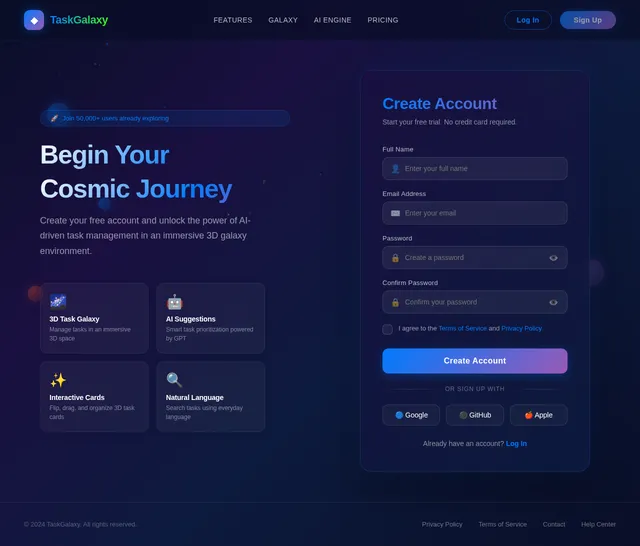
The to-do app will be a web-based platform that allows users to manage their tasks efficiently while enjoying a unique, interactive 3D design experience. The application will include functional 3D elements, such as task cards that rotate, flip, and interact with user inputs. The app will be accessible via modern web browsers and will utilize AI to enhance user interactions, such as providing smart task suggestions or reminders.
Key features include:
- A visually striking 3D interface for task management.
- Functional 3D interactions for task creation, editing, and organization.
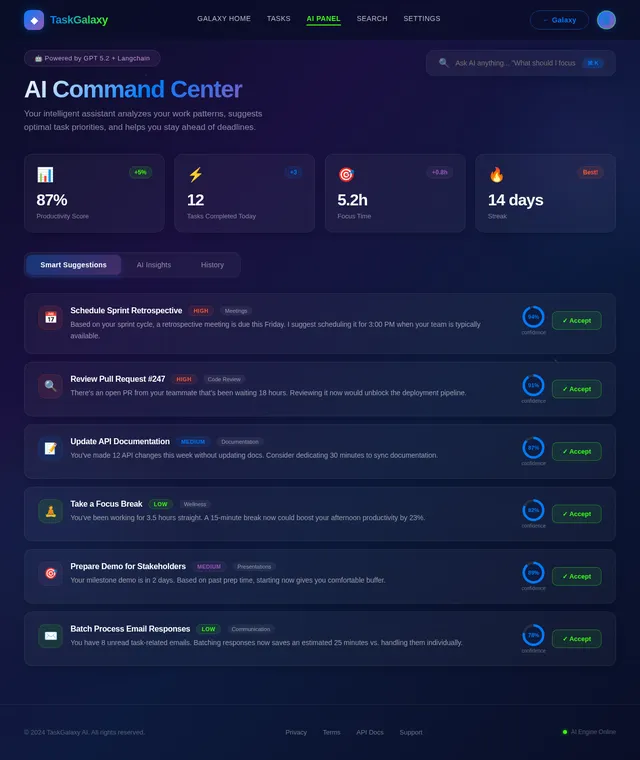
- AI-powered features for task prioritization and suggestions.
- A sleek, modern design with vivid colors and animations.
3. Functional Requirements as Story Points
- As a User, I should be able to create new tasks by interacting with 3D task cards.
- As a User, I should be able to edit tasks by clicking on 3D task cards that rotate to reveal editing options.
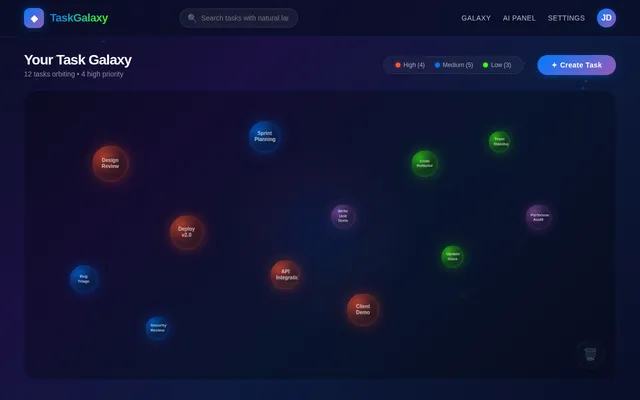
- As a User, I should be able to delete tasks by dragging and dropping 3D task cards into a "trash" area.
- As a User, I should be able to organize tasks by dragging and stacking 3D task cards.
- As a User, I should be able to view tasks in a 3D space with depth and layering for better visualization.
- As a User, I should be able to receive AI-generated task suggestions based on my input and past behavior.
- As a User, I should be able to set reminders for tasks with AI-powered smart scheduling.
- As a User, I should be able to search for tasks using natural language queries.
- As a User, I should be able to customize the appearance of the 3D interface, such as colors and themes.
4. User Personas
1. Regular User
- Description: A general user who wants to manage their daily tasks efficiently.
- Goals: Simplify task management, enjoy a visually appealing interface, and receive smart task suggestions.
- Pain Points: Overwhelmed by traditional task management apps, looking for something unique and engaging.
2. Power User
- Description: A tech-savvy user who values customization and advanced features.
- Goals: Leverage AI for task prioritization and enjoy the novelty of 3D interactions.
- Pain Points: Frustrated by lack of innovation in existing task management tools.
5. Visuals Colors and Theme
The app will feature a sleek, modern design with a vivid color palette. The proposed theme includes:
- Primary Colors: Electric Blue (#007BFF), Neon Green (#39FF14), and Vibrant Purple (#9B59B6).
- Secondary Colors: Soft Gray (#F5F5F5) and Midnight Black (#2C3E50).
- Accent Colors: Bright Orange (#FF5733) for highlights and notifications.
- Background: A gradient of deep blue and purple with subtle animated particles for a futuristic feel.
The 3D elements will have a polished, glass-like appearance with reflections and shadows to enhance depth.
6. Signature Design Concept
Interactive 3D Task Galaxy
The homepage will feature an interactive 3D galaxy where each task is represented as a floating, glowing orb. Users can navigate through the galaxy by clicking and dragging to rotate the view. Tasks will be color-coded based on priority (e.g., red for high priority, green for low priority) and will emit a subtle glow.
When a user clicks on a task orb:
- The orb will expand and transform into a 3D task card that flips open, revealing task details and options to edit, delete, or set reminders.
- The background will subtly shift colors based on the task's priority, creating an immersive experience.
Additional features:
- Micro-interactions: Hovering over orbs will cause them to gently pulse, and completed tasks will "shatter" into particles and fade away.
- Animations: Smooth transitions between views, such as zooming into a specific cluster of tasks or panning across the galaxy.
- Sound Design: Subtle, futuristic sound effects for interactions, like a soft "whoosh" when opening a task card.
This concept ensures the app is not only functional but also unforgettable, leaving users excited to return and manage their tasks.
7. Non-Functional Requirements
- The application must load the 3D interface within 3 seconds on modern web browsers.
- The system must support at least 10,000 tasks per user without performance degradation.
- The 3D interactions must be smooth and responsive, with a frame rate of at least 60 FPS.
- The AI features must provide task suggestions within 1 second of user input.
- The application must be accessible on both desktop and tablet devices.
8. Tech Stack
Frontend
- React for Web
- Three.js for 3D elements
Backend
- Python
- FastAPI
Database
- MySQL (with Alembic for migrations)
AI Models
- GPT 5.2 for user-friendly responses and task suggestions
AI Tools
- Langchain for AI workflow management
Local Orchestration
- Docker
- docker-compose
9. Assumptions and Constraints
- The application will only be developed for web platforms and will not include a mobile app.
- Users will require a modern web browser with WebGL support to access the 3D features.
- The system will rely on an internet connection for AI-powered features.
10. Glossary
- 3D Task Card: A visual representation of a task in the form of a 3D object that users can interact with.
- AI-Powered Suggestions: Recommendations generated by artificial intelligence based on user behavior and input.
- WebGL: A JavaScript API for rendering 3D graphics in web browsers.
- Three.js: A JavaScript library used to create and display animated 3D graphics in a web browser.
This document provides a comprehensive plan for the development of the AI-powered to-do app with a vivid 3D design. The interactive 3D Task Galaxy concept ensures a unique and engaging user experience.
No comments yet. Be the first!