Invoice status
- Pending
- Created
 Rafa Mariyam


Sign in to leave a comment
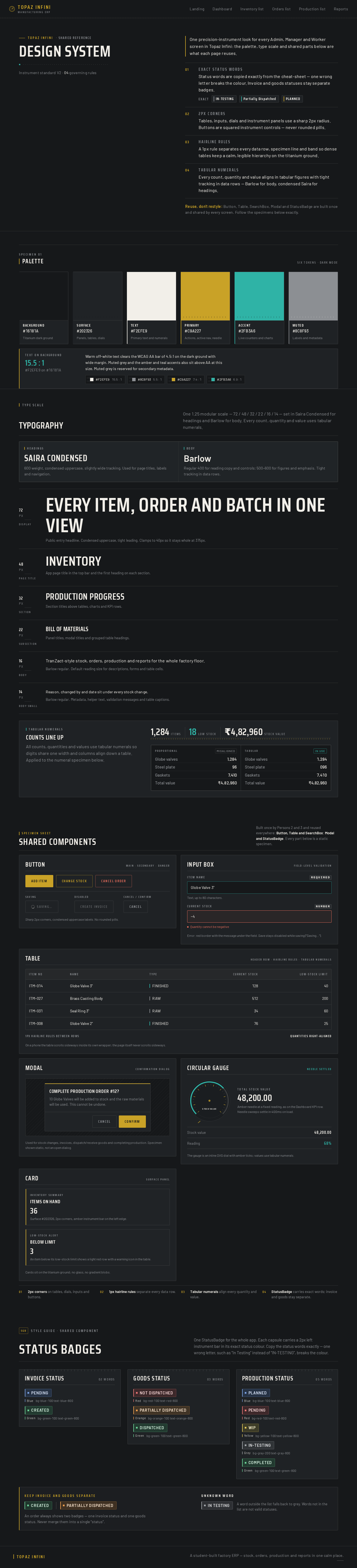
Topaz Infini· Shared reference
One precision-instrument look for every Admin, Manager and Worker screen in Topaz Infini: the palette, type scale and shared parts below are what each page reuses.
Reuse, don't restyle: Button, Table, SearchBox, Modal and StatusBadge are built once and shared by every screen. Follow the specimens below exactly.
Specimen 01
Background
#16181A
Titanium dark ground
Surface
#202326
Panels, tables, dials
Text
#F2EFE9
Primary text and numerals
Primary
#C9A227
Actions, active nav, needle
Accent
#2FB3A6
Live counters and charts
Muted
#8C8F93
Labels and metadata
Warm off-white text clears the WCAG AA bar of 4.5:1 on the dark ground with wide margin. Muted grey and the amber and teal accents also sit above AA at this size. Muted grey is reserved for secondary metadata.
Type scale
One 1.25 modular scale — 72 / 48 / 32 / 22 / 16 / 14 — set in Saira Condensed for headings and Barlow for body. Every count, quantity and value uses tabular numerals.
Headings
Saira Condensed
600 weight, condensed uppercase, slightly wide tracking. Used for page titles, labels and navigation.
Body
Barlow
Regular 400 for reading copy and controls; 500–600 for figures and emphasis. Tight tracking in data rows.
Public entry headline. Condensed uppercase, tight leading. Clamps to 40px so it stays whole at 375px.
App page title in the top bar and the first heading on each section.
Section titles above tables, charts and KPI rows.
Panel titles, modal titles and grouped table headings.
TranZact-style stock, orders, production and reports for the whole factory floor.
Barlow regular. Default reading size for descriptions, forms and table cells.
Reason, changed by and date sit under every stock change.
Barlow regular. Metadata, helper text, validation messages and table captions.
Tabular numerals
All counts, quantities and values use tabular numerals so digits share one width and columns align down a table. Applied to the numeral specimen below.
1,284Items18Low stock₹4,82,960Stock value
Proportionalmisaligned
Tabularin use
Specimen sheet
Built once by Persons 2 and 3 and reused everywhere: Button, Table and SearchBox; Modal and StatusBadge. Every part below is a static specimen.
Main · Secondary · Danger
Sharp 2px corners, condensed uppercase labels. No rounded pills.
Field-level validation
Text, up to 80 characters.
Quantity cannot be negative
Error: red border with the message under the field. Save stays disabled while saving (“Saving…”).
Header row · hairline rules · tabular numerals
| Item No | Name | Type | Current Stock | Low-stock Limit |
|---|---|---|---|---|
| ITM-014 | Globe Valve 3" | FINISHED | 128 | 40 |
| ITM-027 | Brass Casting Body | RAW | 512 | 200 |
| ITM-031 | Seal Ring 3" | RAW | 34 | 60 |
| ITM-008 | Globe Valve 2" | FINISHED | 76 | 25 |
On a phone the table scrolls sideways inside its own wrapper; the page itself never scrolls sideways.
Confirmation dialog
10 Globe Valves will be added to stock and the raw materials will be used. This cannot be undone.
Used for stock changes, invoices, dispatch/receive goods and completing production. Specimen shown static, not an open dialog.
Needle settled
Total stock value
48,200.00
Amber needle at a fixed reading, as on the Dashboard KPI row. Needle sweeps settle in 400ms on load.
The gauge is an inline SVG dial with amber ticks; values use tabular numerals.
Surface panel
Inventory summary
36
Low-stock alert
3
Cards sit on the titanium ground; no glass, no gradient blobs.
012px corners on tables, dials, inputs and buttons.
021px hairline rules separate every data row.
03Tabular numerals align every quantity and value.
04StatusBadge carries exact words; invoice and goods stay separate.
Style guide · Shared component
One StatusBadge for the whole app. Each capsule carries a 2px left instrument bar in its exact status colour. Copy the status words exactly — one wrong letter, such as “In Testing” instead of “IN-TESTING”, breaks the colour.
Keep invoice and goods separate
An order always shows two badges — one invoice status and one goods status. Never merge them into a single “status”.
Unknown word
A word outside the list falls back to grey. Words not in the list are not valid statuses.
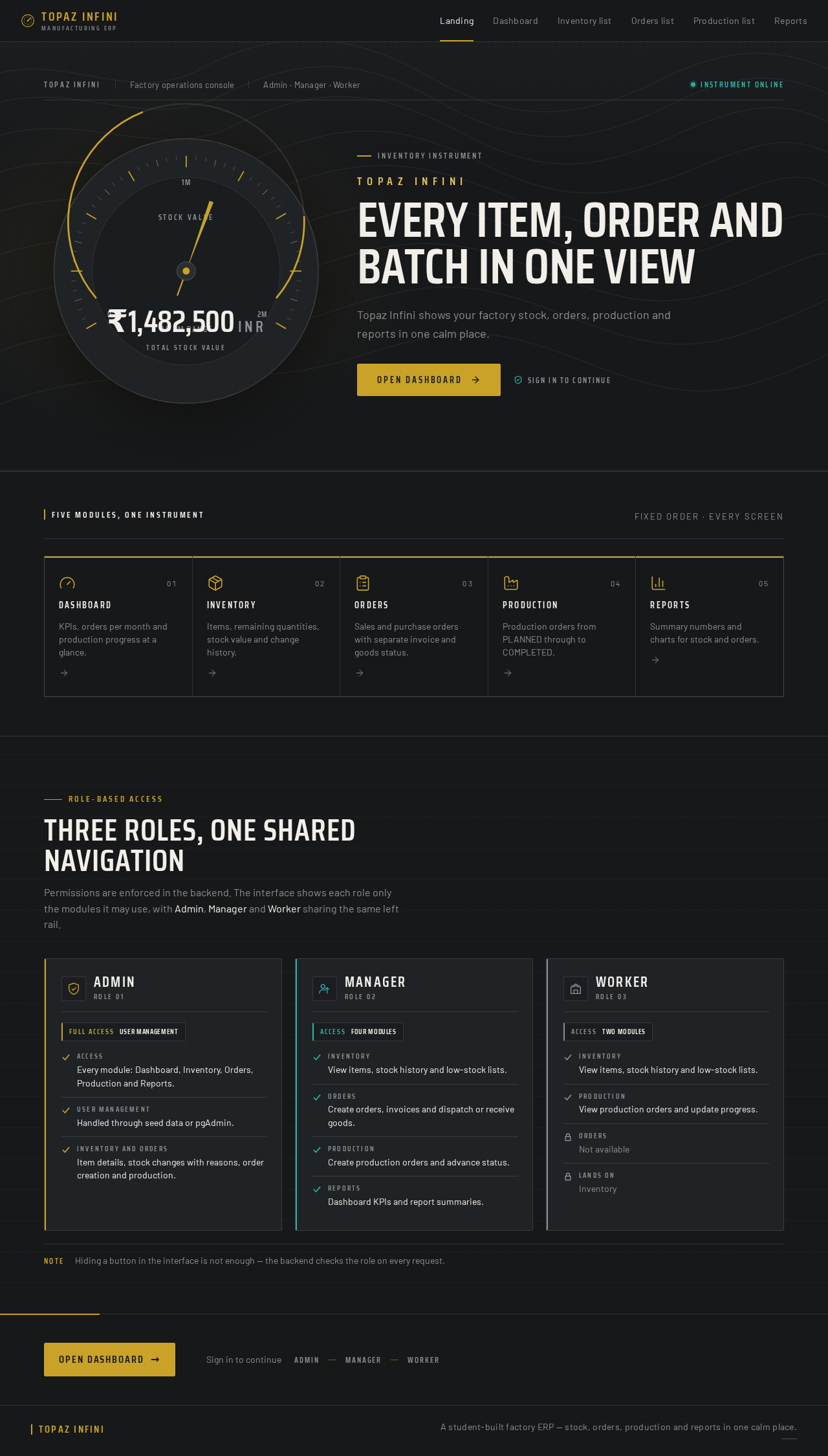
₹0INR
Total stock valueTopaz Infini
Topaz Infini shows your factory stock, orders, production and reports in one calm place.
Role-based access
Permissions are enforced in the backend. The interface shows each role only the modules it may use, with Admin, Manager and Worker sharing the same left rail.
NoteHiding a button in the interface is not enough — the backend checks the role on every request.
No comments yet. Be the first!