topaz-game
 Godwin Victor
Create a simple game for me android phone

Comments (0)
Sign in to leave a comment
System Requirements
System Requirements Document for topaz-game
1. Introduction
topaz-game is a simple puzzle game for Android phones. The player solves puzzles and earns points, chasing a rising score across short, casual play sessions. The product intent is a lightweight, instantly legible game that a person can pick up one-handed, play for a few minutes, and feel an immediate hit of accomplishment from a score that visibly climbs.
The audience is anyone with a spare minute who wants colour and a small reward — a casual mobile player, not a productivity user. The experience is deliberately simple: one puzzle interaction, one score, no accounts, no setup, no complexity beyond tapping to solve and watching the score rise.
2. System Overview
topaz-game is delivered as a lightweight, mobile-first web game that runs in the Android phone browser. It presents three surfaces: a Landing entry that introduces the game and starts play, a Puzzle Game surface where the core puzzle interaction and scoring happen, and a Score surface that shows the player's current score. All three surfaces are application-owned and openly reachable — there is no sign-in, no account, and no stored identity. The single active human actor is the Player.
The accepted behavior is narrow and complete: the player starts the game, plays the puzzle, earns points for solving, and sees the score. The score is a first-class, visible character in the interface — it flashes and rolls on every gain. There is no multiplayer, no leaderboard, no social layer, no in-app purchase, and no account management; none of these were requested and none are added.
2a. Product Interpretation and Delivery Boundary
Delivery. The game is a browser-delivered web experience optimized for Android phones, played one-handed in portrait. It is intentionally lightweight — no heavy 3D engine, no native install requirement — so it loads fast on a phone and responds instantly to taps.
Access ownership. All three surfaces are application-owned and require no identity. The player is anonymous throughout: there is no login, no profile, and no durable account. The score is a session-scoped game state, not a persisted personal record. Because no accepted journey requires a human to privately own or resume durable actor-specific state, no application identity is introduced.
Current vs. future. Everything in this document is current. No future-horizon features were accepted; nothing is deferred.
2b. Source Content Inventory
Not applicable — no reference directive in this project declares content_source.
2c. Page Content and Component Coverage
The page inventory is the supplied final page contract: Landing, Puzzle Game, Score. Each is application-owned with no access requirement.
Landing
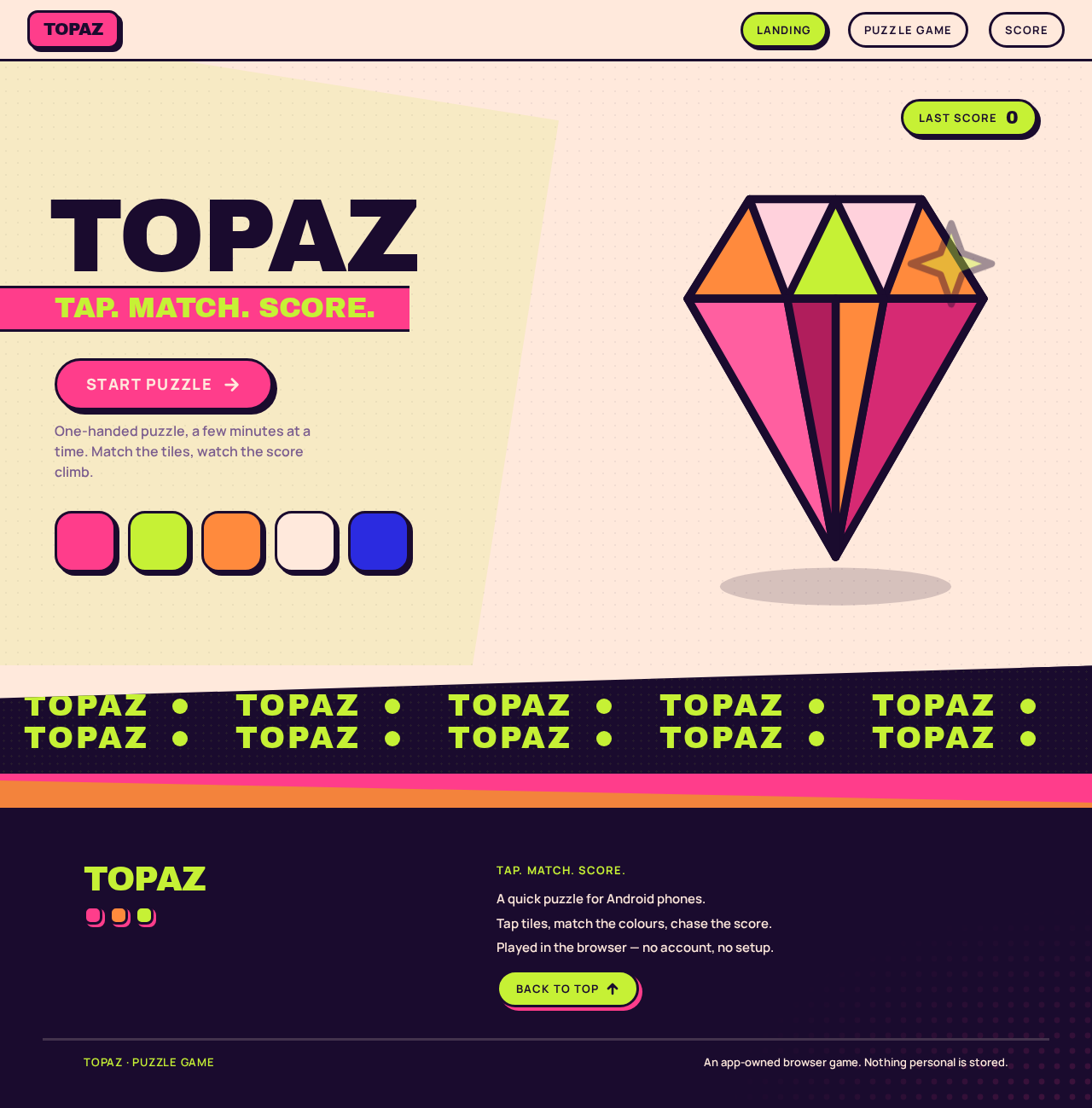
- Information / state: The game's identity and its promise. A saturated blush poster composition: the oversized wordmark TOPAZ stacked over a pink colour block, the tagline TAP. MATCH. SCORE., and a lime score pill showing the last score achieved in this session (empty/zero on first arrival).
- Primary action: START PUZZLE — a fat pink pill button that enters the Puzzle Game.
- Supporting actions: None required; the score pill is a readout, not a control.
- Domain entities: Game identity (wordmark, tagline), last score value.
- Component responsibilities:
- Hero type block — Archivo Black wordmark, uppercase, stacked on two lines, with the second line in lime on a pink block bleeding off the left edge.
- Topaz gem prop — a single glossy oversized 3D topaz gem, cropped by the right edge, overlapping the type block as decoration only (never covering readable text or the CTA).
- Score pill — acid lime pill at top-right showing the last score.
- Start CTA — pink pill with a 5px solid ink offset shadow, pinned above the thumb zone on mobile.
- Marquee strip — a one-pass
TOPAZ ·strip along the bottom edge.
- States:
- Loading: instant; no blocking spinner. Tiles/type scale in with a 120ms overshoot, staggered 40ms.
- Empty (first visit): score pill reads zero / no prior score.
- Success: CTA tap transitions to Puzzle Game.
- Error / recovery: if the game fails to initialize, the CTA remains available to retry; no dead end.
- Reduced motion: marquee becomes a static centred wordmark; scale-ins become instant opacity changes.
Puzzle Game
- Information / state: The live puzzle board and the running score. The board is the dominant element, filling the remaining viewport beneath a compact top bar (wordmark left, score pill right).
- Primary action: Tap a puzzle tile to make a move / solve.
- Supporting actions: Restart or continue play after a completed or failed puzzle (recovery), returning to the board.
- Domain entities: Puzzle board, puzzle tiles (chunky rounded squares with ink outline and solid colour fill), current score, combo/best indicators.
- Component responsibilities:
- Top bar — wordmark and live score pill.
- Puzzle board — pink card with a hard offset shadow holding the tile grid; reads as a physical toy.
- Tiles — chunky rounded squares, 3px ink outline, solid colour fill; squash-and-pop on successful tap and flip colour (pink ↔ tangerine, lime ↔ cobalt) as feedback.
- Score pill — acid lime, flashes and rolls numerals vertically on every point gain.
- Sticker badges — lime NEW BEST sticker and pink x2 COMBO tag overlapping section seams.
- States:
- Loading: tiles scale in with a 120ms overshoot, staggered 40ms.
- Empty: board presented ready to play.
- Success: a solved move triggers a 90ms squash-and-pop, a lime flash across the score pill, and a score increment.
- Error / recovery: an invalid or non-scoring move gives plain colour feedback with no score change; the player can immediately try again.
- Reduced motion: tap feedback is a plain colour change with no transform.
Score
- Information / state: The player's current score, presented as a large tabular numeral in Archivo Black, with supporting labels and any best/combo indicators.
- Primary action: Return to the Puzzle Game to keep playing.
- Supporting actions: None required.
- Domain entities: Current score, best score for the session, combo indicator.
- Component responsibilities:
- Score numeral — Archivo Black tabular, 44px mobile → 72px, the visual centrepiece.
- Score pill / panel — colour-block column carrying the score and its labels.
- Sticker badges — NEW BEST / x2 COMBO where applicable.
- Play-again control — returns to the Puzzle Game.
- States:
- Loading: instant.
- Empty: zero score before any play.
- Success: score displayed with a lime flash on the most recent gain.
- Error / recovery: if no score is available, the surface shows zero and offers return to play.
- Reduced motion: numeral updates without the vertical roll.
3. Functional Requirements
FR-1 — Start the game from the landing entry. (explicit) As a Player, I should be able to open topaz-game on my Android phone and start playing from the landing entry, so that I can begin a session immediately.
- Trigger / input: Player opens the game URL on an Android phone browser.
- Observable result: The Landing surface renders with the TOPAZ wordmark, tagline, score pill, and a START PUZZLE CTA.
- Access state: Anonymous; no identity required.
- Failure / recovery: If the game fails to initialize, the CTA remains available to retry.
- Continuation: Tapping START PUZZLE enters the Puzzle Game.
FR-2 — Play the puzzle. (explicit) As a Player, I should be able to play a puzzle on the Puzzle Game surface, so that I can engage with the core game.
- Trigger / input: Player taps puzzle tiles on the board.
- Observable result: Tiles respond with a squash-and-pop and a colour flip; the board reflects the move.
- Access state: Anonymous; no identity required.
- Failure / recovery: A non-scoring or invalid move gives plain colour feedback with no score change; the player can immediately try again.
- Continuation: Successful moves advance play and feed the score.
FR-3 — Score points for solving. (explicit) As a Player, I should earn points when I solve the puzzle, so that I have a score to chase.
- Trigger / input: A successful, scoring move on the Puzzle Game board.
- Observable result: The score increments; the lime score pill flashes and rolls its numerals vertically; a x2 COMBO tag appears where a combo applies.
- Access state: Anonymous; no identity required.
- Failure / recovery: If a move does not score, the score is unchanged and the player continues.
- Continuation: The player keeps playing to raise the score.
FR-4 — See the current score. (explicit) As a Player, I should see my current score, so that I know how well I am doing.
- Trigger / input: Any score change, or navigating to the Score surface.
- Observable result: The current score is displayed as a large tabular numeral; the score pill reflects the same value.
- Access state: Anonymous; no identity required.
- Failure / recovery: If no score is available, the surface shows zero and offers return to play.
- Continuation: The player can return to the Puzzle Game to keep playing.
FR-5 — Recognize a new best. (required_inference) As a Player, I should be told when I beat my previous best score in the session, so that the score chase feels rewarding.
- Trigger / input: The score exceeds the session's previous best.
- Observable result: A lime NEW BEST sticker appears.
- Access state: Anonymous; session-scoped only.
- Failure / recovery: If the score does not exceed the best, no sticker appears and play continues.
- Continuation: The player continues playing.
FR-6 — Continue or restart after a puzzle ends. (required_inference) As a Player, I should be able to continue or restart play after a puzzle is completed or fails, so that a session never dead-ends.
- Trigger / input: A puzzle is completed or reaches a failed state.
- Observable result: The board resets or advances and the player can play again; the score is preserved for the session.
- Access state: Anonymous; no identity required.
- Failure / recovery: This requirement is the recovery path — it guarantees the player is never stuck.
- Continuation: The player resumes play and continues scoring.
4. User Personas
Player
Product context. The Player is a casual mobile user with a spare minute and an Android phone in one hand. They are not looking for depth, setup, or a commitment — they want colour, a tap, and a small hit of accomplishment. They arrive anonymously and expect to be playing within seconds.
Primary goal. Solve the puzzle and accumulate a score, with success measured by the score they achieve through repeated play sessions.
Distinct accepted responsibilities.
- Start a session from the landing entry.
- Play the puzzle by tapping tiles.
- Earn points for solving.
- See and track their current score.
- Recognize when they have set a new best.
- Continue or restart after a puzzle ends.
Relevant inputs or decisions. Which tile to tap; whether to keep playing or restart after a puzzle ends; whether to return to the board from the Score surface.
Interactions with other accepted participants. None. The Player is the only active human actor; there are no other participants, counterparties, or recipients in the accepted scope.
Observable success. A rising score, a flashing lime score pill, a NEW BEST sticker when they beat their best, and a session that never dead-ends.
What makes this role distinct. The Player is the sole human actor and the sole beneficiary of every accepted capability. Their work is entirely self-directed play: there is no handoff, no approval, no counterparty, and no shared state with anyone else. The score exists only for them, in their session.
5. Core User Flows
Flow 1 — Start and play a session (Player)
- The Player opens topaz-game on their Android phone browser.
- The Landing surface renders: the TOPAZ wordmark stacked over a pink block, the tagline TAP. MATCH. SCORE., a lime score pill at top-right, and a pink START PUZZLE pill above the thumb zone.
- The Player taps START PUZZLE.
- The Puzzle Game surface opens with the board filling the viewport beneath the top bar; tiles scale in with a 120ms overshoot, staggered 40ms.
- The Player taps a tile. It squash-and-pops (90ms) and flips colour as feedback.
- Result: the move registers on the board.
- Next step: the Player continues tapping to solve the puzzle (Flow 2).
Flow 2 — Score points (Player)
- From the Puzzle Game surface, the Player makes a successful, scoring move.
- The tile squash-and-pops and flips colour.
- The score increments; the lime score pill flashes and rolls its numerals vertically.
- If a combo applies, a pink x2 COMBO tag appears.
- Result: the Player's score has risen and is visibly reflected in the score pill.
- Next step: the Player keeps playing to raise the score further, or checks the Score surface (Flow 3).
Flow 3 — Check the score (Player)
- From the Puzzle Game surface, the Player navigates to the Score surface.
- The Score surface displays the current score as a large tabular numeral in Archivo Black, with supporting labels.
- If the score is a new session best, a lime NEW BEST sticker is shown.
- Result: the Player sees their current score and best.
- Next step: the Player taps the play-again control to return to the Puzzle Game and continue (Flow 2).
Flow 4 — Recover from a non-scoring move (Player)
- On the Puzzle Game surface, the Player makes a move that does not score.
- The tile gives plain colour feedback with no transform and no score change.
- Result: the score is unchanged; the board remains playable.
- Next step: the Player immediately tries another move (Flow 2).
Flow 5 — Continue or restart after a puzzle ends (Player)
- On the Puzzle Game surface, a puzzle is completed or reaches a failed state.
- The board resets or advances; the session score is preserved.
- Result: the Player is presented with a playable board and is never stuck.
- Next step: the Player resumes play and continues scoring (Flow 2).
6. Visuals, Colors and Theme
Muse: Jessica Walsh. Headline direction: Saturated play, candy-block puzzle craft.
The register is delight, confidence, and instant reward — a toy you want to tap, never a productivity app. Colour is the surface itself; there is no white-first ground.
Palette (light mode):
| Role | Hex | Use |
|---|---|---|
| Background | #FFE9DC | Warm blush ground — the dominant field, never white |
| Surface | #FFD1DC | Cards, board card |
| Text | #1A0B2E | Ink for all readable text on the blush ground (~13:1 contrast) |
| Primary | #FF3D8B | Primary action and puzzle-piece family colour |
| Accent | #C6F135 | Acid lime — score gains, success states, winning tile |
| Muted | #7A5C8E | Labels and metadata only, never body copy below 14px |
| Support | #FF8A3D | Tangerine — secondary tiles and hover flips |
| Rare | #2B2BE0 | Cobalt — reserved for rare 'rare tile' moments |
Proportion: 60% blush ground, 20% pink, 12% lime/tangerine tiles, 8% ink text and outlines.
Typography:
- Headings: Archivo Black, uppercase, tight tracking (−0.02em), stacked into two or three lines so words read as colour blocks. Scale contrast is extreme — display type is 3–4× body.
- Body / UI: Manrope (600–700), roomy line-height (1.5), friendly geometric roundness.
- Type scale (1.333 modular): display
clamp(3.5rem, 12vw, 8rem)(56px mobile → 128px desktop); h2 40px → 64px; h3 28px → 36px; body 17px → 19px; label 13px uppercase tracked +0.08em; score numeral 44px → 72px in Archivo Black tabular.
Shape language: Big radii (24–32px) on cards and tiles; full pill buttons; sticker-like badges; offset hard shadows (4–6px solid ink, no blur). Puzzle tiles are chunky rounded squares with a 3px ink outline and a solid colour fill; the board sits on a pink card with a hard offset shadow so it reads as a physical toy. Section edges are cut with diagonal colour bands rather than straight rules. No soft glass, no gradient blobs — flat saturated colour fields with hard ink outlines.
Layout: Mobile-first single column at 375px — compact top bar (wordmark left, score pill right), a full-width Archivo Black headline wrapping to two lines, the puzzle board filling the remaining viewport as the dominant element, and the primary action pinned in a bottom thumb zone. At 768px the headline moves to a 5/7 asymmetric split with the board on the right and a sticker badge overlapping the seam. At 1280px the composition becomes an editorial poster: oversized headline bleeding off the left edge, board centred-right, score panel as a tall colour-block column on the far right. Strict 8pt spacing; hard-edged colour blocks instead of dividers.
Imagery: No stock photography. Imagery is the puzzle itself — solid-colour rounded tiles, sticker-style badges, chunky arrow and sparkle icons drawn as thick-outline vectors, and one or two surreal 3D props (a glossy oversized topaz gem, a melting ice-cream puzzle piece) art-directed as hero decorations that bleed off the edge. Halftone dot textures and diagonal colour bands fill empty space. Every graphic is flat colour with a hard ink outline, in the Walsh sticker vocabulary.
Readable text and controls stay whole at 375px, 768px, and 1280px — headlines, wordmarks, labels, numbers, cards' text and controls stay entirely inside the viewport and their container, wrapping or scaling to fit. Imagery, decoration, and motion may be cropped, bled, rotated, or overlapped as the direction asks, provided they cover no readable text or control.
7. Signature Design Concept
The public entry is a saturated blush poster, not a SaaS banner.
- Left two-thirds: TOPAZ set in Archivo Black at
clamp(3.5rem, 12vw, 8rem), uppercase, stacked on two lines, with the second line TAP. MATCH. SCORE. in lime on a pink colour block that bleeds off the left viewport edge. - Right: a single glossy 3D topaz gem, oversized and cropped by the right edge, overlapping the type block as decoration only.
- Beneath the headline: a fat pink pill CTA START PUZZLE with a 5px solid ink offset shadow, pinned above the thumb zone on mobile.
- Top-right: a lime score pill showing the last score.
- Bottom edge: a thin marquee strip of
TOPAZ ·running once.
No centred stack, no subhead, no blue button, no gradient blob — colour blocks and oversized type are the composition. The gem, tiles, and marquee may be cropped; the wordmark, tagline, score pill, and CTA stay whole.
8. Interaction Model & Motion Direction
Interaction Model: Animated Motion Tempo: expressive Hero Dimensionality: layered_2d
Landing Hero Motion Brief
- Focal subject: the oversized Archivo Black TOPAZ wordmark over a pink colour block, with the cropped glossy topaz gem overlapping the type on the right.
- Input → transformation → outcome thesis: on load, the type block and tiles scale in with a 120ms overshoot (staggered 40ms); the marquee strip runs once across the bottom edge; the score pill settles into place. The outcome is a poster that assembles itself into a game the moment it loads.
- Motion vocabulary: bouncy scale-ins with overshoot, a single one-pass marquee, and direct tap responses — nothing floats or drifts.
- Composed first frame: blush ground, TOPAZ stacked over the pink block bleeding off the left edge, gem cropped by the right edge, lime score pill top-right, pink START PUZZLE pill above the thumb zone, marquee strip along the bottom.
- Reduced-motion state: all scale-ins become instant opacity changes; the marquee becomes a static centred wordmark; tap feedback is a plain colour change with no transform.
In-game motion: tiles scale-in with a 120ms overshoot on load (staggered 40ms); a 90ms squash-and-pop on every successful tap; score numerals flip with a quick vertical roll; a lime flash wipes across the score pill on gain. Hover/tap colour flips on tiles (pink → tangerine, lime → cobalt). Every motion is a direct response to a tap or a reveal.
9. Non-Functional Requirements
NFR-1 — Android phone target. (explicit) The game must run on Android phones. It is delivered as a lightweight, mobile-first web experience optimized for Android phone browsers, played one-handed in portrait.
NFR-2 — Simplicity. (explicit) The game must be simple. It has one puzzle interaction, one score, and no setup, accounts, or complexity beyond tapping to solve and watching the score rise.
NFR-3 — Lightweight performance. (required_inference) The game must load fast and respond instantly to taps on a phone. No heavy 3D engine is used; motion is phone-cheap and every animation is a direct response to a tap or a reveal.
NFR-4 — Readable text and controls. (explicit, from creative direction) Readable text and controls must stay whole at 375px, 768px, and 1280px — entirely inside the viewport and their container, wrapping or scaling to fit, with no other element covering any part of them. Imagery, decoration, and motion may be cropped, bled, rotated, or overlapped instead.
NFR-5 — Reduced-motion support. (explicit, from creative direction)
Under prefers-reduced-motion, all scale-ins become instant opacity changes, the marquee becomes a static centred wordmark, and tap feedback is a plain colour change with no transform. A usable static arrangement is provided for any moving or scrollable content.
NFR-6 — Accessible contrast. (explicit, from creative direction)
Ink #1A0B2E on the blush ground #FFE9DC provides ~13:1 contrast. Muted #7A5C8E is used only for labels and metadata, never body copy below 14px.
10. Tech Stack
- Frontend: React (web), mobile-first, targeting Android phone browsers. (Default — not specified by user)
- Styling: CSS with the palette, typography, shape, and motion tokens defined in Sections 6–8. (Default — not specified by user)
- Backend: Python / FastAPI, serving the game and any score-related endpoints. (Default — not specified by user)
- Storage: Session-scoped game state; no durable account or profile storage is required by the accepted scope. (Default — not specified by user)
- Deployment: Docker / docker-compose for the application service. (Default — not specified by user)
No source-specified technology choices were provided; the above are labeled defaults and do not introduce product behavior.
11. Assumptions and Constraints
Constraints (explicit):
- The game targets Android phones.
- The game should be simple.
- The game is a puzzle game.
- The player plays to score points.
Assumptions (narrow, labeled):
- The game is delivered as a browser-based web experience rather than a native Android app, consistent with the lightweight, simple constraint. (Default — not specified by user)
- The score is session-scoped and not persisted across sessions, since no account or durable identity was accepted. (Default — not specified by user)
- The three surfaces (Landing, Puzzle Game, Score) are the complete current information architecture, per the supplied final page contract.
- No multiplayer, leaderboard, social, purchase, or account-management capabilities are in scope; none were requested.
12. Glossary
- Player — The single active human actor: a person playing the puzzle game on an Android phone.
- Puzzle Game — The surface where the core puzzle interaction and scoring happen.
- Score — The points the Player earns for solving the puzzle; also the surface that displays the current score.
- Landing — The anonymous public entry surface that introduces the game and starts play.
- Score pill — The acid lime readout at the top-right that flashes and rolls its numerals on every point gain.
- Combo — A consecutive-scoring state indicated by the pink x2 COMBO tag.
- New best — A session record beaten by the current score, indicated by the lime NEW BEST sticker.
- Session — A single continuous period of play; the score is scoped to it.
TOPAZ
TAP. MATCH. SCORE.One-handed puzzle, a few minutes at a time. Match the tiles, watch the score climb.
TOPAZ
TAP. MATCH. SCORE.One-handed puzzle, a few minutes at a time. Match the tiles, watch the score climb.
No comments yet. Be the first!