tiktoe-game
 aabhii 2
create a tiktoe game

Comments (0)
Sign in to leave a comment
System Requirements
System Requirements Document for tiktoe-game
1. Introduction
tiktoe-game is a small, self-contained Tic-Tac-Toe game delivered as HTML code that a person opens in a browser and plays immediately. The product intent is deliberately narrow: one page, one board, nine squares, two marks, and the pleasure of a well-drawn X and an O. There is no account, no server, no data collection, and no business surface — the game is the whole product.
The audience is a single person or a pair of people sharing one phone or laptop. They already know how to play Tic-Tac-Toe; the product's job is to get out of the way, present a crisp, legible 3×3 board, alternate turns correctly, announce the result clearly, and let them start another match without friction. The visual and tonal register is warm, nostalgic, and instantly legible, drawn from early personal-computer iconography: chunky outlined tiles, pixel-drawn marks, a paper-white ground, and one crisp signal red.
The product is delivered as HTML code — a single HTML page the user can open and play. That delivery constraint is explicit and binding.
2. System Overview
tiktoe-game is a single-page, client-side browser game. The entire experience lives on one page, Game, which is also the public entry surface: opening the HTML file or URL puts the player directly in front of the board. There is no navigation bar, no marketing hero, no login, and no separate settings or results screen.
Actors. The only accepted human actor is the Player — the person playing on a single device in the browser. Because two people may share one device, the same Player persona occupies both sides of the match: the player who places X and the player who places O alternate on the same board, and the status strip names whose turn it is. There are no system, provider, or external actors that a human interacts with; all game logic runs locally in the browser.
Accepted behavior. The Game page introduces Tic-Tac-Toe, presents a 3×3 board of nine chunky outlined tiles, supports alternating turns placing X and O, detects and displays the win or draw outcome, tracks a running score of X wins / draws / O wins, and allows another match via a new-match control and a score reset control.
Ownership. All accepted human-facing behavior is owned by the single first-party page, Game. No provider surface, external destination, or headless delivery is involved. No identity, session, or account continuity is required: the game is public and ephemeral, and a fresh open starts a fresh board.
Exclusions. This document does not introduce online multiplayer, matchmaking, opponent AI, accounts, profiles, persistent leaderboards, chat, monetization, analytics, or any second page. The game is local, single-device, and self-contained.
2a. Product Interpretation and Delivery Boundary
The authoritative request is to create a Tic-Tac-Toe game and to write the code in HTML. Both are current commitments. The delivery boundary is therefore a single HTML page that runs entirely in the browser with no backend dependency: the player opens it and plays.
Access is public and requires no identity. Nothing in the accepted behavior creates a durable relationship, obligation, entitlement, or value transfer that must remain bound to a particular person, so no account establishment, sign-in, or session continuity is introduced. The running score is a convenience of the current session on the current page, not a persisted per-person record.
Everything described in this document is current. No future-horizon features are accepted, and none are specified here.
2b. Source Content Inventory
Not applicable. No reference directive in this project declares a content_source, so no source content inventory is produced.
2c. Page Content and Component Coverage
Game
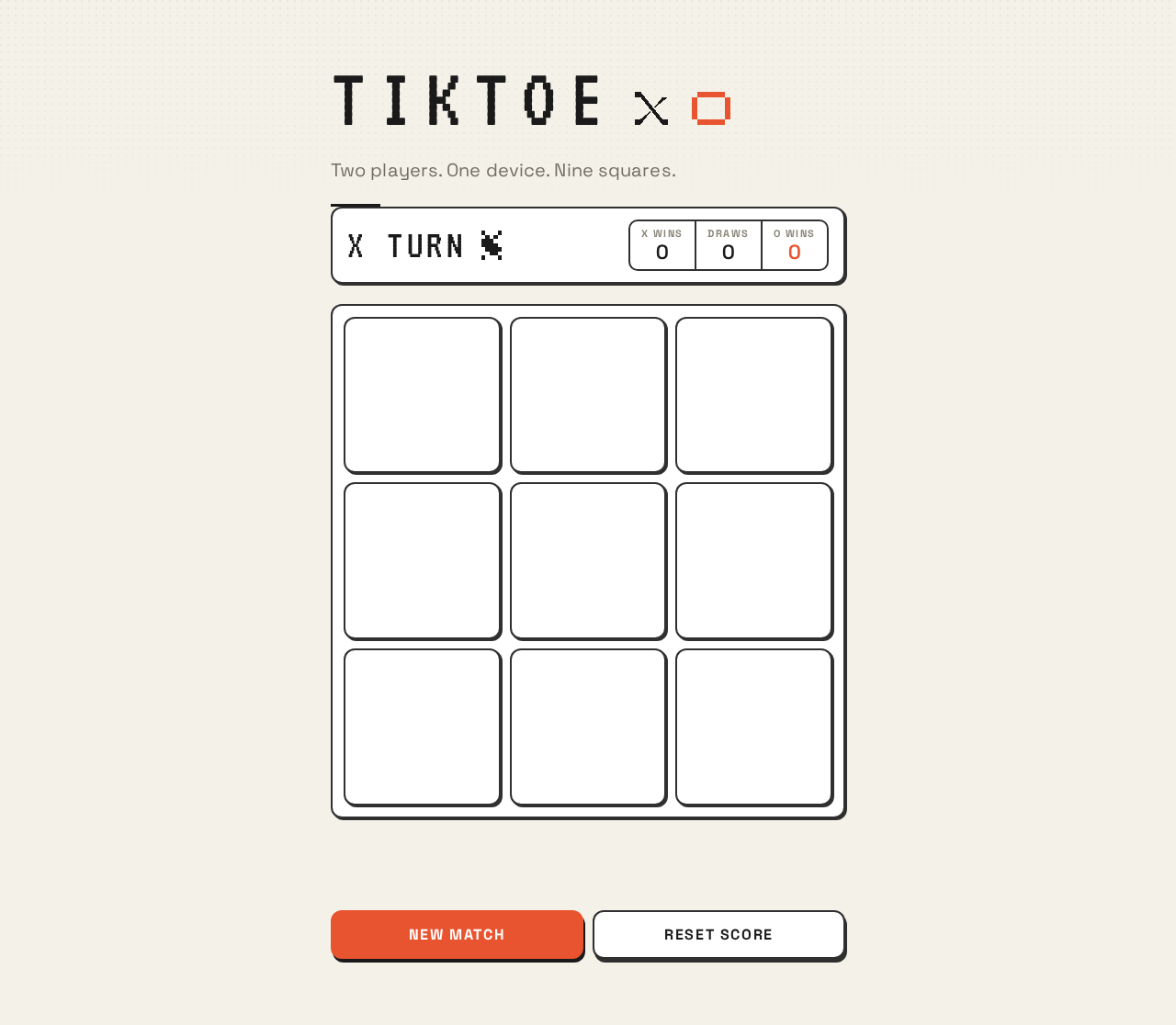
The Game page is the public entry surface and the only page. It is a single centred column, max-width 560px, on a warm paper ground, reading as one printed sheet rather than an application shell.
Information and state
- Wordmark:
TIKTOEin VT323, uppercase, with a pixel X in ink black and a pixel O in signal red sitting as a pair of icons to its right. - One rule of body copy beneath the wordmark: "Two players. One device. Nine squares."
- Status strip: the current turn named in VT323 uppercase with a live pixel X or O icon that flips colour as turns pass, plus a tabular score of X wins / draws / O wins.
- Board state: nine cells, each empty, occupied by X, or occupied by O.
- Result state: no result yet, X wins, O wins, or draw.
- Score state: running counts of X wins, draws, and O wins for the current session.
Primary actions
- Place a mark: select a legal empty cell to commit the current player's mark.
- Start a new match:
NEW MATCHclears the board and begins a fresh match while preserving the running score. - Reset the score:
RESET SCOREreturns the X wins / draws / O wins counters to zero.
Supporting actions and affordances
- Hovering a legal cell lifts it 2px, darkens the outline, and shows a faint 20%-opacity ghost of the mark that would go there, so the board teaches itself before commitment.
- Occupied cells and cells after a completed match are not selectable.
Domain entities
- Board: the 3×3 grid of nine cells with 10px gutters.
- Cell: a single square tile, either empty or holding one mark.
- Mark: X (ink black) or O (signal red).
- Turn: which mark is currently to be placed; X moves first.
- Match: one game from empty board to win or draw.
- Result: X wins, O wins, or draw, with the three winning cells identified when applicable.
- Score: session counters for X wins, draws, and O wins.
Component responsibilities
- Wordmark and mark pair: identifies the game and establishes the ink/red mark logic.
- Status strip: names the current turn and renders the live score as tabular numerals.
- Board: renders nine chunky 12px-radius square tiles with 2px ink outlines and 10px gutters; owns cell hit areas, hover ghosting, and the placed-mark pop-in.
- Mark glyphs: pixel-drawn X and O as inline SVG on a 16-unit grid with hard edges, sized clamp(44px, 14vw, 88px) so the marks are the loudest thing on the page.
- Win line: a single thick 6px ink rule drawn across the three winning cells.
- Result line: the outcome announced in VT323, accompanied by a pixel trophy for a win or a pixel handshake for a draw.
- Controls:
NEW MATCHandRESET SCORE, built as the same tile shape, slightly shorter, with a 2px bottom edge that depresses 2px on:active.
States
- Loading: none. The page is static HTML with no network dependency; the board is present and playable on first paint.
- Empty: a fresh match shows nine empty tiles, the status strip naming X as the current turn, and the score at its current values (zero on first open).
- In progress: placed marks render in their cells; the status strip names the next turn; legal cells remain hoverable and selectable.
- Success: on a win, the win line draws across the three winning cells, the result line announces the winner, the winning mark's score increments, and the board stops accepting marks.
- Draw: on a full board with no line, the result line announces a draw with the pixel handshake, the draw counter increments, and the board stops accepting marks.
- Error and recovery: there is no server or data dependency, so no network or persistence error state exists. The only invalid interaction is selecting an occupied cell or selecting any cell after the match has ended; both are refused by leaving the board unchanged, and the player recovers by choosing a legal empty cell or by pressing
NEW MATCH. - Continuation: after any result,
NEW MATCHclears the board, keeps the running score, and returns the status strip to X's turn.RESET SCOREzeroes the counters at any time without disturbing the board.
3. Functional Requirements
FR-1 — Open and play the game from HTML As a Player, I should open the delivered HTML and immediately see a playable Tic-Tac-Toe board, so that I can start a match without any setup.
- Provenance: explicit
- Trigger/input: the Player opens the HTML page in a browser.
- Observable result: the Game page renders the wordmark, the body line "Two players. One device. Nine squares.", the status strip, and a 3×3 board of nine empty tiles, with X named as the current turn.
- Access state: public; no identity required.
- Failure/recovery: none applicable — the page is static and self-contained.
- Continuation: the Player selects a cell to place the first mark.
FR-2 — Alternate turns placing X and O As a Player, I should place my mark on a legal empty cell and then hand the device to the other player, so that we alternate turns correctly on one device.
- Provenance: required_inference
- Trigger/input: the Player selects an empty cell during an unfinished match.
- Observable result: the current player's mark appears in that cell with a 2-step scale pop-in (0.7 → 1.05 → 1.0) over 140ms; the cell becomes non-selectable; the status strip flips to name the other mark with its live pixel icon changing colour.
- Access state: public; no identity required.
- Failure/recovery: selecting an occupied cell or any cell after the match has ended leaves the board unchanged; the Player recovers by choosing a legal empty cell or starting a new match.
- Continuation: the other player takes their turn on the same board.
FR-3 — See the win outcome As a Player, I should see clearly when a player has won, so that the match ends unambiguously.
- Provenance: required_inference
- Trigger/input: a placed mark completes three in a row horizontally, vertically, or diagonally.
- Observable result: a thick 6px ink rule draws across the three winning cells in 220ms with a stepped timing function; the result line swaps in with a hard cut in VT323 announcing the winner, accompanied by a pixel trophy; the winning mark's score increments; the board stops accepting marks.
- Access state: public; no identity required.
- Failure/recovery: none applicable; the outcome is determined locally and immediately.
- Continuation: the Player presses
NEW MATCHto play again, orRESET SCOREto zero the counters.
FR-4 — See the draw outcome As a Player, I should see clearly when the match is a draw, so that a full board with no line is not left ambiguous.
- Provenance: required_inference
- Trigger/input: all nine cells are filled with no three-in-a-row.
- Observable result: the result line announces a draw in VT323 with a pixel handshake; the draw counter increments; the board stops accepting marks.
- Access state: public; no identity required.
- Failure/recovery: none applicable.
- Continuation: the Player presses
NEW MATCHto play again, orRESET SCOREto zero the counters.
FR-5 — Track the running score As a Player, I should see a running score of X wins, draws, and O wins, so that a series of matches on one device has a visible tally.
- Provenance: required_inference
- Trigger/input: each completed match increments exactly one counter.
- Observable result: the status strip shows X wins / draws / O wins as tabular numerals, updated at the moment the result is announced.
- Access state: public; no identity required; the score is a session convenience on the current page, not a persisted per-person record.
- Failure/recovery: none applicable.
- Continuation: the counters persist across matches until the page is reloaded or
RESET SCOREis pressed.
FR-6 — Start a new match As a Player, I should be able to start a new match without reloading the page, so that playing again is frictionless.
- Provenance: required_inference
- Trigger/input: the Player presses
NEW MATCH. - Observable result: the board clears to nine empty tiles, any win line and result line are removed, the status strip returns to X's turn, and the running score is preserved.
- Access state: public; no identity required.
- Failure/recovery: none applicable.
- Continuation: the Player places the first mark of the new match.
FR-7 — Reset the score As a Player, I should be able to zero the running score, so that a new series can begin cleanly.
- Provenance: required_inference
- Trigger/input: the Player presses
RESET SCORE. - Observable result: X wins, draws, and O wins all return to zero; the board and current match state are untouched.
- Access state: public; no identity required.
- Failure/recovery: none applicable.
- Continuation: the Player continues the current match or starts a new one.
FR-8 — Deliver the game as HTML code As a Player, I should receive the game as HTML code I can open and play, so that the delivery matches the explicit request.
- Provenance: explicit
- Trigger/input: the delivered artifact is opened in a browser.
- Observable result: a single HTML page containing the complete game — markup, styling, and game logic — runs with no build step, no server, and no external service dependency.
- Access state: public; no identity required.
- Failure/recovery: none applicable.
- Continuation: the Player plays the game as described in FR-1 through FR-7.
4. User Personas
Player
Product context. The Player is the person playing Tic-Tac-Toe on a single device in a browser. They may be one person playing both sides for fun, or two people passing a phone or laptop between them. They arrive with no account, no onboarding, and no expectation of anything beyond a board and a result. The device may be a 375px phone or a 1280px laptop, and the game must read as one clean sheet at every width.
Primary goal. Complete a full match of Tic-Tac-Toe and know the result — win, loss, or draw — without any friction before, during, or after play.
Distinct accepted responsibilities.
- Opening the HTML and starting play immediately, with no setup step.
- Selecting a legal empty cell to commit the current mark, and reading the status strip to know whose turn it is before committing.
- Handing the device to the other player between turns, relying on the status strip and the live turn icon to make the handoff unambiguous.
- Reading the outcome: the win line across the three winning cells plus the result line, or the draw announcement on a full board.
- Tracking the running score across matches on the same page.
- Choosing to start a new match or reset the score.
Relevant inputs and decisions. Which empty cell to select on their turn; whether to start a new match after a result; whether to reset the score. The Player's inputs are cell selections and two control presses — nothing else.
Interactions with other accepted participants. There is no other accepted human persona. The Player interacts with the second player only physically, by passing the device; the product supports that handoff through the status strip naming the current turn and the live pixel X or O icon that flips colour as turns pass. The Player also interacts with the board itself, which teaches the next move through the faint ghost mark shown on hover over a legal cell.
Observable success. The Player sees their mark appear in the chosen cell, sees the turn indicator flip to the other mark, sees a clear win line and result line or a clear draw announcement, sees the score increment, and can start another match with one press.
What makes this role distinct. The Player is simultaneously the initiator and the recipient of every state change: they place the mark, and they are the one who must read the resulting turn, outcome, and score. There is no separate operator, administrator, or observer role, and no permission boundary — the whole product is one public surface with one kind of participant.
5. Core User Flows
Flow 1 — First open and first move
- The Player opens the delivered HTML page in a browser. The Game page renders: the
TIKTOEwordmark in VT323 with a pixel X in ink black and a pixel O in signal red beside it, the body line "Two players. One device. Nine squares.", the status strip, and a 3×3 board of nine empty chunky outlined tiles on the warm paper ground. - The Player reads the status strip, which names X as the current turn with the live pixel X icon.
- The Player hovers a legal cell. The tile lifts 2px, its outline darkens, and a faint 20%-opacity ghost X appears in the cell, showing what would be placed.
- The Player selects that cell. The X mark pops in with the 2-step scale keyframe (0.7 → 1.05 → 1.0) over 140ms, and the cell becomes non-selectable.
- The status strip flips to name O as the current turn, with the live pixel icon changing to signal red.
- Next step: the Player passes the device to the other player, who continues in Flow 2.
Flow 2 — Alternating turns and the handoff
- The second player receives the device and reads the status strip, which names O as the current turn with the signal-red pixel O icon.
- The second player hovers a legal empty cell; the ghost O appears in signal red at 20% opacity, and the tile lifts 2px.
- The second player selects the cell. The O mark pops in, the cell becomes non-selectable, and the status strip flips back to X.
- The players repeat steps 1–3, alternating marks, until either a player completes three in a row or all nine cells are filled.
- Failure/recovery: if a player selects an occupied cell or a cell after the match has ended, the board does not change; the player recovers by selecting a legal empty cell or by pressing
NEW MATCH. - Next step: the match resolves into Flow 3 or Flow 4.
Flow 3 — Win outcome and continuation
- A player selects a cell that completes three in a row horizontally, vertically, or diagonally.
- The mark pops in, and a thick 6px ink rule draws across the three winning cells in 220ms with a stepped timing function.
- The result line swaps in with a hard cut in VT323, announcing the winner, accompanied by a pixel trophy.
- The winning mark's counter in the status strip increments, and the board stops accepting marks.
- Next step: the Player presses
NEW MATCH. The board clears to nine empty tiles, the win line and result line are removed, the status strip returns to X's turn, and the running score is preserved. Play resumes at Flow 1 step 2.
Flow 4 — Draw outcome and continuation
- A player fills the ninth cell with no three-in-a-row on the board.
- The result line announces a draw in VT323 with a pixel handshake, and the draw counter in the status strip increments.
- The board stops accepting marks.
- Next step: the Player presses
NEW MATCHto clear the board and preserve the score, or pressesRESET SCOREto return X wins, draws, and O wins to zero before starting again.
Flow 5 — Resetting the score
- At any point — mid-match or after a result — the Player presses
RESET SCORE. - X wins, draws, and O wins all return to zero in the status strip.
- The board and the current match state are untouched.
- Next step: the Player continues the current match, or presses
NEW MATCHto begin a fresh series with a clean tally.
6. Visuals Colors and Theme
The creative direction is authoritative for this section. The muse is Susan Kare, and the headline idea is "Charming clarity: the Macintosh icon grid, played as a game." The translation into concrete tokens follows.
Color tokens — light mode (default)
| Role | Hex | Use |
|---|---|---|
| Background | #F4F1E8 | Warm paper-white ground for the whole page |
| Surface | #FFFFFF | Pure white board tiles, so the board reads as a sheet of paper with nine lifted chips |
| Text | #1A1A1A | Ink black: the X mark, all type, and the chunky 2px outlines |
| Primary | #1A1A1A | Ink black as the primary action and structural colour |
| Accent | #E8542F | Macintosh-era signal red: the O mark, the active-turn indicator, and the single hot button — roughly 8% of the surface |
| Muted | #8A8578 | Warm grey for labels, grid coordinates, and secondary copy |
| Focus ring | #3A6EA5 | Secondary blue, used only as a 1px focus ring, never as a fill |
A dark variant may exist but must keep the same ink/red logic; the paper-white ground is the default and the point.
Typography
- Headings: VT323 — used at large sizes for the wordmark, the turn indicator, and the result line. Uppercase, generous letterspacing, so it reads as a system label rather than a retro joke.
- Body: Space Grotesk — used for everything readable at length: the rule text, the reset button, the score strip. No weights below 400 for body so small copy stays crisp.
- Scale: 1.25 modular — 48 / 38 / 30 / 20 / 16.
- Wordmark:
clamp(40px, 12vw, 96px)in VT323. - Turn/result line:
clamp(28px, 7vw, 44px)in VT323. - Board cell glyph:
clamp(44px, 14vw, 88px). - Body and controls: 16–20px.
Shape language. Chunky 12px-radius square tiles with 2px ink outlines, like system-UI buttons you can almost press. The board is a 3×3 grid of these tiles with 10px gutters. The win line is a thick 6px ink rule drawn across the three winning cells. Buttons are the same tile shape, slightly shorter, with a 2px bottom edge that reads as a physical key. No blobs, no pills, and no soft shadows beyond a 2px offset ink shadow.
Spacing rhythm. A single centred column, max-width 560px, on the warm paper ground. Everything stacks cleanly at 375px with the board filling the width minus 24px of margin; at 768px and 1280px the column stays narrow and centred so the board never becomes a giant empty square.
Imagery style. The imagery is the interface itself: hand-tuned pixel X and O glyphs, a tiny pixel-art trophy for a win, and a pixel handshake for a draw, drawn as inline SVG on a 16-unit grid with hard edges and no anti-aliasing tricks. An optional faint 1px dot-grid texture on the paper ground at 8px spacing and 4% opacity makes the ground feel like graph paper without becoming decoration.
Explicitly avoided. No blue–indigo primary or accent on white; no glassmorphism, frosted panels, or soft multicolour gradient blobs behind the board; no grid of identical hover-lift cards; no Inter, Roboto, Arial, Helvetica, Open Sans, Lato, Poppins, or system-ui for headings or body; no rounded-pill buttons or blob shapes; no bouncy springy micro-interactions; no marketing hero above the game; no dark mode by default. The generic indigo/blue-on-white SaaS template is forbidden for this project.
7. Signature Design Concept
The board is the first thing you see, and it teaches itself.
The public entry is not a marketing hero — it is the game. A warm paper ground (#F4F1E8) carries a faint 8px dot grid at 4% opacity. At the top-left of the centred column sits the wordmark TIKTOE in VT323 at clamp(40px, 12vw, 96px), with a pixel X in ink black and a pixel O in signal red sitting as a pair of icons to its right — the two marks introduced before a single square is played. Directly beneath, one rule of Space Grotesk body copy: "Two players. One device. Nine squares."
Then the status strip, then the board as the dominant element: a white sheet of nine chunky outlined tiles, each empty cell showing a faint 20%-opacity ghost of the mark that would go there on hover. The composition is vertical, centred, and reads as a single printed sheet — no nav bar, no gradient, no floating cards, no blue button.
The signature moves that carry the concept:
- A 3×3 board of chunky outlined white tiles on warm paper, each legal cell showing a faint ghost X or O on hover before you commit — the board teaches itself.
- Pixel-drawn X and O glyphs as inline SVG on a 16-unit grid: the X in ink black (
#1A1A1A), the O in Macintosh signal red (#E8542F), sizedclamp(44px, 14vw, 88px)so the marks are the loudest thing on the page. - The win line as a single thick 6px ink rule drawn across the three winning cells in 220ms with a stepped timing function, then a pixel trophy and the result line in VT323 swapping in with a hard cut.
- A status strip above the board naming the current turn in VT323 uppercase with a live pixel X or O icon that flips colour as turns pass, plus a tabular score of X wins / draws / O wins.
- Two physical-feeling controls beneath the board —
NEW MATCHandRESET SCORE— built as the same tile shape with a 2px bottom edge that depresses 2px on:active, like a real key.
This concept recomposes only accepted content, states, and controls. It introduces no new behavior, page, or destination.
8. Interaction Model & Motion Direction
Interaction Model: Static (direction) Motion Tempo: restrained Hero Dimensionality: flat
The direction specifies a restrained tempo with frame-by-frame, stepped motion and a flat hero dimensionality. The interaction model is therefore static in the sense that there is no scroll-linked depth, no parallax, and no dimensional scene; the motion that exists is small, stepped, and state-driven.
Landing Hero Motion Brief
- Focal subject. The 3×3 board of nine chunky outlined white tiles on the warm paper ground, with the
TIKTOEwordmark and its pixel X/O pair above it. - Input → transformation → outcome thesis. The player hovers a legal cell → the tile lifts 2px, its outline darkens, and a faint 20%-opacity ghost of the mark appears → the player selects the cell, the mark pops in with a 2-step scale keyframe (0.7 → 1.05 → 1.0) over 140ms, and the status strip flips to the other mark. On a win, the 6px ink rule draws across the three winning cells in 220ms with a stepped timing function, and the result line swaps in with a hard cut.
- Motion vocabulary. Stepped, frame-like, no easing theatrics: a 2-step scale pop-in for placed marks, a 2px hover lift with a darkened outline, a 220ms stepped draw for the win line, and a hard cut — never a fade — for the result line.
- Composed first frame. Paper ground with the faint dot grid; the
TIKTOEwordmark in VT323 with the ink X and signal-red O beside it; the body line "Two players. One device. Nine squares."; the status strip naming X's turn with the live pixel X icon and the score at zero; and the empty 3×3 board, dominant and square, with no mark placed and no ghost visible until hover. - Reduced-motion state. With
prefers-reduced-motion, every motion becomes an instant state change: marks appear immediately with no scale keyframe, the hover lift and ghost are replaced by an immediate outline change, the win line appears fully drawn with no 220ms draw, and the result line appears with no transition.
9. Non-Functional Requirements
NFR-1 — HTML delivery The game must be delivered as HTML code: a single HTML page the user can open and play, with no build step, no server, and no external service dependency. Provenance: explicit. Rationale: the authoritative request states "write code in html," and the planning constraint records "Implementation must be written in HTML."
NFR-2 — Client-side execution All game logic — turn alternation, win and draw detection, score tracking, and new-match and score-reset behavior — must run locally in the browser. Provenance: required_inference. Rationale: the accepted behavior is a single-device browser game with no server, account, or persistence requirement.
NFR-3 — Responsive legibility
Readable text and controls must stay whole at every viewport: the wordmark, labels, numbers, and both controls must stay entirely inside the viewport and their container at 375px, 768px, and 1280px, wrapping or scaling (for example font-size: clamp(...) with its mobile size) to fit, with no other element covering any part of them. Provenance: explicit (creative direction). Rationale: the direction's readable-text-and-controls rule is binding and takes precedence over any cropping gesture.
NFR-4 — Reduced motion
With prefers-reduced-motion, all motion must become an instant state change. Provenance: explicit (creative direction).
NFR-5 — No identity or persistence The game must not require an account, sign-in, or session continuity, and must not persist the running score beyond the current page session. Provenance: required_inference. Rationale: no accepted behavior creates a durable relationship, obligation, entitlement, or value transfer bound to a particular person.
NFR-6 — No external dependencies for play Playing the game must not depend on any network call, third-party service, or remote asset. Provenance: required_inference. Rationale: the delivery is a self-contained HTML page opened and played directly.
10. Tech Stack
- HTML — the explicit delivery format. The game is a single HTML page containing markup, styling, and game logic. Provenance: explicit.
- CSS — inline or embedded in the HTML page, implementing the color tokens, VT323 and Space Grotesk typography, the 12px-radius chunky tile shape language, the 560px centred column, and the stepped motion described in the creative direction.
- JavaScript — embedded in the HTML page, implementing turn alternation, win and draw detection, the win-line and result-line states, the running score,
NEW MATCH, andRESET SCORE. - Inline SVG — the pixel X and O glyphs, the pixel trophy, and the pixel handshake, drawn on a 16-unit grid with hard edges.
- Fonts — VT323 for headings, the wordmark, the turn indicator, and the result line; Space Grotesk for body copy, the reset button, and the score strip.
No backend, database, container, or orchestration technology is required, because the accepted delivery is a single self-contained HTML page.
11. Assumptions and Constraints
Constraints
- The implementation must be written in HTML. This is an explicit, binding constraint.
- The game must be playable by opening the delivered HTML page directly, with no setup step.
- The visual and motion direction in Sections 6–8 is authoritative for palette, typography, shape language, layout, imagery, and motion tempo.
- The generic indigo/blue-on-white SaaS template is forbidden for this project.
Assumptions
- Assumption: "tiktoe game" means Tic-Tac-Toe, played on a 3×3 grid with alternating X and O marks. This interpretation is recorded in the planning scope as the accepted reading of the request.
- Assumption: Two players share one device, and the same Player persona occupies both sides of the match. The status strip naming the current turn is the mechanism that makes this handoff unambiguous.
- Assumption: The running score is a session convenience on the current page, not a persisted per-person record, because no accepted behavior requires durable per-person state.
- Assumption: X moves first in every match. This is the conventional starting mark and is consistent with the direction's status strip naming X as the initial turn.
- Assumption: The board is not interactive after a match ends until
NEW MATCHis pressed, so the result stays readable.
Out of scope
- Online or networked multiplayer, matchmaking, and opponent AI.
- Accounts, profiles, sign-in, and any identity or permission model.
- Persistent leaderboards, cross-session statistics, and analytics.
- Chat, messaging, and social features.
- Monetization, advertising, and payment.
- Any second page, settings screen, or results screen.
- Dark mode as a default presentation.
12. Glossary
- Board — the 3×3 grid of nine chunky outlined tiles with 10px gutters, on which marks are placed.
- Cell — a single square tile on the board, either empty or holding one mark.
- Mark — a player's symbol: X (ink black
#1A1A1A) or O (Macintosh signal red#E8542F). - Turn — the state indicating which mark is currently to be placed; X moves first.
- Match — one game of Tic-Tac-Toe, from an empty board to a win or a draw.
- Result — the outcome of a match: X wins, O wins, or draw.
- Win line — the thick 6px ink rule drawn across the three winning cells when a player completes three in a row.
- Ghost mark — the faint 20%-opacity preview of the mark that would be placed, shown when hovering a legal empty cell.
- Status strip — the strip above the board naming the current turn with a live pixel X or O icon, plus the tabular score.
- Score — the running session tally of X wins, draws, and O wins.
- New match — the
NEW MATCHcontrol, which clears the board and begins a fresh match while preserving the running score. - Reset score — the
RESET SCOREcontrol, which returns the X wins, draws, and O wins counters to zero without disturbing the board. - Player — the accepted human persona: the person playing the game on a single device in the browser.
- VT323 — the bitmap-terminal typeface used for the wordmark, the turn indicator, and the result line.
- Space Grotesk — the typeface used for body copy, the reset button, and the score strip.
tiktoe
Two players. One device. Nine squares.
tiktoe
Two players. One device. Nine squares.
No comments yet. Be the first!