tidal-start
 Diya Trivedi
start a project to build a simple single page design of calculator

Comments (0)
Sign in to leave a comment
System Requirements
System Requirements Document for tidal-start
1. Introduction
tidal-start is a simple calculator delivered as a single-page design. The product intent is narrow and explicit: a person opens one page, enters numbers and arithmetic operators, sees the computed result displayed on the page, and can clear the current entry or calculation to start over. There is no account, no navigation, no second screen, and no workflow beyond arithmetic entry, result display, and clearing.
The audience is the everyday person who wants fast, accurate relief from mental arithmetic — a single precision instrument they can use in five seconds. The design register is calm trust: a machined, legible, honest object rather than a toy or a dashboard.
2. System Overview
tidal-start is a single-page web calculator. The page is anonymous and public: no identity, session, or persistence is required to use it, and the accepted behavior creates no durable actor-specific state. All arithmetic entry, result display, and clearing happen within the one page.
Actors
- Calculator User (human, active): enters numbers and operators, reads the computed result, and clears to start over.
- Frontend application (system): renders the single page, holds the current expression and result state in the browser, and evaluates arithmetic.
- Shared backend (system, provisioned): a FastAPI process available for application APIs and domain modules. The accepted calculator behavior requires no server-side computation, storage, or identity, so the backend carries no calculator domain logic in the current scope.
- Database (system, provisioned): MariaDB for application-owned persistent data. The accepted behavior defines no persistent data, so no calculator entities are stored.
Current delivery: one custom React page (Calculator) served to anonymous visitors, with all calculator state held client-side. The provisioned backend and database remain part of the deployment inventory but are not exercised by current calculator requirements.
Removed from scope
- User accounts, sign-in, and sessions (also: authentication, login)
- Calculation history and saved calculations (also: memory keys, M+, M−)
- Scientific functions, parentheses, and expression parsing beyond basic arithmetic (also: trigonometry, exponents)
- Multiple pages, navigation, and routing beyond the single page (also: sidebar, menu)
2a. Product Interpretation and Delivery Boundary
tidal-start is delivered as exactly one page. That page is the anonymous public entry: a visitor lands on it and can immediately use the calculator without establishing identity, because the accepted behavior requires no continuity across visits and creates no commitment, entitlement, or value transfer bound to a participant. Nothing is protected, and no access boundary exists beyond reaching the page itself.
The calculator's working state — the current entry, the pending operator, and the displayed result — lives in the browser for the duration of the visit. Clearing resets that state. Because the source accepts no history, no saved results, and no accounts, the product deliberately does not persist anything about a calculation.
The provisioned shared backend and MariaDB database are part of the deployment but are not required by any current calculator requirement. They are retained as infrastructure, not as product behavior; no calculator API, entity, or table is defined here. Future ideas are kept out of the current page and acceptance criteria (see Section 11).
2c. Page Content and Component Coverage
Calculator
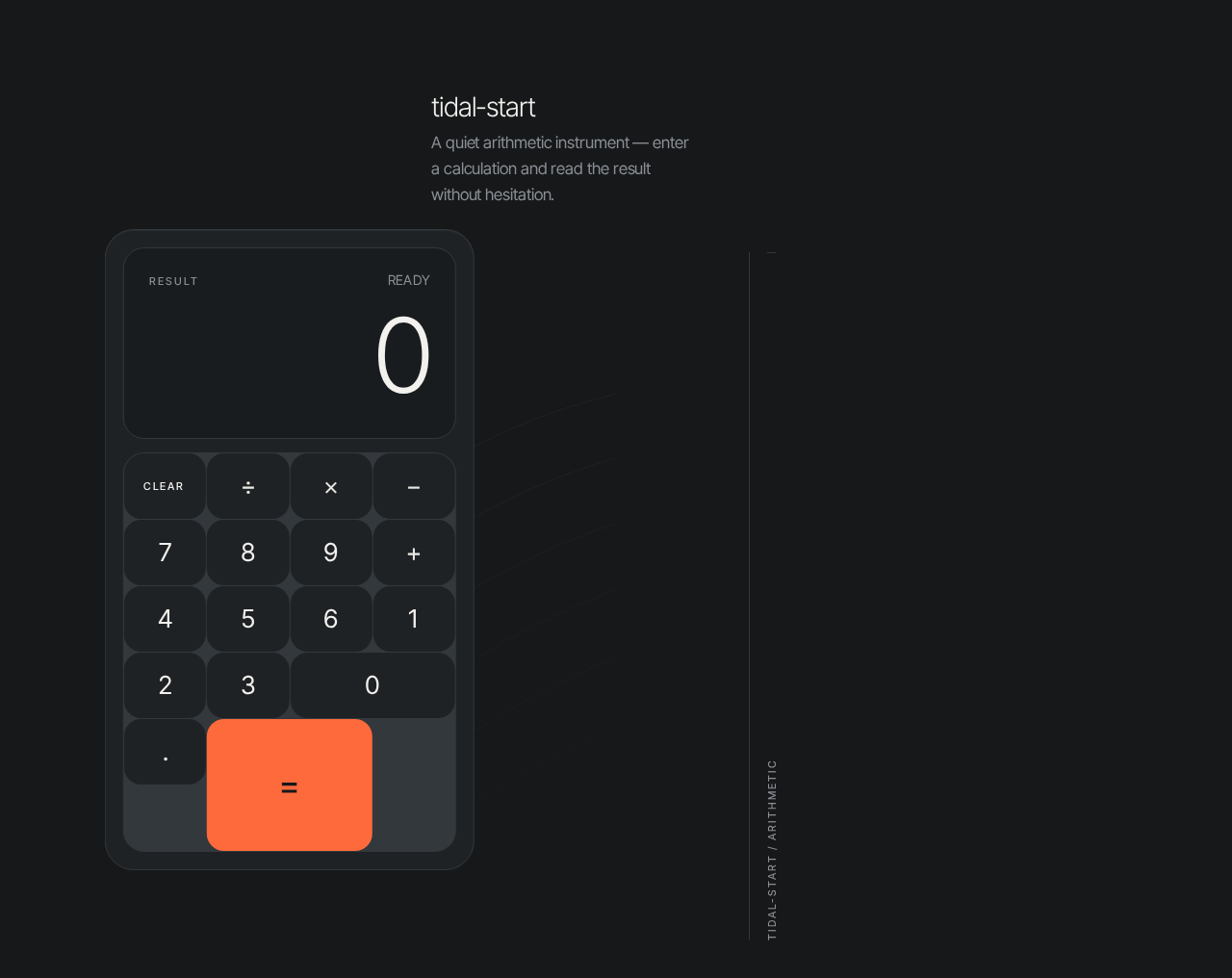
The single page of the product. It is the anonymous public entry and the complete working surface: wordmark and one-line description, the oversized result display, and the keypad, all within one centered instrument column.
Information and state
- Current expression state: the digits entered so far, the pending operator, and the second operand once entered.
- Displayed result: the oversized tabular numeral in the display well, showing the current entry or the computed result.
- Active operator state: exactly one operator key may be shown as active (ember accent) while an operator is pending.
- Error state: an invalid operation (for example division by zero) replaces the numeral with a short, legible error message in the display well.
- No loading state is required; arithmetic is instantaneous and client-side.
Primary actions
- Digit keys (0–9) and decimal point: append to the current entry.
- Operator keys (+, −, ×, ÷): set or replace the pending operator and mark that key active.
- Equals key (the single ember accent): evaluate the pending expression and display the result.
- Clear key: reset the current entry or the whole calculation to start over.
Supporting elements
- Wordmark "tidal-start" and a one-line description above the instrument, left-aligned to the slab edge.
- Micro-labels ('RESULT', 'CLEAR') in 11px uppercase tracked type.
- On desktop, a vertical hairline rule with a rotated micro-label ('TIDAL-START / ARITHMETIC') in the right margin; at 375px this collapses to a horizontal rule under the wordmark.
Domain entities
- Calculation (in-memory only): current entry, pending operator, stored operand, displayed result, error flag. Not persisted.
Component responsibilities
- Instrument column: max-width 420px on mobile, 480px on desktop, minimum 96px top margin, offset slightly left of center at 1280px.
- Display well: recessed surface at 22px radius, hosting the result numeral at clamp(56px, 14vw, 128px), tabular numerals, off-white; cross-fades over 180ms when the value changes.
- Keypad slab: aluminium-grey surface at 28px radius with a 1px top bevel highlight and hairline seams between rows; 4-column key grid with 18px continuous-curve keys.
- Key: depresses exactly 1px with a 120ms ease-out on press and releases; no hover-lift, no shadow.
States
- Empty/initial: display shows
0; no operator active. - Entry in progress: display shows the digits entered.
- Operator pending: the chosen operator key is ember-active.
- Success: computed result shown in the display well.
- Error: invalid operation shows an error message; the Clear key returns the instrument to the initial state.
- Reduced motion: all transitions are instant and the load reveal is removed.
3. Functional Requirements
FR-1 — Single-page calculator delivery (explicit) As a Calculator User I should reach the entire calculator on one page so that I can do arithmetic without navigating anywhere.
- Trigger: the visitor opens the product.
- Observable result: the Calculator page renders the wordmark, description, display well, and keypad as one instrument.
- Access: anonymous, public; no identity required.
- Failure/recovery: if the page fails to render, reloading returns the same single page; there is no alternate destination.
- Continuation: the user proceeds directly to entry.
FR-2 — Enter numbers and arithmetic operators (explicit) As a Calculator User I should enter numbers and arithmetic operators so that I can build the calculation I want.
- Trigger: the user presses digit keys, the decimal point, and an operator key (+, −, ×, ÷).
- Observable result: digits append to the current entry in the display well; the pressed operator becomes the pending operator and is shown as the single active operator (ember accent).
- Access: anonymous.
- Failure/recovery: pressing an operator with no entry yet leaves the display unchanged; pressing a second operator replaces the pending operator rather than stacking.
- Continuation: the user enters the second operand or presses equals.
FR-3 — See the computed result displayed (explicit) As a Calculator User I should see the computed result displayed on the page so that I know the answer.
- Trigger: the user presses the equals key with a pending expression.
- Observable result: the result appears as the oversized tabular numeral in the display well, cross-fading over 180ms (instant under reduced motion).
- Access: anonymous.
- Failure/recovery: an invalid operation (such as division by zero) shows a short error message in the display well instead of a numeral; the user clears to recover.
- Continuation: the user may continue entering a new calculation or clear.
FR-4 — Clear the current entry or calculation (explicit) As a Calculator User I should clear the current entry or calculation so that I can start over.
- Trigger: the user presses the Clear key.
- Observable result: the current entry or the whole calculation resets and the display returns to
0with no active operator. - Access: anonymous.
- Failure/recovery: clearing from an error state also returns the instrument to the initial state.
- Continuation: the user begins a new calculation.
FR-5 — Tactile key feedback (explicit, from creative direction) As a Calculator User I should feel each key respond when pressed so that entry feels precise and confirmed.
- Trigger: any key press.
- Observable result: the key depresses exactly 1px with a 120ms ease-out and releases; no bounce, no hover-lift.
- Access: anonymous.
- Failure/recovery: under
prefers-reduced-motion, the press state is instant. - Continuation: entry continues normally.
4. User Personas
Calculator User
Product context. An ordinary person who needs a quick, accurate answer to everyday arithmetic and wants relief from doing it in their head. They arrive at the single page with no account and no setup, often for a five-second task.
Primary goal. Enter a calculation and read a trustworthy result immediately, then clear and move on.
Distinct accepted responsibilities.
- Enters numbers and arithmetic operators to build an expression.
- Reads the computed result in the oversized display.
- Clears the current entry or the whole calculation to start over.
- Recovers from an invalid operation by clearing.
Relevant inputs and decisions. Which digits and operator to enter, when to press equals, and when to clear. The user decides when a calculation is finished and when to begin a new one.
Interactions with other participants. The Calculator User is the only human participant. The frontend application evaluates and displays results; the user is the sole initiator and the sole reader of outcomes. No handoff to another person occurs.
Observable success. The result numeral appears in the display well and matches the arithmetic entered; clearing returns the instrument to 0 ready for a new calculation.
5. Core User Flows
Flow 1 — Perform a calculation
- The Calculator User opens the product and lands on the Calculator page (anonymous, no sign-in).
- The instrument fades up 8px over 400ms (removed under reduced motion), showing
0in the display well. - The user presses digit keys; each digit appends to the current entry and each key depresses 1px with a 120ms ease-out.
- The user presses an operator key (+, −, ×, ÷); that key becomes the single ember-active operator.
- The user enters the second operand.
- The user presses the equals key; the frontend evaluates the expression and the result cross-fades into the display well over 180ms as the oversized tabular numeral.
- Continuation: the user either begins a new calculation or presses Clear.
Flow 2 — Clear and start over
- From any state on the Calculator page, the Calculator User presses the Clear key.
- The current entry or the whole calculation resets; the display returns to
0and no operator is active. - Continuation: the user begins a new calculation as in Flow 1.
Flow 3 — Recover from an invalid operation
- The Calculator User enters an expression that cannot be evaluated (for example division by zero) and presses equals.
- The display well shows a short error message instead of a numeral.
- The user presses Clear; the instrument returns to the initial
0state. - Continuation: the user re-enters a valid calculation.
6. Visuals Colors and Theme
The muse is Jony Ive; the headline idea is quiet precision — a calculator treated like a precision instrument.
Palette (dark mode)
- Background:
#16181A(graphite ground) - Surface:
#1F2225(aluminium-grey keypad slab) - Text:
#F2F1EE(warm off-white; all readable type and result numerals) - Primary:
#E8E6E1 - Accent:
#FF6A3D(ember; reserved for the equals key and the active operator — never more than two spots on screen) - Muted:
#8A8F94(secondary labels at 14px+ only; never the result) - Hairlines:
#33383C
Typography
- Family: Inter Tight for headings and body.
- Result numeral: Light 300,
clamp(56px, 14vw, 128px), tabular numerals, tracking −0.04em. - Wordmark: Light 300,
clamp(20px, 3vw, 28px). - Section labels: 11px uppercase, 0.18em tracking, weight 500.
- Keypad digits:
clamp(20px, 2.4vw, 26px)at weight 400. - Helper copy: 15–17px at weight 400, line-height 1.6.
- Scale: 1.5 modular.
Shape language. Soft continuous-curve radii — keys 18px, keypad slab 28px, display well 22px — with 1px hairlines in #33383C instead of shadows. No pill buttons, no blobs, no glass.
Layout. Single-column centered instrument: oversized result display above a 4-column keypad slab, inside a max-width 420px column on mobile and 480px on desktop, with a minimum 96px top margin. Wordmark and one-line description sit above the instrument, left-aligned to the slab edge. At 1280px the instrument is offset slightly left of center with a tall hairline rule and rotated vertical micro-label ('TIDAL-START / ARITHMETIC') in the right margin. Everything stacks and stays whole at 375px and 768px.
Imagery. No photography and no illustration. The instrument itself is the image: a graphite slab with a recessed display well, hairline seams between key rows, and a faint 1px inner highlight along the top edge of the slab suggesting a machined bevel. A single topographic hairline motif may run at low opacity behind the instrument, cropped off the right edge, never behind readable text.
Accessibility. Readable text and controls stay whole inside the viewport and their container at 375px, 768px, and 1280px, wrapping or scaling to fit; no element covers them. Decoration may bleed off edges; readable content may not.
7. Signature Design Concept
The first screen is the instrument, not a marketing hero. A full-bleed graphite field (#16181A) holds a single softly lit keypad slab floating in the upper-middle, its oversized result numeral dominating the recessed display well above it. A small left-aligned wordmark and one line of helper copy sit above the slab, and on desktop a vertical hairline rule with a rotated micro-label anchors the right margin.
The signature moves, implemented together:
- An oversized tabular result numeral at
clamp(56px, 14vw, 128px)in a recessed display well, cross-fading on every calculation instead of a small right-aligned readout. - A single graphite keypad slab with continuous-curve 18px keys, hairline seams, and a 1px top bevel highlight — it reads as a machined object, not a card grid.
- One ember accent (
#FF6A3D) used only on the equals key and the currently active operator, so the eye always knows where the action is. - A vertical hairline rule with a rotated uppercase micro-label ('TIDAL-START / ARITHMETIC') down the right margin on desktop, collapsing to a horizontal rule under the wordmark at 375px.
- Keys depress exactly 1px on press with a 120ms ease-out — tactile feedback with zero bounce or hover-lift.
There is no centered headline-plus-button stack, no gradient, no blob; the dominant element is the enormous numeral and the physical slab beneath it, with the ember equals key as the only warm note in the frame.
8. Interaction Model & Motion Direction
Interaction Model: Animated Motion Tempo: restrained Hero Dimensionality: layered_2d
Landing Hero Motion Brief
- Focal subject: the keypad slab and its oversized result numeral in the recessed display well — the instrument itself.
- Input → transformation → outcome thesis: a key press depresses the key 1px (120ms ease-out) → the entry updates in the display well → pressing equals cross-fades the result numeral over 180ms into the display well. Only accepted calculator behavior is animated.
- Motion vocabulary: restrained — 1px key depression with 120ms ease-out and release; 180ms cross-fade of the result numeral on change; a single reveal-on-load where the instrument fades up 8px over 400ms. No bounce, no particles, no hover-lift, no continuous decorative loops.
- Composed first frame: graphite field, instrument faded up and settled,
0in the display well, no operator active, ember equals key as the only warm note. - Reduced-motion state: all transitions collapse to instant state changes and the load reveal is removed; the instrument appears fully composed with no motion.
9. Non-Functional Requirements
- Single-page constraint (explicit): the design must be a single page; no additional routes, navigation, or secondary screens.
- Responsive integrity (explicit, from creative direction): readable text and controls remain whole inside the viewport and their container at 375px, 768px, and 1280px; the instrument stacks and stays whole.
- Reduced motion (explicit, from creative direction): with
prefers-reduced-motion, all transitions are instant and the load reveal is removed. - Accessibility of contrast (required_inference): off-white
#F2F1EEon graphite#16181Aand on surface#1F2225provides legible contrast for the result numeral and labels; muted#8A8F94is used only for secondary labels at 14px+. - Client-side responsiveness (required_inference): arithmetic evaluation is instantaneous and local, so no loading state is shown.
- No persistence (required_inference): no calculation state is stored server-side or across visits, consistent with the absence of accounts and history.
10. Tech Stack
- Frontend: React application UI rendering the single Calculator page; calculator state and arithmetic evaluation held client-side.
- Backend: shared FastAPI process for application APIs and domain modules (provisioned; no calculator domain logic required in current scope).
- Database: MariaDB for application-owned persistent data (provisioned; no calculator entities defined in current scope).
- Containerization: Docker / docker-compose for the frontend, backend, and database services.
- Typography: Inter Tight (Light 300, Regular 400, Medium 500) with tabular numerals.
11. Assumptions and Constraints
Assumptions
- The calculator supports the four basic arithmetic operations (+, −, ×, ÷) and decimal entry, as the minimum implied by "enter numbers and arithmetic operators." (required_inference)
- An invalid operation such as division by zero shows a short error message in the display well and is recoverable via Clear. (required_inference)
- The page is anonymous and public; no identity, session, or persistence is required. (required_inference, consistent with the absence of accounts and history)
- The provisioned backend and database are retained as infrastructure but carry no calculator behavior in current scope.
Constraints
- The design must be a single page. (explicit)
- The product is a simple calculator. (explicit)
- The palette, fonts, surfaces, tone, and layout follow the supplied creative direction; the generic indigo/blue-on-white SaaS template is forbidden. (explicit)
Future (not in current scope, not in current pages or acceptance)
- Calculation history or memory functions.
- Scientific functions or expression parsing beyond basic arithmetic.
- Any account or saved-calculation capability.
12. Glossary
- Instrument: the calculator's visual object — the display well and keypad slab together.
- Display well: the recessed surface hosting the oversized result numeral.
- Keypad slab: the aluminium-grey surface holding the 4-column key grid.
- Active operator: the single operator key shown in ember accent while an operator is pending.
- Ember accent: the
#FF6A3Dcolor reserved for the equals key and the active operator. - Expression: the current entry, pending operator, and second operand awaiting evaluation.
- Clear: the action that resets the current entry or the whole calculation to
0.
tidal-start
A quiet arithmetic instrument — enter a calculation and read the result without hesitation.
tidal-start
A quiet arithmetic instrument — enter a calculation and read the result without hesitation.
No comments yet. Be the first!