tidal-pdf
 Pardeep Bagri
PDF Converter app

Comments (0)
Sign in to leave a comment
System Requirements
System Requirements Document (SRD) for tidal-pdf
1. Introduction
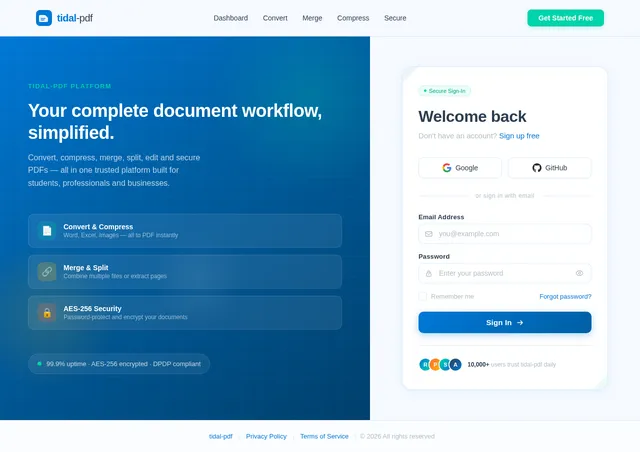
The tidal-pdf project is a comprehensive PDF converter application designed to simplify document workflows for users in India and beyond. This tool aims to provide an all-in-one solution for converting, compressing, merging, and managing PDF files. Whether you're a student, professional, or business user, tidal-pdf is tailored to meet your needs with a seamless and intuitive experience.
This document outlines the system requirements for tidal-pdf, ensuring clarity in development and alignment with user expectations.
2. System Overview
tidal-pdf is a web-based and mobile-friendly application that offers a wide range of PDF-related functionalities. The system is designed to cater to diverse user groups, including students, professionals, and businesses, by providing tools for:
- Converting files to and from PDF format (e.g., Word, Excel, Images).
- Compressing PDF files to reduce file size.
- Merging multiple PDFs into a single document.
- Splitting PDFs into smaller sections.
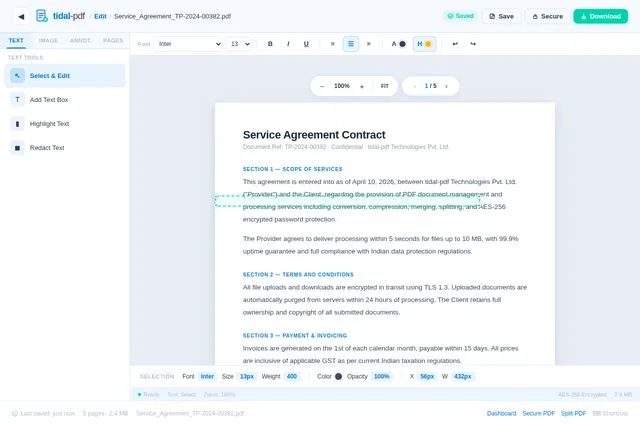
- Editing PDFs, including text and image modifications.
- Securing PDFs with encryption and password protection.
The application will be accessible via both web browsers and mobile devices, ensuring flexibility and convenience for users. The system will prioritize user-friendly interfaces, fast processing times, and robust security measures.
3. Functional Requirements
As a User:
- I should be able to upload files for conversion to/from PDF.
- I should be able to compress PDF files to reduce their size.
- I should be able to merge multiple PDF files into one.
- I should be able to split a PDF into smaller sections.
- I should be able to edit text and images within a PDF.
- I should be able to secure a PDF with encryption and password protection.
- I should be able to preview the output before downloading.
- I should be able to access the application on both web and mobile platforms.
As an Admin:
- I should be able to monitor user activity and system performance.
- I should be able to manage user accounts and permissions.
- I should be able to generate reports on system usage and errors.
- I should be able to update system features and configurations.
4. User Personas
1. Student
- Needs: Convert lecture notes, compress large files for sharing, and merge multiple PDFs for assignments.
- Devices: Mobile and web.
- Skill Level: Basic to intermediate.
2. Professional
- Needs: Edit contracts, secure sensitive documents, and split large reports for distribution.
- Devices: Desktop and mobile.
- Skill Level: Intermediate to advanced.
3. Business User
- Needs: Batch process files, manage team accounts, and generate usage reports.
- Devices: Desktop.
- Skill Level: Advanced.
5. Visuals Colors and Theme
Unique Color Palette for tidal-pdf:
- Background: #F5F9FF (Soft Sky Blue)
- Surface: #FFFFFF (Pure White)
- Text: #2C3E50 (Deep Slate Gray)
- Accent: #0078D7 (Vivid Azure Blue)
- Muted: #B0BEC5 (Cool Gray)
This palette reflects professionalism, clarity, and trustworthiness, aligning with the application's purpose of simplifying document workflows.
6. Signature Design Concept
Interactive Origami Landing Page
The homepage of tidal-pdf will feature an interactive origami-inspired design. Users will see a dynamic 3D paper-folding animation that transforms into different icons representing the app's core features (e.g., a folded paper crane for "Convert," a layered stack for "Merge," and a lock for "Secure").
- Animation Details: As users hover over each feature, the origami folds will animate smoothly, unfolding to reveal a brief description of the feature.
- Transitions: The background will subtly shift between shades of the color palette, creating a calming gradient effect.
- Micro-interactions: Clicking on a feature will trigger a ripple effect, leading users to the respective tool page.
- Mood: The design will evoke creativity and precision, resonating with the app's focus on document management.
This unique concept will make tidal-pdf instantly memorable and engaging for users.
7. Non-Functional Requirements
- Performance: The system should process file conversions within 5 seconds for files up to 10 MB.
- Scalability: The system should support up to 10,000 concurrent users.
- Security: All file uploads and downloads must be encrypted using AES-256.
- Availability: The system should maintain 99.9% uptime.
- Localization: The system should support English and Hindi languages initially, with the ability to add more in the future.
8. Tech Stack
Frontend:
- React for Web
- React Native for Mobile App
Backend:
- Python
- FastAPI
Database:
- MySQL (with Alembic for migrations)
AI Models:
- GPT 5.4 for user-friendly responses
- Claude 4.6 Opas for academic or coding work
AI Tools:
- Litellm for LLM Routing
- Langchain
Orchestration:
- Docker for local orchestration
- Kubernetes for server-side orchestration
9. Assumptions and Constraints
Assumptions:
- Users will have stable internet connections.
- The majority of users will access the system via modern web browsers or smartphones.
- File uploads will not exceed 100 MB per file.
Constraints:
- Initial deployment will focus on the Indian market.
- The system must comply with Indian data protection regulations.
- Limited support for older browsers (e.g., Internet Explorer).
10. Glossary
- PDF: Portable Document Format, a file format developed by Adobe.
- AES-256: Advanced Encryption Standard with a 256-bit key, used for secure data encryption.
- LLM: Large Language Model, an AI model designed for natural language processing tasks.
- Docker: A platform for developing, shipping, and running applications in containers.
- Kubernetes: An open-source system for automating deployment, scaling, and management of containerized applications.

Transform Your Documents
with Ease
Convert, Compress, Merge, and Secure PDFs — All in One Place. Simplify your document workflow with tidal-pdf.
Everything You Need for PDF Workflows
Six powerful tools designed to handle every aspect of your document management — fast, secure, and effortless.
Convert
Transform files to and from PDF effortlessly. Support for Word, Excel, Images, and more formats with pixel-perfect output.
Learn More→Compress
Shrink PDF file sizes by up to 90% without compromising quality. Perfect for sharing and uploading large documents.
Learn More→Merge
Combine multiple PDF files into a single organized document. Drag-and-drop reordering makes it easy to arrange pages.
Learn More→Split
Break large PDFs into smaller sections or extract specific pages. Ideal for distributing reports and organizing content.
Learn More→Edit
Modify text, images, and annotations directly within your PDFs. A full-featured editor right in your browser.
Learn More→Secure
Protect sensitive documents with AES-256 encryption and password protection. Control who can view, edit, or print your files.
Learn More→Unfold the Power of tidal-pdf
Hover over each shape to discover our suite of document tools. Click to dive right in.
Designed for Every User
Whether you're a student managing assignments or a business scaling document workflows, tidal-pdf adapts to your needs.
Student
Simplify your academic workflow
Key Needs
- Convert lecture notes to PDF instantly
- Compress large files for easy sharing
- Merge multiple PDFs for assignments
Professional
Streamline your document operations
Key Needs
- Edit contracts and legal documents
- Secure sensitive files with encryption
- Split large reports for distribution
Business User
Scale document management for your team
Key Needs
- Batch process files at scale
- Manage team accounts and permissions
- Generate detailed usage reports
Admin
Full control over platform operations
Key Needs
- Monitor user activity and performance
- Manage accounts and system permissions
- Update features and configurations
How tidal-pdf Works
Transform your documents in five easy steps. No software to install, no learning curve—just results.
Drag and drop your PDF, Word, Excel, or image file into tidal-pdf. We support all major document formats for seamless conversion.
Select from powerful tools—Convert, Compress, Merge, Split, Edit, or Secure. Customize settings to match your exact needs.
Review your processed document in our built-in previewer. Verify formatting, layout, and quality before finalizing.
Download your optimized file instantly. Share via link or save to cloud storage—your documents, ready in seconds.
Add password protection or AES-256 encryption. All files are automatically deleted from our servers after processing.
Trusted by Thousands of Users
See how students, professionals, and businesses rely on tidal-pdf to simplify their document workflows every day.
Simple, Transparent Pricing
Choose the plan that fits your document workflow. No hidden fees, cancel anytime.
Free
Perfect for students and casual users
- ✓Convert up to 5 PDFs per day
- ✓Compress files up to 10MB
- ✓Merge up to 3 documents
- ✓Basic PDF editing
- ✕Batch processing
- ✕Password protection
- ✕Priority support
Pro
Ideal for professionals and power users
- ✓Unlimited PDF conversions
- ✓Compress files up to 100MB
- ✓Merge unlimited documents
- ✓Advanced PDF editing tools
- ✓Batch processing up to 50 files
- ✓AES-256 encryption & passwords
- ✓Priority email support
Enterprise
Built for teams and business workflows
- ✓Everything in Pro, plus:
- ✓Unlimited file size
- ✓Team accounts & admin dashboard
- ✓Usage reports & analytics
- ✓Batch processing unlimited files
- ✓GDPR & data compliance tools
- ✓Dedicated account manager
All plans include secure file handling with AES-256 encryption. Need a custom plan? Contact us.
Your Documents Are Safe With Us
We take security seriously. Every file you process on tidal-pdf is protected with enterprise-grade encryption and strict compliance standards.
AES-256
End-to-End Encryption
All file uploads and downloads are protected with military-grade AES-256 encryption.
99.9%
Uptime Guarantee
Our infrastructure ensures your tools are available whenever you need them, around the clock.
GDPR
Regulatory Compliance
Fully compliant with GDPR and Indian data protection regulations for your peace of mind.
10,000+
Concurrent Users
Built to scale seamlessly and handle thousands of simultaneous users without slowdowns.
Ready to Transform Your Document Workflow?
Join thousands of students, professionals, and businesses who trust tidal-pdf to convert, compress, merge, and secure their documents effortlessly.
Frequently Asked Questions
Everything you need to know about tidal-pdf. Can't find the answer you're looking for? Reach out to our support team.
Still have questions? We're here to help.
Contact Support
No comments yet. Be the first!