tidal-locks
 Hello Mcdonald
write a complete code/builder to clone a software called brute


Comments (0)
Sign in to leave a comment
System Requirements
System Requirements Document for tidal-locks
1. Introduction
tidal-locks is an original password testing tool for authorized security auditing of live login forms. It exists so that a technically fluent, authorized security auditor can point the tool at a live login form they are cleared to test, run a password-strength/security audit against it, and review the resulting findings as evidence they can stand behind professionally.
The product is deliberately not a clone of, copy of, or reference to any existing commercial product called "Brute" — neither its code, its name, its logo, nor its interface. tidal-locks is built from scratch as an independent instrument.
The audience is a single role: the Authorized Security Auditor — someone who lives in terminals, request logs, and evidence, and who is staking their professional authorization on the correctness of the tool's output. The product's tone is instrument-grade trust and precision with a slight edge of operational tension: not a friendly consumer app, not a neutral enterprise admin panel.
2. System Overview
tidal-locks is a web application with application-owned identity and a custom UI. It delivers:
- An anonymous Landing page that explains the original tool and its authorized-auditing purpose.
- Self-service Sign Up enrollment for a new auditor.
- Login returning verification for an auditor to reach their protected audit work and durable audit results.
- An Audits workspace (login-protected) where an authorized auditor confirms authorization for a target live login form, runs a password audit against it, and reviews the resulting audit results.
Actors
- Authorized Security Auditor (human, active) — the sole accepted persona. Runs audits only against live login forms they are authorized to test, reviews findings, and uses them to assess the login forms' password handling and strength behavior.
- tidal-locks application backend (system) — executes the audit against the target login form, records durable audit state and results, and enforces that protected audit work is reachable only by an authenticated auditor.
- Target live login form (external system) — the third-party login form under audit; it receives the audit's password attempts and returns responses that the tool interprets.
Narrow exclusions
- No cloning or copying of the existing commercial product "Brute" or its code, name, logo, or interface.
- No auditing of any login form the auditor is not authorized to test.
- No adjacent account-management capabilities beyond first-use enrollment and returning verification.
- No differentiated roles, RBAC, or permission tiers — a single auditor role owns its own audit work.
2a. Product Interpretation and Delivery Boundary
tidal-locks is delivered as a first-party web application with application-owned identity. Because audit work and its results are durable and must remain bound to the correct auditor across sessions, the application establishes identity at first use (self-service Sign Up) and verifies it on return (Login). The Landing page and both identity surfaces are anonymously reachable; the Audits workspace is protected and requires login.
The current delivery horizon covers exactly the accepted behavior above: enrollment, returning verification, authorization confirmation for a target, running a password audit against an authorized live login form, and reviewing durable audit results. Anything beyond that — additional audit types, reporting exports, team collaboration, scheduling — is out of current scope and is not implemented.
The tool's purpose is password strength/security testing of live login forms the auditor is authorized to test. It does not perform any testing against targets outside that authorization, and it does not reproduce any existing commercial product.
2c. Page Content and Component Coverage
Landing
- Information/state: Anonymous public entry. Explains the original password testing tool for authorized auditing of live login forms, before any identity establishment. Presents the product's purpose and the authorization precondition.
- Primary action: Proceed to begin using the tool (to Sign Up) or to returning verification (to Login).
- Supporting actions: Read the explanation of authorized auditing; navigate to Login.
- Domain entities: None persisted; product-purpose content and authorization framing only.
- Component responsibilities:
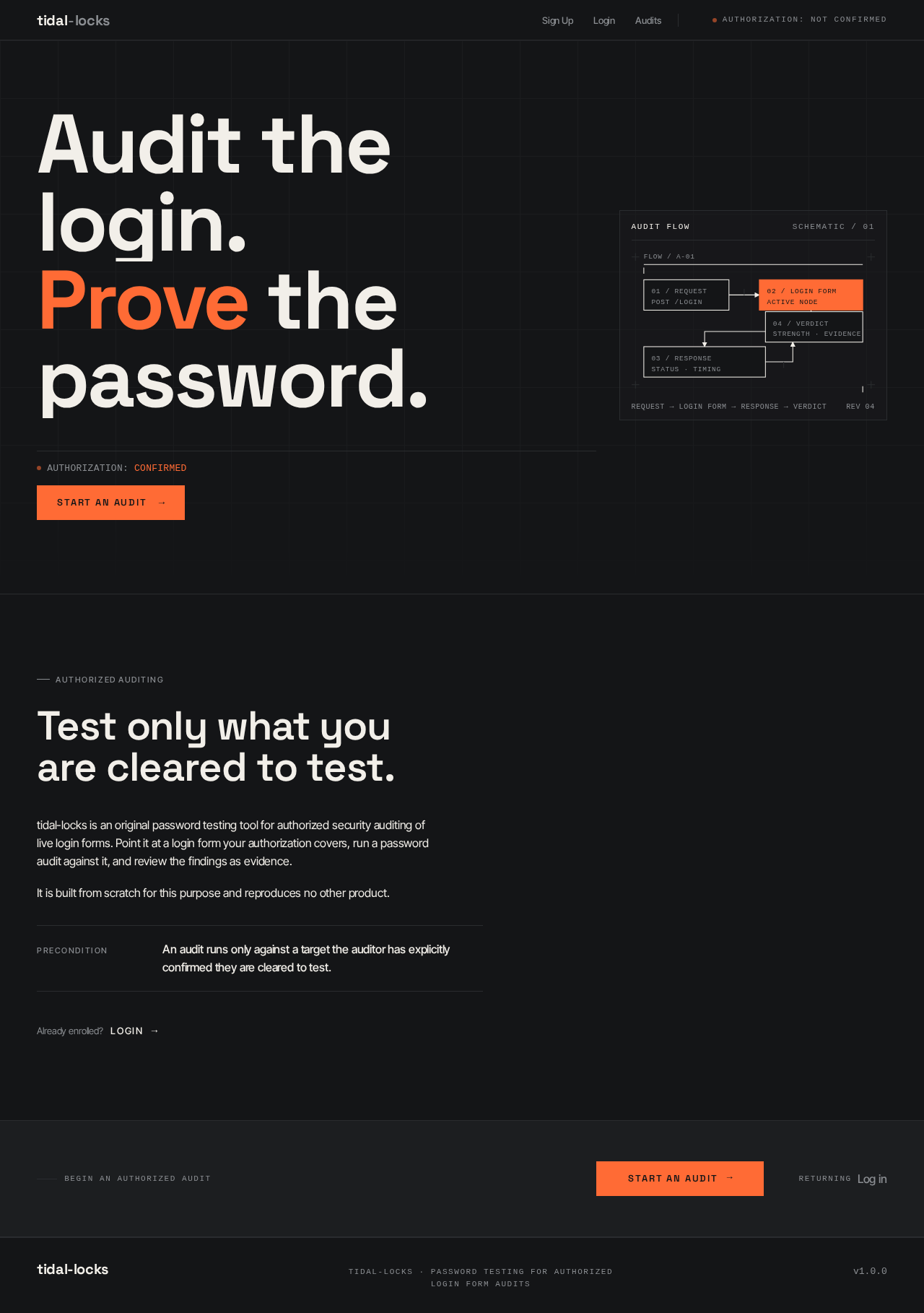
- Oversized flush-left headline with exactly one word in tangerine.
- Full-width hairline rule beneath the headline.
- Monospace status strip (authorization state, targets, queue) with a pulsing tangerine live-dot.
- Hard-cornered tangerine CTA block ("Start an audit") flush-left beneath the status strip.
- Narrow right column carrying a hairline schematic diagram of the audit flow (Request → Login Form → Response → Verdict) with a single tangerine active node.
- Fixed top bar: wordmark left, tangerine live-dot + state right, hairline bottom border.
- States:
- Loading: static content; no data fetch required.
- Empty: not applicable (static explanatory surface).
- Success: content renders; CTA routes to Sign Up; Login link routes to Login.
- Error: not applicable to static content.
- Recovery: not applicable.
Sign Up
- Information/state: Anonymous self-service first-use enrollment for a new auditor. Single-column, centered, max-width 420px, giant Space Grotesk wordmark above the form.
- Primary action: Create the auditor's account and establish identity.
- Supporting actions: Navigate to Login if already enrolled.
- Domain entities: Auditor identity (credentials held by the application).
- Component responsibilities:
- Wordmark above the form.
- Near-square bordered inputs with ALL-CAPS micro-labels floating above.
- Submit control.
- Link to Login.
- States:
- Loading: submit disabled with in-progress indication while enrollment is processed.
- Empty: blank form on first arrival.
- Success: identity established; auditor proceeds to protected Audits work.
- Error: invalid or incomplete input, or enrollment failure, shown inline; form remains editable.
- Recovery: correct input and resubmit; or navigate to Login if already enrolled.
Login
- Information/state: Anonymous returning verification for an auditor to reach protected audit work and durable audit results. Single-column, centered, max-width 420px, giant Space Grotesk wordmark above the form.
- Primary action: Verify identity and enter the protected Audits workspace.
- Supporting actions: Navigate to Sign Up if not yet enrolled.
- Domain entities: Auditor identity; session continuity.
- Component responsibilities:
- Wordmark above the form.
- Near-square bordered inputs with ALL-CAPS micro-labels.
- Submit control.
- Link to Sign Up.
- States:
- Loading: submit disabled with in-progress indication while verification runs.
- Empty: blank form on first arrival.
- Success: verified; auditor lands in Audits with their durable audit results available.
- Error: invalid credentials shown inline; form remains editable; no protected state is exposed.
- Recovery: correct credentials and resubmit; or navigate to Sign Up.
Audits
- Information/state: Login-protected workspace. Dense, keyboard-first table of the auditor's audits with tabular numerals, hairline row rules, and a persistent right-side detail drawer that slides in on row selection. Shows each audit's target live login form, authorization confirmation, run state, and results.
- Primary action: Confirm authorization for a target live login form and run a password audit against it.
- Supporting actions: Select a row to open the detail drawer; review audit results (attempt counts, response times, verdicts, timestamps) in tabular numerals; return to the table.
- Domain entities: Audit (target URL, authorization confirmation, run state, timestamps), Audit result (attempt counts, response times, verdicts).
- Component responsibilities:
- Fixed top bar with wordmark, tangerine live-dot + current authorization state, hairline bottom border.
- Audit table with hairline row rules and tabular numerals; row hover lifts background from #141517 to #1C1E20 in 120ms.
- Authorization confirmation control for the target before a run.
- Run control to start the password audit.
- Right-side detail drawer with result rows and number counters that tick up over 400ms on first mount.
- States:
- Loading: table and drawer show in-progress indication while audit data loads.
- Empty: no audits yet — table shows an empty state prompting the auditor to confirm authorization and start an audit.
- Success: audit runs; results populate the table and drawer with tabular numerals.
- Error: authorization not confirmed, target unreachable, or audit failure — shown inline with the affected audit row; the auditor can correct and retry.
- Recovery: re-confirm authorization or correct the target and re-run; prior durable results remain available.
3. Functional Requirements
FR-1 — Original tool, not a clone (explicit) As an Authorized Security Auditor, I should use an original password testing tool that is not a clone of, or copy of, any existing commercial product called "Brute" or its code, so that my work rests on an independently built instrument.
- Lifecycle: The tool is built from scratch; no Brute code, name, logo, or interface is referenced.
- Access: Applies to the whole product.
- Observable acceptance: The product contains no Brute branding, copied code, or reproduced interface.
- Failure/recovery: Not applicable (build-time constraint).
- Continuation: All other requirements operate within this constraint.
FR-2 — Audit live login forms the auditor is authorized to test (explicit) As an Authorized Security Auditor, I should run password audits only against live login forms I am authorized to test, so that my testing stays within my professional authorization.
- Trigger/input: The auditor supplies a target live login form and confirms authorization.
- Observable result: The audit runs only after authorization is confirmed for that target; the audit is recorded against that target.
- Access state: Requires login (Audits is protected).
- Failure/recovery: If authorization is not confirmed, the audit does not run; the auditor can confirm and retry.
- Continuation: Confirmed audits proceed to FR-3.
FR-3 — Password strength/security testing of the target (explicit) As an Authorized Security Auditor, I should have the tool perform password strength/security testing against the authorized live login form, so that I can assess its password handling and strength behavior.
- Trigger/input: A confirmed authorization and a target live login form.
- Observable result: The tool exercises the target's login form with password attempts and records the responses as audit results (attempt counts, response times, verdicts).
- Access state: Requires login.
- Failure/recovery: If the target is unreachable or the audit fails, the failure is shown on the affected audit; the auditor can retry.
- Continuation: Results are reviewed in FR-4.
FR-4 — Review durable audit results (explicit) As an Authorized Security Auditor, I should review the resulting audit results for each audited login form, so that I can use them to assess the login forms' password handling and strength behavior.
- Trigger/input: Selecting an audit row in the Audits table.
- Observable result: The detail drawer shows the audit's results in tabular numerals (attempt counts, response times, verdicts, timestamps).
- Access state: Requires login; results are durable and bound to the auditor.
- Failure/recovery: If results fail to load, an inline error is shown and the auditor can retry.
- Continuation: The auditor returns to the table to run or review other audits.
FR-5 — Self-service enrollment for a new auditor (required_inference) As a new Authorized Security Auditor, I should enroll myself on first use, so that I can begin authorized audit work without an invitation or provisioning step.
- Trigger/input: The auditor submits enrollment details on Sign Up.
- Observable result: An auditor identity is established and the auditor can reach protected Audits work.
- Access state: Sign Up is anonymously reachable.
- Failure/recovery: Invalid or incomplete input or enrollment failure is shown inline; the form remains editable.
- Continuation: The auditor proceeds to Audits or to Login on return.
FR-6 — Returning verification before protected audit work (required_inference) As a returning Authorized Security Auditor, I should verify my identity on Login, so that I can reach my protected audit work and durable audit results.
- Trigger/input: The auditor submits credentials on Login.
- Observable result: On success the auditor enters Audits with their durable results available; on failure no protected state is exposed.
- Access state: Login is anonymously reachable; Audits requires login.
- Failure/recovery: Invalid credentials are shown inline; the auditor can correct and resubmit or navigate to Sign Up.
- Continuation: The auditor resumes audit work in Audits.
FR-7 — Confirm authorization to test the target (required_inference) As an Authorized Security Auditor, I should explicitly confirm my authorization to test a specific target live login form before the audit runs, so that the tool only tests forms I am cleared to test.
- Trigger/input: The auditor selects or enters a target and confirms authorization in Audits.
- Observable result: The audit is gated on the confirmation; the confirmed authorization is recorded with the audit.
- Access state: Requires login.
- Failure/recovery: Without confirmation the run control does not proceed; the auditor can confirm and retry.
- Continuation: Confirmed authorization enables FR-3.
4. User Personas
Authorized Security Auditor
Product context. A technically fluent security professional who lives in terminals, request logs, and evidence. They are staking their professional authorization on the correctness of the tool's output, so they need an instrument that has a point of view about correctness — precise, dense, and honest — rather than a friendly consumer app or a neutral admin panel.
Primary goal. Audit live login forms they are authorized to test, and obtain trustworthy password strength/security findings they can use to assess those forms' password handling and strength behavior.
Distinct accepted responsibilities.
- Enroll themselves on first use (Sign Up).
- Verify identity on return (Login).
- Confirm authorization to test a specific target live login form (Audits).
- Run a password audit against that authorized target (Audits).
- Review the resulting audit results in tabular numerals (Audits detail drawer).
Relevant inputs or decisions.
- Enrollment details and returning credentials.
- The target live login form to audit.
- The explicit authorization confirmation for that target.
- Selection of an audit row to inspect its results.
Interactions with other accepted participants.
- With the tidal-locks backend: submits enrollment, credentials, target, and authorization confirmation; receives durable audit state and results.
- With the target live login form (external): the tool exercises the target's login form with password attempts; the target returns responses that become audit results. The auditor does not interact with the target directly through tidal-locks beyond designating it and confirming authorization.
Observable success. The auditor is enrolled, verified, has confirmed authorization for a target, has a completed audit with results visible in tabular numerals, and can return later to find those durable results intact.
Constraints carried from source. Auditing is limited to live login forms the auditor is authorized to test. The tool is original and does not clone or reference the commercial product "Brute."
5. Core User Flows
Flow A — First-use enrollment and first audit
- The auditor arrives anonymously at Landing, which explains the original password testing tool for authorized auditing of live login forms.
- The auditor chooses to begin and proceeds to Sign Up.
- On Sign Up, the auditor enters enrollment details and submits. The application establishes the auditor's identity.
- On success, the auditor enters the protected Audits workspace. (On invalid input, an inline error appears and the form remains editable; the auditor corrects and resubmits.)
- In Audits, the auditor designates a target live login form they are authorized to test.
- The auditor explicitly confirms authorization to test that target. Without confirmation, the run does not proceed.
- The auditor starts the password audit. The backend exercises the target's login form with password attempts and records the responses.
- The auditor selects the audit row; the right-side detail drawer slides in showing results in tabular numerals (attempt counts, response times, verdicts, timestamps), with number counters ticking up over 400ms on first mount.
- If the target is unreachable or the audit fails, the failure is shown on the affected audit row; the auditor re-confirms authorization or corrects the target and re-runs.
- The auditor returns to the table to run or review other audits.
Flow B — Returning verification and resuming audit work
- The returning auditor arrives at Login (or navigates there from Landing).
- The auditor submits credentials. On success, they enter the protected Audits workspace with their durable audit results available.
- On invalid credentials, an inline error appears, no protected state is exposed, and the auditor corrects and resubmits — or navigates to Sign Up if not yet enrolled.
- In Audits, the auditor reviews existing audits and their results, or confirms authorization for a new target and runs a new audit (Flow A steps 5–10).
Flow C — Reviewing an existing audit's results
- The verified auditor is in Audits.
- The auditor selects an audit row; the detail drawer slides in.
- The drawer shows the audit's results in tabular numerals.
- If results fail to load, an inline error appears and the auditor retries.
- The auditor closes the drawer and continues with other audits.
6. Visuals Colors and Theme
Muse: Rasmus Andersson. Headline: "Audit the login. Prove the password."
Mode: Dark.
Colour tokens (exact hex by role):
- Background / page ground:
#141517(graphite) - Surface (panels, result rows, form fields):
#1C1E20 - Text / primary:
#F2EFE9(warm off-white; type is the primary surface on this dark ground) - Accent:
#FF6B35(tangerine) — used sparingly and only on: the live-audit state indicator, the primary CTA, the current verdict chip, and the cursor/underline under the active nav item. - Muted (metadata, timestamps, secondary labels, disabled controls):
#8A8D91 - Hairline borders:
#2A2C2F - No blue anywhere.
Contrast: #F2EFE9 on #141517 ≈ 15:1; #8A8D91 on #141517 ≈ 5.2:1; #FF6B35 on #141517 ≈ 6.4:1 — all readable at body size.
Typography:
- Headings: Space Grotesk, 600–700 weight, tight tracking (−0.02em to −0.03em); sentence case for headlines, ALL-CAPS for micro-labels at 11px with 0.14em tracking.
- Body: Inter Tight, 400/500, 16px base, 1.55 line-height, tight tracking on UI labels (−0.01em).
- Numerals: JetBrains Mono tabular figures for all attempt counts, timestamps, response times, verdict percentages — treated as a deliberate ornamental layer.
- Scale: 1.25 modular rhythm with display breakout — 128/96/64/40/28/20/16/13/11. Landing display
clamp(3.5rem, 9vw, 8rem)(56px mobile → 128px desktop). Section headings 32px mobile → 56px desktop. Panel titles 20px. Body 16px. Micro-labels 11px ALL CAPS 0.14em tracking. Numerals JetBrains Mono 13–28px tabular.
Shape language: Flat, hairline, honest. 4/8-pt spacing scale. 2px corner radius on inputs and chips (near-square, deliberate); 0px on primary buttons and panels — hard edges, no softness. Hairline 1px borders at #2A2C2F on every panel, row, and divider. No drop shadows, no glows, no rounded pills. The one curve in the system is the accent underline that sweeps in under the active nav item on hover (a 2px tangerine bar, 120ms).
Layout: Single-column landing with an asymmetric two-column body — a wide left column carrying the oversized headline and a narrow right column carrying a live status strip (audit queue, authorization checklist, session state). The Audits page is a dense, keyboard-first table with tabular numerals, hairline row rules, and a persistent right-side detail drawer that slides in on row selection. Sign Up and Login are single-column, centered, max-width 420px, with a giant Space Grotesk wordmark above the form and near-square bordered inputs with ALL-CAPS micro-labels floating above. Every page has a fixed top bar: wordmark left, tangerine live-dot + state right, hairline bottom border.
Imagery: The interface is the imagery. No stock photography, no illustrations, no gradient blobs. Visual interest comes from: (1) a large schematic diagram on the landing — a hairline-drawn flow of Request → Login Form → Response → Verdict rendered as a technical drawing in #F2EFE9 lines on graphite, with the tangerine accent marking the single active node; (2) a monospace request-log excerpt panel with syntax-highlighted headers rendered as authentic HTTP text; (3) tabular numerals as the dominant ornamental texture in the audit result table. Optional: a single macro photograph of a keyed lock mechanism treated in near-monochrome graphite for the sign-up page's right column, only if it can be shot or sourced as a real macro, never as a stock illustration.
Readable text and controls stay whole at every viewport (375px, 768px, 1280px), wrapping or scaling to fit; no element covers any part of them. Imagery, decoration, and motion may be cropped, bled, rotated, overlapped, or cut as the direction asks, as long as they cover no readable text or control.
7. Signature Design Concept
The public entry is composed as an instrument panel, not a marketing hero. A dark graphite #141517 full-bleed first screen carries a hairline grid overlay at 80px intervals in #2A2C2F. The dominant element is a single oversized Space Grotesk headline, flush-left, wrapping across 9 of 12 columns at clamp(3.5rem, 9vw, 8rem): "Audit the login. Prove the password." — with "Prove" set in tangerine #FF6B35 as the only coloured word on the page.
Beneath the headline, a 1px hairline rule spans the full content width, then a horizontal status strip in JetBrains Mono: AUTHORIZATION: CONFIRMED · TARGETS: 3 · QUEUE: 0 with the tangerine live-dot pulsing at the left. To the right of the headline, in the narrow column, a schematic diagram of the audit flow is drawn in hairlines with one tangerine active node. There is no button in the centre, no subtext paragraph, no gradient — the CTA "Start an audit" sits flush-left beneath the status strip as a hard-cornered tangerine block, 48px tall, with the label in ALL-CAPS 13px 0.14em tracking.
The composition recomposes only accepted content and controls: the headline, the authorization/status strip, the schematic audit-flow diagram, and the CTA that routes to Sign Up. It introduces no new behavior, page, or destination.
8. Interaction Model & Motion Direction
Interaction Model: Animated Motion Tempo: restrained Hero Dimensionality: flat
Landing Hero Motion Brief
- Focal subject: The oversized flush-left Space Grotesk headline "Audit the login. Prove the password." with "Prove" in tangerine, above a full-width hairline rule and a monospace status strip with a pulsing tangerine live-dot; the narrow right column carries the hairline schematic audit-flow diagram with one tangerine active node.
- Input → transformation → outcome thesis: On load, the headline reveals by a 3-line staggered clip-path wipe (600ms total) and stops; the status strip and schematic settle into place; the live-dot begins its 2s breath. The outcome is a composed instrument panel at rest — no further motion.
- Motion vocabulary: Fast, functional, 120–200ms cubic-bezier(0.2, 0, 0, 1). No decoration. The 3-line staggered clip-path wipe (600ms total, then stops). The live-dot pulses at 2s intervals with a 40% opacity breath — the single permitted loop in the system. Row hover lifts background from
#141517to#1C1E20in 120ms. Number counters in the audit result panel tick up over 400ms on first mount. - Composed first frame: Graphite ground with hairline grid; headline flush-left with "Prove" in tangerine; hairline rule; monospace status strip with tangerine live-dot; hard-cornered tangerine CTA flush-left; schematic diagram in the narrow right column with one tangerine active node.
- Reduced-motion state: All reveals become instant; the live-dot becomes a static filled circle; counters render at final value.
9. Non-Functional Requirements
- NFR-1 — Originality (explicit): The product must not clone or copy the existing commercial product "Brute" or its code, name, logo, or interface. Rationale: explicit hard constraint.
- NFR-2 — Authorization scope (explicit): Auditing is limited to live login forms the auditor is authorized to test. Rationale: explicit hard constraint; the tool must gate audit runs on explicit authorization confirmation.
- NFR-3 — Durable state (required_inference): Audit state and results must persist and remain bound to the correct auditor across sessions. Rationale: audit results are evidence the auditor returns to review.
- NFR-4 — Protected access (required_inference): The Audits workspace must be reachable only by an authenticated auditor; no protected state is exposed on failed verification. Rationale: durable audit work must remain bound to the correct participant.
- NFR-5 — Readability and contrast (explicit, from creative direction): Text and controls stay whole at 375px, 768px, and 1280px; contrast ratios meet the stated values (
#F2EFE9on#141517≈ 15:1;#8A8D91on#141517≈ 5.2:1;#FF6B35on#141517≈ 6.4:1). - NFR-6 — Reduced motion (explicit, from creative direction): With
prefers-reduced-motion, all reveals become instant, the live-dot becomes a static filled circle, and counters render at final value.
10. Tech Stack
- Frontend: React (custom UI, dark graphite theme per Section 6).
- Backend: Python / FastAPI — extends a single shared backend process for identity, audit orchestration, and durable audit state/results.
- Storage: A persistent database for auditor identity, audits, authorization confirmations, and audit results (durable state required).
- Deployment: Docker / docker-compose for the frontend and backend services; Kubernetes only if deployment requires it.
11. Assumptions and Constraints
- A-1 (explicit): The tool is original and does not clone or reference the commercial product "Brute."
- A-2 (explicit): Auditing is limited to live login forms the auditor is authorized to test.
- A-3 (required_inference): Application-owned identity is used; enrollment is self-service with no invitation or provisioning boundary.
- A-4 (required_inference): A single auditor role owns its own audit work; no differentiated roles, RBAC, or permission tiers are established.
- A-5 (required_inference): Audit results are durable and bound to the auditor who ran them.
- A-6 (default — not specified by user): The backend is a single shared FastAPI process; no separate queue worker is required for the current scope.
- A-7 (default — not specified by user): The optional macro lock photograph on Sign Up is omitted unless a real macro can be sourced; the interface itself is the imagery.
12. Glossary
- Authorized Security Auditor — The sole accepted human persona; a technically fluent professional who audits live login forms they are authorized to test.
- Live login form — A third-party login form under audit that receives password attempts and returns responses.
- Audit — A single password strength/security test run against a confirmed target live login form, with durable state and results.
- Authorization confirmation — The auditor's explicit confirmation that they are cleared to test a specific target live login form; required before an audit runs.
- Audit result — The recorded outcome of an audit: attempt counts, response times, verdicts, and timestamps, rendered in tabular numerals.
- Verdict — The tool's assessment of the target's password handling/strength behavior for an audit.
- Brute — An existing commercial product that tidal-locks must not clone, copy, or reference by name, logo, or interface.
No comments yet. Be the first!