ticket-booking
hi make me single page ticket booking app

Comments (0)
Sign in to leave a comment
System Requirements
System Requirements Document for ticket-booking
1. Introduction
ticket-booking is a single-page ticket booking application. A visitor lands on one page, browses the available tickets with their key details, selects one, provides their booking details, submits the booking, and receives confirmation of the completed booking — all without leaving that page.
The product intent is a complete, self-contained booking journey on exactly one page: browse → select → enter details → submit → confirmation. The audience is a casual ticket buyer who arrives anonymously, wants to see what is available, and books in one sitting. There is no account, no multi-page checkout, and no separate confirmation route; the page reveals each stage in place.
This document is the System Requirements Document for the product described in the request "make me single page ticket booking app."
2. System Overview
ticket-booking is delivered as a single custom page, Ticket Booking, owned by the application and reachable anonymously. The page hosts the entire accepted lifecycle: an anonymous visitor views available tickets with key details, selects a ticket, enters booking details, submits the booking, and sees confirmation.
Actors
- Ticket Buyer (active human persona): the anonymous visitor who browses, selects, books, and receives confirmation.
Delivery and ownership
- The frontend is a React application that renders the single Ticket Booking page and its in-place stages.
- The shared FastAPI backend serves the application APIs: listing available tickets, submitting a booking, and returning the booking confirmation.
- MariaDB stores application-owned persistent data: the ticket catalogue and the recorded bookings.
- The whole journey stays on one page; stages are revealed in place, not routed.
Accepted behavior
- Browse available tickets with key details (anonymous).
- Select a ticket to book.
- Provide booking details and complete the booking.
- Receive confirmation of the completed booking.
Narrow exclusions
- No additional pages, routes, or modals for the booking journey.
- No user accounts or sign-in are required to browse or book.
- No payment processing, seat-map selection, or ticket-category filtering is specified.
Removed from scope
- None.
2a. Product Interpretation and Delivery Boundary
The request is a single-page ticket booking app. That single-page constraint is a hard product boundary: the entire journey — browsing, selecting, entering details, submitting, and confirming — happens on one page, with stages revealed in place rather than navigated to. The page is publicly reachable and anonymous; a visitor can browse and book without establishing an account. The application owns the ticket catalogue and the recorded bookings in its database, and the shared backend serves the listing and booking APIs. Nothing in the accepted requirements extends to payments, seat selection, accounts, or additional destinations; those remain outside the current delivery boundary.
2c. Page Content and Component Coverage
Ticket Booking
The single page, publicly reachable and anonymous, hosting the full booking lifecycle in revealed stages.
Information and state
- Hero: oversized headline "YOUR NEXT NIGHT OUT, BOOKED ON ONE PAGE" with "BOOKED" in tomato red, a flat mustard circle behind the top-right of the headline cropped by the viewport edge, a fanned stack of three decorative ticket stubs on the right, a capsule CTA "Browse tickets", and a small all-caps live availability line ("12 TICKETS AVAILABLE · 4 EVENTS").
- Ticket catalogue: available tickets, each rendered as a ticket-silhouette card with key details — event name, a thick-line pictogram, a halftone colour band (teal, mustard, or tomato), price in 28px tabular Jost with a superscript currency symbol, and an availability indicator (tomato dot).
- Booking stage: a two-panel stage — selected ticket summary on the left, booking details form on the right.
- Confirmation state: the same panel flips to a confirmation card bearing a rotated tomato "CONFIRMED" stamp and the booking confirmation details.
Primary actions
- Browse tickets (scrolls/reveals the catalogue).
- Select a ticket card (sets the selected ticket; 2px teal outline on selection).
- Enter booking details and submit the booking.
- View confirmation.
Supporting actions
- Change the selected ticket before submitting.
- Return from confirmation to browse again (start a new booking).
Domain entities
- Ticket: identifier, event name, price, availability status, accent band colour, pictogram.
- Booking: identifier, selected ticket reference, buyer booking details, confirmation status/timestamp.
Component responsibilities
- Hero block: headline, mustard circle decoration, ticket-stub stack decoration, CTA, availability line.
- Catalogue grid: 3 columns at 1280px, 2 at 768px, 1 at 375px; each card a ticket silhouette with punched semicircular notches and a coloured halftone top band.
- Booking stage: ticket summary panel (left) and details form (right), crossfading into place.
- Confirmation card: replaces the form panel on successful submission, with the tomato stamp and confirmation details.
- Section dividers: full-viewport-width 1px walnut rules with small all-caps Jost labels ("AVAILABLE TICKETS", "YOUR DETAILS").
States
- Loading: catalogue shows a loading state while tickets are fetched.
- Empty: no tickets available — catalogue area shows an empty message; booking cannot proceed.
- Success: booking submitted — confirmation card with stamp and booking details.
- Error: ticket fetch failure — catalogue shows an error with retry; booking submission failure — form shows an inline error and preserves entered details for retry.
- Recovery: retry fetch; correct and resubmit the booking; change selection before submitting.
3. Functional Requirements
FR-1 — Single-page app (explicit) As a Ticket Buyer, I should use a ticket booking app that lives on a single page, so that the whole journey happens without navigating away.
- Trigger: opening the app.
- Observable result: one page hosts hero, catalogue, booking stage, and confirmation.
- Acceptance: no route change, modal, or additional page is used for browsing, selecting, entering details, submitting, or confirming.
FR-2 — Browse available tickets (explicit; anonymous view required_inference) As a Ticket Buyer, I should browse available tickets with key details, so that I can decide what to book.
- Trigger: landing on the page / activating "Browse tickets".
- Input: ticket catalogue from the backend.
- Observable result: ticket cards show event name, price, availability, and accent band.
- Access: anonymous; no sign-in required.
- Failure/recovery: fetch error shows an error state with retry; empty catalogue shows an empty message.
- Continuation: selecting a card proceeds to booking.
FR-3 — Select a ticket (explicit) As a Ticket Buyer, I should select one ticket to book, so that the booking is bound to my choice.
- Trigger: activating a ticket card.
- Observable result: the card shows a 2px teal selection outline; the booking stage reveals with that ticket's summary on the left.
- Recovery: selecting a different card replaces the selection before submission.
FR-4 — Provide booking details and complete the booking (explicit; details entry required_inference) As a Ticket Buyer, I should provide my booking details and submit, so that my ticket is booked.
- Trigger: filling the details form and activating the confirm/submit control.
- Input: buyer booking details plus the selected ticket.
- Observable result: the booking is recorded by the backend and the panel flips to confirmation.
- Failure/recovery: submission error shows an inline message and preserves entered details for retry.
FR-5 — Receive confirmation (explicit) As a Ticket Buyer, I should receive confirmation of my completed booking, so that I know the booking succeeded.
- Trigger: successful booking submission.
- Observable result: confirmation card with a rotated tomato "CONFIRMED" stamp and the booking details.
- Continuation: the buyer can return to browsing to start a new booking.
4. User Personas
Ticket Buyer
Product context. A casual buyer who lands anonymously on the single Ticket Booking page, wanting to book a ticket for an event or trip in one sitting. No account, no prior relationship with the app.
Primary goal. Browse what's available, pick a ticket, give their details, and walk away with a confirmed booking — all on one page.
Distinct responsibilities.
- Reviews the catalogue of available tickets and their key details (event, price, availability).
- Selects exactly one ticket to book.
- Enters their booking details.
- Submits the booking and reads the confirmation.
Inputs and decisions. Which ticket to book; what booking details to provide; whether to retry after an error or change selection.
Interactions with other participants. None beyond the application itself; the buyer is the sole human participant in the accepted lifecycle.
Observable success. A confirmation card with the "CONFIRMED" stamp and the booking details, reached without leaving the page.
5. Core User Flows
Flow A — Browse, select, book, and confirm (Ticket Buyer)
- The Ticket Buyer opens the app and lands anonymously on the Ticket Booking page; the hero and live availability line render.
- The buyer activates "Browse tickets" (or scrolls) to reveal the AVAILABLE TICKETS catalogue; ticket cards load with event name, price, availability, and accent band.
- If loading fails, the catalogue shows an error with retry; the buyer retries. If no tickets exist, an empty message is shown and the flow ends.
- The buyer selects a ticket card; it gains a 2px teal outline and the booking stage crossfades in with the selected ticket summary on the left and the YOUR DETAILS form on the right.
- The buyer enters their booking details.
- The buyer submits; the backend records the booking.
- On failure, an inline error appears and the entered details are preserved; the buyer corrects and resubmits.
- On success, the panel flips to the confirmation card with the rotated tomato "CONFIRMED" stamp and the booking details.
- The buyer may return to browsing to start a new booking.
6. Visuals Colors and Theme
Muse: Charles & Ray Eames — warm modernism for a ticket that feels like an invitation. Headline: "YOUR NEXT NIGHT OUT, BOOKED ON ONE PAGE."
Palette (light mode)
- Background (cream paper ground):
#F4EDE0(~60% of page) - Surface (cards, booking panel):
#FBF6EC - Text:
#2A2622 - Primary (structural teal — selected states, booking panel header, confirm button):
#1F4F4A - Accent (tomato — price figure, availability dot, confirmation stamp only):
#D2452C - Muted (metadata labels):
#8A7F6D - Mustard (small ticket-stub bands, hero circle):
#E0A32E - Walnut (small bands, rule accents, 1px hairlines):
#7A4B2A; hairline#C9B79A - All text pairs exceed 4.5:1 at body size.
Typography
- Headings: Jost, 500–600 weight, tracking -0.02em, sentence case, flush-left.
- Body: Literata.
- Scale (1.333 modular): display
clamp(56px, 11vw, 132px); h2clamp(30px, 4.2vw, 52px); h3 24px; body 17px / 1.65 line-height; label 11px all-caps Jost / 0.18em tracking; prices 28px tabular Jost with 14px superscript currency symbol.
Shape language
- Ticket cards: 14px radius with punched semicircular notches on left and right edges (radial-gradient masks).
- Section dividers: full-viewport-width 1px walnut rules.
- One large offset mustard circle behind the hero headline.
- Buttons: capsules with 2px solid teal border, no shadow.
Layout
- Single page, three stacked acts on a 12-column grid, 24px gutter, 64px desktop margin / 20px mobile.
- Act 1: hero (headline left, ticket-stub stack right).
- Act 2: catalogue gallery — 3 columns at 1280px, 2 at 768px, 1 at 375px.
- Act 3: two-panel booking stage (summary left, form right) that slides into place and flips to confirmation on submit.
Imagery. No stock photography. Cream paper ticket cards with perforated edges, a thick-line pictogram per event (film reel, stage light, train, record), and a tiny halftone colour band at the top of each card. Hero right side: three fanned, slightly rotated ticket stubs (decoration only, never covering text).
Avoid. White/near-white ground; blue or indigo anywhere; drop shadows and hover-lift; centred hero with subtext and pill button; gradient blobs, glassmorphism; multi-step routes or modals; generic rounded cards without ticket silhouette; bouncy/springy motion.
7. Signature Design Concept
The public entry is an editorial hero on the cream ground: a 9-column Jost headline at display scale, stacked over three lines, with "BOOKED" in tomato red, sitting in front of a flat mustard circle (~320px) cropped by the right viewport edge. To the right, a fanned stack of three ticket-stub cards rotated -6°, 0°, and 5°, overlapping, each with a perforated notch and a coloured top band. Beneath the headline, a solid teal capsule CTA "Browse tickets" with cream text and a small all-caps live availability line. Every ticket in the catalogue is drawn as a real ticket silhouette with punched notches and a halftone band; prices are the loudest object on each card. The booking flow lives in one two-panel stage that crossfades in place and flips to a confirmation card with a rotated tomato "CONFIRMED" stamp. Full-width 1px walnut rules with small all-caps labels separate each act like gallery signage.
8. Interaction Model & Motion Direction
Interaction Model: Animated Motion Tempo: restrained Hero Dimensionality: layered_2d
Landing Hero Motion Brief
- Focal subject: the fanned stack of three ticket stubs on the right of the hero, with the mustard circle behind the headline.
- Input → transformation → outcome: as the page loads, each ticket card reveals with a slow 24px upward motion as it enters the viewport; selecting a ticket crossfades the booking stage into place; submitting flips the panel to the confirmation card, where the tomato stamp scales gently from 1.06 to 1.0.
- Motion vocabulary: 400–600ms ease-in-out crossfades between booking stages; slow 24px upward reveal per ticket card; single gentle 1.06→1.0 scale on the confirmation stamp. No bounce, no spring, no parallax.
- Composed first frame: cream ground, oversized headline left with "BOOKED" in tomato, mustard circle cropped at the right edge, fanned ticket stubs right, teal capsule CTA and availability line beneath.
- Reduced-motion state: all reveals are instant and the stage change is a plain swap; the static arrangement remains fully usable.
9. Non-Functional Requirements
- Single-page constraint (explicit): the entire booking journey must remain on one page; no routes, modals, or additional pages for browsing, selecting, entering details, submitting, or confirming.
- Anonymous access (required_inference): the Ticket Booking page is publicly reachable without sign-in; no account is required to browse or book.
- Durable state (required_inference): the ticket catalogue and recorded bookings persist in MariaDB so that a submitted booking is retained and its confirmation reflects a recorded booking.
- Readability and containment (creative direction): headlines, labels, numbers, card text, and controls stay entirely inside the viewport and their container at 375px, 768px, and 1280px, wrapping or scaling to fit; decoration may crop, rotate, or bleed but never covers readable text or controls.
- Accessibility (creative direction): all text pairs exceed 4.5:1 at body size;
prefers-reduced-motionyields a usable static arrangement with instant reveals and plain stage swaps. - Responsive layout (creative direction): catalogue grid 3/2/1 columns at 1280/768/375px; page margin 64px desktop, 20px mobile.
10. Tech Stack
- Frontend: React application rendering the single Ticket Booking page.
- Backend: shared FastAPI process serving the ticket listing and booking APIs.
- Database: MariaDB for the ticket catalogue and recorded bookings.
- Infrastructure: docker-compose with
frontend,backend, anddatabaseservices.
11. Assumptions and Constraints
- Hard constraint (explicit): the app must be a single page; the whole journey stays on it.
- Assumption (required_inference): the ticket catalogue is seeded with available tickets (the hero's live availability line reflects the catalogue); no admin or ticket-creation UI is in scope.
- Assumption (required_inference): booking details are captured as a form on the page; the exact field set is not specified by the source and is limited to what is needed to complete a booking.
- Assumption (required_inference): no payment processing is included; the booking completes on submission.
- Constraint (creative direction): no blue or indigo, no white ground, no drop shadows, no multi-step routes or modals.
12. Glossary
- Ticket: an available bookable item in the catalogue, with event name, price, availability, and accent band.
- Booking: a recorded reservation created when a Ticket Buyer submits their details for a selected ticket.
- Booking stage: the two-panel area (ticket summary left, details form right) revealed in place on the single page.
- Confirmation card: the state the booking stage flips to after a successful submission, bearing the "CONFIRMED" stamp.
- Ticket silhouette: the card shape with 14px radius and punched semicircular notches on both edges.
- Act: one of the three stacked sections of the single page (hero, catalogue, booking stage).
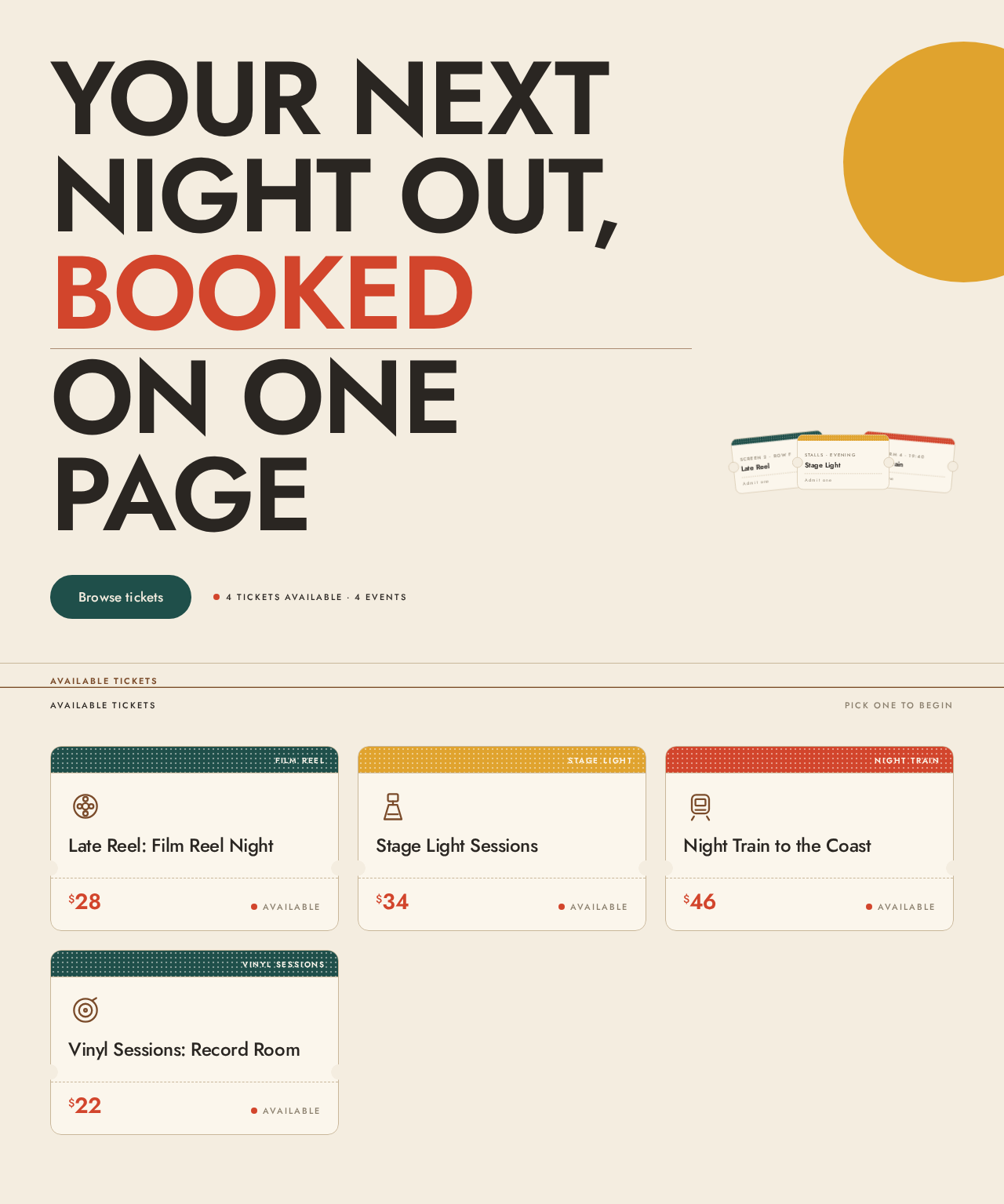
Your nextnight out,bookedon one page
4 tickets available · 4 events
Available tickets
Pick one to beginYour details
4 tickets in the catalogueSelected ticket
No ticket selected yet.
Choose a ticket from the catalogue above and its event, price and availability will appear here with your details form.
4 tickets in the catalogueYour details
Select a ticket from the catalogue to complete your booking.
Your nextnight out,bookedon one page
4 tickets available · 4 events
Available tickets
Pick one to beginYour details
4 tickets in the catalogueSelected ticket
No ticket selected yet.
Choose a ticket from the catalogue above and its event, price and availability will appear here with your details form.
4 tickets in the catalogueYour details
Select a ticket from the catalogue to complete your booking.
No comments yet. Be the first!