tetris-ncurses
 Artur Kummer
hey, can u create tetris game made in c with ncurses?

Comments (0)
Sign in to leave a comment
System Requirements
System Requirements Document for tetris-ncurses
1. Introduction
tetris-ncurses is a keyboard-first Tetris puzzle game implemented in C and rendered in a terminal using the ncurses library. It is intended for programmers, terminal users, and retro-game players who want an immediate, legible falling-block game experience that feels native to a terminal screen.
The game provides a playable falling-tetromino session in which a Player starts a game, controls and rotates pieces, clears completed lines, tracks score and level progression, and receives a clear game-over result when the board can no longer accept a new piece.
2. System Overview
The system is a local terminal application compiled from C source code and executed in a terminal environment with ncurses installed. The application owns all current interaction surfaces and uses ncurses for screen rendering and keyboard input.
The current product has one active human persona: the Player. The Player uses the Landing screen to begin or exit, plays from the Game screen, and receives their end-of-session result on the Game Over screen.
Current behavior includes:
- Starting a Tetris session from the terminal.
- Displaying and updating a 10-column by 20-row playfield.
- Presenting falling tetrominoes that the Player can move and rotate.
- Detecting valid and invalid piece movement or rotation.
- Locking tetrominoes when they can no longer descend.
- Detecting and clearing completed horizontal rows.
- Updating score, cleared-line count, and level as play progresses.
- Showing next-piece and hold-piece information in the gameplay side rail.
- Ending the session when a new tetromino cannot be placed on the playfield.
- Displaying the final score and allowing the Player to replay or quit.
No account creation, authentication, online multiplayer, leaderboards, persistence across separate program executions, payment functionality, web interface, or mobile interface is included in the current scope.
2a. Product Interpretation and Delivery Boundary
tetris-ncurses is delivered as a locally run C application. It is not a hosted web service and does not require application-owned identity, login, external providers, or network access.
The Player begins anonymously in the terminal application. Gameplay state exists for the active session and is presented directly through ncurses screens. The game is designed around keyboard input and terminal-readable feedback rather than mouse, touch, or browser controls.
The current scope is limited to a complete local Tetris play loop: start, play, receive game-over feedback, replay, or exit. Features such as saved profiles, persistent high scores, multiplayer play, online score sharing, configurable themes, and expanded game modes are outside the current delivery boundary.
2c. Page Content and Component Coverage
Landing
-
Information and state
- Identifies the game as
TETRIS / NCURSES. - Presents a terminal-native introduction to the game and its keyboard-first play model.
- Shows a fixed 80-column-style terminal frame on a near-black background.
- Displays a decorative but playable-looking 10×20 playfield motif with an incomplete tetromino stack and one suspended coral T-piece.
- Shows compact keyboard-key diagrams for the supported gameplay controls.
- Presents the current command selection with a blinking yellow block cursor.
- Identifies the game as
-
Primary actions
- Start a new game with the displayed play command, including
[ENTER] PLAY. - Exit the application with the displayed quit command, including
[Q] QUIT.
- Start a new game with the displayed play command, including
-
Supporting actions
- View the control reference before starting play.
- Move the terminal command selection where more than one command is available.
-
Domain entities
- Game session start command.
- Quit command.
- Keyboard control reference.
- Decorative tetromino playfield composition.
-
Component responsibilities
- Render the title wordmark and terminal frame.
- Render the command-line-style navigation instead of conventional button controls.
- Capture the Player’s command-selection and confirmation keys.
- Transition to the Game screen after a valid start command.
- Exit cleanly after a valid quit command.
-
States and recovery
- Initial: Play command is visibly available and selected.
- Selection: The yellow block cursor indicates the active command.
- Invalid input: Unsupported keys do not start or quit the game; the Landing screen remains visible.
- Success: Starting play creates a new active session and opens Game.
- Recovery: The Player can continue choosing a valid command after invalid input.
Game
-
Information and state
- Displays the active 10-column by 20-row Tetris playfield.
- Shows the falling active tetromino and locked tetromino stack.
- Shows a right-side rail containing individually framed modules for
NEXT,HOLD,SCORE,LINES, andLEVEL. - Uses the current session state to show the next tetromino, held tetromino where present, score, total cleared lines, and current level.
- Maintains a visible, readable distinction between the active piece, locked pieces, and empty cells.
-
Primary actions
- Move the active tetromino left or right.
- Rotate the active tetromino.
- Accelerate or advance the active tetromino downward using the documented keyboard controls.
- Hold or swap the active tetromino through the documented hold control.
- Quit the current application session through the documented quit control.
-
Supporting actions
- Observe the next tetromino before it enters the playfield.
- Observe the held tetromino and score progression.
- Continue playing after a successful line clear or rejected move.
- Read gameplay controls from the Landing screen before starting a session.
-
Domain entities
- Active tetromino.
- Locked tetromino cells.
- 10×20 playfield grid.
- Next tetromino.
- Held tetromino.
- Score.
- Cleared-line count.
- Level.
- Active game session.
-
Component responsibilities
- Advance the active tetromino on discrete gameplay ticks.
- Accept keyboard input through ncurses and apply valid movement, rotation, descent, hold, or quit actions.
- Prevent active tetrominoes from moving or rotating outside playfield boundaries or into locked cells.
- Lock a tetromino when it cannot descend further.
- Detect completed horizontal rows after a piece locks.
- Flash each completed row once with a high-contrast inversion before removing it.
- Collapse remaining rows in visible stepped increments after a line clear.
- Update score, line count, and level after qualifying gameplay progress.
- Determine whether a new tetromino can enter the playfield.
- Transition to Game Over when a new tetromino cannot be placed.
-
States and recovery
- Loading/initialization: The application initializes ncurses and creates a fresh session state before drawing the playable board.
- Active play: The active tetromino falls in discrete ticks and responds to valid keyboard input.
- Rejected move or rotation: The board state remains unchanged when the requested action would collide with a locked cell or boundary; play continues.
- Line clear: A completed row flashes once, then the affected rows collapse and the updated score, lines, and level are displayed.
- Hold unavailable or invalid: The current board remains playable and the application does not corrupt active-piece state.
- Terminal size or ncurses initialization failure: The application reports that it cannot render the required terminal interface and exits or returns to a safe terminal state.
- Game over: The active session ends and the final session result is passed to Game Over.
- Quit: The application restores the terminal state before exiting.
Game Over
-
Information and state
- Clearly communicates that the active session has ended.
- Replaces the gameplay status presentation with a coral pixel-banner reading
GAME OVER. - Displays the Player’s final score in oversized pixel-style numerals.
- Shows a replay command prompt and a quit command prompt.
- Retains the final session result only for the Game Over presentation; no cross-execution score persistence is required.
-
Primary actions
- Start a new game from the replay command.
- Exit the application from the quit command.
-
Supporting actions
- Review the final score before replaying or exiting.
- Move command selection where more than one command is available.
-
Domain entities
- Game-over state.
- Final score.
- Replay command.
- Quit command.
-
Component responsibilities
- Render the coral
GAME OVERbanner. - Render the final score prominently.
- Capture replay and quit keyboard input.
- Initialize a new session when replay is selected.
- Restore the terminal state and exit when quit is selected.
- Render the coral
-
States and recovery
- Initial: Final score and replay command are visible after game-over detection.
- Replay success: A new session starts with a cleared board and returns to Game.
- Quit success: The program exits cleanly and restores normal terminal behavior.
- Invalid input: The final result remains visible and the Player may enter a supported command.
3. Functional Requirements
FR-01 — Launch Terminal Tetris
As a Player, I should be able to launch a Tetris game implemented in C with the ncurses library so that I can play in a terminal.
- Provenance: explicit.
- Access state: No account or authentication is required.
- Trigger/input: The Player runs the compiled C program in a terminal environment with ncurses installed.
- Required behavior:
- The application shall initialize ncurses before presenting game interaction.
- The application shall render its interface in the terminal.
- The application shall accept keyboard input through ncurses.
- The application shall present Landing after successful initialization.
- Observable result: The Player sees the terminal-native Landing screen and can issue supported commands.
- Failure and recovery: If ncurses cannot initialize or the terminal cannot support the required display, the application shall present a readable failure message where possible and restore terminal state before exiting.
- Continuation: After successful launch, the Player may start a game or quit.
- Acceptance: A compiled C program using ncurses launches into a keyboard-operable terminal interface.
FR-02 — Start a New Session
As a Player, I should be able to start a new Tetris session from Landing so that I can begin playing.
- Provenance: required_inference.
- Access state: Anonymous local terminal use.
- Trigger/input: The Player selects
[ENTER] PLAYand confirms the command. - Required behavior:
- Landing shall display the
TETRIS / NCURSESidentity, a control reference, and a visible play command. - Selecting the play command shall create a new session with an empty playfield, initialized score, initialized line count, initialized level, and a tetromino ready to enter play.
- The application shall transition from Landing to Game.
- Landing shall display the
- Observable result: The Player sees an active 10×20 gameplay board with a falling tetromino and gameplay status rail.
- Failure and recovery: Unsupported Landing input shall not start an incomplete session; the Player remains on Landing and can use a supported command.
- Continuation: The Player controls the active tetromino on Game.
- Acceptance: Pressing the documented play command from Landing starts a fresh playable session.
FR-03 — Control Falling Tetrominoes
As a Player, I should be able to move, rotate, and advance the active tetromino using the keyboard so that I can position it on the playfield.
- Provenance: required_inference.
- Access state: Active local game session.
- Trigger/input: The Player presses the documented movement, rotation, or downward-progression keys.
- Required behavior:
- The game shall advance the active tetromino downward on discrete gameplay ticks.
- The Player shall be able to request left movement, right movement, rotation, and faster downward progression using documented keyboard controls.
- The game shall apply a requested movement or rotation only when the resulting tetromino placement is within the playfield and does not overlap locked cells.
- The game shall keep the board unchanged when a requested movement or rotation is invalid.
- Observable result: A valid command changes the active tetromino position or orientation on the rendered grid; an invalid command leaves the current valid state visible.
- Failure and recovery: Boundary and collision conflicts are rejected without ending the session. The Player may immediately issue another valid control input.
- Continuation: The tetromino continues falling until it locks, after which a new active tetromino is introduced if possible.
- Acceptance: The Player can visibly move and rotate valid pieces, while invalid moves cannot place pieces outside the board or over locked cells.
FR-04 — Lock Pieces and Clear Completed Lines
As a Player, I should have tetrominoes lock and completed rows clear so that successful placement changes the board and advances my game progress.
- Provenance: required_inference.
- Access state: Active local game session.
- Trigger/input: The active tetromino can no longer descend due to the playfield floor or locked cells.
- Required behavior:
- The game shall lock the active tetromino into the playfield when it cannot descend.
- The game shall evaluate horizontal rows for completion after a tetromino locks.
- Each completed row shall flash once with high-contrast inversion before removal.
- The game shall collapse rows above cleared rows in stepped, discrete visual updates.
- The game shall update the displayed line count, score, and level according to the current session’s progression rules.
- Observable result: The Player sees the locked tetromino become part of the stack, completed rows clear, remaining rows collapse, and relevant status values update.
- Failure and recovery: If no row is complete, the board remains intact and play continues with the next tetromino. Rendering failures shall not leave ncurses terminal state corrupted.
- Continuation: The game introduces the next tetromino when space permits, or ends the session when it does not.
- Acceptance: A fully occupied horizontal row visibly flashes, disappears, causes upper content to collapse, and results in updated gameplay status.
FR-05 — View Gameplay Status and Piece Previews
As a Player, I should be able to view the next piece, held piece, score, lines, and level while playing so that I can make informed placement decisions.
- Provenance: required_inference.
- Access state: Active local game session.
- Trigger/input: The Game screen is active and session state changes.
- Required behavior:
- Game shall display
NEXT,HOLD,SCORE,LINES, andLEVELin individually framed right-side modules. - The next-piece module shall show the tetromino scheduled to follow the active piece.
- The hold module shall show the held tetromino where one exists.
- Score, lines, and level modules shall reflect current session progress.
- Game shall display
- Observable result: The Player can read current status and piece-preview information without leaving the playfield.
- Failure and recovery: If no tetromino has been held, the hold module shall remain visibly empty rather than display incorrect piece data.
- Continuation: The Player continues active play using the presented information.
- Acceptance: During play, all five status modules remain visible and update consistently with the active session.
FR-06 — Hold an Active Tetromino
As a Player, I should be able to use the documented hold control so that I can set aside or exchange the active tetromino during play.
- Provenance: required_inference.
- Access state: Active local game session.
- Trigger/input: The Player uses the documented hold control while an active tetromino is present.
- Required behavior:
- The game shall display a
HOLDmodule in the gameplay side rail. - A valid hold action shall place the active tetromino into the hold state or exchange it with the currently held tetromino.
- The game shall maintain a valid active-piece state after a hold action.
- The game shall display a
- Observable result: The hold module changes to show the held tetromino, and the Player sees the resulting active tetromino on the playfield.
- Failure and recovery: If a hold action cannot validly be applied in the current state, the game shall preserve the existing active board state and allow continued play.
- Continuation: The Player resumes moving, rotating, and placing the resulting active tetromino.
- Acceptance: A valid documented hold command visibly updates the hold state without corrupting the game board or active-piece state.
FR-07 — Detect Game Over and Report the Final Result
As a Player, I should be informed when the playfield can no longer accept a new tetromino so that I know the session has ended and can see my final score.
- Provenance: required_inference.
- Access state: Active local game session transitioning to an ended session.
- Trigger/input: A new tetromino cannot be placed into the playfield.
- Required behavior:
- The game shall detect when the board cannot accept the next tetromino.
- The game shall stop active gameplay progression when game over occurs.
- The application shall transition to Game Over.
- Game Over shall show a coral
GAME OVERbanner and the final score.
- Observable result: The Player sees a distinct Game Over screen with the final score and available next commands.
- Failure and recovery: The Player shall not be returned to active play with an invalid board state. They may replay or quit from Game Over.
- Continuation: The Player may begin a fresh session or exit.
- Acceptance: When a new piece cannot enter the playfield, gameplay ends and the final score is displayed on Game Over.
FR-08 — Replay or Quit
As a Player, I should be able to replay after game over or quit from the terminal command prompts so that I can continue playing or leave the application cleanly.
- Provenance: required_inference.
- Access state: Landing or Game Over; quit is also available during active play where documented.
- Trigger/input: The Player selects a documented replay or quit command.
- Required behavior:
- Game Over shall provide a replay command that starts a fresh Tetris session.
- Landing and Game Over shall provide a quit command.
- Where the quit command is supported during Game, it shall end the application safely.
- On quit, the application shall restore terminal behavior altered by ncurses before process exit.
- Observable result: Replay opens a newly initialized Game session; quit returns the terminal to its normal state.
- Failure and recovery: Unsupported command input shall leave the current screen visible and permit another command attempt.
- Continuation: Replay continues to Game; quit ends the current application run.
- Acceptance: The Player can replay after game over and can exit without leaving the terminal in ncurses display mode.
4. User Personas
Player
- Product context: The Player runs
tetris-ncursesin a terminal and interacts entirely through the keyboard. - Primary goal: Complete a responsive Tetris session by placing falling tetrominoes, clearing lines, and improving score and level until the board reaches game-over state.
- Distinct responsibilities:
- Start a new session from Landing.
- Read the control reference and use documented keyboard commands.
- Move, rotate, drop, and hold tetrominoes during active play.
- Monitor the next piece, held piece, score, lines, and level.
- Decide whether to replay or quit after game over.
- Relevant inputs and decisions: Keyboard commands for start, quit, movement, rotation, downward progression, hold, replay, and command selection.
- Interactions with other accepted participants: None. The game is a local single-player experience with no additional human participant, external provider, or remote service.
- Observable success: The Player can play a stable terminal Tetris session, receive visible feedback for movement and line clears, see accurate progress information, and receive an unambiguous final score and game-over result.
- Provenance: required_inference from the accepted terminal Tetris gameplay journey.
5. Core User Flows
Flow 1 — Launch and Start a Game
- The Player runs the compiled
tetris-ncursesC program in a terminal with ncurses installed. - The application initializes ncurses, prepares keyboard input handling, and renders Landing.
- The Player sees the
TETRIS / NCURSESterminal frame, decorative playfield motif, available commands, and control reference. - The Player selects or confirms
[ENTER] PLAY. - The application creates a fresh game session with an empty playfield and initialized score, line count, level, next-piece state, and hold state.
- The application opens Game and draws the 10×20 playfield, active tetromino, and gameplay side rail.
- The Player begins controlling the active tetromino.
Failure and recovery: If the Player presses an unsupported key on Landing, the screen remains visible and the Player can issue a supported start or quit command. If ncurses initialization fails, the application reports the failure where possible and restores terminal state before exit.
Flow 2 — Play a Falling Tetromino
- The Player is on Game with an active tetromino falling on discrete ticks.
- The Player reviews the playfield and the
NEXT,HOLD,SCORE,LINES, andLEVELmodules. - The Player presses a documented movement key to move the tetromino left or right.
- The application validates the requested position against playfield boundaries and locked cells.
- If valid, the application redraws the tetromino in its new position.
- If invalid, the application leaves the tetromino in its last valid position and continues the game.
- The Player presses the documented rotation key when a different tetromino orientation is desired.
- The application validates and applies the rotation only if it results in a legal placement.
- The Player uses the documented downward-progression control when a faster descent is desired.
- The tetromino continues descending until it reaches the floor or locked cells below it.
Failure and recovery: Rejected movement and rotation do not end the game or change locked board cells. The Player may immediately choose another movement, rotation, descent, or hold action.
Flow 3 — Hold or Exchange a Tetromino
- The Player is on Game with an active tetromino.
- The Player decides that the current active tetromino should be saved for later or exchanged with the held tetromino.
- The Player presses the documented hold control.
- The application validates whether the hold action can be applied to the current session state.
- On a valid action, the application stores the active tetromino in the hold state or exchanges it with the held tetromino.
- The application updates the
HOLDmodule and displays the resulting active tetromino on the playfield. - The Player resumes movement, rotation, descent, and placement.
Failure and recovery: If holding is unavailable or would produce an invalid active-piece state, the application preserves the current board and active tetromino. The Player continues playing normally.
Flow 4 — Lock a Tetromino and Clear Lines
- The active tetromino reaches a position where it cannot descend further.
- The application locks the tetromino’s cells into the playfield.
- The application checks each horizontal row for completion.
- If no row is complete, the application selects the next tetromino and continues active play.
- If one or more rows are complete, the application flashes each completed row once with high-contrast inversion.
- The application removes completed rows and collapses rows above them in stepped updates.
- The application updates
SCORE,LINES, andLEVEL. - The Player sees the updated board and status rail.
- The application attempts to introduce the next tetromino.
Failure and recovery: If the next tetromino can be placed, play continues. If it cannot be placed, the application starts the game-over flow.
Flow 5 — Reach Game Over and Replay
- The application determines that a new tetromino cannot be placed in the playfield.
- The application stops active gameplay and preserves the final session score for the end-of-session presentation.
- The application opens Game Over.
- The Player sees the coral
GAME OVERbanner, final score, replay prompt, and quit prompt. - The Player selects the replay command.
- The application clears the prior session state and creates a new game session.
- The application returns the Player to Game with a new empty board and initialized gameplay values.
Failure and recovery: Unsupported Game Over input leaves the final score and command prompt visible. The Player can then select replay or quit.
Flow 6 — Quit the Application
- The Player is on Landing, Game, or Game Over.
- The Player uses the documented quit command.
- The application stops active processing, where applicable.
- The application restores terminal settings altered by ncurses.
- The application exits.
- The Player returns to their normal terminal prompt.
Failure and recovery: If an unsupported key is entered instead of the quit command, the current screen remains active and playable.
6. Visuals Colors and Theme
Muse: Susan Kare
Headline: Charming terminal clarity after Susan Kare
The visual language shall make the terminal itself feel like the game’s native arcade cabinet: immediate, chunky, readable, playful, and strictly keyboard-first. The design shall not resemble a browser dashboard or modern SaaS interface.
Color Tokens
| Role | Color | Usage |
|---|---|---|
| Terminal background | #101116 | Primary near-black application ground and playfield/frame ground |
| Surface | #1C1F26 | Terminal panels, score modules, and side-rail surfaces |
| Critical text | #F4F1E8 | Essential labels, instructions, scores, and readable terminal text |
| Primary signal | #FFCC33 | Active commands, selected cursor, major calls to action, I/O tetromino |
| Alert and game-over emphasis | #FF5A5F | Coral game-over banner, paused emphasis, alerts, suspended hero T-piece |
| Muted metadata | #777C88 | Secondary labels, dividers, and compact supporting metadata |
| Tetromino cyan | #44D7E8 | Fixed arcade tetromino color |
| Tetromino green | #62D26F | Fixed arcade tetromino color |
| Tetromino violet | #A678FF | Fixed arcade tetromino color |
| Tetromino orange | ` |
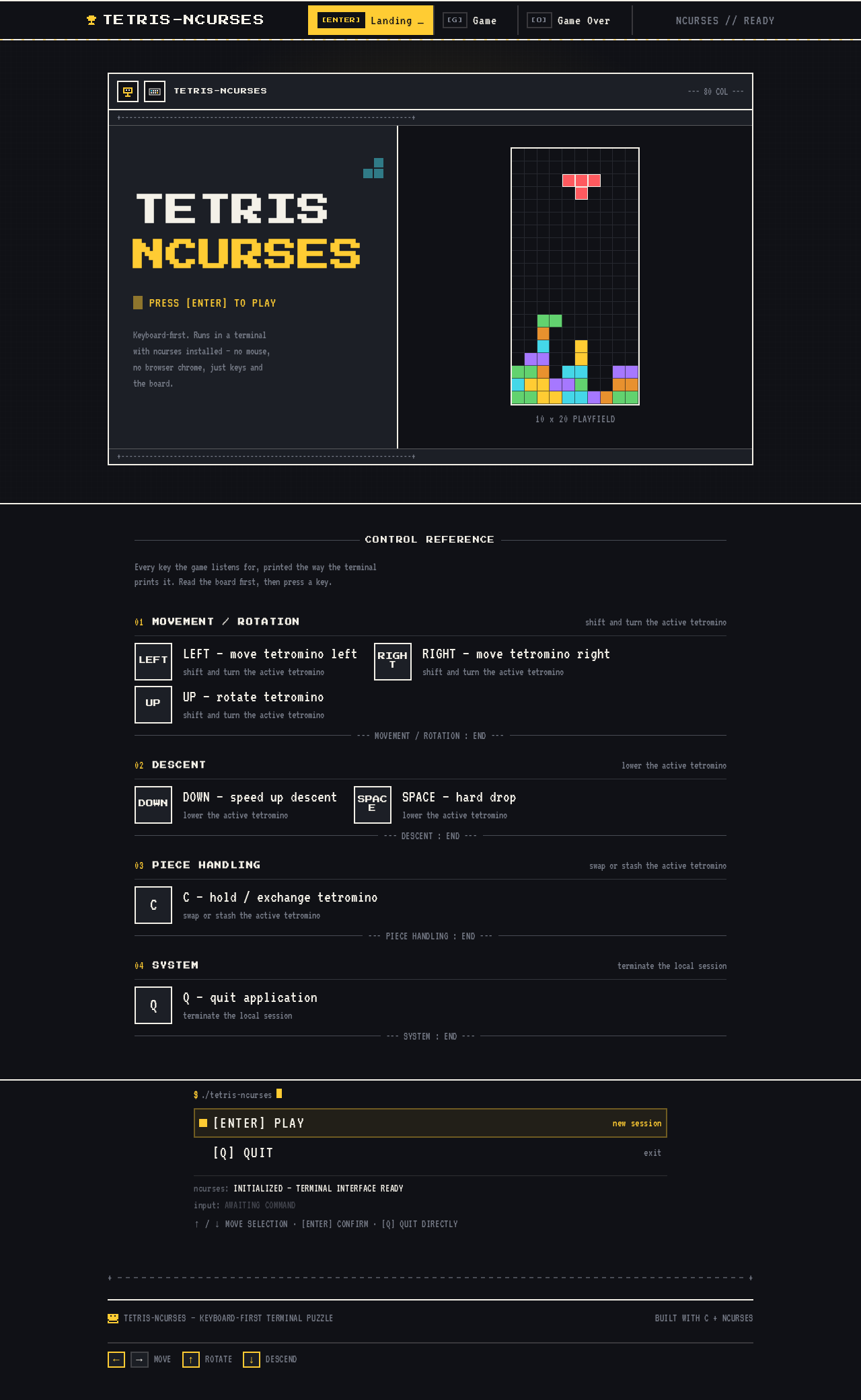
TETRISNCURSES
Keyboard-first. Runs in a terminal with ncurses installed — no mouse, no browser chrome, just keys and the board.
10 x 20 PLAYFIELD
CONTROL REFERENCE
Every key the game listens for, printed the way the terminal prints it. Read the board first, then press a key.
Movement / Rotation
- LEFT — move tetromino leftshift and turn the active tetromino
- RIGHT — move tetromino rightshift and turn the active tetromino
- UP — rotate tetrominoshift and turn the active tetromino
Descent
- DOWN — speed up descentlower the active tetromino
- SPACE — hard droplower the active tetromino
Piece Handling
- C — hold / exchange tetrominoswap or stash the active tetromino
System
- Q — quit applicationterminate the local session
ncurses:INITIALIZED — TERMINAL INTERFACE READY
input:AWAITING COMMAND
↑ / ↓ MOVE SELECTION · [ENTER] CONFIRM · [Q] QUIT DIRECTLY
TETRISNCURSES
Keyboard-first. Runs in a terminal with ncurses installed — no mouse, no browser chrome, just keys and the board.
10 x 20 PLAYFIELD
CONTROL REFERENCE
Every key the game listens for, printed the way the terminal prints it. Read the board first, then press a key.
Movement / Rotation
- LEFT — move tetromino leftshift and turn the active tetromino
- RIGHT — move tetromino rightshift and turn the active tetromino
- UP — rotate tetrominoshift and turn the active tetromino
Descent
- DOWN — speed up descentlower the active tetromino
- SPACE — hard droplower the active tetromino
Piece Handling
- C — hold / exchange tetrominoswap or stash the active tetromino
System
- Q — quit applicationterminate the local session
ncurses:INITIALIZED — TERMINAL INTERFACE READY
input:AWAITING COMMAND
↑ / ↓ MOVE SELECTION · [ENTER] CONFIRM · [Q] QUIT DIRECTLY
No comments yet. Be the first!